
infra-lens-mcp connects to Linux hosts over SSH, captures bounded live metrics, stores observations and approved baselines in local SQLite, explains anomalies, and produces review-first incident artifacts. The npm package and signed container are release-ready; public connector publication remains intentionally blocked until an external OAuth/HTTPS deployment is verified.
Demo
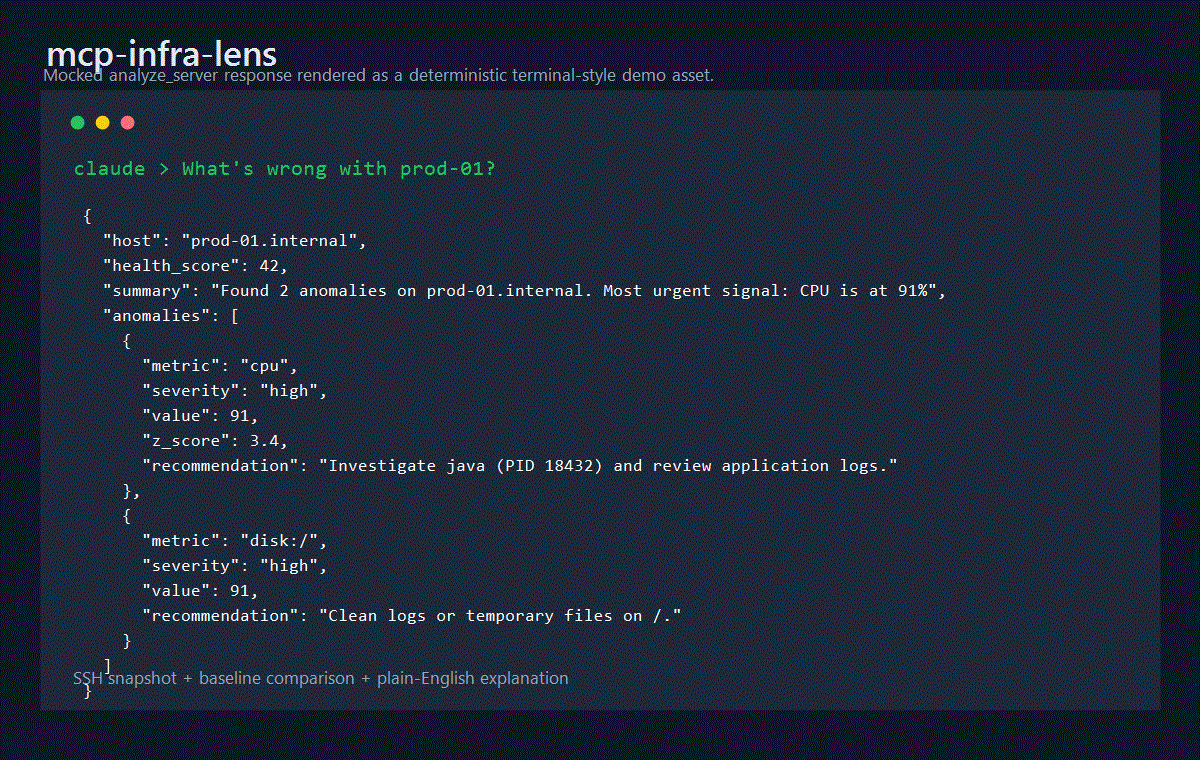
See the MCP 2025-11-25 compliance matrix for current protocol support, delegated behavior, and connector publication constraints.
Tools
| Tool | Purpose |
|---|---|
analyze_server |
Analyze a bounded sampled window with progress/cancellation support, then store only the completed observation |
analyze_server_snapshot |
Analyze and store one immediate snapshot without a sampling delay |
snapshot |
Store a point-in-time observation without anomaly analysis |
record_baseline |
Save a labeled healthy-state sample |
compare_to_baseline |
Compare current state with a named baseline |
get_history |
Return CPU, memory, or load history from SQLite |
inspect_host_capabilities |
Check required Linux commands and proc files before collection |
plan_remediation |
Propose evidence-backed, approval-required remediation without executing changes |
draft_incident_report |
Draft an incident report and postmortem from persisted observations |
compare_incident_windows |
Compare adjacent windows for one host or the same window across two hosts |
All tools return both readable JSON text and MCP structuredContent validated by declared outputSchema definitions, so clients and agents can consume responses without parsing the text block. Collection tools include a warnings array when optional sections cannot be collected but a partial snapshot is still usable. Use analyze_server_snapshot for interactive checks; use analyze_server only when a sampled window is required. Sampled analysis emits MCP progress when the client supplies a progress token and never persists a cancelled partial run.
Requirements
- Node.js 24 LTS for CI, Docker, and release workflows
- Node.js 22 or newer for package runtime compatibility
- pnpm 11.15.1 through Corepack for development installs
- Linux SSH targets with
/proc,free,df,ps, anduname - Strict SSH host verification through
known_hostsor pinned SHA256 host keys
Quick Start
Run the stdio MCP server from npm:
npx -y infra-lens-mcp
Desktop MCP client style configuration:
{
  "mcpServers": {
    "infra-lens": {
      "command": "npx",
      "args": ["-y", "infra-lens-mcp"],
      "env": {
        "INFRA_LENS_DB": "/Users/you/.infra-lens-mcp/metrics.db"
      }
    }
  }
}
Local development:
corepack enable
corepack prepare [email protected] --activate
pnpm install --frozen-lockfile
pnpm run build
node dist/mcp.js
Configuration
Transport is selected by the executable entry point, not by an environment variable: npx -y infra-lens-mcp or node dist/mcp.js starts stdio, while node dist/server-http.js starts Streamable HTTP.
| Variable | Default | Description |
|---|---|---|
INFRA_LENS_DB |
~/.infra-lens-mcp/metrics.db |
SQLite database path |
INFRA_LENS_RETENTION_DAYS |
30 |
Snapshot retention in days; 0 disables automatic pruning |
MCP_HTTP_HOST |
127.0.0.1 |
HTTP bind host. HOST remains a deprecated alias |
MCP_HTTP_PORT |
3000 |
HTTP bind port. PORT remains a deprecated alias |
MCP_HTTP_ENDPOINT_PATH |
/mcp |
Canonical Streamable HTTP MCP endpoint path |
MCP_HTTP_ALLOWED_ORIGINS |
unset | Comma-separated allowed Origin values |
MCP_HTTP_ALLOWED_HOSTS |
unset | Comma-separated allowed Host values |
MCP_HTTP_AUTH_MODE |
none |
none, bearer, or oauth-gateway; oauth is accepted as a compatibility alias |
MCP_HTTP_BEARER_TOKEN |
unset | Local/dev bearer fallback token |
MCP_HTTP_OAUTH_GATEWAY_HEADER |
x-infra-lens-gateway-auth |
Header injected by a trusted OAuth gateway |
MCP_HTTP_OAUTH_GATEWAY_SECRET |
unset | Shared backend secret required for oauth-gateway mode |
MCP_HTTP_BODY_LIMIT_BYTES |
1048576 |
Maximum JSON request body size |
MCP_HTTP_REQUEST_TIMEOUT_MS |
30000 |
Maximum time to receive and handle an HTTP request before the socket is closed |
MCP_HTTP_MAX_CONCURRENT_REQUESTS |
100 |
Maximum concurrent HTTP requests accepted by the Node process |
MCP_HTTP_RATE_LIMIT_PER_MINUTE |
0 |
Optional per-client in-memory rate limit; 0 disables it |
MCP_HTTP_AUTHORIZATION_SERVERS |
unset | OAuth authorization server metadata URLs |
MCP_PROFILE |
full |
full, remote-safe, chatgpt, or claude |
MCP_SSH_STRICT_HOST_CHECKING |
true |
Strict host key verification toggle |
MCP_SSH_KNOWN_HOSTS |
~/.ssh/known_hosts |
Known hosts file |
MCP_SSH_ALLOWED_HOSTS |
unset | Exact host/IP or IPv4 CIDR allowlist; required for remote-safe profiles and enforced in full profile when set |
MCP_SSH_ALLOWED_USERS |
unset | Optional comma-separated SSH username allowlist |
MCP_SSH_ALLOWED_PORTS |
unset | Optional comma-separated SSH port allowlist |
MCP_SSH_MAX_SESSIONS_PER_HOST |
0 |
Optional active SSH session cap per host:port; 0 disables it |
MCP_SSH_MAX_CONNECTION_ATTEMPTS_PER_MINUTE |
0 |
Optional SSH connection-attempt cap per host:port per minute; 0 disables it |
MCP_DB_PATH from older examples is not used; use INFRA_LENS_DB.
SSH Security
Strict host key checking is enabled by default. Provide either:
- a
hostKeySha256value in the connection input, such asSHA256:... - a
knownHostsPathin the connection input MCP_SSH_KNOWN_HOSTSpointing at an OpenSSHknown_hostsfile
Raw passwords, private keys, and passphrases are accepted only in the default full profile for trusted local MCP contexts. remote-safe, chatgpt, and claude profiles reject raw SSH credentials in tool input and require MCP_SSH_ALLOWED_HOSTS. Production SSH policy can also restrict exact hosts or IPv4 CIDR ranges, users, ports, per-host active sessions, and per-host connection attempts.
Process command arguments are not collected by the default process command. Secret-like values in process data, SSH errors, and logs are redacted before storage or output.
HTTP Transport
Run the Streamable HTTP transport locally. The canonical MCP endpoint is http://127.0.0.1:3000/mcp unless MCP_HTTP_ENDPOINT_PATH is changed. HTTP mode is stateless today: the server does not issue or accept MCP-Session-Id, and only POST JSON-RPC calls are supported on the MCP endpoint. MCP_HTTP_REQUEST_TIMEOUT_MS and any proxy timeout must exceed the requested sampled window; otherwise use analyze_server_snapshot. stdio has no server-owned wall-clock request timeout, so the client controls its timeout and MCP cancellation.
MCP_HTTP_HOST=127.0.0.1 MCP_HTTP_PORT=3000 node dist/server-http.js
Loopback HTTP can run without auth for local development. Any non-loopback bind, such as 0.0.0.0, fails fast unless all of these are configured:
MCP_PROFILE=remote-safe,chatgpt, orclaudeMCP_HTTP_AUTH_MODE=beareroroauth-gatewayMCP_HTTP_ALLOWED_ORIGINSMCP_HTTP_ALLOWED_HOSTS
Native OAuth/JWT validation is not implemented inside this package. Public deployments should use MCP_HTTP_AUTH_MODE=oauth-gateway behind a production OAuth-aware gateway or reverse proxy, configure HTTPS MCP_HTTP_RESOURCE_URL, and block direct access to the Node process. Keep origin/host allowlists, body limits, request timeout, concurrency limit, and optional rate limit enabled at the Node process even when an upstream proxy also enforces them. See ADR 0006. Connector publication readiness remains false until a full connector deployment is verified.
Docker
The Docker image defaults to stdio mode:
docker build -t infra-lens-mcp .
docker volume create infra-lens-data
docker run --rm -i \
  --read-only \
  --cap-drop=ALL \
  --security-opt=no-new-privileges:true \
  --tmpfs /tmp:rw,noexec,nosuid,nodev,size=64m \
  --mount type=volume,src=infra-lens-data,dst=/home/appuser/.infra-lens-mcp \
  infra-lens-mcp
For local HTTP testing, override the command and keep the bind host on loopback unless a remote-safe profile and auth controls are configured:
docker run --rm -p 127.0.0.1:3000:3000 \
  --read-only \
  --cap-drop=ALL \
  --security-opt=no-new-privileges:true \
  --tmpfs /tmp:rw,noexec,nosuid,nodev,size=64m \
  --mount type=volume,src=infra-lens-data,dst=/home/appuser/.infra-lens-mcp \
  -e MCP_HTTP_HOST=0.0.0.0 \
  -e MCP_HTTP_ALLOWED_ORIGINS=http://localhost:3000 \
  -e MCP_HTTP_ALLOWED_HOSTS=localhost:3000 \
  -e MCP_HTTP_AUTH_MODE=bearer \
  -e MCP_HTTP_BEARER_TOKEN=local-dev-token \
  infra-lens-mcp node dist/server-http.js
Observability exports
Observability is a separate, disabled-by-default process that reads the latest persisted observations without initiating SSH collection:
INFRA_LENS_OBSERVABILITY_ENABLED=true infra-lens-observe
The default OpenMetrics endpoint is http://127.0.0.1:9464/metrics. Optional OTLP/HTTP JSON export uses standard OTEL_EXPORTER_OTLP_* variables. See Observability exports for Prometheus, OpenTelemetry, privacy, and remote-access guidance.
Development
pnpm run format:check
pnpm run lint
pnpm test
pnpm run test:coverage
pnpm run build
pnpm run check:metadata
pnpm run package:dry-run
Docker-backed SSH e2e validation uses a self-contained fixture lifecycle:
pnpm run test:e2e
If a fixture is already running and you intentionally want to skip lifecycle management, use:
INFRA_LENS_E2E_SKIP_FIXTURE=1 pnpm run test:e2e:raw
Start with the documentation index for usage, client setup, operations, incident workflows, observability, storage, security, governance, testing, and release guidance. Generated API docs live in docs/api, and reviewed incident examples live in examples/incidents.
Community
Use SUPPORT.md for support channels and response expectations. Active work is tracked in the infra-lens-mcp Governance project. Project conduct is defined in CODE_OF_CONDUCT.md, and maintainer triage policy lives in docs/governance.md.
Release
Releases are managed through release-please manifest mode and the guarded GitHub Actions release workflow. Implementation PRs must not publish packages, containers, MCP Registry entries, marketplace artifacts, or production GitHub Releases.
See docs/release.md and docs/release-state-machine.md.
License
Agent plugin and runtime configuration
This repository owns the product-level agent plugin, MCP runtime configuration, and product-specific skills for infra-lens-mcp. The central agent-tools repository should catalog this plugin, but the manifest and workflow instructions live here so they stay synchronized with the actual MCP server package.
| File | Purpose |
|---|---|
.claude-plugin/plugin.json |
Claude Code-valid product plugin manifest. |
.mcp.json |
Claude Code project-local MCP server configuration. |
.codex/config.example.toml |
Codex CLI MCP configuration example. |
.vscode/mcp.example.json |
VS Code / GitHub Copilot workspace MCP configuration example. |
opencode.example.jsonc |
OpenCode project MCP configuration example. |
.opencode/skills/ |
OpenCode-native mirrored skill definitions. |
docs/agent-runtime-config.md |
Agent runtime setup and validation notes. |
Validate plugin packaging locally:
claude plugin validate .
For review-first remediation plans, incident drafts, and host/time-window comparisons, see Incident workflows.
No comments yet
Be the first to share your take.