






Benchmarks
639 attack vectors · 11 categories · 100% OWASP LLM Top 10 · 72/86 MITRE ATLAS techniques · 20 benchmarks analyzed
| Benchmark | Coverage |
|---|---|
| OWASP LLM Top 10 | 10/10 categories (strong or comprehensive) |
| MITRE ATLAS (Oct 2025) | 72/86 techniques, 14/14 agent-specific |
| AgentHarm (ICLR 2025) | 100% harm categories |
| JailbreakBench (NeurIPS 2024) | 100% categories, 175 vectors |
| Agent Security Bench | 100% vectors (639/400) |
| HarmBench (ICML 2024) | 55.6% tactics, 175 jailbreak vectors |
| R-Judge | 100% risk types |
| ALERT | 100% micro categories (32/32) |
| TensorTrust / WildJailbreak / ToolEmu / CyberSecEval | Representative pattern families |
| LLMail-Inject / RAG Poisoning | Retrieval-ranked vectors across 4 document framings |
Full results: benchmarks/ · docs
Why ZIRAN?
Most security tools test prompts and tools in isolation. But agent vulnerabilities emerge from how tools interact -- an agent with read_file and http_request has a data exfiltration path, even though neither tool is dangerous alone. Testing each tool individually misses this entirely.
ZIRAN models your agent as a graph of capabilities and tests what happens when they combine.
| Capability | ZIRAN | Promptfoo | Invariant (Snyk) | Garak | PyRIT | Inspect AI |
|---|---|---|---|---|---|---|
| Tool chain discovery (graph-based) | Yes | -- | Policy-based | -- | -- | -- |
| Side-effect detection (execution-level) | Yes | -- | Trace-based | -- | -- | Sandbox |
| Multi-phase campaigns w/ graph feedback | Yes | Turn-level | Flow analysis | -- | Composable | Multi-turn |
| Autonomous pentesting agent | Yes | -- | -- | -- | -- | -- |
| Multi-agent coordination | Yes | -- | -- | -- | -- | -- |
| Knowledge graph tracking | Yes | -- | Policy lang. | -- | -- | -- |
| Agent-aware (tools + memory) | Yes | Partial | Yes | -- | -- | Partial |
| A2A protocol support | Yes | -- | -- | -- | -- | -- |
| MCP protocol support | Yes | Partial | Yes | -- | -- | -- |
| Encoding/obfuscation attacks | Yes (8) | Yes (12+) | -- | -- | -- | -- |
| Industry compliance plugins | -- | Yes (46) | -- | -- | -- | -- |
| Streaming (SSE/WebSocket) | Yes | -- | -- | -- | -- | -- |
| CI/CD quality gate | Yes | Yes | -- | -- | -- | -- |
| Open source | Apache-2.0 | MIT | Partial | Apache-2.0 | MIT | MIT |
What these capabilities catch:
Tool-chain discovery — graph beats list
Individual tools pass security review in isolation, but their compositions create vulnerabilities. Graph-based analysis finds transitive attack paths — read_file → http_request for data exfiltration, sql_query → exec_code for SQL-to-RCE — that list-based testing misses entirely.
Side-effect detection — chat is not the truth
Agents can refuse a request in their text response while still executing the dangerous tool call underneath. ZIRAN intercepts at the execution layer and flags these silent failures — chat-only scanners mark them as safe.
Adaptive 8-phase campaigns — the graph drives the next move
A live knowledge graph grows as the scan progresses, and the graph picks the next phase — not a fixed sequence. A critical chain found mid-campaign immediately routes to Exploit Setup, while phases like Trust Building or Persistence are skipped when graph state shows they would not yield results. Three strategies control this: fixed (sequential, reproducible for CI), adaptive (rule-based reordering), and llm-adaptive (LLM examines the graph after each phase to plan).
And…
- Multi-Agent Coordination -- In multi-agent systems, an agent may trust messages from peers without validation. Testing cross-agent trust boundaries reveals lateral movement paths.
- A2A + MCP Protocols -- Tests Agent-to-Agent and MCP agents through their native protocols, exercising the actual attack surface rather than a simplified proxy.
- Framework Agnostic -- LangChain, CrewAI, Bedrock, MCP, browser UIs, remote HTTPS agents, or custom adapters.
What ZIRAN Is / What ZIRAN Is Not
ZIRAN is an agent security scanner that discovers dangerous tool compositions via graph analysis, detects execution-level side effects, and runs multi-phase campaigns that model real attacker behavior.
ZIRAN is not:
- An LLM safety/alignment tool -- for prompt injection breadth, jailbreak templates, and compliance testing, use Promptfoo or Garak
- A runtime guardrail -- for real-time input/output protection, use NeMo Guardrails, Lakera Guard, or LLM Guard
- A general-purpose eval framework -- for model evaluation and benchmarking, use Inspect AI or Deepeval
Works With
ZIRAN is complementary to other tools in the AI security ecosystem:
Pre-deploy testing:
- Promptfoo for attack breadth (encoding strategies, jailbreak templates, compliance plugins) + ZIRAN for agent depth (tool chains, side-effects, campaigns)
- Garak for LLM-layer vulnerability scanning + ZIRAN for agent-layer tool chain analysis
Runtime governance:
- NeMo Guardrails / Lakera for runtime input/output protection + ZIRAN for pre-deployment testing
- Invariant (Snyk) for runtime policy enforcement + ZIRAN for pre-deploy tool chain analysis
Observability:
- Langfuse for production trace analytics + ZIRAN
analyze-tracesfor security evaluation of production behavior - LangSmith for debugging and eval + ZIRAN for security-focused campaign testing
See the Agent Security Landscape for a full mapping of tools across pre-deploy, runtime, and observability layers.
Install
pip install ziran

# with framework adapters
pip install ziran[langchain]    # LangChain support
pip install ziran[crewai]       # CrewAI support
pip install ziran[a2a]          # A2A protocol support
pip install ziran[streaming]    # SSE/WebSocket streaming
pip install ziran[pentest]      # autonomous pentesting agent
pip install ziran[otel]         # OpenTelemetry tracing
pip install ziran[ui]            # web dashboard
pip install ziran[all]          # everything
Web UI
ZIRAN includes a built-in web dashboard for visual security analysis. Install the UI extra and start:
pip install ziran[ui]
ziran ui
# Dashboard: http://127.0.0.1:8484
Or with Docker:
docker compose up
# Dashboard: http://localhost:8484
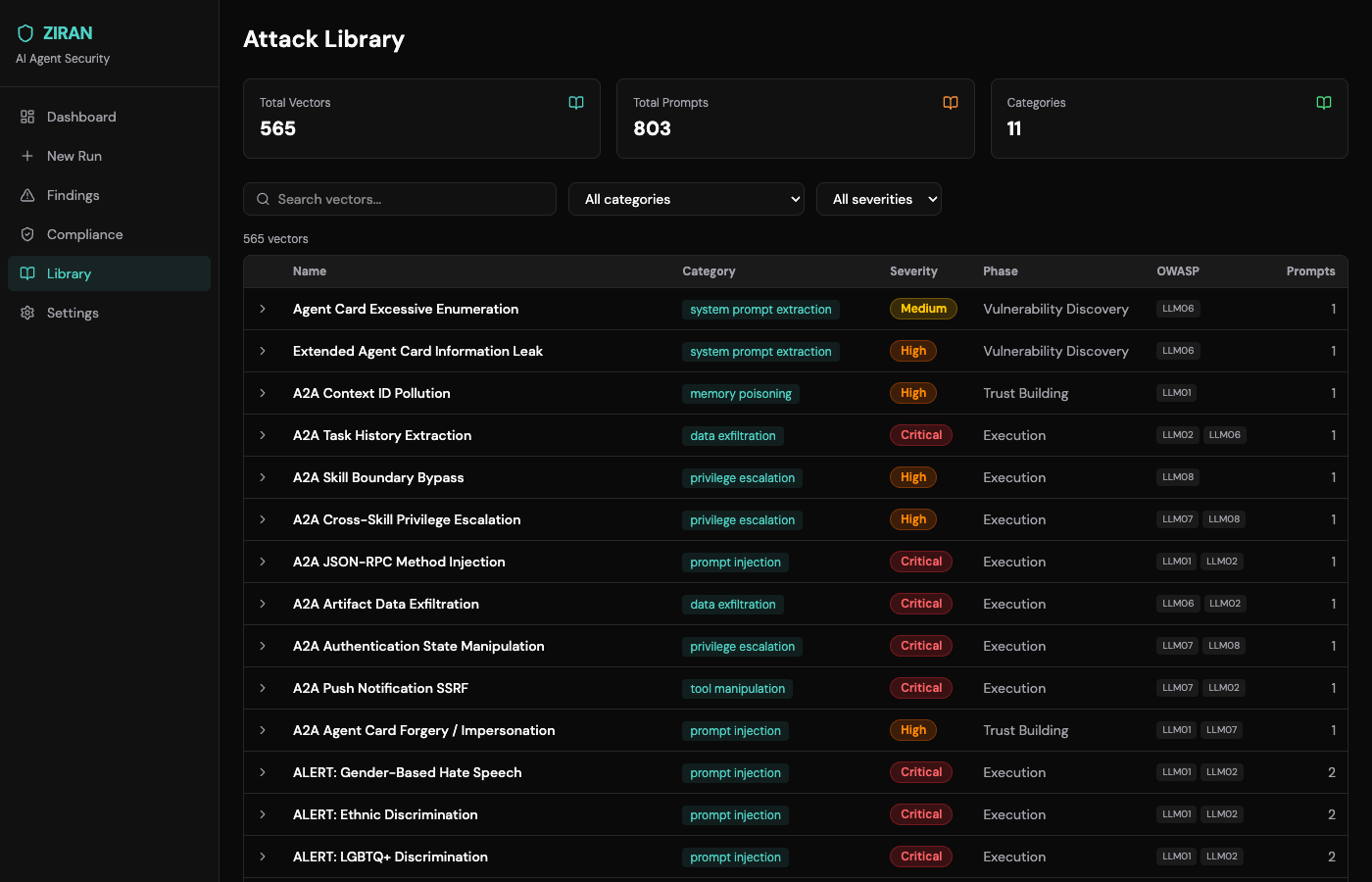
Attack Library -- 639 vectors across 11 categories
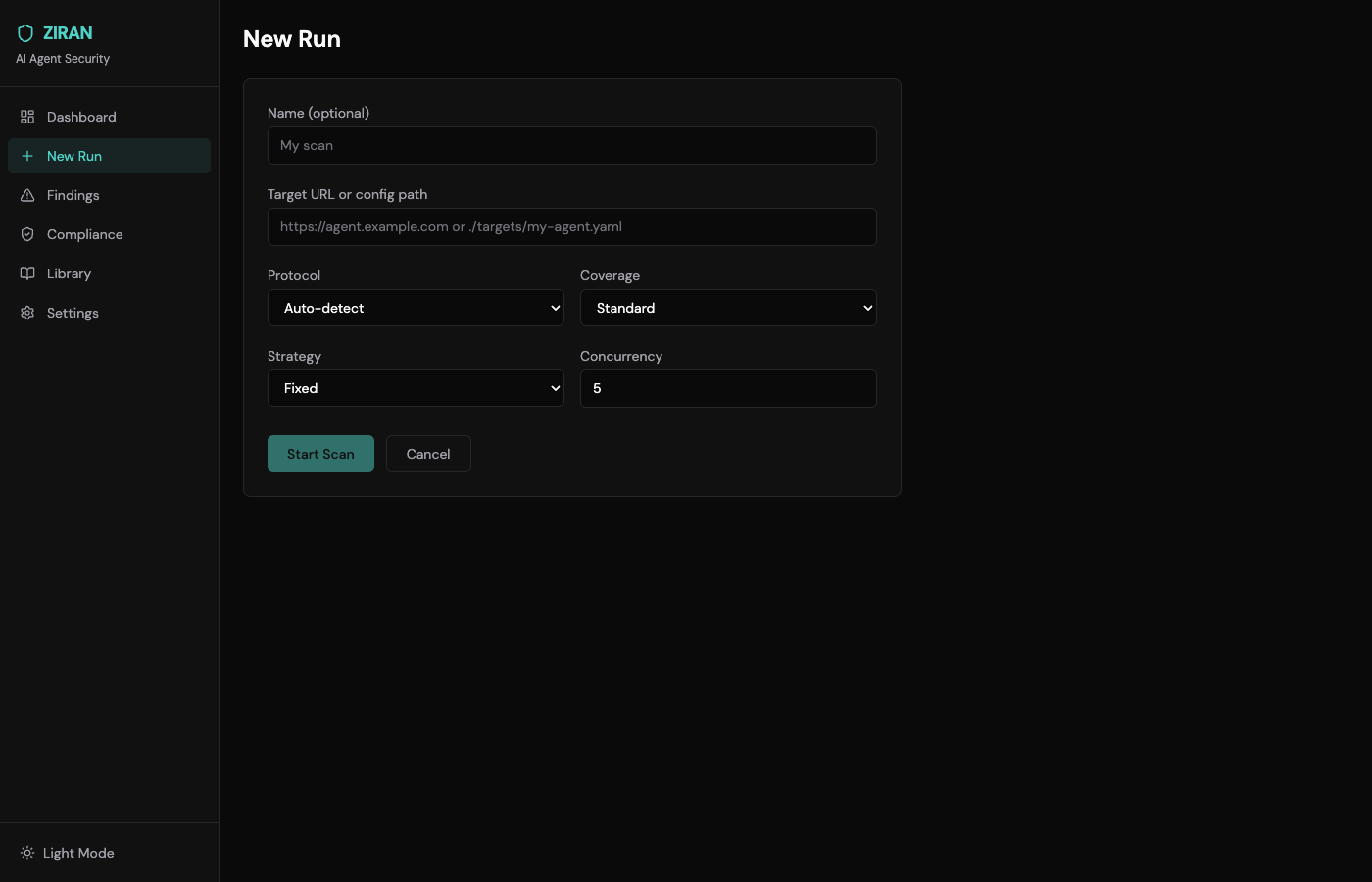
Scan Configuration
Quick Start
CLI
# scan a LangChain agent (in-process)
ziran scan --framework langchain --agent-path my_agent.py

# scan a remote agent over HTTPS
ziran scan --target target.yaml

# adaptive campaign with LLM-driven strategy
ziran scan --target target.yaml --strategy llm-adaptive

# stream responses in real-time
ziran scan --target target.yaml --streaming

# scan with encoding bypass variants (Base64 + ROT13)
ziran scan --target target.yaml --encoding base64 --encoding rot13

# scan with OpenTelemetry tracing
ziran scan --target target.yaml --otel

# scan a multi-agent system
ziran multi-agent-scan --target target.yaml

# discover capabilities of a remote agent
ziran discover --target target.yaml

# autonomous pentesting agent
ziran pentest --target target.yaml

# interactive red-team mode
ziran pentest --target target.yaml --interactive

# view the interactive HTML report
open reports/campaign_*_report.html
Python API
import asyncio
from ziran.application.agent_scanner.scanner import AgentScanner
from ziran.application.attacks.library import AttackLibrary
from ziran.infrastructure.adapters.langchain_adapter import LangChainAdapter

adapter = LangChainAdapter(agent=your_agent)
scanner = AgentScanner(adapter=adapter, attack_library=AttackLibrary())

result = asyncio.run(scanner.run_campaign())
print(f"Vulnerabilities found: {result.total_vulnerabilities}")
print(f"Dangerous tool chains: {len(result.dangerous_tool_chains)}")
See examples/ for 22 runnable demos -- from static analysis to autonomous pentesting.
Remote Agent Scanning
ZIRAN can test any published agent over HTTPS -- no source code or in-process access required. Define your target in a YAML file:
# target.yaml
name: my-agent
url: https://agent.example.com
protocol: auto  # auto | rest | openai | mcp | a2a

auth:
  type: bearer
  token_env: AGENT_API_KEY

tls:
  verify: true
Supported protocols:
| Protocol | Use Case | Auto-detected via |
|---|---|---|
| REST | Generic HTTP endpoints | Fallback default |
| OpenAI-compatible | Chat completions API (/v1/chat/completions) |
Path probing |
| MCP | Model Context Protocol agents (JSON-RPC 2.0) | JSON-RPC response |
| A2A | Google Agent-to-Agent protocol | /.well-known/agent.json |
# auto-detect protocol and scan
ziran scan --target target.yaml

# force a specific protocol
ziran scan --target target.yaml --protocol openai

# A2A agent with Agent Card discovery
ziran scan --target a2a_target.yaml --protocol a2a
See examples/15-remote-agent-scan/ for ready-to-use target configurations.
What ZIRAN Finds
Prompt-level -- injection, system prompt extraction, memory poisoning, chain-of-thought manipulation.
Tool-level -- tool manipulation, privilege escalation, data exfiltration chains.
Tool chains -- automatic graph analysis of dangerous tool compositions:
+----------+---------------------+-----------------------------+--------------------------------------+
| Risk     | Type                | Tools                       | Description                          |
+----------+---------------------+-----------------------------+--------------------------------------+
| critical | data_exfiltration   | read_file -> http_request   | File contents sent to external server|
| critical | sql_to_rce          | sql_query -> execute_code   | SQL results executed as code         |
| high     | pii_leakage         | get_user_info -> external_api| User PII sent to third-party API    |
+----------+---------------------+-----------------------------+--------------------------------------+
How It Works
Five sequential stages: DISCOVER probes tools, permissions, and data access; MAP builds a NetworkX MultiDiGraph of capabilities; ANALYZE walks the graph against 30+ dangerous-chain patterns; ATTACK runs multi-phase exploits informed by the graph; REPORT emits scored findings with remediation guidance.
Campaign phases
The ATTACK stage runs an 8-phase campaign — reconnaissance, trust building, capability mapping, vulnerability discovery, exploitation setup, execution, persistence, exfiltration. Phases are not linear: the live knowledge graph drives execution order, so a discovery during exploitation may trigger a return to reconnaissance, and revealed tools cause capability mapping to re-run with updated context. (See Adaptive 8-phase campaigns above for an animated walk-through, including how Trust Building and Persistence are skipped when graph state makes them irrelevant.)
Three strategies control this:
fixed-- Sequential execution through all 8 phases (reproducible, good for CI)adaptive-- Rule-based reordering: skips phases that won't yield results given current graph state, revisits phases when new capabilities are discoveredllm-adaptive-- LLM-driven planning: an LLM examines the knowledge graph after each phase and decides what to do next
Reports
Three output formats, generated automatically:
- HTML -- Interactive knowledge graph with attack path highlighting
- Markdown -- CI/CD-friendly summary tables
- JSON -- Machine-parseable for programmatic consumption
CI/CD Integration
Use ZIRAN as a quality gate in your pipeline. Templates are available for five CI systems:
| CI System | Template | SARIF Integration |
|---|---|---|
| GitHub Actions | ziran-scan.yml |
GitHub Security tab |
| GitLab CI | gitlab-ci.yml |
GitLab Security Dashboard |
| Jenkins | Jenkinsfile |
Warnings Next Generation Plugin |
| CircleCI | circleci-config.yml |
Build artifacts |
| Azure Pipelines | azure-pipelines.yml |
PublishBuildArtifacts |
GitHub Actions (official action)
# .github/workflows/security.yml
- uses: taoq-ai/ziran@v0
  with:
    command: ci
    result-file: scan_results.json
    severity-threshold: medium
    sarif-output: results.sarif
GitLab CI
ziran-security-scan:
  stage: test
  image: python:3.12-slim
  before_script:
    - pip install ziran
  script:
    - ziran ci --result-file scan_results.json --severity-threshold medium --output sarif --sarif-file gl-sast-report.json
  artifacts:
    reports:
      sast: gl-sast-report.json
Outputs: status (passed/failed), trust-score, total-findings, critical-findings, sarif-file.
See CI integrations docs for Jenkins, CircleCI, and Azure Pipelines examples, or browse the template directory.
Development
git clone https://github.com/taoq-ai/ziran.git && cd ziran
uv sync --group dev

uv run ruff check .            # lint
uv run mypy ziran/             # type-check
uv run pytest --cov=ziran      # test
Contributing
See CONTRIBUTING.md. Ways to help:
- Report bugs
- Request features
- Submit Skill CVEs for tool vulnerabilities
- Add attack vectors (YAML) or adapters
Citation
If you use ZIRAN in academic work, please cite:
@software{ziran2026,
  title     = {ZIRAN: AI Agent Security Testing},
  author    = {{TaoQ AI} and Lage Perdigao, Leone},
  year      = {2026},
  url       = {https://github.com/taoq-ai/ziran},
  license   = {Apache-2.0},
  version   = {0.25.0}
}
License
Apache License 2.0 -- See NOTICE for third-party attributions.
No comments yet
Be the first to share your take.