
Zeno Mobile Runner
Did your AI agent's last change break the app? ZMR gives you a deterministic yes or no — on a real iOS or Android device, with replayable evidence, and no LLM in the loop.


Mobile UI automation built for AI coding agents.
TL;DR
From nothing to a passing run against your own app. Two minutes, five commands.
# 1. Install the binary (checksum-verified against the release SHA256SUMS)
curl -fsSL https://raw.githubusercontent.com/johnmikel/zeno-mobile-runner/main/install.sh | sh
# 2. If the installer warns about PATH, add the line it printed, then restart your shell
export PATH="$HOME/.local/bin:$PATH"
# 3. From your mobile app repo — scaffolds .zmr/ config + starter scenarios
zmr init --app --app-id com.your.bundleid
# 4. Check your toolchain. Ends with the exact command to run next
zmr doctor --strict --config .zmr/config.json
# 5. Run it. Your app must already be installed on the target device
zmr run .zmr/ios-smoke.json --platform ios --device booted \
--trace-dir traces/first --ensure-device
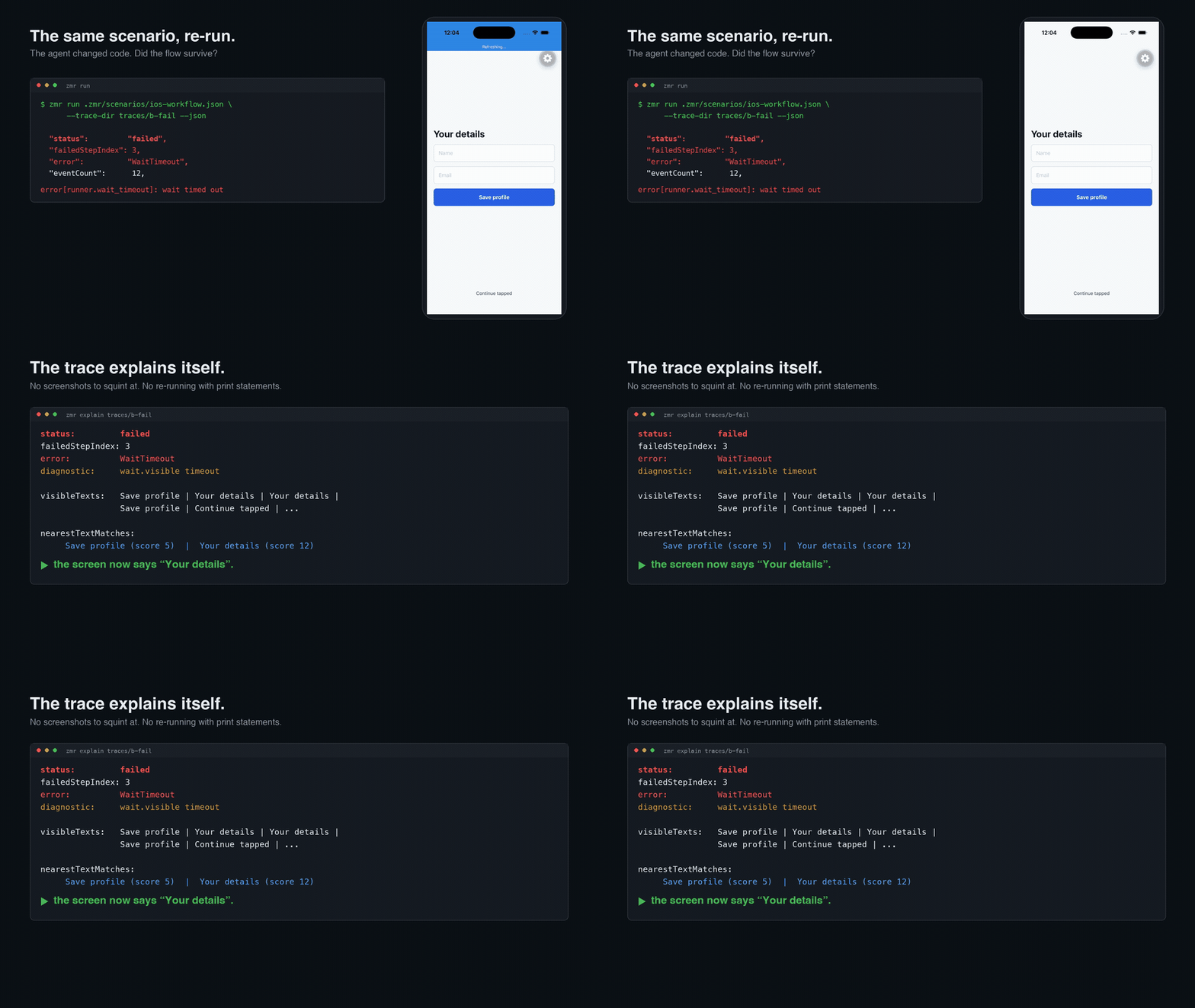
Passing looks like "status": "passed". Failing looks like a named step and the
text that was actually on screen:
zmr explain traces/first
Two things that will otherwise bite you:
- Your app must already be installed on the device. ZMR drives an app, it does not build one. If it isn't installed, step 5 fails on a device command.
- iOS taps and typing need the XCTest shim —
npx zmr-install-ios-shimin your app repo.zmr initdoes not install it, and the smoke scenario above passes without it, because launch and snapshot don't need it. Selector actions do. Android needs no equivalent step.
Android is the same flow with .zmr/android-smoke.json --device emulator-5554
and no --platform flag.
Full detail: docs/install.md · docs/app-integration.md · docs/troubleshooting.md
Your agent can already screenshot a simulator and describe what it sees. What it cannot do is give you the same answer twice, for nothing, with proof. Zeno Mobile Runner (ZMR) is that check: one small Zig binary that installs and launches your app on a real device or simulator, runs a saved scenario, and returns a typed pass/fail plus a replayable trace — screenshots, UI trees, timings, assertion results.
Because there is no LLM inside ZMR, the same check costs nothing per run and returns the same answer every time. A model reading a screenshot is making a judgment, and judgments drift between runs; a gate you merge on cannot. Run ZMR in your agent's loop and in CI. It drives native UI beneath the JavaScript and Dart layers, so React Native, Expo, Flutter, and fully native apps share one runner — over MCP, JSON-RPC, a JSON-output CLI, or committed JSON scenarios.
Why This Exists
- A verdict you can gate a merge on. ZMR returns a typed pass/fail, not a description of a screenshot. There is no LLM inside it, so the same scenario costs nothing per run and answers the same way every time. Measured on the generated Expo fixture: 20 consecutive runs of a 17-step iOS workflow, 20 passes, and the same 45 events on every run — the identical path, not just the same verdict (method and scope).
- Evidence a reviewer can verify instead of trust. A run packages into a content-addressed bundle whose manifest binds every screenshot, UI tree and timing to a SHA-256 digest. Change one byte and validation exits non-zero. See docs/proof-artifact.md for the whole chain, and docs/evidence-contract.md for what it deliberately does not claim.
- Exploration should become tests. After a live agent session,
zmr discover/draftturn trace evidence into reviewable JSON scenarios that replay in CI with no LLM in the loop — and no per-run LLM cost. - Agents need structured mobile state, not terminal scrapings. ZMR returns semantic UI trees, stable selectors, screenshots, and typed action results, so an agent reasons from product state instead of guessing.
- One model below the framework layer. ZMR drives native UI beneath the JavaScript and Dart layers, so React Native, Expo, Flutter, and fully native apps share the same runner, selectors, and traces.
How it works
flowchart LR
A["AI coding agent<br/>AI IDE · Cursor · custom MCP harness"]
subgraph zmr["ZMR — one small Zig binary"]
MCP["MCP server<br/><code>zmr mcp</code>"]
RPC["JSON-RPC stdio/TCP<br/><code>zmr serve</code>"]
CLI["CLI + JSON scenarios<br/><code>zmr run</code>"]
CORE["Core engine<br/>selectors · waits · assertions<br/>scenario runner · trace writer"]
MCP --> CORE
RPC --> CORE
CLI --> CORE
end
subgraph devices["Devices"]
AND["Android emulator/device<br/>ADB · UI Automator · optional shim"]
IOS["iOS simulator/device<br/>simctl · devicectl · XCTest shim"]
end
TRACE["Trace bundle<br/>events.jsonl · screenshots · UI trees<br/>report.html · junit.xml · .zmrtrace"]
A -- "MCP tools" --> MCP
A -- "JSON-RPC" --> RPC
A -- "CLI JSON" --> CLI
CORE --> AND
CORE --> IOS
CORE --> TRACE
One core engine, four driver surfaces, two device backends:
- Core engine (Zig). Selector resolution, waits, assertions, the scenario runner, and the trace writer live in one place and behave identically no matter which surface invoked them.
- Four surfaces, one contract. The MCP server (
zmr mcp), JSON-RPC over stdio/TCP (zmr serve), the JSON-output CLI (zmr run/validate/explain/discover), and committed JSON scenarios all map onto the same engine and the same versioned schemas. - Android backend. Real ADB and UI Automator (
exec-out uiautomator dump,screencap) with no app instrumentation required; an optional app-local Java instrumentation shim speeds up native actions when you build it in. - iOS / iPadOS backend.
xcrun simctlanddevicectlhandle lifecycle; a generated XCTest / XCUIAutomation Swift shim, scaffolded into your app, performs native selector actions.
A standout capability is the trace-to-test loop: drive the app live with an
agent, then run zmr discover / draft / explore to convert the captured
trace into a reviewable, schema-validated replay scenario that runs in CI with no
LLM involved.
See docs/protocol.md, docs/ai-agents.md, and docs/frameworks.md.
Install
ZMR is designed to run from your mobile app repository. The curl path downloads
the native zmr binary and verifies it against the release SHA256SUMS; it then
prints the recommended next steps, which scaffold app-local config (zmr init)
and verify the toolchain (zmr doctor):
curl -fsSL https://raw.githubusercontent.com/johnmikel/zeno-mobile-runner/main/install.sh | sh
export PATH="$HOME/.local/bin:$PATH"
zmr init --app --app-id com.example.mobiletest
zmr doctor --strict --json --config .zmr/config.json
JavaScript teams can pin ZMR inside the app repo via npm and generate npm scripts with the wizard:
npm install --save-dev zeno-mobile-runner
npx zmr-wizard --app-id com.example.mobiletest --package-json
A Homebrew path is also documented (generate a formula, then install the native binary). See docs/install.md.
Usage
As an MCP server for a coding agent
Point any MCP-capable client at the local binary:
zmr mcp --config .zmr/config.json --trace-dir traces/zmr-agent
Or wire it into an .mcp.json / MCP client config:
{
  "mcpServers": {
    "zmr": {
      "command": "zmr",
      "args": ["mcp", "--config", ".zmr/config.json", "--trace-dir", "traces/zmr-agent"]
    }
  }
}
Then ask the agent to verify its own work: "launch the app, walk through onboarding, and show me the trace." The MCP server exposes seven tools, built around one executor rather than one tool per tap:
| Group | Tools |
|---|---|
| Observe | snapshot, semantic_snapshot |
| Run | run_scenario, scenario_validate |
| Evidence | trace_explain, trace_discover, trace_export |
Actions — launch, tap, type, swipe, waits, assertions — are steps inside a
scenario, not separate tools. An agent driving a device one call per tap spends
a round-trip and a slice of its context on every step, and what it leaves behind
is a chat transcript. run_scenario takes the whole scenario in one call,
validates it, runs it, and answers with a typed verdict plus the trace and
evidence digest — and the scenario it ran is the same JSON you commit to
.zmr/, so CI replays exactly that check with no model in the loop.
Agent Verification Loop
sequenceDiagram
    participant Agent as AI agent
    participant ZMR
    participant Device as Emulator / simulator
    Agent->>ZMR: semantic_snapshot
    ZMR->>Device: capture UI + screenshot
    ZMR-->>Agent: roles, stable selectors, bounds
    Agent->>ZMR: tap / type / swipe / open_link
    ZMR->>Device: execute + settle
    Agent->>ZMR: wait_visible / assert_visible
    ZMR-->>Agent: typed result + trace events
    Agent->>ZMR: trace_discover
    ZMR-->>Agent: reviewable replay scenario
    Agent->>ZMR: trace_export --redact
    ZMR-->>Agent: .zmrtrace evidence bundle
A parallel JSON-RPC method set (runner.capabilities, device.list,
session.create, observe.*, ui.*, trace.*, scenario.*) exposes the same
engine to harnesses that embed ZMR over stdio or TCP.
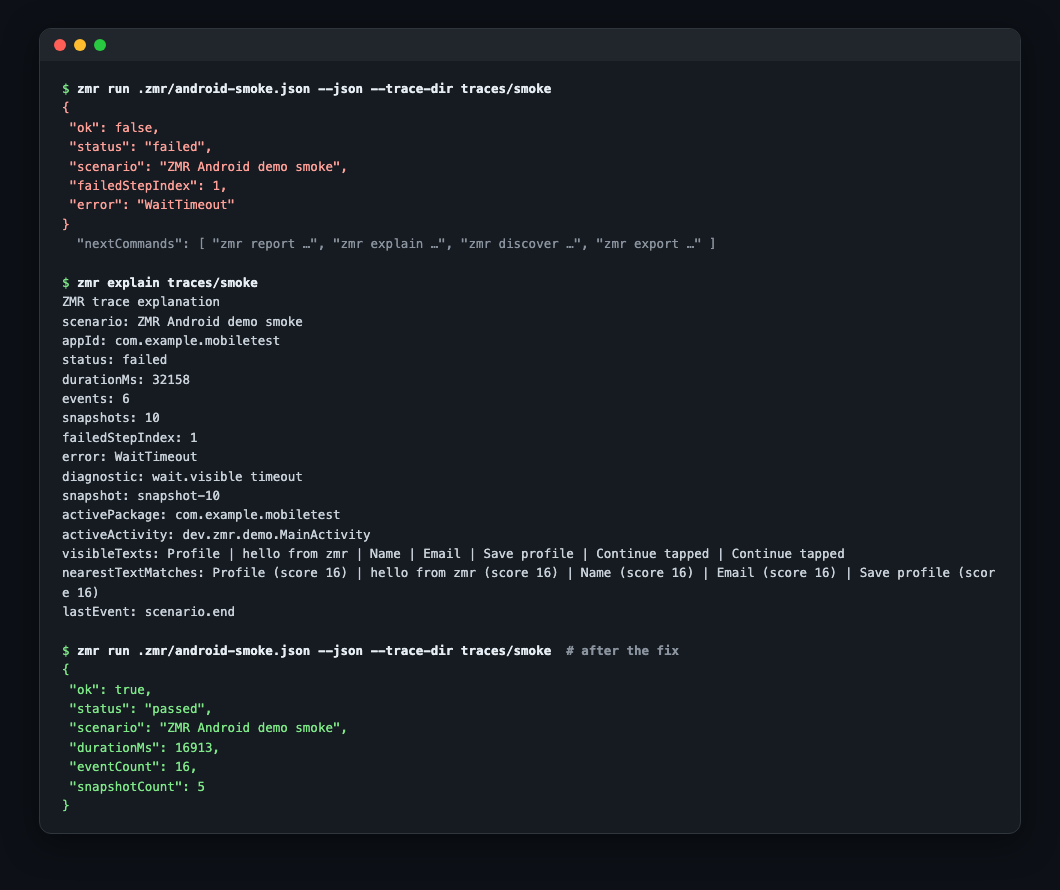
When a run fails, zmr explain diagnoses the trace for humans and agents alike:
Deterministic Scenarios For CI
Scenarios are plain JSON — no second DSL to learn. Agents and build scripts can generate, validate, and mutate them, then replay them in CI with no LLM cost:
{
  "name": "Login smoke",
  "appId": "com.example.mobiletest",
  "steps": [
    { "action": "clearState" },
    { "action": "launch" },
    { "action": "assertHealthy", "timeoutMs": 5000 },
    { "action": "tap", "selector": { "resourceId": "email" } },
    { "action": "typeText", "text": "[email protected]" },
    { "action": "tap", "selector": { "text": "Login" } },
    { "action": "waitVisible", "selector": { "text": "Welcome" }, "timeoutMs": 30000 }
  ]
}
zmr validate --json .zmr/login-smoke.json
zmr run .zmr/login-smoke.json --json --trace-dir traces/login-smoke
zmr report traces/login-smoke --out traces/login-smoke/report.html --junit traces/login-smoke/junit.xml
zmr export traces/login-smoke --out login-smoke-redacted.zmrtrace --redact
Traced zmr run --json responses carry executable nextCommands, so an agent
can continue to reporting, explanation, discovery, or export without
reconstructing paths from text. When a run fails, zmr explain diagnoses the
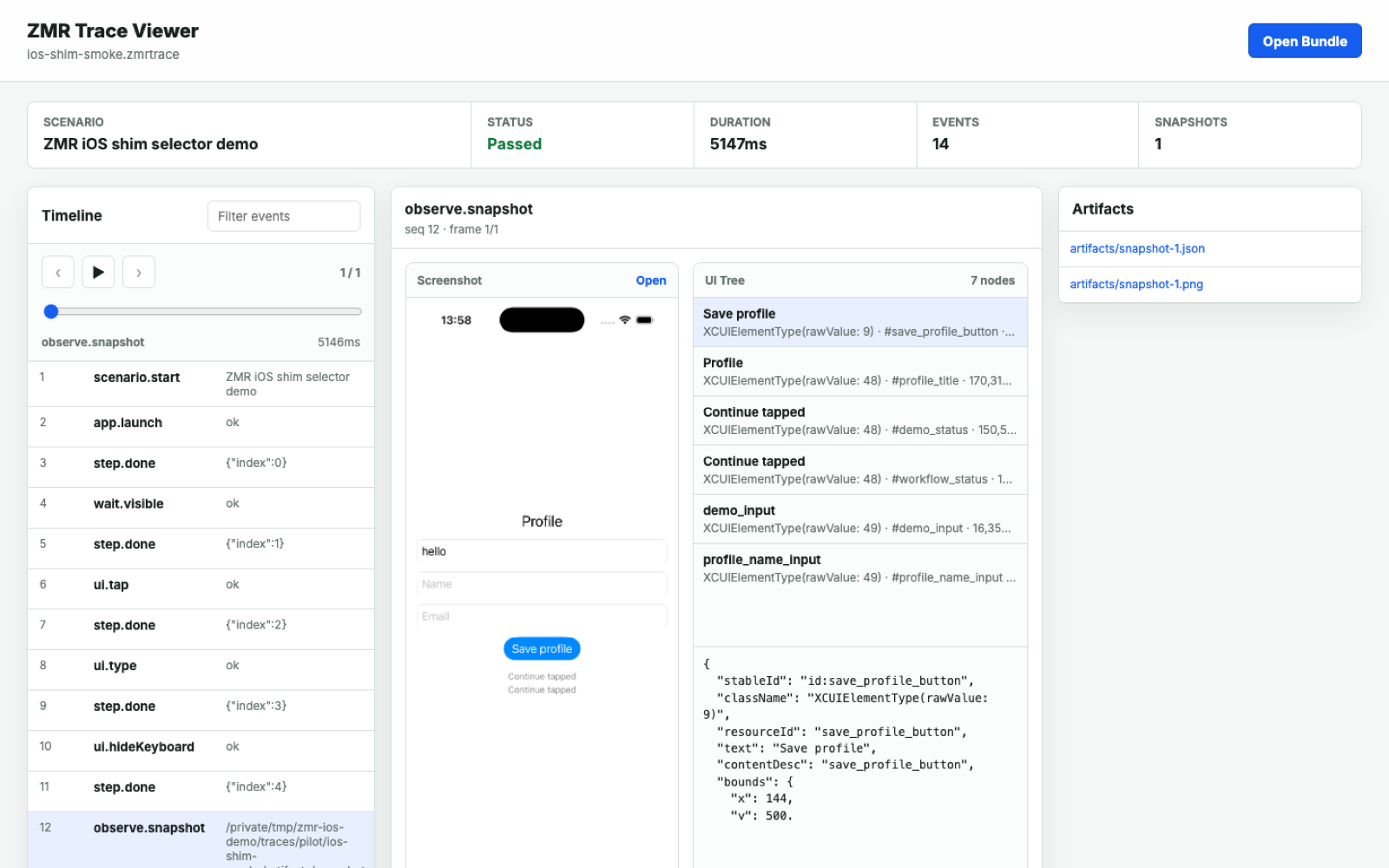
trace for humans and agents alike. Open any exported bundle in the static
trace viewer, or serve it and deep-link with
viewer/index.html?bundle=<url>.
For repeat-run reliability gates (pass-rate, failure-count, p95 duration), device matrices, and baseline comparison, see docs/benchmarking.md. Benchmark fixtures shipped in the repo are generic — gather your own app/device evidence before making performance claims.
Running a whole workspace
zmr test runs every canonical scenario in a directory and writes one
aggregate report, so a suite is a single CI step instead of a loop:
zmr test .zmr --workers 4 --retry 1 --output-dir traces/suite --json
It parallelises across workers, retries failures up to --retry times
(recording every attempt separately), and can split work across CI machines
with --shard-split (or run the full set on each with --shard-all). The
aggregate report is covered by schemas/test-report.schema.json; --dry-run
lists what would run without touching a device.
zmr record prepares a trace workspace for a live agent session, then prints
the follow-up commands that turn that session's evidence into a committed
scenario:
zmr record --trace-dir traces/agent-session --json
Reference clients
Thin JSON-RPC wrappers ship for TypeScript, Python, Go, Rust, Swift, and
Kotlin, each with its own tests. They are optional — all of them call
zmr serve --transport stdio and speak the same protocol. TypeScript and Python
are the usual starting points. See docs/clients.md and
docs/client-installation.md.
Release evidence (mobile + web)
Zeno turns completed ZMR and Playwright runs into one open, digest-verifiable Evidence Contract. It preserves what ran, against which exact build, what passed or failed, and which business journey it supports. See the Evidence Contract guide.
Platform support
| Target | Status | Notes |
|---|---|---|
| Android emulator | Supported | ADB / UI Automator, optional Android shim, emulator lifecycle helpers |
| Android physical device | Supported | Requires ADB connection and an app build/install surface |
| iPhone simulator | Supported | simctl plus app-local XCTest / XCUIAutomation shim for native selector actions |
| iPad simulator | Supported, evidence-needed | Same iOS simulator path; validate tablet layouts and size-class branches before production claims |
| iPhone physical device | Supported, validate locally | devicectl lifecycle plus XCTest shim; pilot on your app/device before relying on it in CI |
| iPad physical device | Supported, evidence-needed | Same iOS / iPadOS physical path; collect separate iPad pilot evidence first |
| Apple TV / Apple Watch | Not in this preview | Would require a separate platform lifecycle, shim, destination, and trace evidence |
| Cloud device farms | Not included | ZMR targets local and self-managed devices in this preview |
Slow CI hardware can extend the generated iOS shim build timeout with
ZMR_IOS_SHIM_BUILD_TIMEOUT_SECONDS; ZMR_IOS_SHIM_RESPONSE_TIMEOUT_SECONDS
bounds each in-flight request, and ZMR_IOS_SHIM_TIMEOUT_MS remains the outer
process ceiling. Current release: 0.2.18 developer preview.
End-to-end device runs require a configured mobile toolchain (Android SDK / ADB,
Xcode / simctl) and, for iOS native selector actions, building the generated
XCTest shim into the app. To exercise the engine without hardware, the repo
ships fake-device test doubles (fake-adb, fake-xcrun, fake shims) used
throughout the test suite and the zmr validate examples/demo-fake.json demo.
Project status
ZMR is a 0.2.x developer preview (runner version 0.2.18, protocol version
2026-04-28), published to npm
with curl / npm / Homebrew install paths. There is no 1.0 stability guarantee
yet, and surfaces may change between minor versions.
What backs that maturity claim:
- Tested. ~16.5k lines of non-test Zig across 78 non-test source files (141
.zigfiles insrc/including tests), with 284 in-source Zigtestblocks, plus atests/directory of 68 shell / Node / Python script tests (a few of which are fake-device doubles).build.zigwires three test targets (unit, iOS, runner). - CI. Three GitHub Actions workflows:
ci.yml(builds Zig and runs the cross-language client tests on macOS),device-smoke.yml(nightly cron that boots a real Android emulator and iOS simulator end-to-end), andrelease.yml(tagged release that builds the dist bundle, attests artifacts, and publishes to npm). - Contracts. 24 published JSON Schemas covering scenarios, snapshots, action results, trace events, protocol messages, and command outputs.
- Supply chain. The release pipeline generates an SPDX SBOM and
SHA256SUMS, and attaches build provenance attestation viaactions/attest. (macOS code-signing/notarization scripts exist inscripts/but are not yet wired into the release workflow; npm publish does not currently set--provenance.) - Distribution. Also shipped with an agent plugin bundle (
.claude-plugin/) and registered as an MCP server (glama.json).
Some Apple-platform and benchmark claims are honestly marked evidence-needed in the support matrix; redaction is intentionally conservative. See FEATURES.md, CHANGELOG.md, SECURITY.md, and docs/production-readiness.md for the full picture.
Documentation
- docs/install.md — install paths and first setup checks
- docs/proof-artifact.md — gate a pull request on a verifiable evidence package, end to end
- docs/ai-agents.md — JSON-RPC and MCP agent workflows
- docs/agent-discovery.md —
explore/discover/draftand the trace-to-test loop - docs/scenario-authoring.md — selectors, waits, and scenario design
- docs/frameworks.md — React Native, Expo, Flutter, native
- docs/expo-smoke.md — reproducible Expo and iOS smoke test
- docs/support-matrix.md — platform support and evidence levels
- docs/protocol.md — JSON-RPC methods and schemas
- docs/trace-privacy.md — safe trace export
- docs/troubleshooting.md — common setup and runtime issues, starting with the five that account for most failed first attempts
- docs/npm.md — pinning ZMR in a JavaScript app repo
- docs/releasing.md — maintainer release runbook
- skills/zmr-mobile-testing/SKILL.md — reusable agent testing workflow
- FEATURES.md — complete feature list and limitations
License
MIT © John Mikel Regida — see LICENSE.
No comments yet
Be the first to share your take.