
YouTube Research MCP





Turn YouTube videos into citation-ready research for Codex, Claude, Cursor, and other MCP clients. Paste a video URL and get transcript evidence with timestamps and links that open at the exact quoted moment.
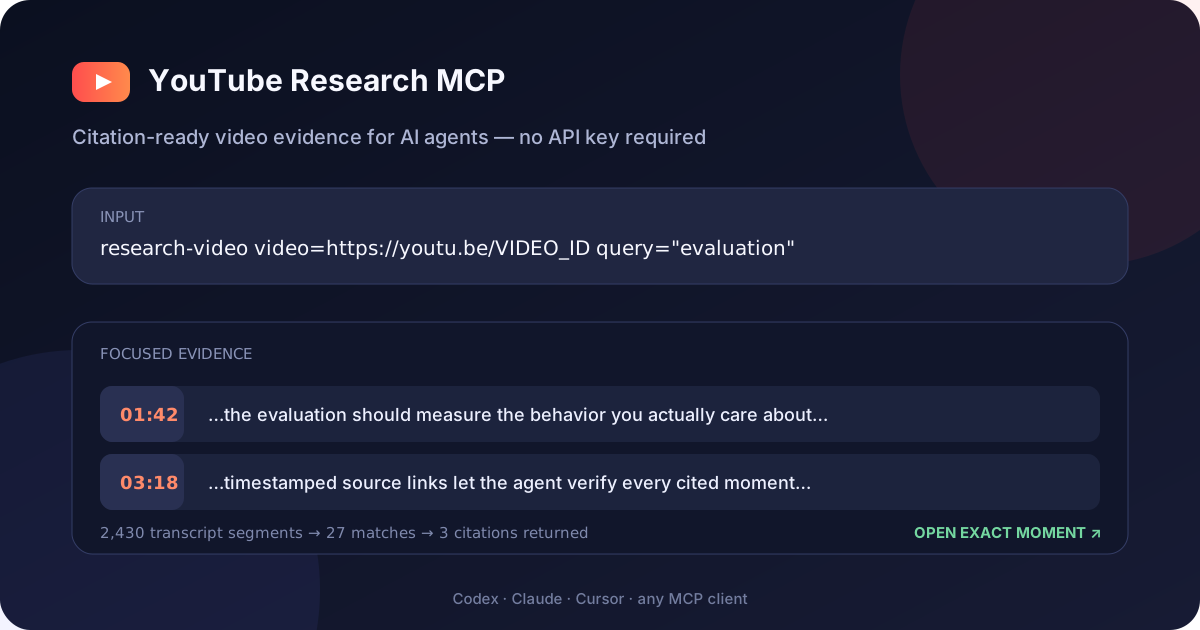
Input:  https://youtu.be/dQw4w9WgXcQ
Output: [01:05] ...evidence text...
        https://www.youtube.com/watch?v=dQw4w9WgXcQ&t=65s
No YouTube API key is required for transcript research.
Why this server
- Citation-ready research — every transcript segment includes a timestamp and source URL.
- Zero-key quick start — transcripts work immediately; add an API key only for search and analytics.
- URL-first input — accepts normal, short, Shorts, embed, live, and raw video-ID formats.
- Agent-efficient filtering — search inside transcripts and return nearby context instead of spending tokens on the entire video.
- Full YouTube intelligence — optional API mode adds comments, video/channel statistics, trends, and comparisons.
- Remote-native MCP — Streamable HTTP transport at
/mcp, plus Docker and Smithery support.
Architecture and trust boundary
flowchart LR
    C[MCP client] -->|stdio or Streamable HTTP| T[Transport]
    T --> R[Tool and resource registry]
    R --> S[YouTubeService]
    S --> K[(In-memory cache)]
    S -->|no key required| YT[Caption tracks]
    S -->|optional API key| API[YouTube Data API v3]
The MCP layer validates inputs and returns structured evidence; it does not ask a model to invent summaries or citations. Transcript tools derive timestamps and canonical links from caption segments. Data API tools return an explicit key-required error when YOUTUBE_API_KEY is unavailable, and remote authentication is enforced before MCP session handling.
Focused evidence, not a transcript dump
The included live smoke test asks a focused question about a public video and compares the response with the full timestamped transcript:
| Response | Characters returned |
|---|---|
| Full transcript | 85,518 |
research-video (3 citations with source identity) |
1,550 |
| Reduction | 98.2% |
This measures response characters, not model-specific tokens. Reproduce it against the default public fixture—or substitute your own video and query:
npm run test:live
LIVE_TEST_VIDEO='https://youtu.be/VIDEO_ID' LIVE_TEST_QUERY='evaluation' npm run test:live
Quick start — no API key
Requirements: Node.js 20 or newer.
The shortest local install uses stdio and needs no API key:
codex mcp add youtube-research -- npx -y @coyasong/youtube-mcp-server@latest
For Claude Desktop and other MCPB-compatible desktop clients, download the latest one-click MCP bundle and open it. The bundle vendors its runtime dependencies, starts locally over stdio, and asks for a YouTube API key only if you want the optional analytics tools.

Or install from the VS Code command line:
code --add-mcp '{"name":"youtube-research","command":"npx","args":["-y","@coyasong/youtube-mcp-server@latest"]}'
For Claude Desktop, Cursor, and other stdio clients, use command npx with arguments -y @coyasong/youtube-mcp-server@latest.
To run the Streamable HTTP transport instead:
git clone https://github.com/coyaSONG/youtube-mcp-server.git
cd youtube-mcp-server
npm install
npm run build
npm start
The server starts at http://localhost:3000/mcp in transcript-only mode. Confirm it with:
curl http://localhost:3000/health
Connect from Codex
With the HTTP server running:
codex mcp add youtube-research --url http://localhost:3000/mcp
Then ask Codex:
Use research-video to find what this video says about evaluation,
and cite the exact moments: https://www.youtube.com/watch?v=VIDEO_ID
Connect with MCP Inspector
npx @modelcontextprotocol/inspector
# Connect to http://localhost:3000/mcp
Install through Smithery
npx -y smithery@latest auth login
npx -y smithery@latest mcp add coyaSONG/youtube-mcp-server --client claude
Enable search, comments, and analytics
Set a YouTube Data API v3 key to switch from transcript-only to full mode:
export YOUTUBE_API_KEY=your_key_here
npm start
YOUTUBE_API_KEY is optional. PORT defaults to 3000.
Secure a remote deployment
Do not expose a full-mode server publicly without authentication: unauthenticated users could consume your YouTube API quota. Set a strong bearer token and restrict browser origins when deploying outside localhost:
export MCP_BEARER_TOKEN='replace-with-a-long-random-secret'
export CORS_ORIGIN='https://your-client.example'
export MAX_SESSIONS=100
export SESSION_IDLE_TIMEOUT_MS=1800000
npm start
Browser origins are denied by default. CORS_ORIGIN accepts a comma-separated
allowlist of exact http:// or https:// origins; wildcard origins are rejected.
Connect Codex using an environment variable rather than writing the secret into its configuration:
export YOUTUBE_MCP_TOKEN='replace-with-a-long-random-secret'
codex mcp add youtube-research \
  --url https://your-server.example/mcp \
  --bearer-token-env-var YOUTUBE_MCP_TOKEN
/health remains public for container health checks. MCP requests return 401 when authentication is enabled and the bearer token is missing or invalid. Idle sessions are removed automatically, and MAX_SESSIONS bounds memory use.
Best first tool
research-video accepts:
video: a YouTube URL or 11-character video IDlanguage: optional caption language such asen,ko, orjaquery: optional phrase to find inside the transcriptcontextLines: surrounding segments to retain, from 0 to 5matchMode:word(default) orsubstringstartSeconds/endSeconds: optional time windowoffset: result offset for paginationmaxSegments: response cap from 1 to 1,000 (default: 200)
It returns structured JSON containing the video title and channel identity, canonical video URL, full caption-track duration and segment count, matching transcript segments, human-readable citation labels, timestamps, directly navigable citation URLs, and pagination metadata. For long videos, use a query or time window first; follow nextOffset only when more evidence is needed.
Compare evidence across videos
research-videos applies one focused query to 2–5 video URLs concurrently. It returns the same structured, timestamp-linked evidence for each source while capping results per video. This is useful for comparing interviews, checking whether multiple sources support a claim, or researching a topic across a short watchlist.
{
  "videos": [
    "https://youtu.be/VIDEO_ONE",
    "https://youtu.be/VIDEO_TWO"
  ],
  "query": "evaluation",
  "maxSegmentsPerVideo": 10
}
See YouTube Research Recipes for copy-paste workflows for fact-checking claims, comparing interviews, navigating long talks, researching multilingual captions, and building citation-ready notes.
Capability modes
| Capability | No-key mode | With YOUTUBE_API_KEY |
|---|---|---|
| Transcript research, filtering, key moments, segmentation, summaries | Yes | Yes |
| Video search and comments | No | Yes |
| Video/channel metadata, statistics, trends, and comparisons | No | Yes |
Captions must be available for the requested video. Age-restricted, private, region-restricted, or caption-disabled videos may not return a transcript.
If this project saves you research time, consider starring the repository so other agent builders can discover it.
See the broader AI tooling portfolio for the
reliability principles shared with ralph-research and tmuxicate.
Docker
docker build -t youtube-research-mcp .
docker run --rm -p 3000:3000 youtube-research-mcp

# Full mode
docker run --rm -p 3000:3000 -e YOUTUBE_API_KEY=your_key youtube-research-mcp
Development
npm run dev             # HTTP server from TypeScript
npm test                # build and run all tests
npm run test:live       # live public-video transcript and citation smoke test
npm run test:user       # clean-room smoke test against the published npm package
npm run test:mcpb       # build, unpack, and exercise the installable MCP bundle
Maintainers can follow the release guide. Published GitHub releases run the complete npm, MCP Registry, MCPB, and Smithery delivery pipeline.
API Reference
Resources
youtube://video/{videoId}- Get detailed information about a specific videoyoutube://channel/{channelId}- Get information about a specific channelyoutube://transcript/{videoId}- Get transcript for a specific video- Optional query parameter:
?language=LANGUAGE_CODE(e.g.,en,ko,ja)
- Optional query parameter:
Tools
Basic Tools
research-video- Get citation-ready transcript evidence from a URL or video ID without an API keyresearch-videos- Compare timestamp-linked evidence across 2–5 videos without an API keysearch-videos- Search for YouTube videos with advanced filtering optionsget-video-comments- Get comments for a specific videoget-video-transcript- Get transcript for a specific video with optional languageenhanced-transcript- Advanced transcript extraction with filtering, search, and multi-video capabilitiesget-key-moments- Extract key moments with timestamps from a video transcript for easier navigationget-segmented-transcript- Divide a video transcript into segments for easier analysis
Tools requiring YOUTUBE_API_KEY are search, comments, statistics, discovery, and channel analysis. enhanced-transcript needs the key only when includeMetadata is true.
Statistical Tools
get-video-stats- Get statistical information for a specific videoget-channel-stats- Get subscriber count, view count, and other channel statisticscompare-videos- Compare statistics across multiple videos
Discovery Tools
get-trending-videos- Retrieve trending videos by region and categoryget-video-categories- Get available video categories for a specific region
Analysis Tools
analyze-channel-videos- Analyze performance trends of videos from a specific channel
Prompts
video-analysis- Generate an analysis of a YouTube videotranscript-summary- Generate a summary of a video based on its transcript with customizable length and keywords extractionsegment-by-segment-analysis- Provide detailed breakdown of content by analyzing each segment of the video
Examples
Accessing a Video Transcript
youtube://transcript/dQw4w9WgXcQ
Getting a Transcript in a Specific Language
youtube://transcript/dQw4w9WgXcQ?language=en
Using the Statistical Tools
// Get video statistics
{
  "type": "tool",
  "name": "get-video-stats",
  "parameters": {
    "videoId": "dQw4w9WgXcQ"
  }
}

// Compare multiple videos
{
  "type": "tool",
  "name": "compare-videos",
  "parameters": {
    "videoIds": ["dQw4w9WgXcQ", "9bZkp7q19f0"]
  }
}
Using the Transcript Summary Prompt
{
  "type": "prompt",
  "name": "transcript-summary",
  "parameters": {
    "videoId": "dQw4w9WgXcQ",
    "language": "en"
  }
}
Using the Enhanced Transcript Tool
// Basic multi-video transcript extraction
{
  "type": "tool",
  "name": "enhanced-transcript",
  "parameters": {
    "videoIds": ["dQw4w9WgXcQ", "9bZkp7q19f0"],
    "format": "timestamped"
  }
}

// With search and time filtering
{
  "type": "tool",
  "name": "enhanced-transcript",
  "parameters": {
    "videoIds": ["dQw4w9WgXcQ"],
    "filters": {
      "timeRange": {
        "start": 60,  // Start at 60 seconds
        "end": 180    // End at 180 seconds
      },
      "search": {
        "query": "never gonna",
        "contextLines": 2
      }
    },
    "format": "merged"
  }
}

// With duration-based segmentation for easier analysis
{
  "type": "tool",
  "name": "enhanced-transcript",
  "parameters": {
    "videoIds": ["dQw4w9WgXcQ"],
    "filters": {
      "segment": {
        "count": 5,
        "method": "smart"  // Balances caption duration across segments
      }
    },
    "format": "timestamped",
    "language": "en"
  }
}
Using the Enhanced Transcript Analysis Features
// Get key moments from a video
{
  "type": "tool",
  "name": "get-key-moments",
  "parameters": {
    "videoId": "dQw4w9WgXcQ",
    "maxMoments": 5
  }
}

// Get a segmented transcript
{
  "type": "tool",
  "name": "get-segmented-transcript",
  "parameters": {
    "videoId": "dQw4w9WgXcQ",
    "segmentCount": 4
  }
}

// Get a segment-by-segment analysis
{
  "type": "prompt",
  "name": "segment-by-segment-analysis",
  "parameters": {
    "videoId": "dQw4w9WgXcQ",
    "segmentCount": 4
  }
}

// Get customized transcript summary
{
  "type": "prompt",
  "name": "transcript-summary",
  "parameters": {
    "videoId": "dQw4w9WgXcQ",
    "language": "en",
    "summaryLength": "detailed",
    "includeKeywords": true
  }
}
Error Handling
The server handles various error conditions, including:
- Invalid or missing API key for Data API tools
- Video or channel not found
- Transcript not available
- Network issues
License
MIT
No comments yet
Be the first to share your take.