
wiki-as-an-mcp




English | 中文
To our best knowledge, this is the first general purpose MCP for building and using your own personal wiki (knowledge base), following the Google proposed Open Knowledge Format and Andrew Karpahyt's LLM wiki design philosophy. This MCP is task-agnostic.
- Git enabled the MCP to manage more than one versions of WIKI.
- 2 modes (user, manager) allows the WIKI stay aways from unintentional contamination.
- Regular health check ensures the correctness of the wiki index.
Why
- Frozen reads. Read mode pins one git commit at startup and serves it, so a consumer stays frozen for its whole session even while the curator keeps editing.
- Safe edits. Manage mode edits a working tree;
kb_snapshotcommits a new version. Earlier commits never change, so a published version cannot be corrupted by an edit. - Rules travel with the data. The rulebook (
AGENT_RULES.md) ships inside the server as the MCPinstructionsand via akb_rules()tool, and the write tools enforce it. - Portable. It self-locates, ships a setup script, a health
doctorthat runs on every start, and a portability test.
Example knowledge base
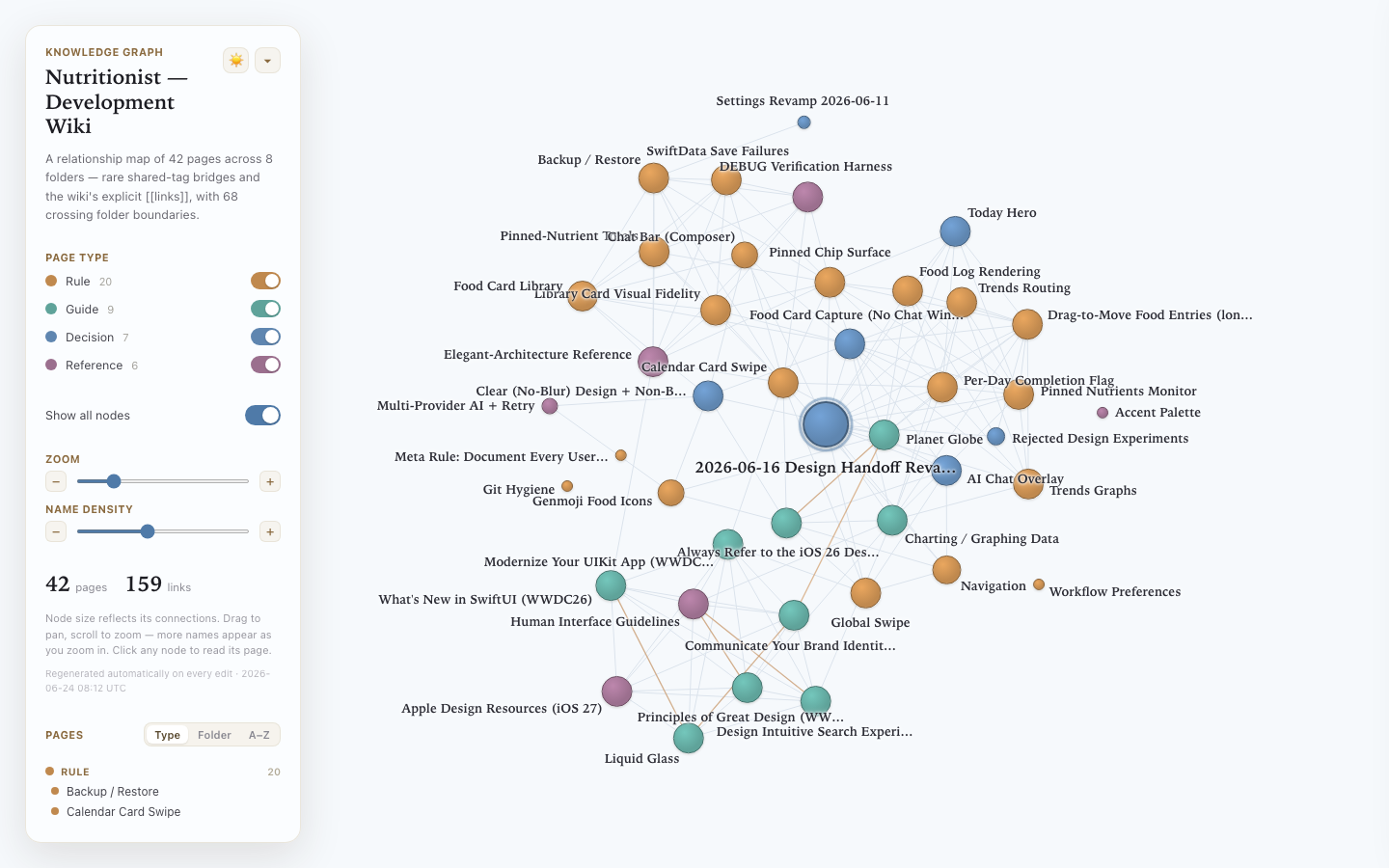
knowledge-iosapp is a real OKF knowledge
base served and maintained by this server — the development wiki for an iOS app.
Open the live, interactive graph » — the
graph.html it ships is regenerated on every manage-mode edit, so the live view always reflects
the current state of the base.
Serve that example against this server yourself:
git clone https://github.com/taikunudel/wiki-as-an-mcp
git clone https://github.com/taikunudel/knowledge-iosapp wiki-as-an-mcp/knowledge
cd wiki-as-an-mcp/knowledge-mcp && ./setup.sh && ./start.sh --mode read --version v1
Quick start
git clone https://github.com/taikunudel/wiki-as-an-mcp
cd wiki-as-an-mcp/knowledge-mcp

# bring an OKF knowledge repo next to the server as ../knowledge (see below),
# or point --registry at one anywhere.

./setup.sh # checks git + Python >= 3.10, builds the venv, localizes configs
./doctor.sh # health check (git, venv, knowledge repo, configs)

./start.sh --mode read --version <branch-or-commit> # serve one frozen version to an agent
./start.sh --mode manage # edit a working tree, then kb_snapshot
Agents usually connect through one of the knowledge-mcp/mcp.read*.json / mcp.manage.json
configs rather than launching start.sh by hand.
The two modes
- read — 5 tools (
kb_index,kb_list,kb_get,kb_grep,kb_rules), pinned to one commit, content served straight from git, read-only. The write tools are not registered, so a read session cannot even see them. - manage — all 14 tools. Checks out a branch and edits its working tree;
kb_snapshotcommits a new version.
The 9 manage tools add: kb_add, kb_update, kb_remove, kb_new_folder, kb_reindex,
kb_validate, kb_versions, kb_snapshot, kb_set_current. Full input/output examples are
in knowledge-mcp/USER_MANUAL.md; the rulebook is knowledge-mcp/AGENT_RULES.md.
Bring your own knowledge repo
The wiki is its own git repo, separate from this server, so the two version independently and neither nests inside the other. Its root is an OKF v0.1 bundle:
- folders of markdown pages, each non-reserved page carrying YAML frontmatter with a non-empty
type, - a reserved
index.mdcatalog in every folder, plus a reservedlog.md, - editions/versions are git branches and commits (a project can keep several arms as branches).
Place it next to the server as knowledge/, or pass --registry /path/to/your/knowledge.
Topics: one server, many bases (update 06262026)
Before this update a server served exactly one base, pinned at launch; a second base meant a second process:
BEFORE 06262026 · one server = one topic, pinned at launch

   agent ──kb_*──▶ server ──▶ one repo @ one commit
                              5 read tools · the whole base in scope

   a second topic  ⇒  a second server process
This update lets one server hold a registry of topic repos and choose between them at the first read, so the irrelevant ones never reach the agent:
AFTER 06262026 · one server, many topics, chosen at the first read

   registry/
    ├ insurance/ (repo) ┐
    ├ nutrition/ (repo) ├─ discovered  (live, unless --dynamic off)
    └ swiftui/   (repo) ┘
         │
   agent ─1st kb_*─▶ GATE ─▶ catalog via kb_topics (name + one-line description)
         ◀────────────────── "select a topic before reading"
         ─ kb_select_topic(insurance) ─▶ active = insurance
         ─ kb_* ─▶ served from insurance @ its commit ONLY;
                   other topics never enter the agent's context

   --topic <t> at launch ⇒ gate skipped = the BEFORE behavior (reproducible)
Concretely:
kb_topicsandkb_select_topicappear only for a multi-topic registry with no pin; a flat repo or a pinned--topickeeps the original 5-read / 14-manage surface.--select auto|manual— at the gate,auto(default) lets the agent match the task to the catalog,manualmakes it ask you first.--dynamic on|off—on(default) re-scans for new topics each call;offfreezes the list at startup for reproducible runs.- Isolation is soft: a wrong pick or a switch is recoverable, but content already read stays in context for the session, so keep the topic count small (see below).
Recommended limits
If you have one server manage multiple knowledge bases (topics), keep the number small. As a soft default, aim for a handful rather than dozens; there is no hard cap.
We have not measured whether managing many bases affects anything (selection accuracy, context size, health-check time) or has no effect at all. Until there is data, a small number is the cautious default, not a proven limit. If you need more, run several servers grouped by related bases instead of loading everything into one.
Git versioning
A version is a git commit; an edition is a branch. Read resolves a ref to one commit at
startup and serves that commit, so the consumer is frozen. Manage edits the working tree and
kb_snapshot commits a new point; earlier commits are untouched. kb_versions is git branch
git log,kb_set_currentisgit checkout.
Robustness and portability
setup.shchecks prerequisites, builds the venv, and rewrites the MCP configs to wherever you cloned the project.doctor.shruns before every start (and on demand): git on PATH, the venv works, the knowledge repo is present with its branches, the configs are valid JSON. A problem stops the start with a fixable message.portability_test.shcopies the project to a new path and re-runs the smoke test, catching any machine-specific absolute path.- Rule of thumb: clone or move it anywhere, run
setup.shonce, then start it. A Python venv cannot be moved, sosetup.shmust be re-run after a move.
An example project (the auto-insurance branch)
The auto-insurance branch uses this server to run an LLM-agent benchmark: it serves a
Tweedie/GLM insurance-modeling wiki across a good arm and silent-defect arms, hands a task and
a grading rubric to agents, scores their models through a sealed evaluator, and collects the
logs. It is a worked example of "a knowledge base as an MCP" inside a real experiment.
wiki-as-an-mcp(作为 MCP 的维基)
English | 中文
据我们所知,这是首个用于构建和使用你自己的个人维基(personal wiki,即知识库 knowledge base)的通用 MCP,它遵循 Google 提出的开放知识格式(Open Knowledge Format)以及 Andrew Karpahyt 的 LLM 维基(LLM wiki)设计理念。本 MCP 与具体任务无关(task-agnostic)。
Andrew Karpahyt 的 LLM 维基(LLM wiki)
- Git 使该 MCP 能够管理一个以上版本的维基(WIKI)。
- 两种模式(用户 user、管理者 manager)让维基(WIKI)远离意外污染(unintentional contamination)。
- 定期的健康检查(health check)确保维基索引(wiki index)的正确性。
为什么(Why)
- 冻结读取(Frozen reads)。 读取模式(Read mode)在启动时固定一个 git 提交(git commit)并提供它,因此即使管理者(curator)持续编辑,使用者在其整个会话期间也保持冻结状态。
- 安全编辑(Safe edits)。 管理模式(Manage mode)编辑一个工作树(working tree);
kb_snapshot提交一个新版本。更早的提交永远不会改变,因此已发布的版本不会被一次编辑破坏。 - 规则随数据同行(Rules travel with the data)。 规则手册(rulebook,即
AGENT_RULES.md)作为 MCP 的instructions内置于服务器中,并通过一个kb_rules()工具提供,写入工具会强制执行这些规则。 - 可移植(Portable)。 它能自我定位,附带一个安装脚本(setup script)、一个在每次启动时运行的健康检查器
doctor,以及一个可移植性测试(portability test)。
示例知识库(Example knowledge base)
knowledge-iosapp 是由本服务器提供并维护的一个真实 OKF 知识库 —— 某 iOS 应用的开发维基。打开在线交互式图谱 » —— 它附带的 graph.html 会在每次管理模式(manage-mode)编辑后重新生成,因此在线视图始终反映知识库的当前状态。
用本服务器亲自运行该示例:
git clone https://github.com/taikunudel/wiki-as-an-mcp
git clone https://github.com/taikunudel/knowledge-iosapp wiki-as-an-mcp/knowledge
cd wiki-as-an-mcp/knowledge-mcp && ./setup.sh && ./start.sh --mode read --version v1
快速开始(Quick start)
git clone https://github.com/taikunudel/wiki-as-an-mcp
cd wiki-as-an-mcp/knowledge-mcp

# bring an OKF knowledge repo next to the server as ../knowledge (see below),
# or point --registry at one anywhere.

./setup.sh # checks git + Python >= 3.10, builds the venv, localizes configs
./doctor.sh # health check (git, venv, knowledge repo, configs)

./start.sh --mode read --version <branch-or-commit> # serve one frozen version to an agent
./start.sh --mode manage # edit a working tree, then kb_snapshot
代理(Agents)通常通过 knowledge-mcp/mcp.read*.json / mcp.manage.json 配置之一进行连接,而不是手动启动 start.sh。
两种模式(The two modes)
- read(读取) —— 5 个工具(
kb_index、kb_list、kb_get、kb_grep、kb_rules),固定到一个提交(commit),内容直接从 git 提供,只读。写入工具未被注册,因此读取会话甚至看不到它们。 - manage(管理) —— 全部 14 个工具。检出一个分支(branch)并编辑其工作树(working tree);
kb_snapshot提交一个新版本。
这 9 个管理工具新增了:kb_add、kb_update、kb_remove、kb_new_folder、kb_reindex、kb_validate、kb_versions、kb_snapshot、kb_set_current。完整的输入/输出示例见 knowledge-mcp/USER_MANUAL.md;规则手册为 knowledge-mcp/AGENT_RULES.md。
带上你自己的知识库(Bring your own knowledge repo)
维基是它自己的 git 仓库(own git repo),独立于本服务器,因此两者各自独立地进行版本管理,互不嵌套。它的根目录是一个 OKF v0.1 包(bundle):
- 由 markdown 页面组成的文件夹,每个非保留页面(non-reserved page)都带有 YAML frontmatter,其中含有一个非空的
type, - 每个文件夹中都有一个保留的
index.md目录,外加一个保留的log.md, - 各个版次/版本(editions/versions)是 git 分支和提交(一个项目可以将多个分支(arms)保留为分支)。
将它放在服务器旁边作为 knowledge/,或传入 --registry /path/to/your/knowledge。
主题:一个服务器,多个知识库(更新 06262026)
在本次更新之前,一个服务器只服务一个知识库,并在启动时固定;要再服务一个就得再开一个进程:
BEFORE 06262026 · one server = one topic, pinned at launch

   agent ──kb_*──▶ server ──▶ one repo @ one commit
                              5 read tools · the whole base in scope

   a second topic  ⇒  a second server process
本次更新让一个服务器可以持有一个主题仓库的注册表(registry of topic repos),并在第一次读取时在它们 之间选择,因此无关的主题永远不会进入代理(agent)的上下文:
AFTER 06262026 · one server, many topics, chosen at the first read

   registry/
    ├ insurance/ (repo) ┐
    ├ nutrition/ (repo) ├─ discovered  (live, unless --dynamic off)
    └ swiftui/   (repo) ┘
         │
   agent ─1st kb_*─▶ GATE ─▶ catalog via kb_topics (name + one-line description)
         ◀────────────────── "select a topic before reading"
         ─ kb_select_topic(insurance) ─▶ active = insurance
         ─ kb_* ─▶ served from insurance @ its commit ONLY;
                   other topics never enter the agent's context

   --topic <t> at launch ⇒ gate skipped = the BEFORE behavior (reproducible)
具体而言:
- 只有当注册表含有多个主题且未用
--topic固定时,才会出现kb_topics和kb_select_topic;扁平单仓库 或固定了--topic时,仍保持原来的 5 个读取 / 14 个管理工具。 --select auto|manual—— 在选择关口处,auto(默认)让代理根据任务匹配目录,manual让它先问你。--dynamic on|off——on(默认)每次调用都重新扫描以发现新主题;off在启动时冻结列表,用于可复现的运行。- 隔离是软性的:选错或切换都可恢复,但已读入的内容会在本次会话中保留在上下文里,因此请让主题数量保持较少(见下文)。
推荐上限(Recommended limits)
如果让单个服务器管理多个知识库(knowledge base,即主题 topic),请让数量保持较少。作为软性默认值,建议保持在个位数,而不是几十个;没有硬性上限。
我们尚未测量管理大量知识库是否会带来任何影响(选择准确性、上下文大小、健康检查耗时),或者根本没有影响。在有数据之前,较少的数量是谨慎的默认选择,而非已证实的限制。如果你需要更多,请按相关主题分组运行多个服务器,而不是把所有内容都塞进一个。
Git 版本管理(Git versioning)
一个版本(version)是一个 git 提交(commit);一个版次(edition)是一个分支(branch)。读取在启动时将一个引用(ref)解析为一个提交并提供该提交,因此使用者被冻结。管理编辑工作树,并由 kb_snapshot 提交一个新的节点;更早的提交不受影响。kb_versions 即 git branch + git log,kb_set_current 即 git checkout。
健壮性与可移植性(Robustness and portability)
setup.sh检查先决条件,构建虚拟环境(venv),并将 MCP 配置重写到你克隆项目的位置。doctor.sh在每次启动前(以及按需)运行:PATH 上的 git、虚拟环境(venv)可用、知识库及其分支存在、配置是有效的 JSON。出现问题时会以一条可修复的消息停止启动。portability_test.sh将项目复制到一个新路径并重新运行冒烟测试(smoke test),以捕捉任何与机器相关的绝对路径。- 经验法则:将它克隆或移动到任何地方,运行一次
setup.sh,然后启动它。Python 虚拟环境(venv)不能被移动,因此移动后必须重新运行setup.sh。
一个示例项目(auto-insurance 分支)
auto-insurance 分支使用本服务器来运行一个 LLM 代理基准测试(LLM-agent benchmark):它在一个正常分支(good arm)和若干静默缺陷分支(silent-defect arms)上提供一个 Tweedie/GLM 保险建模维基,将一个任务和一份评分标准(grading rubric)交给代理,通过一个封闭的评估器(sealed evaluator)对它们的模型评分,并收集日志。它是在一个真实实验中"将知识库作为一个 MCP"的实际示例。
No comments yet
Be the first to share your take.