
Web Taste
Teach your coding agent your taste, not a template.


Web Taste is a Codex skill that learns transferable design decisions from real websites, turns them into visual evidence, remembers only what you approve, and applies that memory to new interfaces.
It does not copy a reference site's identity, assets, code, or isolated CSS values. It learns the relationships behind the design: hierarchy, rhythm, proportion, color roles, component grammar, interaction states, responsive recomposition, and motion logic.
中文说明 · Quick start · See the results
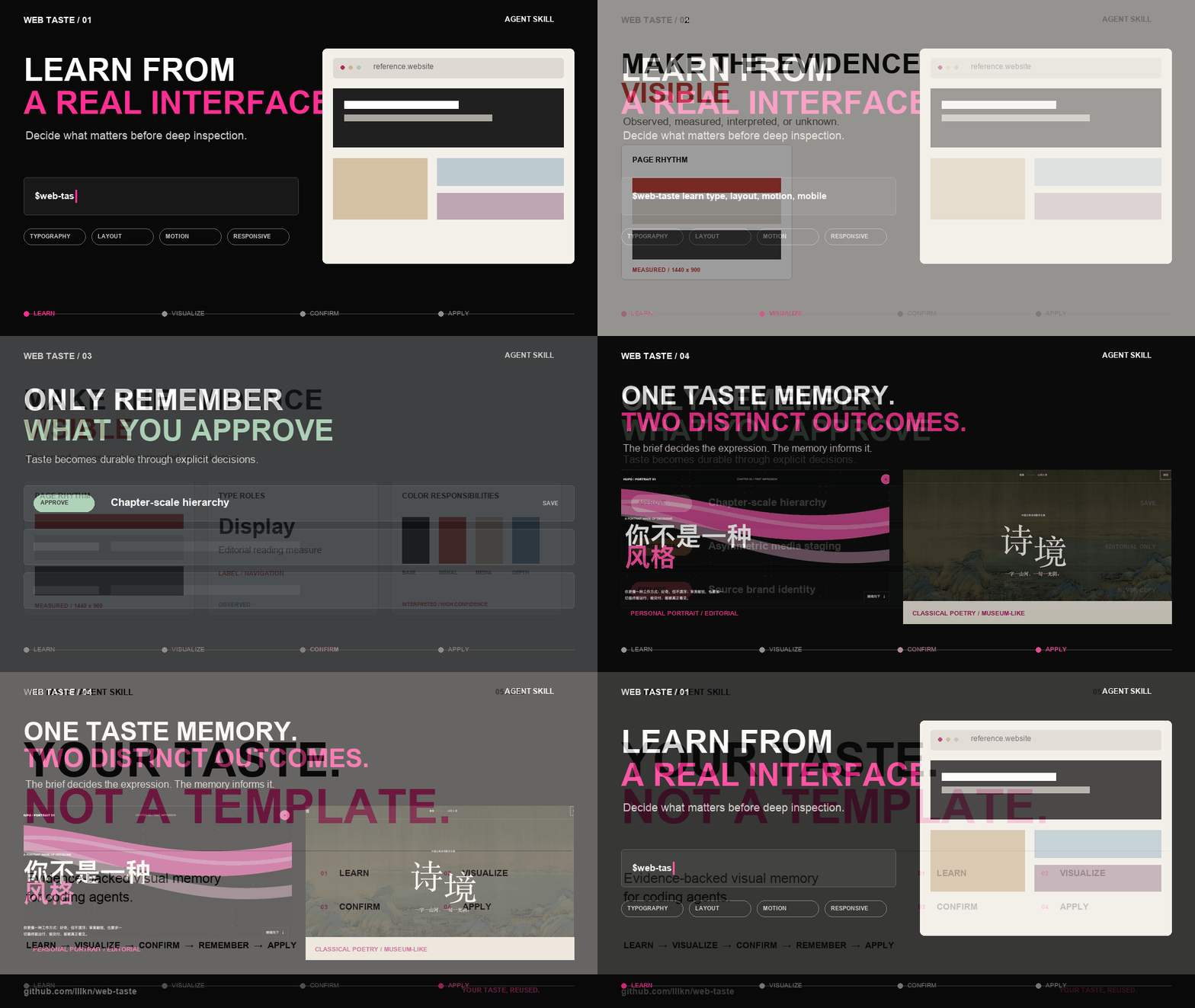
Learn from references, review visual evidence, approve what gets remembered, then apply that memory to new briefs.
Why Web Taste
Most frontend design prompts produce a one-off result. Web Taste builds a reviewable visual memory that improves through explicit decisions:
- Evidence before opinion — inspect rendered desktop, mobile, interaction, and motion states instead of guessing from source code.
- Approval before memory — show a Visual Taste Board and store only the principles the user accepts.
- Context before reuse — retrieve only the memories that fit the new audience, content, function, and emotional goal.
- Choice before propagation — compare meaningful component directions before applying one across the interface.
- Relationships over imitation — transfer hierarchy and design logic without copying brand identity, proprietary assets, or source code.
Quick start
Install globally for Codex with the Agent Skills CLI:
npx skills add lllkn/web-taste --skill web-taste -g -a codex -y
Or ask Codex to install it:
Install the web-taste skill from https://github.com/lllkn/web-taste.
Then learn from a reference website:
Use $web-taste to learn the typography, layout, components, responsive behavior,
and motion from https://example.com. Show me a Learn Brief before deep inspection,
then present a Visual Taste Board and remember only what I approve.
Or apply your existing taste memory to a project:
Use $web-taste to redesign this frontend. Start with an Application Brief and a
Memory Fusion Note, let me choose consequential component directions, then implement
and verify the result on desktop and mobile.
How it works
Reference websites
        ↓
Rendered evidence + Visual Taste Board
        ↓
User approval, correction, or rejection
        ↓
Traceable taste memory
        ↓
Application Brief + Memory Fusion Note
        ↓
Component choices → implementation → responsive verification
The confirmation gates are intentional. A submitted URL is not automatically treated as an endorsement, and a remembered preference is not blindly applied to every product.
中文说明
让你的 AI 逐步形成自己的网页审美:从真实网页中学习前端视觉语言,把经过确认的设计规律沉淀为 taste memory,再复用到新的网页、组件和产品中。
Web Taste 不是一个“照抄参考站”的工具。它关注可迁移的关系,例如信息层级、排版节奏、空间比例、色彩职责、组件语法、交互状态、响应式重组和动效逻辑,同时明确排除品牌标识、专有素材、原站代码与其他不可复用内容。
它能做出什么
下面两个案例来自同一套 Web Taste 工作流。用户先提供若干参考链接,让 Codex 学习其中的前端视觉规律;确认后,这些规律进入本地 taste library。面对新任务时,Codex 再结合目标内容与已经确认的审美记忆进行筛选、融合和重新表达。
这些页面不是固定模板,也不是参考站复刻。它们展示的是同一套 taste memory 如何根据完全不同的主题,生成不同的视觉语言。
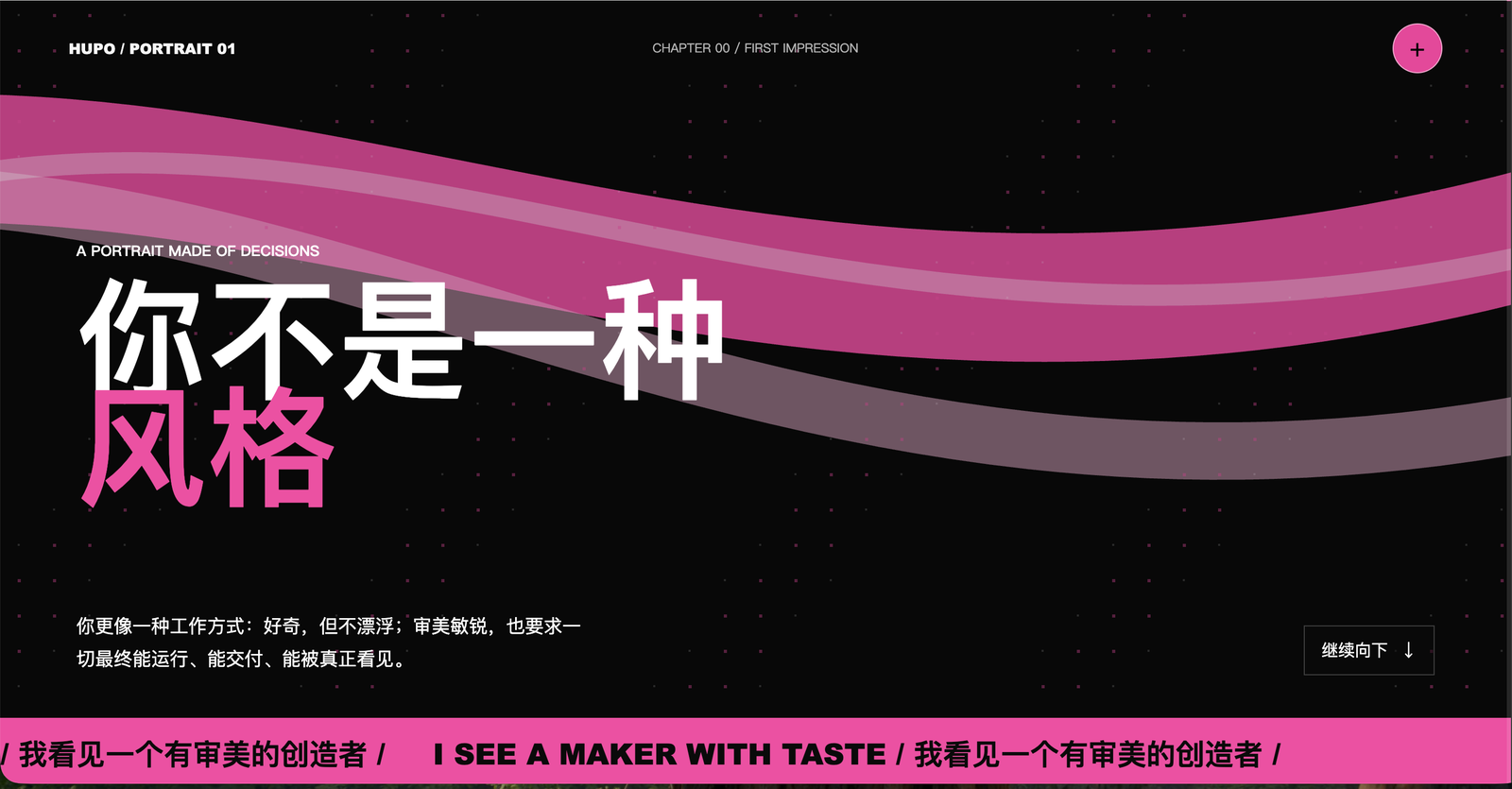
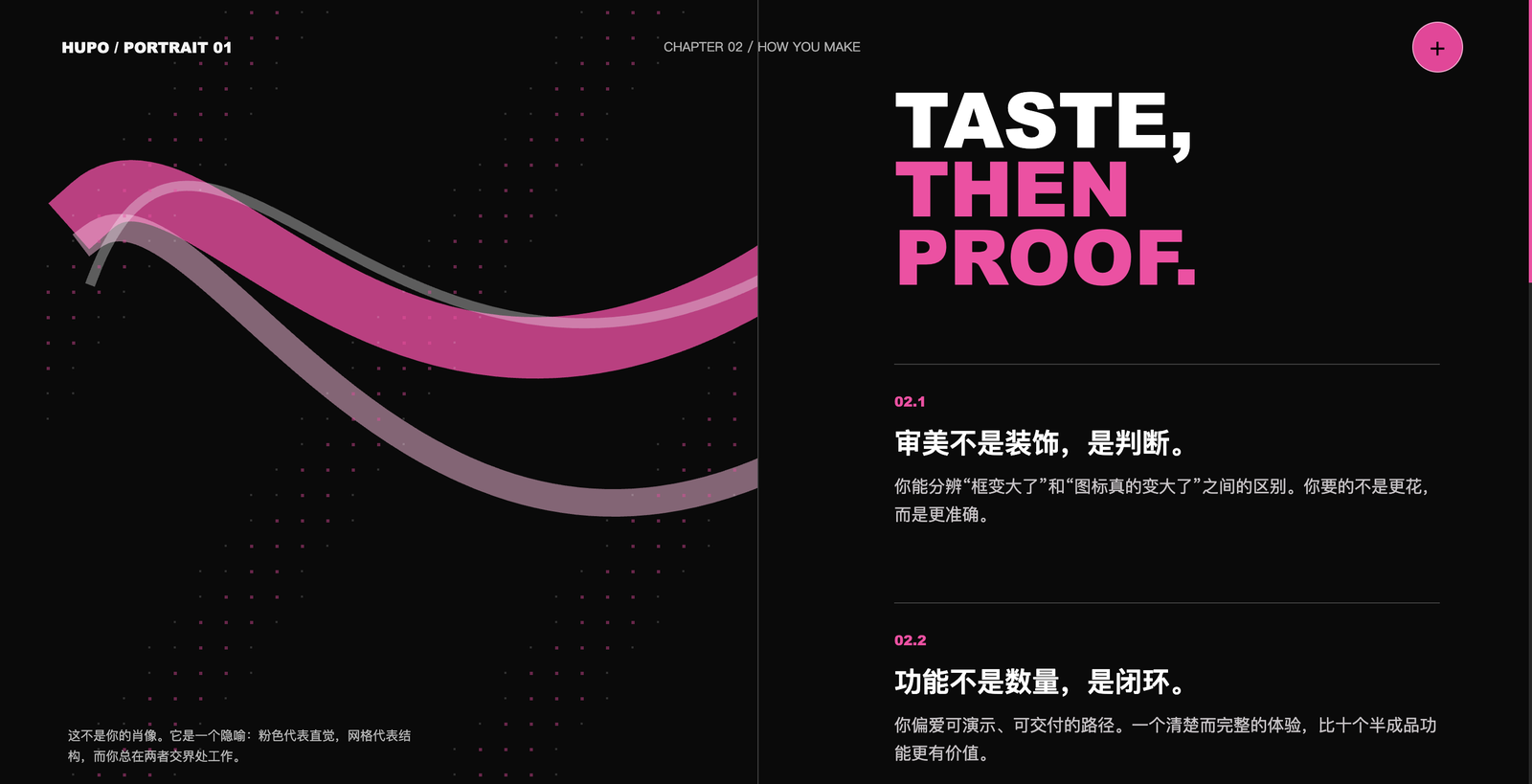
案例一:记忆中的我
目标不是制作普通个人主页,而是让 Codex 根据过去的合作、用户对设计方案的选择和已确认的 taste,生成一个“记忆中的我”。
最终页面把用户的工作方式组织成章节式视觉档案:黑色场景承载克制和判断,粉色作为明确的个性信号,流动曲线连接章节,超大中英文字建立强烈的叙事节奏。这里复用的是历史案例中已经确认的层级、动效和全屏叙事关系,而不是任何参考网站的品牌身份。
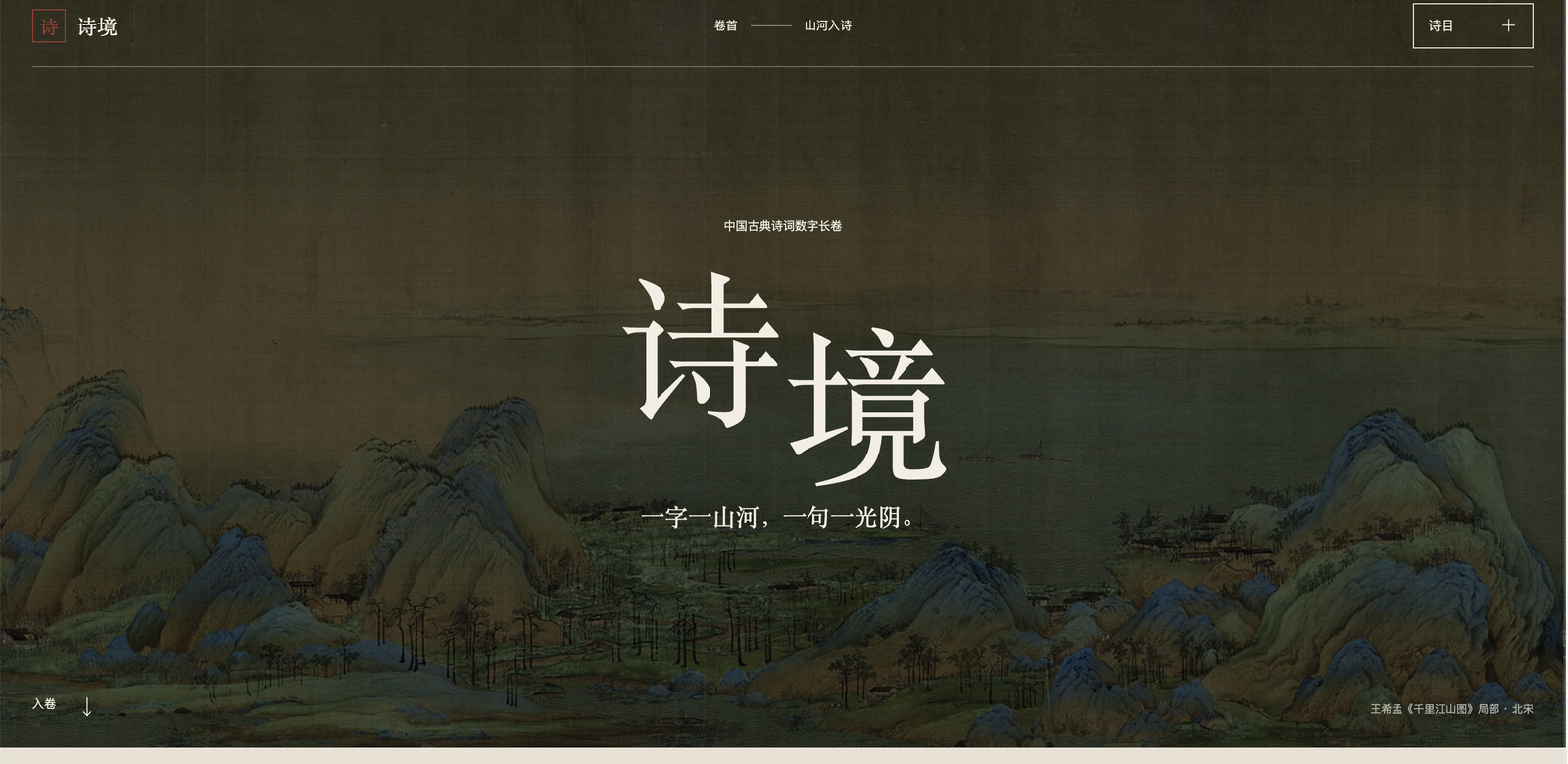
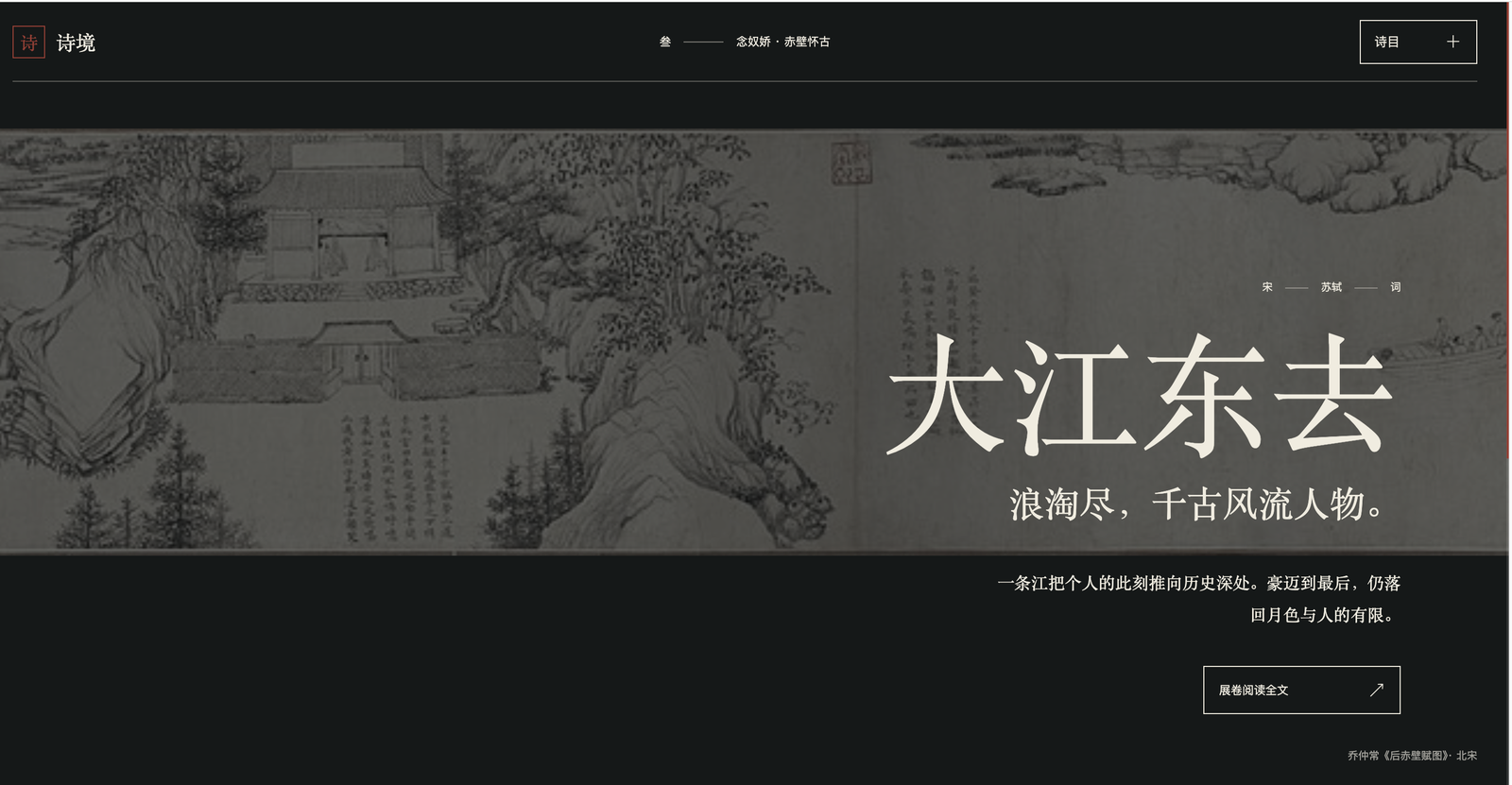
案例二:中国古诗展示页
第二个任务使用相同的知识库,但目标换成中国古典诗词。Codex 没有沿用个人档案的黑粉色表达,而是重新选择更适合诗词阅读的关系:画作成为完整场景,导航保持克制,宋体承担文化语气,内容通过数字长卷和分章阅读逐步展开。
这说明 taste memory 不是一组固定颜色或组件。它保存的是“什么时候应该突出什么、如何安排节奏、怎样让内容成为视觉主体”等可迁移判断,并根据题材、内容密度和情绪目标重新组合。
从参考链接到新页面
- 用户提供参考链接,并确认希望学习的页面、视觉维度和交互状态。
- Codex 用真实浏览器收集证据,生成 Visual Taste Board,而不是只给文字感想。
- 用户批准、修正或排除观察结果,只有确认后的规律进入 taste library。
- 新任务开始时,Codex 根据主题和功能检索相关记忆,提交 Application Brief 与 Memory Fusion Note。
- 用户确认融合方向和关键组件选择后,Codex 才实现页面并验证桌面端、移动端与交互状态。
功能
- 学习网页前端:用真实浏览器观察参考网页的桌面端、移动端和关键交互状态。
- 建立视觉证据:将截图、排版、色板、间距、组件状态和动效整理成 Visual Taste Board。
- 培养 AI taste:只有经过用户确认的规律才会进入长期 taste profile;偶然特征、冲突偏好和明确拒绝的方向会分开记录。
- 复用设计规律:根据新项目的用户、内容、功能和情绪目标,检索最相关的历史案例并形成 Memory Fusion Note。
- 先选方向再实现:当组件存在多个合理方向时,先渲染 2-3 个可比较方案,确认后再扩展到完整界面。
- 验证最终结果:检查桌面端、移动端、交互状态、键盘可访问性、溢出和 reduced motion,而不只检查源代码。
工作方式
学习模式
- 快速扫描参考网址。
- 和用户确认 Learn Brief,明确要学什么、检查哪些页面和状态、是否写入长期知识库。
- 深入检查布局、排版、颜色、图像、间距、组件、响应式和动效。
- 输出可视化的 Visual Taste Board,区分观察、测量、解释和未知项。
- 用户确认或修正后,才把可复用规律写入 taste library。
复用模式
- 了解目标项目、用户、功能、内容和限制,确认 Application Brief。
- 从历史记录中选择 2-4 个最相关案例,说明采用什么、排除什么、如何解决冲突。
- 对关键组件给出可比较的方向,等待用户选择。
- 实现并验证桌面端、移动端、交互与可访问性。
安装
使用 Agent Skills CLI(推荐)
npx skills add lllkn/web-taste --skill web-taste -g -a codex -y
让 Codex 安装
在 Codex 中发送:
请从 https://github.com/lllkn/web-taste 安装 web-taste skill。
手动安装
git clone --depth 1 https://github.com/lllkn/web-taste.git web-taste-repo
mkdir -p ~/.codex/skills
cp -R web-taste-repo/web-taste ~/.codex/skills/
重新启动 Codex 或开启一个新任务,让 skill 被重新发现。
使用
学习一个网页并建立 taste memory:
使用 $web-taste 学习 https://example.com 的排版、组件、响应式和动效。先给我 Learn Brief,确认后再深入分析,并把我认可的规律保存下来。
将已经学习的 taste 用到项目中:
使用 $web-taste 重新设计这个前端。先结合我的 taste library 给出 Application Brief 和 Memory Fusion Note,关键组件让我选择方向后再实现。
学习并立即复用:
使用 $web-taste 学习这个参考站,然后把确认后的视觉规律应用到当前项目。不要复制品牌、素材或源码。
仓库结构
.
├── README.md
├── docs/images/                      # README 使用的公开结果截图
└── web-taste/
    ├── SKILL.md                      # AI 工作流与行为约束
    ├── agents/openai.yaml            # Codex 中显示的 skill 信息
    ├── scripts/
    │   ├── render_visual.py          # 生成自包含的 Taste Board / 组件方案页
    │   ├── taste_library.py          # 新建、索引和校验 taste 记录
    │   └── test_workflow.py          # 脚本回归测试
    └── references/
        ├── workflow-artifacts.md     # Brief、报告和决策记录格式
        ├── visual-analysis-rubric.md # 网页视觉分析维度
        ├── site-record-template.md   # 单个参考站记录规范
        ├── taste-profile.md          # 用户确认后的长期偏好摘要
        ├── site-index.md             # 已学习网页的索引
        ├── sites/                    # 本地网页学习记录,不随仓库上传
        ├── reports/                  # 本地视觉报告,不随仓库上传
        └── applications/             # 本地应用决策,不随仓库上传
render_visual.py 和 taste_library.py 只依赖 Python 3 标准库。网页检查本身需要 AI 环境具备可操作的真实浏览器。
隐私与版权边界
这个公开仓库只包含 skill 工作流、通用模板、脚本和经授权展示的结果截图,不包含作者自己的 taste profile、已学习网站记录、Visual Taste Board 原始报告或项目应用记录。
使用过程中生成的 sites/、reports/ 和 applications/ 内容默认被 Git 忽略。请不要把第三方网页截图、品牌素材、专有字体、源代码或包含个人信息的记录公开提交。Web Taste 学习的是设计关系与约束,不是网站身份。
No comments yet
Be the first to share your take.