
video-watch
Two Claude Code / agent skills that watch videos for you: Whisper transcript plus one page of findings with timestamps, for YouTube videos, podcasts and local recordings. An optional server pipeline turns a YouTube playlist into transcripts in your inbox.


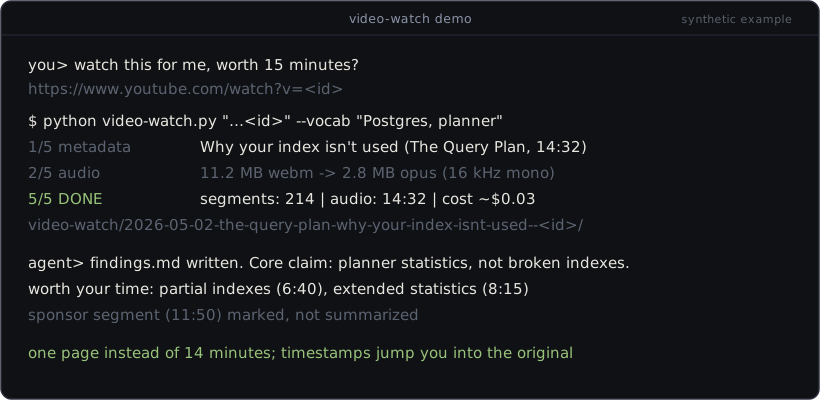
A 40-minute video usually carries about five minutes of substance. These skills let an agent extract that substance: download the audio, transcribe it with Whisper, and reduce it to a findings page you read in one minute, with (mm:ss) timestamps so you can jump into the original where it matters. Follow-up questions ("what exactly does he say about X?") are answered from the transcript on disk, not by watching anything again.
The repo ships two skills plus one optional component:
- video-watch takes a YouTube or podcast URL. yt-dlp fetches the audio, ffmpeg shrinks it to 16 kHz mono opus, a Whisper endpoint transcribes it, and the agent writes findings. For visual questions it can extract frames, spread smartly over the full runtime (transcript cues like "as you can see" first, then even time coverage, with a dedup pass that drops near-identical shots).
- audio-transcribe takes local files: voice memos, meeting recordings, interviews, the audio track of a video file. Same pipeline, imported from video-watch rather than duplicated, which is why the two ship as one repo.
- pipeline/ is the hands-off version for an always-on box: add a video to a designated playlist from your phone, cron polls the playlist RSS (no API key), and the transcript plus findings arrive by mail. The skills work fine without it.
claude-video (the /watch plugin) is a much more popular project covering similar ground: interactive, caption-first, Whisper only as fallback. This repo differs in where the work lands: everything becomes files on disk (transcript, findings with timestamps) that follow-up questions are answered from, the Whisper endpoint is yours to pick (Groq, OpenAI, self-hosted), and the optional pipeline watches a playlist unattended. The frame dedup approach here (16x16 grayscale comparison with a difference threshold) is adapted from claude-video.
you> watch this for me: https://www.youtube.com/watch?v=<id>

  video-watch.py   1/5 metadata ... 14:32, The Query Plan
                   2/5 audio download ... 3/5 transcription (1 chunk) ...
                   5/5 DONE  transcript: video-watch/2026-05-02-.../transcript.md
  agent            reads transcript.md, writes findings.md

you read one page instead of watching 14 minutes.
examples/findings.example.md shows a complete findings page. The video in it is invented; the repo ships no transcripts of real runs.
Requirements
Honest list first, this is half the decision:
- A Whisper-compatible transcription endpoint. Three interchangeable options, configured in
.env: a Groq API key (whisper-large-v3, about $0.111 per audio hour as of 2026-07), an OpenAI API key (whisper-1), or a self-hosted server such as faster-whisper-server (free, needs a GPU box). Anything that accepts OpenAI-styleaudio/transcriptionsmultipart requests withverbose_jsonworks. - yt-dlp and ffmpeg on PATH. Both are established open source tools; yt-dlp does the downloading, ffmpeg does conversion and frame extraction.
- Python 3.9+, stdlib only. The scripts have zero pip dependencies. On Windows, use
python(orpy) instead ofpython3. - An agent that can run shell commands (Claude Code or similar) if you want the findings layer. The scripts themselves are plain CLIs and work without any agent.
Quickstart
1. Install the skills. Copy both skill folders into your skills directory (~/.claude/skills/ for Claude Code):
git clone --depth=1 https://github.com/belschak/video-watch.git video-watch-repo
mkdir -p ~/.claude/skills
cp -r video-watch-repo/video-watch video-watch-repo/audio-transcribe ~/.claude/skills/
2. Configure the endpoint (once):
cp video-watch-repo/.env.example ~/.claude/skills/video-watch/.env
# open it, pick one backend block, paste your key
3. Ask for what you want. "Watch this video and tell me if it's worth my time: " triggers video-watch; "transcribe the voice memo in my recordings folder" triggers audio-transcribe. Or run the scripts directly:
python3 ~/.claude/skills/video-watch/scripts/video-watch.py "<url>" --vocab "product names, jargon"
python3 ~/.claude/skills/audio-transcribe/scripts/audio-transcribe.py "meeting.m4a"
What the scripts absorb
The point of shipping scripts instead of a prompt is that the failure modes are already handled:
| Problem | What the script does |
|---|---|
| APIs cap uploads at 25 MB | converts to 16 kHz mono 24 kbps opus (Whisper works on 16 kHz mono internally, nothing is lost); chunks above 20 MB and re-offsets timestamps on merge |
| Whisper garbles proper nouns | primes the model with title, channel, description and your --vocab terms |
| Transient network failures | retries per chunk; hard API errors (401, 413) abort with the server's message |
| Frame extraction front-loads the intro | picks frame times from transcript pointer cues first, then even coverage over the full runtime, snapped to scene changes |
| 30 near-identical talking-head frames | grayscale-thumbnail dedup pass drops them (fail-open: any decode problem keeps all frames) |
| Transcript folders pile up | after 90 days the retention sweep keeps findings.md and meta.json and deletes the rest of the folder, transcripts included |
Some servers omit duration in verbose_json |
falls back to the last segment end so multi-chunk timestamps stay correct |
Honest limits
- Transcription quality is Whisper's quality. Music-heavy segments, crosstalk and thick accents produce errors; hallucinated fragments on long silences are a known Whisper behavior. The
--vocabpriming helps with jargon but does not fix audio. - Findings quality is the agent's quality. The scripts produce transcripts deterministically; the findings page depends on the model reading it.
- YouTube blocks many datacenter IPs. From home connections yt-dlp is reliable; from rented servers, downloads may be refused. The pipeline parks such videos and makes no attempt to evade blocks (see pipeline/README.md).
- Frame cue detection is English-only for now. Transcripts in any language work (Whisper is multilingual), but the "look at this" pointer-phrase regex only knows English phrasings; other languages fall back to time coverage. Contributions welcome, see CONTRIBUTING.md.
- Developed and used on Windows. Pure stdlib plus cross-platform CLIs, so macOS/Linux should work; the pipeline targets Linux cron. Not all combinations are tested.
- Timestamps are chunk-relative sums. On very long videos (multiple chunks) expect drift of a few seconds late in the video.
A note on downloading
These tools use yt-dlp, an established open source downloader, to fetch audio for personal transcription, the same content your browser streams. No DRM circumvention, no bot-detection evasion, no credential handling. YouTube's Terms of Service restrict downloading except where the service or applicable law permits it; whether downloading a given video is acceptable depends on the platform's terms and your jurisdiction, and that call and that responsibility are yours.
Contributing
Most valuable right now: pointer-cue phrases for non-English languages, endpoint quirks (a server whose verbose_json differs), and platform testing on macOS/Linux. See CONTRIBUTING.md.
Related skills
- web-research-cascade: escalate blocked fetches instead of silently swapping in a weaker source.
Disclaimer
This project is not affiliated with, endorsed by, or sponsored by Anthropic, Google, Groq, or OpenAI. Claude and Claude Code are trademarks of Anthropic, PBC; YouTube is a trademark of Google LLC. These are independent skills built to be used with the official Claude Code CLI, against a Whisper-compatible endpoint you pick and pay for yourself. Use at your own risk; see LICENSE for the warranty disclaimer.
License
MIT. See LICENSE.
Built and maintained by David Belschak.
No comments yet
Be the first to share your take.