
🎮 VibeLign — Safety Guard for AI Coding
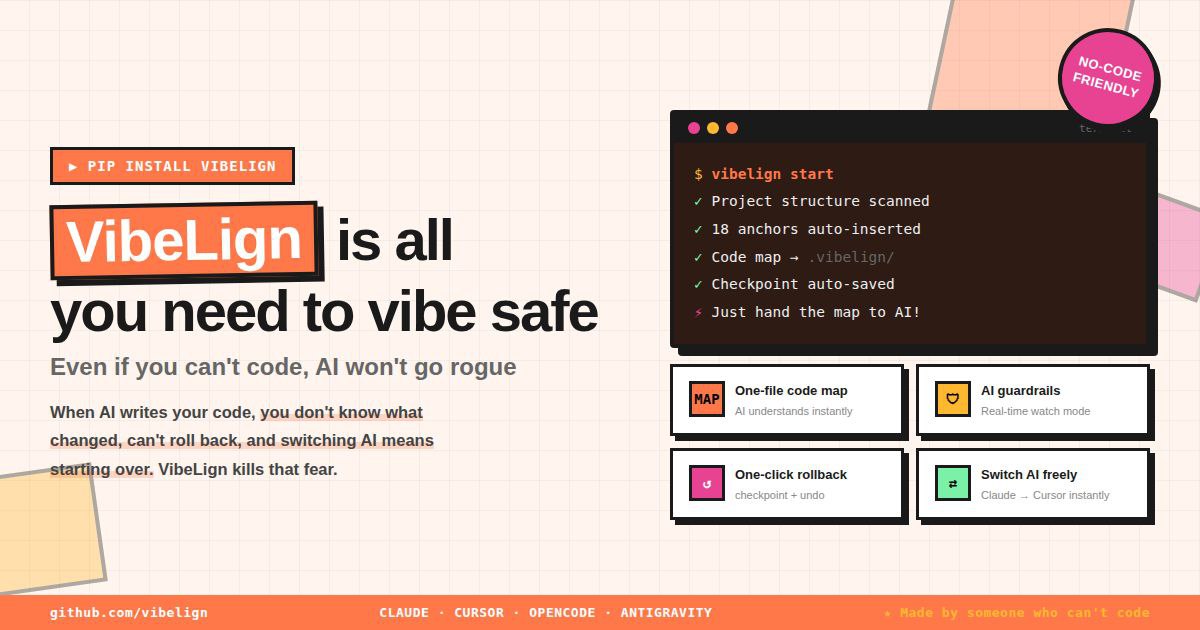
VibeLign (vibelign) is an AI coding safety CLI + Desktop GUI for vibe coding workflows.
It helps developers and non-developers protect project structure, save checkpoints, undo bad AI edits, manage anchors, and block secret leaks before commit.
🆕 v2.5.1: Report export now includes 13 satgat-inspired specimen themes, and the planning room is back to the original Chloe (Claude) → Gio (Codex) priority after Claude reverted the policy change that prompted the warning labels. See CHANGELOG. v1 → v2 users: migration notes.
Documentation: https://yesonsys03-web.github.io/VibeLign/
Repository: https://github.com/yesonsys03-web/VibeLign
Issues: https://github.com/yesonsys03-web/VibeLign/issues
Releases: https://github.com/yesonsys03-web/VibeLign/releases
Sound familiar?
- You asked AI to add a small feature — it rewrote the entire file
- All code ended up in
main.py— 1000+ lines, impossible to manage- AI touched other files and now nothing works
- You want to undo but don't know how
That's why we made this!
Desktop App (macOS / Windows) — 📥 Download latest release
Mac / Linux (CLI)
pip install vibelign
vib start
Windows (PowerShell, CLI)
# Step 1: install uv — one-time setup, auto-configures PATH
powershell -ExecutionPolicy ByPass -c "irm https://astral.sh/uv/install.ps1 | iex"
# Close and reopen PowerShell, then:
uv tool install vibelign
vib start
🤔 What is VibeLign?
AI coding tools (Claude Code, Cursor, etc.) write code fast. But they have problems:
| Problem | VibeLign Fixes It |
|---|---|
All code goes into main.py |
AI organizes code properly |
| AI does something different from what you asked | Creates precise edit requests |
| Code breaks and you can't go back | Save & Undo feature |
Works with any AI tool: Claude Code · Cursor · Codex · OpenCode
📝 Just 3 Things to Remember
Before AI edits  →  vib checkpoint "before work"    # save
AI broke it      →  vib undo                         # undo
Looks good       →  vib checkpoint "done"             # save again
No Git knowledge needed. Just type
vib.
🚀 Start in 3 Steps
Mac / Linux
# 1. Install
pip install vibelign

# 2. Go to your project folder
cd my-project

# 3. Start!
vib start
Windows (PowerShell)
# 1. Install uv — one-time setup (auto-configures PATH, no warnings)
powershell -ExecutionPolicy ByPass -c "irm https://astral.sh/uv/install.ps1 | iex"

# Close and reopen PowerShell, then:

# 2. Install vibelign
uv tool install vibelign

# 3. Go to your project folder and start!
cd my-project
vib start
📚 All Commands
Basics (Must Know)
| Command | What It Does |
|---|---|
vib start |
First time only! Set up project |
vib checkpoint "message" |
Save current state (like game save) |
vib checkpoint |
Will ask for a message |
vib undo |
Go back to last save |
vib history |
See all saves |
vib backup-db-viewer --json |
Inspect the Rust backup DB in read-only mode |
vib backup-db-maintenance --json |
Dry-run backup DB file cleanup planning |
vib backup-db-maintenance --apply --json |
Back up DB files, truncate WAL, and conditionally compact the DB |
When Asking AI to Code
| Command | What It Does |
|---|---|
vib anchor |
Mark safe areas for AI to edit |
vib scan |
Clean up files + check status |
AI edit rules
- Split composite requests into
intent / source / destination / behavior_constraint. - If
deleteandmoveappear together, treat it as move + preservation unless the user clearly wants removal. - Resolve
sourceanddestinationby role, not with the same rule. - If an internal edit contract changes, update tests and docs together.
- Keep terminology aligned with the shared glossary and project docs.
Checking & Verification
| Command | What It Does |
|---|---|
vib doctor |
Check project health |
vib explain |
Explain changes in plain language |
vib guard |
Check if code is broken |
vib ask filename.py |
Ask AI to explain a file |
File Protection
| Command | What It Does |
|---|---|
vib protect filename.py |
Lock important files (AI can't touch) |
vib protect --list |
See locked files |
vib protect --remove filename.py |
Unlock file |
vib secrets --staged |
Block staged API keys, tokens, and .env files before commit |
Settings & Export
| Command | What It Does |
|---|---|
vib config |
Set API keys |
vib export claude |
Create Claude Code settings |
vib export cursor |
Create Cursor settings |
vib export opencode |
Create OpenCode settings |
Other Useful Commands
| Command | What It Does |
|---|---|
vib watch |
Monitor file changes in real-time |
vib bench |
Test how effective anchors are |
vib manual |
Show detailed user guide |
vib rules |
Show all AI development rules |
vib transfer |
Generate PROJECT_CONTEXT.md for switching AI tools |
vib transfer --handoff |
Add Session Handoff block so a new AI can continue immediately |
vib transfer --handoff --session-summary "work" --first-next-action "next" |
Override the handoff summary and first next action |
vib transfer --handoff --dry-run |
Preview handoff output without writing the file |
vib completion |
Set up tab autocomplete |
vib install |
Show step-by-step installation guide |
💡 Recommended Workflow
# First time
vib start

# Before AI edits
vib checkpoint "before login feature"
vib doctor --strict

# After AI edits
vib explain --write-report
vib guard --strict --write-report

# If done
vib checkpoint "login feature done!"

# If something broke
vib undo

# Hitting a token limit or switching AI tools?
vib transfer --handoff    # generates a Session Handoff block
vib transfer --handoff --no-prompt --print  # automatic handoff + console summary
vib transfer --handoff --session-summary "current session work" --first-next-action "rerun tests"
vib transfer --handoff --dry-run  # preview before writing
# Then tell the new AI: "Read PROJECT_CONTEXT.md first"
transfer compatibility: --handoff cannot be combined with --compact or --full.
vib start now also enables Git secret protection automatically when your project uses Git.
Before each commit, VibeLign checks staged changes for API keys, tokens, private keys, and secret-like files such as .env.
# Check manually anytime
vib secrets --staged
🔧 Installation
Option 1: uv (Recommended, faster)
uv tool install vibelign
If you see "is not on your PATH" warning after install:
uv tool update-shellThen close and reopen your terminal.
vibwill work after that. If you use bash, runuv tool update-shellfrom inside bash, or:echo 'export PATH="$HOME/.local/bin:$PATH"' >> ~/.bashrc && source ~/.bashrc
Option 2: pip
pip install vibelign
After installation, both vib and vibelign commands are available.
Option 3: Desktop App (GUI)
Download the latest .dmg (macOS, Apple Silicon) or .exe / .msi (Windows) from the
Releases page.
The GUI bundles the vib runtime — no separate CLI install required.
macOS first-launch: if you see "app is damaged", open Terminal and run
xattr -rc vibelign-gui.app(ad-hoc signed, not notarized).
Windows — if vib is not recognized after pip install
When you install with pip on Windows, vib.exe is placed in the Python Scripts folder which may not be in PATH.
The pip warning message shows the exact path you need to add:
WARNING: The scripts vib.exe ... are installed in 'C:\Users\...\Scripts' which is not on PATH.
To fix manually:
- Press
Win + R→ typesysdm.cpl→ Enter - Advanced tab → Environment Variables
- Under System variables, find
Path→ click Edit - Click New and paste the
Scriptspath shown in the pip warning- Example:
C:\Users\YourName\AppData\Local\Programs\Python\Python312\Scripts\
- Example:
- Click OK → fully close and reopen PowerShell
Tip: Use
uv tool install vibelignto skip this entirely — uv handles PATH automatically.
📖 Want to Learn More?
vib manual          # Detailed user guide
vib manual rules    # AI development rules only
vib rules           # Same as above
🎯 Our Promise
"AI coding is fast. But without safety guards, it can destroy what you built."
VibeLign promises:
- ✅ Save in 1 second (
vib checkpoint "description") - ✅ Undo in 1 second (
vib undo) - ✅ No Git knowledge needed
- ✅ Easy for beginners
⭐ If VibeLign saved your code, a Star would mean a lot — thank you!
📋 Release Notes
v2.5.1 — Satgat specimen report pack + Claude warning cleanup:
- 🧾 13 new satgat-inspired report specimen themes for comparing business report, proposal, result report, and document-style exports without hand-styling each run.
- 🔁 Planning-room priority restored — default response mode is back to Draft · Chloe first, with Instant · Gio still available next.
- 🧹 Claude credit warning labels removed after the policy reversal: planning-room chips, persona settings, Work Room, and Design Preview no longer show the
claude -pcredit warning.
v2.5.0 — Major report export upgrade:
- 📄 One-click plan/document → report export in HTML preview, PDF, Word, and PowerPoint.
- 🎨 50+ report themes, adjustable heading/body/header font sizes, page numbers, and remembered save locations.
- 🔤 Free Korean font selection with embedded PDF fonts: Pretendard, Nanum Myeongjo, Gowun Batang, Gowun Dodum, and Geomun Gothic.
- 🛠 Korean Word/PPT text normalization fixed so decomposed Hangul filenames/content no longer render as split jamo.
v2.4.4 — New 갸리카 (car) guide mascot in onboarding & the planning room:
- 🚗 Onboarding mascot drives in from off-screen left, brakes under the input, then pops a welcome bubble. Click it to dismiss the bubble, click again to "vroom" off-screen right, and click anywhere to drive it back in.
- ⏳ Planning-room loading — while personas (클로이/지오/미나/딥시기) prepare their answers, the car runs in place as a "부릉부릉" loading animation instead of plain waiting text.
- 🧭→🚗 Replaces the old compass guide mascot.
v2.4.3 — Adapt to Claude's programmatic-usage pricing change (minimize automatic Claude calls):
- 🔻 Planning personas no longer auto-fall-back to Claude (Codex/OpenCode first); the Claude persona ("클로이") is off by default — opt-in. Disabled personas can't be selected in the composer and "모두" only calls enabled ones.
- 💲 When Claude is used, it's pinned to Sonnet (not Opus) to reduce credit burn — across personas, the readiness judge, design generation, and the CLI.
- 🎨 Design preview and 🛠 Work Room default to Codex; choosing Claude Code shows a credit-usage warning (it runs
claude -p, which from 2026-06-15 bills a separate monthly credit / standard API rates instead of the subscription pool). - ℹ️ Unaffected: interactive Claude Code in your terminal, MCP integration, and your own API-key calls (
vib ask, docs-enhance).
v2.4.2 — Accurate install detection + Settings readability + planning-room auto-scroll:
- 🔍 Installed AI tools now detected reliably — Settings tool detection relied on
zsh -lc/bash -lc(login, non-interactive)command -v, which skips.zshrcwhere most PATH exports live (e.g.~/.bun/binfor opencode) — so installed tools showed as missing. Now it probes an augmented PATH (homebrew/cargo/bun/.local/bin) directly, so tools are found even when the app is launched from Finder/Dock. - ✅ Clearer install state — replaced the cryptic " MCP" suffix with a distinct "✓ Installed" badge, and color-coded the Installed / Auto-install / Manual badges (green / amber / gray) so they stay readable on the selected (blue) button.
- 🔤 Settings text readability — unified the small, faded description text across the AI-tools, planning-persona, and API-key cards to the standard card style (13px, solid color); provider names no longer use the unreadable terminal-green on white.
- ⬇️ Planning-room smart auto-scroll — after you send or a new reply arrives, the view scrolls to that reply (not the page bottom); it won't hijack your scroll while you're reading earlier messages.
v2.4.1 — Uninstall for AI CLI tools (OpenCode / Codex / Antigravity):
- 🧹 One-click uninstall in
ToolInstallPanel— Remove opencode/codex/antigravity from the app. opencode & codex (macOS) use their uninstall command; agy (macOS) deletes only the PATH-resolved single binary viastd::fs::remove_file(one file, non-recursive, no shell) then re-probes to confirm — preventing false success on symlink/duplicate-PATH installs; codex/agy (Windows) fall back to a manual guide. Binary-only removal — MCP config, tool config, and login state are preserved.
v2.2.20 — Code Explorer adds docs tree + per-category color coding:
- 📚
docs/+.mdfiles now in the sidebar — A Tauri-onlylist_code_filesscanner runs alongside the engine'sproject_scan, sodocs/superpowers/specs/*.md, wiki, release notes and other Markdown docs show up in the tree and open in the viewer (Markdown language tag). Code-analysis pipelines (anchor_tools, patch_suggester, doctor_v2, risk_analyzer) keep their original code-only scope and are untouched. - 🎨 4-color category tab styling — code (green) / docs (orange) / tests (purple) / other (gray). Files categorized by extension + path (
.test.*,__tests__/,spec/,tests/), directories aggregated from subtree majority. Each row gets a 4px left accent bar + category-tinted background + colored dot for fast scanning. - 🧩
vib/*.tsANCHOR markers backfilled — 16 GUI domain modules + 2 DocsViewer tests gained// === ANCHOR: NAME_START === / _END ===sovib guard --strictenforces anchor boundaries across the whole GUI surface.
v2.2.19 — GUI Code Explorer (read-only source viewer):
- 🌲 New
CODE EXPLORERtab — Browse the project source tree by folder (first-level expanded by default, auto-expand while searching) and preview any file read-only with line numbers plus language/line/byte stats. Search matches path, category, and imports. Built as a separate domain from DocsViewer with page/layout/tree/viewer/toolbar/line components soApp.tsxonly wires the tab. - 🔒 Rust
read_code_filecommand +code_access.rsguard — Rejects root escapes (.., absolute paths, Windows UNC/drive, symlinks), skips hidden/generated dirs (.git,node_modules,target…), blocks Windows reserved device names (NUL,CON,COM1…), enforces an extension allowlist, refuses binary/non-UTF-8 files, and caps size (1MB code / 5MB data). BOM-stripped, CRLF-normalized, SHA-256 hashed. - 🧩 Diff extension seam (
CodeDiffViewer) — Red/green diff component pre-split; inactive (unmounted) in v1 until a real diff source is wired.
v2.2.18 — Plan docs sync + GUI tsconfig test exclude:
- 📝 Plan/spec docs reconciled with shipped code (2026-05-14) — Five superpowers plan/spec docs (
mcp-host-llm-pivot-plan,규칙수정안-3,원클릭설치-기획안_초안,지식저장고-기획안,mcp-host-llm-pivot-eval-runbook) got "현재 구현 대조 메모" headers so readers don't mistake aspirational designs for shipped features. Real implementation status (e.g. MCP primitives mainlined,vib knowledgenot yet built,claude doctorexcluded from v1 success criteria) now sits at the top of each doc. - 🧹
vibelign-gui/tsconfig.jsonexcludes test files — Vitest fixtures (src/**/__tests__/**,*.test.{ts,tsx},src/test/**) were dragged intotsc && vite buildand produced spurious type errors. Added anexcludelist so production builds stay quiet without changing test behavior.
v2.2.17 — PyPI publish unblocked (macos-13 → macos-latest):
- ⚡ macOS wheel runner switched to Apple Silicon —
macos-13(Intel x86_64) runner pool was queue-jammed for hours, blocking PyPI publish since v2.2.12.macos-latest(Apple Silicon arm64) runs in seconds. Trade-off: Intel Mac users now install via sdist (requires Rust toolchain locally), not PyPI binary wheel.
v2.2.16 — Phase 9 CI greens up (MCP checkpoint handler tests):
- 🟢
test_handle_checkpoint_create_*2 failures fixed — Rust-engine migration leftovers.handle_checkpoint_createnow treatsfile_count == 0the same assummary is None(both audited as "blocked"). The list-checkpoints test now usesrouter.list_checkpointsso it can see Rust engine's SQLite store. Phase 9 cross-platform CI back to green after staying red since v2.2.11.
v2.2.15 — Post-commit hook v5: restore v3 branch order:
- 🔁 Auto-backup fallback order reverted to v3 — v4's "absolute-path first" structure broke auto-backup for some LLM commit tools (OpenCode + GPT-5.5 reproduced). v5 puts PATH branches back at the top (matching the v3 behavior that worked) and demotes absolute-path branches to the last fallback for the GUI-commit-tool-without-PATH case only. Marker bumped to v5; v1-v4 hooks auto-upgrade on next
vib start.
v2.2.14 — Runtime self-heal for RUST_ENGINE_INTEGRITY_FAILED:
- 🛟 Bundled engine integrity now self-heals on macOS — v2.2.13 only fixed the CI codesign step, so locally-built GUI apps (
npm run tauri buildon Intel/ARM Mac) kept tripping the integrity check. The runtime check now refreshes the.sha256manifest whencodesign --verify --strictconfirms the binary is properly signed. Tamper detection preserved on Windows/Linux (no codesign signal there).
v2.2.13 — Auto-backup integrity hotfix (GUI + GUI commit tools):
- 🩹
RUST_ENGINE_INTEGRITY_FAILEDon macOS GUI fixed —codesign --deepwas adding a signature blob to the bundledvibelign-enginebinary AFTER the.sha256manifest was generated, so every Rust engine call from the GUI (history, backups page) blew up with an integrity check failure. CI now refreshes the manifest right after signing. - 🔌 Post-commit auto-backup no longer requires
vibon PATH — Sourcetree / VS Code / Tower commits inherit the launchd PATH and usually miss~/.local/bin, so everycommand -v vibfallback was silently failing → no backup. The hook now captures absolute paths tovib/vibelign/python -m vibelign.cli.vib_cliat install time and tries them first. Marker bumped to v4; old v1-v3 hooks auto-upgrade on nextvib start. - 🐧 Linux builds dropped from CI — wheel publish + Python smoke build moved off Ubuntu; targets are macOS + Windows only.
v2.2.12 — Flexible pre-commit hook (guard advisory + skip env):
- 🟢
vib guard --strictno longer blocks commits — guard failures now print a one-line advisory to stderr and let the commit through;vib secrets --stagedstill blocks (secrets leakage is irreversible, drift is not). Guard issues are still caught byvib doctorand the next session. - 🚪
VIBELIGN_SKIP_HOOK=1 git commit ...— one-shot bypass (clearer-intent alternative to--no-verify; vib itself doesn't run). - 🔒
VIBELIGN_STRICT_GUARD=1— opt-in to keep guard blocking, for strict-mode teams. - ♻️ Auto-upgrade — any prior
secrets-pre-commit v1/pre-commit-enforcement v1/v2hook is replaced with the new v3 template on the nextvib start. No manual cleanup.
v2.2.11 — Patch card hidden from GUI (accuracy-driven deprecation):
- 🚫 GUI Patch card removed from default order — the legacy structured-patch flow's natural-distribution accuracy was measured at 0/7 across real user requests (keyword traps:
--json→ wrong Python doc command,--preview→ unrelated backup-restore file). Users blindly following the output risked corrupting unrelated files. The card no longer appears in the Home grid for new or existing users. Use Claude Code / Cursor with vibelign-mcp (auto-registered byvib start) for natural-language editing instead.
v2.2.10 — MCP host-LLM pivot PoC + BACKUPS pagination + Explain card cleanup:
- 🧠 New MCP tools —
anchor_read_content(read inside an anchor boundary, path-traversal blocked,_START/_ENDsuffix auto-normalized) andproject_map_get(full project category/file/anchor index in one call). Lets host LLMs (Claude Code / Cursor) map natural-language requests to the rightfile:anchordirectly. Measured 6/6 = 100% on real user requests vs baseline legacy structured-patch flow 0/6. - 📋 BACKUPS file history + DB Viewer rows pagination —
← prev / X / Y page · M–N / TOTAL / next →footer in both lists. Earlier entries are reachable again once the list grows beyond a single page. Search reset to page 1, selected entry auto-jumps to its page. - 🧹 Explain card
--write-report/--jsonoptions removed — flags removed from the GUI Explain card (CLI still supports them; other commands unaffected). - 📚 Dogfooding evidence: the legacy structured-patch flow lands on the wrong file (
vib_docs_build_cmd.py, JSON keyword trap) while a host LLM with the new tools targetscommandData.tsinstantly — see PR #5 description.
v2.2.9 — Patch fix for the v2.2.8 scroll-to-top button:
- 🔧 Scroll-to-top now detects the real scroll container — v2.2.8 listened to
window.scrollY, but the brutalism layout puts scrolling on.page-content(inner flex child), so the button never appeared on macOS or Windows. v2.2.9 adds a capture-phase document scroll listener and reads.page-content.scrollTopdirectly. Clicks also scroll the inner container instead ofwindow.
v2.2.8 — Two GUI UX fixes + scroll-to-top button:
- 🔧 Recovery panel — per-candidate AI explanation visible — the LLM's candidate-specific
reasonfield now renders below the rule-based safety details, so the three recommendations no longer share an identical "근거" line. Rule-based bullets were also softened (e.g. "커밋 직후 저장" → "코드 저장 직후 만든 백업"). - 🔧 CANVAS / RAW HTML viewer — content-aware iframe height — both
CanvasViewPaneandRawHtmlCanvasPaneswitched from a heuristic-only fixed height toonLoadcontent measurement (sandbox keeps scripts/forms disabled, onlyallow-same-originadded). AminHeight: calc(100vh - 200px)ensures the iframe also fills the app viewport for short documents. No more internal scrollbars; long content scrolls with the page like the left sidebar. - ⬆️ Scroll-to-top floating button — a bottom-right floating button (visible after scrolling past 300px) smooth-scrolls to top on click. Available on every page.
v2.2.7 — Recovery recommendation latency cut by ~46%:
- 🚀 Faster Recovery panel — first-call wall for "복구 후보 추천 보기" (Gemini AI recommendation) drops from ~25s to ~13.6s. The LLM prompt was bloated with full commit body text (49% of a 28 KB prompt); now only the subject line (200-char cap) is sent. Recommendation quality is preserved since the LLM uses metadata (source, created_at, evidence_score, commit_boundary), not the verbose commit body.
- 📦
score_path.rsdormant library —meaningful_overlapRust port + 5 parity tests + ipc variant land as a dormant library. The score_path-wide track was retracted (§9) after skip-rate measurements showed leaf-port batch ROI is ~0, but the artifact is preserved for future use and Python alias drift detection. - ✅ Measurement-driven lessons (stub-patch wall diff > cProfile cumtime, skip-rate trap, apples-to-apples harness) drove this release — see
docs/superpowers/plans/2026-05-13-*-plan.md§9 sections.
v2.2.6 — GUI memorySummary acceleration + tokenizer Rust groundwork:
- 🚀 Phase 3 PoC consumer #13 —
SessionMemoryCardmount now uses in-process Rust (callEngineDirect({command:"memory_summary_read"})) instead of a Python sidecar call, removing ~80 ms of mount-time latency. Audit logging parity is fully preserved. - 📦 tokenizer Rust leaf port —
vibelign-core/src/tokenizer.rsports the 6 Korean tokenizer leaf functions frompatch_suggester.pyas a dormant library, backed bytests/fixtures/tokenizer_goldens/(102 case × 6 function = 612 byte-equal parity records). - ⚡
_normalize_korean_tokenpre-sort — moves the per-callsorted()to a module-level constant. Direct 1M-iter benchmark shows 27% speedup; recover preview wall is unchanged (caller-side set processing dominates). - ✅ Cross-platform pre-flight — Windows GNU cross-compile passes for both vibelign-core and vibelign-gui/src-tauri.
v2.2.5 — Desktop release lockfile fix:
- 📦 npm lockfile repair — regenerated the GUI package lock so
npm ciinstalls the real[email protected]dependency instead of a nonexistentjson5-2.2.4.tgztarball. - ✅ Release build retry — v2.2.5 supersedes the failed v2.2.4 desktop GUI release attempt.
v2.2.4 — Desktop release compatibility fix:
- 🛠️ Backup bridge compatibility — restored the legacy
backupCreateexport so existing GUI screens continue to build after the domain-module bridge refactor. - ✅ Release build retry — v2.2.4 supersedes the failed v2.2.3 desktop GUI release attempt while keeping the same bridge modularization work.
v2.2.3 — GUI bridge modularization + cleaner dev logs:
- 🧩 Modular GUI vib bridge — split the large
src/lib/vib.tscommand bridge into focused domain modules while preserving the existingsrc/lib/vibimport path. - 🛡️ Contract-preserving refactor — kept Tauri command strings, payload shapes, Windows onboarding/env behavior, and backup cache singleton behavior stable.
- 🧹 Cleaner Tauri dev output — removed the Rust warnings shown during
npm run tauri dev.
v2.2.2 — DocsViewer HTML Canvas + Windows 안정화:
- 🧭 Document Control Map Canvas — 원문 순서 Outline, Flow, Decisions, Actions, Risks, Glossary 를 시각적으로 재구성하고 bullet 중심 섹션 preview 누락을
body_preview로 보강. - 🧾 Raw HTML artifact mode — 선택 문서를 sandboxed iframe 의 읽기 쉬운 article-style HTML 로 렌더링.
- 🪟 Split tab UX — 창 폭과 상관없이 Split 탭을 항상 표시하고, 좁은 창에서는 내부 레이아웃만 1열로 반응.
- ✨ Active tab highlight — Source/Easy/Canvas/Raw HTML/Split 중 현재 탭을 검은 배경 + 오렌지 그림자로 강조.
- 🛠️ Windows path fix —
C:\Repovsc:\repo\...같은 대소문자 차이에도 추가 문서 소스 폴더 선택이 정상 동작.
v2.2.0 — GUI direct bridge + 통합 에러 로그 + 자동 백업 가시성:
- 🌉 Tauri ↔ vibelign-core direct bridge — GUI 가 Python
vibsubprocess 없이 in-process Rust 엔진 직접 호출. 6개 GUI consumer 의 trivial 명령 wall time ~80ms → <5ms. - 🐛 GUI 통합 에러 로그 뷰 — CLI/GUI 에러를 한 탭에 통합, GitHub 이슈로 단일/다중 보고, 수정 완료된 에러 즉시 정리 버튼.
- 🛟 자동 백업 실패 가시화 — post-commit hook 이 더 이상 silent skip 안 함, 통합 에러 로그에 자동 기록 + git terminal 에 stderr 노출.
- 🔐 Rust secret_scan parity —
VIBELIGN_SECRET_SCAN_RUST=1옵트인 시 Rust 구현 사용 (10개 골든 fixture 로 Python 과 1:1 parity 보장). - 🛠️ Multiple silent regression fixes —
vib memory showrace,vib doctor | headBrokenPipeError, integrity manifest auto-regen, GUI listener cleanup, 홈 카드 그리드 1fr 1fr 불균형 수정.
Rust/SQLite Checkpoint Engine (v2.1 series):
vib checkpoint,vib history, andvib undouse the Rust/SQLite checkpoint engine by default, with visible Python fallback if the bundled engine cannot run.- Existing JSON checkpoints in
.vibelign/checkpoints/are preserved on disk but are not automatically imported or merged into the new SQLite-backed history. Back up.vibelign/checkpoints/before upgrading if you still need old snapshots.
v2.0.0 — Desktop GUI + MCP/Patch Modularization + AI Opt-In:
- 🖥️ VibeLign GUI (macOS / Windows) — Tauri desktop app
- Doctor page: one-click diagnosis + auto-apply
- Anchor card: anchor insertion + intent/aliases regeneration (code-based / AI-based,
--forceoverwrites prior AI results) - DocsViewer: per-document AI summarization
- Settings: API key management, global AI opt-in toggle
- 🔌 MCP server refactored —
vibelign/mcp/with dispatch/handlers/tool_specs split - 🧩 Patch module split —
vibelign/patch/(builder · handoff · preview · targeting · …) - 🤖 AI opt-in — consent UI removed, single global toggle in Settings; Anthropic / OpenAI / Gemini auto-selected
- ⚡ onedir runtime — PyInstaller
onefile → onedirremoves GUI cold-start (1–3 s → instant) - 🏷️ Anchor
_sourcefield —anchor_meta.jsonnow trackscode / ai / manual / ai_failedso AI/manual results are protected from code-based regeneration (use--forceto override) - ⚠️ Breaking:
vibelign.vib_cli→vibelign.cli.vib_cli;vibelign.mcp_server→vibelign.mcp.mcp_server - See CHANGELOG.md · MIGRATION_v1_to_v2.md
v1.6.0 — MCP Server + AI Development Rules System:
vib mcp— MCP (Model Context Protocol) server for Claude Desktop integrationvib start— Auto-register VibeLign MCP for Claude Code and Cursor without overwriting existing Cursor MCP serversvib rules— View all AI development rules directly in CLIvib manual rules— Detailed rules manual- Anchor intent system — Store intent information in anchors
- Korean tokenizer — Accurately interpret patch requests in Korean
- AI_DEV_SYSTEM — Added maintainability/function design rules (Section 6-1, 14)
vib scanbug fix — Fixed missing set_intent attribute
v1.5.32 — Checkpoint & Undo UX Overhaul + AI Config File Protection:
vib checkpoint— Message prompt supportvib undo— Number selection + cancel option[0]vib history— Second-precision timestampsvib start— Beginner onboarding + auto first checkpointvib export— AGENTS.md, CLAUDE.md, OPENCODE.md, .cursorrules protection
v1.5.0 — Multi-Tool AI Config Export:
vib export claude— Generate CLAUDE.md for Claude Codevib export cursor— Generate .cursorrules for Cursorvib export opencode— Generate OPENCODE.md for OpenCodevib export antigravity— Generate AGENTS.md for Codex/agents- Added VibeLign markers to exported files (prevent overwriting)
v1.1.0 — Core Features for Beginners:
vib init— Initialize/reset VibeLignvib start— First-time user guidevib checkpoint/vib undo— Save & restore without Gitvib protect— Lock important filesvib ask— Generate AI explanation promptsvib history— View checkpoint history
License
MIT
No comments yet
Be the first to share your take.