
vellum
a calm window into a folder of markdown





A lightweight, self-hosted MCP server over a folder of markdown files.
One static Go binary with an embedded web UI, one ~24 MB Docker image,
~5 MB idle RAM. docker compose up -d and you're done.
Deliberately light — the smallest stack that just works, for one person or a small team:
- Your data is flat markdown. Portable, readable in any editor, git or Obsidian. No lock-in, no database, no embeddings.
- vellum never calls an LLM itself. The optional curator tools prepare context; the agent on your side decides.
- The vault layer is dumb and deterministic. Everything is a file; config is environment variables.
- Structure is a feature.
inbox/,projects/,archive/— not a pile of files. Unfiled notes land in the inbox. - Small MCP tool surface (15 tools) — less agent context burned on tool definitions.
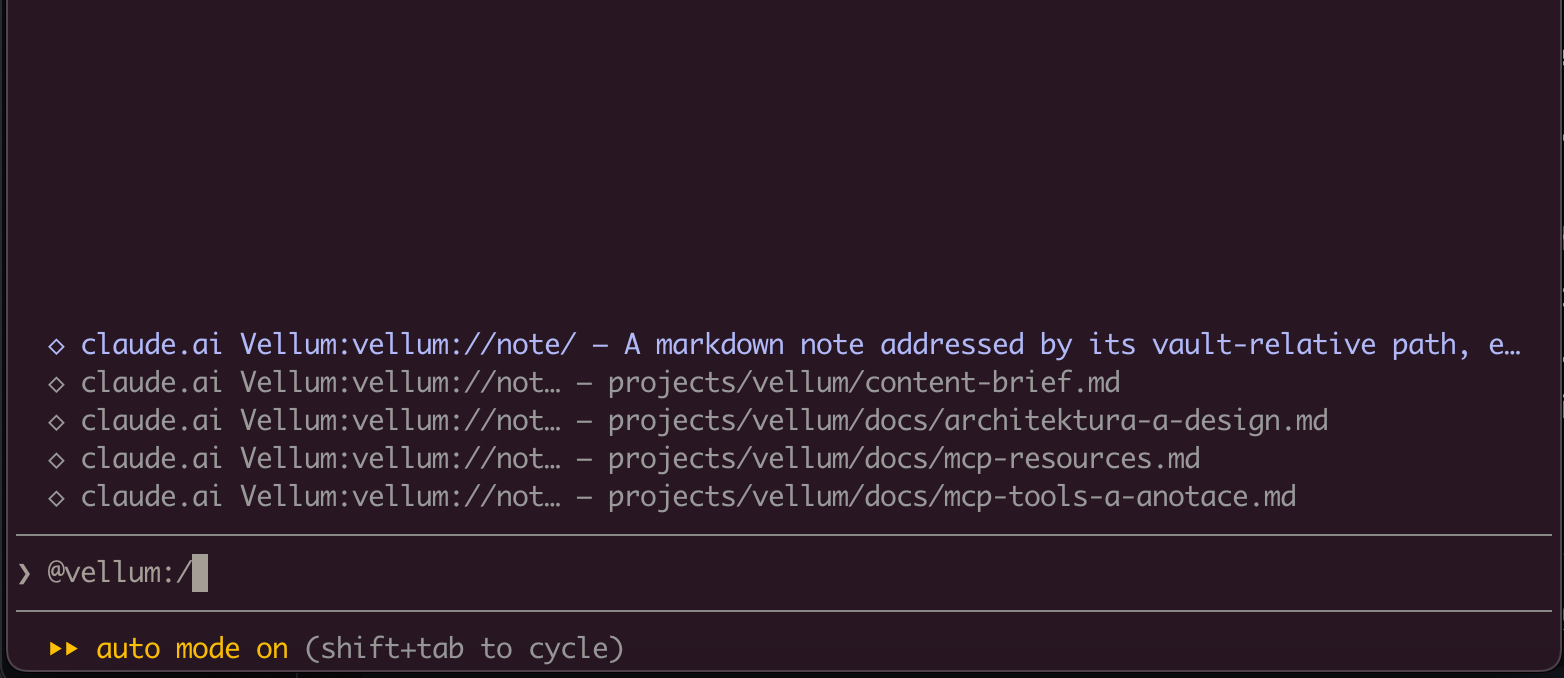
Every note is also a first-class MCP resource — vellum://note/{path} —
so your agent can attach a note as context straight from its resource picker,
no tool call needed:
Quick start
Pre-built multi-arch images (amd64 + arm64) are published to GitHub Container Registry on every release:
docker pull ghcr.io/freema/vellum:latest
Try it in one command
mkdir -p vault
docker run --rm -p 8080:8080 -v "$PWD/vault:/vault" ghcr.io/freema/vellum
Open http://localhost:8080 — that's your vault, served straight from
./vault. Auth is off by default, which is fine on localhost; enable it
before exposing anything (see below).
Linux bind mounts: the container runs as a non-root user (uid 65532, distroless), so the mounted directory must be writable by it:
sudo chown 65532 vault. Docker Desktop on macOS/Windows handles this for you.
Docker Compose (recommended)
Create a docker-compose.yml — this is the same file
the repo ships (curl -fsSLO https://raw.githubusercontent.com/freema/vellum/main/docker-compose.yml
grabs it if you'd rather not paste):
services:
  vellum:
    image: ${VELLUM_IMAGE:-ghcr.io/freema/vellum:latest}
    container_name: vellum
    restart: unless-stopped
    ports:
      - "${VELLUM_PORT:-8080}:8080"
    env_file:
      - path: .env
        required: false
    environment:
      PORT: "8080"
      VELLUM_VAULT_PATH: /vault
    volumes:
      - ./vault:/vault
    # hardening: the binary only ever writes into the mounted vault
    read_only: true
    security_opt:
      - no-new-privileges
    deploy:
      resources:
        limits:
          memory: 256M
Generate a secret and start:
cat > .env <<EOF
AUTH_ENABLED=true
VELLUM_CLIENT_SECRET=$(openssl rand -hex 32)
EOF
docker compose up -d
curl http://localhost:8080/healthz
Open http://localhost:8080, paste the client secret — that's your vault.
Everything else is tunable from the same .env: pin the image with
VELLUM_IMAGE=ghcr.io/freema/vellum:1.9.0 (recommended for production —
latest moves), change the host port with VELLUM_PORT, plus any
variable from the configuration table.
No Docker
go install github.com/freema/vellum/cmd/vellum@latest
vellum                # HTTP API + MCP on :8080, vault in ./vault
vellum -mcp-stdio     # MCP over stdio for local clients
A plain Go build serves the API and MCP but not the web UI — the SPA is
embedded only in the Docker image and in task build-full builds
(-tags embedspa, needs Node; see Development).
Connect Claude
The connector URL must end with /mcp:
claude mcp add --transport http vellum https://your-host/mcp
Claude runs the OAuth flow: a browser window opens vellum's consent screen,
you approve, tokens are exchanged with your VELLUM_CLIENT_SECRET behind
the scenes (authorization code + PKCE; vellum is its own OAuth issuer — no
external identity provider, no calls out). The same works for a
claude.ai custom connector — enter
vellum as client ID and your secret.
Local, no Docker: vellum -mcp-stdio serves MCP over stdio.
MCP tools
list_notes, read_note, write_note, patch_note, append_to_note,
prepend_to_note, delete_note, move_note, search_notes, list_tags,
add_tags, remove_tags, get_backlinks, set_status, list_tasks —
plus, with VELLUM_CURATOR=on: suggest_location, suggest_tags,
suggest_links, find_untagged, find_orphans, find_inbox_stale.
Writes are conflict-safe: read_note returns a content hash, write tools
accept expected_hash and fail on mismatch instead of clobbering.
Every tool carries MCP annotations (readOnlyHint, destructiveHint,
idempotentHint), and the handshake ships short server instructions with
the vault conventions, so agents behave well out of the box. The full
tool/resource reference lives in docs/mcp.md.
MCP resources
Notes are also exposed as resources: vellum://note/{path} serves the raw
markdown (text/markdown), so clients with a resource picker can attach a
note as context without a tool call. Clients can resources/subscribe to a
note URI and receive notifications/resources/updated whenever that note
changes — regardless of whether the change came through MCP or the web
editor.
Web workspace
The embedded UI is a three-pane workspace (tree, list, editor) that stays in sync with the vault on its own: MCP writes appear without a reload, a deleted note switches to a designed 410 state, and a deploy restart shows a reconnect overlay instead of a dead page. Filters (folder, tags, type/status) live in the URL so views are shareable and refresh-safe; theme and editor mode persist locally. Details — URL scheme, storage keys, autosave/conflict/flush semantics: docs/workspace.md.
Vault structure, tasks, curator
- Structure: an empty vault is initialized with
inbox/,projects/,archive/(disable withVELLUM_INIT_STRUCTURE=false). Awrite_notewithout a path files the note into the inbox under a title slug. Pointing vellum at an existing vault changes nothing. - Tasks: a note with
type: taskandstatus: backlog | in-progress | donein the frontmatter.set_statusedits just those lines; the UI andlist_tasksfilter by state and project. Notes without a type areknowledge. - Curator (
VELLUM_CURATOR=on, default off): deterministic context tools — folder suggestions by tag overlap, tag vocabulary for a note, link candidates, untagged/orphaned/stale-inbox lists. No API keys, no LLM calls from the server, moves stay behind the regularmove_note.
Configuration
| Variable | Default | Description |
|---|---|---|
PORT |
8080 |
HTTP listen port |
VELLUM_VAULT_PATH |
./vault |
Vault directory (Docker: /vault) |
AUTH_ENABLED |
false |
OAuth 2.1 with a single client secret — required for anything public |
VELLUM_CLIENT_ID |
vellum |
OAuth client id |
VELLUM_CLIENT_SECRET |
— | The access key (openssl rand -hex 32, min 32 chars) |
VELLUM_ISSUER_URL |
http://localhost:PORT |
Public HTTPS URL when behind a proxy — without it OAuth metadata advertises localhost and clients fail |
TRUST_PROXY |
false |
Set 1 behind Caddy/Traefik so rate limiting sees real client IPs |
CORS_ORIGINS |
claude.ai, claude.com | Origins receiving CORS headers (localhost always allowed) |
VELLUM_ALLOWED_ORIGINS |
claude.ai, claude.com | Browser origins allowed on /mcp + /api (same-origin and localhost always pass) |
VELLUM_REDIRECT_URIS |
any | Optional exact OAuth redirect allowlist |
VELLUM_INIT_STRUCTURE |
true |
Create inbox/projects/archive in an empty vault |
VELLUM_INBOX_DIR / VELLUM_PROJECTS_DIR / VELLUM_ARCHIVE_DIR |
inbox/projects/archive |
Conventional directory names |
VELLUM_CURATOR |
off |
Enable the suggest_/find_ context tools |
Deployment
vellum stays on the internal network; only your reverse proxy is exposed.
Set VELLUM_ISSUER_URL=https://<domain>, TRUST_PROXY=1 and terminate TLS
in the proxy. Details and a smoke-test checklist: docs/deployment.md.
One-click PaaS (Railway / Render / Fly.io)
The easiest path if you don't want to run a VPS: deploy the published image
on a platform that gives you TLS and a public URL for free. vellum honours
the PORT the platform injects, so the only three things that matter are the
same everywhere:
-
Image:
ghcr.io/freema/vellum:1.9.0(pin a version, not:latest). -
A persistent volume mounted at
/vault— this is not optional. vellum stores every note as a file; without a persistent disk your vault is wiped on the next redeploy. (Serverless hosts like Vercel/Netlify/Cloudflare Pages have no persistent writable disk and can't run vellum — use one of the platforms below.) -
Env (from the configuration table):
AUTH_ENABLED=true
VELLUM_CLIENT_SECRET=<openssl rand -hex 32>
VELLUM_ISSUER_URL=https://<your-public-url>   # the URL the platform gives you
TRUST_PROXY=1                                 # you're behind the platform's proxy
Set VELLUM_ISSUER_URL once you know the assigned URL, then redeploy — OAuth
metadata must advertise the real HTTPS host or Claude fails after the consent
step.
- Railway: New Project → Deploy from Docker image →
ghcr.io/freema/vellum:1.9.0. Add a Volume mounted at/vault, set the env above (Railway providesPORTand a*.up.railway.appdomain). - Render: New → Web Service → Deploy an existing image →
ghcr.io/freema/vellum:1.9.0. Add a Disk mounted at/vault, set the env. - Fly.io:
fly launch --image ghcr.io/freema/vellum:1.9.0, thenfly volume create vaultand mount it at/vaultinfly.toml; set the env withfly secrets set VELLUM_CLIENT_SECRET=… VELLUM_ISSUER_URL=… TRUST_PROXY=1 AUTH_ENABLED=true.
Then connect Claude to https://<your-public-url>/mcp (see
Connect Claude).
Coolify / Traefik: point Coolify at the repo or image
ghcr.io/freema/vellum (pin a version, e.g. :1.9.0, not :latest),
mount a volume at /vault, set the env from the table above. Running raw
compose behind Traefik, uncomment the labels in docker-compose.yml:
labels:
  - traefik.enable=true
  - traefik.http.routers.vellum.rule=Host(`vellum.example.com`)
  - traefik.http.services.vellum.loadbalancer.server.port=8080
Caddy is two lines:
vellum.example.com {
    reverse_proxy vellum:8080
}
Security posture (read-only container, threat model, what is never logged): SECURITY.md, docs/threat-model.md, docs/logging.md.
Development
Requires Go 1.25+, Task, and Node 22 for the SPA.
task build        # Go binary without the SPA (no node needed)
task build-full   # SPA + Go binary with the UI embedded
task test         # go test ./...
task lint         # golangci-lint
task e2e          # compose stack with the fixture vault (docs/e2e.md)
Design decisions kept deliberately simple
- Search = ranked RAM scan, not bleve. The metadata index narrows by
tag/dir, content is matched from an in-memory cache invalidated precisely
by the index (modTime+size), and results are ranked (title > tag > path >
body, word starts beat mid-word). Matching is case-, diacritics- and
typo-insensitive — "preklapy" finds "překlepy". A query over a 2 000-note
vault takes ~0.4 ms warm (docs/search.md). Zero heavy
dependencies, no index to corrupt, no warm-up. The
Searcherinterface exists so bleve can slot in if it ever hurts. - Plain CSS custom properties, not Tailwind. The design system is a
fixed token sheet (
DESIGN.md); custom properties map to it 1:1 with no build-time dependency. - Opaque in-memory tokens, not JWTs. Tokens die with the process and clients silently re-authorize; no signing keys to manage.
- No database, ever (v1). Tags, backlinks and task states live in an in-RAM index rebuilt in ~50 ms at startup.
Why vellum and not …?
- Obsidian + plugins — vellum doesn't replace your editor; it happily serves the same vault folder to your agent while you keep editing anywhere. No sync, no plugin sandbox, no Electron on the server.
- Notion/Anytype-style apps — those own your data. vellum's "database"
is
lsandgrep-able markdown. - Heavier MCP note servers — vellum ships one 24 MB container, no vector DB, no API keys, and burns minimal agent context (15 tools).
Author
Created by Tomáš Grasl (@freema).
Issues and PRs welcome — the threat model and SECURITY.md explain the boundaries contributions must keep.
No comments yet
Be the first to share your take.