
This page aims to document Python protocols and usage (e.g. cloud, desktop).
Looking for Javascript/Typescript instructions?
Overview
Universal Intelligence (aka UIN) aims to make AI development accessible to everyone through a simple interface, which can optionally be customized to grow with you as you learn, up to production readiness.
It provides both a standard protocol, and a library of components implementating the protocol for you to get started —on any platform  .
.
🧩 AI made simple. spacehendrix
Learn more by clicking the most appropriate option for you:
Welcome! Before jumping into what this project is, let's start with the basics.
What is an agentic app?
Agentics apps are applications which use AI. They typically use pretrained models, or agents, to interact with the user and/or achieve tasks.
What is a model?
Models are artificial brains, or neural networks in coding terms. 🧠
They can think, but they can't act without being given the appropriate tools for the job. They are trained to produce a specific output, given a specific input. These can be of any type (often called modalities —eg. text, audio, image, video).
What is a tool?
Tools are scripted tasks, or functions in coding terms. 🔧
They can't think, but they can be used to achieve a pre-defined task (eg. executing a script, making an API call, interacting with a database).
What is an agent?
Agents are robots, or simply put, models and tools connected together. 🤖
🤖 = 🧠 + [🔧, 🔧,..]
They can think and act. They typically use a model to decompose a task into a list of actions, and use the appropriate tools to perform these actions.
What is ⚪ Universal Intelligence?
UIN is a protocol aiming to standardize, simplify and modularize these fundamental AI components (ie. models, tools and agents), for them to be accessible to any developer, and distributed on any platform.
It provides three specifications: Universal Model, Universal Tool, and Universal Agent.
UIN also provides a set of ready-made components and playgrounds for you to get familiar with the protocol and start building in seconds.
Universal Intelligence can be used across all platforms (cloud, desktop, web, mobile).
See next: How to make a simple AI application 📖
Universal Intelligence standardizes, simplifies and modularizes the usage and distribution of artifical intelligence, for it to be accessible by any developers, and distributed on any platform.
It aims to be a framework-less agentic protocol, removing the need for proprietary frameworks (eg. Langchain, Google ADK, Autogen, CrewAI) to build simple, portable and composable intelligent applications.
It does so by standardizing the fundamental building blocks used to make an intelligent application (models, tools, agents), which agentic frameworks typically (re)define and build upon —and by ensuring these blocks can communicate and run on any hardware (model, size, and precision dynamically set; agents share resources).
It provides three specifications: Universal Model, Universal Tool, and Universal Agent.
This project also provides a set of community-built components and playgrounds, implementing the UIN specification, for you to get familiar with the protocol and start building in seconds.
Universal Intelligence protocols and components can be used across all platforms (cloud, desktop, web, mobile).
Agentic Framework vs. Agentic Protocol
How do they compare?
Agent frameworks (like Langchain, Google ADK, Autogen, CrewAI), each orchestrate their own versions of so-called building blocks. Some of them implement the building blocks themselves, others have them built by the community.
UIN hopes to standardize those building blocks and remove the need for a framework to run/orchestrate them. It also adds a few cool features to these blocks like portability. For example, UIN models are designed to automatically detect the current hardware (cuda, mps, webgpu), its available memory, and run the appropriate quantization and engine for it (eg. transformers, llama.cpp, mlx, web-llm). It allows developers not to have to implement different stacks to support different devices when running models locally, and (maybe more importantly) not to have to know or care about hardware compatibility, so long as they don't try to run a rocket on a gameboy 🙂
Get Started
[!TIP] An online Google Colab Playground is now available to help introduce you to making AI applications using Universal Intelligence! ⚡
Get familiar with the composable building blocks, using the default community components.
# Choose relevant install for your device
pip install "universal-intelligence[community,mps]" # Apple
pip install "universal-intelligence[community,cuda]" # NVIDIA

# Log into Hugging Face CLI so you can download models
huggingface-cli login
🧠 Simple model
from universal_intelligence import Model # (or in the cloud) RemoteModel [free], PaidRemoteModel [paid, higher perf]

model = Model() # (or in the cloud) RemoteModel(credentials='openrouter-api-key')
result, logs = model.process("Hello, how are you?")
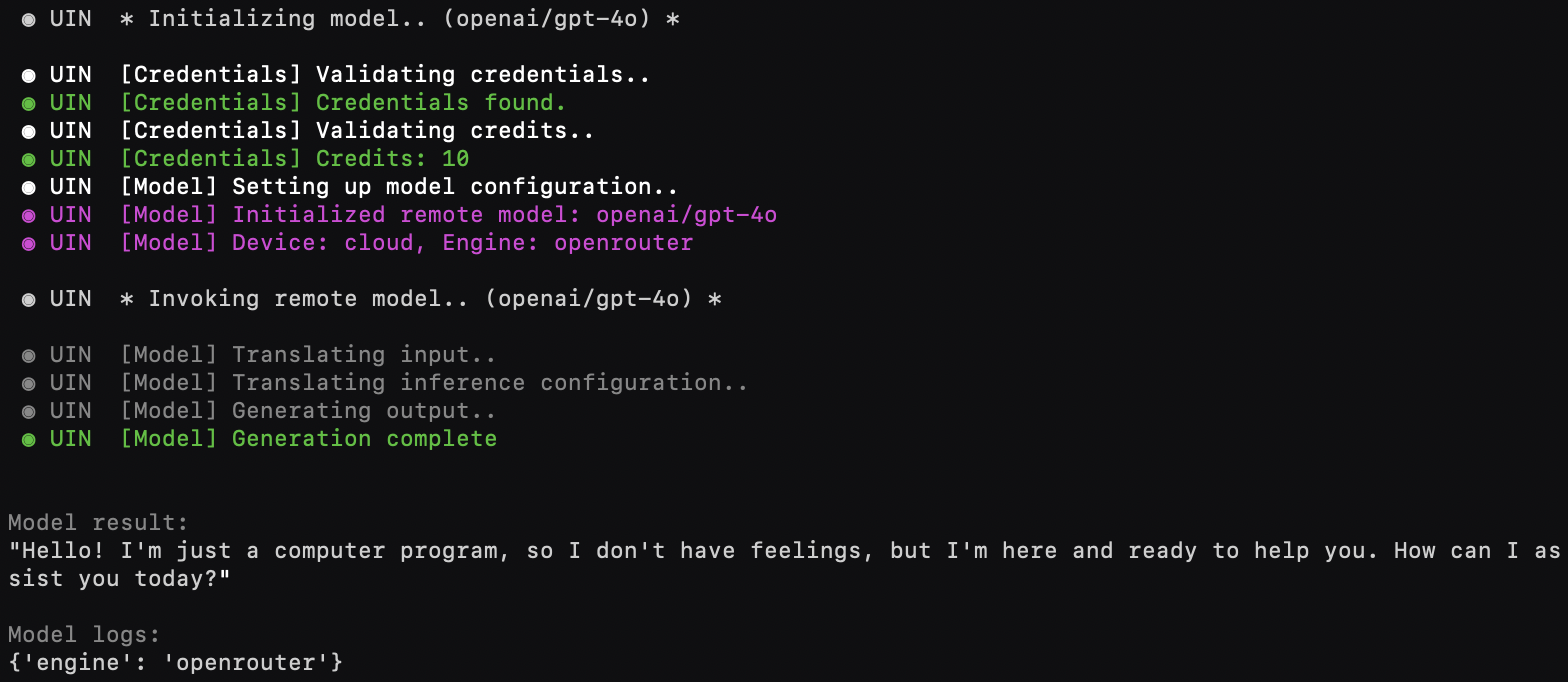
[!NOTE] Models may run locally or in the cloud.
See Documentation>Community Components>Remote Models for details.
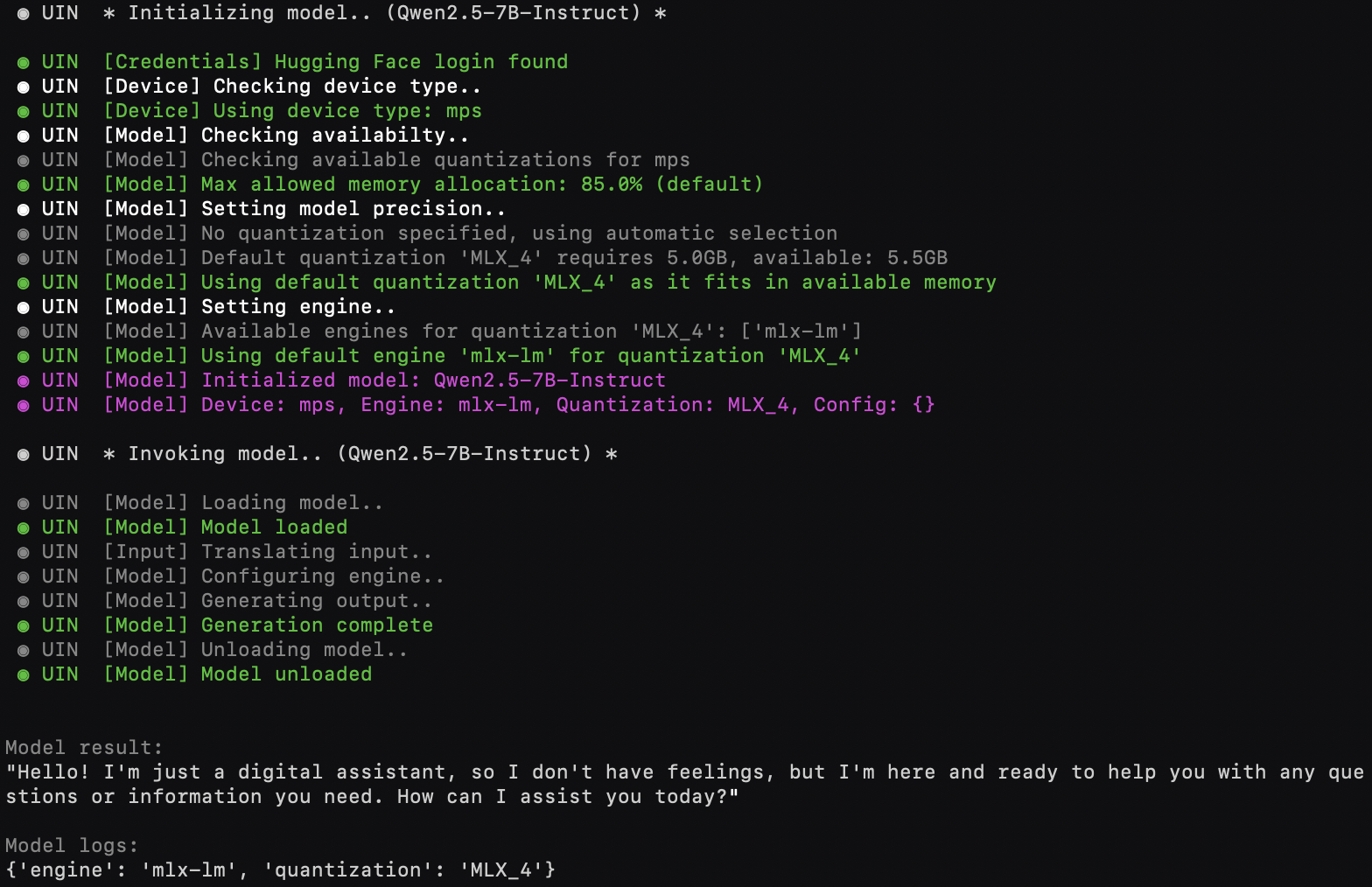
Preview:
- Local Model
- Remote Model (cloud-based)
🔧 Simple tool
from universal_intelligence import Tool

tool = Tool()
result, logs = tool.print_text("This needs to be printed")
Preview:

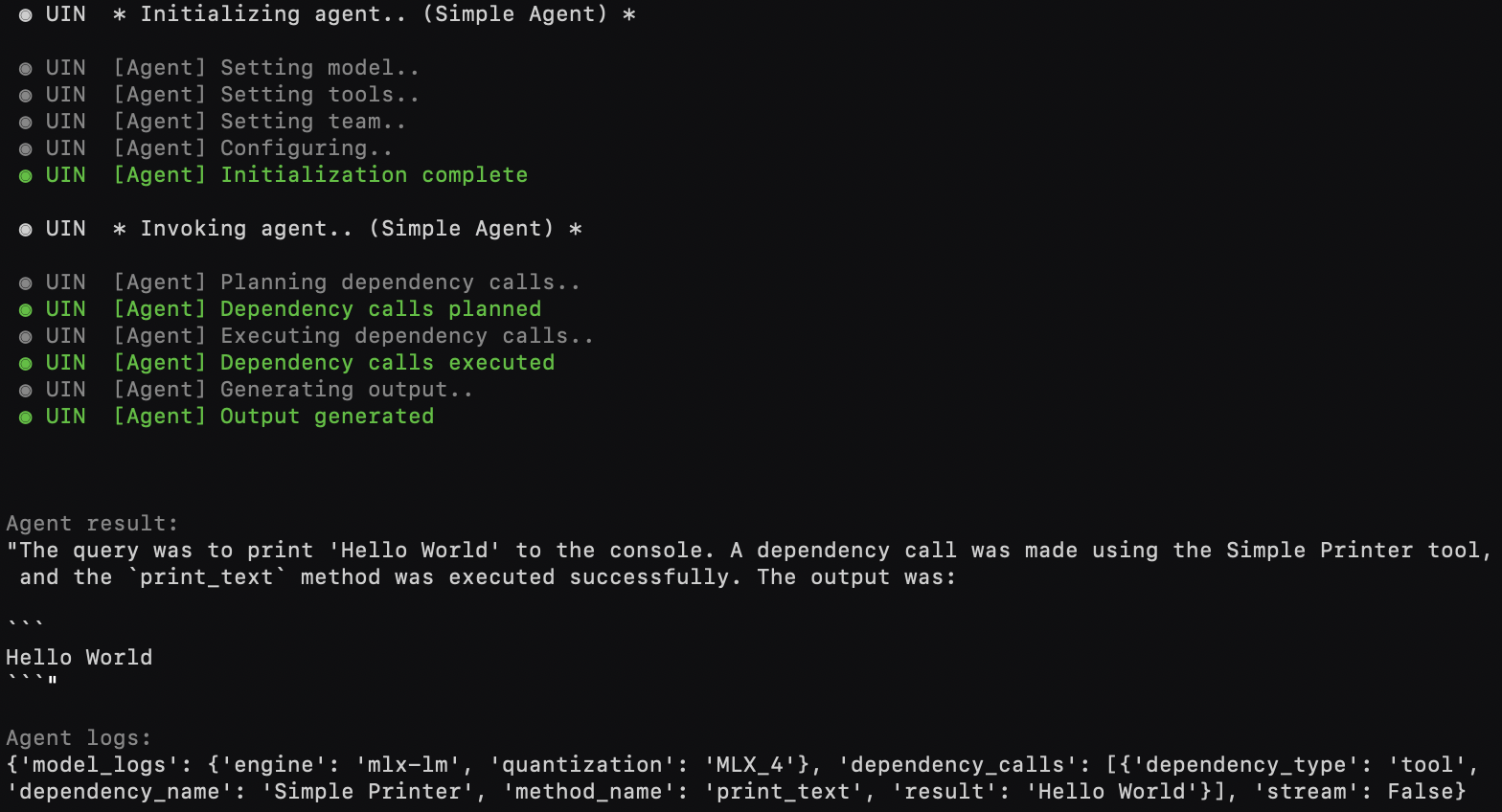
🤖 Simple agent (🧠 + 🔧)
from universal_intelligence import Model, Tool, Agent, OtherAgent

agent = Agent(
  # model=Model(),                  # customize or share 🧠 across [🤖,🤖,🤖,..]
  # expand_tools=[Tool()],          # expand 🔧 set
  # expand_team=[OtherAgent()]      # expand 🤖 team
)
result, logs = agent.process("Please print 'Hello World' to the console", extra_tools=[Tool()])
Preview:
Playground
Online
An online Google Colab Playground is now available!
Local
A ready-made playground is also available locally to help familiarize yourself with the protocols and components.
python -m playground.example
Documentation
[!TIP] Would you rather chat with our docs? 💬
Note: AI responses may include mistakes. Refer to the documentation below for sample code.
Protocol Specifications
Universal Model
A ⚪ Universal Model is a standardized, self-contained and configurable interface able to run a given model, irrespective of the consumer hardware and without requiring domain expertise.
It embeddeds a model (i.e. hosted, fetched, or local), one or more engines (e.g. transformers, lama.cpp, mlx-lm, web-llm), runtime dependencies for each device type (e.g. CUDA, MPS), and exposes a standard interface.
While configurable, every aspect is preset for the user, based on automatic device detection and dynamic model precision, in order to abstract complexity and provide a simplified and portable interface.
Providers: In the intent of preseting a
Universal Modelfor non-technical mass adoption, we recommend defaulting to 4 bit quantization.
Universal Tool
A ⚪ Universal Tool is a standardized tool interface, usable by any Universal Agent.
Tools allow interacting with other systems (e.g. API, database) or performing scripted tasks.
When
Universal Toolsrequire accessing remote services, we recommend standardizing those remote interfaces as well using MCP Servers, for greater portability. Many MCP servers have already been shared with the community and are ready to use, see available MCP servers for details.
Universal Agent
A ⚪ Universal Agent is a standardized, configurable and composable agent, powered by a Universal Model, Universal Tools and other Universal Agents.
While configurable, every aspect is preset for the user, in order to abstract complexity and provide a simplified and portable interface.
Through standardization, Universal Agent can seemlessly and dynamically integrate with other Universal Intelligence components to achieve any task, and/or share hardware recources (i.e. sharing a common Universal Model) —allowing it to generalize and scale at virtually no cost.
When
Universal Agentsrequire accessing remote agents, we recommend leveraging Google's A2A Protocols, for greater compatibility.
In simple terms:
Universal Model = 🧠
Universal Tool = 🔧
Universal Agent = 🤖
🤖 = 🧠 + [🔧, 🔧,..] + [🤖, 🤖,..]
Usage
Universal Model
from <provider> import UniversalModel as Model

model = Model()
output, logs = model.process('How are you today?') # 'Feeling great! How about you?'
Automatically optimized for any supported device 🔥
Customization Options
Simple does not mean limited. Most advanted configuration options remain available.
Those are defined by and specific to the universal model provider.
We encourage providers to use industry standard Hugging Face Transformers specifications, irrespective of the backend internally used for the detected device and translated accordingly, allowing for greater portability and adoption.
Optional Parameters
from <provider> import UniversalModel as Model

model = Model(
  credentials='<token>', # (or) object containing credentials eg. { id: 'example', passkey: 'example' }
  engine='transformers', # (or) ordered by priority ['transformers', 'llama.cpp']
  quantization='BNB_4', # (or) ordered by priority ['Q4_K_M', 'Q8_0'] (or) auto in range {'default': 'Q4_K_M', 'min_precision': '4bit', 'max_precision': '8bit'}
  max_memory_allocation=0.8, # maximum allowed memory allocation in percentage
  configuration={
    # (example)
    # "processor": {
    #     e.g. Tokenizer https://huggingface.co/docs/transformers/fast_tokenizers
    #
    #     model_max_length: 4096,
    #     model_input_names: ['token_type_ids', 'attention_mask']
    #     ...
    # },
    # "model": {
    #     e.g. AutoModel https://huggingface.co/docs/transformers/models
    #
    #     torch_dtype: "auto"
    #     device_map: "auto"
    #     ...
    # }
  },
  verbose=True # or string describing log level
)


output, logs = model.process(
  input=[
    {
      "role": "system",
      "content": "You are a helpful model to recall schedules."
    },
    {
      "role": "user",
      "content": "What did I do in May?"
    },
  ], # multimodal
  context=["May: Went to the Cinema", "June: Listened to Music"],  # multimodal
  configuration={
    # (example)
    # e.g. AutoModel Generate https://huggingface.co/docs/transformers/llm_tutorial
    #
    # max_new_tokens: 2000,
    # use_cache: True,
    # temperature: 1.0
    # ...
  },
  remember=True, # remember this interaction
  stream=False, # stream output asynchronously
  keep_alive=True # keep model loaded after processing the request
) # 'In May, you went to the Cinema.'
Optional Methods
from <provider> import UniversalModel as Model
model = Model()

# Optional
model.load() # loads the model in memory (otherwise automatically loaded/unloaded on execution of `.process()`)
model.loaded() # checks if model is loaded
model.unload() # unloads the model from memory (otherwise automatically loaded/unloaded on execution of `.process()`)
model.reset() # resets remembered chat history
model.configuration() # gets current model configuration

# Class Optional
Model.contract()  # Contract
Model.compatibility()  # Compatibility
Universal Tool
from <provider> import UniversalTool as Tool

tool = Tool(
  # configuration={ "any": "configuration" },
  # verbose=False
)
result, logs = tool.example_task(example_argument=data)
Optional Methods
from <provider> import UniversalTool as Tool

# Class Optional
Tool.contract()  # Contract
Tool.requirements()  # Configuration Requirements
Universal Agent
from <provider> import UniversalAgent as Agent

agent = Agent(
  # (optionally composable)
  #
  # model=Model(),
  # expand_tools=[Tool()],
  # expand_team=[OtherAgent()]
)
output, logs = agent.process('What happened on Friday?') # > (tool call) > 'Friday was your birthday!'
Modular, and automatically optimized for any supported device 🔥
Customization Options
Most advanted configuration options remain available.
Those are defined by and specific to the universal model provider.
We encourage providers to use industry standard Hugging Face Transformers specifications, irrespective of the backend internally used for the detected device and translated accordingly, allowing for greater portability and adoption.
Optional Parameters
from <provider.agent> import UniversalAgent as Agent
from <provider.other_agent> import UniversalAgent as OtherAgent
from <provider.model> import UniversalModel as Model
from <provider.tool> import UniversalTool as Tool # e.g. API, database

# This is where the magic happens ✨
# Standardization of all layers make agents composable and generalized.
# They can now utilize any 3rd party tools or agents on the fly to achieve any tasks.
# Additionally, the models powering each agent can now be hot-swapped so that
# a team of agents shares the same intelligence(s), thus removing hardware overhead,
# and scaling at virtually no cost.
agent = Agent(
  credentials='<token>', # (or) object containing credentials eg. { id: 'example', passkey: 'example' }
  model=Model(), # see Universal Model API for customizations
  expand_tools=[Tool()], # see Universal Tool API for customizations
  expand_team=[OtherAgent()],  # see Universal Agent API for customizations
  configuration={
    # agent configuration (eg. guardrails, behavior, tracing)
  },
  verbose=True # or string describing log level
)

output, logs = agent.process(
  input=[
    {
      "role": "system",
      "content": "You are a helpful model to recall schedules and set events."
    },
    {
      "role": "user",
      "content": "Can you schedule what we did in May again for the next month?"
    },
  ], # multimodal
  context=['May: Went to the Cinema', 'June: Listened to Music'],  # multimodal
  configuration={
    # (example)
    # e.g. AutoModel Generate https://huggingface.co/docs/transformers/llm_tutorial
    #
    # max_new_tokens: 2000,
    # use_cache: True,
    # temperature: 1.0
    # ...
  },
  remember=True, # remember this interaction
  stream=False, # stream output asynchronously
  extra_tools=[Tool()], # extra tools available for this inference; call `agent.connect()` link during initiation to persist them
  extra_team=[OtherAgent()],  # extra agents available for this inference; call `agent.connect()` link during initiation to persist them
  keep_alive=True # keep model loaded after processing the request
)
# > "In May, you went to the Cinema. Let me check the location for you."
# > (tool call: database)
# > "It was in Hollywood. Let me schedule a reminder for next month."
# > (agent call: scheduler)
# > "Alright you are all set! Hollywood cinema is now scheduled again in July."
Optional Methods
from <provider.agent> import UniversalAgent as Agent
from <provider.other_agent> import UniversalAgent as OtherAgent
from <provider.model> import UniversalModel as Model
from <provider.tool> import UniversalTool as Tool # e.g. API, database
agent = Agent()
other_agent = OtherAgent()
tool = Tool()

# Optional
agent.load() # loads the agent's model in memory (otherwise automatically loaded/unloaded on execution of `.process()`)
agent.loaded() # checks if agent is loaded
agent.unload() # unloads the agent's model from memory (otherwise automatically loaded/unloaded on execution of `.process()`)
agent.reset() # resets remembered chat history
agent.connect(tools=[tool], agents=[other_agent]) # connects additionnal tools/agents
agent.disconnect(tools=[tool], agents=[other_agent]) # disconnects tools/agents

# Class Optional
Agent.contract()  # Contract
Agent.requirements()  # Configuration Requirements
Agent.compatibility()  # Compatibility
API
Universal Model
A self-contained environment for running AI models with standardized interfaces.
| Method | Parameters | Return Type | Description |
|---|---|---|---|
__init__ |
• credentials: str | Dict = None: Authentication information (e.g. authentication token (or) object containing credentials such as { id: 'example', passkey: 'example' })• engine: str | List[str] = None: Engine used (e.g., 'transformers', 'llama.cpp', (or) ordered by priority ['transformers', 'llama.cpp']). Prefer setting quantizations over engines for broader portability.• quantization: str | List[str] | QuantizationSettings = None: Quantization specification (e.g., 'Q4_K_M', (or) ordered by priority ['Q4_K_M', 'Q8_0'] (or) auto in range {'default': 'Q4_K_M', 'min_precision': '4bit', 'max_precision': '8bit'})• max_memory_allocation: float = None: Maximum allowed memory allocation in percentage• configuration: Dict = None: Configuration for model and processor settings• verbose: bool | str = "DEFAULT": Enable/Disable logs, or set a specific log level |
None |
Initialize a Universal Model |
process |
• input: Any | List[Message]: Input or input messages• context: List[Any] = None: Context items (multimodal supported)• configuration: Dict = None: Runtime configuration• remember: bool = False: Whether to remember this interaction. Please be mindful of the available context length of the underlaying model.• stream: bool = False: Stream output asynchronously• keep_alive: bool = None: Keep model loaded for faster consecutive interactions |
Tuple[Any, Dict] |
Process input through the model and return output and logs. The output is typically the model's response and the logs contain processing metadata |
load |
None | None |
Load model into memory |
loaded |
None | bool |
Check if model is currently loaded in memory |
unload |
None | None |
Unload model from memory |
reset |
None | None |
Reset model chat history |
configuration |
None | Dict |
Get current model configuration |
(class).contract |
None | Contract |
Model description and interface specification |
(class).compatibility |
None | List[Compatibility] |
Model compatibility specification |
Universal Tool
A standardized interface for tools that can be used by models and agents.
| Method | Parameters | Return Type | Description |
|---|---|---|---|
__init__ |
• configuration: Dict = None: Tool configuration including credentials |
None |
Initialize a Universal Tool |
(class).contract |
None | Contract |
Tool description and interface specification |
(class).requirements |
None | List[Requirement] |
Tool configuration requirements |
Additional methods are defined by the specific tool implementation and documented in the tool's contract.
Any tool specific method must return a tuple[Any, dict], respectively (result, logs).
Universal Agent
An AI agent powered by Universal Models and Tools with standardized interfaces.
| Method | Parameters | Return Type | Description |
|---|---|---|---|
__init__ |
• credentials: str | Dict = None: Authentication information (e.g. authentication token (or) object containing credentials such as { id: 'example', passkey: 'example' })• model: UniversalModel = None: Model powering this agent• expand_tools: List[UniversalTool] = None: Tools to connect• expand_team: List[UniversalAgent] = None: Other agents to connect• configuration: Dict = None: Agent configuration (eg. guardrails, behavior, tracing)• verbose: bool | str = "DEFAULT": Enable/Disable logs, or set a specific log level |
None |
Initialize a Universal Agent |
process |
• input: Any | List[Message]: Input or input messages• context: List[Any] = None: Context items (multimodal)• configuration: Dict = None: Runtime configuration• remember: bool = False: Remember this interaction. Please be mindful of the available context length of the underlaying model.• stream: bool = False: Stream output asynchronously• extra_tools: List[UniversalTool] = None: Additional tools• extra_team: List[UniversalAgent] = None: Additional agents• keep_alive: bool = None: Keep underlaying model loaded for faster consecutive interactions |
Tuple[Any, Dict] |
Process input through the agent and return output and logs. The output is typically the agent's response and the logs contain processing metadata including tool/agent calls |
load |
None | None |
Load agent's model into memory |
loaded |
None | bool |
Check if the agent's model is currently loaded in memory |
unload |
None | None |
Unload agent's model from memory |
reset |
None | None |
Reset agent's chat history |
connect |
• tools: List[UniversalTool] = None: Tools to connect• agents: List[UniversalAgent] = None: Agents to connect |
None |
Connect additional tools and agents |
disconnect |
• tools: List[UniversalTool] = None: Tools to disconnect• agents: List[UniversalAgent] = None: Agents to disconnect |
None |
Disconnect tools and agents |
(class).contract |
None | Contract |
Agent description and interface specification |
(class).requirements |
None | List[Requirement] |
Agent configuration requirements |
(class).compatibility |
None | List[Compatibility] |
Agent compatibility specification |
Data Structures
Message
| Field | Type | Description |
|---|---|---|
role |
str |
The role of the message sender (e.g., "system", "user") |
content |
Any |
The content of the message (multimodal supported) |
Schema
| Field | Type | Description |
|---|---|---|
maxLength |
Optional[int] |
Maximum length constraint |
minLength |
Optional[int] |
Maximum length constraint |
pattern |
Optional[str] |
Pattern constraint |
nested |
Optional[List[Argument]] |
Nested argument definitions for complex types |
properties |
Optional[Dict[str, Schema]] |
Property definitions for object types |
items |
Optional[Schema] |
Schema for array items |
Expandable as needed
Argument
| Field | Type | Description |
|---|---|---|
name |
str |
Name of the argument |
type |
str |
Type of the argument |
schema |
Optional[Schema] |
Schema constraints |
description |
str |
Description of the argument |
required |
bool |
Whether the argument is required |
Output
| Field | Type | Description |
|---|---|---|
type |
str |
Type of the output |
description |
str |
Description of the output |
required |
bool |
Whether the output is required |
Method
| Field | Type | Description |
|---|---|---|
name |
str |
Name of the method |
description |
str |
Description of the method |
arguments |
List[Argument] |
List of method arguments |
outputs |
List[Output] |
List of method outputs |
asynchronous |
Optional[bool] |
Whether the method is asynchronous (default: False) |
Contract
| Field | Type | Description |
|---|---|---|
name |
str |
Name of the contract |
description |
str |
Description of the contract |
methods |
List[Method] |
List of available methods |
When describing a Universal Model, we encourage providers to document core information such as parameter counts and context sizes.
Requirement
| Field | Type | Description |
|---|---|---|
name |
str |
Name of the requirement |
type |
str |
Type of the requirement |
schema |
Schema |
Schema constraints |
description |
str |
Description of the requirement |
required |
bool |
Whether the requirement is required |
Compatibility
| Field | Type | Description |
|---|---|---|
engine |
str |
Supported engine |
quantization |
str |
Supported quantization |
devices |
List[str] |
List of supported devices |
memory |
float |
Required memory in GB |
dependencies |
List[str] |
Required software dependencies |
precision |
int |
Precision in bits |
QuantizationSettings
| Field | Type | Description |
|---|---|---|
default |
Optional[str] |
Default quantization to use (e.g., 'Q4_K_M'), otherwise using defaults set in sources.yaml |
min_precision |
Optional[str] |
Minimum precision requirement (e.g., '4bit'). Default: Lowest between 4 bit and the default's precision if explicitly provided. |
max_precision |
Optional[str] |
Maximum precision requirement (e.g., '8bit'). Default: 8 bit or the default's precision if explicitly provided. |
Expandable as needed
Development
Abstract classes and types for Universal Intelligence components are made available by the package if you wish to develop and publish your own.
# Install abstracts
pip install universal-intelligence
from universal_intelligence.core import AbstractUniversalModel, AbstractUniversalTool, AbstractUniversalAgent, types

class UniversalModel(AbstractUniversalModel):
  # ...
  pass

class UniversalTool(AbstractUniversalTool):
  # ...
  pass

class UniversalAgent(AbstractUniversalAgent):
  # ...
  pass
If you wish to contribute to community based components, mixins are made available to allow quickly bootstrapping new Universal Models.
See Community>Development section below for additional information.
Community Components
The universal-intelligence package provides several community-built models, agents, and tools that you can use out of the box.
Installation
# Install with device optimizations
pip install "universal-intelligence[community,mps]" # Apple
pip install "universal-intelligence[community,cuda]" # NVIDIA
Some components may require additional dependencies. These can be installed on demand.
# Install MCP specific dependencies
pip install "universal-intelligence[community,mps,mcp]" # Apple
pip install "universal-intelligence[community,cuda,mcp]" # NVIDIA
Some of the community components interface with gated models, in which case you may have to accept the model's terms on Hugging Face and log into that approved account.
You may do so in your terminal using
huggingface-cli loginor in your code:
from huggingface_hub import login
login()
Playground
You can get familiar with the library using our ready-made playground
python -m playground.example
or online using our Google Colab Playground!
Usage
Local Models
from universal_intelligence.community.models.local.default import UniversalModel as Model

model = Model()
output, logs = model.process("How are you doing today?")
View Universal Intelligence Protocols for additional information.
Remote Models
from universal_intelligence.community.models.remote.default import UniversalModel as Model # (or) .default__free

model = Model(credentials='your-openrouter-api-key-here')
output, logs = model.process("How are you doing today?")
View Universal Intelligence Protocols for additional information.
Tools
from universal_intelligence.community.tools.simple_printer import UniversalTool as Tool

tool = Tool()
result, logs = tool.print_text("This needs to be printed")
View Universal Intelligence Protocols for additional information.
Agents
from universal_intelligence.community.agents.default import UniversalAgent as Agent

agent = Agent(
  # model=Model(),                  # customize or share 🧠 across [🤖,🤖,🤖,..]
  # expand_tools=[Tool()],          # expand 🔧 set
  # expand_team=[OtherAgent()]      # expand 🤖 team
)
result, logs = agent.process("Please print 'Hello World' to the console", extra_tools=[Tool()])
View Universal Intelligence Protocols for additional information.
Supported Components
Models
Local Models
Import path:
universal_intelligence.community.models.local.<import>(eg. universal_intelligence.community.models.local.default)
| I/O | Name | Import | Description | Supported Configurations |
|---|---|---|---|---|
| Text/Text | Qwen2.5-7B-Instruct (default) | default or qwen2_5_7b_instruct |
Small powerful model by Alibaba Cloud | Supported ConfigurationsDefault:cuda:BNB_4:transformersmps:MLX_4:mlxcpu:Q4_K_M:llama.cpp |
| Text/Text | Qwen2.5-32B-Instruct | qwen2_5_32b_instruct |
Large powerful model by Alibaba Cloud | Supported ConfigurationsDefault:cuda:BNB_4:transformersmps:MLX_4:mlxcpu:Q4_K_M:llama.cpp |
| Text/Text | Qwen2.5-14B-Instruct | qwen2_5_14b_instruct |
Medium powerful model by Alibaba Cloud | Supported ConfigurationsDefault:cuda:BNB_4:transformersmps:MLX_4:mlxcpu:Q4_K_M:llama.cpp |
| Text/Text | Qwen2.5-14B-Instruct-1M | qwen2_5_14b_instruct_1m |
Medium powerful model with 1M context by Alibaba Cloud | Supported ConfigurationsDefault:cuda:BNB_4:transformersmps:MLX_4:mlxcpu:Q4_K_M:llama.cpp |
| Text/Text | Qwen2.5-7B-Instruct-1M | qwen2_5_7b_instruct_1m |
Small powerful model with 1M context by Alibaba Cloud | Supported ConfigurationsDefault:cuda:BNB_4:transformersmps:MLX_4:mlxcpu:Q4_K_M:llama.cpp |
| Text/Text | Qwen2.5-3B-Instruct | qwen2_5_3b_instruct |
Compact powerful model by Alibaba Cloud | Supported ConfigurationsDefault:cuda:BNB_4:transformersmps:MLX_4:mlxcpu:Q4_K_M:llama.cpp |
| Text/Text | Qwen2.5-1.5B-Instruct | qwen2_5_1d5b_instruct |
Ultra-compact powerful model by Alibaba Cloud | Supported ConfigurationsDefault:cuda:bfloat16:transformersmps:MLX_8:mlxcpu:Q4_K_M:llama.cpp |
| Text/Text | gemma-3-27b-it | gemma3_27b_it |
Large powerful model by Google | Supported ConfigurationsDefault:cuda:Q4_K_M:llama.cppmps:Q4_K_M:llama.cppcpu:Q4_K_M:llama.cpp |
| Text/Text | gemma-3-12b-it | gemma3_12b_it |
Medium powerful model by Google | Supported ConfigurationsDefault:cuda:Q4_K_M:llama.cppmps:MLX_4:mlxcpu:Q4_K_M:llama.cpp |
| Text/Text | gemma-3-4b-it | gemma3_4b_it |
Small powerful model by Google | Supported ConfigurationsDefault:cuda:Q4_K_M:llama.cppmps:MLX_4:mlxcpu:Q4_K_M:llama.cpp |
| Text/Text | gemma-3-1b-it | gemma3_1b_it |
Ultra-compact powerful model by Google | Supported ConfigurationsDefault:cuda:bfloat16:transformersmps:bfloat16:transformerscpu:bfloat16:transformers |
| Text/Text | falcon-3-10b-instruct | falcon3_10b_instruct |
Medium powerful model by TII | Supported ConfigurationsDefault:cuda:AWQ_4:transformersmps:MLX_4:mlxcpu:Q4_K_M:llama.cpp |
| Text/Text | falcon-3-7b-instruct | falcon3_7b_instruct |
Small powerful model by TII | Supported ConfigurationsDefault:cuda:Q4_K_M:llama.cppmps:Q4_K_M:llama.cppcpu:Q4_K_M:llama.cpp |
| Text/Text | falcon-3-3b-instruct | falcon3_3b_instruct |
Compact powerful model by TII | Supported ConfigurationsDefault:cuda:bfloat16:transformersmps:bfloat16:transformerscpu:bfloat16:transformers |
| Text/Text | Llama-3.3-70B-Instruct | llama3_3_70b_instruct |
Large powerful model by Meta | Supported ConfigurationsDefault:cuda:BNB_4:transformersmps:MLX_4:mlxcpu:Q4_K_M:llama.cpp |
| Text/Text | Llama-3.1-8B-Instruct | llama3_1_8b_instruct |
Small powerful model by Meta | Supported ConfigurationsDefault:cuda:BNB_4:transformersmps:MLX_4:mlxcpu:Q4_K_M:llama.cpp |
| Text/Text | Llama-3.2-3B-Instruct | llama3_2_3b_instruct |
Compact powerful model by Meta | Supported ConfigurationsDefault:cuda:BNB_4:transformersmps:MLX_4:mlxcpu:Q4_K_M:llama.cpp |
| Text/Text | Llama-3.2-1B-Instruct | llama3_2_1b_instruct |
Ultra-compact powerful model by Meta | Supported ConfigurationsDefault:cuda:bfloat16:transformersmps:bfloat16:transformerscpu:Q4_K_M:llama.cpp |
| Text/Text | phi-4 | phi4 |
Small powerful model by Microsoft | Supported ConfigurationsDefault:cuda:BNB_4:transformersmps:MLX_4:mlxcpu:Q4_K_M:llama.cpp |
| Text/Text | phi-4-mini-instruct | phi4_mini_instruct |
Compact powerful model by Microsoft | [Supported Configurations](https://gith |
No comments yet
Be the first to share your take.