
UML Drawing — diagrams as code, for your docs




An Agent Skill by BESSER that gives your AI coding agent one job and makes it do it right: put a correct UML class diagram — as a real, rendered image — into your docs.
This skill supports two common workflows:
1. Design a system from a description. Describe your domain in natural language, and the agent creates a B-UML model and renders the corresponding UML class diagram.
You: "Add a class diagram of our vehicle fleet to the README."
Agent: ‣ models Vehicle · Car · Truck · ElectricCar with correct inheritance
‣ renders it to a real SVG itself — one call, no browser
‣ embeds 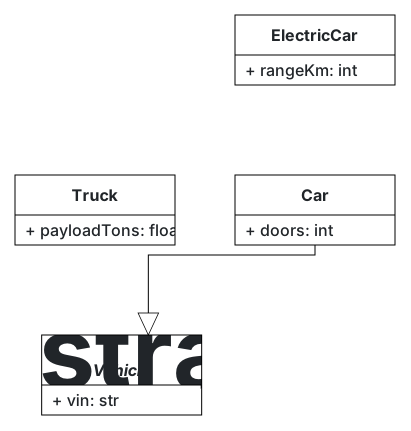
2. Document an existing codebase. Point the agent to your source code, and it extracts the classes and relationships, creates the B-UML model, and generates the diagram.
You:   "Diagram the classes in src/fleet/ for the docs."
Agent: ‣ reads your existing code, recovers the classes and how they relate
       ‣ builds the same validated B-UML model and renders the SVG
The result is a diagram generated from a validated model that can be included directly in README files, design documents, wikis, and presentations.
Why you need it
Models are a powerful way to quickly understand your codebase. A class diagram, for example, provides a compact view of a software system by showing its classes, attributes, and relationships. It is often used in documentation, README files, and design discussions because it allows developers to understand the structure of a system without reading the complete source code.
But when you ask an AI agent to create one, things can easily go wrong in two ways:
- A wrong diagram — reversed arrows, invalid multiplicities, inheritance backwards. It looks fine until someone who knows the domain reads it.
- A block of text that never becomes a picture — pseudocode or ASCII "explaining" a diagram inside a code fence that no viewer actually renders.
This skill fixes both: a structurally-correct model, delivered as an image that really renders — on GitHub, GitLab, wikis, and slides, no plugin.
Why it's different
Most "diagram" tools give you a picture or a model. This gives you both, and keeps them in sync:
- Correct by construction. The diagram is always built as a structurally-validated BESSER B-UML model — not freehand ASCII the model guessed at. Multiplicities, associations, and inheritance are right.
- Start from a description or your code. Describe the domain, or point the agent at existing source and let it model the structure.
- Two ways to embed — and the agent renders the image itself. Drop the
B-UML code straight into your
.md, or get a real SVG/PNG: the agent renders it with a single call to BESSER's headlessB-UML → SVGendpoint — no browser, no Mermaid plugin, no rendering service. (Want to hand-place the layout? Export from editor.besser-pearl.org instead — same model.) - It doesn't drift. Both come from one model you keep in the repo. Change the model, re-deliver, commit — the doc never goes stale.
- The diagram can become the system. The same model generates working code — Python, SQL, FastAPI, Django, React, and more. Your documentation diagram is your source of truth.
Install
# Any skills-compatible agent (Claude Code, Cursor, Cline, Windsurf, Copilot, …)
npx skills add BESSER-PEARL/uml-drawing --all
Or copy the uml-drawing/ folder into your agent's skills directory
(.claude/skills/, .agents/skills/, …).
How it works
- Model it — the agent builds a B-UML class model from your description or from existing code it reads (always class diagrams, always via B-UML).
- Deliver it — embed the B-UML code in your
.md, or get a rendered SVG/PNG: one HTTP call to BESSER's headless endpoint (no browser), or a hand-tuned export from the BESSER editor when layout matters. - Keep it current — the model is the source of truth; change it and re-deliver. The doc never drifts.
Full instructions live in SKILL.md; your agent
loads them automatically when a task matches.
Examples
Ready-to-render B-UML models live in examples/, one per
class-diagram feature the skill handles:
| Example | Shows |
|---|---|
ecommerce.py |
associations · multiplicities · composition |
vehicles.py |
inheritance hierarchy · abstract classes |
tasks.py |
enumerations · composition |
org.py |
self-referential associations |
enroll.py |
association classes |
Point your agent at any of them and ask it to add the diagram to your docs.
Part of the BESSER skill family
This skill is the "diagrams for docs" front door to BESSER. For the full platform — deep modeling, every generator, troubleshooting, contributing — see besser-skills.
Try BESSER yourself
Prefer to model by hand? Drag classes around, tune the layout, then generate working code from the same model — open the BESSER web editor at editor.besser-pearl.org. It's the same B-UML underneath; the skill just lets your agent drive it for you.
License
Apache-2.0.
No comments yet
Be the first to share your take.