

The 30-second version
Your agent burns most of its context on work it already did: re-reading files that have not changed, dumping a whole file to see three lines, running unbounded searches, and re-deriving conclusions it reached last session and then forgot.
Token Optimizer attacks that on four fronts.
1. It makes the expensive call impossible. Install the plugin and a built-in
Read of a 200 KB file is denied, with the refusal naming the cached,
diffed replacement. Same for Grep, Glob, Edit, Write, and cat /
head / grep -r through the shell. Re-reading a file you already read this
session returns only a diff — usually the single biggest win, and one that
size-based rules structurally cannot catch. There is no setting to turn on.
2. It remembers what your agent worked out. A per-project knowledge graph accumulates findings, decisions and dead ends as a side effect of working, then feeds them back the moment the agent touches the relevant file. A finding costs ~150 tokens to carry. Re-deriving it costs 5k–50k.
3. It measures itself, in public, and tells you when it is losing. A materialized before/actual-return measurement for MCP progressive disclosure, with later expansions debited from the same net. Modeled graph substitutions and the randomized control arm for downstream graph effects remain separate. Every number is measured, visibly collecting, excluded, or absent.
4. It attributes the traffic. Returned context, optional cost equivalents, and net transport avoided are grouped by operation and MCP handshake identity. Codex, Claude Code, Gemini, and any other connected client get separate rows. Old records without identity remain explicitly unattributed instead of being assigned to whichever agent happens to be open now.
No account, no telemetry, no hosted service. MIT, so it is usable at work.
What the dashboard proves on a real machine
The screenshots in this README come from the shipped server reading persisted local data, not a design mockup. In the capture above it reports:
- 43,491 net verified MCP transport tokens avoided in the current live proof: 54,037 gross reduction minus a deliberate 10,546-token expansion;
- 486,074,740 historical/tool-reported tokens quarantined, dominated by repository scan volume that never entered model context;
- a live Codex / Claude Code / Gemini stdio smoke against AiDotNet, with each client attributed independently;
- 2,648 graph nodes, 6,527 edges, and 58 findings across 11 local projects;
- more than 1,000 hook runs with zero failures and zero timeouts across six active CLI clients in the selected rolling 24-hour window;
- 6,332 tokens of modeled graph-substitution potential, excluded from the
verified headline while the causal graph-reuse study remains
Collecting.
The dashboard now reads native CLI usage receipts and prices uncached input, cache reads, cache writes, and output with the exact captured provider, model, route, request-time tier, and versioned official source. Ambiguous model ids stay Not priced instead of receiving a blended guess. API/list-price equivalents are kept separate from provider-reported charges and are never labeled as a subscription invoice. See the token accounting contract.
Quick start
Claude Code — install the plugin, not the bare MCP server. The plugin is what enforces; adding the server alone just gives the model tools it can ignore.
/plugin marketplace add ooples/token-optimizer-mcp
/plugin install token-optimizer@token-optimizer
/reload-plugins
That is the entire installation. All sixteen clients →
Then, whenever you want to know what to do next:
token_audit
One ranked queue: what is costing the most per session, with an optional monthly cost equivalent only after you configure your own effective rate. Each line names how to fix it. Not a dashboard, not six reports — a queue.
The knowledge graph — the part nothing else has
Every agent session ends the same way: the reasoning evaporates. The next session re-derives it, at full price, forever.
This builds a living per-project graph — nodes for files, symbols, tasks and
findings; edges for derived_from, contains, supersedes, contradicts,
related — and it fills itself in from real work. No ingestion job, no
embedding model, no rebuild step, no query to formulate.
you touch  src/auth.ts
           │
           ├─ verify() compares exp against the LOCAL clock          (finding, 0.9)
           ├─ per-host retry budgets; global was rejected — deadlock (decision)
           ├─ ! the skew fix was reverted once already               (dead end)
           └─ [git] 47 changes in 90d, last three: "fix token expiry",
                    "revert skew fix", "fix token expiry again"
None of that is in your repository. It exists only because an agent once burned tokens finding it out — and every other tool throws it away at the end of the session.
Why this is not RAG
| Classic RAG | This |
|---|---|
| Retrieves evidence; the model re-derives meaning each time | Retrieves verdicts — the reasoning already happened |
| Index built by a batch ingestion job | Accretes from real agent traffic — coverage follows attention |
| Similarity search | Traversal — this symbol and its callers |
| Model must formulate a query | Fires when the model reaches for a file |
| Staleness invisible; serves rotted chunks confidently | Staleness computed from content hashes, served with the invalidating diff |
| Returns only what is in the documents | Returns dead ends, which exist nowhere in your source tree |
Traversal plus lexical search: deterministic, instant, explainable, and it works offline.
The zero-turn refusal
A plain deny costs a full turn: the model calls Read, is refused, re-plans,
calls smart_read. But at refusal time we already hold the file and the
snapshot the graph stored — so the refusal carries the answer inside it.
Nothing to re-plan, no second call. Turn cost drops from one to zero.
And when the graph already holds the verdict a tool output would support, the output never enters context at all. Not compressed. Absent.
The dashboard
npm install
npm run build
npm run dashboard      # http://localhost:3100
The overview answers the questions a token optimizer should answer first:
- How much MCP context did it avoid? The headline is gross materialized payload reduction minus every later linked expansion. Graph estimates are intentionally separate.
- How much context still reached the agents? Every successful current MCP result records its actual returned text, even when no valid before-state exists. That row is context-accounted but savings-unmeasured.
- Which agent and action spent it? The client ledger and action table show
operations, returned context, optional cost equivalent, and net tokens
avoided. Lifecycle-only clients say
Not measured; no zero is invented. - Did remembering cost more than it saved? Delivery and semantic-harvest tokens are charged to the graph. A causal benefit is added only after the treated/holdout evidence gate passes.
Walkthrough: get useful data, not an empty dashboard
- Install the MCP server and the native adapter for your CLI. The MCP handshake provides per-client accounting; native lifecycle hooks provide automatic routing, capture, health, and delivery where the client protocol permits it.
- Use
smart_read,smart_grep,smart_glob,smart_edit, or any other MCP operation normally. Every successful result records returned context; tools with a comparable materialized before-state also record a gross reduction; laterexpandcalls debit that reduction. - Let the active model record durable conclusions with
wiki_write. Before a new agent re-derives work, callwiki_readfor the project or the files it is about to touch. Native clients can also deliver matching knowledge automatically. - Open
http://localhost:3100. Use Overview for combined accounting and What it knows for capture health, graph exploration, audits, and causal evidence. - To register existing local repositories without reading their source, run
npm run projects:discover -- /absolute/path/to/repos. This makes coverage gaps explicit; it does not fabricate findings.
For maintainers, this live smoke exercises the shipped stdio transport and creates separately attributed rows without seeding the analytics database:
npm run dashboard:attribution-smoke -- /absolute/path/to/project /absolute/path/to/large-file
npm run dashboard:verify-live -- http://localhost:3100
The health panel is deliberately operational rather than a raw text dump. Each client has activity, runtime failures/timeouts, policy outcomes, and observed surface coverage. Diagnostics keep no prompts, commands, paths, or tool output.
Modeled substitution potential and causal graph effects are different claims.
The first is a full-file counterfactual and is never promoted to the verified
MCP headline. The second asks whether delivered knowledge prevented later reads;
it uses a control arm and remains Collecting until there are at least 20
treated file touches and 5 holdouts with valid downstream joins.
Drag to orbit, scroll to zoom, click a node for provenance, or switch to the bounded one-hop focus view. The default All known projects scope pools local graphs through opaque project IDs; filesystem paths never reach the browser.
Audit tab. Contradictions, stale findings, and low-confidence claims remain reviewable instead of silently becoming model truth.
Evidence console. Client/model/task cohorts, matched effects with 95% intervals, live outcome joins, harm feedback, and capability tiers for all 16 clients. Release and superiority claims fail closed while evidence is missing.
One-click Markdown export. The accumulated graph becomes documentation you can inspect, edit, and commit.
Server-side by design: the browser asks for a neighbourhood, a search result or a page. A mature graph holds thousands of nodes, and shipping it wholesale would make every page load a multi-megabyte download for a view that shows twenty things.
The default All known projects scope combines captured graphs through an opaque machine-local project registry; filesystem paths never reach the browser. Lifecycle hooks register repositories as they are used. To backfill existing local checkouts without reading their source files, run the bounded discovery command against one or more explicit roots:
npm run projects:discover -- /absolute/path/to/repos /absolute/path/to/worktrees
Coverage distinguishes repositories with graph data from known repositories
whose capture has not started. The balance cards are backed by persisted events:
Memory deliveries counts graph context actually supplied to an agent,
Kept back for comparison counts randomized control touches, and Cost of
remembering combines delivered-context tokens with measured semantic-write
payload cost. Reading avoided stays Collecting or Not measured until at
least 20 treated file touches and 5 holdouts exist with a downstream join; the
dashboard does not manufacture a savings estimate from missing data.
See the causal evidence protocol, the cross-client capability contract, and the live evaluation suite.
Cross-client lifecycle diagnostics
Every native hook writes the same bounded JSONL lifecycle record, including Claude Code's custom router and compaction paths. Records carry the client and plugin versions, event, hashed session/turn correlation, latency, outcome, input/output byte counts, and response key shape. They deliberately retain no prompt, command, tool output, file content, or raw working-directory path. The fields include OpenTelemetry log severity and resource semantics so the local files can be collected without inventing a second schema.
npm run diagnostics                         # last 24 hours, summary-first JSON
npm run diagnostics -- --hours 72 --output hook-summary.json
npm run diagnostics -- --include-events --limit 100 --output hook-report.json
Raw event rows are opt-in and capped at 1,000. The default report contains aggregate health and at most twenty recent failures/timeouts, keeping routine troubleshooting output small enough for CLI and model context windows.
The dashboard's Capture health panel shows runs, failures, timeouts and
p50/p95 latency by client. Logs rotate at 5 MiB, retain at most 40 files for 14
days, and live under .token-optimizer/logs when a state directory is set (or
~/.token-optimizer/logs otherwise). TOKEN_OPTIMIZER_LOG_DIR,
TOKEN_OPTIMIZER_LOG_MAX_BYTES, TOKEN_OPTIMIZER_LOG_MAX_FILES, and
TOKEN_OPTIMIZER_LOG_RETENTION_DAYS override those operational defaults.
What it does that other optimizers do not
Compaction is consolidation, not loss
Everyone else checkpoints and restores what you had — which spends the scarcest budget in the session replaying context you already paid for.
Selection here is derived, not a category list: cost-to-rederive × irrecoverability × reuse-probability, with dead ends and decisions on a floor,
because cheap-to-find is not the same as cheap-to-find-again. Restoration then
adapts to the situation — mid-problem, cold resume, or in-flow — within a
measured budget:
Where you were: does clock skew explain the 401s? ruled out: token signing, clock drift on the client untested: NTP skew on the server
That is resuming a thought. A summary describes one.
Progressive disclosure that knows what you asked
A large tool result becomes a preview chosen by the session's actual question, after parsing the output's shape (test report, diff, stack trace, log, JSON) — not the first 40 lines because they are first.
[selected against: "which shard fails?"]
--- failures ---
  FAILED  DBNetTests.BceOnRelu -- expected 0.0 got NaN
  FAILED  TftGradientFlow -- gradient did not reach the encoder
---- omitted: 1,760 lines of passing tests (expand 8bb6bd66) ----
Every cut is named, because a model reasoning over a silent truncation
cannot know it is missing anything. expand serves from a content-addressed
store — it never re-runs your test suite — and expanding both teaches the next
preview and promotes what you needed into the graph, so the second expansion
never happens.
Prompt-cache economics, measured from your own transcript
Provider caches are billable and provider-specific; a cache hit is not a free input token. For example, Anthropic publishes separate cache-read and cache-write multipliers, while OpenAI and Gemini expose their own cached-input usage and pricing rules. Token Optimizer reads native cache fields when the client supplies them and keeps reads, writes, uncached input, and output separate. It never applies one provider's cache multiplier to another client. The attribution view then does the part a hit rate cannot:
! CLAUDE.md:2 has an embedded timestamp, invalidating everything after it
    about 329,421 tokens re-written per session
Attributed to a line, priced by what sits behind it. Keep-warm is decided by expected value from your observed gaps, per TTL tier — and when neither tier pays, it says so.
Model routing decided by outcomes, not by task size
Everyone guesses from task shape and never checks. This reads which model ran each episode and what happened — retries, errors, turns — and prices both mistakes: what an overpowered model wastes, and what an underpowered one costs in retries. A tier that needs a retry in more than half its episodes is excluded at any price, because four cheap turns that fail are not cheap.
Waste detection that becomes a ratchet
A report is read once and forgotten. Here a detection produces a durable, measured, reversible fix — a skip rule, a composite touch — plus a ~50-token session-start briefing so the waste never starts. Detectors are a shipped floor plus patterns derived from your project's own history, each carrying what it has actually saved:
generated/schema.d.ts: read in 9/9 sessions, never the source of a finding
    3,400 tokens/session; cost equivalent not priced; apply: waste_audit action="apply"
Anything that touches your files is proposed as a diff and never applied.
One audit across every project
fleet_audit ranks your whole machine by measured cost, and does something a
per-project scanner cannot: a fix proven in one project is offered to the others
containing the same file contents, carrying the evidence from where it was
measured. Matching is by content hash, never by filename.
It also runs the natural experiment nobody else can — enforcing clients versus directive ones — and reports it whichever way it falls, with the confound stated.
Trust: we ship hooks that refuse your tool calls
That is a bigger ask than a normal dependency makes, so:
Verify the release. Published from CI with npm provenance — npm audit signatures ties the artifact to the workflow run and the commit, without
trusting us. CHECKSUMS.sha256 ships alongside for offline checking.
If nothing seems to be happening, the hooks are probably not wired. npm 11
gates lifecycle scripts behind allow-scripts, so on a default global install
our postinstall never runs. Recovery is one line:
npx token-optimizer-install     # wire the hooks
npx token-optimizer-doctor      # prove they work
Check that it works — not that files exist.
npx token-optimizer-doctor # or npm run doctor, from a clone
It feeds a synthetic payload to the real hook binary and asserts a large read
is refused and a small one is not. A checklist would have passed on the exact
bug this project once shipped, where the plugin was connected, visible in
/mcp, and saving nothing. Every failure names its own fix.
Every refusal carries its own off switch. Enforcement that hides its disable is coercive, and the person who needs it is mid-refusal, not reading a README:
auth.ts is 91 KB. Call smart_read instead.
(Not what you wanted? TOKEN_OPTIMIZER_MODE=off disables enforcement.)
Removal is exact. The installer records every file it wrote, with hashes.
Uninstall removes only what still matches; anything you edited since is left in
place and named. Your own hooks are never touched, and we never rewrite your
settings.json — we merge into it.
npm run uninstall-hooks              # show the plan; changes nothing
npm run uninstall-hooks -- --apply   # carry it out
It separates direct savings from causal graph evidence
Every tool in this space reports "tokens saved" computed from its own assumptions. That number cannot be wrong, because nothing checks it.
For optimizer results, this records the materialized before-state and the text actually returned to the client, then subtracts any linked expansion responses. Native graph-substitution counterfactuals stay labeled as modeled and outside the main headline.
The graph's broader claim—whether delivered knowledge prevented later re-reading—is causal, so it runs a randomized holdout. Delivery is silently withheld on a slice of file touches, stratified by file, and the effect is the difference in downstream reads between arms. That effect is not added to the combined net until the experiment can support it, and the page will tell you plainly:
the graph is NOT yet paying for itself
A tool that can only ever report good news is not reporting. The same discipline
runs throughout: an unmeasurable saving renders as unknown, never as zero,
and never as $0.00 — because "cannot tell yet" printed as "saved nothing" is a
silent false negative, and dollars get quoted to other people.
It runs everywhere, and says which tier
The tier is a protocol guarantee, not a preference:
- Lifecycle continuation: Claude Code, Codex, GitHub Copilot CLI, Gemini CLI, Qwen Code, and Cursor. Native routing/capture/delivery plus one active-model completion reflection.
- Native observation: Cline, OpenCode, Kilo, and Windsurf. Native routing/capture/delivery; the active model performs semantic writes.
- MCP + rules: Roo Code, Zed, Amp, Continue, Crush, and Droid. MCP-visible activity and explicit graph tools, with no claim over hidden built-in calls.
The exact surfaces still differ. For example, a protocol that can replace a large read before it reaches the model provides a stronger token guarantee than one that can only observe it. The generated registry, adapters, dashboard, and certification report all read the same capability source so those claims cannot drift independently.
Every config shape is confirmed against that client's published documentation, with the source URL recorded in its README.
Everything here is verified, and you can run it
npm run verify:all
| Suite | Checks | What it proves |
|---|---|---|
test |
2,340 | Enforcement, staleness, injection, consolidation, disclosure, cache, routing, trust — driving the real hooks over stdin |
verify:clients |
129 | Every client config matches its documented schema |
verify:harvest |
26 | Request shape, response parsing, and that no secret from a tool result crosses the wire |
verify:ui |
22 | Real headless Chromium: layout, label collisions, legibility |
doctor |
10 | The installed hooks actually refuse, and the server actually answers |
These are not decoration. They found six client configs that would have failed silently, an installer that destroyed user hooks, a Windows path bug that made enforcement blind to half its own refusals, and an uninstaller that printed a plan and deleted nothing.
Honest comparison
| Token Optimizer | Typical alternatives | |
|---|---|---|
| License | MIT — commercial use fine | Often noncommercial-only; check before using at work |
| Default behaviour | Refuses the wasteful call | Suggests a better tool |
| Re-read of an unchanged file | Returns a diff | Returns the file again |
| Savings figure | Direct before/return ledger; causal graph effect separately held out | Computed from the tool's own assumptions |
| Cross-session memory | Findings, decisions, dead ends | Usually none |
| Compaction | Consolidation, ranked by cost-to-rederive | Checkpoint and replay |
| Cache economics | Measured from the transcript, attributed to a line | Rarely addressed |
| Model routing | Measured from episode outcomes | Guessed from task size |
| Cross-project | Fixes transfer by content hash | Per-project only |
| Clients | 16 | 3–6 typical |
| Telemetry | None | Varies |
Installation
Every client launches the same stdio server — npx -y @ooples/token-optimizer-mcp@latest —
but they differ in what they let a hook do, and that difference is the whole
product. A client with a pre-execution veto can have the wasteful call refused;
one without can only be told. Both are listed honestly below.
Ready-made configuration for all sixteen lives in
integrations/, generated from one source and validated by
npm run verify:clients. Full matrix: docs/CLIENT_SUPPORT.md.
Enforcing tier — the wasteful call is refused
| Client | Install | What runs |
|---|---|---|
| Claude Code | /plugin marketplace add ooples/token-optimizer-mcp then /plugin install token-optimizer@token-optimizer |
SessionStart policy, PreToolUse router over Read/Grep/Glob/Edit/Write/Bash, PreCompact optimization |
| Codex | Copy integrations/codex to ~/.codex |
SessionStart policy + PreToolUse router |
| OpenCode | Copy integrations/opencode |
Pre-tool router |
Directive tier — MCP plus an always-applied rules file
No pre-execution veto exists on these, so the optimizer states the policy on every request instead of enforcing it. Each directory holds the MCP config and the rules file, both at the paths that client's own documentation specifies.
| Client | Config | Rules |
|---|---|---|
| Cursor | .cursor/mcp.json |
.cursor/rules/token-optimizer.mdc (alwaysApply: true) |
| Windsurf | mcp_config.json |
.windsurf/rules/token-optimizer.md |
| Cline | ~/.cline/mcp.json |
.clinerules/token-optimizer.md |
| Roo Code | .roo/mcp.json |
.roo/rules/token-optimizer.md |
| Kilo | .kilo/kilo.jsonc (mcp key) |
.kilo/rules/token-optimizer.md |
| Zed | settings.json (context_servers) |
AGENTS.md |
| Amp | settings.json (amp.mcpServers) |
AGENTS.md |
| Continue | config.yaml (mcpServers list) |
.continue/rules/token-optimizer.md |
| Crush | crush.json (mcp key) |
AGENTS.md |
| Droid (Factory) | ~/.factory/mcp.json |
AGENTS.md |
| GitHub Copilot CLI | copilot mcp add token-optimizer -- npx -y @ooples/token-optimizer-mcp@latest |
.github/copilot-instructions.md |
| Gemini CLI | gemini mcp add --scope user token-optimizer npx -y @ooples/token-optimizer-mcp@latest |
Gemini extension context |
| Qwen Code | Extension config | Extension context |
These paths are checked, not assumed. Verifying them against each client's published docs found six configs that would have installed cleanly and never loaded — including Kilo, whose schema shares nothing with the
mcpServersconvention the other clients use. A convention is not a schema.
Codex
1. Add the MCP server or native plugin
For the best experience, install the Codex plugin. It bundles the MCP server, the token-optimization skill, session guidance, and a large-read hook:
codex plugin marketplace add ooples/token-optimizer-mcp
codex plugin add token-optimizer@token-optimizer
Review and trust the bundled hooks with /hooks, then start a new conversation. If you prefer an MCP-only installation, use:
codex mcp add token-optimizer -- npx -y @ooples/token-optimizer-mcp@latest
On Windows, if PowerShell blocks the codex.ps1 shim, use the command launcher directly:
codex.cmd mcp add token-optimizer -- npx -y @ooples/token-optimizer-mcp@latest
This writes the server to ~/.codex/config.toml. Codex CLI, the Codex IDE extension, and the Codex app on the same host share that configuration.
2. Verify the installation
codex mcp get token-optimizer
codex mcp list
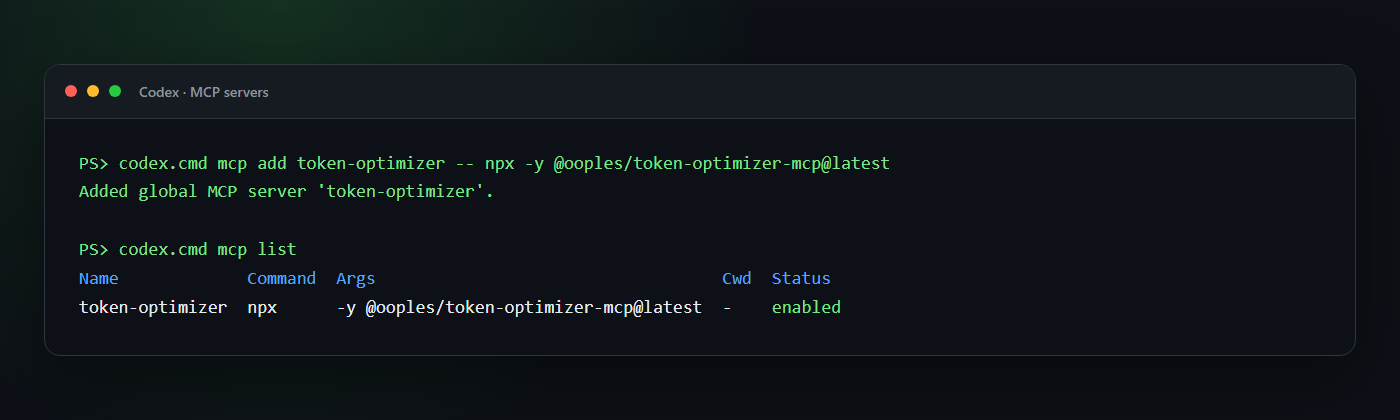
Start a new Codex conversation after installation so the new tools are discovered. In an interactive CLI session, /mcp shows the tools available to the conversation.
3. Add optimization guidance and hooks
The plugin supplies both automatically. For an MCP-only installation, add the guidance from integrations/AGENTS.md to a project or global AGENTS.md. A ready-made standalone hook is also available under integrations/codex/hooks; merge its hooks.json into ~/.codex/hooks.json, copy the script to ~/.codex/hooks/, and review it once with /hooks.
The Codex hook injects guidance at SessionStart, advises on large first-class read calls, and can block those reads when TOKEN_OPTIMIZER_REDIRECT_LARGE_READS=true. Shell commands such as cat or Get-Content are exposed to hooks as Bash, so the hook does not try to parse and rewrite arbitrary shell syntax. The AGENTS.md/skill guidance remains important.
If you prefer a smaller instruction block:
## Token optimization

Use the token-optimizer MCP for large or repeated reads:

- `smart_read` for files over roughly 400 lines and for files already read once.
- `smart_glob`/`smart_grep` for large search results.
- `optimize_text` to store bulky text outside the model context.
- `get_optimization_report` when the user asks for token or compression stats.

Use normal tools for small, one-off operations.
See the current Codex hooks documentation for hook trust, matching, and tool-coverage details.
Equivalent manual Codex configuration
If you prefer to edit ~/.codex/config.toml yourself:
[mcp_servers.token-optimizer]
command = "npx"
args = ["-y", "@ooples/token-optimizer-mcp@latest"]

# Optional: keep the cache in a custom location.
# env = { TOKEN_OPTIMIZER_CACHE_DIR = "/absolute/path/to/cache" }
Claude Code
Install the plugin, not the bare MCP server. The plugin is the only path that optimizes by default; adding the MCP server alone gives the model a set of tools it is free to never call.
/plugin marketplace add ooples/token-optimizer-mcp
/plugin install token-optimizer@token-optimizer
/reload-plugins
That is the whole installation. There is nothing to configure and no flag to turn on.
What you get immediately
From the first message of the next session, expensive built-in calls are refused and redirected to the optimized equivalent:
| You (or the model) do this | What happens |
|---|---|
Read a file over ~25 KB |
Denied → smart_read (cached) |
Read any file already read this session |
Denied → smart_read (returns only the diff) |
Grep file contents / Glob for files |
Denied → smart_grep / smart_glob |
Edit a file over ~25 KB |
Denied → smart_edit (returns a diff, not the file) |
cat/head/tail/Get-Content a large file |
Denied → smart_read |
grep -r / rg across the tree |
Denied → smart_grep |
| Context fills and compaction starts | optimize_session runs first |
The re-read case is usually the largest single win and the one most often missed: a 5 KB config read fifteen times across a session costs far more than one 200 KB file read once. Size-based rules never catch it.
It cannot get you stuck
Three properties, all tested:
- Fail-open. Any error in the optimizer — bad payload, unreadable file, unexpected exception — allows the original call through, exactly as if the plugin were not installed.
- Loop-breaking. A given target is refused once. Come back to it and it is allowed. So if the MCP server is missing or misconfigured, the cost is one wasted turn per file, self-healing, with no intervention.
- Cheap calls are left alone. Small files, paged reads,
git log | head, and binary paths are never touched.
Turning it down
One variable, no reinstall:
TOKEN_OPTIMIZER_MODE=advise   # nudge instead of refuse (the pre-5.2 behaviour)
TOKEN_OPTIMIZER_MODE=off      # disable the hooks entirely
TOKEN_OPTIMIZER_LARGE_READ_BYTES=51200   # raise the "large file" threshold
MCP server only (not recommended)
If you want the tools without the enforcement:
claude mcp add --transport stdio --scope user token-optimizer -- \
  npx -y @ooples/token-optimizer-mcp@latest
Verify with claude mcp get token-optimizer, or /mcp inside Claude Code. Then
add the recommendations from integrations/AGENTS.md
to your CLAUDE.md — but be aware that guidance in a context file is advisory,
and models routinely read past it.
The standalone global installer can also configure the Claude Code hooks and supported desktop clients:
npm install -g @ooples/token-optimizer-mcp@latest
On Windows, a restrictive PowerShell policy may need this user-scoped adjustment first:
Set-ExecutionPolicy -ExecutionPolicy RemoteSigned -Scope CurrentUser
npm install -g @ooples/toke
No comments yet
Be the first to share your take.