
The 30-Second Version
Token Optimizer cuts the tokens your AI coding assistant wastes, keeps your work alive across sessions and compactions, and shows you where every dollar went on a live dashboard. Most of it runs automatically. You install it, run the audit once, and the hooks do the rest.
Why not just use Headroom or RTK? They compress command output, which covers 15-25% of your context. Token Optimizer covers that plus the other 75%: bloated configs, unused skills, stale memory, compaction loss, model misrouting, behavioral waste. Every saving is cache-safe and measured. The dashboard updates after every session, automatically.
Works on Claude Code (CLI and VS Code), OpenCode, OpenClaw, Codex, Hermes, and GitHub Copilot. Windsurf and Cursor are next on the roadmap.
Install
Claude Code (recommended):
/plugin marketplace add alexgreensh/token-optimizer
/plugin install token-optimizer@alexgreensh-token-optimizer
Then in Claude Code: /token-optimizer
Enable auto-update after installing. Claude Code ships third-party marketplaces with auto-update off by default.
/plugin→ Marketplaces tab → selectalexgreensh-token-optimizer→ Enable auto-update. One-time, 10 seconds.After install, run
/token-optimizeronce to set up hooks. From there, everything runs automatically: compression, checkpoints, quality scoring, dashboard updates. You don't need to run any command again unless you want an audit.
Codex:
codex plugin marketplace add alexgreensh/token-optimizer
Then in the Codex TUI: /plugins and install Token Optimizer. See docs/codex.md.
OpenCode: add token-optimizer-opencode to the plugin array in your opencode.json:
{ "$schema": "https://opencode.ai/config.json", "plugin": ["token-optimizer-opencode"] }
See opencode/README.md.
OpenClaw:
openclaw plugins install github:alexgreensh/token-optimizer
See openclaw/README.md.
Hermes:
git clone https://github.com/alexgreensh/token-optimizer.git
token-optimizer/install.sh --hermes
See hermes/README.md.
GitHub Copilot:
git clone --depth 1 https://github.com/alexgreensh/token-optimizer.git
cd token-optimizer
bash install.sh --copilot
See docs/copilot.md.
macOS/Linux script install (alternative to plugin):
tmp="$(mktemp -d)"
release_json="$(curl -fsSL https://api.github.com/repos/alexgreensh/token-optimizer/releases/latest)"
tag="$(python3 -c 'import json,sys; print(json.load(sys.stdin)["tag_name"])' <<<"$release_json")"
git clone --branch "$tag" --depth 1 https://github.com/alexgreensh/token-optimizer.git ~/.claude/token-optimizer
bash ~/.claude/token-optimizer/install.sh
rm -rf "$tmp"
Windows users: Use the plugin install only. Do not run install.sh on Windows. If you hit EBUSY errors, close all Claude Code and Git Bash windows, kill lingering git.exe processes, delete C:\Users\<you>\.claude\token-optimizer and C:\Users\<you>\.claude\plugins\marketplaces\alexgreensh-token-optimizer, then retry.
If install.sh fails with $'\r': command not found (a clone made before LF line endings were enforced converted the script to CRLF), strip the carriage returns once and re-run — the repo now ships a .gitattributes that prevents this on fresh clones:
sed -i 's/\r$//' ~/.claude/token-optimizer/install.sh
# already have the repo? re-normalize line endings in place:
git -C ~/.claude/token-optimizer add --renormalize . && git -C ~/.claude/token-optimizer checkout -- .
Token Optimizer is additive and reversible. Every runtime has a clean uninstall that removes only what we installed, leaving your own hooks, config, and session data intact. Full per-runtime steps live in docs/uninstall.md.
Quickest path (Claude Code plugin install):
/plugin uninstall token-optimizer@alexgreensh-token-optimizer
What You Get
Runs automatically, every session, you do nothing:
- 🔄 Smart Compaction: checkpoints before auto-compact, restores after
- 🗄️ Session Continuity: cross-session hints, cold-resume, checkpoint scoring
- 📦 Active Compression: 9 features, all on by default (delta diffs, skeletons, bash/search compression, lean-output nudges, quality nudges, loop detection, activity mode, decision extraction)
- 📊 Quality Scoring: 7 signals, real-time, letter grades S–F
- 🗃️ Session Database: SQLite, 15 tables, full audit trail, zero network
- 🔍 Progressive Disclosure: large outputs archived, expand on demand
- 🧠 Context Intel Digest: post-compaction re-orientation without re-reads
- 🔀 Model Routing Nudges: steers to the right tier for the task
When you ask for it:
- 🩺
/token-optimizer: full audit with guided fixes - 📈
/token-coach: 30-day trend analysis with specific fixes - ⚡
quick: 10-second health check - 🎯
route: the model and effort this task actually needs, before you spend - 🔧
doctor: installation check - 💰
savings: dollar savings report - 📋
report: per-component token breakdown - 🌐
dashboard: open the full dashboard - 📝
memory-review: MEMORY.md structural audit - 📂
expand: retrieve archived tool result - 🔙
resume-lean: reopen a cold session
Install, run /token-optimizer once, everything else runs automatically.
How It's Different
Most token tools compress command output. That covers 15-25% of your context. The other 75% goes untouched.
Compression coverage. Headroom, RTK, and JFrog Boost compress bash and command output. Token Optimizer compresses eight surfaces of the output stack. Status: 🟢 supported, 🟡 partial, 🔴 not supported.
| Compression surface | Token Optimizer | Headroom | RTK | Boost |
|---|---|---|---|---|
| Bash / command output (git, tests, lint, build, logs) | 🟢 111 commands across 22 pattern families, credential-safe; 564 → 115 tokens on a pytest run | 🟢 SmartCrusher, CodeCompressor, Kompress-v2 | 🟢 100+ filters | 🟢 Command-aware filters |
| Search / grep output | 🟢 Top hits plus a count; 500 lines → 20 | 🔴 | 🔴 | — |
| Tabular / JSON output (jq, yq, csvtool, mlr) | 🟢 Value-preserving columnar | 🟢 SmartCrusher | 🔴 | — |
| File re-reads, delta mode | 🟢 Diff only; 2,000-token re-read → ~50 | 🔴 | 🔴 | — |
| File re-reads, structure map | 🟢 Skeleton of signatures and imports; 720KB → 250 tokens | 🔴 | 🔴 | — |
| Large tool results (over 4K chars) | 🟢 Archived to disk, expandable on demand | 🔴 | 🔴 | — |
| Model output verbosity | 🟢 Lean-output nudge, cache-safe (savings estimated, not metered) | 🔴 | 🔴 | 🔴 |
| Structural context (configs, skills, MCP, memory) | 🟢 Per-component audit, each source scored | 🔴 | 🔴 | 🔴 |
RTK and Boost reach the first surface. Headroom reaches the first and the third. Token Optimizer covers all eight, then keeps going into what happens around compression:
- Three kinds of waste, not one. Structural (bloated configs, unused skills, stale memory), runtime (verbose output, re-reads), and behavioral (model misrouting, cache expiry, retry loops). How each works →
- Savings survive compaction. Checkpoints before auto-compact, restores after. Without this, compression savings vanish the moment compaction fires.
- Measures whether it helped. Before/after token deltas, dollar savings across four pricing tiers, quality scores that track degradation. Not just "we compressed stuff."
- Zero baseline overhead. External process, no always-on instructions in your context, no MCP server, no dependencies, no telemetry.
These ten rows are the ones where Token Optimizer is the only 🟢 in the row: what survives beyond compression, and the waste no compressor looks for. Compression mechanics, cost and safety, and the two rows where we lose are behind the fold.
| Token Optimizer | Headroom | RTK | Boost | context-mode | /context |
|
|---|---|---|---|---|---|---|
| Session continuity | 🟢 Progressive checkpoints before compaction + restore after, cross-session hints, cold-resume, tool-output digest; measured ~3.9M tokens / ~$19 recovered in a 30-day snapshot (checkpoint restores + lean resumes) | 🔴 | 🔴 | — | 🟡 Session guide only | 🔴 |
| Structural waste audit | 🟢 Deep per-component (CLAUDE.md, skills, MCP, memory) | 🔴 | 🔴 | 🔴 | 🔴 | 🟡 Summary only |
| CLAUDE.md and MEMORY.md health | 🟢 8 auditors + attention-curve scoring | 🔴 | 🔴 | 🔴 | 🔴 | 🔴 |
| Model routing and behavioral coaching | 🟢 12 detectors, subagent cost breakdown, anti-patterns | 🔴 | 🔴 | — | 🔴 | 🟡 Basic suggestions |
| Historical trend analysis | 🟢 30-day trends, quality/cost/cache/duration correlation, model-switch detection | 🔴 | 🔴 | — | 🔴 | 🔴 |
| Context quality scoring | 🟢 7-signal quality score with grades | 🔴 | 🔴 | — | 🔴 | 🟡 Capacity % only |
| Loop and spin detection | 🟢 Catches behavioral loops before they burn | 🔴 | 🔴 | — | 🔴 | 🔴 |
| Measures if compression helped | 🟢 Local telemetry, before/after tokens, dollar savings | 🔴 | 🟡 rtk gain (token counts only) |
🟡 boost report, vendor-side |
🔴 | 🔴 |
| Fleet-level cross-agent analysis | 🟢 | 🔴 | 🔴 | — | 🔴 | 🔴 |
| Token Optimizer | Headroom | RTK | Boost | context-mode | /context |
|
|---|---|---|---|---|---|---|
| No command rewriting required | 🟢 Hook-wired, fires automatically | 🟢 Transparent proxy | 🟢 Hook-based rewrite | 🟢 boost init wires supported agents; terminal use can be prefixed |
🟡 Automatic on hook-capable platforms | N/A Native command |
| Full original recoverable | 🟢 Raw archived before compression, expand retrieves it; failures never compressed |
🟢 Reversible retrieval | 🟡 Full output saved on command failure | 🟢 Vendor documents command-output recovery | — | N/A Does not compress |
| Register a custom command filter | 🟢 Custom TOML filters (command-filters.toml, additive + exclude, safety-gated) |
— | 🟢 Custom TOML filters | 🟢 TOML filters | — | N/A |
| User-tunable configuration | 🟢 92 code-referenced TOKEN_OPTIMIZER_* names, explicitly split into user-facing and internal controls; additive allowlist; .contextignore |
🟢 Documented configuration | 🟢 config.toml and environment controls |
🟢 Filter TOML | 🟢 Documented configuration | N/A |
| Cache-safe | 🟢 Never modifies existing context prefix | 🟡 Proxy mode rewrites in-flight | 🟢 Pre-shell only | 🟢 Pre-shell only | 🟡 MCP overhead | 🟢 |
| Zero baseline context overhead | 🟢 External process, no context injection | 🔴 Injects instructions | 🟢 Shell-level only | 🟢 Shell-level only | 🔴 MCP server overhead | 🟢 Native |
| Zero runtime dependencies | 🟢 Pure stdlib (Python/TypeScript) | 🟡 Python + Rust + optional model | 🟢 Single Rust binary | 🟢 Single binary | 🟡 SQLite adapter required | 🟢 N/A |
| Zero telemetry | 🟢 Nothing leaves the machine | 🟡 HEADROOM_TELEMETRY opt-in, off by default |
🟡 Opt-in | 🔴 Collects commands invoked, command arguments, exit codes, duration, CI attributes, IP | 🟡 Varies | 🟢 |
| Multi-platform | 🟢 Claude Code, VS Code, Cowork, Codex, OpenClaw, OpenCode, Hermes, Copilot | 🟢 Claude Code, Cursor, Codex, Aider, Copilot | 🟢 15 integrations | 🟡 Cursor, Claude Code, Copilot, Codex CLI | 🟢 17 integrations | 🔴 Claude Code only |
| Per-task model and effort advice | 🟢 route sizes the task before you spend |
— | — | — | — | — |
| Keep-Warm (cache TTL refresh) | 🟢 Opt-in ping before cache expiry, tripwire auto-off | 🔴 | 🔴 | — | 🔴 | 🔴 |
| End-to-end task-outcome benchmark | 🟡 Controlled A/B on 7 real tasks (output tokens) + measured real-session with/without savings; pass-rate study not yet run | — | — | 🟢 Vendor reports Terminal-Bench 2.0 with the same pass rate and ~12% lower cost | — | N/A |
| Signed and checksum-verified install | 🟢 CHECKSUMS.sha256 per release, verified at install, CI-enforced |
— | — | 🔴 Installer verifies neither a checksum nor a signature | — | N/A |
The Dashboard
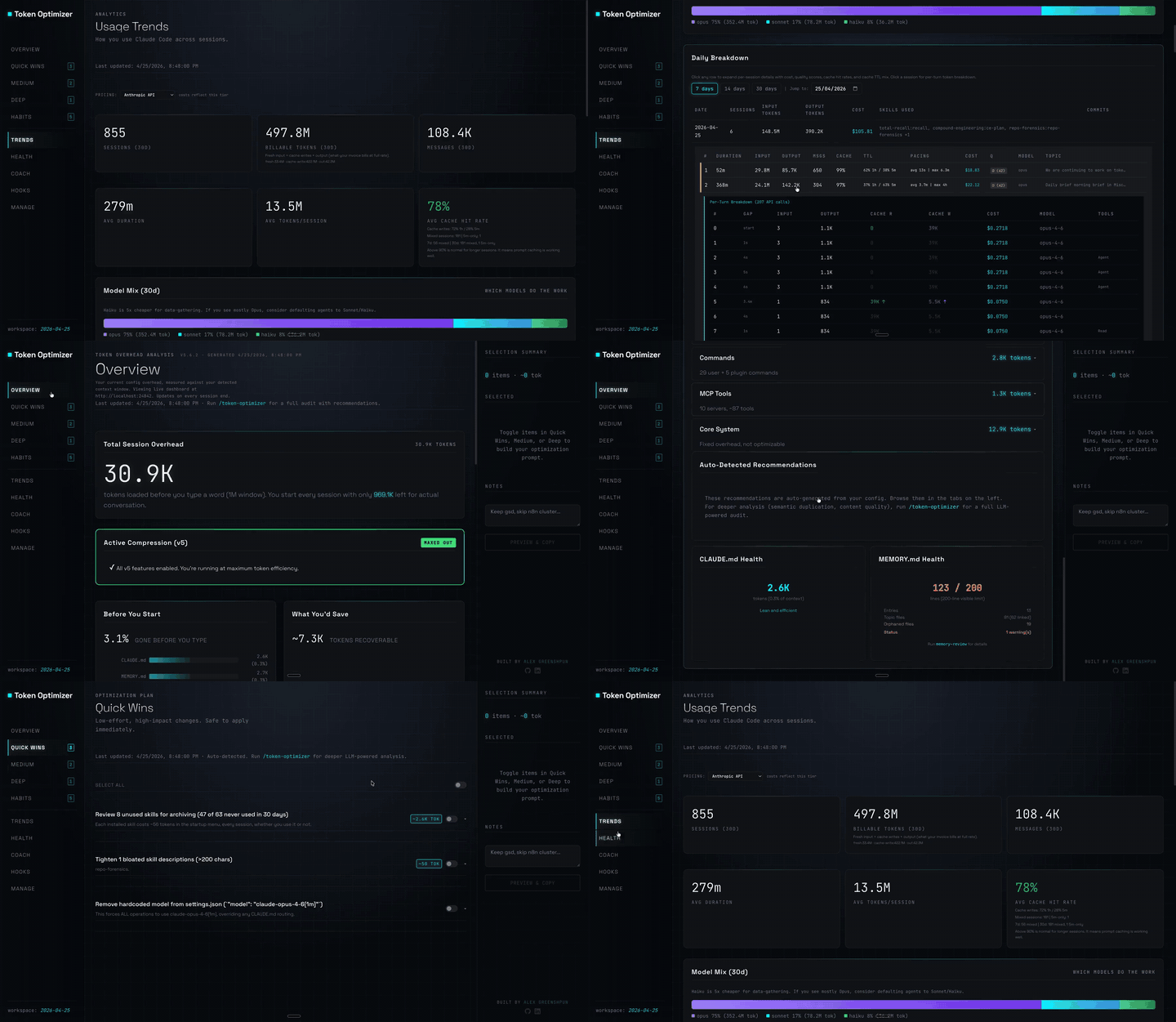
One HTML page, auto-regenerates after every session via the SessionEnd hook, no manual trigger needed. The bookmarkable URL http://localhost:24842/token-optimizer is opt-in: it only works after you run python3 skills/token-optimizer/scripts/measure.py setup-daemon to start the local server. Until then, open the file path that measure.py dashboard prints on the Dashboard: line.
Per-turn token breakdowns, cost across four pricing tiers, cache analysis with TTL mix and hit rate, quality scores overlaid on every session, subagent cost breakdown, savings tracker with four non-overlapping pools. Zero setup after install. Full dashboard docs →
What It Saves
Savings come from four non-overlapping pools, tracked in two tiers:
| Pool | What it covers |
|---|---|
| Model routing + caching | Leaner prefix, lighter model mix, cache-write as a routing lever |
| Subagent routing | Sidechain cost optimization (Claude Code only) |
| Compression add-back | Tokens removed by delta mode, structure map, bash/search compression |
| Lean-output add-back | Output tokens never produced due to conciseness nudges |
Two numbers, kept separate:
- Counted (~$313/mo), logged action by action. Every time Token Optimizer swapped in a lighter model, trimmed a bulky result, or skipped a repeat read, it added it up: smarter habits ~$260/mo, while-you-work compression ~$53/mo. This is the slice metered event by event, so it is smaller and exact.
- Big picture (~$1,877/mo, ~18%), the full counterfactual. Had you worked the way you did before Token Optimizer (~95% Opus), you would have paid about ~$10,585/mo versus ~$8,708/mo now. The gap is mostly a lighter model mix (95% Opus down to 60%, ~$1,076/mo for main routing + caching), plus cheaper subagents (~$741/mo) and the metered compression add-back (~$60/mo).
These numbers are never summed. Counted is the floor with hard receipts. Big picture is a model priced against your frozen pre-Token-Optimizer baseline. See the full methodology →
Based on 684 sessions over 30 days (snapshot ending 2026-06-15), priced against a frozen pre-Token-Optimizer baseline (~95% Opus). Your number is your own. See the methodology →
Active Compression
Nine features that actively reduce context, all on by default, all automatic, all toggleable from the dashboard or CLI.
Under the hood, PreToolUse hooks intercept every Read and Bash call before it enters your context. If the file was already read, only the diff comes back. If it's a code file re-read, a structural skeleton replaces the full content. If it's a CLI command, the output is compressed. PostToolUse hooks archive the full original to disk and log a compression event to SQLite. Nothing is lost, and everything is retrievable. You do nothing. The hooks handle it all.
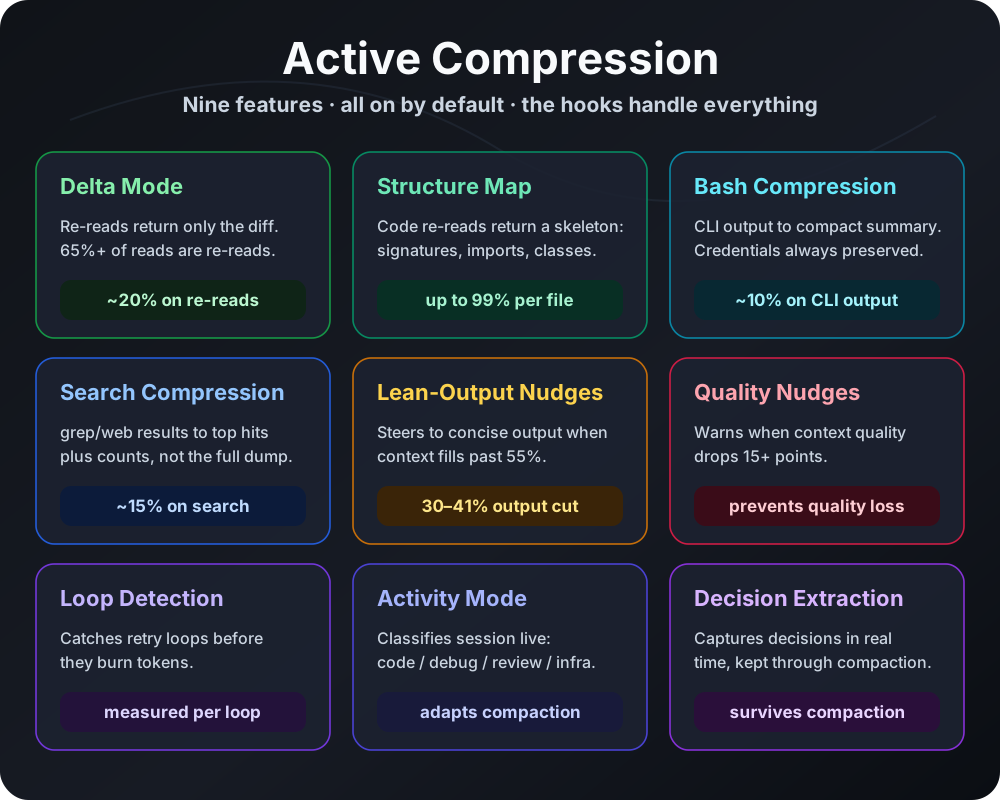
| Feature | What it does | Savings |
|---|---|---|
| Delta Mode | Re-reads return only what changed | ~20% on re-reads |
| Structure Map | Unchanged file re-reads return a structural skeleton | ~30% (up to 99% per file) |
| Bash Compression | CLI output condensed to essentials | ~10% |
| Search Compression | grep/web results condensed to top hits + counts | ~15% |
| Lean-Output Nudges | Steers model to concise output when context fills | Estimated 10-15%; not counterfactually measured |
| Quality Nudges | Warns when context quality drops | Prevents compaction loss |
| Loop Detection | Catches retry loops before they burn tokens | Measured per loop |
| Activity Mode | Adapts compaction to your session phase | Prevents decision loss |
| Decision Extraction | Preserves decisions across compactions | Prevents decision drift |
Toggle from the dashboard Manage tab, CLI (measure.py v5 enable|disable <feature>), or env vars. The v5 verb is a legacy command name that controls current features.
Delta Mode
When the AI re-reads a file after editing it, the Read call returns only the diff. 65%+ of Read calls in real sessions are re-reads. A 2,000-token file re-read becomes a 50-token diff.
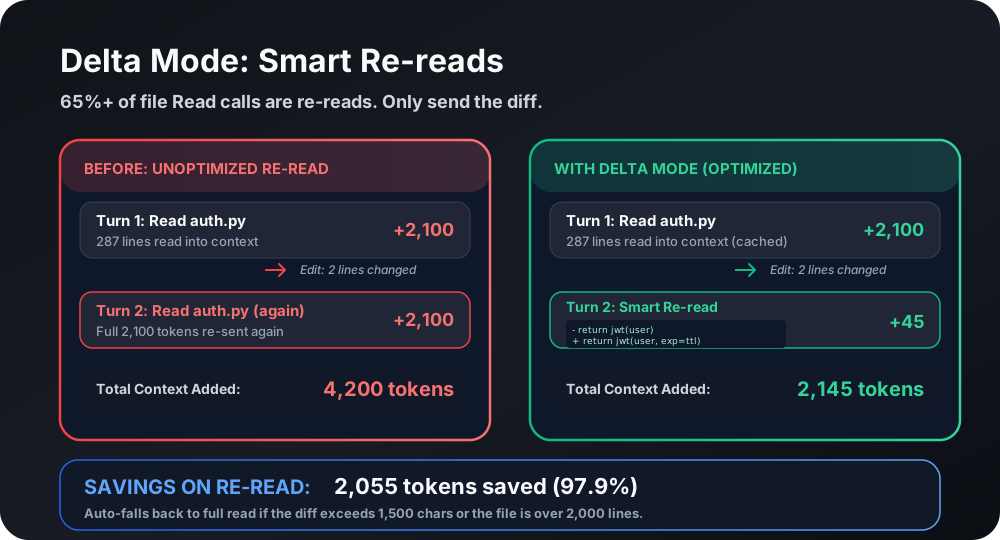
Disable: TOKEN_OPTIMIZER_READ_CACHE_DELTA=0
Structure Map
When Claude re-reads a code file it already saw, the Read call is blocked and replaced with a structural summary: function signatures, class hierarchies, imports. A 720KB Python file (180,000 tokens) becomes a 250-token skeleton.
Disable: TOKEN_OPTIMIZER_READ_CACHE_MODE=shadow
First-Read Skeleton
On the first read of a large code file (Python or TypeScript, 16KB–256KB) in a history-validated cohort, the Read returns a structural skeleton (signatures/imports) instead of the full file, with a one-line notice and the full content always one step away: expand <key>, a ranged Read (offset/limit), or a direct Edit. The original is archived before any substitution, fail-open — if archiving can't happen, the full file is served.
As of v5.12, the target file is always served in full on the first read; savings come from periphery skeletons (one-hop relationships, PageRank-ordered) injected alongside the target, not from withholding the target itself. This eliminates the re-read flip-flop that demoted cohorts under the old tripwire.
This applies to code only. Markdown and other prose are not skeletoned on first read (as of v5.11.27): a headings-only outline drops load-bearing prose, so docs always come back complete. A runtime tripwire auto-demotes a code cohort back to measure-only if its live edit-rate climbs.
Disable serving (keep measurement): TOKEN_OPTIMIZER_FIRST_READ_ACTIVE=0. Disable entirely: TOKEN_OPTIMIZER_FIRST_READ_SHADOW=0. Both are also visible and toggleable via measure.py v5 status and the dashboard Manage tab.
Bash Output Compression
Rewrites common CLI commands to return compressed summaries. Covers lint, log tails, tree, docker pull, long listings, build output, and test runners. A 564-token pytest output becomes 115 tokens.
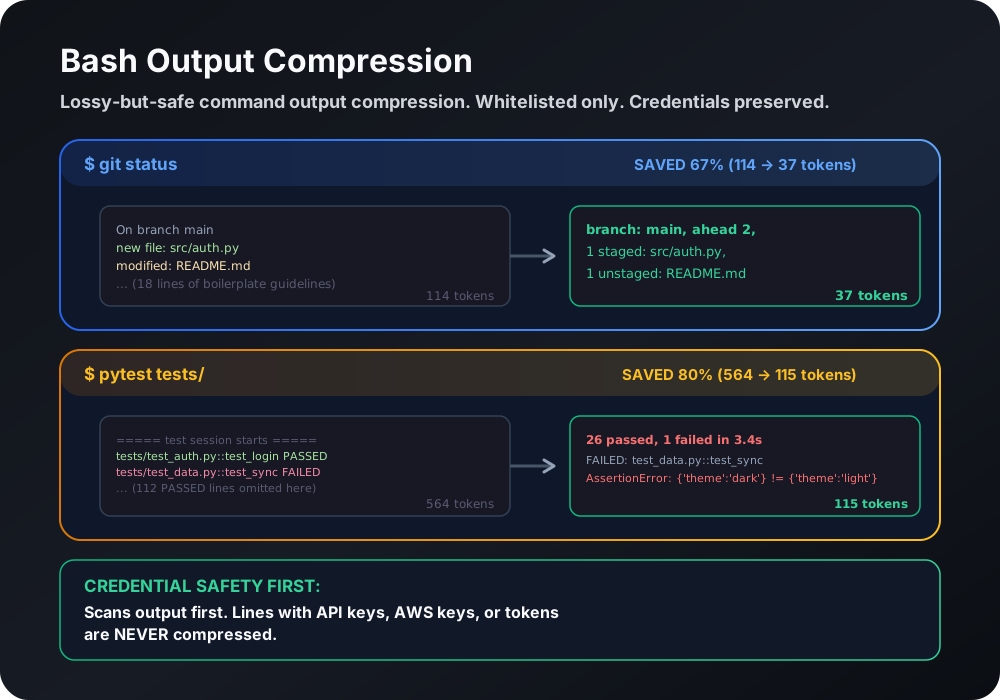
Disable: TOKEN_OPTIMIZER_BASH_COMPRESS=0
Custom Command Filters (TOML)
You can extend the bash-compression allowlist with your own read-only commands
and exclude commands you don't want compressed, via a TOML file at
<runtime-home>/token-optimizer/command-filters.toml (override the path with
TOKEN_OPTIMIZER_COMMAND_FILTERS).
# Add a read-only command to an existing compression handler.
# handler must be one of the built-in pattern names (pytest, lint, ls, etc.).
[filters.add]
my-tests = { command = "cargo test", handler = "pytest" }
my-lint = { command = "ruff check", handler = "lint" }

# Exclude commands from compression (glob patterns supported).
[filters.exclude]
commands = ["git status", "ls -la"]
Safety is immutable: the loader rejects add entries that name a shell
interpreter (bash, python, node, ...), a privilege-escalation wrapper
(sudo, su, doas), a destructive write subcommand (rm, chmod, dd,
...), or any command containing shell metacharacters (;, |, $, ...).
Categorical exclusions (dangerous chars, git write subcommands, interpreters)
are enforced in the hook and dispatch code and cannot be overridden by user
config. Built-in detection always runs first, so a user add only extends
the set, never replaces a built-in handler for the same command.
Search Result Compression
When the AI runs grep, rg, or web searches that return long result lists, the output is condensed to the top hits plus a count. A 500-line grep result becomes 20 lines plus a summary.
Disable: TOKEN_OPTIMIZER_BASH_COMPRESS=0 (search compression is part of bash compression; it has no separate switch)
Lean-Output Nudges
When context fills past 25%, a short nudge tells the model to reason deeply but keep visible output lean. Fill is the only condition — quality no longer gates it, so an ordinary healthy session gets the nudge too, not just a long degraded one. The saving is estimated at 10-15%, not measured: the counterfactual (what the model would have written without the nudge) cannot be observed, so Token Optimizer reports this in the estimated tier and never folds it into metered savings. Cache-safe: injected as additionalContext, never modifies the existing prefix.
No on/off switch today (not a v5 feature). Tune the trigger point with TOKEN_OPTIMIZER_VERBOSITY_MIN_FILL (default 25).
Quality Nudges
Watches context quality in real time. When the score drops more than 15 points or crosses below 60, an inline note enters the context. Claude sees it on the next turn and surfaces the warning or adjusts behavior. Cooldown of 5 minutes, max 3 per session.
Disable: TOKEN_OPTIMIZER_QUALITY_NUDGES=0
Loop Detection
Catches the AI getting stuck on a retry loop. Compares the last 4 user messages and last 5 tool results for similarity. Fires at confidence ≥0.7, session cap of 2 notes. Savings measured from actual loop turn content.
Disable: TOKEN_OPTIMIZER_LOOP_DETECTION=0
UserPromptSubmit Hook
Every prompt fires the UserPromptSubmit hook, which runs the per-turn work: prompt-continuity hint, verbosity steer, quality-cache warn tick, and (in harness/container/Cowork contexts) the once-per-session ensure-health, forced cache warm, and compact-restore pointer. These six subcommands share one measure.py import inside a single dispatcher (hooks/userpromptsubmit_runner.py), so one prompt spawns three processes, not eighteen. The dispatcher uses one shared deadline (18s, 2s margin under the 20s hooks.json timeout) with fair-share budgeting across subcommands, and buffers all stdout through a single emitter for controlled, host-consumable output.
Disable the entire UserPromptSubmit path: TOKEN_OPTIMIZER_HOOKS_USERPROMPTSUBMIT=0. Checked before measure.py is imported, so the opt-out costs zero per prompt. The other hook events (PreToolUse, PostToolUse, SessionStart, Stop, etc.) are unaffected.
Activity Mode Detection
Classifies your session into one of five modes (code, debug, review, infra, general) using the last 10 tool calls. The mode feeds into compaction guidance so PRESERVE/DROP priorities adapt to what you're doing.
Decision Extraction
Detects decision statements in real-time from tool outputs and stores them in the session database. At compaction time, these decisions are injected as CRITICAL DECISIONS that the compaction summary must preserve verbatim. Capped at 10 per session.
Measuring real savings
All compression features log to a local SQLite table. Nothing leaves your machine.
python3 measure.py compression-stats --days 30
The Session Database
Everything Token Optimizer does is backed by two local SQLite databases. Nothing leaves your machine. Zero network calls.
Per-session DB (~/.claude/token-optimizer/snapshots/session-store/<session>.db) holds 8 tables tracking file reads, tool outputs, command outputs, cached content, context intel events, activity log, decision log, and hint serves. WAL mode for concurrent read/write from hook processes. 50MB cap per session.
Trends DB (~/.claude/token-optimizer/snapshots/trends.db) holds 7 tables tracking session history, daily aggregates, skill/model/subagent usage, savings events, and compression events. Indexed by session UUID for O(log n) joins. This is what powers the dashboard, coach mode, and 30-day trend analysis.
Every compression event, every saving, every quality measurement is a row you can query. The dashboard is a read-only view of this data. measure.py compression-stats is a SQL query. Your data is your data.
Progressive Disclosure
Large tool results (>4KB) are archived to disk and replaced with a short preview plus a retrieval pointer. The full output survives compaction. When the model needs it, it pulls the original via expand, with no command re-run and no lost output.
This isn't just storage. The system tracks how many results were archived vs re-expanded, so you can see the net tokens that stayed collapsed. Re-expansions are netted out of the savings total, so you only count what actually stayed compressed.
python3 measure.py expand --list          # List archived tool results
python3 measure.py expand <tool-use-id>   # Retrieve a specific result
python3 measure.py expand --search <query>  # Search archived results by keyword/lineage
expand --search runs a full-text search (FTS5 with a LIKE fallback) over
archived tool outputs, including the full response body, tool name, command,
source file path, language, and archive origin. Each match prints the key,
lineage, and a snippet. Use expand <key> to retrieve the full content.
Some MCP tools are documented to return large verbatim payloads (source fetchers, doc retrievers) where a metadata preview defeats the point. Allowlist those so their full result reaches context instead of being replaced (it's still archived, so expand works). Set a comma-separated list of fnmatch globs matched against the full tool name:
TOKEN_OPTIMIZER_ARCHIVE_EXEMPT_TOOLS="mcp__context7__*,*github_repository_file"
Default is empty — nothing is exempt unless you opt a tool in.
Session Continuity
Compression matters, but the most important thing Token Optimizer does is keep your work alive across sessions and compactions, automatically.
When you end a session, Token Optimizer checkpoints your state to SQLite: active task, key decisions, modified files, git branch, recent reads. When you start a new session, it scores all recent checkpoints against your prompt and surfaces the most relevant one as a hint. You resume with context, not from zero.
What happens automatically:
- Cross-session hints: relevance-scored checkpoints surface when you start a new session. The hint includes the prior session's task, decisions, files, and branch. All fenced as RECOVERED DATA, never instructions.
- Cold-resume-lean: reopen a stale session without paying the full transcript cost. Token Optimizer reconstructs a lean context from its checkpoint. No LLM call, no full-transcript cold-resume. Token-free reconstruction from SQLite.
- Hint-follow measurement: when a continuity hint surfaces file paths and the model subsequently reads one, Token Optimizer credits an avoided exploratory search. Measured causality, not a guess.
python3 measure.py resume-lean                    # list reopenable cold sessions
python3 measure.py resume-lean <#|session_id> --print  # emit lean context block
Compression savings only stick if your session survives compaction. Session continuity is what makes that happen.
Smart Compaction
When auto-compact fires, 60-70% of your conversation vanishes. Decisions, error-fix sequences, agent state, all gone.
Token Optimizer checkpoints your session before compaction and restores what the summary dropped, automatically, via hooks. It also injects a context intel digest: heuristic summaries of large tool outputs the model already processed (file paths touched, errors seen, line counts). After compaction, the model knows what it saw without re-reading everything.
Activity mode detection classifies your session in real time (code, debug, review, infra, general) using the last 10 tool calls. The mode feeds into compaction guidance so PRESERVE/DROP priorities adapt to what you're doing right now, not a generic heuristic.
Decision extraction captures decision statements from tool outputs as they happen and stores them in the session DB. At compaction time, these are injected as CRITICAL DECISIONS the summary must preserve verbatim. Capped at 10 per session.
Compression savings only stick if your session survives compaction. Saving tokens on git status doesn't help if the next auto-compact wipes out the decision that made you run it.
Progressive Checkpoints
Captures session state at multiple thresholds: 20%, 35%, 50%, 65%, 80% context fill, plus quality drops below 80, 70, 50, and 40. Also snapshots before agent fan-out and after large edit batches. On restore, picks the richest eligible checkpoint.
Context Intel Digest
After compaction, Token Optimizer injects a digest of the session's largest tool outputs: file paths touched, errors detected, line counts. Generated heuristically in <30ms, no LLM call. The model re-orients without re-reading everything.
python3 measure.py setup-smart-compact # checkpoint + restore hooks
Output Tokens: Lean vs Verbose
Output tokens are the most expensive part of your session. They cost 5x more than input tokens on Opus and are billed per generation, not per cache read. A verbose response to a simple question burns dollars you never needed to spend.
Token Optimizer handles this automatically with lean-output nudges. When your context fills past 25%, a short nudge tells the model to reason deeply but keep visible output lean. Fill is the only trigger; context quality is not a condition. The reduction is estimated at 10-15% and is not counterfactually measured, so it is reported in the estimated tier, separately from metered savings.
How it works:
- The nudge is injected as
additionalContext, never modifying the existing prefix, so your cache stays intact - It only fires when context is filling up, not when you have plenty of room
- The model still thinks through the problem; it just produces a more concise visible answer
- No on/off switch today; tune the trigger point with
TOKEN_OPTIMIZER_VERBOSITY_MIN_FILL(default25)
This is one of the 9 active compression features, and it's the one that saves on the output side, where tokens cost the most.
Quality Scoring
The quality score tracks two things: Resource Health (how close you are to the degradation cliff) and Session Efficiency (whether your tokens are doing useful work). Letter grades from S to F make triage instant.
As context fills, quality drops. MRCR falls from 93% to 76% between 256K and 1M context. Your AI gets measurably dumber as the window fills. The quality score shows you exactly when that happens.
The status bar shifts color as quality degrades: green, yellow, orange, red. When quality drops below 75, session duration appears as a warning. Running subagents show with their model and elapsed time.
pytho
No comments yet
Be the first to share your take.