
Chess Review MCP


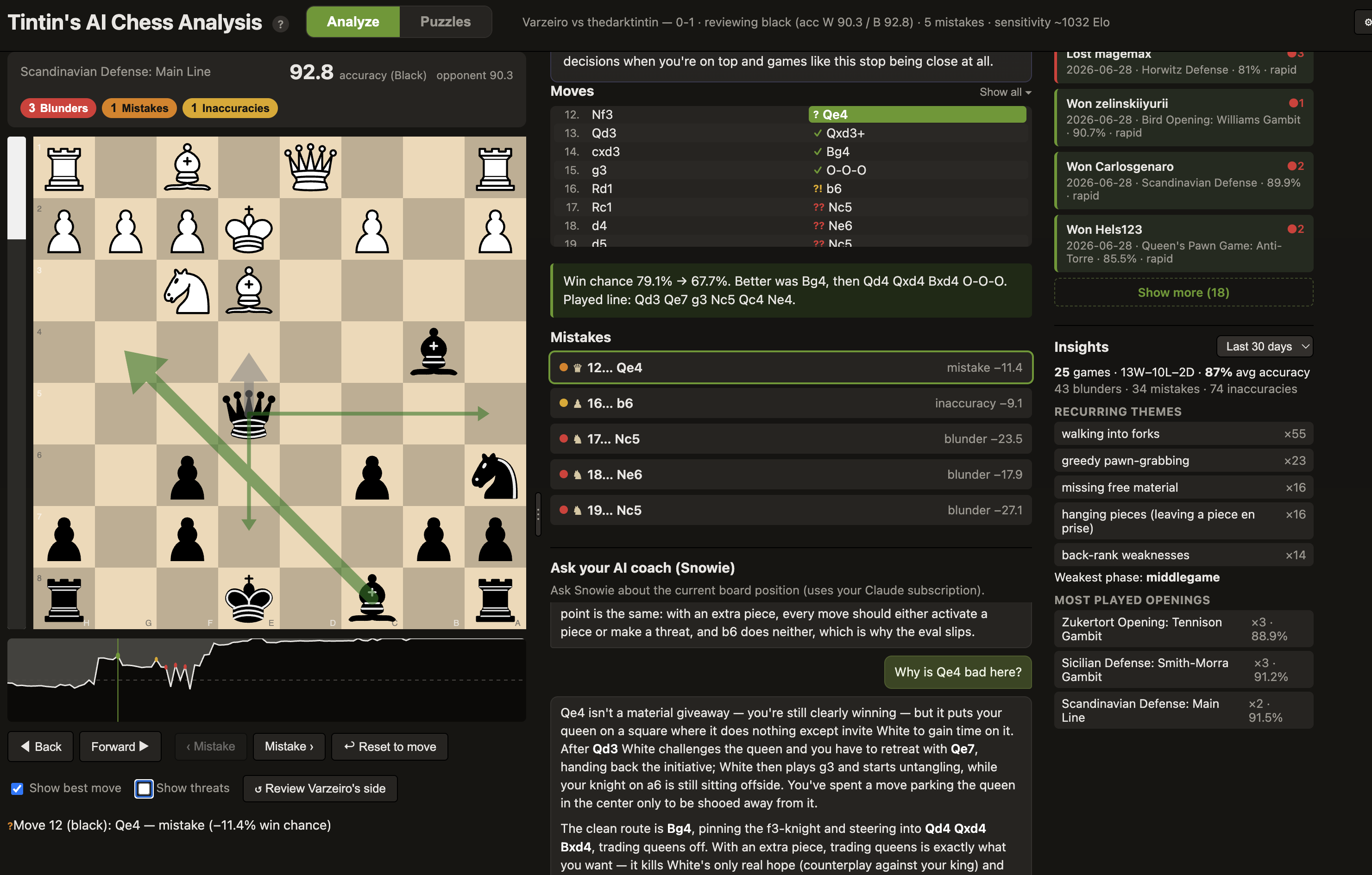
A chess coach you can actually talk to, and one that doesn't make things up. Ask why a move was a mistake or what you should have played, and get a straight answer in words, grounded in real Stockfish lines instead of guessed. Under the hood it reviews your game with the engine and finds exactly where you went wrong; the difference is it then explains it. Works with games from anywhere (Lichess, Chess.com, or any PGN you can paste). Both Lichess and Chess.com games can be fetched by username, your latest game auto-loads on launch, and new Chess.com games sync automatically into your history. Lichess players get a few extras. It runs two ways: from the Claude Code terminal (as an MCP server) and as an interactive web board that share one engine and one analysis, so they never disagree.
It has two modes, side by side in the same board:
- Analyze your games: the full-game review described above.
- Puzzles: a built-in tactics trainer with a faithful Glicko-2 rating, a timed Storm rush, and, uniquely, an AI coach that teaches the pattern behind each solution. It can also turn your own past blunders into practice puzzles. See Puzzle trainer.
Requires a Claude subscription (or a local model). The AI-coach explanations and chat (Snowie), the whole "explained in words" part, run on headless
claude, using your existing Claude subscription (no API key, no per-token billing). You need theclaudeCLI installed and logged in (claude login). Prefer to stay fully offline? You can instead point the AI coach at a local model (Ollama, LM Studio, …) with no Claude account at all; see Run the AI on a local model. Either way, the engine review itself (mistake list, eval bar, win graph, arrows) works without any of it.
New here? Pick your goal:
- 🎯 I just want to review my games (and train puzzles) → get the app (download on Mac, or double-click the launcher on Windows/Linux; it sets itself up).
- 🤖 I want chess analysis inside Claude Code → run the installer.
Features
- Full-game review → an ordered list of your inaccuracies / mistakes / blunders with per-side accuracy, using Lichess-style win%-drop thresholds.
- Explanations in words. Every flagged move gets a concrete, engine-grounded comment (the better move, its line, and how your move gets punished). No guessing: it's built from the engine sweep.
- Interactive board (chessground): replay each mistake, try your own moves, free-explore down any line.
- Eval bar + Lichess-style win graph that orient to the side you're reviewing (black-on-bottom when you played black). Click the graph or use ← / → to scrub the whole game.
- Move arrows: gray = the move you played, green = engine best moves (live multi-PV with
progressive deepening, thicker arrow = better move), red = the refutation of a move you try and yellow = threats (toggle Show threats or press
t) to show what the opponent is threatening to play next. - Chess.com auto-sync. If your Chess.com username is set, your latest games will be fetched and analyzed (alternatively you can use the ⟳ Sync button on the Chess.com tab).
- Insights panel. Recurring themes and stats aggregated across every analyzed game in a chosen period (today / past 7 days / past 30 days / all time). Insights include record, average accuracy, your most common mistake motifs, weakest phase, and most-played openings.
- In-browser AI coach (Snowie). A "why? / what now?" chat powered by headless
claude -p(your Claude subscription), fed pre-computed engine facts so answers are grounded, not estimated. - Cross-game history + coaching profile. Every reviewed game is saved locally, tagged with recurring mistake motifs (hung pieces, missed forks, back-rank, time trouble…), and rolled up into a per-player profile. With "Personalize AI coach with my history" on (in ⚙ Settings), Claude can draw on your recurring patterns, but only when they actually bear on the position at hand.
- Puzzle trainer. A second mode alongside Analyze: solve tactical puzzles with a faithful Glicko-2 rating, a timed Storm rush, a daily streak, and a "train my weaknesses" filter that biases selection toward the motifs you miss most. Unlike a bare puzzle site, the AI coach explains the motif behind each solution, and you can practice your own past blunders as engine-checked puzzles. See Puzzle trainer.
- Fully offline board. The board (chessground + chess.js) is vendored, not loaded from a CDN, so it renders with zero network. Only the optional extras (Lichess/Chess.com fetch, puzzle downloads, the AI coach, update checks) reach the network, and each is individually disablable.
How it works
One Python process holds one Stockfish engine pool and one in-memory review session. The MCP server (for Claude Code) and the FastAPI web server run in that same process and share the session, so the terminal and the board are always looking at the same analysis.
The browser's "why?" chat is the only part that reaches outside the process: the FastAPI backend
shells out to headless claude -p (your subscription).
Installation
Two ways to use it (the goal-picker links at the top jump straight there). Either way you need nothing installed first, no Python and no Stockfish: the app/installer fetches everything, using uv to download a compatible Python for you.
🎯 I just want to review my games
Zero terminal required. Open the app and it brings up a chess board in your browser, ready to review a game from any source: paste or upload a PGN, or, if you play on Lichess or Chess.com, just give it your username and it loads your recent games for you.
macOS: the app. Download the zip from the
Releases page. Unzipping it
gives you Tintin's AI Chess Analysis.app. Drag that into Applications, and open it.
- First open: it's unsigned, so macOS blocks it once. Double-click it (you'll get a "cannot verify" / "blocked" message, click Done), then go to System Settings → Privacy & Security, scroll down to the message about the app, and click Open Anyway → Open. You only do this once. (On older macOS you can instead right-click the app → Open → Open.)
- The app installs Stockfish + its Python env on first run (needs internet once), then opens the
board. Its environment and your games/settings live in
~/Library/Application Support/Tintin AI Chess Analysis/, outside the app, so your data survives updates. Setup problems show in a dialog; logs go to that folder'slaunch.log.
Windows / Linux: the double-click launcher. Three steps, no terminal, no GitHub account needed.
Step 1: download the project as a ZIP. On this project's GitHub page, scroll to the top,
click the green < > Code button, and choose Download ZIP (see the circled buttons below).
Step 2: unzip it. Double-click the downloaded .zip to extract it. You'll get a folder named
something like tintins-chess-analysis; open it. (On Windows, if it opens "inside" the zip
first, drag the folder out to your Desktop, or right-click the zip → Extract All.)
Step 3: double-click the launcher inside that folder:
- Windows:
Tintin's AI Chess Analysis.bat(if SmartScreen warns: More info → Run anyway) - Linux:
Tintin's AI Chess Analysis.command
The first launch installs everything (uv + Stockfish + the env) and can take a couple of minutes; a loading page opens in your browser while it works. Every launch after opens straight to the board.
Once the board is open (any platform), load a game from wherever you play, via the Games panel (☰), which has four tabs:
- Paste PGN: works for everyone. Paste any PGN, or Upload .pgn a file (e.g. a Chess.com export of one or many games), pick your side, and click Analyze; all games land in My games. This is the universal path, no account of any kind needed.
- Lichess: type any handle to fetch that player's recent games, and click "Set as my account" to make it yours: that drives My games, your coaching profile, and (in the app) auto-loading your latest game on launch.
- Chess.com: Enter any chess.com username to fetch that player's recent games, or press ⟳ Sync new games to retrieve any new games of your own if your Chess.com username is set.
- My games: your previously-analyzed games, to reopen instantly.
Your account/username is set under ⚙ Settings → Your username (or the Lichess panel's button) and saved server-side, so it's the same everywhere. To quit: just close the browser tab; the server stops a few seconds later (and the launcher's terminal window closes itself).
🤖 I want it inside Claude Code
Run the one-command installer from the repo root, then reload Claude Code; the chess MCP server
is already registered in .mcp.json (no path editing; it runs via uv, which is machine-independent).
# macOS / Linux
./install.sh
# Windows (PowerShell)
powershell -ExecutionPolicy Bypass -File .\install.ps1
The script is safe to re-run (each step is skipped if already done), prompts for your username, and finishes with a self-check you can re-run any time:
uv run python -m server.doctor
Then open Claude Code in this folder, paste a PGN, and say "analyze this game." You also get the web board for free; see Usage.
Build the .app from source (instead of downloading it); produces the same bundle the
Releases page ships:
./scripts/build_app.sh # → Tintin's AI Chess Analysis.app (in the repo root)
Drag it into /Applications and open it (first time, unsigned: double-click, then System
Settings → Privacy & Security → Open Anyway). The bundle is
immutable at runtime; its Python env + your data live under
~/Library/Application Support/Tintin AI Chess Analysis/. To customise the icon, replace
assets/app_icon.png (1024×1024) or drop an assets/AppIcon.icns, then rebuild. It still needs the
network on first run and the claude CLI for the in-browser chat.
Skip uv (plain venv / conda). The project is a standard pyproject.toml, so any Python 3.11+
environment works:
python3.11 -m venv .venv && source .venv/bin/activate   # or conda
pip install -r requirements.txt
Then in .mcp.json set "command" to that interpreter's absolute path (e.g.
/abs/path/.venv/bin/python) and "args" to ["-m", "server.mcp_server"], and run scripts with
that interpreter instead of uv run python.
Prerequisites (what the app/installer handles for you)
- Stockfish is installed for you (via
brew/apt/winget, or a direct download of the official build) and auto-detected, so no path setup is needed; setSTOCKFISH_PATHonly to force a custom build. - Internet is needed for first-time setup only (Python, Stockfish, and the puzzle set). After that the board runs fully offline: chessground and chess.js are vendored, with no build step or CDN.
- The
claudeCLI + a Claude subscription power the AI coach and chat, on your existing subscription (no API key, no per-token billing), or use a local model instead. The engine review works without either; only the plain-English explanations need it.
Usage
Option A: the web board (no Claude Code required)
The quickest way to review a game. Pass a PGN file and which color you played:
uv run python scripts/run_web.py example_pgns/game1.pgn white
It analyzes the game (~20 to 45s depending on length), opens your browser to
http://127.0.0.1:8765, and you can:
- Click a mistake in the sidebar → the board jumps to that position (gray arrow = the move you played) and a written explanation appears.
- Drag a piece to try a better move → eval bar + a verdict update; a red arrow shows the refutation if it's bad.
- Toggle Show best move to see the engine's top move(s) as green arrows that sharpen as the search deepens.
- Scrub the whole game with ← / → or by clicking the win graph; Back undoes one ply when you're exploring a line.
- Ask "why is this bad?" or "what should I do here?" in the chat panel.
The third argument is your color: white, black, or auto (infer from the PGN headers).
Browse & reopen past games (the Games panel). A collapsible third column (toggle with the ☰ Games button) lists games you can open in the board. The panel has four tabs: My games (your previously-analyzed local games), Lichess, Chess.com, and Paste PGN: paste a PGN from anywhere, pick which color you played (or leave it on auto), and click Analyze. Click any game (or paste PGN data) and the board opens immediately; you can step through the moves with ← / → while the engine analysis runs in the background; the eval bar, win graph, mistake list, comments, and best-move arrows fill in as soon as it finishes.
Bulk-analyze a Chess.com export (multiple games at once). Chess.com lets you download many games as a single PGN file. In the Paste PGN tab, hit Upload .pgn (or paste the file's contents); the app detects all the games, analyzes them one-by-one in the background (showing "Game k of N"), and files every one under My games. It figures out which handle is you (the player present in all the games) automatically; if it can't, type your username in the optional box. Once a handle is recognized this way it's remembered, so future games from that account (Chess.com or Lichess) fold into the same history and coaching profile.
Option B: from the Claude Code terminal (MCP)
With the server registered in .mcp.json, open Claude Code in this directory (reload so it picks
up the chess server), then:
- Paste a PGN and say "analyze this game" → Claude calls
mcp__chess__analyze_game, narrates the mistakes, and gives you the board URL. - Ask "why was move 4 bad?" → Claude calls
mcp__chess__get_engine_lineand explains using the returned best line + refutation.
Tools exposed: mcp__chess__analyze_game, mcp__chess__fetch_games, mcp__chess__fetch_game,
mcp__chess__get_engine_line, mcp__chess__goto_mistake, mcp__chess__get_player_profile (your
cross-game coaching profile, see below), and the puzzle-trainer pair mcp__chess__next_puzzle /
mcp__chess__solve_puzzle (drive the same puzzle session as the board; see
Puzzle trainer).
Example (terminal)
You: (paste PGN) analyze this as white
Claude: Your accuracy: 92.7%, a clean game. 3 flagged moments…
- Move 4: Nf3 was the big one. After 3…Nd4?? the crushing reply was 4. c3!, kicking the knight with nowhere to go (~+3.7). Instead 4. Nf3 invited 4…Nxf3+ and dropped to roughly equal.
- Move 10: Qf3 (a mistake, but you were already winning)…
📊 Open the interactive board: http://127.0.0.1:8765
Snowie: the in-browser AI coach
Snowie is the chat panel: it answers position-aware questions using your Claude subscription. Each question is handed the current board (for "what should I do here?") and the move in question (for "why is this bad?"), each with pre-computed Stockfish facts, so Snowie reasons from real lines. Follow-up questions remember the conversation.
Run the AI on a local model (instead of Claude)
The chat and AI coach can run on a model on your own machine instead of your Claude subscription,
with no Claude account or claude CLI at all. It works with any local server exposing an
OpenAI-compatible /v1/chat/completions endpoint (Ollama, LM Studio,
llama.cpp, a LiteLLM proxy, …).
- Ollama (one click): pull a model (
ollama pull qwen2.5-coder), then in ⚙ Settings → Advanced → Local AI model click Detect Ollama, pick a model, and Save. - Anything else: in the same place, fill in the server URL (e.g.
http://localhost:1234/v1for LM Studio) and the Model name. Clear the field to switch back to Claude.
Quality depends on the local model, and the Stockfish analysis stays local either way. The terminal MCP workflow still uses Claude; this covers the in-browser chat and coach summary.
Puzzle trainer
A tactics trainer built into the same board. Flip the header switch from Analyze to Puzzles and the whole workspace collapses to a calm, board-first solve layout: one big board, one clear prompt, and a slim rail.
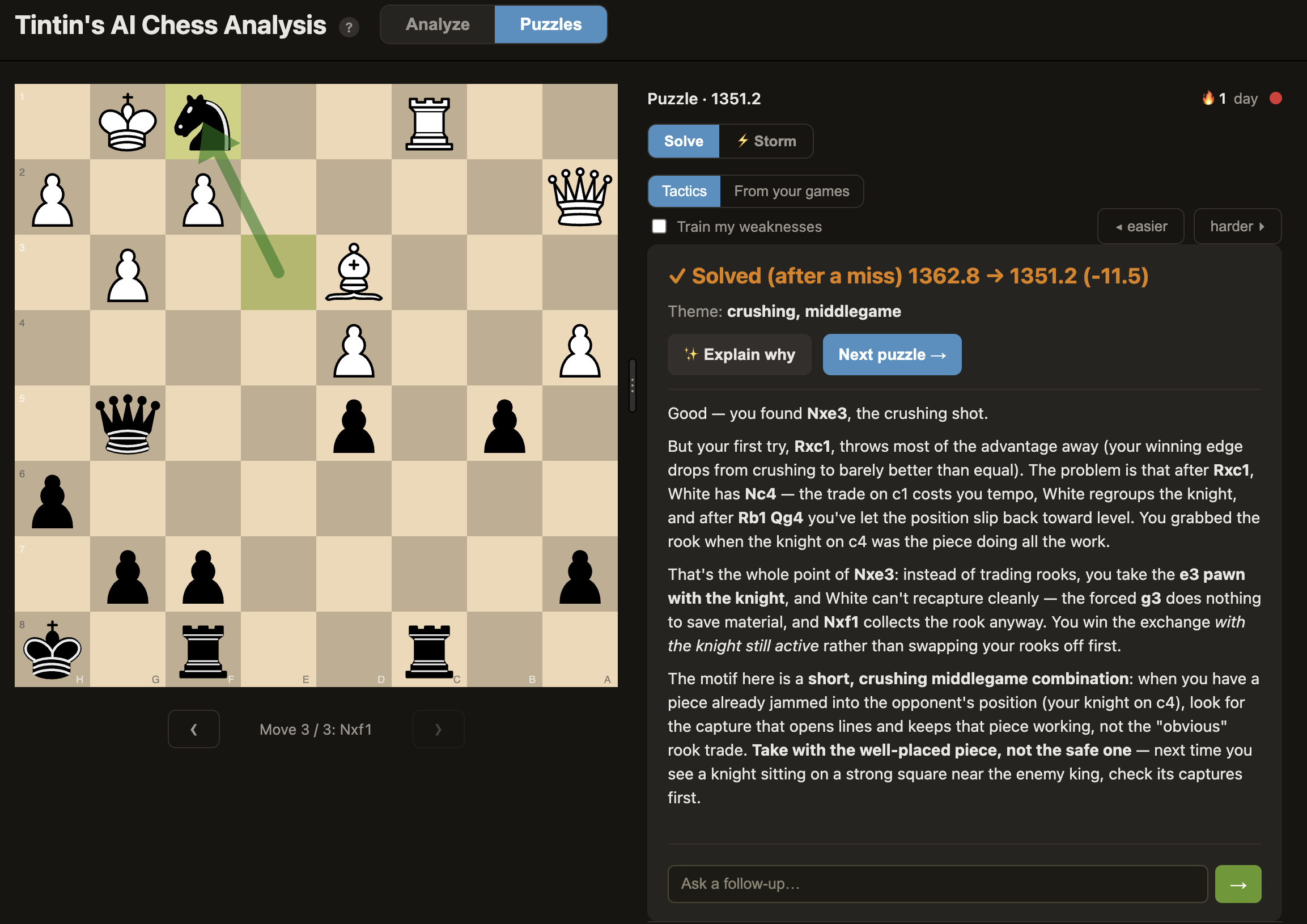
- Rated tactics with real Glicko-2. Puzzles come from the CC0 Lichess puzzle database, sliced into rating-banded, theme-stratified shards. Each solve or miss moves your rating with a faithful Glicko-2 update (the same system Lichess uses), and a quiet rating curve tracks your progress. A per-user seed means two players of the same rating get different, non-repeating streams from identical files.
- The AI coach teaches the pattern. Press ✨ Explain why and the coach names the motif and walks the forced line, grounded in the puzzle's verified solution and its theme tags. On a miss it first shows concretely why your move failed (the engine refutation), then teaches the winning idea. This is the part a bare puzzle site can't do.
- "From your games" mistake puzzles. A second source resurfaces positions where you actually blundered in a past game as practice. These are engine-checked (any move that holds the eval is accepted, so positional spots allow several answers), badged with the matchup and date, and carry a "replay in the full game" link back to the review board. They stay unrated so your own losses never pollute the Glicko score, and space themselves out Anki-style as you get them right.
- Train my weaknesses. A toggle that biases puzzle selection toward the motifs your coaching profile says you miss most (forks, back-rank, loose conversion…), closing the loop between the games you played and the puzzles you drill.
- Storm (timed rush). A ⚡ Storm sub-mode: solve as many as you can before the clock runs out, with a combo counter, bonus time for streaks, and a saved high score. Unrated by design, so it never touches your Glicko rating.
- Flow-state extras. A daily streak (consecutive days you've solved at least one), optional auto-advance to the next puzzle after a solve, and green/yellow/red square-blink feedback. All configurable under ⚙ Settings → Puzzles.
Everything degrades gracefully: the first puzzle serves instantly from a small vendored offline
baseline while the full set (~16 MB) downloads in the background; with no engine, only the static
tactics track shows; with no claude/local model, you still solve, just without the written
explanation. Puzzles are drivable from Claude Code too via the mcp__chess__next_puzzle /
mcp__chess__solve_puzzle tools, which share the same session as the board.
Game history & coaching profile
Every game you review is saved locally so the tool can learn your recurring weaknesses over time. This is best-effort and fully local: history can never break a review, and nothing leaves your machine (the chat is the only outbound call, and your profile is only attached to it when you opt in).
- What's saved. One compact record per reviewed game, in a per-user app-data folder shared by Claude Code and the app. Re-analyzing a game supersedes the old record rather than duplicating it.
- Mistake motifs. Each flagged mistake is tagged with engine-free heuristics (hung pieces, missed forks, back-rank, time trouble, …) that build up your profile.
- Game-mode aware. Games are tagged bullet / blitz / rapid / classical, and the flagging thresholds scale by mode and by your skill level, so a bullet blunder is judged more leniently than a classical one.
- Coaching profile. A hybrid of a
recentsliding window (so fixed weaknesses fade) and alifetimeview, with an "improving / slipping" trend. Available in the terminal viamcp__chess__get_player_profile, or fed to the board's chat. - Personalized chat. The "Personalize AI coach with my history" setting (on by default) lets Claude connect the position to your recurring patterns, subtly, only when it sharpens the answer.
Who is "you"? (identity & aliases)
History is keyed to a canonical player, not a username, so games across your Lichess and Chess.com
accounts merge into one profile. Set your handles in ⚙ Settings (or CHESS_USERNAME / CHESS_ALIASES)
and they all fold into one player, which also drives player="auto" side detection. To turn history
off entirely, set CHESS_HISTORY=0.
Configuration
Most people never need to configure anything. The common options live in the in-app ⚙ Settings
panel (no file editing): your username and other accounts, an optional Lichess token, your
skill level, and, under Advanced, the Stockfish path, a local AI model, and the puzzle
toggles. Saving applies immediately, to both the standalone app and the Claude Code workflow (they
share one settings.json).
Everything is also settable via environment variables (settings.json wins where both are set). The
handful worth knowing:
| Variable | Purpose |
|---|---|
STOCKFISH_PATH |
Force a specific Stockfish binary (otherwise auto-detected). |
CHESS_USERNAME / CHESS_ALIASES |
Your handle(s), for side-detection and merging history across accounts. |
CHESS_LOCAL_LLM_BASE_URL / CHESS_LOCAL_LLM_MODEL |
Run the AI on a local model instead of Claude. |
CHESS_HISTORY=0 / CHESS_PUZZLES=0 |
Turn off game history, or the puzzle trainer. |
The full list (analysis depths, ports, cache sizes, profile windows, data directory, puzzle knobs, …)
lives in server/config.py.
Running the tests
uv sync --extra dev          # pulls in pytest (one time)
uv run python -m pytest
The suite is all fast unit/mock tests with no Stockfish, no network, and no claude CLI (the
engine, the Lichess API, and the chat are mocked), so it runs in well under a second and never
spends Agent-SDK credit. It also runs on every push / PR via GitHub Actions (.github/workflows/ci.yml).
Project layout
server/
  config.py          # all tunables (env-driven)
  core/              # engine pool, evaluation math, game analysis, session, engine_line,
                     #   history (game records + motifs + coaching profile), lifecycle watchdog,
                     #   puzzles (Glicko-2 rating, shard fetch, mistake puzzles, storm)
  mcp_server.py      # MCP tools; boots the web server in a background thread
  claude_bridge.py   # headless `claude -p` for the chat + puzzle coach (subscription)
  web/               # FastAPI app + board/chat/puzzle routes + uvicorn runner
frontend/            # no-build single page (index.html + main.js + styles.css, vendored chessground)
scripts/             # run_web.py (standalone board), validation/smoke scripts
example_pgns/        # sample games (game1.pgn White, game2.pgn Black)
tests/               # pytest suite
Limitations / notes
- The web board is no-build and vendored (chessground & chess.js ship with it), so once set up it renders fully offline; only first-time setup needs the network.
- In-browser chat requires the
claudeCLI installed and logged in, and draws from your Agent SDK credit; the terminal path is the zero-extra-cost fallback. (Or point it at a local model to skip Claude entirely.) - Engine analysis is fixed-depth and cached for reproducibility, so evals can differ slightly from Lichess near classification boundaries. That's expected.
FAQ
How do I install the claude CLI, and how is it different from the Claude app?
The claude CLI (Claude Code) is a separate program that runs in your computer's terminal. It
is not the Claude desktop app or the claude.ai website, but it signs in with the same Claude
subscription, so there's no extra account, no API key, and no per-token bill. This tool uses the
CLI behind the scenes to write the plain-English coaching, which is why you need it installed and
logged in.
Open a terminal and install Claude Code with one of these (the native install is recommended):
# macOS / Linux / WSL
curl -fsSL https://claude.ai/install.sh | bash

# Windows (PowerShell)
irm https://claude.ai/install.ps1 | iex
Or use a package manager: brew install --cask claude-code (macOS) or
winget install Anthropic.ClaudeCode (Windows).
Then run claude once and follow the prompt to log in with your Claude subscription. After that,
restart the app (or reload Claude Code) and the AI coach will work. Full details are in the
Claude Code docs.
The engine review itself (the mistake list, eval bar, win graph, and arrows) works without the CLI. You only need it for the conversational coaching and the AI summaries.
License & credits
Created and developed by Dmitri Demler.
This project is licensed under the MIT License. See LICENSE.
With thanks to contributors:
- riskydissonance and Leland Olney: Chess.com API integration.
It also stands on the shoulders of others:
- Stockfish: the chess engine doing the actual analysis. Stockfish is licensed under the GNU GPL v3; this project invokes it as a separate binary and does not include or modify its source. The app/launcher downloads the official Stockfish build when no system install is found.
- python-chess (GPL v3): PGN parsing, move generation, and board logic.
- chessground & chess.js: the interactive board UI (vendored under
frontend/vendor/, no CDN). - Lichess puzzle database (CC0): the tactics puzzles behind the trainer.
- Opening names come from the Lichess
chess-openingsECO dataset (CC0), vendored inserver/data/eco/. - FastAPI, uvicorn, Pydantic, and the MCP Python SDK power the server.
Trademarks (Lichess, Chess.com, Claude, Anthropic) belong to their respective owners; this is an independent project not affiliated with any of them.
No comments yet
Be the first to share your take.