
sync-worktrees
Keep every branch and every repo you work on checked out as predictable directories — no stashing, no re-cloning, no re-orienting your AI assistant.
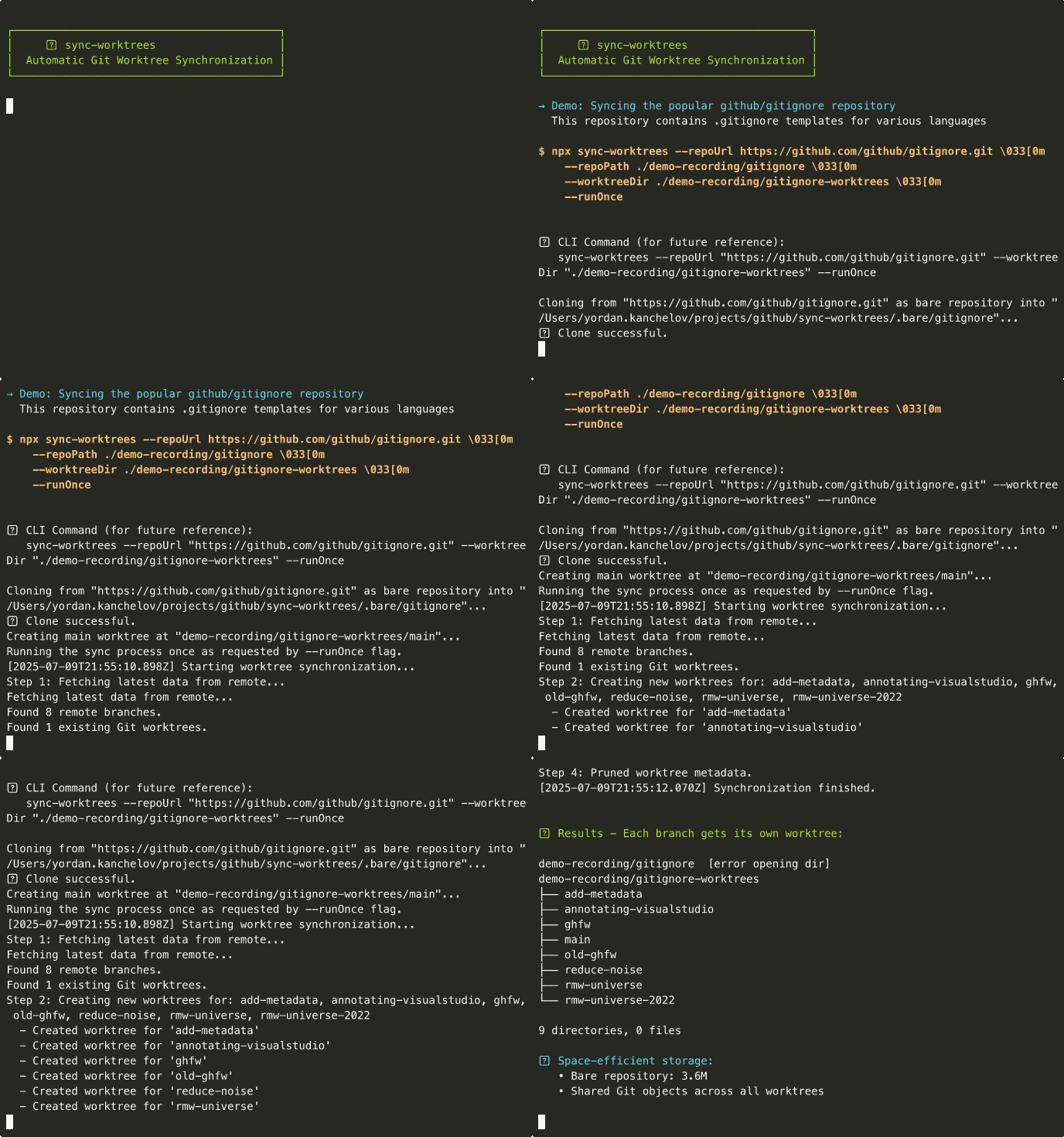
Contents: Why · How it works · Quick start · MCP server · Interactive TUI · CLI options
Why sync-worktrees
If you've ever:
- Stashed half-finished work just to check out another branch
- Lost minutes hunting for where you cloned a sibling repo
- Switched branches in five repos because one feature spans them all
- Re-explained to an AI assistant which directory holds which branch
…sync-worktrees fixes that. It keeps the entire branch and repo layout you work in materialized on disk — one directory per branch, automatically kept in sync with the remote. Switching branches becomes cd. Searching across repos becomes grep -r. AI agents see the same shape you do, so "look in the other repo" actually works.
It's also a clean answer to dev-environment bootstrapping. One config file describes every repo, branch, and folder layout your team works in. Hand it to a new hire (or a fresh laptop) and sync-worktrees lays down the whole workspace in a single command — no day-one cloning checklist, no "where do I put this repo?" Slack threads.
Runs as a one-shot, a background daemon, or an interactive TUI — and ships an MCP server so AI assistants can list, create, and inspect worktrees themselves.
How it works
The default — worktree mode — gives every remote branch its own directory while sharing one Git database underneath:
- First run clones the repo once as a bare repository (just the Git data, no working files).
- Each sync:
- Creates a directory for every remote branch (
main,develop,feature/*). - Fetches latest changes (no merge — your local work stays untouched).
- Removes directories for branches deleted upstream (preserves dirty trees and unpushed commits).
- Creates a directory for every remote branch (
The bare repository is not an extra object store layered on top — it is the single Git database every worktree attaches to natively, so branches share history for free (no --reference, no alternates). The bare layout exists only so that no branch is a privileged "main" checkout: every branch, the default included, is a peer directory.
Smallest config that produces this:
// sync-worktrees.config.js
// @ts-check

/** @satisfies {import("sync-worktrees").SyncWorktreesConfig} */
const config = {
  repositories: [
    {
      name: "my-repo",
      repoUrl: "https://github.com/user/my-repo.git",
      worktreeDir: "./worktrees/my-repo",
    },
  ],
};

export default config;
Run sync-worktrees from the directory holding the config and you get:
.
├── sync-worktrees.config.js
├── .bare/
│   └── my-repo/             # Bare repository (shared Git objects)
└── worktrees/my-repo/
    ├── main/                # Worktree for main branch
    ├── feature-1/           # Worktree for feature-1 branch
    └── feature-2/           # Worktree for feature-2 branch
Clone mode (mode: "clone") is a first-class alternative: a plain git clone of one branch into worktreeDir, no bare repo, no per-branch subfolders. Reach for it when you want a repo to live at a fixed path — a dependency sibling, a single-branch dev clone, or any case where one checkout is enough. See Clone mode.
Features
- Filtering & lifecycle — branch name globs, age filtering, sparse checkout, automatic divergence detection with
.diverged/preservation, retry with exponential backoff. - Interactive TUI — Ink-based UI with wizards for opening worktrees, creating branches, and inspecting status; diverged-directory management; live log streaming; multi-repo filtering.
Installation
npm install -g sync-worktrees
Quick start
sync-worktrees always runs against a config file. Create one once, then run the tool.
cd ~/projects/my-sync-dir
sync-worktrees init      # interactive wizard → writes sync-worktrees.config.js
sync-worktrees           # auto-loads the config in the current directory and starts syncing
By default, bare sync-worktrees launches the interactive TUI and keeps syncing on the cron schedule from your config. Press q to quit. For a one-shot run (CI, scripts, ad-hoc), add --runOnce.
To manage multiple repositories, edit the generated config file and add entries under repositories. See Configuration.
If the config lives outside the current directory, pass it explicitly:
sync-worktrees --config /path/to/sync-worktrees.config.js
sync-worktrees --config /path/to/sync-worktrees.config.js --runOnce
sync-worktrees list --config ./config.js --filter "frontend-*"
MCP server
sync-worktrees ships a Model Context Protocol server so AI assistants (Claude Desktop, Claude Code, Cursor, Windsurf, etc.) can inspect and operate your workspace directly. Installing the package exposes a second binary, sync-worktrees-mcp, that speaks MCP over stdio.
In a single call, an AI assistant can discover every repo and worktree you have configured — so an agent working in frontend/ can grep across backend/ and shared/ without you reorienting it. That call is detect_context with includeAllWorktrees: true; the response also includes a per-capability { available, reason } block telling the agent which operations are reachable from its current vantage point, so there's no guessing whether sync will work. See Available tools for the full surface.
Getting started
Install the sync-worktrees MCP server with your client.
Standard config works in most tools:
{
  "mcpServers": {
    "sync-worktrees": {
      "command": "npx",
      "args": ["-y", "-p", "sync-worktrees", "sync-worktrees-mcp"],
      "env": {
        "SYNC_WORKTREES_CONFIG": "/absolute/path/to/sync-worktrees.config.js"
      }
    }
  }
}
If installed globally, replace command with sync-worktrees-mcp and drop args. SYNC_WORKTREES_CONFIG is optional — without it the server runs in auto-detect mode: when the client's CWD sits inside a worktree managed by sync-worktrees, the server locates the bare repo, enumerates sibling worktrees, and enables per-worktree operations. sync and initialize require a loaded config (or call load_config at runtime).
Use the Claude Code CLI:
claude mcp add sync-worktrees -- npx -y -p sync-worktrees sync-worktrees-mcp
To pass a config path, append -e SYNC_WORKTREES_CONFIG=/absolute/path/to/sync-worktrees.config.js to the command.
Edit claude_desktop_config.json and paste the standard config above into the mcpServers block. Default locations:
- macOS:
~/Library/Application Support/Claude/claude_desktop_config.json - Windows:
%APPDATA%\Claude\claude_desktop_config.json
Restart Claude Desktop after editing.
Edit ~/.cursor/mcp.json (global) or .cursor/mcp.json (per-project). Paste the standard config above.
Or open Cursor Settings → MCP → Add new MCP Server, pick command type, and enter npx -y -p sync-worktrees sync-worktrees-mcp.
Follow the Windsurf MCP documentation and use the standard config above.
Use the VS Code CLI:
code --add-mcp '{"name":"sync-worktrees","command":"npx","args":["-y","-p","sync-worktrees","sync-worktrees-mcp"]}'
Or follow the VS Code MCP install guide and use the standard config above.
Use the Codex CLI:
codex mcp add sync-worktrees -- npx -y -p sync-worktrees sync-worktrees-mcp
Or edit ~/.codex/config.toml:
[mcp_servers.sync-worktrees]
command = "npx"
args = ["-y", "-p", "sync-worktrees", "sync-worktrees-mcp"]
Follow the Gemini CLI MCP install guide and use the standard config above.
Edit cline_mcp_settings.json (see Configuring MCP Servers) and add:
{
  "mcpServers": {
    "sync-worktrees": {
      "type": "stdio",
      "command": "npx",
      "args": ["-y", "-p", "sync-worktrees", "sync-worktrees-mcp"],
      "disabled": false
    }
  }
}
Edit ~/.config/opencode/opencode.json:
{
  "$schema": "https://opencode.ai/config.json",
  "mcp": {
    "sync-worktrees": {
      "type": "local",
      "command": ["npx", "-y", "-p", "sync-worktrees", "sync-worktrees-mcp"],
      "enabled": true
    }
  }
}
Open Settings → AI → Manage MCP Servers → + Add (see Warp MCP docs) and paste the standard config above. Alternatively, run /add-mcp in the prompt.
Available tools
| Tool | Purpose |
|---|---|
detect_context |
Inspect a path, resolve the bare repo, enumerate sibling worktrees, report config-driven sibling repositories and capabilities. Pass includeAllWorktrees: true to include every configured repo's worktrees keyed by repo name. |
list_worktrees |
List worktrees with status label (clean/dirty/stale/current), divergence, safeToRemove, last sync. Without repoName and with a loaded config, results are grouped across all configured repos. |
get_worktree_status |
Detailed status for one worktree (dirty files, unpushed commits, stashes, operation in progress). |
create_worktree |
Create a worktree for a branch; optionally create the branch from baseBranch. Newly created branches are pushed to origin unless push=false. |
update_worktree |
Fast-forward one worktree to match upstream. |
sync |
Full sync cycle (fetch, create, prune, update). Requires config. Streams progress notifications. |
initialize |
Clone the bare repo and create the main worktree. Requires config. Streams progress. |
load_config |
Load or reload a config file at runtime. |
set_current_repository |
Select the active repo when multiple are configured. |
All tools that target a single repo accept an optional repoName. When omitted, they use the current repository — set by auto-detect, the first entry in the config, or set_current_repository.
Safety
- The MCP surface exposes no removal or trash operations — an agent cannot delete a worktree or touch the trash through it. Removal happens via sync's own safety-gated pruning or manual git commands.
create_worktreerejects sanitized-path collisions (e.g.feature/foovsfeature-fooboth resolving tofeature-foo/) before touching disk.- Branches created by sync-worktrees use
--no-trackfirst, then publish withgit push -u origin <branch>, so they do not inheritorigin/mainas their upstream. - Path-targeted tools verify the supplied path is a registered worktree of the selected repository.
Interactive TUI
Running sync-worktrees without runOnce drops you into an interactive terminal UI with live log streaming, manual sync triggers, and wizards for the common operations.
Keybindings
| Key | Action |
|---|---|
s |
Manually trigger sync for all repositories |
c |
Create a new branch (wizard) |
o |
Open a worktree in terminal or editor (wizard) |
w |
View worktree status across repos |
x |
Force clean trash, recovery refs, and objects |
r |
Reload configuration and re-sync |
? / h |
Toggle help screen |
q / Esc |
Gracefully quit |
j / ↓ |
Scroll log down one line |
k / ↑ |
Scroll log up one line |
| wheel | Scroll the log (hold Shift to select text) |
gg |
Jump to top of log |
G |
Jump to bottom (re-enables auto-scroll) |
Wizards
-
Open wizard (
o) — select a worktree across all configured repos with live filtering (just type to narrow the list). PressTabto flip between Terminal mode (launches a new terminal window attached to atmuxsession in the worktree) and Editor mode (launches$EDITOR/$VISUAL, falling back tocode). Re-opening the same worktree attaches to the existing tmux session instead of creating a duplicate. -
Branch creation wizard (
c) — pick a repo, pick a base branch from a live-filtered list, type the new branch name. Names are validated against Git's rules; if the desired name already exists, a numeric suffix (-2,-3, …) is suggested automatically. -
Worktree status view (
w) — flat list of every worktree across every configured repo, each tagged with status flags:Flag Meaning ✓Clean MModified / uncommitted changes ↑Unpushed commits ⇡Commits absent from every remote but fully pushed before the remote branch was deleted (likely squash-merged) SStashed changes ⚠Operation in progress (merge/rebase/cherry-pick/revert/bisect) ⊞Modified submodules ✗Upstream branch is gone Press
Enteron an entry to expand file/commit/stash counts. The view also surfaces.diverged/directories preserved from past force-pushes; pressd(withy/nconfirmation) to delete one after reviewing.
Terminal mode environment variables
| Variable | Purpose | Default behavior |
|---|---|---|
SYNC_WORKTREES_TERMINAL |
Override the terminal launcher on any platform. Value is a command string; the tmux invocation is appended via sh -c. Example: SYNC_WORKTREES_TERMINAL="alacritty -e". |
See per-platform defaults below. |
TERMINAL |
Linux-only fallback when SYNC_WORKTREES_TERMINAL is unset. Same format. |
Probes gnome-terminal, konsole, alacritty, kitty, xterm in order. |
EDITOR / VISUAL |
Editor mode launcher. | Falls back to code. |
Per-platform terminal defaults (when no env override is set):
- macOS — Ghostty if
Ghostty.appis installed, otherwise Terminal.app via AppleScript. - Linux —
$TERMINALif set; otherwise the first found among the candidates above.
Terminal mode requires tmux to be installed.
Configuration
Config files are JavaScript ES modules. Relative paths resolve from the config file's location, and you have full access to process.env and Node module loading.
Minimal config
// @ts-check

/** @satisfies {import("sync-worktrees").SyncWorktreesConfig} */
const config = {
  repositories: [
    {
      name: "my-project",
      repoUrl: "https://github.com/user/my-project.git",
      worktreeDir: "./worktrees/my-project",
    },
  ],
};

export default config;
Multi-repo config
// @ts-check

/** @satisfies {import("sync-worktrees").SyncWorktreesConfig} */
const config = {
  defaults: {
    cronSchedule: "0 * * * *", // hourly
    branchMaxAge: "30d", // ignore stale branches
    branchExclude: ["wip-*", "tmp-*"],
    updateExistingWorktrees: true,
  },

  retry: {
    maxAttempts: "unlimited",
    initialDelayMs: 1000,
    maxDelayMs: 600000,
    backoffMultiplier: 2,
  },

  repositories: [
    {
      name: "frontend",
      repoUrl: "https://github.com/company/frontend.git",
      worktreeDir: "./worktrees/frontend",
      cronSchedule: "*/30 * * * *", // override default
    },
    {
      name: "backend",
      repoUrl: process.env.BACKEND_REPO_URL || "https://github.com/company/backend.git",
      worktreeDir: "/absolute/path/backend-worktrees",
      branchMaxAge: "6m",
      branchInclude: ["feature/*", "release-*", "main"],
      retry: { maxAttempts: 10 }, // per-repo override
    },
  ],
};

export default config;
Notes:
bareRepoDirdefaults to.bare/<repo-name>if not specified.- Repository-specific settings override
defaults.
Clone mode
Set mode: "clone" to clone one checked-out branch directly into worktreeDir instead of maintaining one worktree per remote branch:
{
  name: "game-platform",
  repoUrl: "ssh://[email protected]/game-platform.git",
  worktreeDir: "./slots/game-platform",
  mode: "clone",
  branch: "main",
  depth: 1,                            // optional shallow clone
}
Clone mode keeps only the checked-out branch materialized as a local origin/* ref. Branch discovery uses remote metadata, so the tool can list remote branches without downloading object closure for every branch tip. branch controls the checked-out branch that sync-worktrees fast-forwards on each sync. Omit branch and the remote HEAD is resolved at clone time.
depth is valid only for clone-mode repositories and must be a positive safe integer. Shallow clones use --single-branch --no-tags, and sync fetches keep only the tracked branch at the configured depth. If you later remove depth from the config, the next sync unshallows the existing clone with git fetch --unshallow --no-tags.
Clone mode rejects branchInclude, branchExclude, branchMaxAge, updateExistingWorktrees, and bareRepoDir at validation time (whether set directly or inherited via defaults) — they have no meaning for a single-branch checkout.
Sparse checkout
For monorepos where you only need a subset of folders, set sparseCheckout per repository entry. The tool runs git worktree add --no-checkout, configures sparse-checkout, then materializes only the included paths. The same repository URL can be listed multiple times under different names with different sparse patterns to build domain-grouped layouts.
// @ts-check

/** @satisfies {import("sync-worktrees").SyncWorktreesConfig} */
const config = {
  repositories: [
    {
      name: "roulette-game-client",
      repoUrl: "https://github.com/acme/casino-monorepo.git",
      worktreeDir: "/Users/me/game-clients/roulette",
      sparseCheckout: { include: ["game-client"] },
    },
    {
      name: "roulette-autocue",
      repoUrl: "https://github.com/acme/casino-monorepo.git",
      worktreeDir: "/Users/me/autocues/roulette",
      sparseCheckout: { include: ["autocue"] },
    },
  ],
};

export default config;
Modes:
cone(default): pass folder names ininclude. Fast and recommended.no-cone: pass gitignore-style patterns including!negation. Required forexcludeand any!-prefixed include.
If you set exclude or !-prefixed patterns while mode: "cone" is explicit, the tool auto-promotes to no-cone and logs a warning.
Duplicate repoUrl handling: The first entry per repoUrl keeps the URL-derived bare path (.bare/<repo-slug>). Subsequent duplicate entries auto-derive bareRepoDir from name (.bare/<name>). Pin bareRepoDir explicitly on duplicate entries if you want config order to be irrelevant.
Narrowing safety: When a sync would narrow an existing worktree's sparse patterns (remove a previously included path), it first checks the worktree is clean. If there are uncommitted changes, unpushed commits, or in-progress operations, the sparse update is skipped with a warning.
Maintenance
Over time a repository accumulates unreachable Git objects — clone mode leaves them behind when single-branch fetches narrow refs, and both modes churn objects as branches come and go. The optional maintenance block runs git gc periodically to reclaim that storage and consolidate pack files. It applies to both modes and runs at the tail of a successful sync, under the same repository operation lock as the sync itself (so it never races a fetch, merge, or worktree operation).
defaults: {
  maintenance: {
    enabled: true,      // default: true
    interval: "7d",     // default: "7d" — minimum time between runs
    aggressive: false,  // default: false
  },
}
intervalis a duration string (h/d/w/m/y). The last run is timestamped in the object store (<bare-repo>/sync-worktrees-maintenance.json, or<worktreeDir>/.git/…in clone mode), so throttling survives daemon restarts and repeatedrunOnceinvocations.aggressive: false(default) runs plaingit gc, which honors Git's two-week grace period — recently-unreachable objects (and anything reachable from a branch, tag, stash, or reflog) are always preserved.aggressive: truerunsgit gc --prune=now, pruning recently-unreachable objects immediately. Use it only for explicit reclamation; the default is the safe choice. The repository operation lock only serializes sync-worktrees' own operations —--prune=nowcan still race manualgitwork happening in the checkout outside the daemon, so avoid enabling it on repositories you also edit by hand concurrently.- A maintenance failure is logged as a warning and never fails the sync. The attempt is still timestamped, so a broken
gcis throttled instead of retried every tick.
Branch filtering
Two filters can be combined:
defaults: {
  branchInclude: ["feature/*", "release-*", "main"],
  branchExclude: ["feature/wip-*"],
  branchMaxAge: "30d",
}
- Name patterns support
*wildcards (including across/):feature/*matchesfeature/loginandfeature/auth/oauth. branchIncludekeeps only matching branches;branchExcluderemoves matching branches. When both are set, include runs first, then exclude.branchMaxAgedrops branches whose latest commit is older than the duration (h/d/w/m/y— e.g.24h,30d,6m,1y). Applied after name filtering.- The default branch is always retained regardless of filters.
- Filters define the managed branch set. An existing managed worktree that no longer matches a filter is handled like a removed remote branch and is safety-checked, then moved to trash when removable.
Diverged branches
When upstream is force-pushed and your worktree contains divergent local commits, sync-worktrees moves the worktree to a hidden .diverged/ directory before creating a fresh one from the new upstream. No data loss; you can review the old state later.
my-repo-worktrees/
├── main/
├── feature-a/
└── .diverged/
    └── 2024-01-15-feature-x/
        ├── .diverged-info.json
        └── [all your local files]
Reviewing a diverged worktree:
cd my-repo-worktrees/.diverged/2024-01-15-feature-x
git diff origin/feature-x

# keep local: git push --force-with-lease
# discard: use `d` on the entry in the TUI worktree status view
The TUI's worktree status view (w) lists diverged directories and offers a guided delete (d with y/n confirmation) once you've decided.
Clean rebases where file content matches the upstream are auto-applied with no detour through .diverged/. Diverged-but-no-local-commits is also handled without preservation, since there's no user work to keep.
With trash enabled (the default), the preserved copy lands in .trash/ instead of .diverged/, so it ages out under the retention policy and can be restored as a full worktree — see Trash and restore. The .diverged/ layout above applies when trash is disabled.
Trash and restore
Every managed-worktree removal — including age/filter pruning, exact stale-target replacement, and diverged-branch replacement — is reversible by default. Unknown top-level directories are never inferred to be owned by sync-worktrees and are left untouched.
my-repo-worktrees/
├── main/
├── feature-a/
└── .trash/
    └── 2026-06-06T18-30-00-000Z-feature-x-a1b2c3/
        ├── manifest.json     # branch, reason, original path, HEAD commit, expiry
        └── payload/          # the directory exactly as it was, including uncommitted work
When the removed directory was a branch worktree, a pin ref (refs/sync-worktrees/trash/<workspace-hash>/<id>) keeps the trashed HEAD's objects alive through git gc for the whole retention window — even though the local branch ref itself is deleted after trashing. Each entry expires on its own clock; maintenance runs the reaper after every sync attempt, including failed attempts.
defaults: {
  trash: {
    enabled: true,        // default: true — disabling restores direct deletion
    retentionDays: 30,    // default: 30
    warnSizeBytes: 5e9,   // optional: warn when total trash exceeds this
    migrateLegacy: true,  // default: true — adopt old .removed/ and .diverged/ entries
  },
}
Trash entries are deliberately not exposed through the MCP server — listing, restoring, and purging are human operations.
In the TUI, press x to preview a force clean across every configured repository. Confirming with y immediately deletes every valid trash entry and all permanent refs/sync-worktrees/keep/* recovery refs, then runs git gc --prune=now. This is irreversible; active worktrees and unrecognized trash content are left untouched.
sync-worktrees trash --filter <repository-name>
sync-worktrees trash --filter <repository-name> --restore <id>
sync-worktrees trash --filter <repository-name> --dropKeepRef <listed-keep-name>
Restoring: read manifest.json for the entry's branch, headOid, and originalPath, then either copy payload/ wherever you need the files, or rebuild the worktree yourself:
cd my-repo-worktrees/.trash/<id>
cat manifest.json
git -C <bare-repo> branch <branch> <headOid>
git -C <bare-repo> worktree add --no-checkout <originalPath> <branch>
cp -R payload/. <originalPath>/   # then restore the .git link git wrote:
git -C <bare-repo> worktree repair <originalPath>
git -C <originalPath> reset       # index at HEAD, payload shows as unstaged changes
cd .. && rm -rf <id>              # discard the trash entry when done
git -C <bare-repo> update-ref -d refs/sync-worktrees/trash/<workspace-hash>/<id>   # drop the pin
Notes:
- Trash applies to worktree mode only; clone mode never removes its checkout.
- Anything in
.trash/without a valid manifest is left alone by the reaper and reported, never deleted. - Pin refs whose trash entry is gone (e.g. a failed cleanup, a manually emptied
.trash/) are swept by the reaper on the next sync, so nothing stays pinned forever. - A failure to move a directory into trash (e.g. trash on a different filesystem) skips the removal entirely — the worktree stays in place.
- Worktrees containing submodules are preserved byte-for-byte; nested submodule state is restored as-is but submodules are not re-registered automatically.
Retry and LFS
The tool retries network errors (timeouts, DNS failures, access issues) and filesystem race conditions automatically:
retry: {
  maxAttempts: 5;
} // try 5 times then stop
retry: {
  maxAttempts: "unlimited";
} // keep trying forever (default)
retry: {
  maxDelayMs: 60000;
} // cap retry delay at 1 minute
For repositories with Git LFS issues or large files you don't need, set skipLfs: true in defaults or per repository. The tool also retries LFS-specific failures with LFS disabled (configurable via retry.maxLfsRetries).
Hooks and file copying
Two lifecycle hooks the example config covers in depth:
hooks.onBranchCreated— array of shell commands run after a new branch's worktree is created. Placeholders:{BRANCH_NAME},{WORKTREE_PATH},{REPO_NAME},{BASE_BRANCH},{REPO_URL}. Fire-and-forget.filesToCopyOnBranchCreate— paths copied into every newly created worktree (e.g..env.local,.npmrc). Glob patterns are resolved relative to the config file's directory.
In clone mode, filesToCopyOnBranchCreate fires once on the initial clone, and hooks.onBranchCreated fires only for TUI-initiated branch creation (clone mode tracks a single fixed branch with no later branch-creation events).
For every knob (timeouts, parallelism, jitter, sparse-update behavior, retry tuning), see sync-worktrees.config.example.js.
CLI options
The CLI loads a config file and runs it. Most run-mode settings (branch filters, retry, parallelism, LFS, clone mode, depth, etc.) live in the config file. Use --runOnce for an ad-hoc one-shot run without editing config.
| Option | Alias | Description | Default |
|---|---|---|---|
--config |
-c |
Path to JavaScript config file (auto-detected in CWD when omitted) | - |
--runOnce |
- | Run a sync once and exit, overriding config runOnce settings for this invocation |
false |
--help |
-h |
Show help | - |
--version |
- | Print version | - |
Subcommands:
sync-worktrees init [--config <path>] [--force]— interactive wizard that writes a minimal config file (./sync-worktrees.config.jsby default). Refuses to overwrite an existing target unless--forceis passed.sync-worktrees list [--config <path>] [--filter <pattern>]— print the resolved repositories and exit.
Requirements
- Node.js >= 22.0.0
- Git
- An MCP-capable client (optional, only for the
sync-worktrees-mcpserver)
Contributing
Contributions are welcome! Please feel free to submit a Pull Request.
License
MIT © Yordan Kanchelov
No comments yet
Be the first to share your take.