
synapcores-agent
Embed a real, memory-grounded AI support agent on any site with one
<script> tag. The widget is MIT-licensed and CDN-hosted; the agent
loop runs natively in SynapCores via
AGENT_RUN(); your browser never holds a database credential.
<script defer
  src="https://cdn.jsdelivr.net/npm/@synapcores/[email protected]/dist/widget.js"
  integrity="sha384-rn44GdC0gnzNPwhJYHl4TEzahTnCGWtcE/N7QJZ1T5L+Sta8Bh/2d4lga2FaM4NB"
  crossorigin="anonymous"
  data-api-base="https://chat.your.com"
  data-project-key="pk_abc123"></script>
That's the entire install on the embedder's side. The two data-*
attributes point at your @synapcores/widget-proxy (this repo's
proxy/), which holds the SynapCores credential and pipes
AiChatWsMessage frames between the browser and a SynapCores instance
you own.
What's in this repo
synapcores-agent/
├── widget/    @synapcores/widget   — TypeScript bundle (21 KB), on npm
├── proxy/     @synapcores/widget-proxy — Node.js delivery + WS proxy
├── examples/  Bare HTML, Next.js, WordPress reference embeds
└── src/       Original v1 Python agent demo (still works, see below)
| Piece | Role | Who runs it |
|---|---|---|
widget/ |
The chat UI — floating launcher, panel, streaming render, ARIA, dark mode, mobile overlay | CDN (jsDelivr + unpkg + the proxy itself) |
proxy/ |
Holds the SynapCores credential, issues HttpOnly cookies, proxies WS, injects context.database + identity |
You (one Node 20 process per site) |
| SynapCores | The actual database + AGENT_RUN agent loop (recall memory → RAG → tool route → grounded generation) | You (one Docker container) |
The browser holds only an HttpOnly signed session cookie. No JWT, no API key, no database token ever reaches JavaScript.
Architecture
Browser                 widget-proxy (Node.js)        SynapCores gateway
─────────               ──────────────────────         ──────────────────
<script /widget.js>
  │  POST /v1/session  ─►  validate origin,
  │  {project_key}         set HttpOnly cookie,
  │                        return persona/agent_name
  │ ◄─
  │
  │  WS /ws (cookie)   ─►  verify cookie,
  │                        open upstream WS with
  │                        server-held JWT,
  │                        pipe AiChatWsMessage    ─►  AGENT_RUN in-DB
  │ ◄─ message_chunk          ◄─                       ◄─
  │ ◄─ message_complete       ◄─                       ◄─
The proxy is a credentialed pipe + a tiny session ledger. The
AGENT_RUN() SQL function inside SynapCores does the full agent loop
(recall memory + RAG + tool routing + grounded generation) — see
https://synapcores.com/recipes/agents/.
Full install — one site, three components
1. Run SynapCores
docker run -d --name synapcores -p 8080:8080 \
  -e AIDB_ACCEPT_LICENSE=1 \
  -e AIDB_JWT_SECRET="$(openssl rand -base64 32)" \
  -v synapcores-data:/var/lib/synapcores \
  ghcr.io/synapcores/community:latest

# Grab the one-time admin credentials printed on first boot:
docker logs synapcores | grep -A 12 FIRST-BOOT
The Community image ships an embedded LLM (small GGUF model) + embeddings
out of the box. First call cold-starts in ~30s; subsequent calls are
sub-second. To use a hosted LLM instead, see the gateway docs for the
[ai_chat] config block.
2. Run the widget-proxy
git clone https://github.com/SynapCores/synapcores-agent
cd synapcores-agent/proxy
npm install

# Obtain a JWT for the proxy to hold:
curl -s http://localhost:8080/v1/auth/login \
  -H 'content-type: application/json' \
  -d '{"email":"admin@local","password":"<from-docker-logs>"}' \
  | python3 -c 'import json,sys;print(json.load(sys.stdin)["token"])'
# → save the printed JWT

# Configure
cp projects.example.json projects.json
# Edit projects.json: set `allowed_origins` for your sites, then run:

export PROXY_SESSION_SECRET="$(openssl rand -hex 32)"
export DEMO_SYNAPCORES_TOKEN="<paste the JWT>"

npm start         # listens on 127.0.0.1:5060
Visit http://127.0.0.1:5060/ — the proxy ships a built-in dev landing page that script-tags the widget against the first configured project, so you can sanity-check the whole pipeline before going live.
For production, build and run with the included Dockerfile + compose:
cp docker-compose.example.yml docker-compose.yml
docker compose up -d        # SynapCores + widget-proxy together
3. Paste the widget on your site
Pick one source — both are free, both serve the identical 21 KB bundle:
A. CDN (recommended, version-pinned + SRI):
<script defer
  src="https://cdn.jsdelivr.net/npm/@synapcores/[email protected]/dist/widget.js"
  integrity="sha384-rn44GdC0gnzNPwhJYHl4TEzahTnCGWtcE/N7QJZ1T5L+Sta8Bh/2d4lga2FaM4NB"
  crossorigin="anonymous"
  data-api-base="https://chat.your.com"
  data-project-key="pk_abc123"></script>
B. Proxy-hosted (no external CDN dependency):
<script defer
  src="https://chat.your.com/widget.js"
  data-api-base="https://chat.your.com"
  data-project-key="pk_abc123"></script>
Three reference embeds in examples/:
examples/embed-html/— bare HTML, Webflow, Carrd, static sitesexamples/embed-nextjs/— Next.js (Script tag + React component patterns)examples/embed-wordpress/— drop-in WordPress plugin (Settings page)
What the widget does
- Floating launcher button → 380×600 slide-up chat panel (full-screen overlay below 480px)
- Light / dark /
prefers-color-scheme: auto, primary-color theming - Streaming token render via
message_chunk→ markdown re-render onmessage_complete - Exponential-backoff WebSocket reconnect (1s, 2s, 4s, 8s, 16s, cap 30s)
- ARIA
role="dialog"+ focus trap + ESC-to-close,prefers-reduced-motionrespected - Persistent conversation across page loads — deterministic session_id (HMAC of proxy secret + visitor + project) means returning visitors see their prior turns, and AGENT_RUN's chat-memory layer threads context across days
SynapCores.identify({id, name, email, attrs})— when the host site knows who the visitor is (after login), it identifies them; the proxy injects identity intosend_message.context.userserver-side so AGENT_RUN sees an identified visitor
Full surface: see widget/README.md.
What the proxy does
- Serves the widget bundle at
GET /widget.js(ETag + 5-min cache) - Issues HMAC-signed HttpOnly cookies at
POST /v1/session - Authenticates WS upgrades on
GET /wsvia the cookie + a per-project origin allowlist - Pipes
AiChatWsMessageframes; onlysend_message+pingfrom browser;execute_sql/execute_toolsilently dropped - Server-side injection of
context.database,context.visitor_id,context.user(no client-side override possible) - Per-visitor sliding-window rate limit (default 60/min/project)
- Persistent conversation history via
GET /v1/history(proxies to SynapCores's/v1/chat/sessions/{id}/messages) - Tiny CLI —
sc-widget projects ls | embed <key> | verify-config
Full surface: see proxy/README.md.
Distribution
| Where | URL | Cost |
|---|---|---|
| npm | @synapcores/widget |
Free, public |
| jsDelivr | https://cdn.jsdelivr.net/npm/@synapcores/[email protected]/dist/widget.js |
Free, global edge |
| unpkg | https://unpkg.com/@synapcores/[email protected]/dist/widget.js |
Free, global edge |
| Your proxy | https://chat.your.com/widget.js |
Whatever your proxy host costs |
| Cloudflare Pages | https://cdn.synapcores.com/widget.js (optional CNAME) |
Free tier — unlimited bandwidth |
Publishing pipeline is wired in .github/workflows/widget-cdn.yml:
- Master push touching widget/ → Cloudflare Pages deploy
widget-v*tag push →npm publish
See widget/PUBLISH.md for the operator guide.
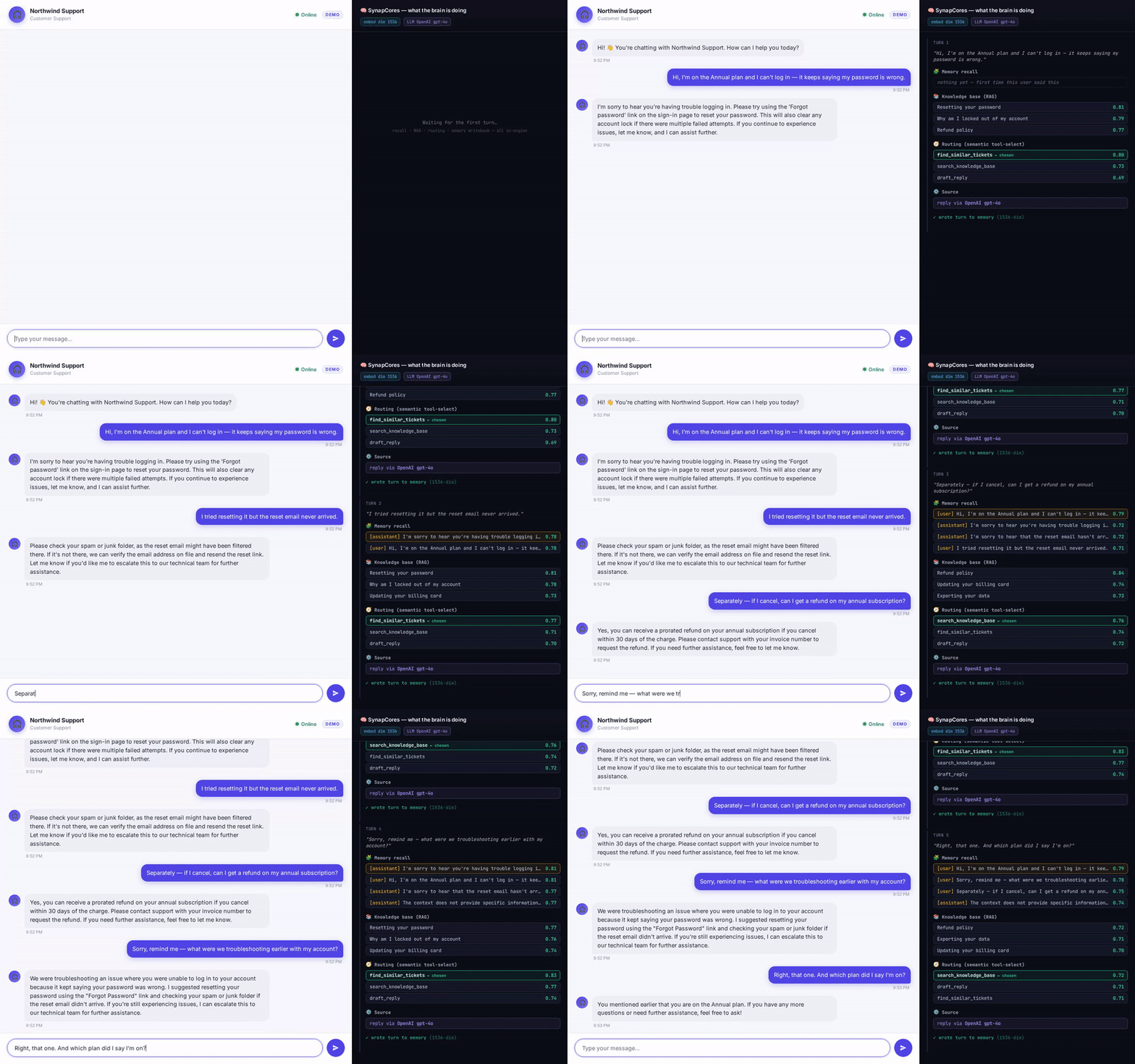
Also included: the v1 Python agent demo
The original v1 of this repo was a framework-free Python agent loop
(src/synapcores_agent/) that exercises the same brain (recall + RAG +
semantic routing + grounded generation) from a CLI / WebSocket demo —
the engine behind the support-chat.gif at the top.
The widget is not a replacement: it's a delivery surface. The Python agent is still the cleanest way to see the loop step-by-step and to fork as a starting point for non-browser agents (CLI tools, Discord bots, internal pipelines).
# v1 Python agent — separate from the widget/proxy stack
git clone https://github.com/SynapCores/synapcores-agent
cd synapcores-agent
cp .env.example .env
# edit .env: SYNAPCORES_URL + admin credentials
pip install -e .

python -m synapcores_agent --seed --trace
python -m synapcores_agent --ask "I can't log in"
The full v1 agent loop, certified recipes, tool surface, and test suite
are documented under https://synapcores.com/recipes/agents/. Source
under src/synapcores_agent/.
Repository layout
synapcores-agent/
├── .github/workflows/widget-cdn.yml   Cloudflare Pages + npm publish
├── widget/
│   ├── src/         TypeScript widget bundle source
│   ├── dist/        Built artifact (committed for the proxy to serve)
│   ├── PUBLISH.md   How publishing works (Cloudflare + npm)
│   └── README.md    Widget config + dev surface
├── proxy/
│   ├── src/         Node.js HTTP + WS proxy
│   ├── bin/         sc-widget CLI
│   ├── Dockerfile, docker-compose.example.yml
│   └── README.md    Proxy config + security checklist + deploy
├── examples/
│   ├── embed-html/, embed-nextjs/, embed-wordpress/
│   └── README.md    Embed patterns
└── src/synapcores_agent/   v1 Python agent (original demo)
Status
| Component | Status |
|---|---|
@synapcores/[email protected] |
✅ Live on npm, jsDelivr, unpkg |
@synapcores/widget-proxy (this repo's proxy/) |
✅ Sprint 2-4 complete |
| identify() + persistent conversation | ✅ Sprint 3 |
| Dockerfile + docker-compose | ✅ Sprint 4 |
| Cloudflare Pages auto-deploy | ⚠️ Workflow present, awaiting secrets |
| v1 Python agent demo | ✅ Unchanged from May |
License
MIT — see LICENSE.
Built on SynapCores. The agentic patterns are the certified recipes at https://synapcores.com/recipes/agents/.
No comments yet
Be the first to share your take.