
symaira-fritz





A CLI to administer, analyse, and control an AVM FRITZ!Box — part of the
Symaira ecosystem. Binary name: symfritz.
Why symfritz
- Single binary, no dependencies — works on macOS, Linux, and Windows
- Speaks documented interfaces only (TR-064, AHA-HTTP) — no reverse-engineering required
- End-to-end diagnosis in one command —
symfritz diagnose <host>checks box entry, activity, LAN/WLAN, DNS, and TCP ports - Secure credential handling — resolves from env, symvault, or macOS Keychain; never stores plaintext by default
- MCP server for AI agents — exposes all capabilities as a stdio MCP server
It speaks the FRITZ!Box's documented interfaces, no reverse-engineering required:
| Interface | Used for | Endpoint |
|---|---|---|
| TR-064 (SOAP) | Administration: status, WAN/IP, WLAN, host list, mesh, reboot | :49000 / :49443 |
| AHA-HTTP | DECT smart-home actors (switches, thermostats) | /webservices/homeautoswitch.lua |
| Session login | Auth for AHA and (later) web-UI scraping | /login_sid.lua |
Inspired by
fritzconnection(Python, the best TR-064 reference) andfritzctl(Go, the architectural blueprint).
Status
What works today:
- Session auth — modern PBKDF2 (FRITZ!OS 7.24+) and legacy MD5 challenge-response, with automatic re-login on session expiry.
- TR-064 — generic action calls with HTTP digest auth, plus
tr64desc.xmlservice discovery (symfritz services). - Hosts — first-class host table:
list,active,getby name/MAC/IP. - Detect — find FRITZ!Box on local network when
fritz.boxresolves to a public IP. - Diagnose — end-to-end host reachability (box entry → active → LAN/WLAN → DNS → TCP ports).
- Mesh — topology of nodes, repeaters, and links.
- WLAN — radios, associated clients, guest-network status/toggle.
- Wake-on-LAN — by host name/IP or explicit MAC.
- AHA-HTTP — DECT device listing, switch on/off, and thermostat temperature control (
symfritz home). - Credentials —
auth login/test/store, resolved from env → symvault → macOS Keychain → config. - Traffic — real-time WAN traffic monitoring (downstream/upstream by category).
- DSL — line statistics: noise margin, attenuation, max bit rate.
- Phone — call list with type filtering, dial, and hangup.
- Log — system event log with category filtering (sys/net/fon/wlan/usb).
status,reboot, an MCP server (stdio) exposing the above, config + env loading.--jsonon the query/diagnose commands for scripting.
Still planned: per-radio band labelling.
There is also a best-effort symfritz scrape command for the web-UI data.lua
endpoint (stats TR-064 doesn't expose), see Caveats below.
Install
make build           # → ./symfritz
# or
go install github.com/danieljustus/symaira-fritz/cmd/symfritz@latest
# or via Homebrew
brew install danieljustus/tap/symfritz
Configure
symfritz config init                       # writes ~/.config/symfritz/config.toml
# edit host/user in the file, then store the password securely:
symfritz auth login                        # prompts, verifies against the box, stores it
symfritz auth test                         # confirm it resolves and works
Where the password comes from
symfritz resolves the password at runtime, in this order (first hit wins):
SYMFRITZ_PASSWORDenvironment variable — ad-hoc / CI.- symvault — set
password_ref = "fritz.password"in the config; symfritz shells out tosymvault getso nothing is stored on disk. - macOS Keychain — set
keychain = true; servicesymfritz, account = host. passwordplaintext in the config — least secure, convenience only.
auth login captures the password once, verifies it, and stores it in the
Keychain (default on macOS) or symvault (--symvault fritz.password). symvault
and the Keychain are reached through their CLIs, so symfritz has no build
dependency on either and works fine when they are absent.
symfritz auth login --symvault fritz.password   # store in symvault instead of Keychain
symfritz auth store --keychain                  # store without verifying (reads SYMFRITZ_PASSWORD or prompts)
symfritz auth test                              # show source + verify web login and TR-064 access
Tip: use a dedicated FRITZ!Box user with only the permissions you need rather than the admin account. TR-064 must be enabled on the box (Home Network → Network → Network Settings → "Allow access for applications").
Usage
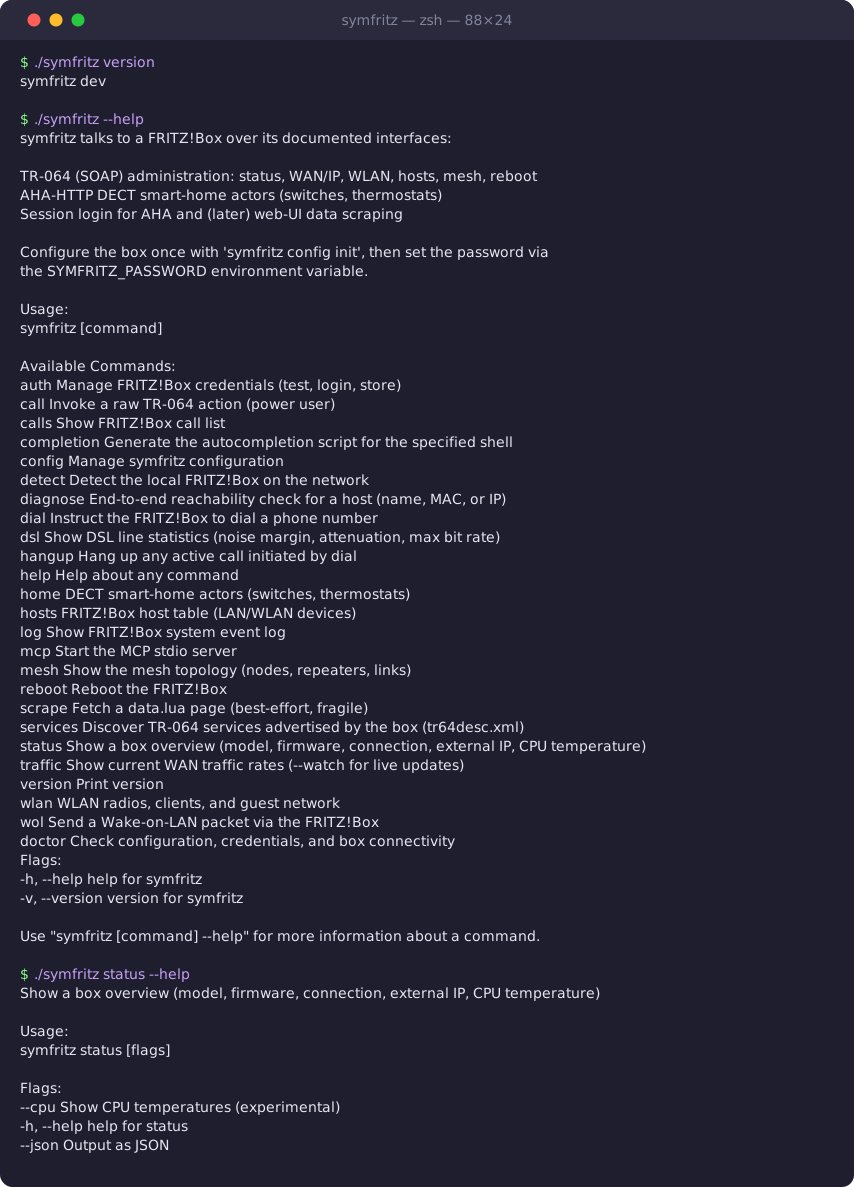
For the complete list of commands, subcommands, and flags, see the CLI Command Reference.
Common commands
symfritz status                             # model, firmware, connection, external IP
symfritz detect                             # find FRITZ!Box on local network
symfritz diagnose macmini                   # end-to-end host reachability check
symfritz diagnose router                    # detect and diagnose local router
symfritz hosts list                         # all known network devices
symfritz wlan radios                        # WLAN SSIDs, channels, state
symfritz traffic                            # real-time WAN traffic monitoring
symfritz dsl                                # DSL line statistics
symfritz home list                          # DECT smart-home actors
symfritz home temp <ain> <celsius|on|off>   # set target temperature for thermostat
symfritz calls                              # recent call list
symfritz reboot --yes                       # reboot the FRITZ!Box
symfritz mcp                                # start MCP stdio server for AI agents
Typical Mac Mini check
symfritz diagnose macmini
# Diagnose macmini  →  192.168.188.65
#   ✓ FRITZ!Box knows host       macmini
#   ✓ Host active
#   ✓ IP address                 192.168.188.65
#   ✓ Link medium                LAN
#   ✓ DNS resolves               192.168.188.65
#   ✓ TCP 22 (SSH)               open
#   ✗ TCP 5900 (VNC/Screen Sharing)  closed or filtered
#   ✓ TCP 8001 (Paperless)       open
Raw TR-064 service names
Shortcuts: deviceinfo, wanip, wanppp, wancommon, hosts, wlan1. Any
other name is resolved through tr64desc.xml discovery, so call reaches every
action the box advertises.
MCP server
symfritz mcp starts a stdio MCP server that exposes the FRITZ!Box capabilities
to AI agents such as Hermes.
Registering in Hermes
Add a server block to your Hermes configuration. The example below assumes the
Homebrew-installed binary at /opt/homebrew/bin/symfritz; adjust the path to
your installation:
mcp_servers:
  symfritz:
    command: /opt/homebrew/bin/symfritz
    args:
      - mcp
    env:
      SYMFRITZ_HOST: "192.168.188.1"
    enabled: true
Note:
fritz.boxcan resolve to a public IP address on some networks, which causes the MCP server to fail to reach the box. Use an explicit local IP or a DNS name you control, and set it viaSYMFRITZ_HOSTorhostin the config.
Smoke test
After registering, verify the server starts and exposes the expected tools:
$ SYMFRITZ_HOST=192.168.188.1 symfritz mcp
initialize: OK
serverInfo.name: symfritz
serverInfo.version: <version>
tools/list: 9 tools
The expected tools are status, host_list, host_get, diagnose, mesh,
wlan_clients, wake_on_lan, home_list, and home_switch.
Architecture
cmd/symfritz/        Cobra CLI
  detect.go            FRITZ!Box network discovery
internal/config/     TOML + env config (corekit configkit)
internal/fritz/      Core library:
  client.go            Client, options, endpoints
  session.go           login_sid.lua auth (PBKDF2 + MD5, auto re-login)
  tr064.go             SOAP action calls
  digest.go            HTTP digest auth
  discover.go          tr64desc.xml service discovery
  hosts.go             host table, lookup, Wake-on-LAN
  diagnose.go          end-to-end reachability checks
  errors.go            Error classification with actionable messages
  router.go            Router utilities
  router_gateway.go    Gateway detection
  wlan.go              radios, clients, guest network
  mesh.go              mesh topology
  aha.go               AHA-HTTP smart-home
  status.go            high-level overview
internal/secret/     credential resolution (env → symvault → keychain → config),
                     symvault & macOS Keychain via their CLIs (no build coupling)
internal/mcp/        MCP stdio server: status, host_list, host_get, diagnose,
                     mesh, wlan_clients, wake_on_lan, home_list, home_switch
The internal/fritz package is deliberately self-contained so other Symaira
tools could embed it later.
Caveats
- TR-064 + AHA cover the stable ~80%. The remaining bits (some stats, certain
logs, guest-WLAN details) are only available via web-UI
data.luascraping, which is FRITZ!OS-version-dependent and may break on firmware updates. That layer is intentionally not built yet and will be clearly marked "best effort".
Development
Build:
make build           # → ./symfritz
go install github.com/danieljustus/symaira-fritz/cmd/symfritz@latest
Test:
make test
go test ./...        # CGO_ENABLED=0
Lint:
make lint            # go fmt + go vet
go vet ./...
See CONTRIBUTING.md for the full contribution guide.
License
Apache-2.0. See LICENSE.
No comments yet
Be the first to share your take.