
Sovrant
A source-available command center for agents and agent activity — built on .NET 10.
Sovrant is a clean-room C# reimplementation inspired by the architecture and feature set of OpenClaude (the community fork of Anthropic's Claude Code). No Anthropic source code was copied, translated, or incorporated. Every line of Sovrant is original C# / .NET 10 code written from scratch — the project uses OpenClaude only as a functional reference for what an agentic coding tool should be able to do, not as a source of code.
We build Sovrant guided by four tenets:
- Be ethical with AI — Sovrant is designed with safety, trust boundaries, and responsible use at its core. We believe AI systems should be transparent, auditable, and operate within clearly defined human-controlled limits.
- Drive AI spend toward zero — by first-class support for free-tier and locally-hosted LLMs, Sovrant aims to make powerful AI accessible without recurring API costs. Paying for inference should be a choice, not a requirement.
- Minimise compute footprint — every architectural decision considers CPU, memory, and energy efficiency. Lower resource consumption means a smaller environmental impact and better performance on modest hardware.
- Own your own data — individuals, teams, and organisations should have full control over their data. Sovrant supports private workspaces, per-user memory scoping, and self-hosted LLMs so sensitive work never has to leave your infrastructure. Data privacy is a first-class feature, not an afterthought.
Sovrant is a command center for AI — from conversational chat and directed agents to persistent teams, long-running missions, and parallel swarms. Runs can be fully autonomous, human-watched, or anywhere in between. Sovrant also connects to Claws — fully autonomous agent runtimes such as Pico Claw, Hermes, and Open Claw — via MCP, letting you observe and steer them from a single cockpit; future releases will let you launch Claws directly from Sovrant to handle tasks. It is not limited to coding — Sovrant powers chat interfaces, research workflows, business process automation, content creation, project management, and any task that benefits from tool-augmented, session-persistent AI.
The engine runs as a CLI agent, an OpenAI-compatible HTTP server, a desktop application (Windows/macOS/Linux), a web application (Blazor Server), an MCP server for IDE embedding, or via webhooks from Slack, Teams, Discord, and custom systems. Agents read and write files, execute shell commands, search the web, call tools autonomously, delegate to sub-agents, and maintain full conversation history across sessions — all with configurable permission controls.
Architecture note: The CLI, Server, Desktop, and Web are independent frontends. All consume the runtime layer (
Sovrant.Runtime) directly — the server does not depend on the CLI, and the desktop/web apps run the runtime in-process. You can deploy any frontend independently.
Runtime: .NET 10 / C# 14 License: Business Source License 1.1 — source-available, converts to Apache 2.0 on 2029-05-15. See LICENSE. Status: 58 tools. 25 agent templates. 32 built-in skills. 141 server endpoints + SignalR hub. Command Center cockpit + User Dashboard (Web + Desktop). Per-record privacy toggles. Optional Supabase/PostgreSQL backend. Multi-user with login, registration, per-user API tokens, workspaces, projects, and ownership scoping. Team orchestration with per-team run profiles. Swarm orchestrator. Mission engine. Inter-agent coordination. Cost tracking. Eval framework. MCP server mode. Desktop app. Web app (embedded + remote mode). Frontend SDK. 2,222 tests passing across 10 projects.
| Web | Desktop |
|---|---|
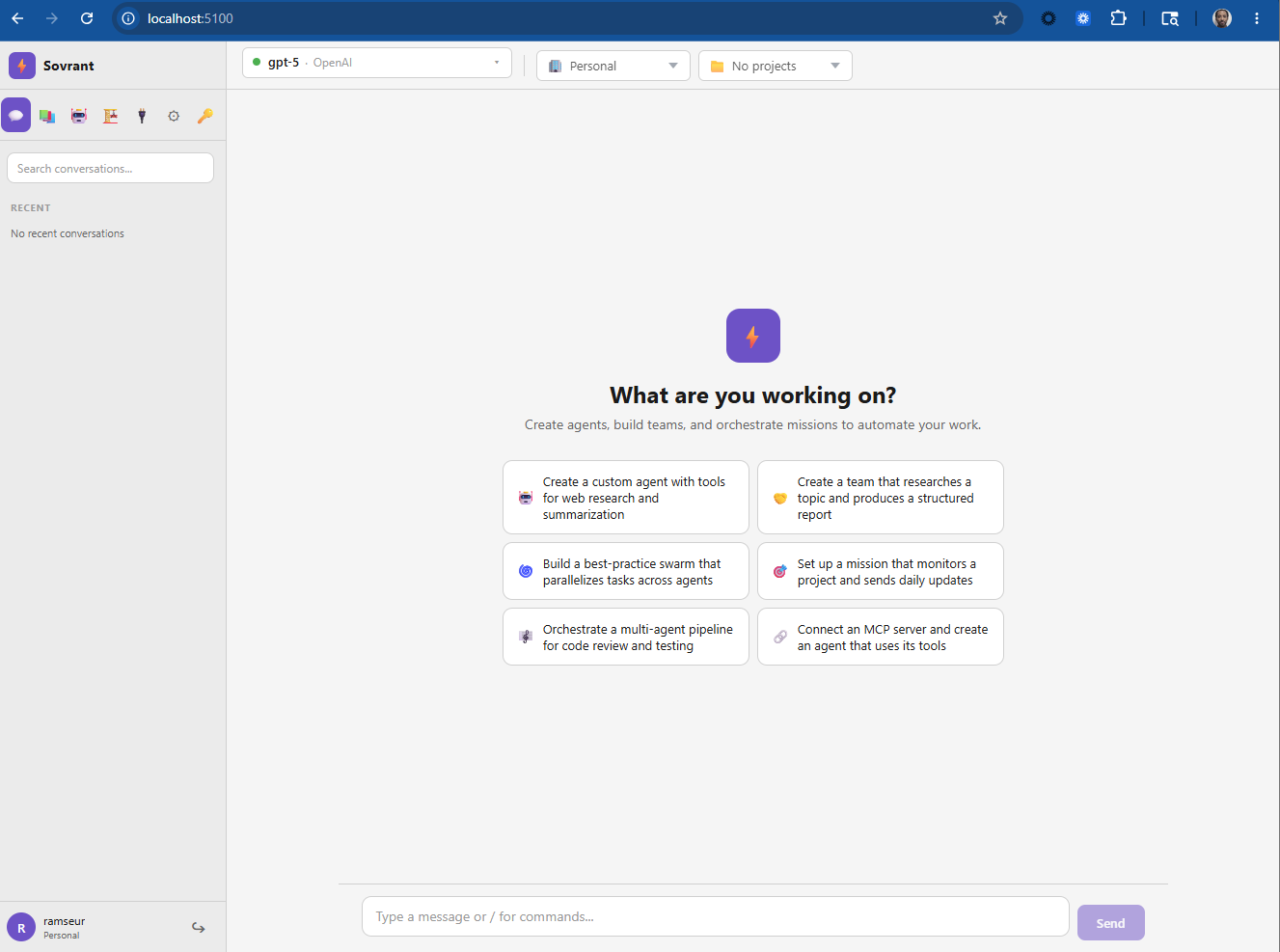 |
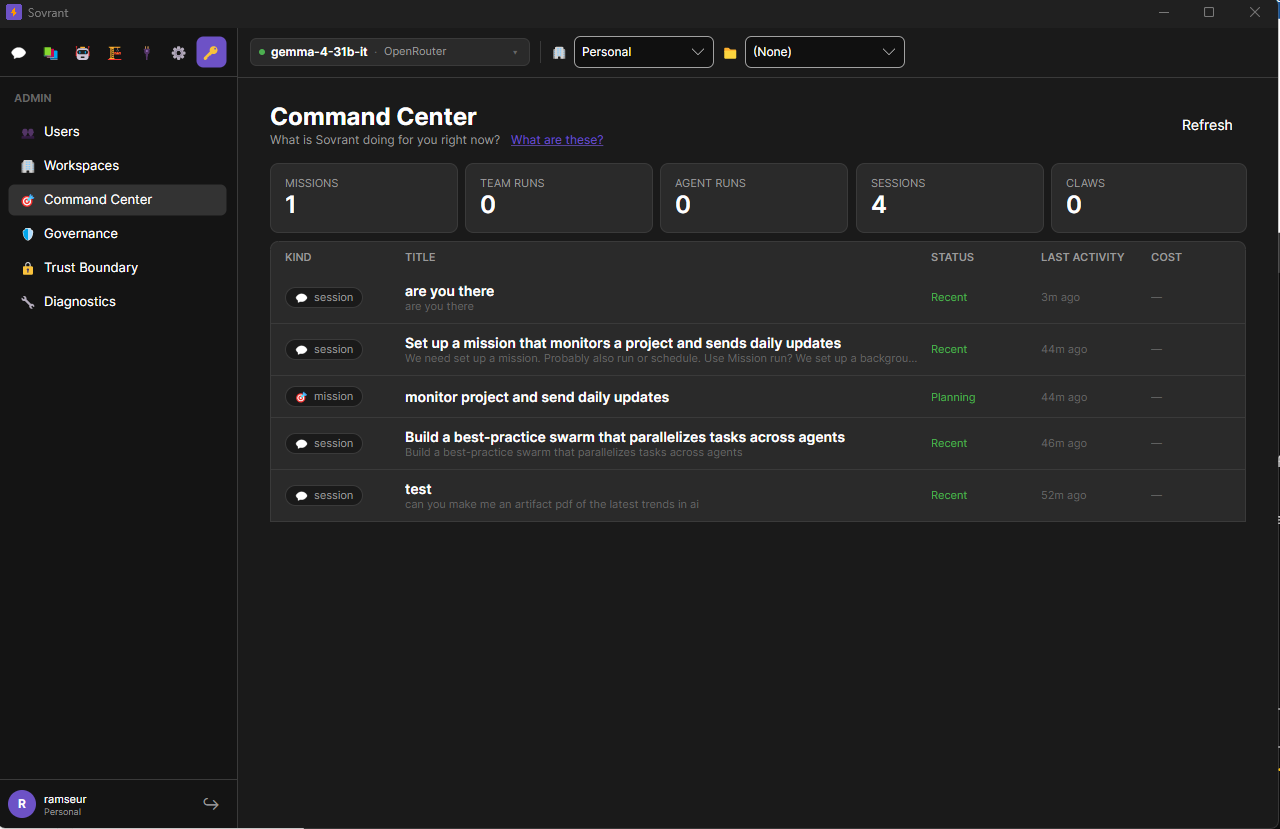 |
Table of Contents
- Quick Start
- Command Center
- User Dashboard
- Key Features
- Architecture
- Tools
- Agent System
- Missions
- Eval Framework
- Providers
- Server API
- Desktop App
- Web App
- Frontend SDK
- MCP Server Mode
- LSP Integration
- Persistence
- Configuration
- Production Deployment
- Tests
- Documentation
Quick Start
Best experiences today: The Desktop app and the embedded Web app deliver the most complete, polished experience. The CLI is functional but actively being refined — treat it as a work in progress.
Vibe Coding (Cursor, Claude Code, or any AI coding tool)
The fastest way to get up and running is to let your AI coding tool do it for you. This has been proven to work with Cursor and Claude Code — paste the prompt below into your tool and it will clone the repo, orient itself, build the project, and launch both the Desktop and Web apps.
Clone https://github.com/ramseur/sovrant.git, then:
1. Read README.md for an overview of the project
2. Read every file in the docs/ folder to understand the architecture
3. Run: dotnet restore && dotnet build
4. Start the Desktop app (Windows — no console window):
   Start-Process dotnet -ArgumentList "run --project src/Sovrant.Desktop" -WindowStyle Hidden
   macOS/Linux: dotnet run --project src/Sovrant.Desktop &
5. Start the Web app: dotnet run --project src/Sovrant.Web
   (opens on http://localhost:5100)
Report what you find and confirm both surfaces are running.
Your tool will read the docs, build the solution, and start both surfaces. On first launch the Desktop setup wizard walks you through adding an API key — the Web app does the same on first login.
Prerequisites
- .NET 10 SDK or Runtime
- An API key from any supported LLM provider
Clone & Build
git clone https://github.com/ramseur/sovrant.git
cd sovrant
dotnet restore
dotnet build
Desktop App (recommended for first-time users)
The fastest way to get started. Full GUI with provider setup wizard, chat, and management pages.
Windows (PowerShell — no console window alongside the app):
Start-Process dotnet -ArgumentList "run --project src/Sovrant.Desktop" -WindowStyle Hidden
macOS / Linux:
dotnet run --project src/Sovrant.Desktop &
dotnet runusesWinExeoutput type so the app itself never shows a console window. TheStart-Process -WindowStyle Hidden/&hides the dotnet host process. Alternatively, build first (dotnet build -c Release src/Sovrant.Desktop) and run the compiled executable directly — it launches with no console window on all platforms.
On first launch, the setup wizard guides you through provider configuration (API key, model selection). Supports OpenAI, OpenRouter, DeepSeek, Groq, Mistral, Together AI, Google, Azure OpenAI, Ollama, and LM Studio.
Web App
Browser-based UI on port 5100 with the full runtime embedded.
dotnet run --project src/Sovrant.Web
# Open http://localhost:5100
CLI
Set your provider credentials. Sovrant stores API keys in an encrypted, on-disk credential store; the auth subcommand prompts without echo so the key never lands in shell history.
Recommended (interactive — no echo):
dotnet run --project src/Sovrant.Cli -- auth set llm
# Enter value for llm: ********

# inspect what's configured (names only, never values)
dotnet run --project src/Sovrant.Cli -- auth list

# remove a stored key
dotnet run --project src/Sovrant.Cli -- auth delete llm
Scripted / CI (read from stdin):
cat key.txt | dotnet run --project src/Sovrant.Cli -- auth set llm --stdin
Env-var override (still supported for 12-factor / CI parity — wins over the stored value):
Linux / macOS / WSL:
export LLM_API_KEY="sk-..."
# Optional: use a different provider
export LLM_BASE_URL="https://generativelanguage.googleapis.com/v1beta/openai/"
Windows (PowerShell):
$env:LLM_API_KEY = "sk-..."
$env:LLM_BASE_URL = "https://generativelanguage.googleapis.com/v1beta/openai/"
Precedence: environment variable > encrypted credential store > built-in default.
auth listshows which is currently winning for each name.
Supported auth set <name> values: llm, provider, brave, firecrawl, openrouter.
Then run:
# One-shot prompt
dotnet run --project src/Sovrant.Cli -- --model gpt-4o-mini prompt "List all .cs files in src/"

# Interactive REPL
dotnet run --project src/Sovrant.Cli -- --model gpt-4o-mini

# Resume a named session
dotnet run --project src/Sovrant.Cli -- --model gpt-4o-mini --session my-project

# CI mode — machine-readable JSON output, non-zero exit on error
dotnet run --project src/Sovrant.Cli -- --ci --model gpt-4o-mini prompt "Fix the failing tests"
Server
dotnet run --project src/Sovrant.Server
The server starts on port 5200. On first run, register your admin account — the first user to register is automatically granted the admin role.
# 1. Register (first user becomes admin)
curl -X POST http://localhost:5200/v1/auth/register \
  -H "Content-Type: application/json" \
  -d '{"email":"[email protected]","password":"your-password"}'
# → { "token": "svt_...", "user_id": "...", "role": "admin" }

# 2. Save your token
export SVT_TOKEN="svt_..."
All credentials (API keys, provider tokens) are stored in the AES-256-GCM encrypted keystore at ~/.sovrant/credentials/ by default. Environment variables (e.g. LLM_API_KEY) are still accepted as an override for 12-factor / CI deployments and always take precedence over the stored value.
# Non-streaming
curl -X POST http://localhost:5200/v1/chat/completions \
  -H "Authorization: Bearer $SVT_TOKEN" \
  -H "Content-Type: application/json" \
  -d '{"model":"gpt-4o-mini","messages":[{"role":"user","content":"Hello"}]}'

# Streaming (SSE)
curl -X POST http://localhost:5200/v1/chat/completions \
  -H "Authorization: Bearer $SVT_TOKEN" \
  -H "Content-Type: application/json" \
  -d '{"model":"gpt-4o-mini","messages":[{"role":"user","content":"Hello"}],"stream":true}'

# Persistent session
curl -X POST http://localhost:5200/v1/chat/completions \
  -H "Authorization: Bearer $SVT_TOKEN" \
  -H "Content-Type: application/json" \
  -d '{"model":"gpt-4o-mini","messages":[{"role":"user","content":"My name is Eric"}],"session_id":"user-123"}'
Auth model: All requests require a
svt_*bearer token. Log in viaPOST /v1/auth/loginto get a token. Additional long-lived tokens can be issued viaPOST /v1/users/me/tokens(self-service) orPOST /v1/users/{id}/tokens(admin). Tokens carry an optional expiry and can be revoked at any time. Non-admin callers see only their own data. See Multi-User & Workspaces.
Permission Modes
| Mode | Behaviour |
|---|---|
default |
Asks before each tool use |
acceptEdits |
Auto-approves file edits, asks for shell |
bypassPermissions |
Auto-approves everything |
dontAsk |
Never prompts; silently skips denied tools |
plan |
Read-only — no file or shell writes |
dotnet run --project src/Sovrant.Cli -- --permission-mode bypassPermissions prompt "Refactor the auth module"
Use camelCase for
--permission-modevalues:bypassPermissions, notbypass-permissions.
Command Center
The Command Center (/command) is the homepage for Web and Desktop — a single live grid that answers "what is Sovrant doing for me right now?" It aggregates every active mission, team run, agent run, and conversation session into one read-only cockpit, with click-through to the existing detail pages (Activity, Orchestration, Mission detail).
┌──────────────────────────────────────────────────────────────────────┐
│ Command Center                                           ⟳ live · 30s │
├──────────────────────────────────────────────────────────────────────┤
│ KIND       TITLE                       STATUS    STARTED   COST       │
│ 🎯 mission Refactor the auth module    Running   12m ago   $0.42      │
│ 👥 team    Code review sweep           Running   3m ago    $0.08      │
│ 🤖 agent   security-auditor:OWASP scan Running   <1m ago   $0.01      │
│ 💬 session user-123                    Idle      2h ago    $1.17      │
└──────────────────────────────────────────────────────────────────────┘
- Live — polled every 30 seconds; paginated grid with header timestamp and page-preserve on navigation.
- Read-only by design (v1). Click a row to drill into the detail page that already exists for it.
- Privacy masking. Private records appear as masked rows — title and content are hidden, existence is acknowledged for admin accountability.
- Backed by one endpoint:
GET /v1/command-center/stateaggregates fromagent_runs, the mission engine,team_runs, and the session pool. - First-run lands here. A clean install completes the setup wizard and lands the user on Command Center, not on a blank chat — the empty state explains how to start activity.
See docs/server.md for the endpoint contract and docs/frontend-integration.md for the SDK call.
User Dashboard
The User Dashboard (/dashboard) is a personal cross-workspace activity view, distinct from the Command Center. Reached via the 👤 rail nav icon on both Web and Desktop.
┌──────────────────────────────────────────────────────────────────────┐
│ My Activity                                              ⟳ live · 30s │
├──────────────────────────────────────────────────────────────────────┤
│ Shared (12)  Private (3)  Active (2)                                  │
├──────────────────────────────────────────────────────────────────────┤
│ KIND       TITLE                       PRIVACY   STARTED   WORKSPACE  │
│ 💬 session API research                 Public   2h ago    my-project │
│ 💬 session Internal notes              🔒 Private  1h ago  personal  │
│ 🤖 agent   doc-writer run              Public   3h ago    team-ws    │
└──────────────────────────────────────────────────────────────────────┘
- What you see: own public ("Shared") records + own private records + teammates' public records in shared workspaces. Other users' private records are never returned — not masked, not counted.
- Privacy toggles. Any session or agent run can be marked private. Private records are visible only to the owner. On the Command Center they appear as masked rows (title/content hidden); on the User Dashboard they're excluded entirely from other users' views. Server-side enforcement — no client-side bypass.
- Backed by
GET /v1/user-dashboard/state. Powered byUserDashboardAggregatorwith workspace membership gating.
See docs/server.md for the endpoint contract.
Key Features
Provider-Agnostic LLM Routing
Connect to any OpenAI-compatible API — OpenAI, OpenRouter, Google Gemini, DeepSeek, Groq, Mistral, Together AI, Ollama (local), LM Studio (local), Azure OpenAI, or any provider that speaks the OpenAI chat completions format. The SmartRouter pings all configured providers on startup, scores them by latency, cost, and error rate, and routes each request to the optimal one. Switch providers by changing an environment variable or from the desktop/web settings UI — no code changes.
Intent-Aware Model Routing
Automatically selects the best model for each turn based on what you're asking. A rule-based IntentClassifier categorizes every input into one of 10 intent classes (SimpleQa, CodeGeneration, Refactor, Planning, Debugging, etc.) with a complexity score (0.0–1.0), then routes to the appropriate model tier (fast / standard / high). The ModelTierResolver auto-assigns your discovered models into tiers from OpenRouter pricing data — no manual configuration needed.
Free models only mode — set SOVRANT_FREE_MODELS_ONLY=true to restrict routing to zero-cost models. On OpenRouter this means only :free variants are eligible; local/self-hosted models (Ollama) are always included.
Tool-aware routing — when the request includes tools, the resolver automatically filters to models that support native tool use, preventing 404 errors from providers that don't support tool_calls.
Configure via the Settings UI (Web + Desktop, persists to the DB) or environment variables — .sovrant/routing.json is no longer read as of Phase 93; any pre-existing file is imported once on first boot via LegacyConfigMigrator:
# Use OpenRouter as the provider
export LLM_BASE_URL="https://openrouter.ai/api/v1"
export LLM_API_KEY="sk-or-v1-..."
export OPENROUTER_API_KEY="sk-or-v1-..."  # enables live model discovery
export SOVRANT_MODEL="google/gemma-4-31b-it:free"

# Restrict to free models only (no charges)
export SOVRANT_FREE_MODELS_ONLY=true

# Inspect tier assignments
sovrant router models
sovrant router status
58 Built-in Tools
Agents autonomously use tools for file operations, shell execution, web access, task management, plan/worktree mode, notebook editing, MCP resource access, LSP code intelligence, code verification, skill execution, agent delegation, team orchestration, swarm orchestration, mission management, artifact retrieval, and document generation. Up to 20 tool rounds per turn with automatic retries.
25 Specialized Agent Templates
Define reusable agent roles as .md files with YAML frontmatter — each specifying a name, recommended model tier, system prompt, and allowed tools. 25 built-in templates ship with the engine. Drop custom templates into .sovrant/agents/ to override built-ins or add your own.
32 Built-in Skills (Composable Workflow Packages)
Skills are single .md files — YAML frontmatter (name, trigger, agents, tools) plus a markdown body with steps and instructions. 32 built-in skills across 7 domains: research (5), writing (5), business (5), project management (4), coding (7), media (3), and agent infrastructure (3). Invoke via /trigger slash commands or programmatically. Create new skills at runtime with SkillCreate.
Team Orchestration
Create persistent named agents with specific roles, custom system prompts, and tool restrictions. Teams persist to SQLite across restarts with full workspace/project scoping. Manage teams from within the agentic loop (LLM tool calls), via the HTTP API (/v1/teams/*, /v1/runs/*), or from the desktop/web UI. Run teams with optional parallelism and file-level locking. Publish swarm workers as reusable team members.
Swarm Orchestrator
Submit a single complex prompt and the swarm auto-decomposes it into a task DAG, executes tasks in parallel waves via specialized agents, enforces file-level locking and token budgets, and runs an optional quality gate review. Available via CLI (sovrant swarm "task"), the Swarm tool, /swarm slash command, and POST /v1/swarm (SSE streaming).
Mission Engine
Long-lived, goal-driven execution that spans multiple engine runs. A mission pursues an objective autonomously with re-planning, acceptance gates, and a full event journal. Missions are durable (persisted to SQLite), workspace-scoped, and manageable via API (/v1/missions/*).
Session Persistence
Every conversation is stored in a SQLite database with full-text search via FTS5. Resume sessions by name across CLI invocations or HTTP requests. Automatic context compaction when conversations exceed token limits. See Persistence.
Multi-User & Workspaces
Sovrant ships as a proper multi-user system, not a single-admin tool.
- Login + registration on Web and Desktop. First-run goes through registration, not a blank config screen. Username + password (hashed in SQLite via V026). Admins can flip open registration and require admin approval flags from the Admin UI.
- Per-user API tokens. Users issue
svt_*bearer tokens viaPOST /v1/users/me/tokens(or admins viaPOST /v1/users/{id}/tokens); the plaintext is returned once and never recoverable. Tokens carry an optional expiry, a slidinglast_used_atfor inactivity TTL, and can be revoked at any time. svt_*bearer tokens. All API requests require asvt_*bearer token obtained viaPOST /v1/auth/login(or returned at registration). Additional long-lived tokens can be issued viaPOST /v1/users/me/tokens(self-service) orPOST /v1/users/{id}/tokens(admin); the plaintext is returned once and never recoverable. Tokens carry an optional expiry, a slidinglast_used_atfor inactivity TTL, and can be revoked at any time. Non-admin callers see only their own sessions, usage, and audit; cross-user access returns404(not403) so IDs are not enumerable.- Admin role.
users.role = 'admin'grants cross-user visibility and/v1/users/{id}/*management. Admin-issued password reset tokens (password_reset_tokenstable, 24-hour TTL, one-time use) cover lost-password flows. - Personal workspace per user. Every user gets an auto-created
ws-personal-{user_id}workspace on signup, idempotent and undeletable. Team workspaces are created via the API with 7-day invite tokens and owner/editor/viewer roles. Accept invites viaPOST /v1/workspaces/invites/accept. - Projects nest inside workspaces with their own member lists and 3-tier config inheritance (project → workspace → global).
- Workspace-scoped provider profiles. Admins add a provider key once at workspace level and every member sees it in the provider dropdown (marked with a "Workspace" badge) without ever seeing the plaintext key. Per-user profiles work the same way at personal-workspace scope. All API keys flow through the encrypted keystore —
provider_profiles.credential_idreferences the encrypted store, never the raw value. - Per-workspace provider gating (opt-in). Globally configured providers are hidden from all workspaces by default. Admins explicitly enable each provider per workspace from the Workspaces admin page — members only see providers their workspace has been granted access to. When adding a provider on the Providers page, a workspace picker lets the admin opt in one or more workspaces immediately. The model picker refreshes on every open, so access changes take effect for connected clients without requiring re-login.
- Per-record privacy toggles. Any session or agent run can be marked private from the chat header or Agents UI. Private records are visible only to the owner — on the Command Center they appear as masked rows (title/content hidden); on the User Dashboard they are excluded from all other users' views entirely. Server-side enforcement via
is_privatecolumn (V030 migration).
Webhook Integrations
Single endpoint that accepts messages from Slack, Teams, Discord, or custom systems. Build bots and automations that leverage the full agent toolkit. See docs/webhooks.md.
CI/CD Pipeline Support
Machine-readable JSON output mode (--ci flag) with non-zero exit on error. GitHub Actions action and GitLab CI templates included. See docs/ci-cd.md.
Permission Controls
Five permission modes from fully interactive (default — asks before each tool use) to fully autonomous (bypassPermissions). Plan mode provides read-only access for safe exploration. Configurable per-session via API.
Structured Logging & Observability
Rolling file logs, JSON structured output for log aggregators, configurable log levels, per-session token usage tracking, and rate limiting.
Architecture
┌───────────────────────────────────────────────────────────────────┐
│  Frontends                                                        │
│  ┌──────────┐ ┌────────────┐ ┌──────────┐ ┌──────────────┐       │
│  │ CLI      │ │  Desktop   │ │   Web    │ │  Server      │       │
│  │ (REPL)   │ │ (Avalonia) │ │ (Blazor) │ │ HTTP :5200   │       │
│  └────┬─────┘ └─────┬──────┘ └────┬─────┘ └──────┬───────┘       │
│       └─────────────┬┴─────────────┘              │               │
│                     │  All consume Sovrant.Runtime in-process     │
└─────────────────────┼─────────────────────────────────────────────┘
                      │
    ┌─────────────────▼──────────────────────────────────────────┐
    │  Sovrant.Runtime                                           │
    │                                                            │
    │  Mission Engine                                            │
    │  ├── IMissionStore (SQLite)                                │
    │  ├── LlmMissionPlanner → RuntimePlan                       │
    │  └── ParallelMissionExecutor                               │
    │                                                            │
    │  Engine Layer                                              │
    │  ├── IPlanner → LlmPlanner (plan/re-plan)                  │
    │  ├── IExecutor → LlmExecutor (crash-safe trace)            │
    │  └── IStepRunner → LlmStepRunner (tool dispatch)           │
    │                                                            │
    │  ConversationRuntime                                       │
    │  ├── agentic loop (up to 20 tool rounds)                   │
    │  ├── session history (SQLite + in-memory)                  │
    │  ├── permission gate                                       │
    │  └── MCP client (tool registration)                        │
    │                                                            │
    │  IRuntimeSessionPool  (one runtime per session_id)         │
    │  IStorageProvider  (SQLite, 30 migrations, 45+ tables)     │
    └───────────┬──────────────────┬─────────────────────────────┘
                │                  │
    ┌───────────▼────────┐  ┌──────▼──────────────────────────┐
    │  Sovrant.Api       │  │  Sovrant.Tools (58 tools)        │
    │                    │  │                                  │
    │  SmartRouter       │  │  File:  Read Write Edit          │
    │  ├── OpenAI        │  │         Glob Grep LS             │
    │  ├── OpenRouter    │  │  Shell: Bash PowerShell REPL     │
    │  ├── DeepSeek      │  │  Web:   WebFetch WebSearch       │
    │  ├── Groq          │  │  Tasks: TodoWrite Task*          │
    │  ├── Mistral       │  │  Agent  AskUser  Sleep           │
    │  ├── Google        │  │  PlanMode  Worktree              │
    │  ├── Ollama        │  │  Skill  ToolSearch  SkillCreate  │
    │  ├── LM Studio     │  │  Verify  NotebookEdit            │
    │  └── Custom        │  │  MCP: List Read MCPTool McpAuth  │
    │                    │  │  LSP: 5 tools (18 languages)     │
    │  IntentClassifier  │  └──────────┬───────────────────────┘
    │  ModelTierResolver │             │
    └───────────┬────────┘  ┌──────────▼───────────────────────┐
                │           │  Sovrant.Agents                   │
                │           │                                   │
                │           │  Unified Orchestration            │
                │           │  ├── SqliteTeamRegistry (DB)      │
                │           │  ├── AgentOrchestrator             │
                │           │  └── AgentRunStore (run ledger)   │
                │           │                                   │
                │           │  SovrantAgentFactory               │
                │           │  ├── 25 agent templates            │
                │           │  └── FilteredToolRegistry          │
                │           │                                   │
                │           │  IOrchestrationSystem              │
                │           │  ├── Isolated (process-per-agent)  │
                │           │  └── Shared (in-process async)    │
                │           │                                   │
                │           │  Swarm Orchestrator                │
                │           │  ├── LlmSwarmDecomposer (DAG)     │
                │           │  ├── SwarmOrchestrator (waves)     │
                │           │  ├── SwarmFileLockManager          │
                │           │  └── SwarmQualityGate              │
                │           └───────────────────────────────────┘
                │
    ┌───────────▼──────────────────┐
    │  LLM Providers               │
    │  OpenAI · OpenRouter ·       │
    │  DeepSeek · Groq ·           │
    │  Mistral · Google ·          │
    │  Together AI · Ollama ·      │
    │  LM Studio · Azure · Custom  │
    └──────────────────────────────┘
Projects
| Project | Description |
|---|---|
Sovrant.Cli |
Interactive REPL and one-shot prompt CLI. Entry point for local use. |
Sovrant.Server |
ASP.NET Core Minimal API — OpenAI-compatible endpoints plus management APIs. 141 endpoints + SignalR hub. |
Sovrant.Desktop |
Avalonia desktop app — full GUI with streaming chat, tool use, settings, and management pages. |
Sovrant.Web |
Blazor Server web app — browser-based UI with embedded or remote runtime. Port 5100. Dual-mode: SOVRANT_RUNTIME_MODE=embedded (default) or remote (connects to Sovrant.Server via SignalR). |
Sovrant.Runtime |
Core agentic loop, mission engine, planner/executor, SQLite persistence (30 migrations V001–V030), permission system, tool executor, MCP client, cost tracking. |
Sovrant.Api |
LLM provider abstraction: OpenAI-compat, Ollama, native messages API. SmartRouter with health/latency/cost scoring. Intent-aware model routing. |
Sovrant.Tools |
All 58 tool implementations. 32 built-in skill .md files. |
Sovrant.Storage.Postgres |
Optional PostgreSQL/Supabase backend — overrides ISessionStore and ICredentialStore with Npgsql implementations. Schema mirrors SQLite (V001–V030). Activated at boot when system.database_backend = "supabase" is set via the Admin → System Integrations UI. |
Sovrant.Commands |
Slash commands for the REPL (/help, /clear, /session, /memory, etc.). |
Sovrant.Agents |
Orchestration: team registry (SQLite-backed), agent factory, dual backends (isolated + shared), 25 agent templates, swarm orchestrator, unified run ledger, inter-agent coordination (PM agents + mailbox). |
Sovrant.Mcp |
Shared MCP protocol handlers (tools/list, tools/call, resources, prompts, completions). Consumed by both the CLI's mcp-server stdio subcommand and Sovrant.Server's HTTP/SSE MCP transport. |
Sovrant.Lsp |
Language Server Protocol client: JSON-RPC over stdio, manages language server lifecycle, 5 LSP tools. |
sdk/js |
TypeScript/JavaScript client SDK: SovrantClient covering the 141-endpoint server (incl. login / register / getCommandCenterState / updateTeamProfile), SSE streaming, React useChat() hook, 85+ TypeScript interfaces. |
Key Design Decisions
Always streaming internally. ConversationRuntime always sets Stream: true on every request. The server decides independently whether to forward chunks as SSE or buffer into a single JSON response. One code path in the agentic loop regardless of the client's preference.
One runtime per session. The server keeps one ConversationRuntime alive per session_id in a ConcurrentDictionary. Each runtime holds its own message history in memory, loaded from SQLite on first access.
SmartRouter with health fallback. All LLM calls go through ISmartRouter. On startup it pings every configured provider and scores them by latency, cost, and error rate. If all providers fail the startup ping, the router falls back to the configured list rather than refusing to start.
Tool execution is permission-gated. Every tool call goes through IPermissionPolicy before execution. The CLI uses ModeAwarePermissionPolicy (interactive prompts based on PermissionMode). The server defaults to DontAsk and can be changed live via PUT /v1/config.
Per-model token capping. The runtime automatically caps max_tokens to model-specific limits (e.g., gpt-4o: 16,384, gpt-4.1: 32,768) to prevent 400 errors from providers that enforce strict limits.
Tools
58 tools available. All run inside the agentic loop with automatic retries up to 20 tool rounds per turn.
File
Read · Write · Edit · Glob · Grep · LS
Shell
Bash (WSL required on Windows) · PowerShell · REPL (Python, Node, Ruby, Perl)
Web
WebFetch · WebSearch (backend selected by SOVRANT_WEB_SEARCH — auto / brave / firecrawl / native / off — or per-session via /websearch; see docs/web-search.md)
Task Management
TodoWrite · TaskCreate · TaskGet · TaskList · TaskOutput · TaskStop · TaskUpdate
Plan Mode & Worktree
EnterPlanMode · ExitPlanMode · EnterWorktree (git worktree add) · ExitWorktree
Agent & Interaction
Agent (spawns an isolated sub-agent session) · AskUserQuestion · Sleep
Team Orchestration
TeamCreate · TeamDelete · TeamStatus · TeamDelegate · TeamRun (run a team with optional parallelism) · TeamPublish (publish swarm workers as reusable team members)
Persistent named agents with roles, system prompts, and tool restrictions. SQLite-backed, workspace-scoped. See Agent System.
Missions
Mission (create and drive long-lived goals with re-planning and acceptance gates)
Swarm Orchestration
Swarm (auto-decompose + parallel DAG execution with optional team) · SwarmStatus (live progress tracking)
Submit complex tasks for automatic decomposition into parallel waves. See Agent System.
Discovery & Skills
ToolSearch (keyword search over registered tools) · Skill (loads and executes a skill by name or /trigger) · SkillCreate (creates new .md skill files at runtime)
Quality
Verify (6-phase quality gate: build, type-check, lint, test, security scan, diff review)
MCP
ListMcpResources · ReadMcpResource · MCPTool (dynamic proxy — calls any tool on any connected MCP server) · McpAuth (OAuth 2.0 + PKCE flow for MCP servers that require authorization)
LSP (Language Server Protocol)
LspHover · LspDefinition · LspReferences · LspDiagnostics · LspRename
Requires a language server configured via the Settings UI (Web + Desktop, persisted to the lsp_servers table). See LSP Integration.
Notebook
NotebookEdit (read/write Jupyter .ipynb cells)
Agent System
Sovrant provides a layered orchestration capability: ad-hoc sub-agents for quick delegation, reusable agent templates for purpose-built roles, persistent teams for structured orchestration, and swarm for parallel task execution.
Ad-hoc Sub-Agents (Agent tool)
The Agent tool spawns a lightweight, stateless sub-agent for a single task. The LLM decides when to use it — typically to parallelize independent research, explore multiple solution paths, or isolate risky operations.
- Each sub-agent gets its own
ConversationRuntimewith a fresh session - No persistent identity — created, runs, and discarded
- Recursion depth limited to 5
- Same tool access as the parent (unless a template restricts it)
25 Agent Templates
Agent templates are .md files with YAML frontmatter — each defines a reusable agent persona with a name, recommended model tier (High/Standard/Fast), system prompt, and optional tool restrictions. Templates live in src/Sovrant.Agents/agents/ (built-in) and can be overridden by dropping .md files into .sovrant/agents/.
| Category | Templates |
|---|---|
| General-purpose (10) | researcher, writer, analyst, planner, summarizer, translator, tutor, debater, advisor, fact-checker |
| Code-specific (8) | coder, reviewer, debugger, refactorer, test-writer, architect, doc-writer, security-auditor |
| Creative / Domain (6) | storyteller, copywriter, data-scientist, sysadmin, product-manager, interviewer |
| Coordination (1) | pm-coordinator |
# Spawn a purpose-built agent from a template
Agent(template: "security-auditor", prompt: "Audit the auth module for OWASP Top 10")

# Create a team member backed by a template
TeamCreate(name: "reviewer", template: "reviewer")
Each template specifies a recommended_level that maps to a model string via ModelLevels config — so a "Fast" agent can use a cheaper model while a "High" agent gets the most capable one, without hardcoding model names.
Persistent Teams
Teams provide structured orchestration with persistent, named agents. Teams are stored in SQLite and survive process restarts with full workspace and project scoping.
Create and use teams from the agentic loop:
# Create a specialist agent (with or without a template)
TeamCreate(name: "reviewer", role: "reviewer",
           prompt: "You review code for bugs and security issues",
           allowed_tools: ["Read", "Grep", "Glob"])

# Delegate work
TeamDelegate(member_id: "abc123",
             prompt: "Review the auth module for SQL injection")

# Check status
TeamStatus()  →  [{ name: "reviewer", status: "Completed", last_output: "Found 2 issues..." }]

# Run a team with parallelism and file-locking
TeamRun(team_id: "team-abc", prompt: "Implement the feature across all modules")

# Publish ephemeral swarm workers as reusable team members
TeamPublish(team_id: "team-abc")
Or manage teams via the HTTP API:
POST   /v1/teams              — create a team
GET    /v1/teams              — list teams
GET    /v1/teams/{id}         — get team + members
DELETE /v1/teams/{id}         — delete a team
POST   /v1/teams/{id}/members — add a member
POST   /v1/teams/{id}/runs    — start a team run
GET    /v1/runs               — list all runs
GET    /v1/runs/{id}          — get run details
Each team member has a role (General, Planner, Coder, Reviewer, Executor, Supervisor) with a role-specific system prompt, can be backed by an agent template, restricted to a subset of tools, and tracks lifecycle state (Idle → Running → Completed/Failed). All runs are recorded in the unified agent_runs ledger with token counts and status.
Swarm Orchestrator
The swarm auto-decomposes complex tasks into parallel DAGs and executes them across multiple agents.
User prompt → [1. Decompose] → SwarmPlan (task DAG with waves)
                                    ↓
              [2. Execute]   → wave-by-wave parallel execution
                                    ↓
              [3. Quality Gate] → score + verdict → SwarmResult
Phase 1 — Decomposition: A high-level LLM agent analyzes the prompt and produces a JSON task array with dependencies, file predictions, and agent template assignments. Kahn's topological sort assigns parallel wave indices.
Phase 2 — Execution: The orchestrator processes waves sequentially, tasks within a wave in parallel (bounded by SemaphoreSlim). File-level pessimistic locking prevents conflicts. Token budget enforcement with aut
No comments yet
Be the first to share your take.