
Smart Illustrator


🆕 v1.4.0 — Tri-Engine System (Feb 2026)
New Excalidraw engine for hand-drawn concept diagrams. Three-tier priority: Gemini → Excalidraw → Mermaid. All diagram engines now output PNG by default. Details →
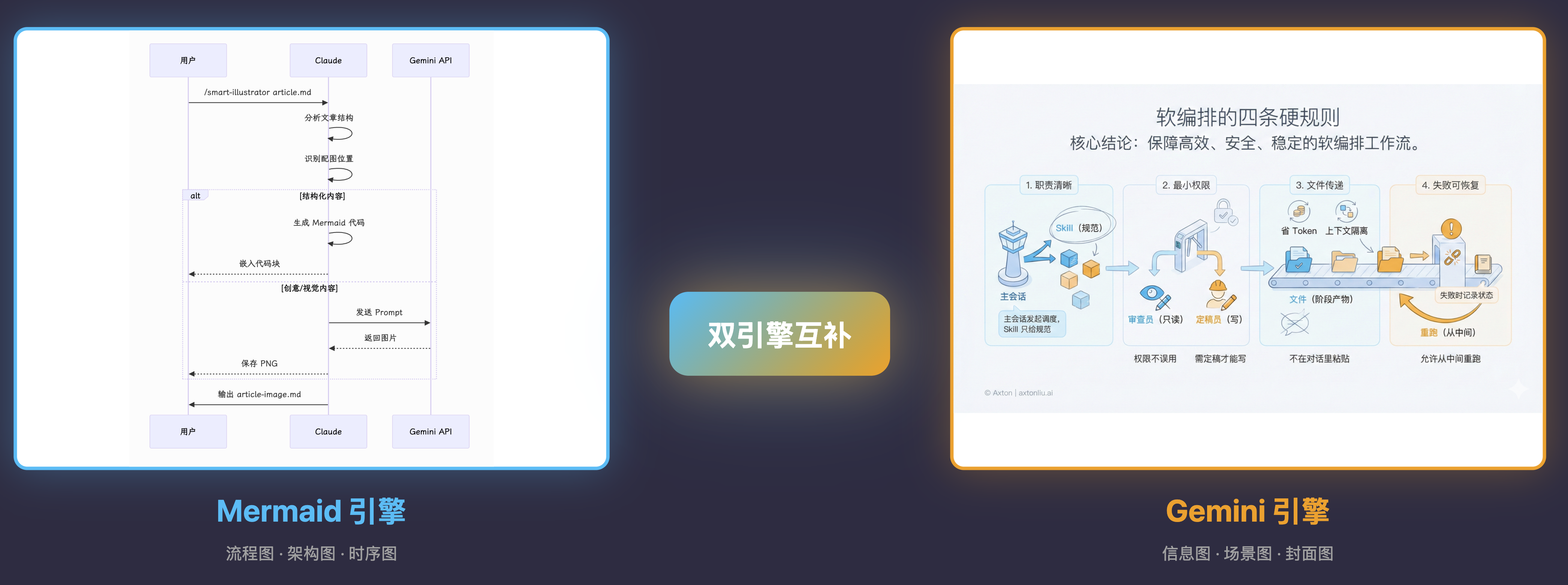
Intelligent article illustration Skill for Claude Code with tri-engine system: automatically selects Gemini (for creative visuals), Excalidraw (for hand-drawn diagrams), or Mermaid (for structured diagrams) based on content type.
Status
Status: Experimental
- This is a public prototype that works for my demos, but does not yet cover all input scales and edge cases.
- Output quality varies based on model version and input structure; results may fluctuate.
- My primary focus is demonstrating how tools and systems work together, not maintaining this codebase.
- If you encounter issues, please submit a reproducible case (input + output file + steps to reproduce).
Why Smart Illustrator?
Creating illustrations for articles is time-consuming: manual design takes hours, stock photos lack context, and generic AI tools don't understand article structure. Smart Illustrator combines intelligent position detection, tri-engine system (Gemini + Excalidraw + Mermaid), and cover learning to generate contextual illustrations in minutes.
Who it's for: Newsletter writers, YouTube creators, technical bloggers, course instructors.
When to use: When you need high-quality illustrations for articles, YouTube thumbnails with best practices, or consistent visual style across content series.
Background: the Make workflow version (auto-illustrate + WeChat publish)
Before packaging this into a Skill, I had already built an end-to-end Make workflow: search → write → auto-illustrate → format/publish (WeChat Official Account).
Full walkthrough (workflow logic & design trade-offs): https://youtu.be/TbyJ3imLuXQ
Features
- Tri-Engine System: Auto-selects Gemini, Excalidraw, or Mermaid based on content type
- Smart Position Detection: Analyzes article structure to identify optimal illustration points
- 10+ Illustration Types: flowchart, sequence, mindmap, concept, comparison, scene, metaphor...
- Extensible Style System: Light, Dark, Minimal, Cover, and custom styles
- Cover Mode: Generate high-CTR YouTube thumbnails with best practices built-in
- Multi-Platform Sizes: YouTube, WeChat, Twitter, Xiaohongshu presets
- Resume Generation: Skip already-generated images, regenerate specific ones
- Brand Customizable: Modify
styles/to apply your brand style - Multiple Backends: Gemini API for creative visuals (2K resolution), Excalidraw for hand-drawn diagrams, Mermaid CLI for structured diagrams — all output PNG by default
What Are Skills?
Skills are prompt-based extensions for Claude Code that give Claude specialized capabilities. Unlike MCP servers that require complex setup, skills are simple markdown files that Claude loads on demand.
Installation
Prerequisites
- Claude Code CLI installed
- Bun runtime (for scripts)
- Mermaid CLI (for Mermaid diagrams):
npm install -g @mermaid-js/mermaid-cli - Excalidraw export dependencies (optional, for Excalidraw diagrams):
cd ~/.claude/skills/smart-illustrator/scripts && npm install && npx playwright install firefox - Gemini API Key (optional, for creative visuals): https://aistudio.google.com/apikey
Option A: Manual Installation (Recommended)
# Clone to Claude Code Skills directory
git clone https://github.com/axtonliu/smart-illustrator.git ~/.claude/skills/smart-illustrator
Option B: Copy Individual Files
# If you only want the skill without scripts
cp -r smart-illustrator/SKILL.md ~/.claude/skills/smart-illustrator/
cp -r smart-illustrator/styles ~/.claude/skills/smart-illustrator/
Usage
Basic Usage
# Analyze article and auto-generate illustrations (default)
/smart-illustrator path/to/article.md

# Output prompts only, don't auto-generate images
/smart-illustrator path/to/article.md --prompt-only

# Specify style (loads from styles/ directory)
/smart-illustrator path/to/article.md --style light     # Light style (default)
/smart-illustrator path/to/article.md --style dark      # Dark tech style
/smart-illustrator path/to/article.md --style minimal   # Minimal style

# List available styles
/smart-illustrator --list-styles

# Without cover image
/smart-illustrator path/to/article.md --no-cover

# Specify number of illustrations
/smart-illustrator path/to/article.md --count 5
Parameters
| Parameter | Default | Description |
|---|---|---|
--mode |
article |
Mode: article, slides, or cover |
--engine |
auto |
Engine: auto, gemini, excalidraw, or mermaid |
--mermaid-embed |
false |
Embed Mermaid code blocks instead of exporting PNG |
--platform |
youtube |
Cover platform: youtube/wechat/twitter/xiaohongshu/landscape/square |
--topic |
- | Cover topic (alternative to article path, cover mode only) |
--description |
- | Cover visual direction (cover mode only) |
--prompt-only |
false |
Output prompts only, don't call API to generate images |
--style |
light |
Style name, loads styles/style-{name}.md |
--list-styles |
- | List all available styles in styles/ directory |
--no-cover |
false |
Skip cover image generation (article mode) |
--count |
auto | Number of illustrations (auto-determined by article length) |
Illustration Count Guidelines
| Article Length | Suggested Count |
|---|---|
| Short (< 1000 words) | 1-2 images |
| Medium (1000-3000 words) | 2-4 images |
| Long (> 3000 words) | 4-6 images |
| Tutorials/Guides | 1 per major step |
Output Files
article.md                    # Original
article-image.md              # Article with illustrations (main output)
article-cover.png             # Cover image (16:9)
article-image-01.png          # Content illustration (3:4)
article-image-02.png
article-image-03.png
Manual Script Usage
generate-image.ts (Single Image)
export GEMINI_API_KEY=your_key

# From prompt text
npx -y bun ~/.claude/skills/smart-illustrator/scripts/generate-image.ts \
  --prompt "A concept diagram showing..." \
  --output image.png

# From prompt file
npx -y bun ~/.claude/skills/smart-illustrator/scripts/generate-image.ts \
  --prompt-file prompt.md \
  --output image.png
| Option | Description |
|---|---|
-p, --prompt |
Image description text |
-f, --prompt-file |
Read prompt from file |
-o, --output |
Output path (default: generated.png) |
-m, --model |
Model (default: gemini-3-pro-image-preview) |
batch-generate.ts (Batch Generation)
export GEMINI_API_KEY=your_key

npx -y bun ~/.claude/skills/smart-illustrator/scripts/batch-generate.ts \
  --config slides.json \
  --output-dir ./images \
  --prefix SKILL_01
| Option | Description |
|---|---|
-c, --config |
JSON config file (required) |
-o, --output-dir |
Output directory (default: ./illustrations) |
-m, --model |
Model (default: gemini-3-pro-image-preview) |
-d, --delay |
Delay between requests in ms (default: 2000) |
-p, --prefix |
Filename prefix (default: from config filename) |
-r, --regenerate |
Regenerate specific images (e.g., "3" or "3,5,7") |
-f, --force |
Force regenerate all images (ignore existing) |
Resume Generation: By default, the script skips images that already exist in the output directory. This allows resuming interrupted generation without re-generating completed images.
Output: {prefix}-01.png, {prefix}-02.png, etc.
mermaid-export.ts (Mermaid to PNG)
# From .mmd file
npx -y bun ~/.claude/skills/smart-illustrator/scripts/mermaid-export.ts \
  --input diagram.mmd \
  --output diagram.png

# From inline content
npx -y bun ~/.claude/skills/smart-illustrator/scripts/mermaid-export.ts \
  --content "flowchart LR
    A[Start] --> B[End]" \
  --output simple.png \
  --theme dark
| Option | Description |
|---|---|
-i, --input |
Input .mmd file path |
-c, --content |
Mermaid diagram content (alternative) |
-o, --output |
Output path (default: output.png) |
-t, --theme |
Theme: light (default) or dark |
-w, --width |
Image width in pixels |
-H, --height |
Image height in pixels |
PPT/Slides Generation Mode
Beyond article illustrations, this skill can generate batch infographics for PPT/Keynote slides.
When to Use
| Mode | Use Case | Output |
|---|---|---|
| Article Mode | Blog posts, newsletters | 3-5 illustrations inserted in article |
| Slides Mode | Video B-roll, presentations | 8-15 standalone infographics |
JSON Format for Batch Generation
Use pictures[] array format with explicit batch rules:
{
  "instruction": "请为我绘制 7 张图片(generate 7 images)。你是一位「信息图绘制者」。请逐条执行 pictures 数组:每个 id 对应 1 张独立的 16:9 信息图,严禁合并,严禁只输出文字描述。",
  "batch_rules": {
    "total": 7,
    "one_item_one_image": true,
    "aspect_ratio": "16:9",
    "do_not_merge": true
  },
  "fallback": "如果无法一次生成全部图片:请输出 7 条独立的单图绘图指令...",
  "style": "[Complete style prompt - see styles/style-light.md]",
  "pictures": [
    { "id": 1, "topic": "封面", "content": "Course Name\n\nSection Title\n\nLearning objectives..." },
    { "id": 2, "topic": "核心概念", "content": "[Raw content]" }
  ]
}
Critical Rules
-
Use
pictures[]array - Array structure helps Gemini enter "loop execution" mode for batch generation. -
Add image trigger phrase - Must include "请为我绘制 N 张图片(generate N images)" to trigger image generation mode.
-
Role as "绘制者" not "导演" - Use "信息图绘制者" (illustrator) not "视觉导演" (director) to trigger actual drawing behavior.
-
Separate instruction from style -
instruction= what to do + role;style= visual rules only. -
Pass complete style - Include the full style prompt from
styles/style-light.md, don't summarize. -
Content granularity - Judge by information density, not mechanically by H2 headers.
Cover Slide Branding (PPT Mode)
For course/series content, the cover slide (id: 1) should include:
{
  "id": 1,
  "topic": "封面",
  "content": "Agent Skills 完全指南\n\n第4节:渐进式披露与 Description 优化\n\n学习目标:理解 Progressive Disclosure 机制"
}
Structure:
- Series name: e.g., "Agent Skills 完全指南"
- Section number: e.g., "第4节"
- Section title: e.g., "渐进式披露与 Description 优化"
- Learning objectives (optional)
Output Options (Applies to All Modes)
--prompt-only is a global option that works with Article, Slides, Cover, and all other modes:
| Output Mode | Parameter | Description | API Required |
|---|---|---|---|
| Generate Images | Default | Calls Gemini API to generate images | ✅ Yes |
| Output JSON Prompt | --prompt-only |
Copy to Gemini Web for manual generation | ❌ No |
Example Combinations:
# Slides mode + generate images (needs API)
/smart-illustrator script.md --mode slides

# Slides mode + output JSON only (no API)
/smart-illustrator script.md --mode slides --prompt-only

# Article mode + generate images (needs API)
/smart-illustrator article.md

# Article mode + output JSON only (no API)
/smart-illustrator article.md --prompt-only
Manual Batch Generation (after JSON prompt output):
export GEMINI_API_KEY=your_key

npx -y bun ~/.claude/skills/smart-illustrator/scripts/batch-generate.ts \
  --config slides.json \
  --output-dir ./images
See references/slides-prompt-example.json for a complete example.
💡 Tip: Batch image generation with JSON in Gemini doesn't have 100% success rate. If generation fails:
- Retry 1-3 times (usually succeeds)
- If retries fail, copy individual items from
picturesarray and generate one by one
Configuration Files (Style Reuse)
Save common parameters to configuration files for consistent style across series content (courses, newsletters).
Configuration File Locations
Priority: CLI Arguments > Project Config > User Config
| Location | Path | Purpose |
|---|---|---|
| Project | {working-dir}/.smart-illustrator/config.json |
Project-specific style (e.g., course series) |
| User | ~/.smart-illustrator/config.json |
User's global default style |
Configuration File Format
{
  "references": [
    "./refs/style-ref-01.png",
    "./refs/style-ref-02.png"
  ]
}
Supported options:
references: Array of reference image paths (relative paths are resolved relative to config file directory)
Usage Examples
# Initial setup: configure style for course series
cd ~/my-course
/smart-illustrator article-01.md --ref ./refs/style-1.png --save-config

# Subsequent generation: auto-apply config
/smart-illustrator article-02.md  # Automatically uses reference images

# Temporary override: use different reference
/smart-illustrator article-03.md --ref ./other-ref.png

# Completely ignore config
/smart-illustrator article-04.md --no-config

# Save to user-level config (global default)
/smart-illustrator article.md --ref ./my-style.png --save-config-global
Configuration Loading Rules
- Read user-level config (if exists)
- Read project-level config (if exists, overrides user-level)
- Apply command-line arguments (overrides config files)
Typical scenarios:
- Course series: Save
.smart-illustrator/config.jsonin project directory for unified style across chapters - Personal default: Save
~/.smart-illustrator/config.jsonin user directory as global default - Temporary adjustment: Use
--refparameter to temporarily override config without modifying saved settings
Cover Mode (YouTube Thumbnails)
Generate high-CTR cover images for YouTube, WeChat, Twitter, and more. Built on YouTuber best practices research.
# Generate YouTube thumbnail from article
/smart-illustrator path/to/article.md --mode cover --platform youtube

# Generate with specific topic
/smart-illustrator --mode cover --platform youtube --topic "Claude 4 Deep Review"

# Generate with visual direction
/smart-illustrator --mode cover --platform wechat --description "Comparison diagram + tech aesthetic"
Supported Platforms
All outputs are 2K resolution (e.g., ~2816×1584 for 16:9).
| Platform | Code | Aspect Ratio |
|---|---|---|
| YouTube | youtube |
16:9 |
wechat |
2.35:1 | |
| Twitter/X | twitter |
1.91:1 |
| Xiaohongshu | xiaohongshu |
3:4 |
| Landscape | landscape |
16:9 |
| Square | square |
1:1 |
Design Principles (from references/cover-best-practices.md)
- 3-Second Rule: Instantly convey topic and value
- High Contrast: Dark background + bright subject
- Single Focus: Only one visual center
- Minimal Text: 3-6 words, bold sans-serif
- Curiosity Gap: Make viewers want to click
Visual Metaphors for Tech Content
| Concept | Metaphor |
|---|---|
| AI Assistant | Two collaborative hands, chat bubbles |
| Efficiency | Upward arrows, stairs, rocket trail |
| Automation | Gears, assembly line nodes |
| Learning/Growth | Seed → tree, ascending stairs |
| Problem → Solution | Maze exit, completed puzzle |
Smart Position Detection
The skill analyzes article structure to identify optimal illustration points:
| Signal | Illustration Value |
|---|---|
| Abstract concept first appears | High - helps build mental model |
| Process/step description | High - visual is clearer than text |
| Comparison/choice discussion | High - side-by-side is clear |
| Data/statistics reference | Medium - numbers visualized have impact |
| Section transition point | Medium - provides visual breathing room |
| Emotional/story climax | Medium - enhances resonance |
Tri-Engine System
The skill automatically selects the best rendering engine based on content, with three-tier priority:
| Priority | Engine | Best For | Output |
|---|---|---|---|
| 1 | Gemini | Creative visuals (metaphors, scenes, infographics) | PNG (2K) |
| 2 | Excalidraw | Hand-drawn concept diagrams, comparisons, simple flows | PNG |
| 3 | Mermaid | Complex structured diagrams (flowcharts, sequences, architectures) | PNG |
Selection logic:
- Needs metaphor, emotion, or creative expression → Gemini
- Needs hand-drawn / informal style, or simple concept relationships → Excalidraw
- Complex structured flows / architectures → Mermaid
Illustration Types
| Type | Engine | Best For | Syntax/Style |
|---|---|---|---|
process |
Mermaid | Complex workflows | flowchart |
architecture |
Mermaid | System components | block-beta |
sequence |
Mermaid | API calls, interactions | sequenceDiagram |
mindmap |
Mermaid | Knowledge structure | mindmap |
state |
Mermaid | State transitions | stateDiagram |
concept |
Excalidraw / Gemini | Abstract concepts | Hand-drawn / Center-radial |
comparison |
Excalidraw / Gemini | A vs B, contrasts | Hand-drawn / Left-right split |
data |
Gemini | Statistics, trends | Infographic style |
scene |
Gemini | Stories, scenarios | Narrative illustration |
metaphor |
Gemini | Analogies, symbols | Creative visual |
cover |
Gemini | Article cover | 16:9 dark tech |
Type × Composition Reference
| Type | Recommended Composition | Elements |
|---|---|---|
| concept | Center-radial, hierarchy | Core icon + surrounding factors |
| process | Horizontal/vertical flow | Nodes + arrows + labels |
| comparison | Left-right / top-bottom split | Two columns + corresponding items |
| data | Chart-style | Numbers prominent + graphical |
| scene | Narrative illustration | Characters + environment + action |
| summary | Card grid, bullet points | Structured layout |
| metaphor | Analogy visual | Creative visual metaphor |
Style System
Built-in Styles
| Style | File | Best For |
|---|---|---|
| Light | styles/style-light.md |
Content illustrations (default) |
| Dark | styles/style-dark.md |
Cover images, marketing |
| Minimal | styles/style-minimal.md |
Technical docs, whitepapers |
| Cover | styles/style-cover.md |
YouTube thumbnails, social covers (cover mode) |
Content Illustrations: Light Style
- 3:4 portrait format
- Light gray background
#F8F9FA - Flat geometric + thin lines
- See
styles/style-light.md
Cover Images: Dark Tech Style
- 16:9 landscape format
- Deep blue gradient background
- Line icons + glassmorphism
- No text
- See
styles/style-dark.md
Custom Styles
Add your own style by creating styles/style-{name}.md and use it with --style {name}.
File Structure
smart-illustrator/
├── SKILL.md                  # Skill definition (Claude Code entry)
├── CLAUDE.md                 # Project rules (style sync, JSON format)
├── README.md
├── README.zh-CN.md           # Chinese documentation
├── LICENSE
├── scripts/
│   ├── generate-image.ts     # Gemini single image generation
│   ├── batch-generate.ts     # Gemini batch generation (2K, resume support)
│   ├── mermaid-export.ts     # Mermaid diagram to PNG export
│   ├── excalidraw-export.ts  # Excalidraw diagram to PNG export
│   └── package.json          # Script dependencies (Excalidraw export)
├── styles/
│   ├── brand-colors.md       # Brand palette (customizable)
│   ├── style-light.md        # Light style Gemini prompt (default)
│   ├── style-dark.md         # Dark style Gemini prompt
│   ├── style-minimal.md      # Minimal style Gemini prompt
│   └── style-cover.md        # Cover/thumbnail style (cover mode)
└── references/
    ├── slides-prompt-example.json  # PPT mode JSON format example
    ├── cover-best-practices.md     # YouTube thumbnail best practices
    └── excalidraw-guide.md         # Excalidraw JSON specification
Customization
Want to use your own brand style?
Option 1: Modify Existing Styles
- Edit
styles/brand-colors.mdwith your colors - Sync color values in
styles/style-*.mdfiles - Done! Your Skill now has your own brand identity.
Option 2: Add New Styles
- Create
styles/style-{name}.md(e.g.,style-corporate.md) - Follow the format in existing style files
- Use with
--style {name}
Example: Custom Brand Palette
Edit styles/brand-colors.md:
## Core / 核心色
| Your Brand Color | `#XXXXXX` | Your main color |

## Accent / 点缀色
| Your Accent | `#XXXXXX` | Your accent color |
Option 3: Customize AI Prompts
All AI prompts are centralized in prompts/ directory for easy customization:
prompts/
  ├── README.md              # Prompt management guide
  ├── varied-styles.md       # Style hints for Varied mode
  └── learning-analysis.md   # Cover learning analysis prompt
To customize:
- Edit the Markdown files directly (no code changes needed)
- Changes take effect immediately on next generation
- See
prompts/README.mdfor detailed instructions
Difference from Style System:
- Style files (
styles/*.md): Define core design rules (composition, colors, constraints) - Prompt templates (
prompts/*.md): Define generation strategies (style hints, analysis focus) - Both work together: styles set the foundation, prompts add nuance
Configuration Reference
Mermaid Engine Parameters
| Parameter | Value | Description |
|---|---|---|
-s |
3 |
3x scale for high-resolution output |
-w |
1600 |
1600px width |
-b |
white |
White background (light style) |
-t |
neutral |
Neutral theme |
Full command:
mmdc -i input.mmd -o output.png -s 3 -w 1600 -b white
Mermaid Best Practices:
This skill follows the style guidelines from mermaid-visualizer:
- Use
subgraph id["Display Name"]format for groups with spaces - Reference nodes by ID, not display text
- Avoid
number. spacepatterns (use①②③or(1)(2)(3)instead) - Apply consistent color coding per layer/category
- Use
direction LRinside subgraphs for horizontal layouts
Gemini Engine Parameters
| Parameter | Value | Description |
|---|---|---|
| Model | gemini-3-pro-image-preview |
Best for illustrations |
| Resolution | 2K (2816×1536) | High-res output via imageConfig.imageSize |
| Content Aspect | 3:4 portrait | Optimized for article embedding |
| Cover Aspect | 16:9 landscape | Platform-ready cover format |
| Cover Text | None | Clean visual, title shown by platform |
Brand Color Palette (Default: Axton Brand)
| Name | Hex | Usage |
|---|---|---|
| Deep Space Violet | #2F2B42 |
Core color, dark backgrounds |
| Amber | #F59E0B |
Accent, highlights, Skills layer |
| Sky Blue | #38BDF8 |
Accent, secondary highlights, Agents layer |
| Light Gray | #F8F9FA |
Light backgrounds, neutral elements |
Style Files
| File | Purpose | Aspect |
|---|---|---|
styles/style-light.md |
Content illustrations (default) | 3:4 portrait |
styles/style-dark.md |
Cover images | 16:9 landscape |
styles/style-minimal.md |
Technical docs | 3:4 portrait |
styles/style-cover.md |
YouTube/social covers | Platform-specific |
styles/brand-colors.md |
Color palette reference | - |
Cost
When using Gemini API for auto-generation:
| Model | Price | Quality |
|---|---|---|
gemini-3-pro-image-preview |
$0.134/image ≈ ¥1/image | 2K (default) |
Get API Key: https://aistudio.google.com/apikey
Contributing
Contributions welcome (low-maintenance project):
- Reproducible bug reports (input + output + steps + environment)
- Documentation improvements
- Small PRs (fixes/docs)
Note: Feature requests may not be acted on due to limited maintenance capacity.
Acknowledgments
This project builds upon these excellent tools:
- Claude Code - Anthropic's AI coding assistant
- Mermaid - Diagramming and charting tool
- Mermaid CLI - Command line interface for Mermaid
- Excalidraw - Virtual whiteboard for hand-drawn diagrams
- Playwright - Browser automation (for Excalidraw PNG export)
- Gemini API - Google's image generation API
- Bun - Fast JavaScript runtime
License
MIT License - see LICENSE for details.
Author
Axton Liu - AI Educator & Creator
- Website: axtonliu.ai
- YouTube: @AxtonLiu
- Twitter/X: @axtonliu
Learn More
- MAPS™ AI Agent Course - Systematic AI agent skills training
- Agent Skills Resource Library - Claude Code Skills collection and guides
- Claude Skills: A Systematic Guide - Complete methodology
- AI Elite Weekly Newsletter - Weekly AI insights
- Free AI Course - Get started with AI
MIT License © Axton Liu
No comments yet
Be the first to share your take.