
Skill Tree



Per-project skills, agent docs, and permissions for your AI coding agents — Claude Code, Codex, Pi, and opencode.
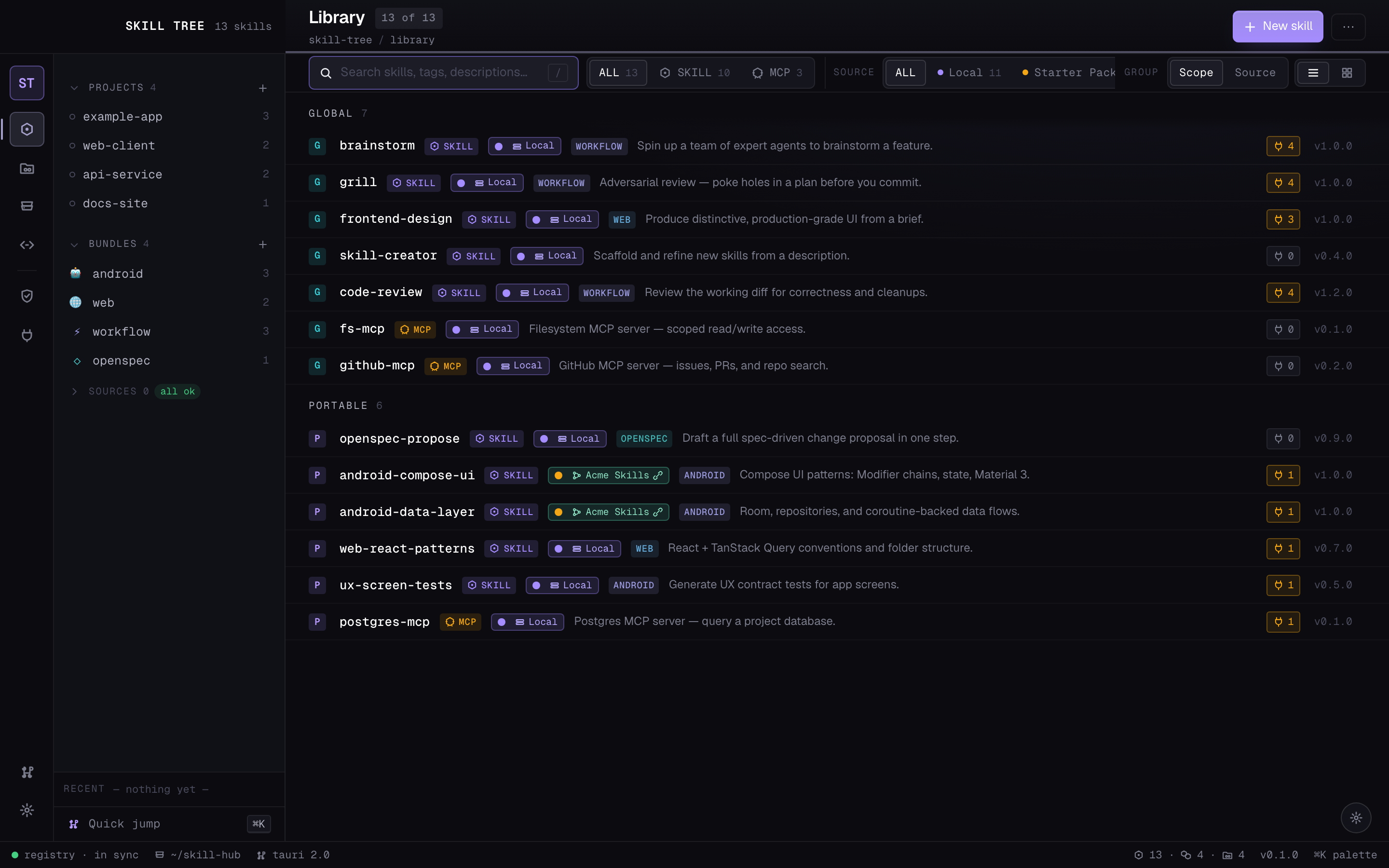
Screens shown with sample data.
Skill scope today is binary: a skill either lives at the user level and loads
into every session, or you copy it into one project's .claude/skills/. Neither
matches how skills actually cluster. The set you want for a Next.js frontend —
component conventions, your Tailwind setup, an accessibility checklist — is dead
weight in a Go service, where it costs context and occasionally steers the agent
toward advice that doesn't apply. Push those skills down to the project level
instead and there's no shared source of truth: the same react-component.md
gets copied into six repos, and a fix to one is a fix to one.
Skill Tree adds a layer between the two: bundles, named reusable sets of
skills you assign to projects. A skill is authored once in a canonical home
(~/.skill-hub/skills/) and can be referenced by any number of bundles; a
bundle can be applied to any number of projects. A frontend bundle (component
patterns, design-system notes, Playwright helpers) lands on your web repos and
nowhere else; a rust-cli bundle carries your error-handling and clap
conventions onto exactly the projects that are Rust CLIs. Onboarding a new repo
on a stack you've built before is one assignment, not a directory of
copy-paste. hub sync resolves the union of global bundles ∪ a project's
applied bundles ∪ its directly-enabled skills and materialises symlinks into
each harness's skills directory — so editing the canonical copy propagates
everywhere it's referenced, and a given session sees only the skills scoped to
that project.
It targets four harnesses today — Claude Code, Codex, Pi, and
opencode — each enabled globally or per project. Skill Tree meets each where
it already looks for skills: Codex, Pi, and opencode share a .agents/skills/
directory, so turning several on usually writes one set of files rather than a
copy per agent, while Claude Code reads its own .claude/skills/. hub sync
only touches the harnesses a project actually uses. The desktop app sits on top
of all this — a visual library, a per-project workspace, drag-and-drop bundle
assignment, and a live view of which skills land where.
Alpha software. Things move around. The CLI and registry format are stable; the desktop app is in active development.
Beyond skills
The same model — one canonical source, applied per project — extends past skills:
- 📄 Agent docs — one canonical root per project (
AGENTS.md, with a derivedCLAUDE.mdfor Claude Code), a map of every nested doc, and a per-file view of how much context each one pushes into the repo. - 🧩 Snippets — reusable agent-doc instruction blocks you apply across projects and update everywhere at once. Bundles, but for the prose your agents read rather than the skills they load.
- 🔒 Permissions — allow / ask / deny rules and hooks managed globally and per project, then written into each harness's own settings format (and kept scope-correct so a project file holds only its own rules).
Screens
Installing
Skill Tree ships without a skill library — you bring your own. The first-run
bootstrap imports the skills you already have (from ~/.claude/skills/,
~/.codex/skills/, and your project folders), and a curated starter pack is
planned as an optional external source.
Prebuilt app (macOS)
Each release attaches a built Skill Tree.app to its
GitHub Release. The build is
not yet code-signed or notarized, so macOS Gatekeeper will quarantine it on
first launch. After downloading and unzipping into /Applications:
# Either: right-click the app → Open → Open (once), or clear the quarantine flag:
xattr -dr com.apple.quarantine "/Applications/Skill Tree.app"
You still need Python 3.11+ on PATH for the CLI the app drives.
From source
macOS is the primary target; Linux is best-effort, Windows untested. Releases do
attach a best-effort, unsigned Windows installer built by CI
(SkillTree-windows-x64-setup.exe / .msi) — it is unsupported, ships no
bundled Python runtime, and has no auto-update. You need:
- Python 3.11+ on PATH
- Node 20+ and npm (for the desktop app)
- Rust stable (for the Tauri build)
git clone https://github.com/Ramtoi/skill-tree.git
cd skill-tree
python3 hub.py bootstrap     # first-run wizard — sets up ~/.skill-hub/
Real user data lives in ~/.skill-hub/registry.yaml; the repo only ships
registry.example.yaml as a reference.
To run the desktop app:
hub app dev                  # hot-reload dev mode (Vite + Tauri)
hub app build --install      # macOS: build and copy into /Applications
hub dashboard                # launch the installed app
Under the hood
- A YAML registry (
~/.skill-hub/registry.yaml) records skills, bundles, projects, and per-project harness/skill assignments — the single source of truth everything else is derived from. hub.pyis a single-file Python CLI that reads and writes the registry, materialises symlinks into each harness's skills directory, and handles MCP server and permission distribution. Path resolution separates code home (read-only assets shipped with the install) from data home (~/.skill-hub/— your registry, owned skills, and backups).- Skills are folders: a
SKILL.md(frontmatter + body) plus any reference files. - A Tauri 2 + React 19 desktop app (
app/) drives the same CLI — every UI action maps to one Rust command that shells out, so no business logic lives in the app.
For the design story behind the desktop app, see DESIGN.md. For the primitive
contracts inside it, see COMPONENTS.md. For onboarding to the codebase as a
contributor, see CLAUDE.md and CONTRIBUTING.md.
No comments yet
Be the first to share your take.