
Skael
One registry for your team's AI skills — across every agent and every project.
Your team's SKILL.md files live in scattered home directories and half-synced repos, copied by hand into each agent, with no idea which ones are actually used. Skael is the single source of truth: publish once, and it versions every skill, scans it for secrets and prompt injection, syncs it to Claude Code, Cursor, Codex, and OpenCode on every machine, and shows you which skills actually fire — by which agent, how often. Self-hosted and open source.
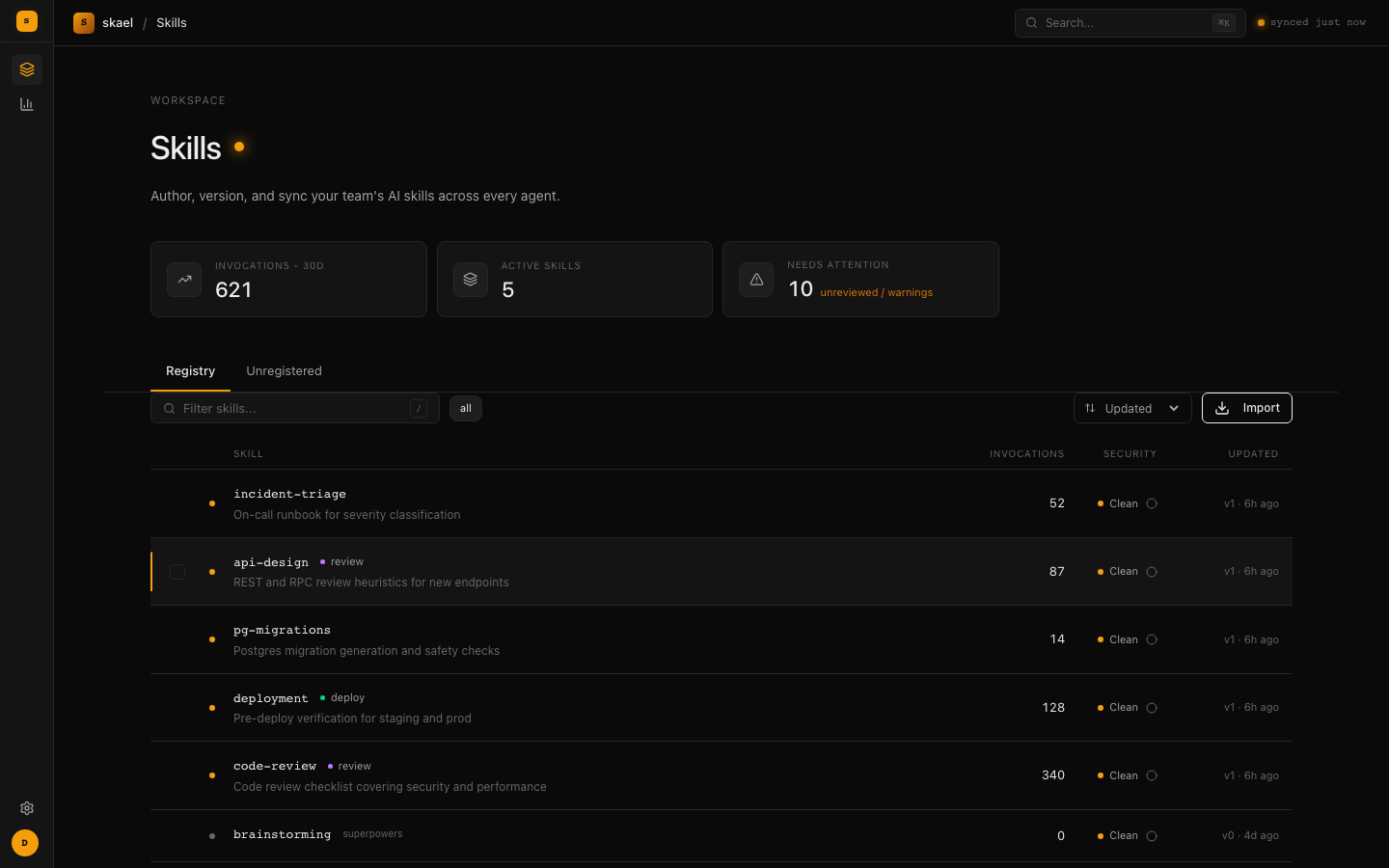

Why not just a git repo?
You can commit .claude/skills/ to a repo — if everyone's on the same agent, in the same project, and remembers to pull. A git folder gives you a folder. It doesn't place skills into Cursor and Codex and OpenCode, doesn't sync across machines, doesn't scan for injection, doesn't tell you which version everyone's on, and has no idea which skills your agents actually use. Skael is the layer that turns a folder of markdown into managed infrastructure — and unlike Claude's native org sharing (Claude.ai/Desktop, paid tiers only), it's vendor-neutral across every agent your team runs.
Quick Start
Run the published image (bring your own Postgres)
If you already have a Postgres database, the only required env var is DATABASE_URL:
docker run -p 8080:8080 \
  -e DATABASE_URL="postgres://user:pass@host:5432/skael?sslmode=disable" \
  ghcr.io/skael-dev/skael:latest
Migrations run automatically on startup. Platform is at http://localhost:8080 — sign up to create the first account and a personal API key.
Self-hosted (Docker Compose)
Bundles Postgres, so there's nothing external to provision:
docker compose up -d
Platform is at http://localhost:8080. This brings up the server and database only — publishing, scanning and syncing work immediately. Skill evaluations additionally need a skael-worker, on the host or in a container (docker compose --profile worker up); see Running the eval worker.
Storage: archives default to local disk (
STORAGE_PATH). For Kubernetes/ephemeral hosts or multiple replicas, setSTORAGE_PATH=s3://bucket/prefixto use S3-compatible object storage (AWS S3, MinIO, R2, Spaces) — see Self-hosting.
Behind a reverse proxy: set
TRUSTED_PROXIESto your proxy's address or CIDR (not your clients'). Forwarding headers are only honoured from proxies you declare, so without it every request looks like it came from the proxy and rate limits apply to your whole team at once. A directly-exposed instance needs nothing — the safe default is to trust no forwarding headers at all.
Install the CLI
# macOS / Linux (Homebrew)
brew install skael-dev/skael/skael

# From source
git clone https://github.com/skael-dev/skael.git
cd skael && go build -o skael ./cmd/skael
go install github.com/skael-dev/skael/cmd/skael@latest does not work: go.mod has a replace directive, and go install <pkg>@version refuses any module that carries one. Building from a clone is unaffected.
Connect to your registry
skael setup http://localhost:8080 <your-api-key>
This validates the connection, saves config, and installs activation tracking and auto-sync hooks for every detected agent. Pass --no-auto-sync to skip auto-sync hook installation.
What it does
skael add my-skill               # install a skill from the registry
skael add my-skill --scope user  # install to user scope only
skael remove my-skill            # uninstall a skill
skael sync                       # update installed skills to latest versions
skael list                       # see everything published on the registry
skael list --installed           # see what you have installed locally
skael init my-skill              # scaffold a new spec-compliant skill
skael publish ./my-skill         # publish a skill to the registry
skael import <url|path>          # import skills from GitHub or a local directory
skael scan ./my-skill            # security scan before publishing
skael search "review"            # find skills
skael show my-skill              # skill details, versions, activations
skael owners list                # every ownership rule and its members
skael owners set payments:* [email protected]   # who may publish to a namespace
skael owners show my-skill       # who owns this name, and which rule matched
skael review show my-skill       # what changed, and what's still holding it
skael review my-skill 3 --approve --reason "..."  # release a version held for review
skael doctor                     # check your setup
skael hook install               # set up activation tracking + auto-sync
skael version                    # version, commit, build date
Skills are installed explicitly — skael add picks what you want, skael sync keeps them up to date. There's no "sync everything" default; your ~/.skael/config.json tracks exactly which skills you've chosen to install (like package.json). Auto-sync hooks run skael sync in the background with 30-minute debouncing so your agents always have the latest versions without manual intervention.
User scope vs. project scope
Every install lands in one of two places: user scope puts a skill in your home directory, available to you in every project on that machine. Project scope puts it inside the current repo, so anyone who checks out that repo and runs skael sync gets it too.
The default is project. Run skael setup --scope user to change your default, or override per skill with skael add my-skill --scope user. skael sync --scope user overrides for that run, but any skill with its own recorded scope (set via skael add --scope) keeps it regardless. Project root is the nearest ancestor directory containing .git, falling back to the current directory if there isn't one.
Where each agent looks:
| Agent | user scope | project scope |
|---|---|---|
| Claude Code | ~/.claude/skills/<name> |
<project>/.claude/skills/<name> |
| Cursor | ~/.cursor/skills/<name> |
<project>/.cursor/skills/<name> |
| Codex | ~/.codex/skills/<name> |
<project>/.agents/skills/<name> |
| OpenCode | ~/.config/opencode/skills/<name> |
<project>/.opencode/skills/<name> |
Codex is the odd one out — project scope goes to .agents/skills/, not .codex/skills/. Don't assume it follows the same pattern as the others.
Every skael publish runs a security scan that checks for hardcoded secrets, prompt injection, data exfiltration patterns, dangerous shell commands, and obfuscated payloads. Critical and high-severity findings don't all mean the same thing, so they don't all get the same treatment.
Blocked, permanently. A finding that means credentials or data are leaving the machine — a hardcoded secret, a reverse shell — is unappealable. The publish is rejected with a 422, no version is created, and nothing clears it: not an evaluation, not --override, not an admin. The only fix is to remove it from the bundle. This is a per-rule property, not a per-category one: reading a credential path is access and is appealable; shipping the credential is not.
Held for review. Everything else that blocks — dangerous execution, prompt injection, heuristic matches — creates the version but does not release it. The archive exists and has a version number, but skills.latest_version doesn't advance, so the skill never appears in the sync manifest, skael add reports it as not found, skael sync won't install it, and no client can download it.
A hold is a set of reasons, not a single state, and every one of them has to clear before the version is served. There are two. scan is an appealable security finding; it clears on a verified evaluation that scores at or above QUALITY_FLOOR with a complete panel and no critical contract violations, or on an instance admin's decision. ownership means the publisher doesn't own the name; it clears on a decision by a skill owner or an instance admin.
Neither can launder the other. A quality score clears scan and never ownership — if it could, the review path would be decorative. A skill owner clears ownership and never scan — if they could, the security gate would only be as strong as the least careful self-managed namespace. Rejecting any single reason rejects the whole version.
An instance admin can short-circuit the scan reason at publish time with --override. It does not clear an ownership hold.
skael publish runs the same scan locally first and applies the same decision, so it can tell you before the upload rather than after. It aborts only on what the server would block outright; an appealable finding is sent, held, and reported as held. --skip-local-scan skips the local check entirely and lets the server decide.
One honest caveat: a skill whose only version is held still shows up in skael list and search with latest_version: 0, exactly like a skill that was created but never published. What's withheld is everything servable — the archive, the content, the scan result. Nothing servable is served.
Skill ownership
Ownership rules decide who may publish to a skill name. A rule is a pattern — an exact name, a payments:* namespace, or the bare * — plus the people who own everything it matches. A publish by anyone outside the matched rule is held with the ownership reason until one of them approves it.
skael owners set payments:* [email protected] [email protected]
One rule wins per name: an exact match beats the longest matching prefix, which beats unowned. Matches replace rather than stack, the same as CODEOWNERS — otherwise a namespace owner could never delegate a skill away, and delegating is the whole point of patterns. Delegation only ever narrows: a member of a rule can manage patterns inside it, never the namespace that contains it.
An unowned name doesn't hold anything. Upgrading changes nothing until someone writes the first rule that covers a namespace; there is no flag day and no review queue full of things nobody asked to review. Publishing version 1 of a brand-new name records you as its sole owner, unless a rule already covers it — that's what stops someone claiming a name inside your namespace by publishing to it.
Ownership never gates reads, and never re-gates a version that already shipped. Removing a rule or deleting a user changes who reviews future changes and nothing else. Full detail: skael.dev/docs/ownership.
skael import <url|path> brings skills into the registry from GitHub or a local directory, instead of authoring them from scratch:
skael import https://github.com/anthropics/skills                            # a whole repo
skael import https://github.com/anthropics/skills/tree/main/skills/docx      # a subpath within a repo
skael import ./my-skills/code-review                                          # a local directory
It discovers skills at the source and prompts before importing each one — pass --all to import everything without prompting, or --dry-run to preview first. Each import runs the same security scan and publish gate described above, so an imported skill can be rejected or held for review exactly like one published with skael publish. Set GITHUB_TOKEN on the server to raise GitHub's API rate limit for larger repos.
Every account is owner (the first one, singular), admin, or member — the default for new signups. These are instance roles, and they are not the same thing as skill ownership, which decides who may publish to a given skill name. Where this README says "instance admin" it means the owner or admin role; where it says "skill owner" it means someone named by an ownership rule.
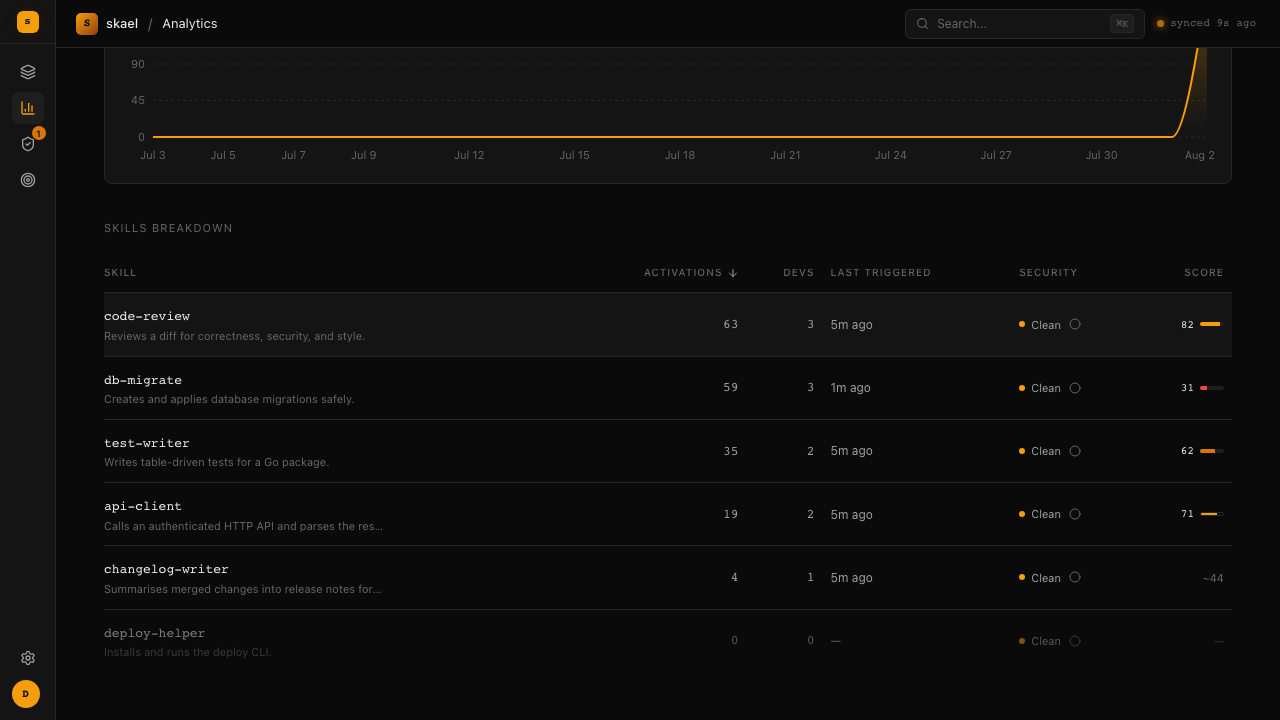
Every agent that uses a skill reports activation events back to the platform. skael doctor shows you which agents have tracking installed.
Agents don't all measure the same thing, so events record how they were observed. Claude Code and OpenCode report an explicit skill invocation; the Cursor hook scans a session transcript afterwards and matches skill files that were referenced. The first misses skills that were read but never invoked, the second may count skills that were only read — so the dashboard shows the split rather than one merged number. Skill names that aren't in the registry are counted separately from activations instead of being mixed in.
whetstone: authoring and linting skills
whetstone is a separate, standalone CLI for drafting, linting, and scoring skills before they're published. It's not the registry client — that's skael. The authoring half works entirely on local files; suite push needs a server, and eval, repair, and suite check need a Docker daemon and an LLM key.
It has its own formula — brew install skael-dev/skael/whetstone. The skael formula and the curl installer give you skael only. skael-worker is a release-archive download or just build.
whetstone init                    # create a .whetstone workspace in the current directory
whetstone doctor                  # check the agent CLI, LLM gateway, and sandbox runtime
whetstone new "<intent>"          # interview, generate, lint, and evaluate a new skill from a plain-language intent
whetstone spec show my-skill      # print the latest stored spec
whetstone spec edit my-skill      # edit a spec and store the result as a new version
whetstone spec approve my-skill   # mark the latest stored spec version approved
whetstone gen my-skill            # regenerate a skill bundle from its approved spec
whetstone lint my-skill           # run spec conformance, quality, and injection lint over a bundle
whetstone suite gen my-skill      # generate and write the evaluation suite for a skill
whetstone suite check my-skill    # gate the suite on its own oracle and verifier
whetstone suite push my-skill     # register the checked suite with the server
whetstone pack my-skill           # write a spec-valid archive with the eval sidecar stripped
whetstone eval my-skill           # run the model panel, score it, write the report
whetstone drift my-skill          # per-member adherence breakdown for one eval
whetstone report my-skill --open  # render the HTML report
whetstone repair my-skill         # cluster failures, propose edits, re-evaluate
whetstone version                 # version, commit, build date
Full reference: skael.dev/docs/whetstone.
Running the eval worker
A skill only gets scored if it has a registered evaluation suite — by design, not as a failure mode. Publishing a skill with no suite leaves it unscored indefinitely; there's no default suite and nothing generates one automatically.
Register a suite once you've generated and approved one locally with whetstone:
whetstone suite gen my-skill      # draft a suite from the skill's approved spec
whetstone suite push my-skill     # register it with the server as the skill's current suite
From then on, every skael publish for that skill looks up its registered suite and enqueues an evaluation job automatically — publishing never fails because the queue is down or a suite lookup errors; the version is already durable, and an unscored version is a state the product already models.
Jobs sit on the server; nothing evaluates them until a worker is running to claim, execute, and report them back:
export SKAEL_ENDPOINT=http://localhost:8080
export SKAEL_API_KEY=<your-api-key>
export ANTHROPIC_API_KEY=<your-anthropic-key>   # direct API gateway — never a subscription CLI on PATH
skael-worker
SKAEL_ENDPOINT, SKAEL_API_KEY, and a credential for the LLM provider are the only strictly required variables — the worker exits at startup naming whichever is missing. Everything else (WORKER_ID, WORKER_LEASE, WORKER_POLL, WORKER_WORK_ROOT, WORKER_CONCURRENCY) has a working default; see CLAUDE.md. The worker also needs a running Docker daemon — it sandboxes every eval run.
To run the worker in a container instead (Kubernetes, Coolify, or just keeping everything in Compose):
export SKAEL_API_KEY=<your-api-key>
export ANTHROPIC_API_KEY=<your-anthropic-key>
docker compose --profile worker up
It starts sandbox containers as siblings through the host's Docker socket rather than running a daemon of its own. That imposes two requirements, both already wired into docker-compose.yml:
WORKER_RUN_ROOTandWORKER_WORK_ROOTmust each be bind-mounted at the same path on both sides — never a named volume. Session workspaces and the suite's verifier are bind-mounted into sandboxes, and the host daemon resolves those paths; a container-local path silently mounts as an empty directory, which would score every skill as though it did nothing. The worker refuses to start containerized unless both are set.- Auth must arrive as environment variables rather than a mounted
~/.claude. All four setups work in a container — Anthropic API key, a Claude subscription for the panel viaCLAUDE_CODE_OAUTH_TOKEN, OpenRouter for both judge and panel, or OpenRouter for the judge with the subscription for the panel.docker-compose.ymlcarries them all, with the inactive ones commented out.
See Running the worker in a container.
The LLM provider
Four variables configure every model call, and skael-worker and whetstone read the same four. The judge that scores a run and the panel agents that attempt the tasks use one gateway; the worker forwards these into the sandbox for the panel.
| Variable | Required | Description |
|---|---|---|
ANTHROPIC_API_KEY |
one of the two | Sent as x-api-key. On its own, that is Anthropic's own API |
ANTHROPIC_AUTH_TOKEN |
one of the two | Sent as Authorization: Bearer. What OpenRouter and most compatible gateways issue |
ANTHROPIC_BASE_URL |
no | An Anthropic-compatible gateway. It posts to {base}/v1/messages, so the base carries no /v1 |
LLM_MODEL |
with a gateway | Comma-separated model ids, most capable first. The first judges every run and leads the panel; later entries are the panel's floor members, which only the deep tier runs |
Four modes follow from those:
- Anthropic direct — set
ANTHROPIC_API_KEYand nothing else. - A compatible gateway — set
ANTHROPIC_BASE_URL, a credential, andLLM_MODEL.LLM_MODELis not optional here: a gateway that namespaces its identifiers (anthropic/claude-sonnet-5) answers Anthropic's own names with a 404, and every panel member then fails its health probe. - Your Claude subscription — set nothing and let
whetstoneuse theclaudeCLI on your PATH.skael-workernever does this: a published score must come from a metered, reproducible backend. - Split — mode 2, plus
CLAUDE_CODE_OAUTH_TOKEN. The judge keeps the gateway and the panel runs on the subscription.
The auth header is inferred from which credential you set, so there is nothing to keep in sync. whetstone doctor prints what resolved, and the worker logs the same words at startup.
CLAUDE_CODE_OAUTH_TOKEN (generate it with claude setup-token) bills the panel agents to a Claude subscription rather than per call. The judge still needs one of the two credentials above, in every mode. Beside a gateway it also selects mode 4: the worker withholds the gateway variables from the sandbox, so the panel cannot follow the judge onto it, and the panel asks for the shipped alias rather than the gateway's namespaced ids. That is a local and small-team setup — the panel is recorded in model_panel, so turning it on splits a skill's score trend. See Quality scoring for what changing the judge or the panel does to score comparability.
Once a job completes, GET /api/skills/{name}/quality returns the most recent score; .../quality/history returns the full history, newest first. Until then, that endpoint 404s — there's no "pending" score record, just none yet (the publish response does carry a quality.state of "pending" with the job's ID while it's in flight, versus "none" when no suite is registered at all).
Scoring a skill and clearing a hold
What has to be running: the server, Postgres, and a skael-worker with a Docker daemon. Nothing gets scored without a worker — jobs just queue.
A skill needs a registered suite before it can be scored:
whetstone suite gen my-skill
whetstone suite push my-skill
No suite means no score, ever — that's by design (see "Running the eval worker" above).
On publish, the server looks up the skill's registered suite and enqueues an evaluation job automatically. A version the gate holds still gets a version number and an archive, but isn't served until it clears.
If a version is held, check the review queue (web UI's Review page, or GET /api/review/queue via the API). Every outstanding reason has to clear, and which one you're looking at decides who can clear it:
scan— wait for a verified evaluation to score at or aboveQUALITY_FLOOR(an eval run takes roughly 45-90 minutes), or have an instance admin approve it:skael review <name> <version> --approve --reason "..." --reason-kind scan.ownership— a skill owner or an instance admin approves it with--reason-kind ownership. No evaluation clears this one, however good the score.
With only one reason outstanding you can leave --reason-kind off and it's inferred. skael review show <name> prints the diff against the currently-served version plus what's still holding it.
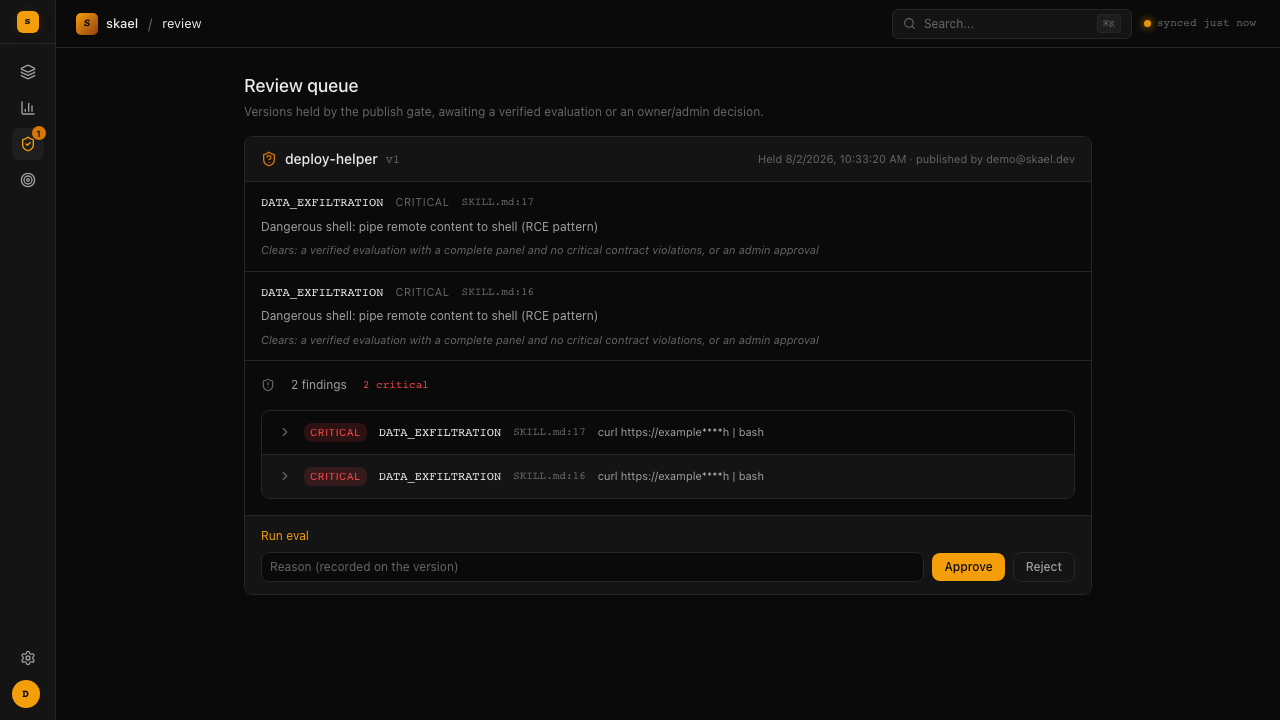
Scores appear wherever skills are listed. A skill that has never been scored reads as unscored, not as a zero — those are different facts, and a score of nothing is not a score of zero:
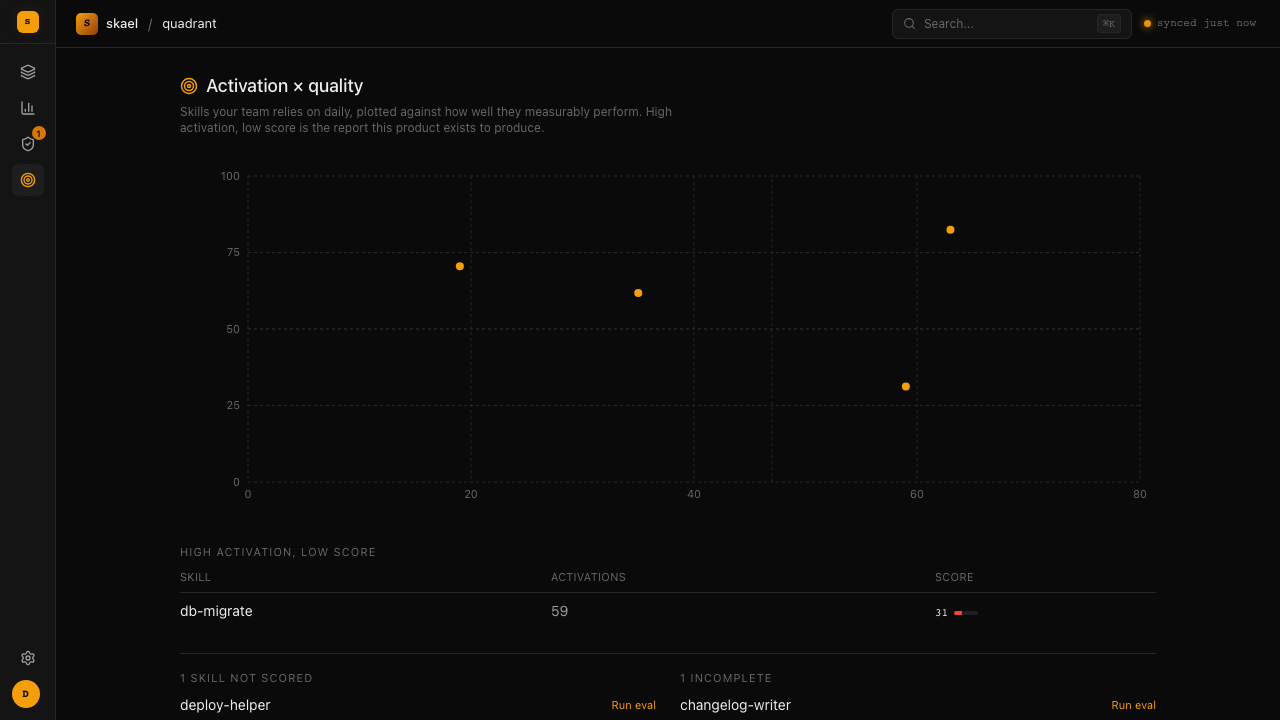
Crossing usage against quality is the report the two halves exist to produce: the skills your team leans on daily that measurably don't work.
Development
Requires: Go 1.25+, Docker, just
cp .env.example .env         # configure local env vars
just db                      # start Postgres
just dev                     # run the server
just test                    # run all tests
just test-fast               # run tests without testcontainers (instant)
just test-e2e                # run end-to-end scenario tests
just check                   # vet + fmt + test
Run just to see all available commands.
Project structure
cmd/server/       → API server binary (Huma v2 + Chi + Postgres)
cmd/skael/        → CLI binary (Cobra + Lipgloss)
cmd/whetstone/    → Skill authoring/eval CLI binary
cmd/skael-worker/ → Eval queue worker binary (claim/materialise/evaluate/report loop)
internal/         → Server packages (skill, scan, gate, ownership, quality, evalqueue,
                    evalsuite, analytics, auth, platform, server, import, sync, worker)
internal/eval/    → Evaluation engine (spec, generation, contracts, suite, runner,
                    sandbox/docker, agent adapters, scoring, repair, report)
cli/              → CLI packages (commands, client, config, agents, hooks)
cli/whetstone/    → whetstone commands (authoring + evaluation)
web/              → React 19 SPA (Vite 8, Tailwind 4, TanStack Query) — embedded into server binary
examples/         → Example skills (hello-world, code-review, scanner demo)
tests/e2e/        → End-to-end integration tests
Key commands
| Command | What it does |
|---|---|
just build |
Build all four binaries (skael-server, skael, whetstone, skael-worker) to bin/ |
just dev |
Run server (reads .env) |
just db |
Start Postgres 17 in Docker |
just test |
All tests (needs Docker for testcontainers) |
just test-pkg internal/scan |
Test a single package |
just test-run TestScan_Clean |
Run a single test |
just test-fast |
Fast tests only (no DB, instant) |
just test-e2e |
End-to-end scenario tests |
just check |
Full CI check (vet + fmt + test) |
just scan ./path |
Security scan a skill directory |
Architecture
Single Go binary embeds the API server and a React dashboard (served from the same process). Backed by Postgres for skill metadata, full-text search, and activation events. Skill archives stored on local filesystem or S3-compatible object storage.
The CLI is a separate binary that talks to the API. It handles agent detection, file placement, hook installation, selective sync with checksum verification, and auto-sync via debounced hooks. Supports Claude Code, Codex, OpenCode, and Cursor.
The server exposes a Prometheus /metrics endpoint for monitoring, supports CORS for separate frontend deployments, and includes rate limiting, security headers, and request tracing out of the box.
License
Apache-2.0
No comments yet
Be the first to share your take.