
Simten
A TypeScript HDL. Simulates in the browser, synthesizes to Verilog.
Write circuits as typed TypeScript, from a single NAND gate up to a RISC-V core. Simulate them in the browser, export Verilog, run the result on an FPGA.
Live demo · Play · Docs · Blog



Why
Learning digital logic usually means choosing between visual simulators that stop scaling after a few dozen gates, and Verilog, which wants a whole toolchain before it shows you anything.
Simten circuits are TypeScript. Autocomplete, type errors on mismatched ports and
rename-refactoring all work the way they do in the rest of your editor, and you can
drive a circuit with any npm package: fast-check for property tests, pcap-parser
to replay real packets through an Ethernet parser.
circuit() builds an intermediate representation rather than running anything.
Everything else reads that IR: the simulator, the canvas, the Verilog exporter,
snapshot and restore. Only primitives contain behaviour. Composites are pure
structure and expand into primitives when elaborated, so any component can be
opened up and shown as what it is made of.
Try it
- simten.dev/circuit is the editor: type on the left, watch the circuit build itself on the right.
- play.simten.dev is a ten-level campaign that starts with one wire and ends at a full adder, with every gate built out of NAND.
pnpm add @simten/coreif you would rather start in your own project.
Your first circuit
import { circuit, bit } from '@simten/core/circuit'
import { Xor, And } from '@simten/core/std'

const HalfAdder = circuit('HalfAdder', {
  inputs: { a: bit, b: bit },
  outputs: { sum: bit, carry: bit },
  nodes: { xor1: Xor, and1: And },
  connect: ({ inputs, outputs, nodes: { xor1, and1 } }) => [
    inputs.a.to(xor1.a, and1.a),
    inputs.b.to(xor1.b, and1.b),
    xor1.out.to(outputs.sum),
    and1.out.to(outputs.carry),
  ],
})
Drop it into a React app with <CircuitEmbed circuit={HalfAdder} /> from
@simten/embed, which wires switches to the inputs and LEDs to the outputs for you.
AI assist (optional)
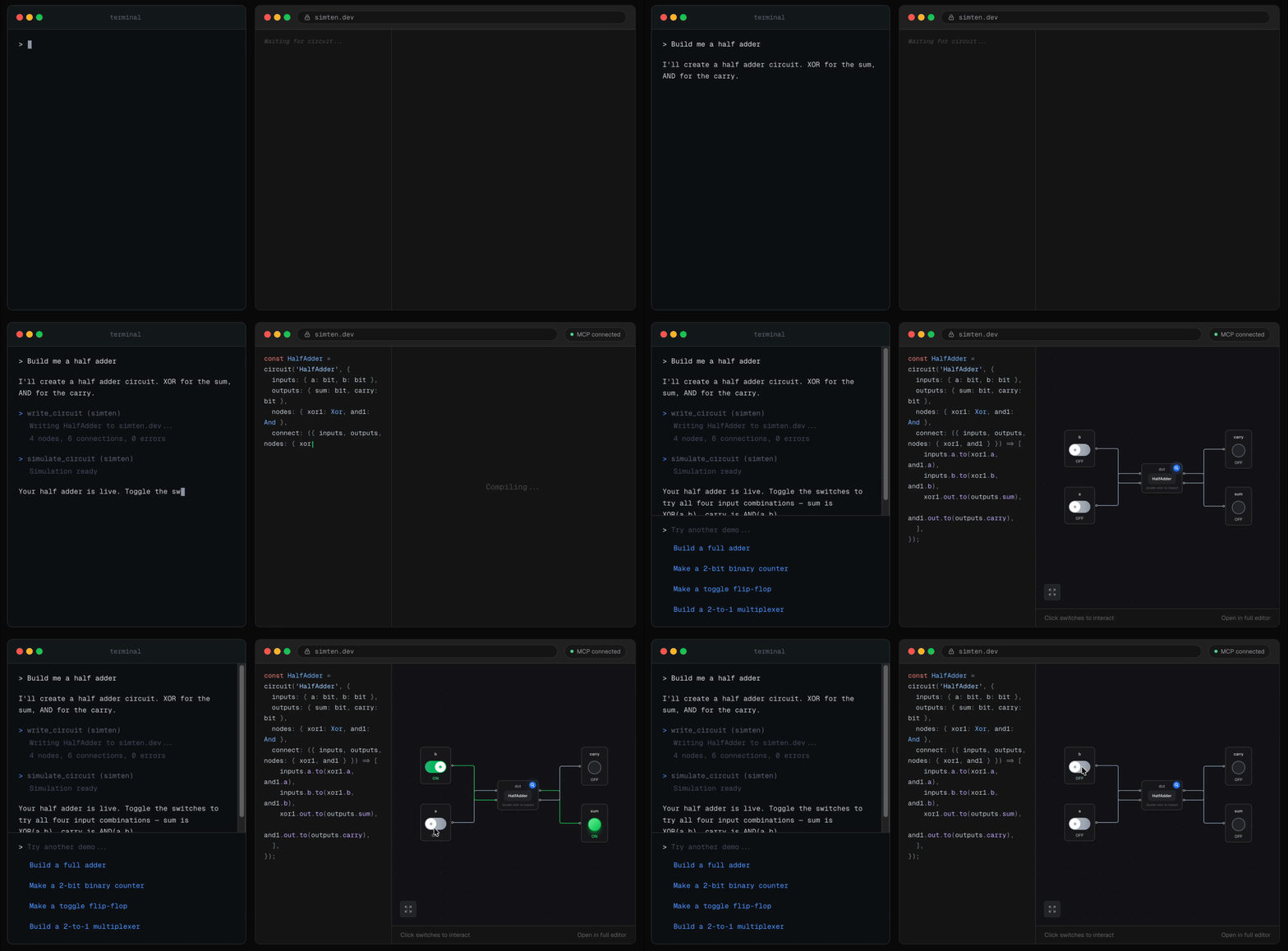
@simten/mcp is a local MCP server. Your agent writes circuits as files and calls
tools to check, simulate, verify and draw them, so the design lives in your repo
rather than in a chat log. show_circuit pushes to a browser tab over a local
WebSocket, which is why circuits appear and animate while the agent is still working.
claude mcp add --scope user simten npx @simten/mcp
The server runs on your machine, so no AI calls touch Simten's infrastructure and
none of this is on unless you set it up. Testbenches run locally under the same
trust model as npm test, with no sandbox, so circuits you did not write belong in
the web editor instead, where they run in an isolated worker. See
packages/mcp/README.md.
FPGA
Exported Verilog goes through Yosys and nextpnr onto a ULX3S 85F (Lattice ECP5). The RV32I core there runs C and Rust firmware over UART, and an HDMI Snake runs as pure RTL with no firmware at all.
pnpm fpga:run --project=cpu \
  --firmware=hardware/ulx3s/projects/cpu/firmware/hello.rs \
  --match='Hello, World!'
Details in hardware/README.md.
Repo layout
packages/
├── core/        simulator, circuit() builder, stdlib, Verilog exporter
├── ui/          canvas, Monaco editor setup, shadcn primitives
├── embed/       <CircuitEmbed /> and a web-component build
└── mcp/         MCP server

apps/
├── web/         simten.dev (TanStack Start, Vite, Cloudflare Workers)
├── game/        play.simten.dev, the level campaign
├── sandbox/     isolated origin where user circuit code executes
├── compiler/    RISC-V cross-compiler (GCC + Rust)
├── verifier/    Icarus Verilog, cross-checks exported Verilog against our trace
└── synth/       Yosys, returns gate counts and netlists

hardware/ulx3s/  FPGA projects and the build/flash/capture CLI
TanStack Start, React 19, React Flow, Zustand with Immer, Tailwind 4, Vitest, deployed on Cloudflare Workers.
Simulation happens in the browser, so the edge stays stateless. The three container
services run on Cloudflare Containers behind Durable Objects and sleep after two
minutes idle. User circuit code never executes in the main frame: it runs in
apps/sandbox, on its own origin, under CSP.
Running it locally
pnpm install
pnpm dev           # simten.dev on :3001
pnpm dev:sandbox   # second terminal, on :3002
pnpm dev:game      # play.simten.dev on :3003
pnpm test          # 1,000+ tests, plus the exports drift check
The sandbox is not optional. The canvas runs circuit code in an iframe pointed at
localhost:3002 in dev and sandbox.simten.dev in production, so without
pnpm dev:sandbox running alongside, nothing crashes and nothing draws either.
Docs and contributing
- Rendered docs: simten.dev/docs. Markdown source in
apps/web/content/docs/. - Blog posts working through real circuits: simten.dev/blog.
- CONTRIBUTING.md covers setup tiers, code style and how publishing works.
- Bugs and features: Issues. Design questions: Discussions. Security: SECURITY.md. Anything else:
[email protected].
No comments yet
Be the first to share your take.