
✍︎ Signs of AI Writing








Are you a teacher? Start here → — what this does and what it cannot do, in plain language, with the error rate drawn rather than tabulated. No badges, no interval notation, nothing to install. English & Spanish.
Try the live demo → — English & Spanish, runs in your browser. No signup, and the analysis uploads nothing.
Download the Windows app → — the same tool in a window. Nothing to install alongside it: the .NET runtime is bundled.
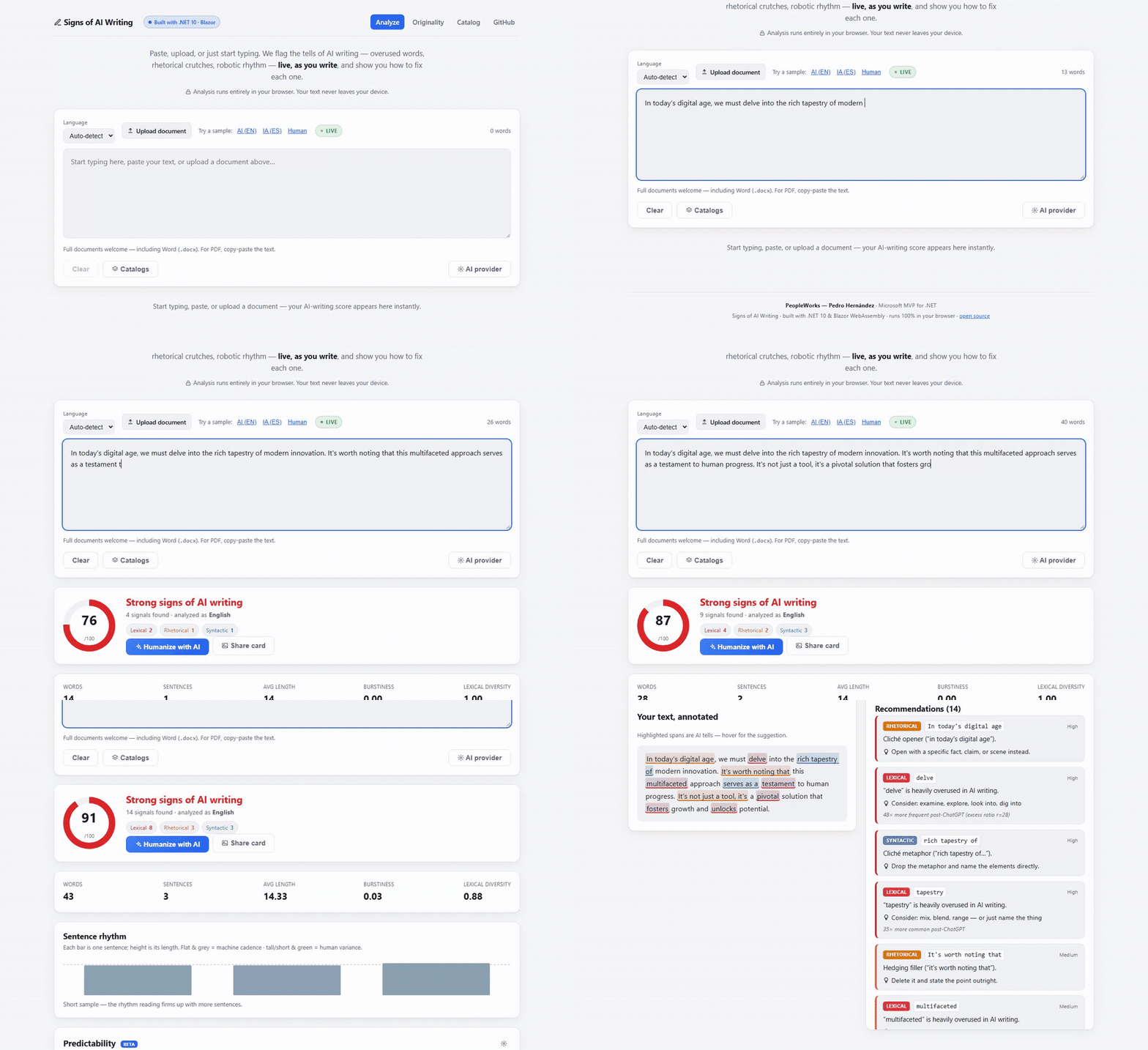
Real recording of the live demo — the score updates as you type, and every highlight comes with a suggested fix.
Rather watch than read? The two-minute explainer: English · Español
A free, privacy-first toolkit for academic and writing integrity. It does two things:
- De-AI-ify linter — flags the tells of AI-generated writing (overused vocabulary, rhetorical crutches, robotic sentence rhythm) and, for every finding, tells you how to fix it.
- Originality checker — "did they write it, or copy it?" Compares documents against each other and surfaces the passages they share — verbatim copies, reworded paraphrases (even across languages), and a whole-cohort overview — as evidence a human judges. Not a black-box verdict.
🔒 The analysis runs entirely in your browser, and nothing is uploaded to run it. No account, no telemetry, no server that sees your text.
Four features can send text off the device, and not one of them runs unless you turn it on, each disclosed in the interface at the moment you choose it: the paraphrase check and the perplexity measurement (both call a server you or we host), the live rewrite when you supply your own API key — the key stays on your device, the text goes to the provider you picked — and the optional web spot-check for a distinctive phrase, which exists only if the operator configured a search provider.
Everything else — every rule, the score, the character scan, the citation cross-check, the writer baseline, the report — is computed locally and stays there. In the desktop app, the perplexity measurement is local too.
Built with .NET 10 and Blazor WebAssembly by Pedro Hernández (PeopleWorks), Microsoft MVP for .NET — for the .NET and Microsoft developer community, por y para la comunidad educativa.
Repo: https://github.com/peopleworks/SignsofAI
English and Spanish are supported in two independent ways:
- The interface switches EN ⇄ ES instantly from the toolbar — no page reload, remembered per browser, and it follows your browser's language on a first visit. Translations are plain JSON files anyone can contribute: see Translating the interface.
- The analysis runs against a per-language rule-pack, auto-detected or selectable. The Spanish rule-pack is an original derivation of AI-writing markers for Spanish.
The two are separate on purpose, so findings stay in the language of the text being analyzed: advice about English prose is given in English even when the interface is in Spanish, because that's the language the advice is about.
How often is it wrong about a human?
Every AI detector gets asked this and none of them answer. Docs/CALIBRATION.md
is the answer, measured against 90 texts published before generative models existed — open-access
research articles and pre-2022 encyclopedia revisions in both languages.
At a threshold of 25/100 it flags none of them: an observed 0%, with a 95% interval reaching 4.1% because ninety texts cannot promise more than that. The recommendation is made from the uncertain end of the interval rather than the flattering one, so it stays cautious while the corpus is small and tightens on its own as it grows.
It is deliberately not an accuracy figure. Accuracy needs a collection of machine-written text, which is a sample of whichever models were around that month; a false-positive rate needs only human writing, and it measures the harm this category actually causes — detectors flag 61% of essays by non-native English speakers, and none of them publish that about themselves.
The report also names which rules misfire, ranked. That list is uncomfortable and it is the most useful thing the exercise produces.
The corpus is a JSON manifest anyone can extend, the tool that builds and measures it is in
tools/SignsOfAI.Calibration, and the whole thing re-runs in one command. See
Docs/Calibration/README.md — Spanish academic writing is the most
wanted contribution.
For teachers: the part that is not software
A detector is not what you need first. Docs/Teaching/ is syllabus
language you can paste, a one-page sheet to hand students before anything goes wrong, and a procedure
for the day a question becomes formal — all bilingual, all free of any licence, attribution or
permission.
None of it requires this tool. It exists because the hard part of AI writing in a classroom was never detection; it is what you do on the morning you suspect something and have nobody to ask. All three documents are built on the same rule: a score is never the reason for a decision about a student, and a conversation about the work settles what no software can.
1. The AI-writing linter ("Analyze")
Unlike black-box detectors that only spit out a score, this is an explainable, actionable, educational
linter. Paste, upload (.docx / .txt / .md), or just start typing — the 0–100 score, highlights,
statistics, and per-finding fixes update as you write.
| Category | Examples |
|---|---|
| Lexical | delve, tapestry, multifaceted, nuanced, pivotal, underscore, showcase, testament… (weighted by post-ChatGPT excess frequency) |
| Rhetorical | Negative parallelisms ("it's not just X, it's Y"), cliché openers ("in today's digital age"), hedging ("it's worth noting that"), false ranges, rule-of-three |
| Syntactic | Copula avoidance ("serves as a…", "a testament to…"), inflated constructions ("plays a crucial role") |
| Statistical | Burstiness — sentence-length uniformity. Machine text hovers at 0.0–0.2; human prose 0.6–0.8 |
-
Sentence-rhythm visualization — a per-sentence bar chart that makes burstiness visible.
-
Per-finding recommendations — every flagged tell carries a concrete fix and the research behind it.
-
Live rewrite (on-device, no key) — your text and a de-AI-ified version side by side, rebuilt on every keystroke, with the score dropping as you go. It runs off the rule-pack — no model, no network, no API key — so it is instant and free. Every change is listed with alternatives to pick from and a one-click leave this one alone. Three strengths, from only the strongest tells to delete the empty intensifiers too.
It only does what a word swap can honestly do, and declines the edits it would get wrong: it won't turn "delve into" into "examine into", won't drop the "just" that a "not just X, it's Y" construction depends on, and won't put "el" in front of a feminine noun. Rhythm and rhetorical structure need real rewriting, so those stay in the recommendations — and the panel says how many.
-
Humanize (optional, BYOK) — connect an AI provider and rewrite the flagged text in one click. Anthropic (
claude-opus-4-8, works from the browser), OpenAI / DeepSeek, Azure OpenAI, or Ollama (local, no key). Credentials live only in your browser and are sent directly to the provider. -
Before/after diff and a shareable result card (a PNG summary that never includes your text).
-
Custom catalogs (BYO rules) — paste banned words or import a rule-pack JSON; merges live.
-
Catalog page — a searchable library of every AI-writing sign, in both languages, ranked with an in-browser BM25 index.
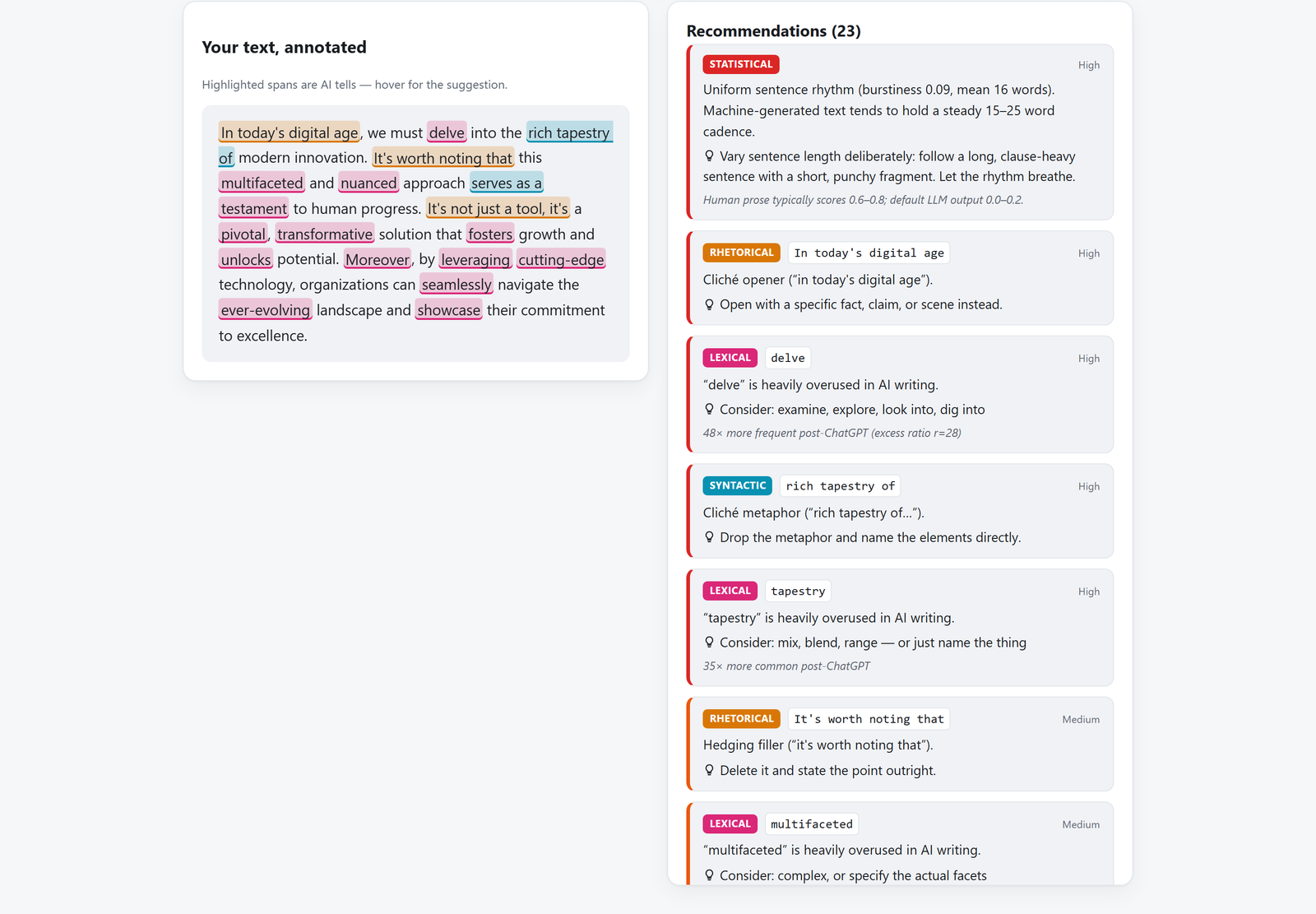
This is the difference: not "87% AI", but which words, why they were flagged, and what to write instead.
2. The Originality checker ("Originality")
"¿Lo escribió la IA, lo copiaste, o lo parafraseaste para esconderlo?" Drop in two or more documents — a thesis and its sources, a batch of student submissions — and see exactly what they share. The guiding principle is honest: we surface the evidence and highlight it; a human judges. We never accuse. This is not a whole-internet index like Turnitin.
| Phase | What it catches | How | Where it runs |
|---|---|---|---|
| A — Literal copy | verbatim shared passages, resistant to changed capitalization/accents | accent/case-folded word k-shingles + greedy longest-match tiling, verified token-by-token | 🔒 in your browser |
| B — Paraphrase | reworded copies — same idea, different words — even across languages | sentence embeddings (Google EmbeddingGemma-300M, ONNX) + cosine similarity | 🌐 optional server (opt-in) |
| C — Cohort | who copied whom across a whole class, at a glance | batch upload + an N×N overlap heatmap; click a cell to inspect the pair | 🔒 in your browser |
| D — Web spot-check | whether a passage already exists online | extracts a document's most distinctive passages and hands you one-click exact-phrase searches (Google/Bing/DuckDuckGo) | 🔒 in your browser |
- Shared-passage evidence — matches are highlighted in both documents, side by side; the headline overlap number equals exactly what you see highlighted (the evidence is the score).
- Phase B is the one feature that leaves the device. It's opt-in, disclosed in the UI, and sends only the sentences you choose to check to the PeopleWorks server. Everything else stays on your machine.
- Phase D is deliberately honest: we can't index the whole web, so instead of pretending to, we surface the passages worth checking and prepare the searches — nothing is sent anywhere until you click one. An optional automatic web search can be enabled by the server operator (see Optional server below).
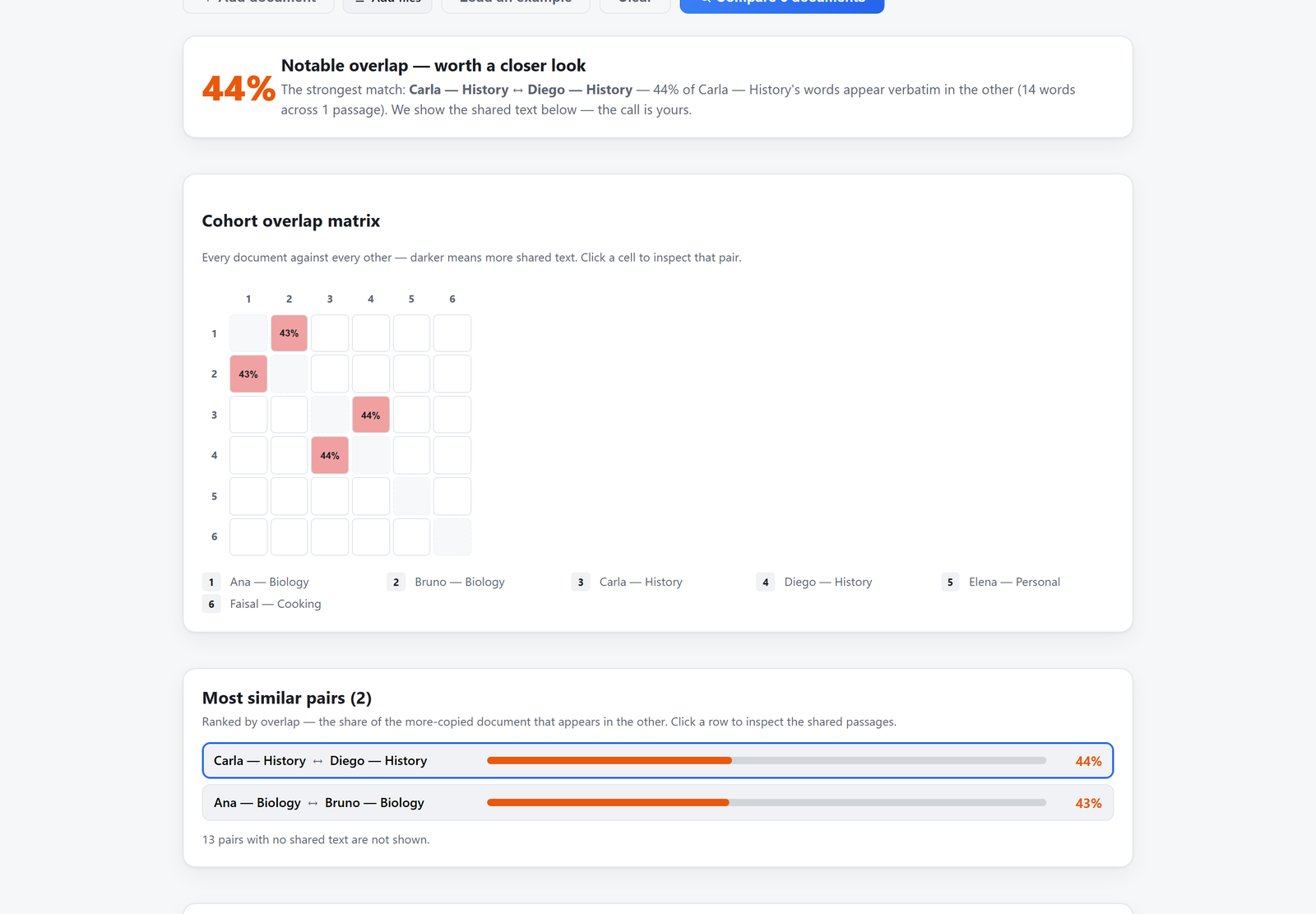
A whole class at a glance: every document against every other, then the shared passages themselves — evidence, not an accusation.
3. The predictability meter (optional server)
An honest reframing of perplexity. A small language model (Qwen2.5-0.5B or Microsoft Phi-4-mini, int8 ONNX) measures how predictable / generic a text's phrasing is. This is not an AI-vs-human verdict — on a labelled corpus the two overlap badly (memorized human text scores predictable too). We surface predictability honestly as one signal among many, calibrated per language. Opt-in; runs on the PeopleWorks server. The model lazily loads and idle-unloads to keep the server light.
4. Use it from other apps — MCP server
Everything above is also available to Claude Desktop and any MCP
client through SignsOfAI.Mcp, a Model Context Protocol server (built on the official
ModelContextProtocol SDK, stdio transport). Because
the engine lives in SignsOfAI.Core — pure .NET, no browser — the server just exposes it as tools:
| Tool | What it does | Where it runs |
|---|---|---|
analyze_ai_writing |
score + verdict + findings (with fixes) + statistics | 🔒 on-device |
check_originality |
overlap % and shared passages across 2+ documents | 🔒 on-device |
search_catalog |
search the catalog of AI-writing signs (EN/ES) | 🔒 on-device |
extract_distinctive_phrases |
distinctive phrases + ready-made web-search links | 🔒 on-device |
inspect_characters |
invisible characters & letters impersonating Latin ones, with line/column | 🔒 on-device |
check_citations |
where a document contradicts its own bibliography, with the line of each | 🔒 on-device |
compare_to_baseline |
how a piece sits against the same writer's earlier work, on their own scale | 🔒 on-device |
measure_predictability |
perplexity via the optional server | 🌐 server (opt-in) |
check_paraphrase |
reworded/translated matches via EmbeddingGemma | 🌐 server (opt-in) |
The first seven run entirely on the machine; the last two disclose that they send text to the server
(endpoint via the SIGNSOFAI_API_ENDPOINT environment variable).
It ships on NuGet as SignsOfAI.Mcp, so nothing needs
building. Point Claude Desktop at it:
// %APPDATA%\Claude\claude_desktop_config.json
{ "mcpServers": { "signs-of-ai": {
  "command": "dnx",
  "args": ["SignsOfAI.Mcp", "--yes"]
}}}
Or install it as a global tool once — dotnet tool install --global SignsOfAI.Mcp — and use
"command": "signsofai-mcp". See src/SignsOfAI.Mcp/README.md for details.
VS Code: the package ships an MCP manifest, so its
NuGet page has an MCP Server tab with the config
already generated — copy it into .vscode/mcp.json and you're done.
5. Use it as an agent skill — /signs-of-ai
Prefer to work inside your editor? skill/signs-of-ai is a drop-in Claude Code / Codex / agent skill
that de-slops a draft — or judges whether text reads as AI-written — in English and Spanish. It's a
human-readable distillation of the same rules.en.json / rules.es.json taxonomy, so it edits by the
same rules the engine scores by. Install by pasting the repo link into your AI harness, or copy the
folder into ~/.claude/skills/, then:
/signs-of-ai            <your draft>          # edit mode: rewrite + change summary
/signs-of-ai is this AI slop?  <the text>     # detect mode: quoted verdict, no rewrite
The skill deliberately never fakes a numeric score — for a calibrated 0–100 verdict, burstiness,
originality, or perplexity it hands off to this engine (web app, CLI, or the MCP tools above). See
skill/README.md.
Architecture
SignsOfAI.slnx
├─ src/
│  ├─ SignsOfAI.Core            # Pure C# engines (no UI/server deps)
│  │  ├─ Analyzers/             # Lexical, Pattern, Burstiness (IAnalyzer)
│  │  ├─ Originality/           # OriginalityChecker (shingles+tiling), ParaphraseFinder,
│  │  │                         #   DistinctivePhraseExtractor
│  │  ├─ Rewriting/             # LocalRewriter — on-device de-AI-ifying, no model or network
│  │  ├─ Rules/Packs/           # rules.en.json, rules.es.json (embedded, community-extensible)
│  │  ├─ Text/                  # Tokenizer, sentence splitter, language detector, statistics
│  │  └─ AiWritingAnalyzer      # Public facade: Analyze(text, language)
│  ├─ SignsOfAI.UI              # The whole interface (Analyze, Originality, Catalog) — shared by
│  │  │                         #   both hosts below, so a change lands in web and desktop at once
│  │  └─ wwwroot/i18n/          # UI translations: en.json, es.json + locales.json (community-extensible)
│  ├─ SignsOfAI.Web             # Host: Blazor WebAssembly, runs in the browser
│  ├─ SignsOfAI.Desktop         # Host: WPF + WebView2, runs offline and reaches local models
│  ├─ SignsOfAI.Cli             # `dotnet tool` for CI pipelines
│  ├─ SignsOfAI.Mcp             # MCP server (stdio): the engine as tools for Claude Desktop / any client
│  └─ SignsOfAI.Perplexity.Api  # Optional ASP.NET Core server: predictability + embeddings
│     ├─ Engine/                #   OnnxPerplexityEngine, OnnxEmbeddingEngine (lazy-load + idle-unload)
│     └─ Config/                #   model profiles, calibration, embedding + web-search options
└─ tests/
   └─ SignsOfAI.Core.Tests      # xUnit (120+, incl. guards for the community locale files)
The Core engines are decoupled from the UI and server — the CLI, the Blazor app, and the API all reuse them.
Run it
dotnet run --project src/SignsOfAI.Web
# then open http://localhost:5019
Test
dotnet test
Command line & CI (dotnet tool)
The linter ships as a global tool so you can gate prose in CI:
dotnet tool install --global SignsOfAI.Cli

signsofai check README.md                 # pretty report
signsofai check article.docx --lang en    # Word documents too
signsofai check post.md --json            # machine-readable
signsofai check post.md --max-score 40    # exit 1 if it reads too much like AI → fails CI
signsofai check post.md --rules my-style.json   # your custom catalog
The analysis engine is also a library — dotnet add package SignsOfAI.Core:
var result = new SignsOfAI.Core.AiWritingAnalyzer().Analyze(text, "auto");
Console.WriteLine($"{result.OverallScore}/100 — {result.Verdict}");
Optional server (SignsOfAI.Perplexity.Api)
The client works fully on its own; this server only powers the opt-in features (the predictability meter and the Phase B paraphrase check). It's ASP.NET Core (.NET 10) hosting ONNX models with lazy-load and idle-unload so it stays light. Model files are not in git — they download on first use.
The client points at a hosted instance by default; to run your own, set the endpoint in the app's server settings and configure CORS for your origin.
Enabling the optional automatic web search (Phase D)
By default Phase D is the on-device, one-click-search experience (no key, nothing sent until you click). An operator can additionally enable an automatic web search — useful for presentations — by configuring a search provider on the server (the key never touches the browser). It stays off unless configured:
// appsettings.json (or environment variables)
"WebSearch": {
  "Enabled": true,
  "Provider": "brave",              // Brave Search API (free tier); provider-abstracted
  "ApiKey": "",                     // prefer the BRAVE_API_KEY environment variable
  "MaxPhrasesPerDoc": 8,
  "MaxResultsPerPhrase": 5
}
When enabled, the server advertises the capability and the client offers an automatic "search the web" action that reports pages containing a passage verbatim. If it's off, quota-exhausted, or errors, the UI falls back to the manual one-click searches — it never breaks.
Extending the rules
Add entries to src/SignsOfAI.Core/Rules/Packs/rules.<lang>.json — lexical rules match single word
tokens, pattern rules are regexes for multi-word tells. Each sets a weight, severity, and suggestion.
A lexical rule can also tell the live rewriter what to do, which suggestion cannot: that field is
prose for a person ("mix, blend, range — or just name the thing"), and a program shouldn't be reading
intent out of prose.
{ "id": "lex.utilize",  "terms": ["utilize", "utilizes"], "weight": 3.5, "severity": "Medium",
  "suggestion": "use",  "replacements": ["use"] },              // what to substitute, best first
{ "id": "lex.just",     "terms": ["just"],                "weight": 1.0, "severity": "Info",
  "suggestion": "empty intensifier — usually deletable", "delete": true }   // remove the word instead
Both are optional. Without them the rewriter falls back to reading a comma-separated list off
suggestion, and refuses to guess at anything else — a lone term could be a replacement ("use") or a
description ("muletilla"), and telling them apart needs to know the language. So a rule with no explicit
field is simply reported and never auto-edited, which is why every built-in rule states its fix outright
(there's a test that keeps it that way).
Translating the interface
If you speak a language this tool doesn't, you can add it — and you don't need to know C#.
The interface is plain JSON: one file per language in
src/SignsOfAI.UI/wwwroot/i18n/, plus a locales.json manifest.
Adding a language is copy en.json, translate the values on the right, add one line to the manifest.
No build step, no code to read, and the language switch picks it up on its own.
You don't have to finish. Any key you leave out falls back to English, so a partial translation ships as partly translated rather than as a page full of blanks — translate the navigation and the main page, open the pull request, come back for the rest whenever. Contributors are credited on the switch itself.
Every pull request runs a set of locale tests that name the exact mistake — a mistyped key, a
duplicated entry, a lost {0} placeholder — so a translation can be reviewed on evidence instead of by
reading JSON side by side. They deliberately do not fail for an incomplete translation.
Full guide → Docs/TRANSLATING.md
Deploy
The Blazor client is a static bundle (hosts anywhere free). Included GitHub Actions:
- GitHub Pages (
deploy-pages.yml) — Settings → Pages → Source: "GitHub Actions". The workflow rewrites the base href and writes an SPA404.htmlfallback. - Azure Static Web Apps (
azure-static-web-apps.yml) — add the deployment token as a repo secret.
The optional server is a normal ASP.NET Core app (dotnet publish the SignsOfAI.Perplexity.Api project).
Credits
Created by Pedro Hernández — PeopleWorks, Microsoft MVP for .NET. Detection markers are grounded in
linguistics research on AI stylometry — see Docs/GoogleResearch.md.
No comments yet
Be the first to share your take.