
sgMAP
Sengene General Multi-Agent Platform
开源通用多智能体平台 · Open-Source General Multi-Agent Platform
用于构建、编排和扩展 AI 智能体、工作流程和研究 Pipeline For building, orchestrating and scaling AI agents, workflows and research pipelines




快速开始 · 架构说明 · 核心功能 · API 文档 · 部署指南 · English
平台概述
sgMAP 是一个轻量、开箱即用的多智能体协同平台,设计原则是:
简洁且高效 · 第一性原理 · 不重复造轮子
不是又一个重型 Agent 框架——sgMAP 只做好一件事:把分散在多台机器上的 AI 智能体连接起来,统一调度,共享知识,协同完成任务。
你发一条消息 → sgMAP 理解意图 → 分配给最合适的节点 → 执行 → 返回结果
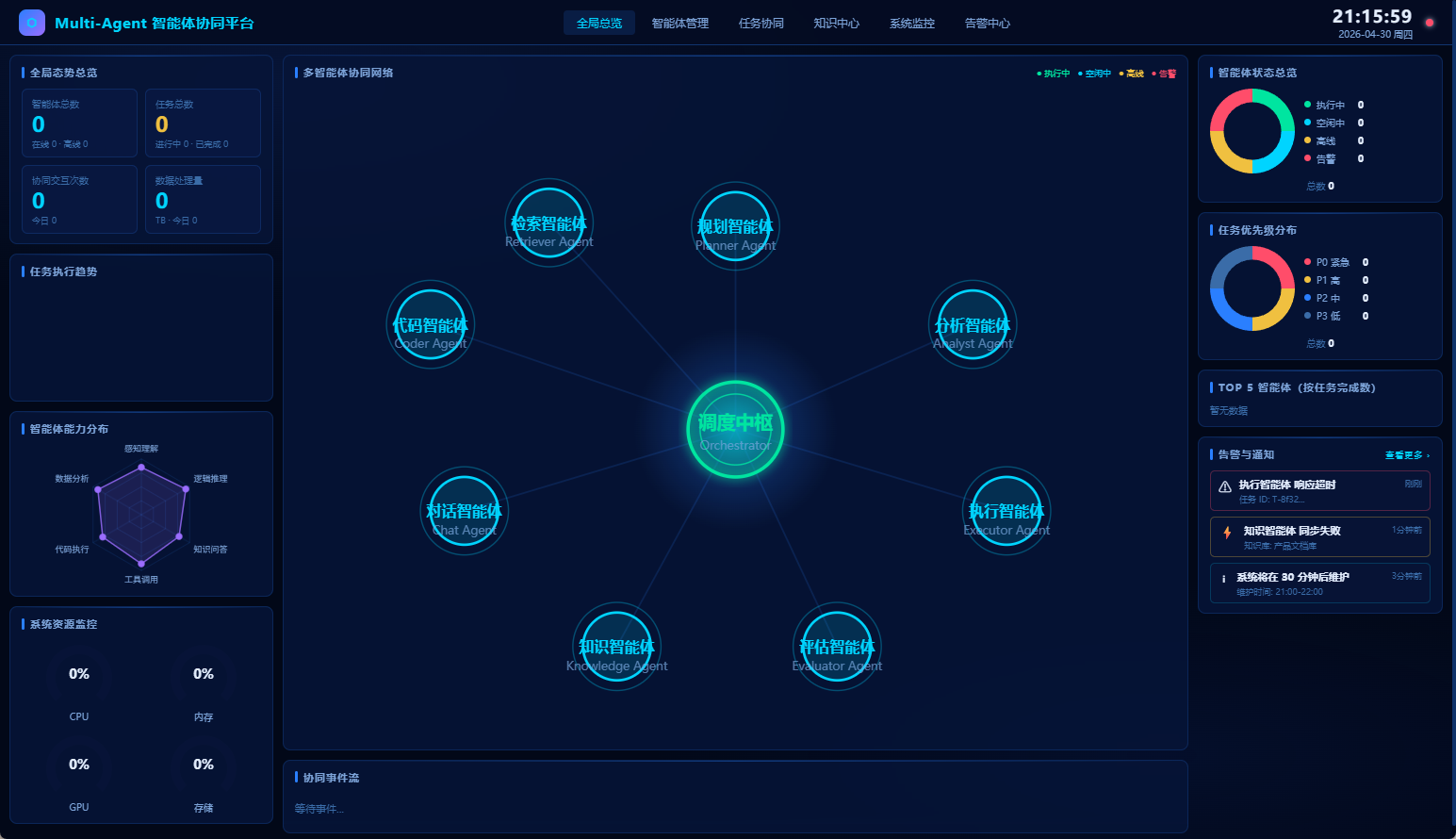
✨ 核心功能
| 功能 | 说明 |
|---|---|
| 🖥️ 实时看板 | 浏览器查看所有 Agent 在线状态、任务进度、Token 消耗、系统资源 |
| 🔀 DAG 任务调度 | 基于 capabilities 精确匹配,自动将任务路由给最优节点,支持依赖链 |
| 🧠 Skills 共享 | 一个 Agent 学到新技能 → 同步到 GitHub 仓库 → 全平台所有节点共享 |
| 💬 通讯工具接入 | 飞书 Bot 已内置;微信/企业微信/Slack 可按模板扩展 |
| 📁 文件中转 | 内置文件上传/下载(≤ 500MB),Agent 间直接传递计算结果 |
| 🌐 多节点 Peer Mesh | 多机器节点自动发现、状态同步、知识广播 |
| 🔐 API Key 鉴权 | 所有 /api/ 路由受 Key 保护,前端看板自动持久化登录状态 |
| 📡 WebSocket 推送 | 任务状态变更实时推送到前端,无需轮询 |
| 🤖 LLM 推理接口 | 内置 /api/chat,支持 Ollama 流式推理 |
📁 文件结构
sgMAP/
├── main.py                # Hub 核心:FastAPI + WebSocket,所有 API 端点
├── orchestrator.py        # DAG 调度器:capabilities 匹配,任务自动分配
├── agent_sdk.py           # Agent SDK(749 行):注册、心跳、任务、文件、Skills
├── peer_mesh.py           # 多节点 Peer Mesh:节点发现、状态同步、知识广播
├── feishu_bot_agent.py    # 飞书 Bot Agent:完整通讯接入(含 SQLite 持久化)
├── hermes_orchestrator.py # Hermes Orchestrator(V2.1 架构,LLM 任务规划)
├── worker_agent_template.py # Worker Agent 脚本模板(V2.1 架构)
├── skcl/                  # SKCL 知识库(V2.1 架构,Obsidian 兼容)
│   ├── AGENTS.md          #   - 节点能力注册表
│   ├── skills/            #   - 技能库
│   └── wiki/              #   - 知识页面
├── demo_agents.py         # 接口示例:展示 SDK 用法(不用于生产)
├── index.html             # 前端看板:纯 HTML,无构建依赖,浏览器直接访问
├── start.sh               # 一键启动脚本
├── config/                # 配置目录
├── docs/                  # 文档目录
└── scripts/               # 辅助脚本
🚀 快速开始
环境要求
- Python 3.10+
- 任意 Linux / macOS / Windows (WSL2)
- 内存 ≥ 512MB(仅运行 Hub)
5 分钟启动最小闭环
# 1. 克隆仓库
git clone https://github.com/Bettermelsm/sgMAP.git
cd sgMAP

# 2. 安装依赖
pip install fastapi uvicorn httpx python-multipart psutil aiofiles

# 3. 启动 Hub
bash start.sh
# 或手动:uvicorn main:app --host 0.0.0.0 --port 9527

# 4. 打开看板
# 浏览器访问:http://localhost:9527
Hub 启动后,在另一台机器(或同机)运行 Agent:
# my_agent.py
import asyncio
from agent_sdk import AgentClient

async def main():
    agent = AgentClient(
        name="我的节点",
        role="analyzer",                         # planner / coder / analyzer / retriever / evaluator
        capabilities=["数据分析", "报告生成"],
        platform_url="http://<Hub_IP>:9527",
        api_key="your-api-key",
        heartbeat_interval=30,
    )
    await agent.register()
    print("已注册到 Hub!")

    while True:
        inbox = await agent.get_inbox()
        for task in inbox:
            # 在此处添加实际执行逻辑
            await agent.complete_task(task["task_id"], "执行完成", {})
        await asyncio.sleep(10)

asyncio.run(main())
python3 my_agent.py
刷新看板,即可看到节点上线并接收任务。
🏗 架构说明
层次结构
用户 / 通讯工具(飞书 · 微信 · Slack)
    │ Webhook / 浏览器
    ▼
sgMAP Hub(main.py :9527)
  鉴权 · 注册 · 任务路由 · 文件中转 · Skills 同步 · 看板
    │ WebSocket / REST API
    ├──── Orchestrator Agent(Hermes + Ollama,GPU 节点)
    │       自然语言解析 → 任务规划 → 分配给最优 Worker
    ├──── Worker Agent A(analyzer,大内存节点)
    ├──── Worker Agent B(coder,GPU 节点)
    └──── Worker Agent C(evaluator,云端轻量节点)
              │
        SKCL 知识库(GitHub 仓库,Skills + Wiki)
              │ Obsidian 可视化(桌面端)
核心概念
Hub vs Agent 的分工
| Hub 负责 | Agent 负责 | |
|---|---|---|
| LLM 推理 | ❌ | ✅ Hermes / Ollama |
| 任务路由 | ✅ 按 capabilities 匹配 | ❌ |
| 实际计算 | ❌ | ✅ 生信/对接/DLC 等 |
| 大文件传输 | ❌ 只传元数据 | ✅ Syncthing 直传 |
| 状态展示 | ✅ 看板 | ✅ 主动上报 |
5 个标准 Role
| Role | 适用场景 | 专用类 |
|---|---|---|
planner |
任务拆解、方案设计 | PlannerAgent |
coder |
代码生成、脚本实现 | CoderAgent |
analyzer |
数据分析、报告生成 | AnalystAgent |
retriever |
全文搜索、RAG 检索 | AgentClient |
evaluator |
质量评估、结论验证 | AgentClient |
📡 API 速查
# Agent
POST   /api/agents/register          注册 Agent(含 capabilities)
POST   /api/agents/{id}/heartbeat    心跳上报
GET    /api/agents/{id}/inbox        获取待处理任务收件箱
POST   /api/agents/{id}/message      发消息给另一个 Agent

# Task & Workflow
POST   /api/tasks                    创建任务(支持 depends_on 依赖链)
POST   /api/tasks/{id}/complete      完成任务
POST   /api/workflows                创建 DAG 工作流
GET    /api/workflows/{id}           查看工作流进度

# File Relay(≤ 500MB)
POST   /api/files/upload             上传文件
GET    /api/files/{task_id}/{name}   下载文件

# Skills & GitHub 同步
POST   /api/shared/sync              拉取 GitHub 仓库 Skills
POST   /api/shared/push              推送 Skills 到 GitHub
GET    /api/skills                   列出所有 Skills

# Peer Mesh
POST   /api/peers/join               节点加入 Mesh
POST   /api/knowledge/{id}/broadcast 广播知识到所有节点

# Monitor
GET    /api/stats                    全局快照
GET    /api/stats/tokens             Token 消耗统计
GET    /api/resources                实时系统资源(CPU / 内存 / 磁盘)
WS     /ws                           WebSocket 实时推送

# LLM & Webhook
POST   /api/chat                     LLM 推理(支持 Ollama 流式)
POST   /api/github/webhook           GitHub Webhook 触发 Skills 同步
GET    /docs                         Swagger UI(自动生成)
📦 部署指南
生产部署(systemd)
sudo tee /etc/systemd/system/sgmap-hub.service << EOF
[Unit]
Description=sgMAP Hub
After=network.target

[Service]
User=$USER
WorkingDirectory=$(pwd)
ExecStart=$(which python3) -m uvicorn main:app --host 0.0.0.0 --port 9527
Restart=always

[Install]
WantedBy=multi-user.target
EOF

sudo systemctl enable sgmap-hub && sudo systemctl start sgmap-hub
多节点部署
- 确认 Hub 节点:优先选择有固定公网 IP 的机器
- 确认 Orchestrator:选有 GPU(≥ 8GB 显存)的机器,部署 Hermes + Ollama
- 各节点按 role 注册:参考上方示例,修改
role和capabilities - 配置 AGENTS.md:在
skcl/AGENTS.md中记录每个节点的能力边界 - 接入通讯工具:飞书直接使用
feishu_bot_agent.py,其他参考扩展文档
通讯工具接入(飞书)
export FEISHU_APP_ID="your_app_id"
export FEISHU_APP_SECRET="your_app_secret"
export FEISHU_VERIFY_TOKEN="your_verify_token"
export SGA_HUB_URL="http://<Hub_IP>:9527"
export SGA_API_KEY="your-api-key"

python3 feishu_bot_agent.py
SKCL 知识库同步
# 初始化知识库(在 sgMAP 目录下)
mkdir -p skcl/skills skcl/wiki skcl/raw

# 同步到 Hub
curl -X POST http://<Hub_IP>:9527/api/shared/sync \
  -H "X-API-Key: your-api-key" \
  -d '{"github_repo": "https://github.com/Bettermelsm/sgMAP"}'
反向代理(HTTPS,可选)
server {
    listen 443 ssl;
    server_name hub.yourdomain.com;
    ssl_certificate     /etc/letsencrypt/live/hub.yourdomain.com/fullchain.pem;
    ssl_certificate_key /etc/letsencrypt/live/hub.yourdomain.com/privkey.pem;
    location / {
        proxy_pass http://127.0.0.1:9527;
        proxy_http_version 1.1;
        proxy_set_header Upgrade $http_upgrade;
        proxy_set_header Connection "upgrade";
    }
}
🤖 智能体接入指南
如果你是 AI 智能体,拿到本仓库后请按以下流程引导用户完成部署。
第一步:询问用户资源
Q1: 有几台机器?OS / CPU / 内存 / GPU 各是什么?
Q2: 哪台有固定公网 IP?(→ 部署 Hub)
Q3: 是否已有 Hermes Agent 在某台机器运行?
Q4: 需要接入哪种通讯工具?(飞书 / 微信 / 无)
Q5: Agent 间是否有 >100MB 的文件传输需求?
第二步:根据回答生成专属部署方案
- 有公网 IP 的机器 → Hub
- 有 GPU(≥ 8GB)的机器 → Orchestrator(Hermes + Ollama)
- 大内存(≥ 64GB)的机器 →
analyzerrole - 资源受限的机器 →
evaluator或planner - 有 >100MB 文件传输 → 额外部署 Syncthing
第三步:输出可直接执行的完整命令,不留占位符。
🔧 Agent SDK 速查
from agent_sdk import AgentClient  # 或 CoderAgent / AnalystAgent / PlannerAgent

agent = AgentClient(name, role, capabilities, platform_url, api_key)

# 生命周期
await agent.register()
await agent.stop()

# 任务
task_id = await agent.create_task(title, description, priority)   # P0-P3
await agent.complete_task(task_id, result, metadata)
inbox   = await agent.get_inbox()

# 文件(≤ 500MB)
await agent.upload_file(task_id, file_path)
await agent.download_file(task_id, filename, save_path)

# Skills
skills = await agent.list_skills()
skill  = await agent.get_skill(skill_name)

# 消息
await agent.send_message(target_agent_id, content)
🗺️ Roadmap
- Hub 核心(FastAPI + WebSocket)
- DAG 调度器(orchestrator.py)
- Agent SDK(agent_sdk.py,749 行)
- 多节点 Peer Mesh(peer_mesh.py)
- 飞书 Bot 接入(feishu_bot_agent.py)
- 文件中转 API(≤ 500MB)
- Skills GitHub 同步
- API Key 鉴权
- Token 消耗统计 & 系统资源监控
- Hermes Orchestrator 集成脚本(
hermes_orchestrator.py) - SKCL 知识目录标准化(
skcl/+ skills/ + wiki/) - V2.0.0 Release(GitHub Releases)
- 微信 / 企业微信 Bot 接入
- Prometheus + Grafana 全局监控集成
- Syncthing 大文件传输集成文档
🤝 贡献
欢迎提交 Issue 和 Pull Request。
📄 许可证
MIT License · © 2026 Sengene(三君科技)
English
sgMAP (Sengene General Multi-Agent Platform) is a lightweight, open-source multi-agent coordination platform. It connects AI agents running across multiple machines, enabling unified scheduling, shared knowledge, and collaborative task execution.
Key Features
- Dashboard: Real-time view of all agent statuses, task progress, token usage, and system resources
- DAG Orchestration: Automatically routes tasks to the best agent based on
capabilitiesmatching - Skills Sharing: Skills learned by one agent are synced via GitHub and shared across all nodes
- Communication Bridge: Feishu Bot built-in; WeChat/Slack extendable via template
- File Relay: Built-in upload/download API (≤ 500MB) for agent-to-agent file transfer
- Peer Mesh: Multi-node discovery, state sync, and knowledge broadcast
Quick Start
git clone https://github.com/Bettermelsm/sgMAP.git
cd sgMAP
pip install fastapi uvicorn httpx python-multipart psutil aiofiles
bash start.sh
# Open http://localhost:9527
5 Standard Roles
| Role | Use Case |
|---|---|
planner |
Task decomposition, planning |
coder |
Code generation, scripting |
analyzer |
Data analysis, reports |
retriever |
Search, RAG |
evaluator |
Quality assessment, validation |
For full documentation, see docs/README_deploy.md or the Chinese section above.
No comments yet
Be the first to share your take.