
SeeFlow
Architecture diagrams that actually run, generated by AI agents.
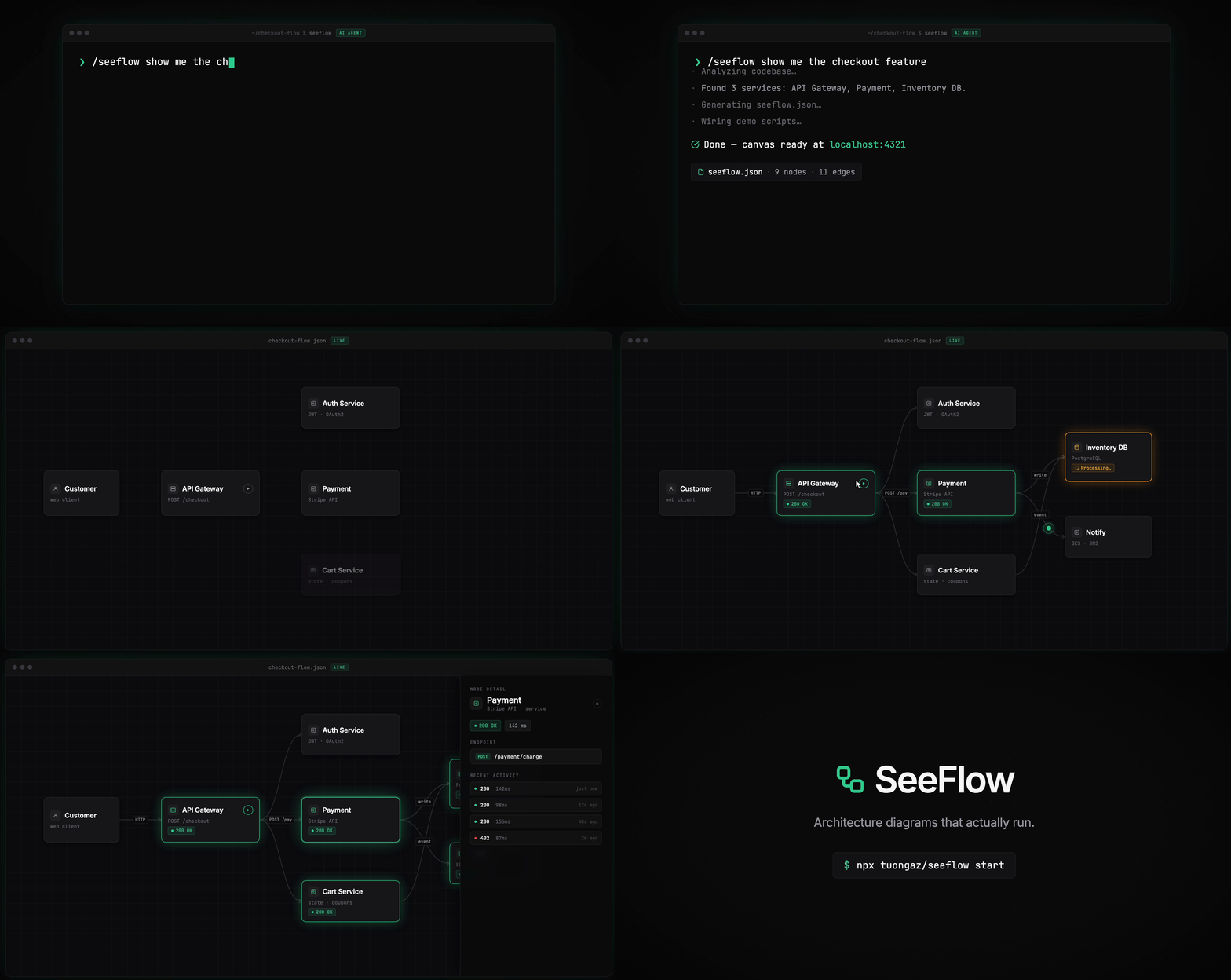
Turn your static system architecture into a live control panel wired directly to your running application. Click a node, fire a real request, watch downstream services light up as your app emits events back.
Why
- Diagram drift — Confluence pages go stale. SeeFlow breaks loudly when your actual system changes.
- Onboarding friction — New engineers click through a live flow instead of reading six-month-old docs.
- Demo tedium — Script it once, replay it flawlessly. No more manually clicking through microservices for stakeholders.
Quick Start
The SeeFlow plugin reads your codebase, understands your architecture, and generates the full diagram and request scripts automatically. Works with Claude Code, Codex, Cursor, and Windsurf.
1. Start the studio
npx -y @tuongaz/seeflow@latest start
# then open http://localhost:4321
Requires Bun ≥ 1.3 (or Node with npx). The studio scans $(pwd)/flow.json on start and auto-registers that flow if present. The studio's registry persists under ~/.seeflow/ across restarts.
⚠️ Heads up: Play and Status scripts run inside the container, so generated scripts that talk to services on your host — HTTP calls to
localhost, host binaries likepsql/redis-cli, your project's CLI — will not work. Interactive nodes are likely to fail. Use the native path above for full functionality.
docker run --rm -it -p 4321:4321 -v $(pwd):/workspace tuongaz/seeflow
The image ships with a pre-registered Order Pipeline demo so you can see the canvas immediately, and the studio scans /workspace/flow.json on start.
2. Install the plugin
Skill installer (recommended):
npx skills add tuongaz/seeflow
Then just ask:
/seeflow show me the shopping cart feature
The plugin scans your routes and database connections, generates flow.json, wires up demo scripts, and opens the canvas at localhost:4321.
/seeflow-lookup — consult an existing flow
Once a flow is registered, agents can read it back as architectural ground truth:
/seeflow-lookup list                                    # catalog of registered flows
/seeflow-lookup flow <id>                               # nodes + connectors (no detail content)
/seeflow-lookup node <flowId> <nodeId>                  # single node with detail/html inlined
/seeflow-lookup flow <id> --full                        # everything inlined
/seeflow-lookup node <flowId> <nodeId> --with-scripts   # adds play.ts / status.ts bodies
Read-only. JSON output. Start cheapest (list) and drill in.
Component nodes
The component node type turns a canvas node into a json-render-powered reactive UI driven by a small catalog of shadcn-styled primitives (Card, Button, Input, Chart, Markdown, etc.). The spec lives at <project>/nodes/<id>/spec.json — declaring an element tree, optional initial state, and a typed action vocabulary — while flow.json carries only the type: 'component' tag. Two action kinds are supported: set actions mutate local state via JSON Pointer paths, and script actions POST to /api/flows/:id/nodes/:nodeId/actions/:name which spawns the matching script under nodes/<id>/ (e.g. nodes/<id>/actions/<name>.ts) and merges the JSON response back into state.
Icon packs
Cloud vendor icons (AWS, GCP, Azure) install on demand into a local cache. Icon ids encode the vendor as a prefix — aws:lambda, gcp:cloud-run, azure:functions, iconify:logos:google-cloud — while unprefixed names continue to resolve against the bundled Lucide set.
CLI
seeflow icons list                 # JSON summary of installed + available packs
seeflow icons add aws              # download + extract + index the AWS pack
seeflow icons add azure --accept-terms   # Microsoft requires explicit acceptance
seeflow icons add gcp --pack-url <url>   # override the default download URL
seeflow icons update aws           # re-install (re-downloads from upstream)
seeflow icons remove aws           # drop the pack from cache + index
Packs install under ~/.seeflow/icons/<vendor>/<version>/ with a shared index.json. Installs are serialized per vendor — a second seeflow icons add aws while the first is running waits rather than racing.
In the studio
Open any icon picker on a canvas node, click Browse packs in the picker footer, then Install on the vendor row. Azure prompts for license acceptance; AWS and GCP proceed directly. A progress toast tracks bytes downloaded, persists across popover close, and refreshes the picker's vendor tabs the moment the pack is indexed. Vendor tabs (Bundled · AWS · GCP · Azure · Logos) appear above the icon grid; uninstalled vendors render disabled with an inline Install affordance.
Docker reference
⚠️ Docker is the non-preferred path. Play/Status scripts execute inside the container and cannot reach host services or host binaries, so interactive nodes generated against your local app will not work. Prefer
npx -y @tuongaz/seeflow@latest startfor the full experience.
The image is published on Docker Hub. See Quick Start above for the basic docker run.
Configuration
| Variable | Default | Description |
|---|---|---|
SEEFLOW_PORT |
4321 |
Port the studio listens on |
SEEFLOW_FLOW |
flow.json |
Flow file path relative to the workspace |
SEEFLOW_WORKSPACE |
/workspace |
Workspace mount point inside the container |
Bake demos into a derived image
Ship a container that already contains your flow:
FROM tuongaz/seeflow
COPY ./my-demos /workspace
# docker build -t my-flow . && docker run --rm -it -p 4321:4321 my-flow
Tags
:latest— newest stable release:<version>— pinned release (e.g.:0.1.18):<major>.<minor>— latest patch on a minor line (e.g.:0.1)
MCP server
SeeFlow ships an MCP server so any MCP-aware editor can list, register, and edit demos directly. The studio must be running first.
Claude Code:
claude mcp add seeflow -- npx -y --package=@tuongaz/seeflow@latest seeflow-mcp
Via .mcp.json (Cursor, Windsurf, etc.):
{
  "mcpServers": {
    "seeflow": {
      "command": "npx",
      "args": ["-y", "--package=@tuongaz/seeflow@latest", "seeflow-mcp"]
    }
  }
}
The MCP server talks to http://127.0.0.1:4321/mcp by default. Override with SEEFLOW_STUDIO_URL if needed.
MCP Apps
On hosts that support the MCP Apps spec (Claude Desktop today), seeflow-mcp renders the live React Flow canvas inline in the chat — no second window, no localhost:4321 tab. You author, navigate, and edit the flow from the same conversation that produced it.
Install in Claude Desktop — add an entry to ~/Library/Application Support/Claude/claude_desktop_config.json:
{
  "mcpServers": {
    "seeflow": {
      "command": "npx",
      "args": ["-y", "--package=@tuongaz/seeflow@latest", "seeflow-mcp"]
    }
  }
}
When launched this way, seeflow-mcp boots an embedded studio on a loopback ephemeral port (the same Hono backend used by seeflow start) and serves the iframe canvas as the ui://seeflow/canvas resource. One process, one install, no separate studio to run.
The 5 canvas-bearing tools open the canvas inline:
| Tool | Renders |
|---|---|
seeflow_get_flow |
The flow's canvas (read view). |
seeflow_get_flow_graph |
Same canvas, with the topology focused. |
seeflow_get_node |
The canvas with the requested node selected + opened. |
seeflow_register_flow |
The newly-registered flow in edit mode + "Just created" highlight. |
seeflow_create_project |
The new project's canvas in edit mode. |
The remaining 18 tools stay JSON-only — their mutations propagate to any open canvas via the studio's SSE channel, no re-render needed.
Model-notify split. Edits inside the canvas reach the model through two channels:
sendMessage— structural edits the model should react to (node added / deleted, connector added / deleted, node renamed, Play / Status pressed). Bursts within 200ms are coalesced.updateModelContext— silent navigation telemetry (selection, hover, drag-in-progress, viewport pan/zoom). Debounced 250ms, throttled to at most 1/sec.
Non-Apps hosts are unaffected. The _meta payload is additive: hosts that don't grok openai/outputTemplate ignore it and continue to receive the same JSON tool responses they've always received. The existing claude mcp add seeflow … flow above keeps working unchanged on Claude Code, Cursor, Windsurf, etc.
See docs/plans/2026-05-25-mcp-apps-for-seeflow-design.md for the full design — architecture, bidirectional channels, CORS / per-process-token model, and lifecycle.
Develop
git clone https://github.com/tuongaz/seeflow.git
cd seeflow && bun install
make dev   # Vite (5173) + Hono studio (4321), both hot-reloading
make help lists every target. Toolchain: Bun ≥ 1.3, Hono, React Flow, Zod, Biome.
Status
Early-stage. The schema is stable enough to author against, but expect changes. Issues, ideas, and PRs welcome.
License
MIT — see LICENSE.
No comments yet
Be the first to share your take.