
ScreenForge


中文 | English
Your AI agent runs the test. You keep the pytest file.
Describe the flow in plain language. Watch the agent click through a live site. Walk away with a self-healing pytest script that survives UI changes — and runs in CI. (Drives real iOS + Android devices too, not just Chrome.)
ScreenForge is an AI-driven UI automation engine that turns natural language into executable test scripts. Unlike record-and-replay tools, you don't perform the actions yourself — the AI does it for you.
Why ScreenForge?
| Playwright Codegen | Browser Use | Midscene.js | ScreenForge | |
|---|---|---|---|---|
| Need to perform actions yourself? | Yes | No | No | No |
| Generates replayable test scripts? | Yes | No | No | Yes (pytest) |
| Self-healing when UI changes? | No | No | No | Yes |
| Works as AI Agent tool (MCP)? | No | Yes | No | Yes |
| Drives real iOS / Android devices? | No | No | No | Yes |
Core architecture: Your AI Agent is the brain (understands requirements, makes decisions). ScreenForge is the hands (executes UI actions, generates code).
Quick Start
pip install screenforge

# See the magic without any API key:
screenforge --demo

# For real usage, set your LLM key:
export OPENAI_API_KEY=sk-...

# Inspect the current page (returns DOM tree for your Agent to analyze):
echo '{"operation":"inspect_ui","platform":"web"}' | screenforge --tool-stdin

# Execute a single action:
screenforge --action click --platform web --locator-type text --locator-value "Login"
How It Works
You (or your AI Agent)          ScreenForge
        │                            │
        ├──── "Test the login" ─────►│
        │                            ├── inspect_ui (get DOM tree)
        │◄── DOM tree ──────────────┤
        │                            │
        ├──── click #email ─────────►│
        ├──── input "user@..." ─────►│
        ├──── click "Sign In" ──────►│
        │                            │
        │◄── pytest script ─────────┤
        │◄── Allure report ─────────┤
Each step: inspect → decide → act → verify. The AI decides, ScreenForge executes.
Features
- Keep a real pytest file: Every run emits a replayable
pytestscript (Allure-instrumented) you can drop straight into CI — not a black-box agent run. - Self-healing engine: When the UI changes and a locator breaks, the engine auto-repairs it with confidence scoring and AST validation, so your committed test survives.
- The agent does the clicking: You (or your AI agent) describe intent; ScreenForge inspects the DOM, acts, and verifies — you never record by hand.
- Real devices, not just browsers: Drives Android (uiautomator2) and iOS (wda) physical devices over the same protocol — the one thing pure-web agents (Playwright MCP, Browser Use) can't do.
- L1/L2 semantic cache: Same page + same instruction = instant response, no LLM call needed
- Visual fallback: When DOM can't locate elements (Canvas, games), VLM parses screenshots
- MCP server: Any MCP-compatible Agent can drive ScreenForge natively
- Structured output: JSON Lines events +
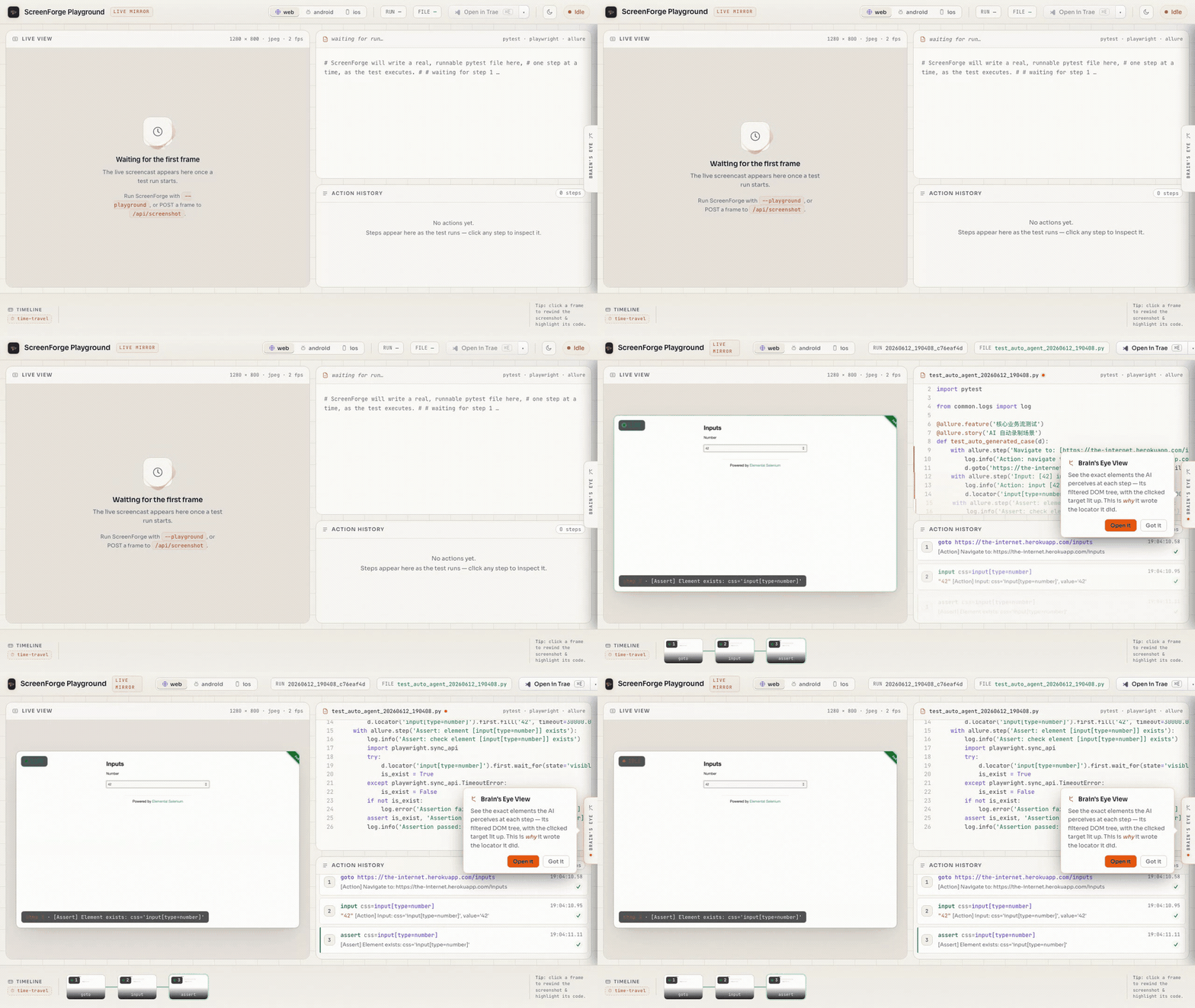
report/runs/<id>/artifacts for CI integration - Live Mirror playground: Watch the generated pytest code grow line-by-line beside a live screenshot as the test runs —
screenforge --playground. See the Playground Guide - Execution-replay review report: Run any test with
REVIEW_RECORD=1and get a self-contained, shareable offlinereport.html— a drag-timeline of each step's screenshot + the test source line that triggered it + the DOM tree, plus avideo.giffilmstrip. Default off, zero overhead. (Web verified; mobile registry/recording seam in place but unverified.) - Case memory hints on
inspect_ui: pass an optionaltasklabel and the payload'smemoryfield carries what the last run of that task did — locator, counts, and outcome — a hint the Agent weighs against the live tree, seen before it acts, never auto-replayed. It records failures too, so checklast_status/success_countbefore trusting a hint. The label must match the one the earlier run recorded (--action-name, else"{action}:{locator_value}");load_case_memorylists them. See the Agent Guide. - Plain-language element lookup on
inspect_ui: pass an optionalintentphrase (e.g."登录按钮") and the payload'scandidatesfield returns up to 3 ranked elements with ready-to-use locators — additive to the fullui_tree, never a replacement. Matching is literal string similarity, not semantic, so phraseintentin the same language as the UI. See the Agent Guide.
Agent Integration (Claude Code / Cursor / Codex)
ScreenForge exposes itself as a tool for AI Agents. The standard loop:
# 1. Get page structure (your Agent analyzes it)
echo '{"operation":"inspect_ui","platform":"web"}' | screenforge --tool-stdin

# 2. Your Agent decides what to do, sends precise actions
screenforge --action click --platform web --locator-type text --locator-value "Login"

# 3. Verify the result, repeat
echo '{"operation":"inspect_ui","platform":"web"}' | screenforge --tool-stdin
For batch operations, use workflows:
screenforge --workflow ./workflows/login.yaml --platform web --json
Or start the MCP server for native Agent integration:
screenforge --mcp-server
GitHub Actions
Add ScreenForge to your CI pipeline:
- uses: jhinzzz/ScreenForge@v1
  with:
    platform: web
    workflow: ./workflows/login.yaml
    openai-api-key: ${{ secrets.OPENAI_API_KEY }}
Results are auto-uploaded as Allure artifacts. See action.yml for all inputs.
See Agent Integration Guide for the complete protocol.
Installation (from source)
git clone https://github.com/jhinzzz/ScreenForge.git
cd ScreenForge
python -m venv .venv && source .venv/bin/activate
pip install -e ".[all]"
Platform-specific extras:
- Web only:
pip install -e .(default, includes Playwright) - Android:
pip install -e ".[android]" - iOS:
pip install -e ".[ios]" - ML/cache:
pip install -e ".[ml]"(sentence-transformers for semantic cache)
Configuration
# Required: LLM API key (OpenAI-compatible endpoint)
export OPENAI_API_KEY=sk-...

# Optional: custom endpoint (defaults to api.openai.com)
export OPENAI_BASE_URL=https://api.openai.com/v1

# Optional: model (defaults to gpt-4o)
export MODEL_NAME=gpt-4o
Or create a .env file (copy from .env_template).
Badge
If ScreenForge generates tests for your project, add this badge to your README:
[](https://github.com/jhinzzz/ScreenForge)

Learn More
| Resource | Description |
|---|---|
| Mobile Setup | Android & iOS device connection guide |
| MCP Setup (3 min) | Connect to Claude Desktop / Cursor / Cline / Claude Code |
| Agent Guide | Integration protocol for AI Agents |
| Capability Matrix | Supported platforms, actions, and locators |
| Architecture Deep-Dive | Brain/hands split, semantic cache, self-heal AST gates, hygiene-as-feature |
| Examples | Real committed workflows + the green pytest they generated |
| Playground Guide | Live Mirror — watch code + screenshots grow as the test runs |
| Workflow Examples | YAML workflow templates |
| CHANGELOG | Version history |
Contributing
See CONTRIBUTING.md for guidelines. Issues and PRs welcome!
No comments yet
Be the first to share your take.