
Multi-Tenant (SaaS) MCP Server Sample
This repository contains a multi-tenant remote MCP server implementation using the Streamable HTTP transport written with the TypeScript SDK.
MCP Server
A remote MCP server implementation for B2B travel booking with multi-tenant authentication and authorization via Amazon Cognito and OAuth 2.1.
- Node.js with Express and MCP SDK for tools, resources and prompts
- AWS services: ECS, DynamoDB, S3, Cognito
- Protected Metadata Resource handling (RFC 9728)
- Multi-tenant architecture with data isolation
- Dynamic client registration (RFC 7591)
- OpenID Configuration endpoint to advertise the registration endpoint (RFC 8414)
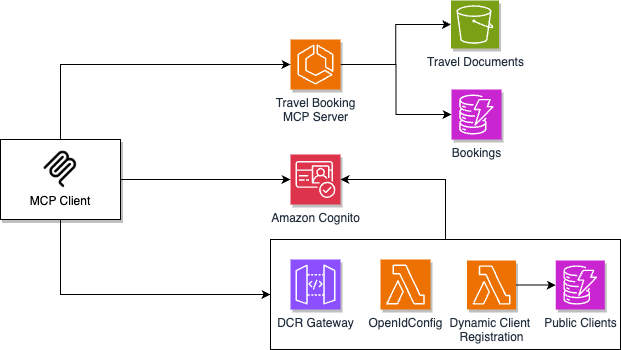
For a detailed architecture overview, see the MCP Server README.
Deploy
cd mcp_server/infra
npm install
./deploy.sh
Note the output URL (https://mc-xxx.ecs.<region>.on.aws). Create a user with the manage-users script:
cd mcp_server/scripts
npm install
node manage-users.js create myuser [email protected]
The +tenantname suffix becomes the tenant ID (see User Management).
Try it
Two ways to connect to the deployed server.
1. MCP Inspector
For protocol-level inspection — see tools/resources/prompts, invoke them manually, no LLM in the loop.
npx @modelcontextprotocol/inspector
Open the URL it prints, paste https://mc-xxx.ecs.<region>.on.aws/mcp, complete the OAuth flow, exercise tools.
2. Amazon Quick Suite
For end-to-end chat with the MCP tools. The Quick Suite MCP client handles OAuth 2.1 + PKCE + Dynamic Client Registration automatically.
- Open Amazon Quick Suite → Connections → Integrations → Actions.
- Choose Model Context Protocol → +.
- MCP server endpoint:
https://mc-xxx.ecs.<region>.on.aws/mcp - Authentication: User authentication (OAuth). Leave credentials blank — DCR will register Quick automatically.
- Approve in the Cognito hosted UI when prompted.
- Quick discovers all tools (
whoami,find_flights,book_flight,list_hotels,book_hotel,list_bookings,loyalty_info).
Full setup reference: Model Context Protocol (MCP) integration.
Disclaimer
This repository is for demonstration and reference purposes only. The code and configurations provided are not intended for production use without proper review, testing, and security considerations.
Contributing
See CONTRIBUTING for more information.
License
This library is licensed under the MIT-0 License. See the LICENSE file.
No comments yet
Be the first to share your take.