
saas-builder — multi-CLI agent plugin to build a complete, secure SaaS



Turn your CLI agent into a product-building partner. Describe what you want to ship — a SaaS, a landing page, a dashboard, an MVP — and
saas-builderasks the right questions, makes smart design and architecture decisions, and produces real, production-grade output instead of generic AI boilerplate.
saas-builder runs on every major CLI agent — Claude Code, OpenCode, Gemini CLI, Codex, and Copilot CLI — because its core is portable Agent Skills, shipped with a native manifest for each platform. It packs eighteen skills orchestrated by a router that figures out what you're actually building before a single line of code is written — and then guides you across the whole lifecycle: discovery, architecture, backend, security, payments, polish, and deploy. (Tested on Claude Code and OpenCode; see Installation.)
saas-builder construye un producto digital completo de principio a fin —un SaaS, una landing, un dashboard o un MVP— con buenas decisiones de diseño, arquitectura, backend, seguridad, pagos y deploy, en vez del típico resultado genérico de IA.
Son 18 skills que se activan solas según lo que pidas (en español o en inglés): descubrimiento de producto, arquitectura, API, base de datos, autenticación, seguridad preventiva, Stripe, performance, accesibilidad, SEO, PWA, deploy, más frontend anti-IA (landings, portfolios) e image-to-code. Funciona con solo tener Superpowers instalado; nada más.
Funciona en todos los CLIs de agentes (Claude Code, OpenCode, Gemini CLI, Codex, Copilot CLI) porque su núcleo son Agent Skills portables, con un manifiesto nativo por plataforma. Probado en Claude Code y OpenCode.
Instalación (Claude Code):
/plugin marketplace add MartinOlivero/saas-builder
/plugin install saas-builder
(Comandos para los otros CLIs en la sección Installation.)
Hecho por Martín Olivero / IamAutom.
The problem it solves
Most AI coding help jumps straight to implementation. You ask for "a SaaS" and you get a purple-gradient, Inter-everywhere, no-empty-states UI built on a stack nobody chose on purpose — with a string-concatenated SQL query, no rate limit, and a checkout that fulfills on the client redirect. This plugin does the thinking before the building, and bakes the safe default in as you build.
Designed to be self-sufficient
saas-builder assumes you have Superpowers (brainstorming, TDD, debugging, planning, code review, git worktrees) and nothing else. It deliberately does not duplicate those. Everything else a solo developer needs to ship a professional digital product — secure backend, auth, payments, performance, accessibility, SEO, deploy — lives here, and every skill works standalone with an embedded fallback (it gets sharper when optional tools like ui-ux-pro-max or the Stripe MCP are present, but never blocks without them).
Where it fits in your stack
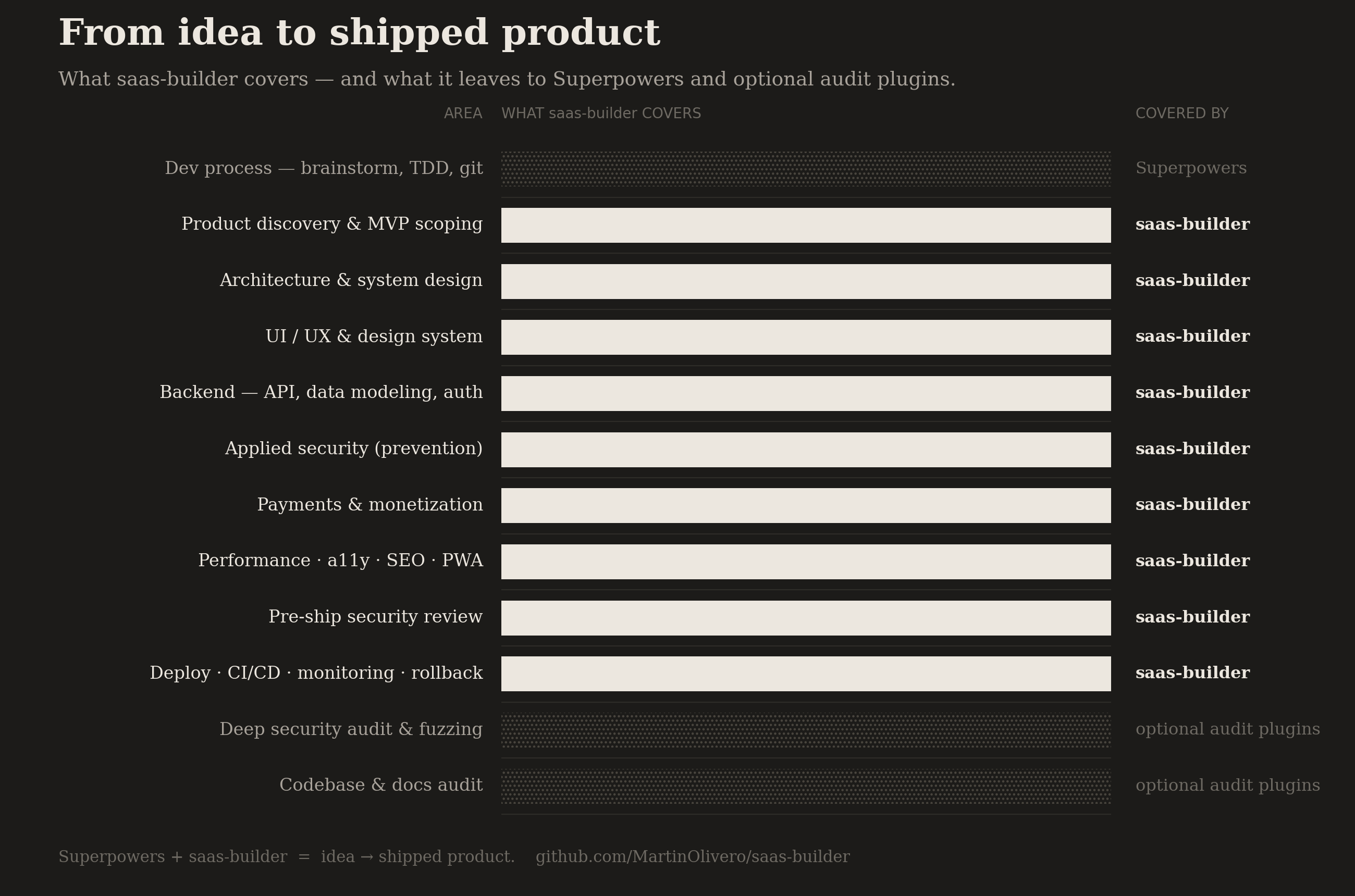
saas-builder knows its lane. Process discipline comes from Superpowers; deep security audit and fuzzing come from optional review plugins (Trail of Bits, the testing handbook, audit suites). saas-builder owns the part those leave empty — building the product itself: design, architecture, backend, prevention-grade security, payments, and shipping.
If your setup already nails security and testing but has a hole in product design, architecture, and SaaS building, that hole is exactly what this fills:
| Lifecycle area | saas-builder | Who else / complement |
|---|---|---|
| Dev process — brainstorm, TDD, debug, git, review | ░░░░░░░░░░ |
Superpowers owns this (not duplicated) |
| Product discovery & MVP scoping | ██████████ |
— |
| Architecture & system design | ██████████ |
— |
| UI/UX & design system | ██████████ |
sharper with ui-ux-pro-max |
| Backend — API, data modeling, auth | ██████████ |
InsForge / Supabase |
| Applied security — prevention while building | ██████████ |
— |
| Payments & monetization | ██████████ |
Stripe MCP |
| Performance · accessibility · SEO · PWA | ██████████ |
— |
| Pre-ship security review | ██████████ |
— |
| Deploy · CI/CD · monitoring · rollback | ██████████ |
— |
| Deep security audit & fuzzing | ░░░░░░░░░░ |
Trail of Bits, testing-handbook (optional, high-risk apps) |
| Codebase & docs audit | ░░░░░░░░░░ |
codebase-audit-suite (optional) |
saas-builder owns security in two passes — prevention while you build (secure-coding) and a verification review before you ship (pre-ship-security). What it deliberately leaves out is the deep audit (static analysis, fuzzing) that high-risk apps need — the pre-ship gate tells you when that moment has come.
The takeaway: Superpowers + saas-builder covers idea → shipped product. Add audit/fuzzing plugins on top when an app handles money, sensitive data, or crypto — they x-ray the house; saas-builder builds it (safely) and walks it through inspection before you move in.
What makes it different
Most AI coding tools act after a decision is already made — they review the code you wrote, scan the contract you deployed, or wrap one service and stop at its edge. saas-builder is opinionated about when it steps in. Two examples capture the whole philosophy.
Security: prevention, not audit
The security ecosystem (Trail of Bits, Semgrep, CodeQL, audit suites) inspects finished code — it finds the SQL injection that's already there. Valuable, but late, and nothing stops you from writing the vulnerability in the first place. The secure-coding skill is that missing companion: it runs while you build the endpoint, baking in the parameterized query, the zod validation, and the server-side authz check before the bug can exist.
It's the seatbelt you put on before driving — not the crash investigator who shows up afterward.
Payments: the whole flow, not just the catalog
Stripe's own MCP is control-plane only: it creates products and prices, but it cannot create a Checkout Session or process a webhook. A plugin that merely wires the MCP gives you an app that would sell but wouldn't charge — the money never actually lands. The payments skill is deliberately hybrid: it delegates the catalog to the MCP, then embeds the part that collects the money — the Checkout Session → signature-verified webhook → idempotent fulfillment chain that Stripe's tooling leaves to you.
The redirect is the customer saying "I'll pay." The webhook is the bank confirming the money arrived. You ship the product when the bank confirms — not on a promise.
The pattern behind both
| Most AI tooling | saas-builder |
|---|---|
| Acts after the code is written (review, audit, scan) | Acts while you build — the safe default is the first draft |
| Point tools for one slice (a scanner, a UI kit, an MCP) | One coherent chain across the whole lifecycle |
| Wraps a service and stops at its edge | Delegates what's good, embeds what the service can't do |
| Generic output you fix later | Opinionated defaults tied to a real stack |
Every skill carries a one-line analogy like the two above — so you understand why a decision is right, not just copy it.
Recommended design skills
saas-builder works standalone, but its design output gets sharper when the original design skills are present. The ui-design and landing-page skills delegate the design system to them when available and fall back to embedded principles otherwise.
Auto-installed
- taste-skill → declared as a plugin dependency, installed automatically with
saas-builderwhen it is available as a Claude Code plugin. It currently ships as a standalone skill rather than a marketplace plugin, so install it directly once:
Provides the tunable style layer (npx skills add https://github.com/leonxlnx/taste-skill --skill "design-taste-frontend"DESIGN_VARIANCE,MOTION_INTENSITY,VISUAL_DENSITY).saas-builderuses it automatically once present.
Manual install recommended
- ui-ux-pro-max (~87k ⭐):
npx uipro@latest init --ai claudesaas-builderdetects whether it is installed and uses it automatically. If it is not installed,saas-builderuses embedded design principles as a fallback.
How detection works
saas-builder checks for ui-ux-pro-max on every session start, via a SessionStart hook (hooks/check-dependencies.sh). If it is missing, you get a one-time install nudge; if it is present, the hook stays silent. Once installed, no further configuration is needed. The router and the architecture logic are fully independent and require nothing extra.
How it works
You: "I want to build a SaaS for X"  (English or Spanish)
        │
        ▼
   saas-router  ──►  asks 2-3 quick questions, then routes
        │
  PLAN  ├─ fuzzy idea?        ──►  product-discovery
        ├─ architecture?      ──►  architecture-primer
        │
  BUILD ├─ database/schema?   ──►  data-modeling
        ├─ API/endpoints?     ──►  api-design
        ├─ login/roles?       ──►  auth
        ├─ dashboard / app UI?──►  ui-design
        ├─ landing page?      ──►  landing-page + design-taste-frontend
        ├─ website/portfolio? ──►  design-taste-frontend
        ├─ clone a screenshot?──►  image-to-code
        │
  SECURE├─ any backend code   ──►  secure-coding  (runs throughout)
 MONEY  ├─ payments/billing?  ──►  payments
        │
 POLISH ├─ slow?              ──►  frontend-performance
        ├─ accessibility?     ──►  accessibility
        ├─ SEO / previews?    ──►  technical-seo
        ├─ offline/installable?──► pwa
        │
  SHIP  ├─ safe to ship?       ──►  pre-ship-security
        └─ deploy/CI/monitor? ──►  deployment
The router never lets Claude write code or design blindly. It triages first — like a nurse sending you to the right specialist — then hands off with full context so you're never asked the same thing twice.
The eighteen skills
Orchestration
| Skill | Triggers on | What it does |
|---|---|---|
saas-router |
"build me a…", "quiero construir…", any product request | The brain. Asks 2-3 questions and routes to the right specialist, in English or Spanish. |
Plan & design
| Skill | Triggers on | What it does |
|---|---|---|
product-discovery |
"I have an idea but…", "what should the MVP be?" | Separates problem from solution, validates the market, defines a prioritized MVP (P0/P1/P2). |
architecture-primer |
"how do I structure this?", "what database?", "how does it scale?" | Discovery → decision tree → decisions with trade-offs, stack, Mermaid diagram. Based on the System Design Primer. |
ui-design |
"design the UI", "pick colors", "dashboard layout" | Design system before code: three-tier tokens, responsive rules, tunable variance/motion/density. Bans the generic AI look. Owns product/app UI — dashboards, admin, data tables. |
landing-page |
"build a landing page", "sales page" | Proven section order + real copy + ready-to-use components. |
design-taste-frontend |
"make a website that doesn't look AI-generated", "portfolio", "marketing site", "redesign my site" | Anti-slop visual execution for public-facing sites: reads the brief, maps to real design systems, dark-mode protocol, redesign protocol, strict pre-flight (no AI tells). Pairs with landing-page on landings. Not for dashboards. |
image-to-code |
"clone this site", "make it look like this screenshot", reference image of a web | Image-first website-to-code: generates/analyzes the design image, then implements the site to match it closely. |
Build the backend
| Skill | Triggers on | What it does |
|---|---|---|
api-design |
"design the API", "REST or GraphQL?", "an endpoint" | REST conventions (errors, pagination, idempotency, versioning), REST-vs-GraphQL decision, env-config validation with zod. |
data-modeling |
"design the database", "schema for…", "multi-tenant" | Postgres by default, safe multi-tenancy (tenant_id + RLS), indexing and migration discipline. |
auth |
"add login", "user roles", "JWT or sessions?", "SSO" | Picks a provider (Clerk/Supabase/Better Auth) over rolled-your-own; sessions-vs-JWT, RBAC, multi-tenant scoping. |
Secure & monetize
| Skill | Triggers on | What it does |
|---|---|---|
secure-coding |
writing any endpoint/input/data write, "is this secure?", "rate limit" | OWASP Top 10 as prevention rules, input validation, mass-assignment guard, secrets hygiene, GDPR basics — baked in as you build. |
payments |
"add Stripe", "subscriptions", "pricing", "billing" | Correct Stripe flow (Checkout → webhook → fulfill), customer portal, idempotent fulfillment, sane pricing tiers. |
Polish & ship
| Skill | Triggers on | What it does |
|---|---|---|
frontend-performance |
"make it faster", "Core Web Vitals", "bundle too big" | Hits LCP/INP/CLS targets with Vite chunking, React.lazy, image/font fixes, CI bundle budget. |
accessibility |
"make it accessible", "a11y", "WCAG", "screen reader" | WCAG 2.2 AA: semantic HTML, keyboard/focus, accessible forms, contrast, jest-axe in CI. |
technical-seo |
"improve SEO", "meta tags", "no preview on WhatsApp" | Per-page OG/Twitter tags, sitemap/robots, JSON-LD, and the SPA-prerender fix so crawlers actually see your content. |
pwa |
"make it a PWA", "work offline", "push notifications" | Installable + offline with vite-plugin-pwa, the right caching strategy, and the stale-service-worker fix. |
pre-ship-security |
"is this safe to ship?", "pre-launch check", "did I miss anything?" | A fast pre-deploy security review (npm audit + secret scan + OWASP checklist), escalating to deep-audit tools only when the app is high-risk. Not a deep audit — it tells you when you need one. |
deployment |
"deploy this", "CI/CD", "Sentry", "rollback" | Uses what Vercel gives free, adds a GitHub Actions CI gate, Sentry with source maps, env hygiene, and a rollback runbook. |
Installation — works across CLI agents
The skills are the product, and they follow the open Agent Skills standard (skills/<name>/SKILL.md with name + description frontmatter) — the same format every major CLI agent now reads. This repo ships a native manifest for each platform, all pointing at the same skills/ folder (no duplication).
Tested vs. packaged (honest scope): verified on Claude Code and OpenCode. The Gemini CLI, Codex, and Copilot CLI manifests are packaged to each platform's official spec but not yet run end-to-end on those CLIs. If you hit a snag on one, open an issue.
| CLI | Manifest in this repo | Install |
|---|---|---|
| Claude Code ✅ tested | .claude-plugin/ |
/plugin marketplace add MartinOlivero/saas-builder → /plugin install saas-builder |
| OpenCode ✅ tested | — (native skills) | clone + link the skills/ folder (below) |
| Gemini CLI 📦 packaged | gemini-extension.json |
gemini extensions install https://github.com/MartinOlivero/saas-builder |
| Codex 📦 packaged | .codex-plugin/plugin.json |
codex plugin marketplace add MartinOlivero/saas-builder |
| Copilot CLI 📦 packaged | plugin.json + .github/plugin/marketplace.json |
copilot plugin marketplace add MartinOlivero/saas-builder → copilot plugin install saas-builder@saas-builder |
After installing, skills activate automatically based on what you ask — you don't call them by name.
OpenCode has no skill installer/marketplace; it scans known folders. Clone the repo and point one of those folders at its skills/:
git clone https://github.com/MartinOlivero/saas-builder ~/.saas-builder
ln -s ~/.saas-builder/skills ~/.config/opencode/skills   # global, all projects
# or per-project:  ln -s ~/.saas-builder/skills .opencode/skills
Claude Code — try it locally without installing (for development):
claude --plugin-dir /path/to/saas-builder
Why one repo serves all of them: each CLI only reads the manifest it knows (.claude-plugin/, gemini-extension.json, .codex-plugin/, plugin.json), and they all share the standard skills/ folder. The manifests don't collide — like one building with several doormen, each opening only the doors on their own keyring, while the shared skills room has a standard lock every key fits.
Example prompts
Each of these activates the right skill on its own — you don't call skills by name.
- Full SaaS: "I want to build a SaaS that helps freelancers track invoices."
→ router →
product-discovery→architecture-primer→data-modeling→api-design→auth→ui-design - Landing page: "Build me a sales page for my online course about AI automation."
→
landing-page(asks offer/avatar/CTA, generates copy + components) - Dashboard: "I need an admin dashboard to manage users and subscriptions."
→
ui-designin dashboard mode (dense, data-first, all states handled) - Backend: "Design the database for a multi-tenant project tracker."
→
data-modeling(Postgres,tenant_id+ RLS, indexes, first migration) - Auth: "Add login with Google and admin roles."
→
auth(provider pick + RBAC + protected routes) - Security, while building: "Add an endpoint to update a user's profile."
→
secure-coding(zod.strict()validation, authz check, mass-assignment guard) - Payments: "Add Stripe subscriptions with a monthly and annual plan."
→
payments(Checkout → webhook → idempotent fulfillment + customer portal) - Performance: "My app's Lighthouse score is bad and the bundle is huge."
→
frontend-performance(Vite chunking, lazy load, CWV targets) - SEO: "My SaaS has no preview when shared on WhatsApp/Twitter."
→
technical-seo(OG tags + SPA prerender so crawlers see them) - Ship it: "Set up CI and deploy to production with error tracking."
→
deployment(GitHub Actions gate + Sentry + rollback runbook) - Fuzzy idea: "I have an idea for an app but I'm not sure what to build first."
→
product-discovery(problem first, then a scoped MVP)
Why this plugin
There are plugins for almost everything after you've decided what to build — testing, security, refactoring, CI. There's a hole at the very start: deciding what to build, how to architect it, and how to make it look like a real product. saas-builder lives in that hole. It encodes the discipline of a good product partner — ask before assuming, scope before scaling, design before defaulting — so the output is something you'd actually ship.
Reference sources
Each skill encodes methodology from authoritative, community-validated sources:
| Skill | Built on |
|---|---|
architecture-primer |
System Design Primer (~352k⭐) |
product-discovery |
Design Sprint, Lean Startup |
api-design |
microsoft/api-guidelines (~23k⭐), Stripe API + idempotency docs, zod (~43k⭐) |
data-modeling |
PostgreSQL RLS docs, supabase (~104k⭐), insforge (~5k⭐, agentic-native), AWS + PlanetScale multi-tenancy guides |
auth |
InsForge Auth (agentic-native), Better Auth (~28k⭐), Auth.js (~28k⭐), Clerk, Supabase Auth |
secure-coding |
OWASP Cheat Sheet Series (~29k⭐), OWASP Top 10:2021, GDPR.eu, gitleaks (~18k⭐) |
pre-ship-security |
OWASP Cheat Sheet Series (~29k⭐), npm audit, gitleaks (~18k⭐), Helmet; escalates to Semgrep/CodeQL, Trail of Bits, testing-handbook |
payments |
stripe-samples, Stripe Customer Portal docs, Stripe MCP, InsForge Stripe integration (agentic-native) |
frontend-performance |
GoogleChrome/web-vitals (~8.5k⭐), web.dev, Vite build docs |
accessibility |
w3c/wcag 2.2, axe-core (~7k⭐), vercel-labs/agent-skills (~27k⭐) |
technical-seo |
Google Search Central, react-helmet-async, vite-ssg |
pwa |
vite-plugin-pwa (~4k⭐), Workbox (~13k⭐), expo/skills (native) |
deployment |
GitHub Actions + Vercel docs, sentry-javascript (~8.5k⭐), InsForge deploy (agentic-native, via insforge-cli) |
ui-design |
style-dictionary (~4.7k⭐), Tailwind v4, motion (~32k⭐) |
design-taste-frontend, image-to-code |
leonxlnx/taste-skill (MIT) — taste-skill v2, vendored with attribution |
Credits & attribution
Created by Martín Olivero / IamAutom.
saas-builder is free and open source under the MIT License — you're welcome to use it, fork it, build on it, and share it, including commercially. The one thing the license requires (and that keeps open source healthy): keep the copyright and attribution intact. If you fork or reuse a substantial part, leave the LICENSE file and this credit in place, and a link back to the original repository is appreciated.
Please don't republish it as your own work or imply it's endorsed by Martín Olivero / IamAutom. Building something similar from your own ideas is fair game — that's how the ecosystem grows.
Third-party skills included: design-taste-frontend and image-to-code are vendored from leonxlnx/taste-skill (taste-skill v2), used under its MIT License with attribution to its author.
License
MIT — Copyright © 2026 Martín Olivero / IamAutom.
No comments yet
Be the first to share your take.