
Rocannon runs on your Ansible control node and turns it into an MCP server. At
startup it reads ansible-doc and exposes every module you have installed (plus
any role with an argument spec) as a typed tool, so an MCP client like Claude
Code, Cursor, or your own agent can drive your real environment in plain English.
The tool surface is whatever you have installed, one collection or a hundred.
Each tool's name is its Ansible FQCN with dots swapped for underscores (e.g.
ansible.builtin.copy becomes ansible_builtin_copy), the form OpenAI-style
function calling requires; the original FQCN stays in the tool's description.
Install
pip install rocannon
This brings ansible-core and ansible-runner with it. rocannon doctor
checks the environment for anything missing.
Quickstart
rocannon quickstart
Scaffolds a localhost profile under .rocannon/ and prints the wiring for your
MCP client (Claude Code, Claude Desktop, Cursor) plus a command to confirm the
tools registered. Then ask your assistant something like "Gather facts from
localhost and tell me the OS and kernel version."
You don't need an LLM, though. The same tools are a shell:
rocannon mcp doctor --profile .rocannon/quickstart.yml   # list registered tools
rocannon repl       --profile .rocannon/quickstart.yml   # operator shell
What it does
- Reflects your modules. Each installed module becomes a typed MCP tool, with
parameters, types, defaults, and choices read from
ansible-doc. Whatever you install shows up automatically. - Scales to whole collections. Set
discovery: progressivein a profile and the module tools start hidden behind two:ansible_search_modulesranks the catalog by capability, andansible_use_modulereveals a match for the session. A revealed module is the real typed tool, same parameters, choices, safety hints, dry-run flags, and approval gate as in static mode, just surfaced on demand so hundreds of modules don't flood the client's context. The default (static) registers every module up front, which is best for small profiles. - Reflects your roles. A role with a
meta/argument_specs.ymlbecomes a typed tool too; its arguments are the parameters, validated by ansible at run time. - Carries the metadata. Tools get safety hints (read-only vs destructive),
collection and namespace tags, and a
metablock with the module's documented requirements, return keys, and version, straight fromansible-doc. - No lock-in. Record any session, from an agent or the CLI, to a standard
Ansible playbook under
.rocannon/playbooks/that runs with plainansible-playbook. Saved sessions also load back as MCP prompts. - Dry runs. Modules that support check mode expose
--checkand--diff, both on the CLI and as MCP tool parameters. - Approval gates. Set
ROCANNON_APPROVAL=destructive(gate the command/shell/script/raw family) or=writes(gate everything that changes state) and Rocannon asks the human to confirm each gated call through the MCP client before it runs, via the protocol's elicitation request. Dry-runs are never gated. If approval is required but the client can't elicit, the call is refused rather than run unattended. - A CLI, too. Every module is a subcommand:
rocannon ansible.builtin.copy --target h1 -i hosts --src a --dest b.
Examples
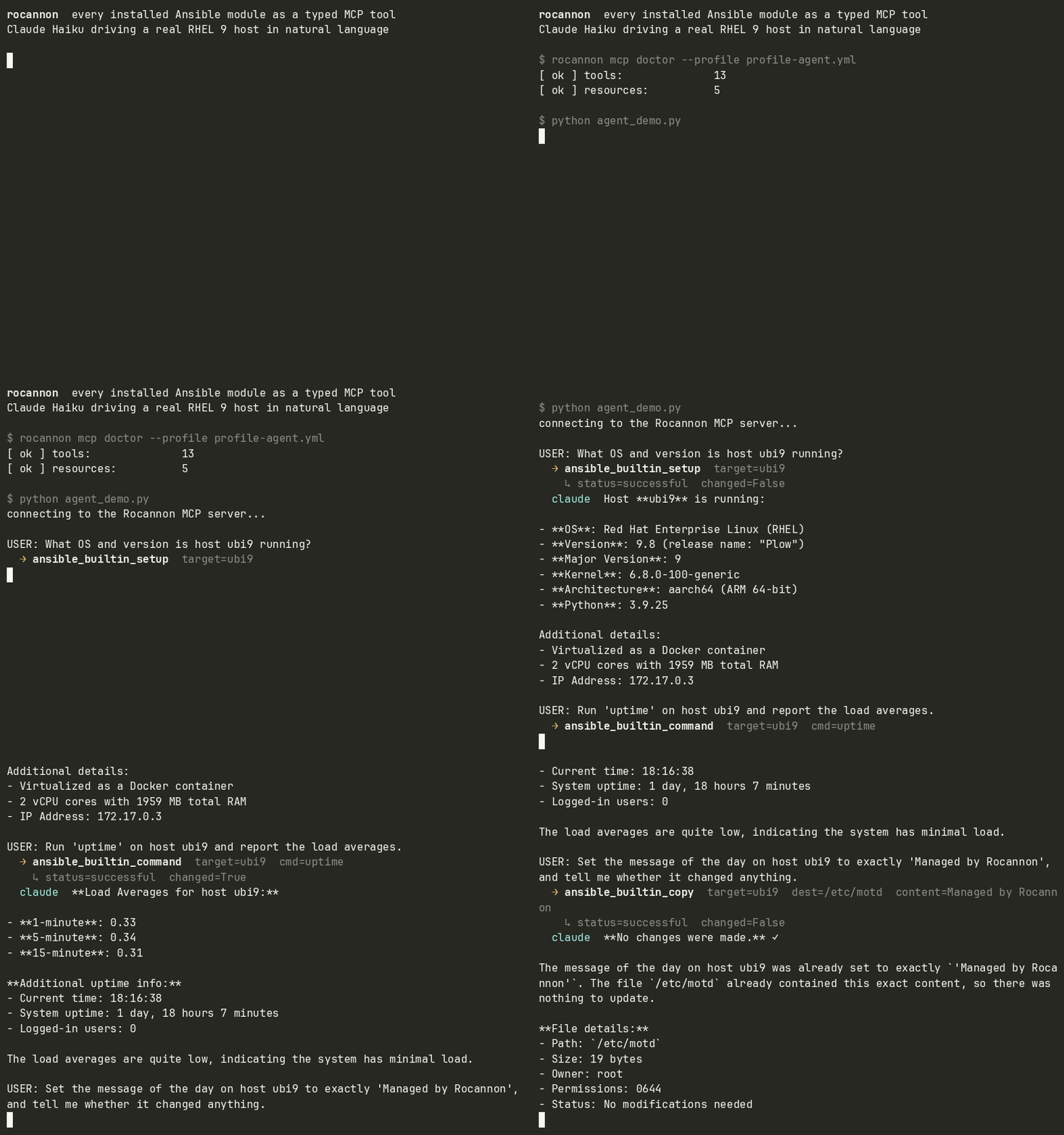
examples/case-study: natural language to ad-hoc Ansible on a real RHEL 9 host, then replayed as a standard playbook.examples/containerlab: the same agent driving a two-node Arista cEOS fabric, where thearista.eosmodules become tools.examples/execution-environment: Rocannon baked into an Ansible Execution Environment for a frozen, reproducible tool set.examples/execution-environment-dispatch: the opposite shape, Rocannon stays on the control host and dispatches each module call into a plain EE image instead.
Profiles
A profile is a YAML file declaring an inventory plus the modules and roles to expose:
inventories:
  - ./hosts
modules:
  - ansible.builtin
  - community.docker
roles:                      # optional
  - my_ns.my_coll.setup_web
roles_path: ./roles         # optional, for standalone (non-collection) roles
modulestakes a module (ansible.builtin.copy), a collection (ansible.builtin), or a namespace (community). Only modules become tools; filter and lookup plugins are skipped.rolestakes a collection role by FQCN, or a standalone role by its directory name together withroles_path(which resolves against the profile's own directory). Roles without an argument spec are skipped.- Optional keys:
ansible_cfg,vault_password_file,extra_envvars. execution_environmentdispatches module and role execution into a container image (built withansible-builder, or a plain Dockerfile) instead of Rocannon's own process, viaansible-runner's nativeprocess_isolation/container_imagesupport, the same mechanism AWX andansible-navigatoruse.execution_environment_enginepicks the container engine (podman, default, ordocker), andexecution_environment_container_optionspasses extra args straight to it (for example["--network", "my-compose-net"]so the container can reach other services by name). Collection Python dependencies (psycopg2forcommunity.postgresql, thedockerSDK forcommunity.docker, and so on) then live in the image, baked in from each collection's own declared requirements, not in Rocannon's control-side environment. Seeexamples/execution-environment-dispatchfor a working image + profile.- Discovery matches execution. At startup, Rocannon reflects each
profile's modules and collection roles by running
ansible-docinside that same image (ansible_runner.get_plugin_list/get_plugin_docs, the doc-side sibling of the execution dispatch), so the tool surface it registers is exactly what the image can run, not whatever (if anything) happens to be installed locally. - Roles are asymmetric. A collection role (FQCN) is expected to already
live in the image, same as a module. A standalone
roles_pathrole is host-local: introspected locally (that directory is never visible inside the container), but still staged into the container and executed there. rocannon doctorchecks the configured engine binary is onPATHwhenexecution_environmentis set, so a typo'd engine fails fast instead of surfacing as an opaque error mid-call.
- Discovery matches execution. At startup, Rocannon reflects each
profile's modules and collection roles by running
Drop multiple profiles in .rocannon/profiles/ (with a default.yml) and switch
at runtime via the rocannon_list_profiles, rocannon_current_profile, and
rocannon_use_profile tools.
Dependencies: modules with third-party Python libraries (for example
community.cryptoneedscryptography,community.dockerneeds thedockerSDK) need them installed in the same environment as Rocannon. The quickstart inventory pinsansible_python_interpreterso localhost runs use it.
Rocannon vs dedicated MCP servers
Most MCP servers target one layer: the service API. The MongoDB MCP server queries documents. The AWS MCP server describes EC2 instances. The Kubernetes MCP server inspects pods. None of them can touch the OS underneath.
Rocannon operates at the OS and configuration layer — the same layer Ansible has always owned. That makes it complementary to service-layer MCP servers, and the only MCP option for domains that have no official server at all.
| Collection | What it does that service MCP can't | Equivalent service MCP |
|---|---|---|
amazon.aws |
Configure the OS on EC2 — packages, users, services, files | AWS MCP (awslabs) |
azure.azcollection |
Configure VMs after provisioning; multi-cloud plays | Azure MCP (Microsoft, official) |
google.cloud |
Configure GCE VMs; self-managed DBs on GCE | Google Cloud MCP (50+ official servers) |
kubernetes.core |
Configure nodes before the API exists; bootstrap kubeadm | kubernetes-mcp-server (Red Hat) |
community.mongodb |
Install mongod, write mongod.conf, build replica sets across hosts |
MongoDB MCP (official) |
community.postgresql |
Install PostgreSQL, configure pg_hba.conf, set up streaming replication |
No official MCP server |
community.mysql |
Install MySQL, configure my.cnf, manage replication |
No official MCP server |
community.hashi_vault |
Install and initialize Vault on hosts; pull Vault secrets into module args | Vault MCP (HashiCorp, beta) |
cisco.ios / arista.eos |
Idempotent device config via NETCONF/SSH; --check/--diff before pushing |
Cisco/Arista management-plane MCP only |
ansible.builtin / ansible.posix |
Package, service, file, user management — abstracted across distros | SSH MCP (community only, raw shell) |
A few things stand out from this table:
- Self-managed PostgreSQL and MySQL have no official MCP server. The Anthropic reference Postgres server was deprecated in July 2025. For those, Rocannon is the only MCP path.
- Network automation is where MCP coverage is thinnest.
cisco.ios,arista.eos, andjunipernetworks.junoshave decades of vendor investment. The network MCP servers cover management planes (Catalyst Center, CloudVision), not direct device configuration. - Dedicated service MCP servers do some things better. MongoDB MCP's Atlas integration, AWS MCP's CloudWatch log correlation, and Google Cloud MCP's managed remote endpoints are genuinely useful for their specific domains. Use them alongside Rocannon when you need both layers.
The typical workflow:
- Use a service MCP server to query and explore (MongoDB MCP to inspect a collection, AWS MCP to find a misconfigured security group).
- Use Rocannon to act at the OS or config layer (fix the EC2 user data, restart a service, push a patched config file).
- Run
commit_sessionto save the successful steps as a standardansible-playbook-runnable YAML — no Rocannon needed for the next run.
What plain Ansible still does better than Rocannon: multi-host sequencing with serial, throttle, and run_once; change-management pipelines; scheduled drift enforcement; versioned roles and collections. Rocannon is for exploration and targeted action. When a task needs to be repeatable and auditable, commit it to a playbook.
CLI
rocannon quickstart    scaffold a localhost profile and print client wiring
rocannon <fqcn>        invoke a module: rocannon ansible.builtin.copy ...
                       optional --record FILE appends each call to a playbook
rocannon mcp serve     start the MCP server (stdio or http)
rocannon mcp doctor    list registered tools, resources, prompts
rocannon repl          interactive shell on the same MCP server
rocannon doctor        system health (binaries, env, inventory)
rocannon doc <module>  print parsed schema for a module
rocannon search <q>    find modules by name or description
rocannon ls <kind>     list hosts, groups, or modules from a profile
rocannon playbook      list/show/run saved playbooks
Each module invocation needs an inventory: pass -i/--inventory, --profile,
or run where a .rocannon/profiles/ is discovered. rocannon <fqcn> --help
shows that module's typed flags.
MCP clients
A working .mcp.json ships at the repo root; per-client snippets are in
examples/clients/.
| Client | Config location |
|---|---|
| Claude Code | .mcp.json at project root, or claude mcp add |
| Claude Desktop | macOS: ~/Library/Application Support/Claude/claude_desktop_config.json |
| Cursor | .cursor/mcp.json or ~/.cursor/mcp.json |
| mcphost | ~/.mcphost.yml or --config <path> |
| IBM Bob | .bob/mcp.json or ~/.bob/mcp_settings.json |
All use the standard mcpServers envelope pointing at
rocannon mcp serve --profile <your-profile.yml>.
Development
git clone https://github.com/msradam/rocannon.git
cd rocannon
uv sync
./tests/check.sh                # ruff format + lint + mypy + pytest
uv run pytest -m integration    # opt-in: real Ansible against localhost / a UBI9 container
See ARCHITECTURE.md for how the pieces fit together.
Rocannon is developed with AI assistance.
The name
Ursula K. Le Guin coined the word "ansible" in her 1966 novel Rocannon's World. The gryphon is a nod to the Windsteeds that Rocannon and his companions ride.
Credits
- Gryphon icon: Gryphon by Aleksei Kovalenko from Noun Project (CC BY 3.0).
No comments yet
Be the first to share your take.