
If you are vibe coding with friends, cofounders, contractors, or several AI agents, this is the coordination layer you want before the repo turns into scattered chats and duplicate edits.
No server, no database, no hooks, and no custom collaboration CLI. Just Markdown files and optional Git.
Install both Skills. Use one role per thread.
team-lead-collaborationteam-member-collaboration
What It Is
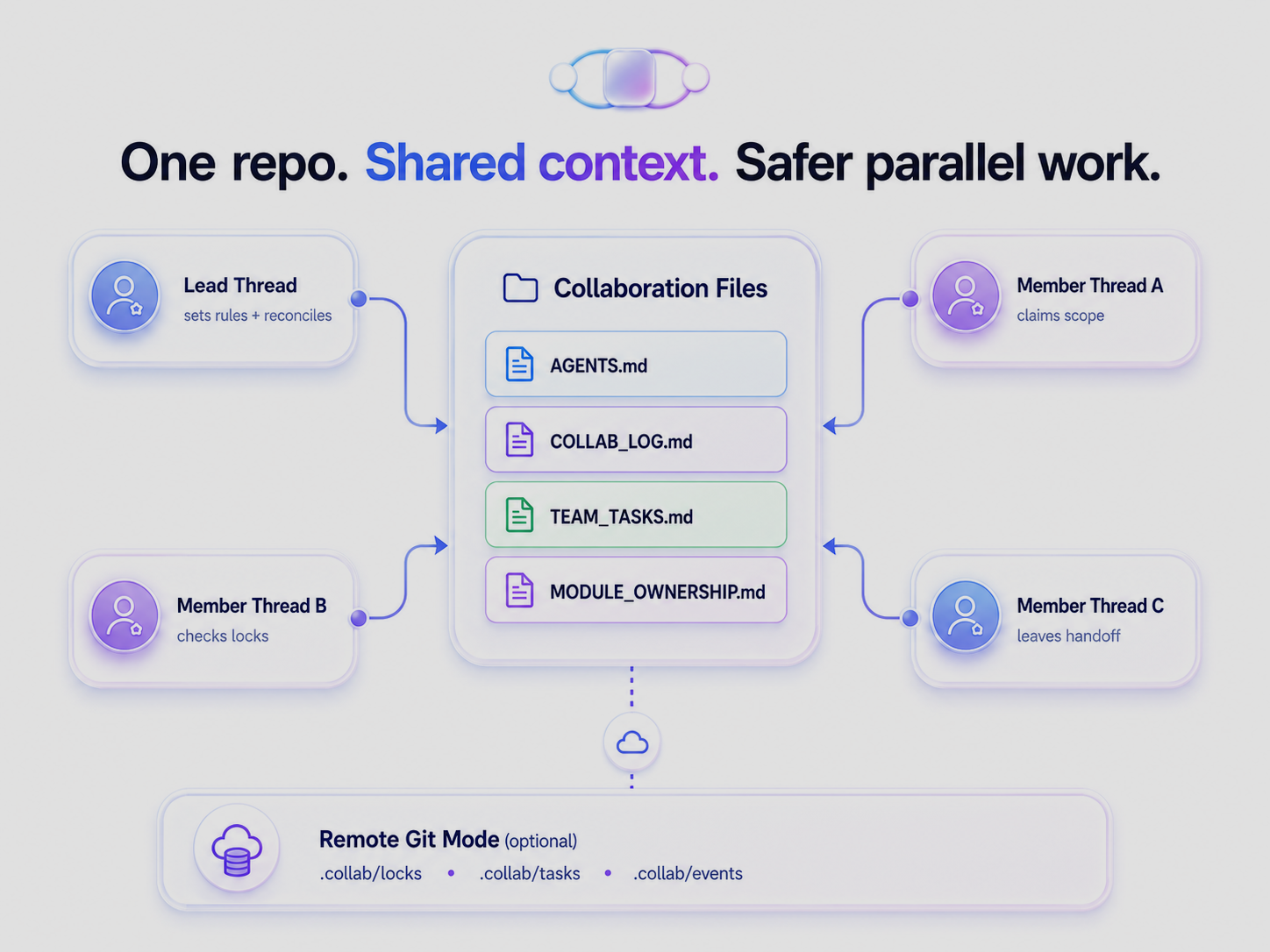
Remote Agent Collaboration Lite is a lightweight collaboration layer for human + AI coding teams. It gives a small team two Markdown Skills, Lead and Member, plus shared project files for actor identity, soft locks, logs, optional tasks, and optional module boundaries.
It does not try to enforce permissions. It gives humans and agents a shared operating surface: read the same coordination files, claim scope before editing, stop on overlapping soft locks, and leave a concise update or handoff when work changes state.
Why Use It
Use it when:
- A small team or tiny company is building in one repository.
- Several Codex, Claude Code, or generic AI threads may edit related files.
- You want a Lead agent to coordinate work without introducing infrastructure.
- You need lightweight logs and soft locks instead of a full project management system.
- You want new human or AI contributors to understand ownership and next actions quickly.
The practical value is simple: fewer duplicate edits, fewer stale chat-only decisions, clearer ownership, and better handoffs.
Works With
| Agent / Environment | Support Level | Recommended Path |
|---|---|---|
| Codex | First-class | Plugin |
| Claude Code | First-class | Plugin |
| Generic AI agents | Compatible | Copy-paste prompts / shared instructions |
| Human contributors | Supported | Shared collaboration files |
Codex and Claude compatibility is explicit and now symmetric. Codex uses the bundled Codex Plugin. Claude Code installs the same two Skills through a native Claude Code plugin from this repository's marketplace, so both Skills appear as /team-lead-collaboration and /team-member-collaboration. The Claude Code adapter remains as a no-install fallback for existing setups. Generic agents can follow the same Markdown instructions, but this project does not claim native support for every agent environment.
30-Second Quick Start
codex plugin marketplace add Gary06868/remote-agent-collaboration-skills
-
Open
/plugins. -
Install
Remote Agent Collaboration Lite. -
Start one Lead thread:
$team-lead-collaboration Set up lightweight collaboration for this project. -
Start one or more Member threads:
$team-member-collaboration Work on my assigned scope and update the shared collaboration log. -
Claude Code users: install the native plugin, then use
/team-lead-collaborationor/team-member-collaboration. See Install.
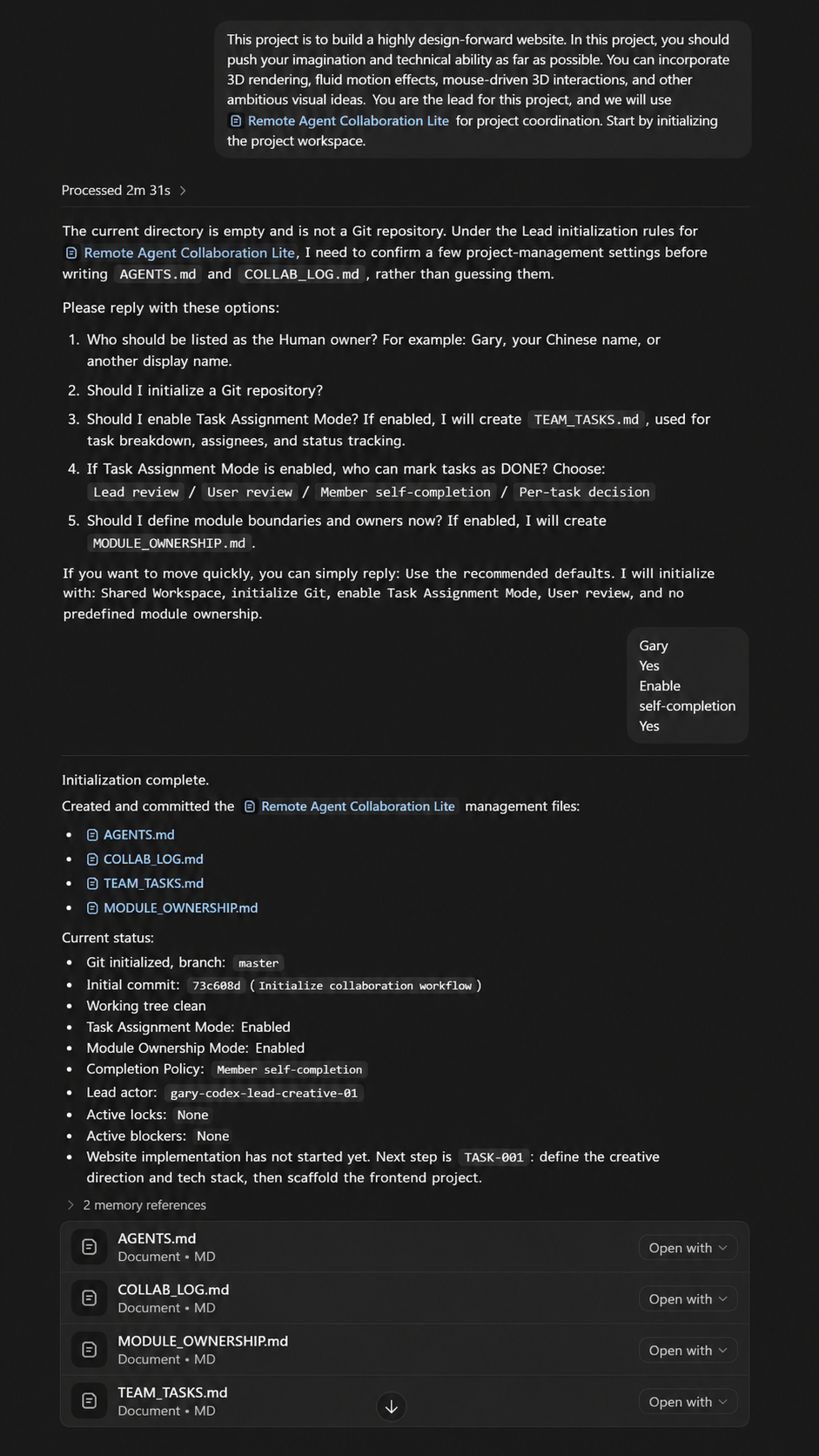
Choose Your Mode
| Need | Mode | What It Means |
|---|---|---|
| Multiple agents in the same working directory | Shared Workspace Mode | Agents coordinate through root Markdown files and double-check Active Work Locks after writing your own lock. |
| Different machines, clones, or worktrees | Remote Git Mode (Beta) | Agents use Git as the sync transport and low-conflict .collab/ files. |
| Lightweight coordination only | Casual Coordination Mode | Use AGENTS.md and COLLAB_LOG.md without task tracking. |
| Lead assigns and reviews tasks | Task Assignment Mode | Add TEAM_TASKS.md for task owner, status, review, and handoff blocks. |
| Clear path/module boundaries | Module Ownership Mode | Add MODULE_OWNERSHIP.md for owners, allowed paths, interfaces, and risks. |
Workspace Topology answers where agents are working. Workflow Options answer how the team tracks work. Shared Workspace Mode means the same working directory. Remote Git Mode means different machines, clones, or worktrees. Do not mix assumptions between these modes.
Remote Git Mode Lock Protocol summary: fetch the latest remote state, read existing locks, create a candidate lock record, commit only the candidate lock, push the candidate lock, and handle non-fast-forward by fetch, rebase or reapply the candidate lock, re-read all locks, and re-evaluate scope overlap. Do not force push. Only edit business files after the candidate lock is published and rechecked on the latest remote state. Lock lifecycle terms are acquire, refresh, pause, resume, release, stale, and abandoned.
Remote Git Mode low-conflict state uses .collab/locks/<actor-id>.md, .collab/tasks/<task-id>.md, .collab/events/<timestamp>-<actor-id>.md, and .collab/snapshots/COLLAB_LOG.md. These files separate authoritative state, append-only event records, and derived snapshot files that Lead may rebuild.
Example Flow: Soft Lock Conflict
The tiny-team example shows the core value of soft locks:
- Member A claims
README.mdfor writing inCOLLAB_LOG.md. - Member B reads Active Work Locks before editing.
- Member B detects the overlap and stops before editing business files.
- The Lead reconciles Current Snapshot, Open Handoffs, and task state.
The rule is intentionally plain: reading with reading does not conflict by default; writing with overlapping writing is a conflict; reading with overlapping writing requires a warning; paused still reserves the scope; stale threshold: 2 hours unless AGENTS.md overrides it. Do not remove another actor's stale lock without user or Lead confirmation.
See examples/tiny-team-project for the full sample state.
Install
Option 1 - Codex Plugin (preferred)
Plugin name: remote-agent-collaboration-lite
Plugin display name: Remote Agent Collaboration Lite
Marketplace name: remote-agent-collaboration-lite
Version: 0.7.0
Add this repository marketplace:
codex plugin marketplace add Gary06868/remote-agent-collaboration-skills
Adding the marketplace does not install the Plugin.
Install it from Codex:
- Open
/plugins. - Choose the
Remote Agent Collaboration Litemarketplace. - Install
Remote Agent Collaboration Lite. - Start a fresh Codex thread.
- Verify both Skills are visible:
team-lead-collaborationteam-member-collaboration
- Activate exactly one role in that thread.
Update later:
codex plugin marketplace upgrade remote-agent-collaboration-lite
Remove the marketplace if needed:
codex plugin marketplace remove remote-agent-collaboration-lite
Uninstalling or disabling the Plugin must not delete project collaboration files such as AGENTS.md, COLLAB_LOG.md, TEAM_TASKS.md, MODULE_OWNERSHIP.md, or .collab/.
Option 2 - Claude Code Plugin
Plugin name: remote-agent-collaboration-lite
Marketplace name: remote-agent-collaboration-skills
Version: 0.7.0
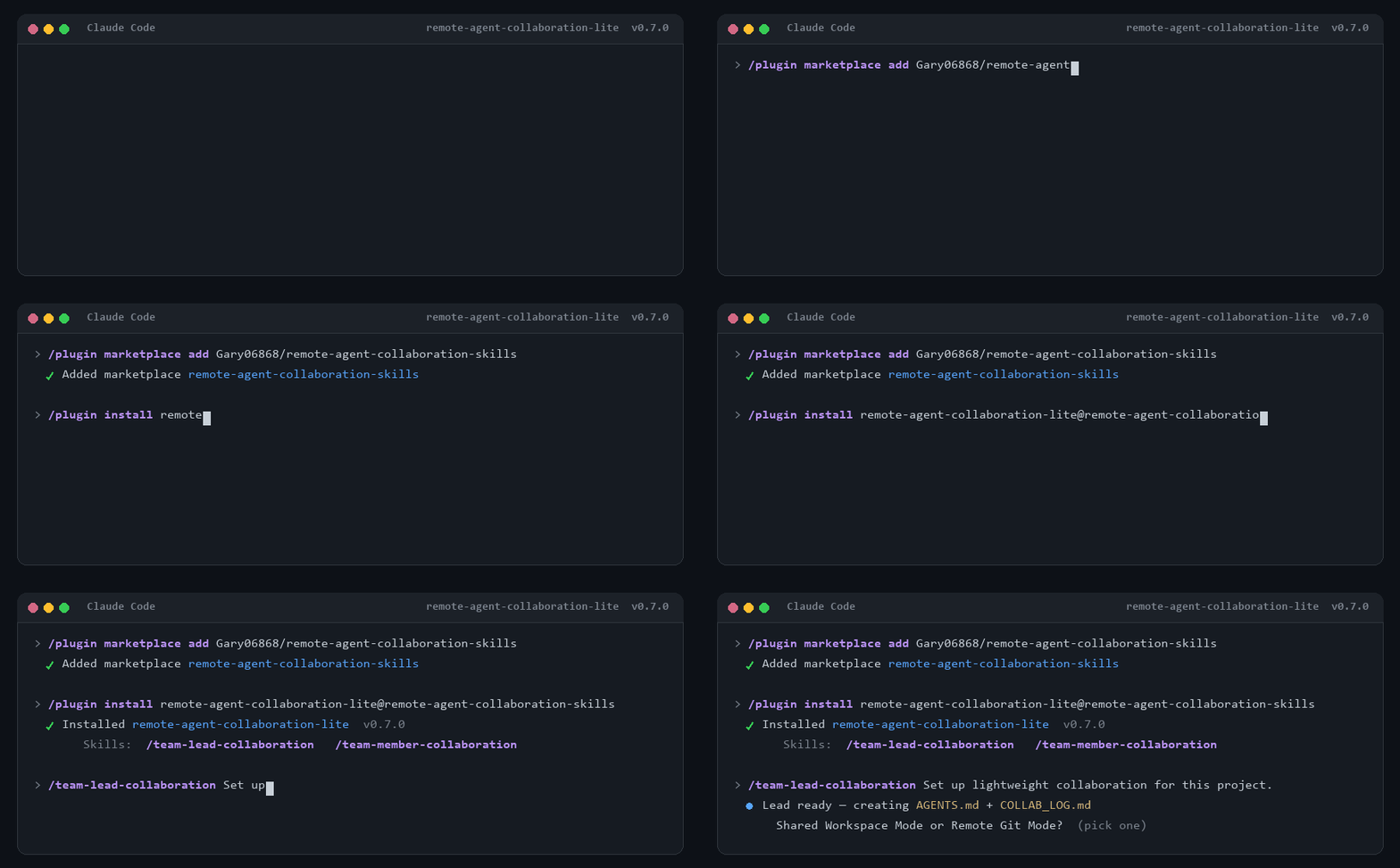
Claude Code installs the same two Skills as a native plugin. Both Skills become slash commands you can call directly. In an interactive Claude Code session:
-
Add this repository as a marketplace:
/plugin marketplace add Gary06868/remote-agent-collaboration-skills -
Install the plugin:
/plugin install remote-agent-collaboration-lite@remote-agent-collaboration-skills -
Start a fresh Claude Code conversation.
-
Verify both Skills are available as slash commands:
/team-lead-collaboration/team-member-collaboration
-
Use exactly one role per conversation:
/team-lead-collaboration Set up lightweight collaboration for this project./team-member-collaboration Work on my assigned scope and update the shared collaboration log.
Update later with /plugin update remote-agent-collaboration-lite@remote-agent-collaboration-skills. Remove with /plugin uninstall remote-agent-collaboration-lite@remote-agent-collaboration-skills.
Prefer the plugin. The Claude Code adapter stays available as a no-install fallback: copy CLAUDE.md into the project root and paste the Lead and Member prompts.
Option 3 - Manual Copy
Use this for development, local recovery, or environments without plugin support. Some environments also expose a built-in $skill-installer; where it exists you may use it, but this repository does not treat it as the primary verified path. Current Codex Skills documentation uses .agents/skills for repository and user-level Skill discovery.
Windows PowerShell from the repository root:
$skills = Join-Path $env:USERPROFILE ".agents\skills"
New-Item -ItemType Directory -Force $skills | Out-Null
Remove-Item -Recurse -Force (Join-Path $skills "team-lead-collaboration") -ErrorAction SilentlyContinue
Remove-Item -Recurse -Force (Join-Path $skills "team-member-collaboration") -ErrorAction SilentlyContinue
Copy-Item -Recurse -Force .\skills\team-lead-collaboration (Join-Path $skills "team-lead-collaboration")
Copy-Item -Recurse -Force .\skills\team-member-collaboration (Join-Path $skills "team-member-collaboration")
Get-ChildItem $skills | Where-Object Name -in @("team-lead-collaboration", "team-member-collaboration")
macOS/Linux shell:
mkdir -p "$HOME/.agents/skills"
rm -rf "$HOME/.agents/skills/team-lead-collaboration"
rm -rf "$HOME/.agents/skills/team-member-collaboration"
cp -R skills/team-lead-collaboration "$HOME/.agents/skills/team-lead-collaboration"
cp -R skills/team-member-collaboration "$HOME/.agents/skills/team-member-collaboration"
find "$HOME/.agents/skills" -maxdepth 1 -type d \( -name team-lead-collaboration -o -name team-member-collaboration \)
These commands are safe to run repeatedly: they remove only the two target Skill directories before copying fresh files.
Project-level install uses <PROJECT_ROOT>/.agents/skills with the same two target directories. See docs/INSTALLATION.md.
Verify both Skills are visible in your AI coding environment's Skill picker or model-visible Skill list:
team-lead-collaborationteam-member-collaboration
For AI Agents: Install the Plugin and Verify Both Skills
Copy this instruction into a fresh Agent:
Install the Remote Agent Collaboration Lite Plugin from:
Gary06868/remote-agent-collaboration-skills

Use this verified marketplace step first:
codex plugin marketplace add Gary06868/remote-agent-collaboration-skills

Then open /plugins and install:
Remote Agent Collaboration Lite

Requirements:
- Install one Plugin that bundles both Skills.
- Verify these two Skills are separately visible:
  - team-lead-collaboration
  - team-member-collaboration
- Do not merge the Skills.
- Do not install hooks.
- Do not install a custom collaboration CLI.
- Start a fresh thread.
- Activate exactly one role in that thread:
  $team-lead-collaboration
  or:
  $team-member-collaboration
- Do not activate the other role in the same thread.
- Report Plugin version 0.7.0, Plugin name remote-agent-collaboration-lite, marketplace name remote-agent-collaboration-lite, and both visible Skill names.
Claude Code users install the same Plugin from this repository's Claude marketplace instead: /plugin marketplace add Gary06868/remote-agent-collaboration-skills, then /plugin install remote-agent-collaboration-lite@remote-agent-collaboration-skills. The two Skills then appear as /team-lead-collaboration and /team-member-collaboration.
Core Files
| File | Required | Purpose |
|---|---|---|
AGENTS.md |
Yes | Shared project rules, Actor Registry, startup checklist, Git rules, logging rules, and conflict handling. |
COLLAB_LOG.md |
Yes | Active locks, Current Snapshot, blockers, Open Handoffs, decisions, updates, and history. |
TEAM_TASKS.md |
Optional | Lightweight task blocks when Task Assignment Mode is enabled. |
MODULE_OWNERSHIP.md |
Optional | Module owners and path boundaries when Module Ownership Mode is enabled. |
.collab/ |
Remote Git Mode only | Low-conflict locks, tasks, events, and derived snapshots for multi-clone coordination. |
Templates are available in templates/. The Lead Skill also carries identical self-contained templates in skills/team-lead-collaboration/references/.
More Docs
- Installation
- Protocol Reference
- Remote Git Mode
- Claude Code Adapter
- Codex Plugin Distribution Audit
- Promotion Kit
- Chinese README
Limitations
- This is a soft coordination workflow, not a security boundary.
- It does not enforce OS-level permissions.
- It does not prevent someone from ignoring the rules.
- Git is optional in Shared Workspace Mode and required only when the team chooses Remote Git Mode (Beta).
- Claude Code support ships as a native Claude Code plugin, with the adapter prompts kept as a no-install fallback.
- Generic agent support means compatible shared instructions, not native integration for every environment.
- It is intentionally not a server, database, custom collaboration CLI, hook system, MCP server, daemon, or enterprise permission model.
Current Lite protocol version: 0.7.0.
Advanced local protocol experiments are preserved on the standard-local-protocol branch.
No comments yet
Be the first to share your take.