
Qwen Audio Agent
中文 | English | User Guide | Quickstart




Agent Presence
Real conversation should not leave you waiting after a single sentence, nor should it grind to a halt just because the Agent is looking something up, calling a tool, or working on a task.
Conversation should keep flowing, and the Agent should always be present.
That is why we built qwen-audio-agent—a realtime voice runtime that keeps Agents talking, working, and present. Whether chatting with you, thinking through a problem, or working on a task, your Agent remains in the conversation. It listens, responds, and when the task is complete, naturally tells you:
"It's ready."
News
- 2026-08-27 · v2.0.0 (In development) 🚧 The next major version is under active development, with ongoing work on the Agent architecture, task lifecycle, multimodal input, memory, and extensibility.
- 2026-08-20 · v1.11.0 🧩 Adds embeddable Gateway and Realtime Provider extensions; 🛠️ supports installing and managing Agent Skills; 📎 adds multimodal input to the TUI; 🎨 links pet animations to runtime states.
- 2026-08-13 · v1.9.0 🧩 Desktop task cards show live Agent progress; 🔎 backend Agent selection is clearer and searchable; 🎙️ supports Qwen3.5-Omni Realtime frontend integration.
- 2026-08-07 · v1.7.0 🎨 The orb opens up custom skins — import your own look, compatible with pet packs from the Awesome Codex Pet community gallery; 🪟 improved Windows backend Agent startup.
- 2026-08-05 · v1.5.0 ⏰ Adds scheduled reminders and progress reporting; 🗣️ adds the voice wake word ("你好千问"); 🐧 desktop build support for Linux; the desktop app now uses a data directory isolated from the CLI.
- 2026-08-03 · v1.3.0 🎙️ Adds 🤗 speech-to-speech frontend integration, supporting fully local VAD, STT, LLM, and TTS.
- 2026-07-30 · v1.0.0 🚀 First stable release, introducing a macOS desktop app with a built-in Gateway.
- 2026-07-28 · v0.9.0 🌍 Project officially open-sourced; backend Agents unified under the ACP architecture.
Conversation Continues, Tasks Too
Conversation doesn't stop for background tasks; when a task completes, the result naturally returns to the current conversation:
https://github.com/user-attachments/assets/ab570531-8da9-4af4-93fa-244bb6614c05
Core Features
- Full-duplex realtime voice interaction, natural interruption, and sustained multi-turn conversation
- One-click integration with your preferred Agent, reusing its model configuration, tools, MCP, Skills, and authentication
- Frontend conversation and background tasks run in parallel; ask about progress or cancel at any time
- Create multiple independent tasks executed asynchronously by the backend Agent, with continuous status tracking
- Task results automatically return to the current conversation, supporting follow-up questions and modifications
- WebUI, terminal TUI, and desktop floating orb (macOS / Windows / Linux)
- Per-user long-term personalization and cross-session memory
Architecture
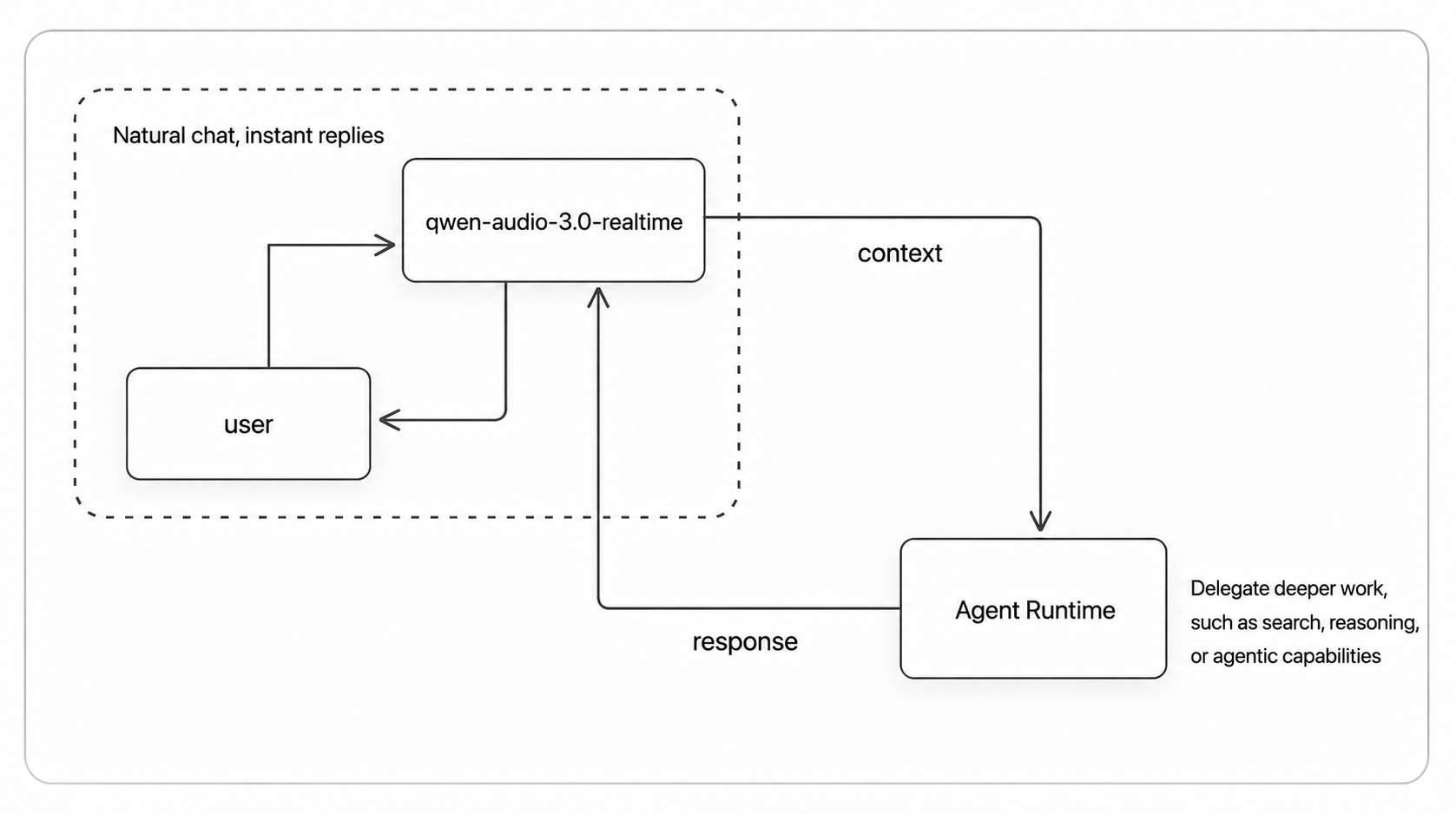
Questions that can be answered directly are answered immediately; when tools or sustained processing are needed, the task is delegated to the backend Agent. Throughout, the user always faces the same assistant.
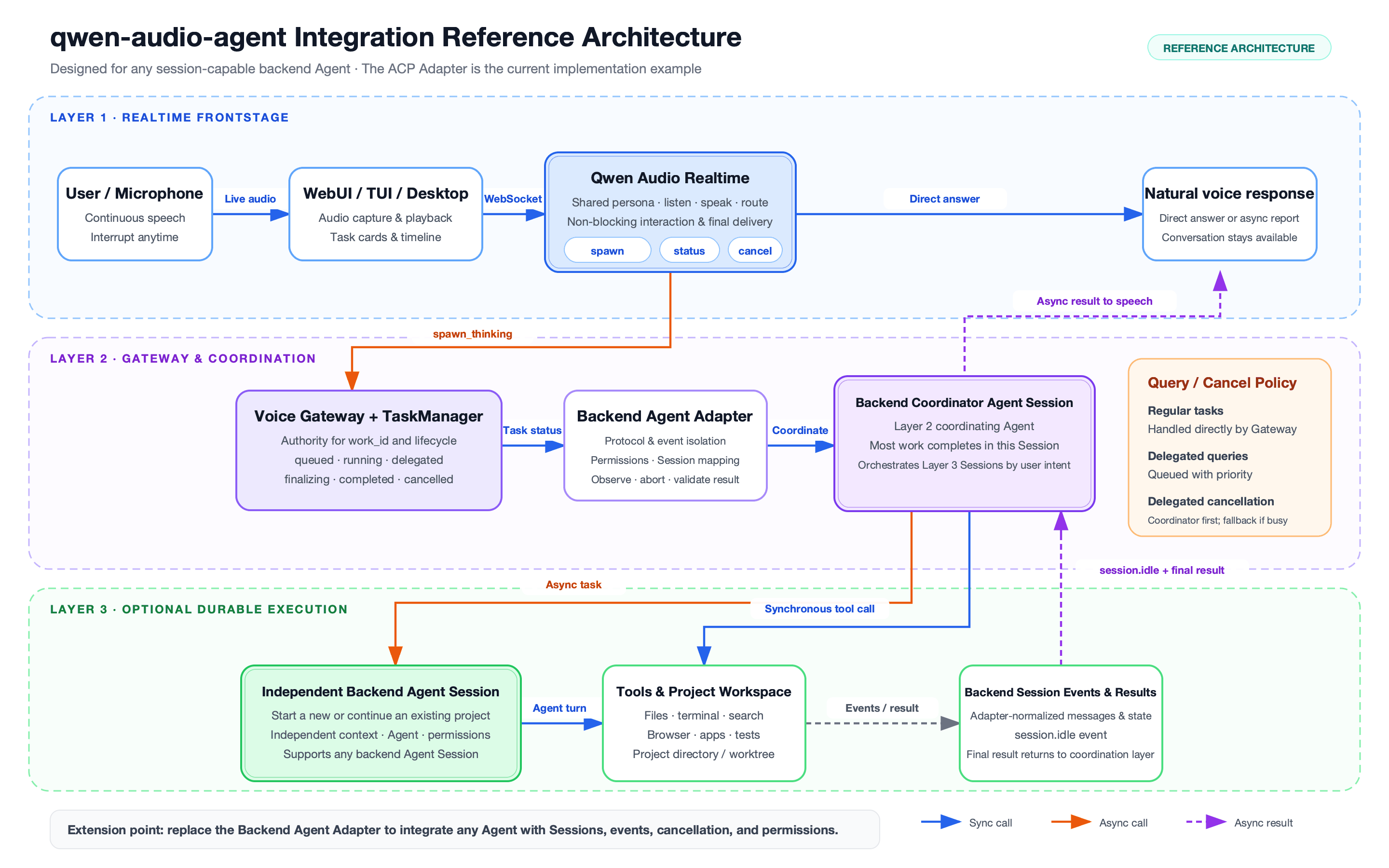
For the full design and module breakdown, see the architecture document.
Agent Support
| Backend Agent | Integration | Setup | Rating |
|---|---|---|---|
| None | N/A | Frontend-only mode, no config needed | ★★★★★ |
| Qwen Code | Native ACP | One-click install, user config required | ★★★★★ |
| OpenCode | Native ACP | One-click install + Bailian config | ★★★★★ |
| OpenClaw | Built-in ACP bridge | One-click install + Bailian config | ★★★★★ |
| Qoder | Native ACP | One-click install, user config required | ★★★★★ |
| Kimi Code | Native ACP | One-click install, user config required | ★★★★★ |
| Hermes | Native ACP | One-click install, user config required | ★★★★☆ |
| CodeBuddy | Native ACP | One-click install, user config required | ★★★★☆ |
| Codex | External ACP adapter | One-click install (base + adapter), user config required | ★★★★☆ |
| Claude Code | External ACP adapter | One-click install (base + adapter), user config required | ★★★★☆ |
| DeepSeek | Native ACP | One-click install, DeepSeek API key required | ★★★★☆ |
| Pi | External ACP adapter | One-click install (base + adapter), user config required | ★★★★☆ |
Ratings reflect current integration completeness, compatibility, and verification level: five stars indicate a thoroughly tested recommended integration; four stars indicate active development or not yet fully verified. For detailed configuration and capability boundaries, see the backend Agent documentation and configuration guide.
Installation
Requires Node.js 22.22.2+ or 24.15.0+, npm 10+. One-click install (recommended):
npm install -g qwen-audio-agent
For building from source, installing from GitHub, and obtaining a DashScope API Key, see the installation guide.
Quick Start
- Create your config and fill in the API Key:
qwenaudio config
DASHSCOPE_API_KEY=your-key
# Voice frontend model: Audio Flash/Plus or Omni Flash/Plus (Audio Plus is default)
QWEN_AUDIO_REALTIME_MODEL=qwen-audio-3.0-realtime-plus
# Backend Agent: optional, leave empty or set to none for frontend-only mode
AGENT_PROTOCOL=openclaw
# Backend model: optional; explicit values use standard ACP, empty reuses Agent config
QWEN_AUDIO_AGENT_BACKEND_MODEL=qwen3.7-max
Uses DashScope realtime voice frontend by default; alternatively, switch to a local speech-to-speech frontend, no cloud API Key needed.
- Start the Gateway, then open another terminal to start the TUI (or use
qwenaudio webuifor the browser UI):
qwenaudio        # Terminal 1: Gateway
qwenaudio tui    # Terminal 2: TUI
For full configuration options, speech-to-speech frontend setup, and TUI platform notes, see quick start, voice frontends, and TUI notes.
Desktop App
The desktop app provides a persistent floating voice orb with a built-in Gateway, automatic idle sleep, local voice wake, and customizable appearance. Download the installer for your platform from the releases page, or build from source:
npm run desktop:build:local      # macOS
npm run desktop:build:win        # Windows
npm run desktop:build:linux      # Linux (AppImage + deb, no signing)
For visuals, orb behavior, and build instructions, see the desktop documentation.
Examples and Scenario Expansion
The current qwen-audio-agent framework focuses on desktop productivity: users can keep talking with the Agent in realtime while delegating tool use, file work, code changes, and long-running tasks to the backend Agent.
This "foreground conversation + background task" design is not limited to desktop use. It can also expand to more scenarios where the Agent can both chat naturally and get real work done.
| Scenario | Description | Link | Status |
|---|---|---|---|
| Desktop | Voice chat, progress follow-up, tools, and background tasks. | Docs | Available |
| Smart cockpit | Vehicle control, navigation, music, weather, and services. | Example | Available |
| Customer support | Issue clarification, order lookup, tickets, and human handoff. | TBD | Planned |
| Embodied intelligence | Voice commands, action execution, inspection, and exception feedback. | TBD | Planned |
| Livestream assistant | Audience interaction, product explanation, coupons, and risk reminders. | TBD | Exploratory |
This repository includes a smart-cockpit reference scenario built on the foreground-conversation and backend-execution boundary. Its cockpit UI, small A2A Agent, and cockpit service are customer-replaceable examples:
cp examples/smart-cockpit/.env.example examples/smart-cockpit/.env.local
npm run example:smart-cockpit:install
npm run example:smart-cockpit          # service + agent + gateway + client
See examples/smart-cockpit for details.
Community
You can start discussions directly in GitHub Issues.
For users in China, scan the QR codes below to join the WeChat group. If the group QR code is full or expired, scan either maintainer's personal QR code to be invited.
| WeChat Group | Personal | Personal |
|---|---|---|
Contributing and Security
- Development and contribution guide: CONTRIBUTING.md
- Security reports: SECURITY.md
- Data flow and privacy: PRIVACY.md
- Third-party notices: THIRD_PARTY_NOTICES.md
No comments yet
Be the first to share your take.