
QMDC — A Markdown-native context graph for humans and agents







[!WARNING] Alpha release. QMDC is early and moving fast — the format, APIs, and tooling may still change, and some edges will be rough or broken, especially on Windows. If something doesn't work, please open an issue — bug reports and feedback are hugely welcome.
Human-readable docs. Machine-queryable graph. Agent-ready context.

QMDC turns documentation into a knowledge graph — without leaving Markdown. Headings become objects, list items become fields, and [[#references]] create typed edges. The result is one source of truth with three audiences: humans read it as Markdown, machines query it with SQL, and agents navigate it over MCP.
## API Gateway [[gateway: Service]]

- port: 8080
- depends: [[#auth]], [[#users]]

## Auth Service [[auth: Service]]

- protocol: JWT
- database: [[#postgres]]
One file, one parse, a queryable graph with typed edges (depends, database, protocol) — all from plain Markdown.
QMD.md vs QMDC
QMD.md is the format — the Markdown convention you write, stored in .qmd.md files. QMDC is the toolchain that reads it: the qmdc CLI, the qmdc-py / qmdc-ts / qmdc-rs parsers, the VS Code extension, and the documentation-site generator. You author QMD.md; QMDC parses, validates, and queries it. The file extension stays .qmd.md.
Install
The qmdc CLI (the fast native Rust binary) is published to every major registry — pick whichever fits your toolchain:
uvx qmdc --help            # PyPI (bundles the native binary)
npx @qmdc/qmdc --help      # npm (bundles the native binary)
cargo install qmdc         # crates.io (builds from source)
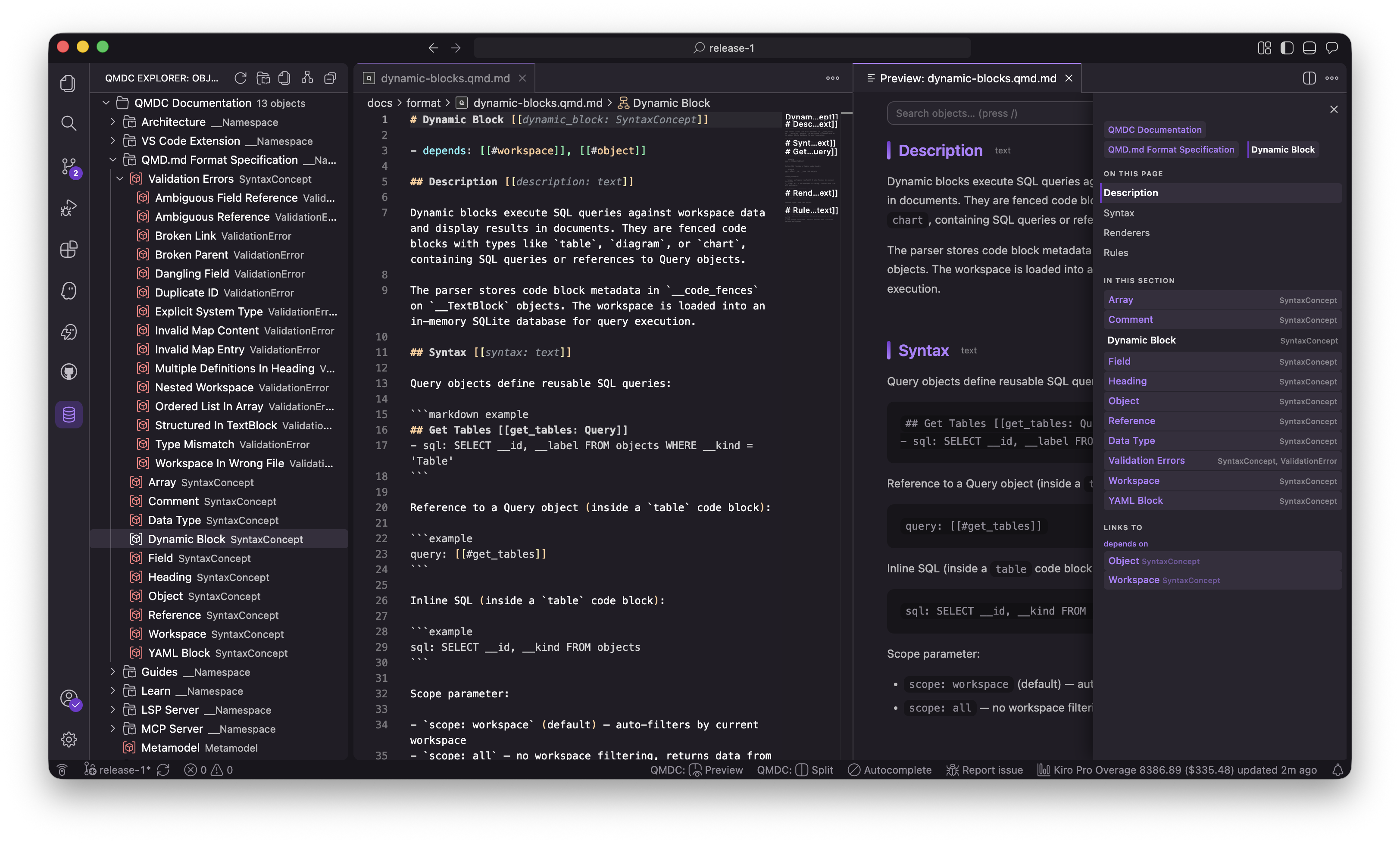
Editor support is on the VS Code Marketplace and Open VSX — search QMDC (publisher mikilabs).
Quickstart
# 1. Write a QMD.md file
cat > services.qmd.md <<'EOF'
## API Gateway [[gateway: Service]]

- port: 8080
- depends: [[#auth]]

## Auth Service [[auth: Service]]

- protocol: JWT
EOF

# 2. Parse it to JSON
qmdc parse -i services.qmd.md

# 3. Validate cross-file references in a workspace
qmdc workspace validate .

# 4. Query the graph with SQL
qmdc query . "SELECT __id, __kind FROM objects WHERE __kind = 'Service'"

# 5. Or hand the whole graph to your AI agent over MCP
qmdc mcp --force-root .
Packages
| Package | Registry | What it is |
|---|---|---|
qmdc |
PyPI / npm (@qmdc/qmdc) / crates.io |
the parser + the fast qmdc CLI (native binary) |
qmdc-semantic |
PyPI (uvx qmdc-semantic) |
semantic search over a QMDC workspace (hybrid search, graph walk, inferred edges) |
qmdc-mkdocs |
PyPI (uvx qmdc-mkdocs) |
MkDocs integration — build a docs site from a QMDC workspace |
qmdc-vscode |
Open VSX (all platforms) + VS Code Marketplace (macOS) | LSP-powered editor support (bundles the same native binary) |
import qmdc (Python) / import { parse } from '@qmdc/qmdc' (TypeScript) / the qmdc crate (Rust) give the library; the qmdc command gives the CLI.
CLI
All three parsers expose the same command set:
qmdc parse -i doc.qmd.md                 # QMD.md → JSON
qmdc parse -i doc.qmd.md --format full    # include __line, __references, __positions
cat doc.qmd.md | qmdc parse               # read from stdin
qmdc rebuild -i data.json                 # JSON → QMD.md
qmdc parse -i doc.qmd.md | qmdc rebuild   # canonical formatting (round-trip)
qmdc workspace parse ./project            # parse a multi-file workspace
qmdc workspace validate ./project         # validate cross-file references
qmdc query ./project "SELECT * FROM objects LIMIT 10"
Queries run against two tables: objects (__id, __kind, __label, __file, __line, data) and edges (source_id, target_id, field_name).
MCP — context for your agents
QMDC ships a built-in MCP server, so AI agents query your project graph directly instead of having prose pasted into a prompt. It exposes the same workspace intelligence as the editor — reference resolution, search, SQL, graph walks, rename — over stdio (JSON-RPC 2.0):
qmdc mcp                          # start the MCP server (stdio)
qmdc mcp --force-root ./project   # fail-closed: restrict every call to this directory
Point any MCP client at it (Claude Desktop, Cursor, Kiro, …):
{
  "mcpServers": {
    "qmdc": {
      "command": "qmdc",
      "args": ["mcp", "--force-root", "/path/to/your/project"]
    }
  }
}
The server provides 14 tools plus 4 qmdc:// resources, grouped by intent:
- Discovery —
qmdc_search_objects,qmdc_locate_object,qmdc_describe_object,qmdc_describe_metamodel,qmdc_get_tree,qmdc_outline_file,qmdc_get_guide - Graph —
qmdc_find_references,qmdc_find_path,qmdc_traverse_graph,qmdc_validate_references - Query —
qmdc_query_sql(read-only),qmdc_dump_index - Refactoring —
qmdc_rename_object(returns a diff; never writes)
The MCP server, the LSP, and the CLI all share one core, so an agent and your editor always get the same answer. See the MCP docs for the full tool reference.
Three implementations
| Implementation | Directory | Highlights |
|---|---|---|
| Python | qmdc-py/ |
reference implementation; full workspace + SQL support |
| Rust | qmdc-rs/ |
high-performance native binary; LSP and MCP servers |
| TypeScript | qmdc-ts/ |
for Node.js and the browser |
All three are kept at byte-for-byte parity by a shared conformance test corpus under tests/.
Build from source
Prerequisites: Python 3.12+, Node.js 18+, Rust 1.70+, and uv.
make init     # install all deps, build every parser, run the full test suite
make test     # run the full sequential test suite
make lint     # lint all three implementations
make format   # format all three implementations
After building, the wrapper scripts ./bin/qmdc-py, ./bin/qmdc-ts, and ./bin/qmdc-rs run each implementation in place.
Documentation
- Documentation site — quickstart, guides, and the full format specification
- Format specification — objects, fields, references, arrays, types
- Contributing — how to build, test, and submit changes
- Releasing — how each component is released and the rebuild cascade
- Per-package READMEs: Python · Rust · TypeScript
License
AGPL-3.0-or-later © mikilabs
No comments yet
Be the first to share your take.