
Promptize
A confidence-gated intent builder, packaged as an Agent Skill — clarify and confirm what you want before an agent acts on it.


Why
As we hand more work to autonomous agentic loops, the bottleneck moves from execution to intent. A loop that runs on a misunderstood premise doesn't make one mistake — it amplifies that mistake across every step it takes.
Promptize is one small, opinionated answer to that, built on a single principle:
No consequential decision without informed gating.
It applies that principle at four touchpoints:
- Your intent — it won't execute on a guess. It clarifies until it is ≥95% sure it has your intent right.
- Your technical choices — when a decision needs domain knowledge you may not have, it gives you grounded trade-offs and a marked, contestable recommendation, not a blank "what do you want?".
- The agent's own forks — if execution hits an unanticipated, consequential fork, it never guesses silently and never blocks an unattended run: in-session it asks; in auto/subagent mode it takes the safest reversible option (or defers that branch) and flags it in the final report.
- The agent's "done" — before calling the job finished, it checks the result against your success criteria instead of stopping early.
The result is governed autonomy: the run completes, but it leaves an audit trail of its judgement calls instead of silent guesses.
The implementation here is a Claude Code skill — but the pattern, gate intent before execution, is ecosystem-agnostic.
What it does
You give Promptize a rough, ambiguous ask. Before anything runs, it turns that into a structured, reviewable prompt — and only then executes it (and saves it for reuse).
The structured prompt has up to nine fields:
Goal · Context · Inputs · Expected output · Scope (in/out)
Constraints · Success criteria · Open assumptions · Examples
You approve the prompt, choose how it runs (in your session, or in an isolated subagent), and Promptize executes it. Every approved prompt is saved to a versioned library for reuse.
The prompt is the deliverable — and it's portable. Plain Markdown, not tied to Claude: paste it into ChatGPT, Gemini, a local model, anything. The tool runs in Claude Code; its output goes anywhere.
Example
You type:
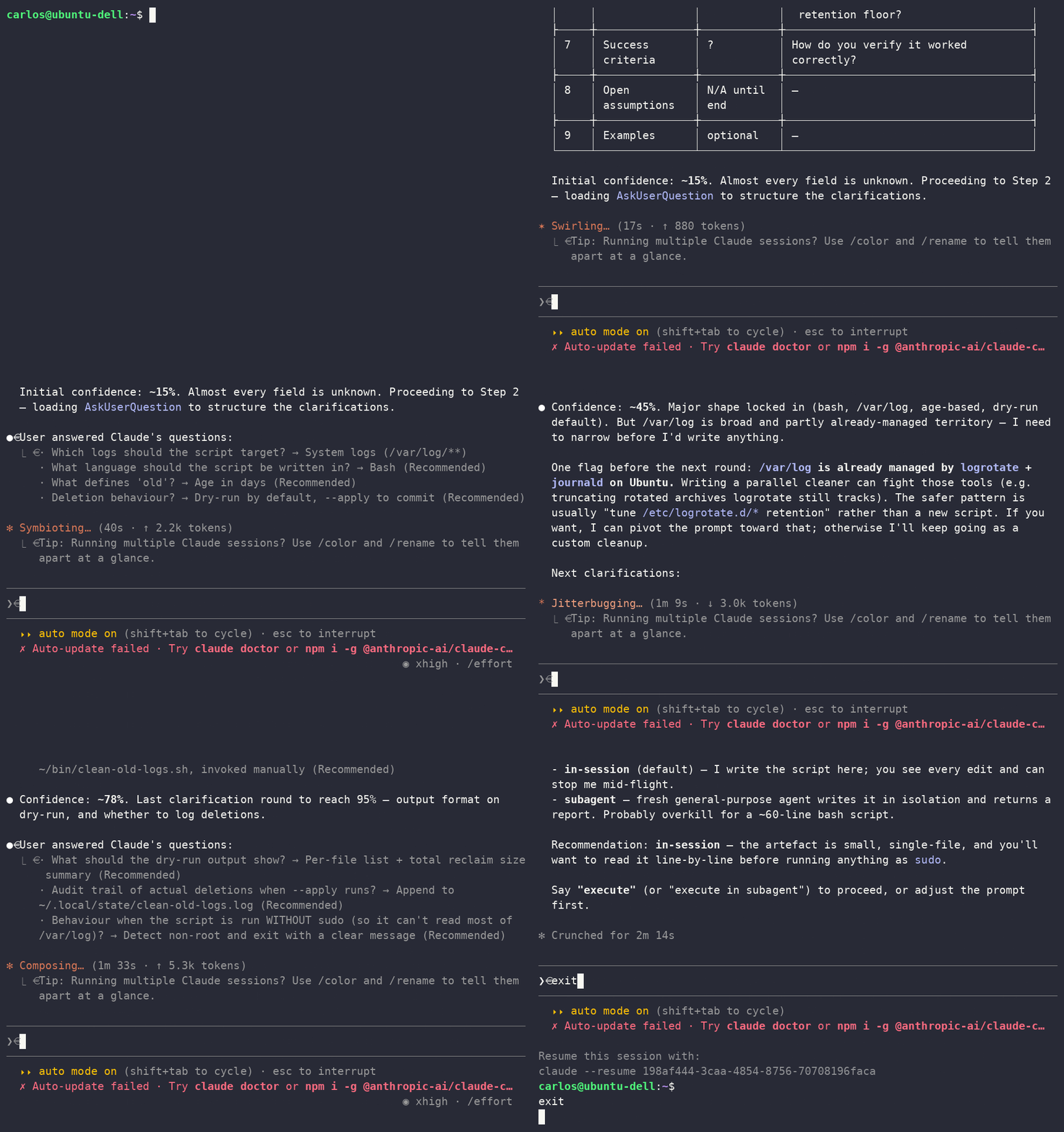
/promptize write a script to delete old logs
Promptize clarifies — because "delete old logs" is dangerously underspecified. A few quick rounds (which logs, and where? what counts as "old"? dry-run or really delete? recurse where — and what must it never touch? what if it's run without sudo?) take it from ~15% confidence to ~96%, then it produces a prompt you approve:
## Goal
Write a Bash script at `~/bin/clean-old-logs.sh` that removes rotated log
archives under `/var/log` older than 14 days.

## Scope
IN: recursive scan of `/var/log/**`, excluding `journal`, `audit`, `installer`.
OUT: active `*.log` files (only rotated archives); anything outside `/var/log`.

## Constraints
Dry-run by default (list `<path> <size> <mtime>` + a summary); only `--apply`
deletes. Never `rm -rf` a directory. If the first dry-run would match >5 GB,
stop and surface it instead of proceeding.

## Success criteria
No flags → prints candidates, deletes nothing. `--apply` → deletes and appends
an audit record. The excluded dirs are never traversed.

## Open assumptions
Pure delete, not compress-then-delete. If that's wrong, ask before applying.
A vague, risky one-liner became a precise, reviewable, dry-run-first plan — before a single file was touched. That's the whole point.
Two ways to run it
Once you approve the prompt, you choose how it executes:
- In-session (default) — runs right here in your conversation. You see every step and can correct it live.
- Subagent — hands the prompt to a separate, isolated Claude that does the whole task alone and returns one consolidated report. Use it for big jobs (long research, large audits) so the noise stays out of your main conversation.
A subagent runs blind — no conversation, can't ask you mid-task — so Promptize holds it to a higher bar: it requires full ≥95% confidence and a self-sufficient brief, and at any unanticipated consequential fork it takes the safe/reversible option or defers that branch and flags it — never guessing, never blocking the run.
Every prompt is kept
Promptize isn't a one-shot. Each prompt you approve is saved to a versioned library as a dated Markdown file (~/.claude/prompts/YYYY-MM-DD-<slug>.md) with metadata — date, execution mode, confidence at approval, status. Over time you build a greppable history of every structured intent you've run: reopen one, adapt it for a new case, and when the same prompt keeps recurring, promote it to a dedicated skill.
Install
Pick one — you don't need both.
A · Claude Code & Claude Cowork (recommended) — via the netcopilot-labs marketplace:
/plugin marketplace add netcopilot-labs/promptize
/plugin install promptize@netcopilot-labs
Invoke as /promptize:promptize. (In Cowork, add the same marketplace from Customize → Plugins → Add marketplace, then install.)
B · Any other Agent Skills client — copy the skill into its skills directory:
git clone https://github.com/netcopilot-labs/promptize.git
cp -r promptize/skills/promptize ~/.claude/skills/   # Claude Code standalone → /promptize
Usage
/promptize write a script to delete old logs
(Installed as a plugin, the command is /promptize:promptize.)
Promptize will:
- parse the ask and show a field-by-field readiness check,
- clarify with you until confidence reaches ≥95% (or you say proceed),
- assemble the structured prompt for your approval,
- execute it in your chosen mode, saving the prompt to your library.
Architecture
For the full flow, the diagram, execution modes, and the mode-aware fork-handling behaviour, see the architecture write-up at netcopilot.io.
No comments yet
Be the first to share your take.