
ProjectMind uses AI-ready project maps to explain software architecture, classes, modules and relationships in a way humans and coding agents can navigate. It's a lightweight, read-only architecture browser for source code that pairs bidirectionally with LLM-driven coding agents — Claude Code, ChatGPT / OpenAI Codex, Gemini CLI, Cursor, and any other frontier model that speaks the Model Context Protocol (MCP).
Status: v0.11 — MCP server + desktop app for macOS, Linux and Windows, with signed auto-updates. Java + Rust language plugins, Spring + Lombok framework recognisers, sixteen diagram types (see the catalogue below — from bean graph and C4 container up to an animated live bean graph and a 3D code city), Markdown + HTML browsers (sandboxed), guided AI walkthroughs with quiz support, presenter mode with PDF tour export, an Architect's Cockpit (risk atlas, pattern-drift detection, semantic tour lookup, morning briefing), live AI-generated HTML/Markdown artifacts, and bidirectional MCP sync between LLM, desktop app and browser.
Quickstart
Install the desktop app + MCP server with one line. The script picks the right pre-built bundle for your OS / arch, no build toolchain required.
macOS / Linux:
curl -fsSL https://raw.githubusercontent.com/Plaintext-Gmbh/projectmind/master/scripts/install.sh | sh
Windows (PowerShell):
iwr -useb https://raw.githubusercontent.com/Plaintext-Gmbh/projectmind/master/scripts/install.ps1 | iex
The desktop app lands in /Applications (macOS), ~/.local/share/projectmind
(Linux), or %LOCALAPPDATA%\Programs\ProjectMind (Windows). The MCP server
binary is installed alongside on your PATH so any LLM CLI can launch it.
Re-running the script upgrades to the newest release. Pin a specific version
with PM_VERSION=v1.2.3 …. Skip components with PM_NO_APP=1 or
PM_NO_MCP=1 (Bash) / $env:PM_NO_APP="1" (PowerShell).
When the bash installer detects a supported LLM CLI on PATH (currently
claude and codex) it offers to register projectmind-mcp for you with a
single claude mcp add / codex mcp add call. Override with
PM_REGISTER=yes (auto-register every detected CLI without prompting) or
PM_REGISTER=no (skip the prompt and just print the manual command).
Why
Modern AI-assisted development with CLI agents is great — until you want to see what just changed, visualise how the architecture is evolving, or drill into the structure without firing up a heavy IDE.
projectmind aims to be the missing piece:
- Standalone desktop app (Mac & Linux); not a VS Code extension.
- Read-only — no editing, no builds. Just an "architecture lens".
- MCP-bidirectional — your LLM can say "show class X with lines 42-58 highlighted" and the viewer renders it. You can mark code regions and the selection flows back into the conversation.
- Plugin-based — languages (Java, Kotlin, TypeScript, …), frameworks (Spring, Lombok, JSF, …) and visualisations (bean graph, package tree, C4, …) are all plugins.
GUI tabs
The Tauri shell's main views (each disabled until a repository is open):
- Files — module sidebar, class list, source viewer with stereotype filters, package drilldown. Also hosts every Markdown file in the repo (rendered preview, mermaid blocks, embedded images) and every
.html/.xhtml/.htm/.jsp/.vm/.ftlfile plus HTML snippets extracted from.java/.kt/.groovy/.scalastring literals (Java text blocks supported). Toggle Rendered ↔ Source; Rendered uses a strict sandbox iframe (no JS, no network) so untrusted repo content stays inert. - Diagrams — the sixteen-kind diagram catalogue below; click a node to drill in. A collapsible mini-map overlay (thumbnail + viewport rectangle, click/drag to pan) keeps you oriented on large graphs.
- Compare — branch & tag compare with commits / changed files / unified diff sub-tabs.
- Risk Atlas — per-class risk (churn + complexity + coverage + fan-in) as a treemap.
- Patterns — architecture-drift compliance heatmap (patterns × modules); violation cells drill into
file:linelists.
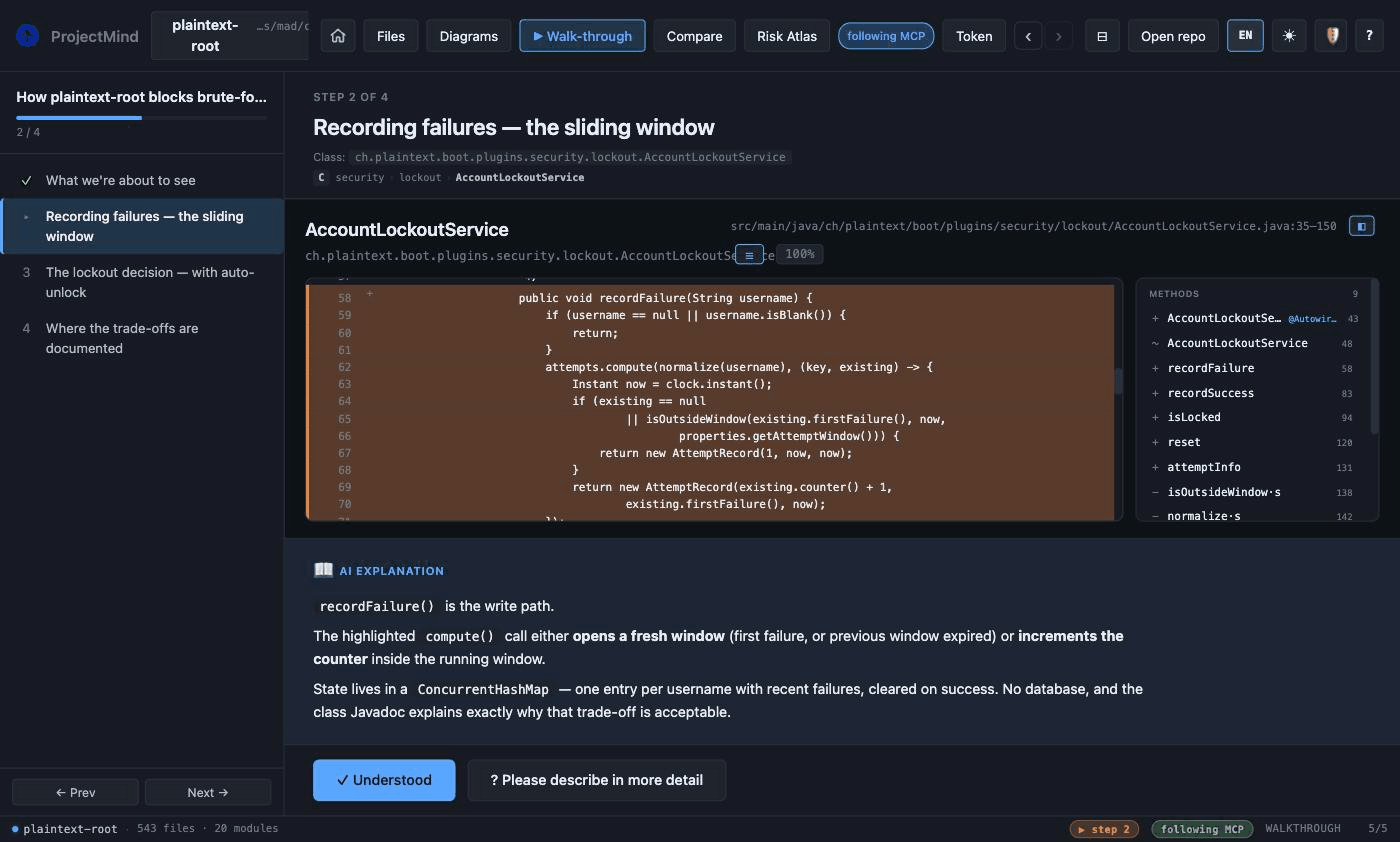
A Tour / Present button appears while a guided walkthrough is active, and an Artifact button while an AI-pushed artifact is loaded.
Diagram catalogue
Sixteen diagram kinds. Core contributes the filesystem- and git-based ones unconditionally; language and framework plugins contribute the rest, so the sidebar only offers what the open repo can actually render:
- Bean graph — Mermaid injection graph, subgraphs per Maven module, colour-coded by stereotype.
- Live bean graph — the interactive Cytoscape sibling of the bean graph: pan/zoom, since-ref diff overlay, animated morph, and the living modes below.
- Package tree — Java packages / Rust module namespaces as a drillable tree.
- Inheritance tree —
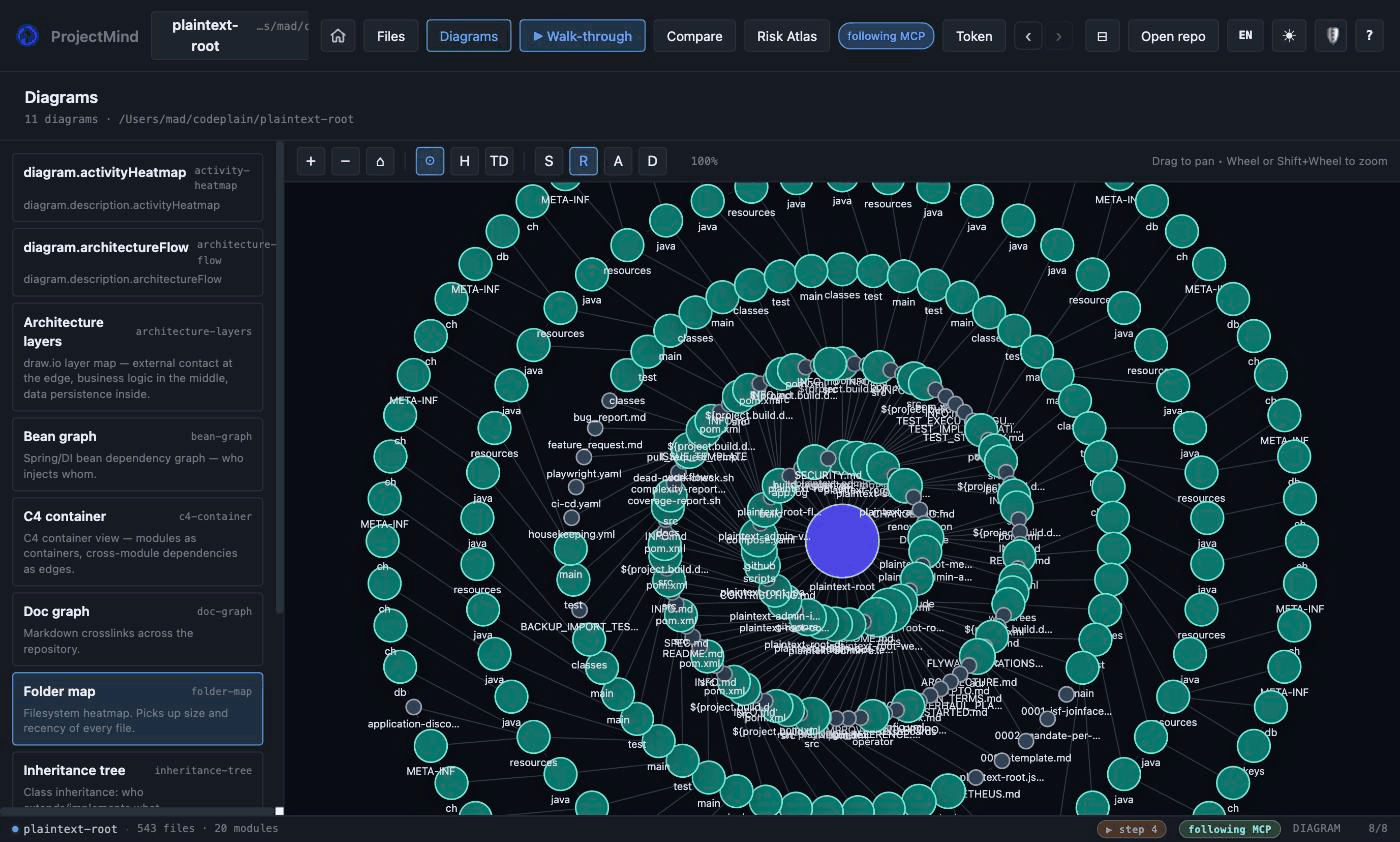
extends/implements/ Rust trait-impl edges; external supertypes grouped separately. - Folder map — treemap of the working tree with hierarchy / solar / top-down layouts; colour by structure, recency, author or diff (with legends).
- Doc graph — the repo's markdown files as a clickable graph (network / radial / orphans layouts, orphan + dangling-link counts).
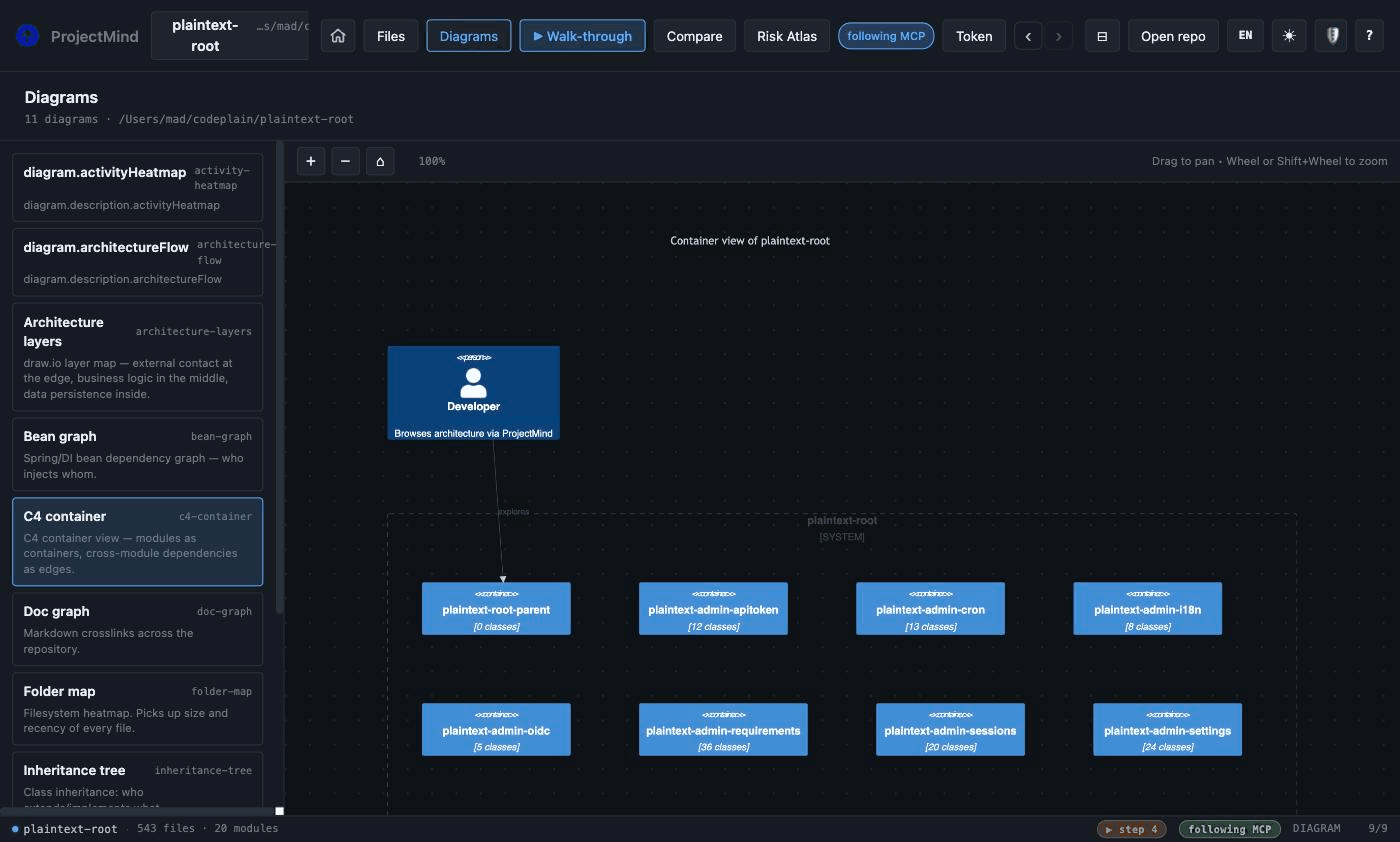
- C4 container — one container per module, rendered via draw.io (exportable).
- C4 model (editable) — the round-trip sibling of C4 container (#142):
scaffold_c4_modelwritesdocs/architecture.dsl(a Structurizr-DSL subset) once, you hand-edit it in Git, and this kind parses it back to Mermaid. ProjectMind never overwrites the file, so the architecture is yours to own — JVM-free, no Structurizr CLI. When the code grows, the view's Update model button (or themerge_c4_modeltool) folds the new modules, classes and relations in additively — your own edits, hand-added elements and comments are preserved byte-for-byte. - C4 component — the container-level zoom (#142): pick one module from a dropdown and see its classes as C4 components with their relations (intra-module
Rels; cross-module dependencies collapse toContainer_Extboundaries). Reuses thebean_graph_datapayload — no new backend data — and the top classes by in-module fan-in are shown when a module is too dense to draw legibly. - Architecture layers — layered draw.io view, kept for export.
- Architecture flow — interactive Controller / Service / Repository / Entity bands with flow arrows whose width tracks the relation count.
- Module chord — cross-module coupling as a circular chord diagram.
- Activity heatmap — GitHub-style 7×52 commit calendar with streaks and a top-author summary.
- Timeline river — per-module commit activity over the last 24 months; answers "when did module X go active or quiet".
- Language stats — file / extension breakdown of the working tree.
- Code city — the codebase as a 3D city (three.js, orbit camera): districts are folders, building height tracks file size, colour tracks the risk score.
The live bean graph has three animation modes (one driver at a time): Flow simulates a request wave travelling from the controllers towards the repositories along the real relation edges; Pulse joins the repo's 24-month commit activity onto the graph so modules with fresh commits visibly beat; Cinematics plays the commit timeline like a film — press play and watch the architecture diff morph step by step. All three are frontend-only overlays over data the MCP server already serves.
What it looks like
A 21-module Spring Boot monorepo (543 classes), straight after open_repo:
| Folder heatmap | C4 container view | Guided AI walkthrough |
|---|---|---|
 |
 |
 |
Dark and light themes, five UI languages, resizable panes throughout.
What works today
The Phase 1 MVP ships a Rust MCP server (projectmind-mcp) that any
MCP-aware client — Claude Code, ChatGPT, Gemini CLI, Cursor, or your own
custom agent — can connect to. It implements:
| Tool | What it does |
|---|---|
open_repo |
Open a repository. Detects Maven multi-module layouts (any pom.xml) and Cargo workspaces (any Cargo.toml with a [package]); falls back to a single module otherwise. |
repo_info |
Summary (modules, classes) of the active repo. |
module_summary |
Per-module class count and stereotype histogram. |
list_module_files |
List PDFs and images inside a module's root (source files are covered by list_classes). |
list_classes |
List parsed classes (filter by stereotype). |
find_class |
Case-insensitive substring search by simple or fully-qualified name. |
class_outline |
Methods, fields, annotations and visibility of a class — without source. |
docs_for_class |
Repo-internal Markdown documents that mention a class or link to its source file, ranked by precision (source-file link > FQN > inline-code name > bare distinctive name). The bridge from code to the ADRs / design docs / runbooks behind it. |
show_class |
Source of a class with optional line-range highlights. |
relations |
The full bean / injection graph as JSON: {from, to, kind, cross_module} edges. |
list_changes_since |
Files changed since a given git ref. |
show_diff |
Unified diff between two refs (or ref vs working tree). |
list_refs |
Local branches and tags with name, kind and target SHA — branches first, master/main floated to the top. |
file_recency |
Per-file recency index: every path's most-recent commit (sha, summary, age), newest-first. The data behind the recency heatmap and author overlay. |
commit_activity |
Per-module commit activity over the last 24 months — the data behind the timeline river; answers "when did module X go active or quiet". |
show_diagram |
Diagram source for a given kind — Mermaid bean graph (subgraphs per Maven module, colour-coded by stereotype), package tree, inheritance tree and friends. The live/3D kinds (bean-graph-live, timeline-river, code-city) are rendered by the viewer from their own data endpoints. |
list_html |
List HTML / XHTML / JSP / Velocity / FreeMarker template files in the open repository. |
list_html_snippets |
Scan source files (.java, .kt, .groovy, .scala, incl. Java text blocks) for HTML snippets in string literals — filtered to ≥2 tags so XML namespace declarations and short error strings drop out. |
plugin_info |
List active language and framework plugins. |
risk_atlas |
Composite per-class risk scores from four signals — git churn, cyclomatic complexity, test coverage (JaCoCo/LCOV/Cobertura, gracefully absent), fan-in — with a why hint per class (hot+uncovered+central). Find the hotspots before reading any source. |
pattern_check |
Architecture-drift detection: five Spring-flavoured detectors (repository, layered, di_only, tx_on_service, no_static_state) returning per-module compliance counts and file:line violations with confidence scores. Configurable via .projectmind/patterns.toml. |
architect_briefing |
Morning briefing — what got worse since you last looked: diffs the current health snapshot against a previous session and reports new hotspots, pattern drift and risk deltas. Call this first in a session. |
walkthrough_query |
Semantic lookup over curated tours: matches a natural-language question against every tour step and returns the best tour's steps with a confidence — the preferred way to answer "how does X work" before grepping. Answers fallback: "grep" when no tour matches. |
tour_scaffold |
Machine skeleton for a "welcome to this repo" tour: ranks the modules worth touring (coupling + size + 90-day activity) and returns ready-made step targets plus facts bullets — the LLM writes the narration and calls walkthrough_start. materialize: true persists a template-narrated tour directly. |
self_demo |
One-click self-demo (V5.3): ranks the repo like tour_scaffold, materialises a template-narrated tour, persists it, and opens it in present + autoplay mode — the viewers enter Presenter Mode and the deck advances itself (narration-length timer + OS TTS) with no client-LLM narration. Exactly what the ▶ Demo button does. Any keypress/click stops it; the demo ends on the last step. |
scaffold_c4_model |
Scaffold an editable C4 model (#142): write docs/architecture.dsl (a Structurizr-DSL subset) so the architecture becomes a hand-editable, versioned Git file — JVM-free, no Structurizr CLI. Generated once from the same data as the c4-container diagram; never clobbers an existing file (returns created:false), so after the first scaffold the file is yours. Render the edited model with the c4-model diagram kind. |
merge_c4_model |
Round-trip the editable C4 model (#142): fold new code structure into docs/architecture.dsl while preserving every edit you made. Strictly additive — inserts only the containers / components / relationships the code has but the DSL lacks; never deletes or changes existing elements, rewritten descriptions, hand-added external systems / actors / relationships, or comments (all survive byte-for-byte). Scaffolds fresh if the file is absent. Returns { path, created, added_containers, added_components, added_relationships } (all added_* zero when already up to date). The c4-model view's Update model button calls this. |
walkthrough_start |
Start a guided tour: pushes the tour body + step 0 to every open viewer. Replaces any previous tour; auto-launches the desktop GUI if nothing is open. |
walkthrough_append |
Append one step to the active tour without moving the pointer — stream a tour while authoring it. |
walkthrough_set_step |
Move the active tour's pointer to a 0-based step index (clamped). |
walkthrough_clear |
End the active tour; viewers return to the previous view. |
walkthrough_feedback |
Read the user's feedback events on the active tour (one entry per Verstanden / Genauer click), so the LLM can expand steps that were flagged. |
view_class |
Open a class in every running viewer (desktop GUI and/or browser webapp); auto-launches the desktop GUI if none is up. |
view_file |
Open an arbitrary file in every running viewer — Markdown rendered (mermaid + images), everything else as source. |
view_diff |
Open the diff view between two refs (or ref vs working tree) in every running viewer. |
view_diagram |
Open one of the sixteen diagram kinds in every running viewer. |
start_gui |
Launch the ProjectMind desktop app if it isn't already running (the view_* tools auto-launch on demand, so call this only to bring up the window before any view intent). Honours $PROJECTMIND_APP for an override path. |
open_browser_repo |
Start the in-process browser host that serves the ProjectMind webapp at a tokenized URL — same UI as the Tauri shell, but reachable from any browser. Default binds on 127.0.0.1; pass lan: true to bind on 0.0.0.0 so the URL works from another device on the same WLAN (iPad / phone / second laptop). The bearer token in the URL fragment gates every API call. |
browser_status |
Return the running browser host's bind address, tokenized URLs and open repo, or null if no host is started. Side-effect free — handy to re-surface the URL/token without restarting the host. |
stop_browser |
Forget the cached browser host status so the next open_browser_repo starts fresh. |
present_artifact |
Render an AI-generated HTML or Markdown artifact live in every open viewer. Content is passed inline (not read from the repo), so the LLM can show generated dashboards, notes or diagrams without writing them to disk. HTML renders inside a sandboxed, CSP-locked iframe (no scripts, no network); Markdown renders like a .md file (mermaid + images). Re-use the id to iterate/stream. Max ~2 MB. |
list_artifacts |
List the pushed artifacts (id, title, format, size, created/updated) — bodies excluded. |
The browser host is the natural answer to "open this repo on my iPad
while I keep working on the laptop": ask the LLM to call
open_browser_repo with lan: true, the response carries a
http://<lan-ip>:<port>/#token=… URL you open on the second device.
Both the Tauri desktop window and the browser tab subscribe to the
same shared statefile, so any subsequent view_* / walkthrough_*
push from the LLM mirrors to whichever viewers happen to be open.
Active language plugins in Phase 1:
- Java — Tree-sitter parser. Classes, interfaces, enums, records; methods, fields, annotations, visibility.
- Rust — Tree-sitter parser. Structs, enums, traits, unions;
implblocks attach methods and liftimpl Trait for Tas annotations onT. Module namespace is derived from the nearest[package].name.
Active framework recognisers in Phase 1:
- Spring —
@Service,@RestController,@Controller,@Component,@Repository,@Configuration. Constructor and field injection (@Autowired,@Inject,@Resource) become Mermaid edges. - Lombok —
@Data,@Value,@Builder,@SuperBuilder,@*ArgsConstructor,@ToString,@EqualsAndHashCode,@Slf4j/@Log*,@Getter,@Setter,@With, … attached as alombokstereotype with the detected annotations inclass.extras.
Smoke-tested against real codebases: a 21-module Spring Boot Maven monorepo parses to ~500 classes with stereotype histograms and a Mermaid bean graph grouped by module; an 8-crate Cargo workspace (this repo) parses to ~60 classes with per-crate modules.
Build the MCP server (Ubuntu / Debian)
This is the path you want for using projectmind from any MCP-aware
agent (Claude Code, ChatGPT, Gemini CLI, …) on Ubuntu — no GUI required.
The repo ships an installer for the impatient:
git clone [email protected]:Plaintext-Gmbh/projectmind.git
cd projectmind
./scripts/install-ubuntu.sh             # MCP server only
# or:
./scripts/install-ubuntu.sh --with-app  # also build the Tauri shell
The script installs build prerequisites, the Rust toolchain (via rustup, if missing), then builds and prints a ready-made .mcp.json snippet. If you'd rather install manually:
sudo apt update
sudo apt install -y build-essential pkg-config libssl-dev cmake git curl
curl --proto '=https' --tlsv1.2 -sSf https://sh.rustup.rs | sh -s -- -y
source "$HOME/.cargo/env"

git clone [email protected]:Plaintext-Gmbh/projectmind.git
cd projectmind
cargo build --release --bin projectmind-mcp

# Result: target/release/projectmind-mcp
Build the MCP server (macOS)
# Prerequisites — Homebrew + Rust
brew install rustup-init || true
rustup-init -y
source "$HOME/.cargo/env"

git clone [email protected]:Plaintext-Gmbh/projectmind.git
cd projectmind
cargo build --release --bin projectmind-mcp
Build the Tauri shell (optional, GUI)
The Tauri app is the read-only graphical browser. It is the same engine, just with a UI on top.
Ubuntu / Debian
# Tauri prerequisites
sudo apt install -y \
  libwebkit2gtk-4.1-dev libgtk-3-dev libayatana-appindicator3-dev \
  librsvg2-dev libsoup-3.0-dev libjavascriptcoregtk-4.1-dev patchelf

# Node toolchain (for the frontend)
curl -fsSL https://get.pnpm.io/install.sh | sh -

# Build
cd app
pnpm install
pnpm tauri build
macOS
# Node toolchain
brew install pnpm

cd app
pnpm install
pnpm tauri build
Run the app in dev mode (live-reload):
cd app && pnpm tauri dev
Use with an MCP-aware agent
ProjectMind speaks the Model Context Protocol (MCP), so any frontier
LLM client that supports MCP can drive it: Claude Code, ChatGPT desktop,
Gemini CLI, Cursor, Continue, or your own scripted agent. Add the server
to whichever config the client uses (e.g. .mcp.json for Claude Code,
mcp_settings.json for Cursor):
{
  "mcpServers": {
    "projectmind": {
      "type": "stdio",
      "command": "/absolute/path/to/projectmind-mcp",
      "env": {
        "PROJECTMIND_LOG": "info"
      }
    }
  }
}
Where is projectmind-mcp on disk?
Pick whichever of these you have installed:
- Desktop app installed — the MCP server is bundled next to the GUI
binary, so you can point your client straight at the in-app path. No
separate install step:
- macOS:
/Applications/ProjectMind.app/Contents/MacOS/projectmind-mcp - Linux (
.deb/.AppImage):/usr/bin/projectmind-mcp(.debinstalls to/usr/bin/;.AppImagemounts a temporary FUSE root — extract the AppImage with--appimage-extractif you need the binary on a stable path) - Windows (
.msi):C:\Program Files\ProjectMind\projectmind-mcp.exe
- macOS:
- MCP-only install (without the desktop app) — use the standalone
tarball from the Releases page
or the helper scripts under
scripts/. The binary lands wherever you placed it (commonly~/.local/bin/projectmind-mcp). - From source —
target/release/projectmind-mcpaftercargo build --release --bin projectmind-mcp.
Claude Code users can register the bundled binary in one line:
# macOS
claude mcp add projectmind /Applications/ProjectMind.app/Contents/MacOS/projectmind-mcp
Re-running the same command after a desktop-app upgrade is a no-op, so the MCP server stays in lockstep with the GUI version automatically.
Restart the client. From a session, you can then ask things like:
- "Open the repo at
/home/me/projects/my-spring-appand tell me how many services and controllers there are per module." - "Find any class containing
Auszahland outline the most relevant one." - "Show me the
UserServiceclass — highlight lines 80-95." - "Which files changed since HEAD~5? Group them by module."
- "Render the bean graph as a Mermaid diagram."
The agent will pick the right tool calls from the list above.
Pre-built binary
The latest release on the
Releases page
ships projectmind-mcp and desktop app bundles where the GitHub runners
can build them. New releases are produced by the Auto-Release workflow
from the Actions tab; it bumps the version, opens a PR, merges, tags, and
publishes in one shot.
Presenter mode & tour recording
A walk-through isn't just for one screen. Two Cockpit 2.6 features turn a tour into a shareable architecture presentation:
Presenter mode — press P (or the header Present button) while a tour
is active to drop into a full-screen slide deck: sidebar hidden, larger fonts,
a 3 / 12 step counter, and single-key navigation.
| Key | Action |
|---|---|
← / → |
previous / next step |
n |
toggle the TTS narrator (reads the step narration aloud) |
r |
overlay the risk-atlas badges for the current class |
p |
overlay the pattern-compliance check for the current class |
+ / - / 0 |
font scale up / down / reset (1.0 · 1.25 · 1.5) |
Esc |
leave presenter mode |
The narrator uses the OS speech engine — say on macOS, espeak on Linux
(install it for the narrator; without it the toggle is a silent no-op with a
hint). In the browser build (open_browser_repo) it uses the Web Speech API on
the client device instead. An MCP client that generates richer narration than
the authored step text can pass that string to the narrator directly — the
presenter just speaks whatever it is handed.
Recording — export the active tour to a self-contained file that reads without ProjectMind installed:
# Structured PDF (the default deliverable): one page per step with title,
# file:line, the highlighted code snippet, narration, and any risk / pattern
# annotations. Pure Rust — no headless browser, no FFmpeg.
projectmind-mcp record <tour-id> --output tour.pdf     # or `active` for the live tour
projectmind-mcp record active --output tour.pdf --repo /path/to/repo

# MP4 export is gated behind the `record-mp4` cargo feature (needs system
# FFmpeg). Without it, an .mp4 output fails with a clear "enable record-mp4
# feature" message and the encoder never compiles into the default build.
cargo build --release --bin projectmind-mcp --features record-mp4
record resolves the active tour on disk (the one walkthrough_start wrote).
Pass --repo (or rely on the repo recorded in the statefile) so class /
risk steps embed real source lines plus risk-atlas badges and pattern steps
embed the drift violations; without a repo it still exports titles + narration.
Tests / development
For day-to-day work, use the small ./build helper:
./build dev      # Tauri app with hot reload
./build check    # cargo fmt --check + cargo clippy
./build test     # cargo test --workspace --all-targets + doctests
./build ci       # check + test
./build mcp      # release-build and smoke-test projectmind-mcp
./build app      # desktop app bundle for this machine
./build dist     # app bundle plus tar.gz + sha256 package
The lower-level CI wrapper is still available when you need exactly the workflow commands:
./scripts/ci.sh check
./scripts/ci.sh test
./scripts/ci.sh all
CI runs on Ubuntu 22.04 and macOS 14 for every push and pull request, plus a Linux release-build smoke test.
Architecture
A Cargo workspace with seven crates plus a Svelte frontend:
| Crate | Purpose |
|---|---|
crates/plugin-api |
Public traits and types (no implementations) |
crates/core |
Repo loader, file walker, plugin pipeline, Maven + Cargo discovery, git helpers |
crates/mcp-server |
The projectmind-mcp binary (JSON-RPC over stdio) |
plugins/lang-java |
Java parser via Tree-sitter |
plugins/lang-rust |
Rust parser via Tree-sitter |
plugins/framework-spring |
Spring stereotypes + bean graph |
plugins/framework-lombok |
Lombok annotation recogniser |
app/src-tauri |
Tauri shell (Rust backend exposing Tauri commands) |
app/src/ |
Svelte + TypeScript frontend with Mermaid integration |
Phase 1 plugins are statically registered. Phase 2 will add dynamic loading from a ./plugins/ directory next to the binary, so third-party plugins can drop in .so / .dylib files.
Reference docs (in the repo)
docs/architecture.md— workspace layout, plugin API, MCP tool schemas. Living reference, kept in sync with the code.docs/architect-briefing.md— the Cockpit 2.7 morning briefing: session log,architect_briefingMCP tool, and theprojectmind briefingCLI.docs/SYNC.md— how the MCP server and the Tauri GUI stay in sync (statefile + view intents).docs/branding.md— colour, typography, logo specs.docs/reviews/— historical architecture reviews.
Roadmap & planning
The roadmap and feature backlog now live on GitHub:
- Issues — concrete, schedulable work items (bugs, features, sub-tasks of epics)
- Project board — Kanban view of what's in flight
- Discussions — vision, longer-form design conversations, and visualisation sketches. The Vision & Roadmap thread is the canonical place for high-level direction.
Phase summary:
- Phase 1 (done): MCP server with Java + Spring + Lombok plugins, Rust plugin, package tree, bean graph, folder map, diff view, Markdown + HTML browsers, walkthrough mode, core MCP tools, Tauri shell with bidirectional MCP sync.
- Phase 2 (in progress): Annotation round-trip,
draw.io embed(.drawiofiles render via the embedded diagrams.net viewer), Confluence MCP bridge, dynamic plugin loading from./plugins/. - Phase 3: Plugin marketplace, more languages, JSF / PrimeFaces preview, C4 diagram generator.
Contributing
See CONTRIBUTING.md. The project is in early design — discussions, ideas, and visualisation sketches are very welcome.
License
MPL 2.0 — Mozilla Public License Version 2.0.
No comments yet
Be the first to share your take.