

PRISM-INSIGHT


AI-Powered Stock Market Analysis & Trading System
13+ specialized AI agents collaborate to detect surge stocks, generate analyst-grade reports, and execute trades automatically.
Platinum Sponsor
AI3, creator of WrksAI - the AI assistant for professionals, proudly sponsors PRISM-INSIGHT - the AI assistant for investors.
NEW: Stance — Which System Trading Strategy Is Winning Right Now?
Past results? We don't take them. Every Stance record starts at registration. There are no uploaded track records and no backfills. Decisions and outcomes then build one continuous public record, revealing the strategy's actual skill and risk instead of a cherry-picked highlight reel.
The highest return is only half the answer. Stance separates KRX and US rankings, then shows return beside worst drawdown, average invested exposure, and record rate—so you can see which strategies are performing well and how they got there.
- Find what is working now — compare every strategy under one rulebook
- Look past the headline return — see risk, real exposure, and missing records
- No historical backfill — the public record starts on registration day with decisions made before outcomes
- Trust the timeline — the server seals decision time and price, then calculates what happens next
- Enter your own strategy — let a coding agent discover, register, connect, and test it
See the live leaderboard · Enter my strategy · Read the quickstart
Open your strategy project in Codex CLI, Cursor, Claude Code, or another coding agent, then paste the instruction copied from the Stance dashboard into its chat. The agent finds separate strategies and KRX/US portfolios, asks only for missing public profile details, shows the registration plan, and proceeds only after your approval. It also stores keys, changes the code, and runs tests.
Your strategy appears under Building a record from its first decision. For stock markets, official ranking begins after 63 trading days and 20 closed trades that each used at least 1% of assets. The record starts on connection day; historical results cannot be backfilled. No live brokerage account, balance, or broker key is required.
NEW: ChatGPT Plus/Pro Subscription Support
No API key? No problem. PRISM-INSIGHT now supports running analysis directly through your ChatGPT Plus ($20/mo) or Pro ($200/mo) subscription via the Codex OAuth Proxy.
# One-time login (browser will open for ChatGPT auth)
python -m cores.chatgpt_proxy.oauth_login

# Re-authenticate (switch account, or refresh expired tokens)
python -m cores.chatgpt_proxy.oauth_login --force

# Run with your ChatGPT subscription
PRISM_OPENAI_AUTH_MODE=chatgpt_oauth python stock_analysis_orchestrator.py --mode morning
Tokens auto-refresh in the background, so you only need to log in again if you change ChatGPT accounts or your password.
Zero API bills. Same powerful analysis. Your existing subscription does the work.
Mobile App
Get AI stock analysis on the go
- Smart Filtering — Receive only the Telegram alerts you care about
- PDF Reports — Mobile-optimized AI analysis reports
- Launch Promo (until Apr 23, 2026) — Install now and get 20 free credits (normally 10)
Watch PRISM-INSIGHT in Action
Try It Now (No Installation Required)
1. Live Dashboard
See AI trading performance in real-time: analysis.stocksimulation.kr
2. Telegram Channels
Get daily surge stock alerts and AI analysis reports:
3. Sample Report
Watch an AI-generated Apple Inc. analysis report:

Try in 60 Seconds (US Stocks)
The fastest way to try PRISM-INSIGHT. Only requires an OpenAI API key.
# Clone and run the quickstart script
git clone https://github.com/dragon1086/prism-insight.git
cd prism-insight
./quickstart.sh YOUR_OPENAI_API_KEY
This generates an AI analysis report for Apple (AAPL). Try other stocks:
python3 demo.py MSFT              # Microsoft
python3 demo.py NVDA              # NVIDIA
python3 demo.py TSLA --language ko  # Tesla (Korean report)
Get your OpenAI API key from OpenAI Platform
Optional: Add a Perplexity API key to
mcp_agent.config.yamlfor news analysisOptional: Add
ADANOS_API_KEYto enrich US stock news analysis with structured social sentiment context
Your AI-generated PDF reports will be saved in prism-us/pdf_reports/.
# 1. Set your OpenAI API key
export OPENAI_API_KEY=sk-your-key-here

# 2. Build and start the local quickstart image
docker compose -f docker-compose.quickstart.yml up --build -d

# 3. Run analysis
docker exec -it prism-quickstart python3 demo.py NVDA
The first run builds the image locally, so it may take several minutes.
Reports will be saved to ./quickstart-output/.
Full Installation
Prerequisites
- Python 3.10+ or Docker
- OpenAI API Key (get one here) or ChatGPT Plus/Pro subscription
Option A: Python Installation
# 1. Clone & Install
git clone https://github.com/dragon1086/prism-insight.git
cd prism-insight
pip install -r requirements.txt

# 2. Install Playwright for PDF generation
python3 -m playwright install chromium

# 3. Install perplexity-ask MCP server
cd perplexity-ask && npm install && npm run build && cd ..

# 4. Setup config
cp mcp_agent.config.yaml.example mcp_agent.config.yaml
cp mcp_agent.secrets.yaml.example mcp_agent.secrets.yaml
# Edit mcp_agent.secrets.yaml with your OpenAI API key
# Edit mcp_agent.config.yaml with KRX credentials (Kakao account)

# 5. Run analysis (no Telegram required!)
python stock_analysis_orchestrator.py --mode morning --no-telegram
Option B: Docker (Recommended for Production)
# 1. Clone & Configure
git clone https://github.com/dragon1086/prism-insight.git
cd prism-insight
cp mcp_agent.config.yaml.example mcp_agent.config.yaml
cp mcp_agent.secrets.yaml.example mcp_agent.secrets.yaml
# Edit config files with your API keys

# 2. Build & Run
docker compose up -d

# 3. Run analysis manually (optional)
docker exec prism-insight-container python3 stock_analysis_orchestrator.py --mode morning --no-telegram
Full Setup Guide: docs/SETUP.md
What is PRISM-INSIGHT?
PRISM-INSIGHT is a completely open-source, free AI-powered stock analysis system for Korean (KOSPI/KOSDAQ) and US (NYSE/NASDAQ) markets.
Core Capabilities
- Surge Stock Detection — Automatic detection of stocks with unusual volume/price movements
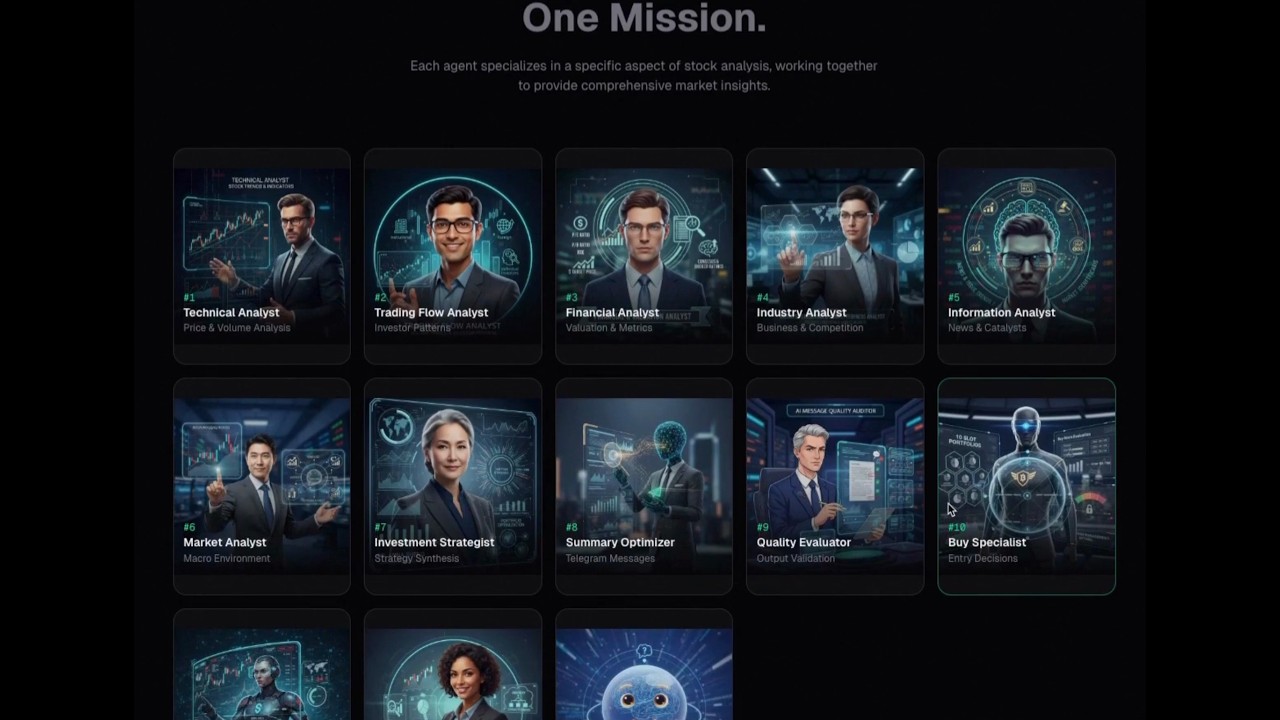
- AI Analysis Reports — Professional analyst-grade reports generated by 13 specialized AI agents
- Trading Simulation — AI-driven buy/sell decisions with portfolio management
- Automated Trading — Real execution via Korea Investment & Securities API
- Telegram Integration — Real-time alerts and multi-language broadcasting
- Macro Intelligence — Market regime detection, sector rotation analysis, risk event monitoring
AI Models
- Analysis & Trading: OpenAI GPT-5 / GPT-5.4-mini (via API or ChatGPT Plus subscription)
- Report Generation: Anthropic Claude Sonnet 4.6
- Translation: OpenAI GPT-5 (EN, JA, ZH, ES support)
AI Agent System
13+ specialized agents collaborate in teams:
| Team | Agents | Purpose |
|---|---|---|
| Macro | 1 agent | Market regime, sector rotation, risk events |
| Analysis | 6 agents | Technical, Financial, Industry, News, Market analysis |
| Strategy | 1 agent | Investment strategy synthesis |
| Communication | 3 agents | Summary, Quality evaluation, Translation |
| Trading | 3 agents | Buy/Sell decisions, Journal |
| Consultation | 2 agents | User interaction via Telegram |
Detailed Agent Documentation: docs/CLAUDE_AGENTS.md
Key Features
| Feature | Description |
|---|---|
| AI Analysis | Expert-level stock analysis through GPT-5 multi-agent system |
| Surge Detection | Automatic watchlist via morning/afternoon market trend analysis |
| Telegram | Real-time analysis distribution to channels |
| Trading Sim | AI-driven investment strategy simulation |
| Auto Trading | Execution via Korea Investment & Securities API |
| Dashboard | Transparent portfolio, trades, and performance tracking |
| Self-Improving | Trading journal feedback loop — past trigger win rates automatically inform future buy decisions (details) |
| US Markets | Full support for NYSE/NASDAQ analysis |
| Macro Intelligence | Market regime detection and sector rotation for smarter stock selection |
| Mobile App | iOS & Android app with smart filtering and PDF reports |
Trading Performance
KR Market — Season 2
| Metric | Value |
|---|---|
| Period | 2025.09.30 ~ 2026.03.24 |
| Total Trades | 86 |
| Win Rate | 45.35% |
| Avg Return per Trade | +2.84% |
| Cumulative Return | +244.63% |
| Current Holdings | 5 stocks |
US Market (Beta)
| Metric | Value |
|---|---|
| Period | 2026.01.28 ~ 2026.03.21 |
| Total Trades | 13 |
| Current Holdings | 6 stocks |
How the Trading System Learned
The Korean-market history shows two opposite failure modes: avoiding too many entries, then taking risk without enough state control. The releases from v1.16.7 through v2.18 progressively moved the system from prompt-level bias correction to deterministic regime, exit-state, and re-entry safeguards.
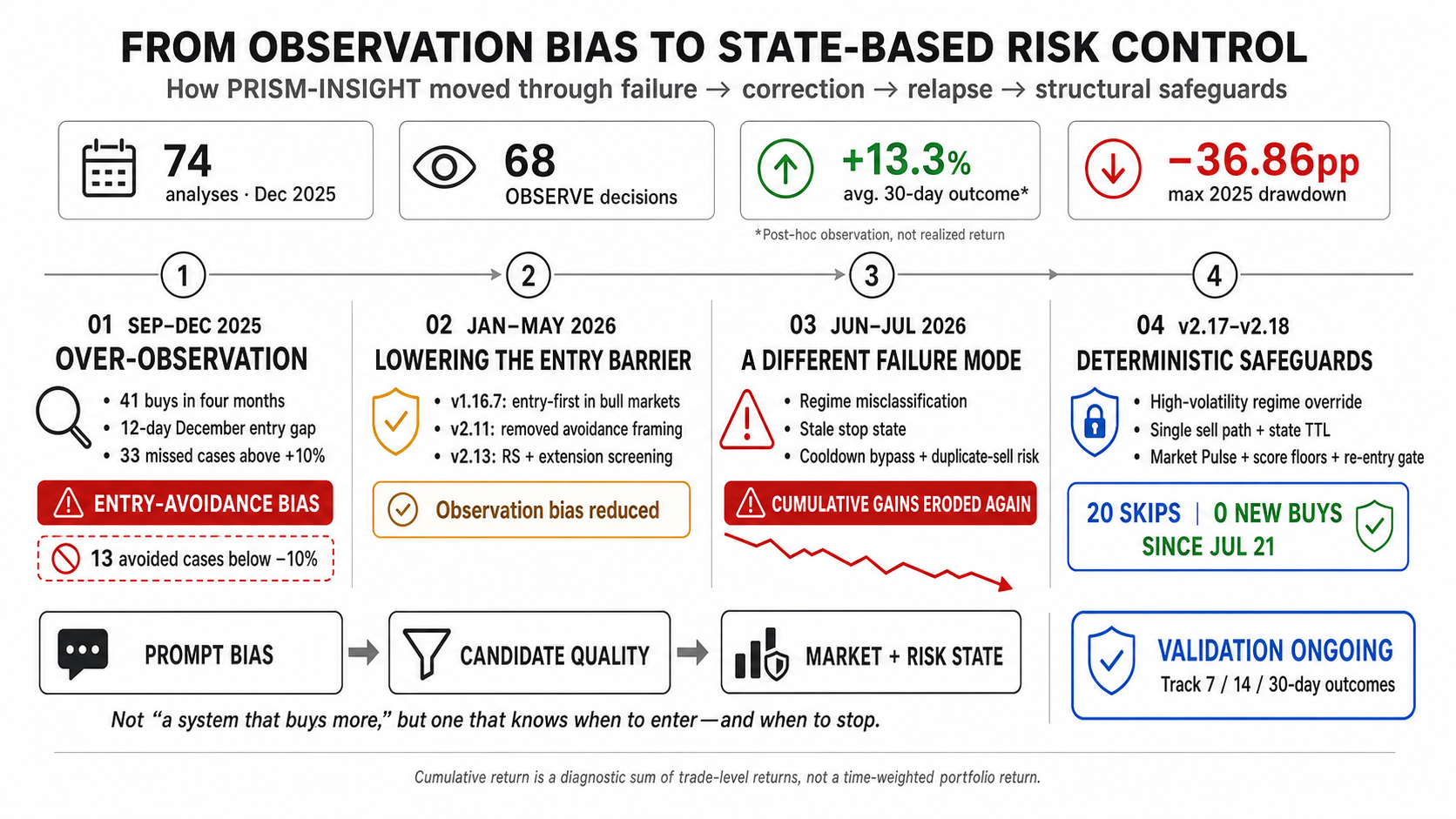
The figures are diagnostic. Cumulative return is the sum of trade-level return rates, while outcomes for unentered candidates are post-hoc observations—not a time-weighted portfolio return or a realizable backtest.
US Stock Market Module
Same AI-powered workflow for US markets:
# Run US analysis
python prism-us/us_stock_analysis_orchestrator.py --mode morning --no-telegram

# With English reports
python prism-us/us_stock_analysis_orchestrator.py --mode morning --language en
Data Sources: yahoo-finance-mcp, sec-edgar-mcp (SEC filings, insider trading)
Documentation
| Document | Description |
|---|---|
| docs/SETUP.md | Complete installation guide |
| docs/CLAUDE_AGENTS.md | AI agent system details |
| docs/TRIGGER_BATCH_ALGORITHMS.md | Surge detection algorithms |
| docs/TRADING_JOURNAL.md | Trading memory system |
Frontend Examples
Dashboard
Real-time portfolio tracking and performance dashboard.
cd examples/dashboard
npm install
npm run dev
# Visit http://localhost:3000
Features: Portfolio overview, trading history, performance metrics, market selector (KR/US), return comparison vs KOSPI/KOSDAQ
Dashboard Setup Guide: examples/dashboard/DASHBOARD_README.md
MCP Servers
Korean Market
- kospi_kosdaq — KRX stock data
- firecrawl — Web crawling
- perplexity — Web search
- sqlite — Trading simulation DB
US Market
- yahoo-finance-mcp — OHLCV, financials
- sec-edgar-mcp — SEC filings, insider trading
Contributing
- Fork the project
- Create a feature branch (
git checkout -b feature/amazing-feature) - Commit your changes (
git commit -m 'Add amazing feature') - Push to the branch (
git push origin feature/amazing-feature) - Create a Pull Request
License
Dual Licensed:
For Individual & Open-Source Use

Free under AGPL-3.0 for personal use, non-commercial projects, and open-source development.
For Commercial SaaS Use
Separate commercial license required for SaaS companies.
Contact: [email protected] Details: LICENSE-COMMERCIAL.md
Disclaimer
Analysis information is for reference only, not investment advice. All investment decisions and resulting profits/losses are the investor's responsibility.
Sponsorship
Support the Project
Monthly operating costs (~$310/month):
- OpenAI API: ~$235/month
- Anthropic API: ~$11/month
- Firecrawl + Perplexity: ~$35/month
- Server infrastructure: ~$30/month
Currently serving 450+ users for free.
Project Growth
If this project helped you, please give us a Star!
Contact: GitHub Issues | Telegram | Discussions
No comments yet
Be the first to share your take.