
The operating environment for AI agent pipelines
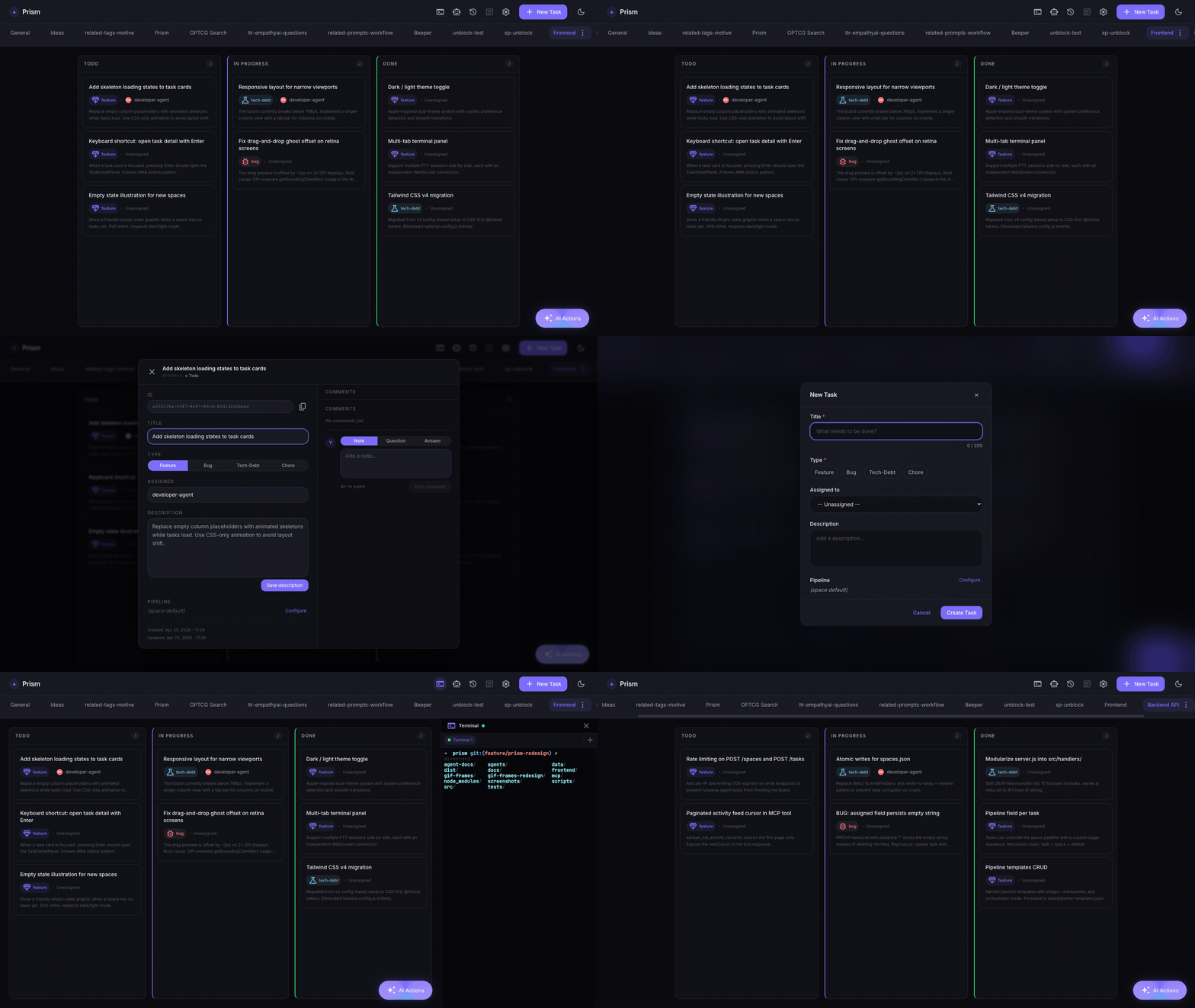
Agents create tasks, move them across a Kanban board, run multi-stage pipelines, and build up a shared knowledge base — all from a single interface you run locally or in Docker.





Getting started · Folio · Routing · CLI · MCP · Docs
What it does
Most Kanban tools are built for humans tracking human work. Prism is built for agents.
| Agents manage the board | Via MCP tools, agents create tasks, update status, and attach artifacts as they work. |
| Pipelines from any task | One click launches a multi-stage pipeline (architect → UX → developer → code review → QA) against a task card, with live stage-by-stage logs and automatic QA/review → developer feedback loops. |
| Per-stage harness & model routing | Every agent in the pipeline can run on its own CLI harness + model — Claude Code, opencode, pi, hermes, or a custom command — with a per-agent fallback harness, overridable at the global, space, or task level. See below. |
| Folio — shared knowledge | Agents stop starting every task from zero — see below. |
| Global search | ⌘K / Ctrl K across all spaces, powered by SQLite FTS5. |
| Embedded terminal | A full PTY shell inside the UI. |
| Multiple spaces | Organise work per project, each with its own board and pipeline config. |
| Durable, local persistence | All state lives in a single prism.db SQLite file. No external database. |
It runs on your machine against your own API key — not a SaaS, single operator, and not a replacement for Jira or Linear.
Folio — knowledge that grows with use
On every new task, agents normally start from zero: they re-discover the stack, re-read the same files, and ignore past decisions. Folio is a navigable, augmentable knowledge base shared between you and your agents that fixes this. The value is asymmetric over time — by the hundredth task the folio beats any static doc.
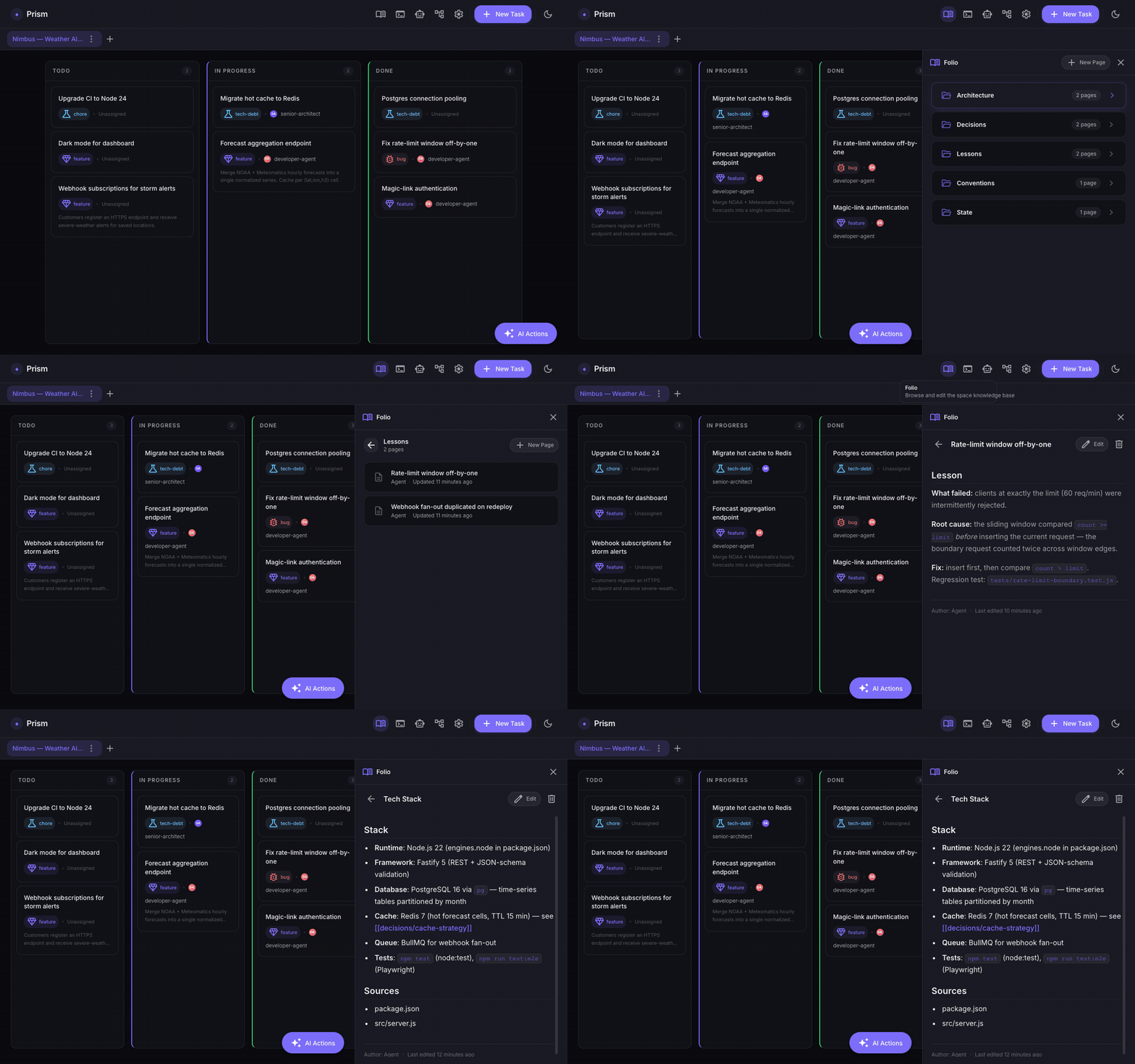
- Folio → Chapter → Page, stored as human-readable markdown you can browse and edit in the UI (and diff in git).
- Co-authored — both you and agents write pages; agent writes are tagged so you can filter and prune them.
- Stage-aware injection — relevant pages are pulled into each pipeline stage automatically, keyed on the task and the stage's role.
- Write-back — at the end of a run a single conservative step records a decision, a lesson, or a state update — only high-signal knowledge.
- Bootstrap from repo — on the first run in a git-backed space, the folio is seeded from the repo. Opt-in and lazy everywhere else.
- Domain-agnostic — neutral vocabulary works for code, on-call runbooks, research, or writing.
Agents reach Folio through its own MCP server (folio_search, folio_get_page, folio_create_page, …). See the .folio/ directory in this repo for the format itself — it is a working Folio describing Prism.
Agents & Routing — bring your own model
Prism doesn't just run pipelines on Claude. Every agent (senior-architect, developer-agent, code-reviewer, qa-engineer-e2e, …) has an independent Harness + model setting, resolved per stage in this order: task override → space override → global setting → the agent's own frontmatter default.
- Four harnesses + custom:
claude(Claude Code), opencode, pi, and hermes, or acustomcommand template for any other CLI or wrapper. opencode and pi can point at any OpenAI-compatible endpoint: local inference (e.g. vLLM on your own hardware), a self-hosted proxy, or a third-party provider. - Configure it from the UI — the Agents & Routing panel (⚙ → Agents & Routing) lists every agent with its resolved harness + model, source (global/space/task), and a fallback harness, editable inline.
- Per-agent fallback (advanced) — each agent can declare a fallback harness + model, used when the primary CLI isn't installed, or when a stage fails at runtime and is retried once on the fallback before the pipeline marks it failed.
- Harness discovery — the panel shows which CLIs (
claude,opencode,pi,hermes) are installed on this machine and turns unavailable ones into install links, so you never wonder why a harness option is missing. - Mix and match — keep the highest-stakes reasoning (architecture, irreversible decisions) on a frontier model while running implementation/QA stages on a local model, or vice versa.
- Isolated per run — regardless of which harness a stage runs on, it still executes inside its own git worktree (see below), so a local model's mistakes never touch your working branch.
Only Claude Code is bundled in the Docker image — install opencode, pi, or hermes yourself and point Prism's routing config at them (the UI links to each product's install page when a CLI isn't found). See opencode's docs for provider setup.
Getting started
One-liner (recommended)
curl -fsSL https://raw.githubusercontent.com/oscarmenendezgarcia/prism/main/install.sh | sh
This installs Node.js ≥ 20 if needed (via nvm), runs npm install -g prism-kanban, and runs prism init to create the data directory and a default settings.json.
curl -fsSL https://raw.githubusercontent.com/oscarmenendezgarcia/prism/main/install.sh | sh -s -- --data-dir /custom/path
Docker
docker compose up -d
# → http://localhost:3000
No Node.js or build tools required locally. Board data persists in ./data/prism.db. The image ships with Claude Code (claude) pre-installed for running pipelines.
The board works without an API key. To enable agent pipelines and auto-task generation, set ANTHROPIC_API_KEY:
ANTHROPIC_API_KEY=sk-... docker compose up -d
Agents that write code need files on disk. Mount each project as a volume in docker-compose.yml and point the Space's Working Directory at it:
services:
  prism:
    volumes:
      - ./data:/app/data                            # board state (already present)
      - /home/user/myproject:/workspace/myproject   # ← your repo
Or run Prism locally for native host filesystem access with no volume mapping.
npm (manual)
npm install -g prism-kanban
prism init           # create data dir + settings.json
prism start          # → http://localhost:3000
Full prerequisites, what
prism initcreates, and troubleshooting:docs/installation.md.
CLI
prism start          # start the server → http://localhost:3000
prism stop           # SIGTERM, wait up to 35 s for clean exit (--force for SIGKILL)
prism update         # update to the latest npm release
prism doctor         # verify runtime dependencies (--json for CI)
prism --help         # list all commands and flags
Common flags: --port <n> (env PORT), --data-dir <path> (env DATA_DIR), --silent, --no-update-check (env PRISM_NO_UPDATE_CHECK).
prism doctor checks Node version, the node-pty spawn-helper bit, better-sqlite3, the claude CLI, data-dir writability, and server status. Exit 0 if all pass, 1 otherwise; --json emits { ok, checks: [...] } for pipelines.
MCP — let your agent CLI drive Prism
Prism ships two MCP servers:
| Server | Tools |
|---|---|
mcp/mcp-server.js |
The full Kanban API — kanban_list_tasks, kanban_create_task, kanban_update_task, kanban_move_task, kanban_start_run, kanban_get_run_status, kanban_get_run_logs, and more. |
mcp/folio-mcp-server.js |
Folio read/write — folio_search, folio_get_page, folio_create_page, folio_update_page, folio_list_chapters, … |
Pipeline runs are driven by kanban_start_run / kanban_stop_run / kanban_resume_run, and inspected with kanban_get_run_status (state) and kanban_get_run_logs (per-stage logs, by full run id or unique prefix). The older kanban_*_pipeline names still work as deprecated aliases.
Prerequisite: the server (
prism startordocker compose up) must be running before starting any agent session.Registration is per harness — an agent pipeline stage routed to opencode, pi, or hermes (see above) needs the
prismMCP server registered in that CLI's own config, separate from any Claude Code registration. Without it, that stage can't move tasks, leave comments, or attach artifacts, even though the model itself is running fine.
Claude Code — one-liner from the project root:
claude mcp add prism node ./mcp/mcp-server.js -e KANBAN_API_URL=http://localhost:3000/api/v1
Add to .claude/settings.json (or claude_desktop_config.json, using an absolute path):
{
  "mcpServers": {
    "prism": {
      "command": "node",
      "args": ["./mcp/mcp-server.js"],
      "env": { "KANBAN_API_URL": "http://localhost:3000/api/v1" }
    }
  }
}
{
  "mcp": {
    "prism": {
      "type": "local",
      "command": ["node", "/absolute/path/to/prism/mcp/mcp-server.js"],
      "environment": { "KANBAN_API_URL": "http://localhost:3000/api/v1" },
      "enabled": true
    }
  }
}
opencode requires an absolute path (no relative ./ shorthand) and its own node_modules installed under mcp/ — run cd mcp && npm install first if you haven't already.
Running locally (without Docker)
Prerequisites: Node.js ≥ 20 and native build tools for better-sqlite3 and node-pty — xcode-select --install (macOS), sudo apt install build-essential python3 (Linux), or npm install --global windows-build-tools (Windows).
npm install
cd frontend && npm install && npm run build && cd ..
cd mcp && npm install && cd ..
node server.js                 # → http://localhost:3000
Development mode with Vite HMR:
node server.js &
cd frontend && npm run dev     # → http://localhost:5173
Advanced
Parallel pipeline runs — git worktree isolation
Every run gets its own isolated git worktree — not just concurrent ones. A run must never mutate your main checkout: running in-place let a solo run switch the current branch, commit to the wrong branch, or clobber in-flight work.
- Each run gets its own worktree at
.worktrees/run-<short-runId>, branched off HEAD aspipeline/run-<short-runId>. - Fallback to in-place: a directory that isn't a git repo (or has a detached
HEAD) can't be isolated — those runs work directly in the working directory, same as before this existed. If another run is already active in that same non-isolatable directory, the new run is rejected instead of racing it. - Disable entirely with
PIPELINE_WORKTREE_ENABLED=0— every run then works in-place, at the race risk described above. - Cleanup is automatic on terminal states (
completed,failed,interrupted,aborted); orphans are reaped on the next startup.
The worktree path and branch are git-ignored and never committed.
| Variable | Default | Description |
|---|---|---|
PIPELINE_WORKTREE_ENABLED |
1 |
Set 0 to disable worktree provisioning |
PIPELINE_WORKTREE_DIR |
.worktrees |
Subdirectory under the space working directory |
PIPELINE_DELETE_BRANCH_ON_FAILURE |
0 |
Set 1 to delete the branch on failure or abort |
Environment variables
| Variable | Default | Description |
|---|---|---|
PORT |
3000 |
HTTP server port |
DATA_DIR |
(resolved, see below) | Directory where prism.db is stored |
ALLOWED_ORIGINS |
http://localhost:3000,http://127.0.0.1:3000,http://localhost:5173 |
Allowed WebSocket origins — set to your public URL behind a reverse proxy |
ANTHROPIC_API_KEY |
— | Required for any stage/agent routed to Claude (the default). Not needed for stages routed to opencode, pi, or hermes against a local or self-hosted model — see Agents & Routing. |
DATA_DIR isn't a flat default — without an explicit override it's resolved in this order: (1) DATA_DIR env var if set; (2) <packageRoot>/data when running from a git checkout (has a .git directory — this repo, or a dev clone); (3) $XDG_DATA_HOME/prism if XDG_DATA_HOME is set; (4) ~/.local/share/prism otherwise. A global npm install -g prism-kanban install lands on (3) or (4), not ./data — the Docker image sets DATA_DIR=/app/data explicitly, which is why that path shows up there.
Tests
npm test                        # Backend (Node.js test runner)
cd frontend && npm test         # Frontend (Vitest + React Testing Library)
Stack — Node.js (no framework) · React 19 · TypeScript · Tailwind CSS v4 · Vite · Zustand · SQLite (better-sqlite3) · node-pty
MIT © Oscar Menendez · Support the project on Ko-fi
No comments yet
Be the first to share your take.