
Most RAG tools retrieve documents. Preciso builds a knowledge graph — so your agent can reason across connections, not just find similar text.
Documents → Agent picks skill → Extraction JSON → MCP ingest → Local graph
Drop source files into to_be_extracted/. An agent reads them, extracts entities and relationships using domain-specific skills, and persists a queryable knowledge graph locally in GRAPH_IS_HERE/. No cloud required. No pipeline to configure.
Why GraphRAG Over Regular RAG?
Regular RAG:
"What are Apple's risk factors?"
→ returns the Risk Factors section text
Preciso:
"What are Apple's risk factors and which executives are responsible for managing them?"
→ traverses RISK_FACTOR → EXPOSED_TO → COMPANY → EMPLOYS → PERSON
→ returns a connected answer with evidence
The graph makes multi-hop reasoning possible.
Benchmark Results
Tested on 23 financial QA questions from Walmart FY2022 + FY2023 10-K filings, scored on four dimensions:
| Metric | Score |
|---|---|
| Context Relevancy | 0.983 |
| Faithfulness | 1.000 |
| Answer Correctness | 0.960 |
| Precision | 0.910 |
| Preciso Score | 95 / 100 |
- Hallucinations: 0 / 23
- Failed questions: 0 / 23
| System | Score |
|---|---|
| Preciso | 95.4% |
| GPT-4 + long context (79k tokens) | ~79% |
| GPT-4 + standard RAG | ~19% |
See docs/eval-guide.md for full methodology and multi-hop breakdowns.
Quickstart (3 Minutes)
1. Clone and install
git clone https://github.com/Preciso-GR/preciso-graphrag
cd preciso-graphrag
python3 -m venv .venv
source .venv/bin/activate
pip install -r requirements.txt
pip install -e .   # register the preciso_mcp/core/ingest packages (editable)
Requires Python 3.11+, a local virtualenv at
.venv, and the agent opened from the repo root.
2. Drop files into to_be_extracted/
Best inputs: .md, .txt, README files, wiki exports, notes.
For PDFs: convert to
.mdfirst, or use Claude Code / Codex which can read PDFs natively.
Important: verify your source documents before extraction
Before you ask an agent to process anything in to_be_extracted/, check the source documents yourself. Make sure they are factually correct, current, complete, and the exact versions you want represented in the graph. Extraction validation can catch structural problems, but it cannot guarantee that the source document itself is true.
Starting with flawed source data can waste both time and money:
- Extraction may consume paid agent or language-model credits.
- Ingestion generates chunk, entity, and relationship embeddings, which may consume paid embedding-provider credits.
- Flawed evidence can propagate into shared entities, relationships, descriptions, summaries, source links, and embeddings.
- Correcting the mistake later may require regenerating the extraction and rebuilding the entire graph from every valid extraction.
Before starting extraction:
- Remove drafts, duplicates, and superseded document versions.
- Confirm that every remaining document is accurate, final, and belongs in the corpus.
- Preserve the validated source documents so the graph can be reproduced later.
- Start the agent extraction workflow only after you are satisfied with the source corpus.
The agent will perform a second, structural validation of the generated extraction before ingestion. That second check complements—but does not replace—your review of the original data.
If you discover flawed source data after it has entered the graph, follow the full correction workflow.
3. Run this prompt in your agent
Open Codex, Claude Code, Copilot, or OpenCode from the repo root.
Quick version:
Process the files in to_be_extracted/ using Preciso. Before ingestion, show me
the validation summary and ask me to confirm that the corpus is correct and current.
Call get_server_status().
If overall is ready, proceed.
If overall is degraded, explain what is degraded, what still works,
and ask whether to proceed or fix first.
Read the files in to_be_extracted/.
Choose the most appropriate extraction skill from the skills folder for each file.
Extract entities, relationships, and chunks into extractions/{source_name}_extracted.json.
Validate that every source_id maps to a real chunk_id and that all relationships
reference defined entities.
If you find duplicate entities, orphaned relationships, or conflicts,
use the reconciliation skill before ingestion.
Before calling any ingestion tool, summarize the source files, document IDs,
entity/relationship/chunk counts, validation results, and unresolved concerns.
Explain that ingestion is additive and ask me to confirm that the source documents
and extractions are correct, current, and ready to persist.
Only after I confirm, call ingest_from_file for each generated extraction file.
Confirm the graph artifacts written to GRAPH_IS_HERE/ and summarize what was ingested.
How It Works
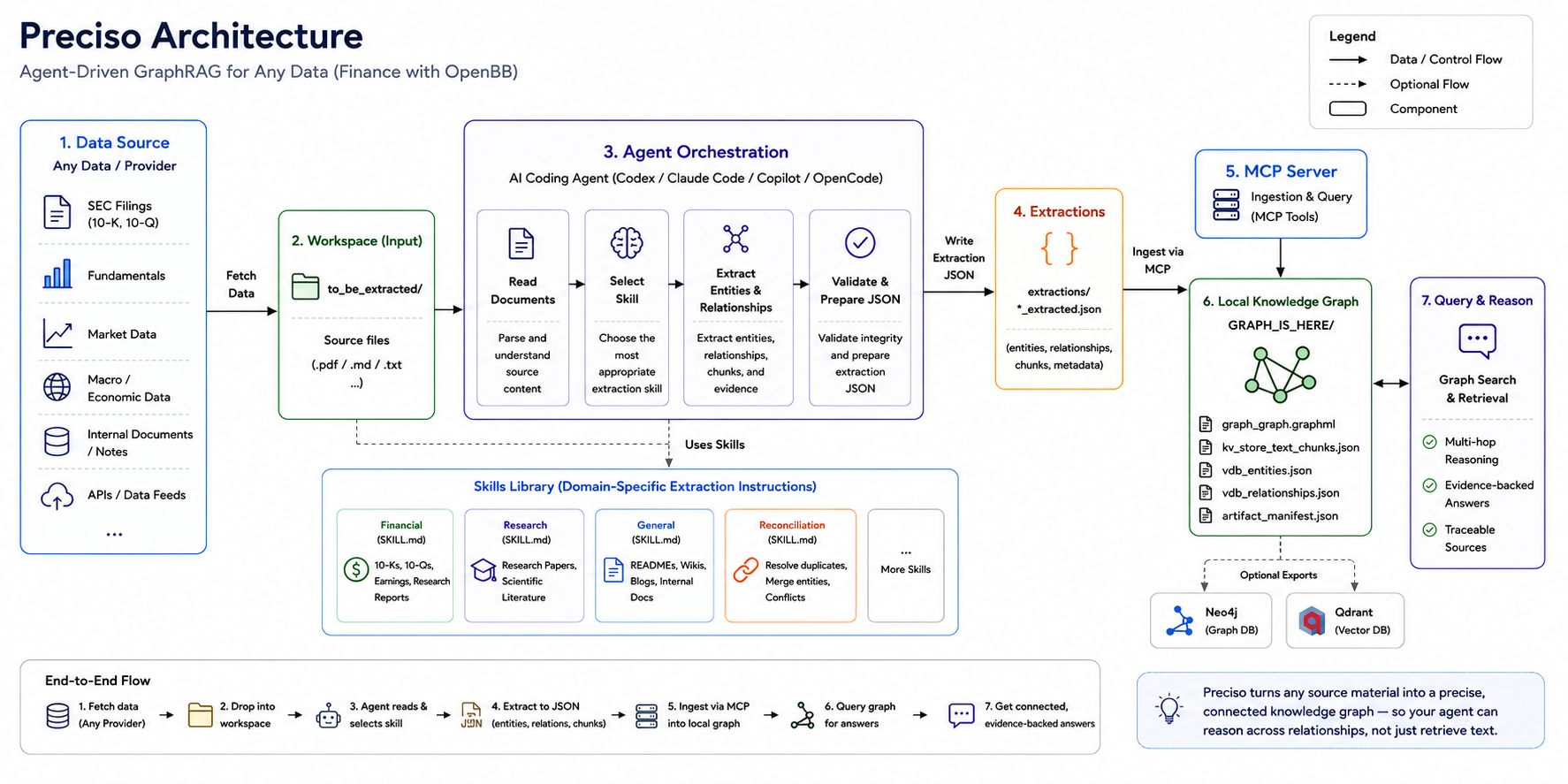
Six steps, always in this order:
| Step | Who | What happens |
|---|---|---|
| 1 | You | Drop source files into to_be_extracted/ |
| 2 | Agent | Reads the files |
| 3 | Agent | Selects the right skill from skills/ |
| 4 | Agent | Writes extractions/{source_name}_extracted.json |
| 5 | Agent | Calls the MCP ingestion tool |
| 6 | Preciso | Persists graph in GRAPH_IS_HERE/ — queryable immediately |
Folder Contract
to_be_extracted/    ← drop your source files here (.md, .txt)
skills/             ← agent reads these to know how to extract
extractions/        ← agent writes extraction JSON here
GRAPH_IS_HERE/      ← complete operational graph artifacts
docs/               ← guides and architecture reference
evals/              ← benchmark test cases and results
Skill Selection
| Skill | Path | Use When |
|---|---|---|
| Financial | skills/Financial-Graph-Extraction/SKILL.md |
10-Ks, 10-Qs, earnings calls, analyst reports |
| Research | skills/Research-paper-graph-extraction-skill/SKILL.md |
Research papers, scientific literature, academic corpora |
| General | skills/General-graph-extraction-skill/SKILL.md |
Codebases, READMEs, wikis, internal docs |
| Reconciliation | skills/Reconciliation-Subagent-Skill/SKILL.md |
Cleanup of existing extraction JSON only |
| Eval | evals/SKILL.md |
Evaluating a built graph — not for extraction |
MCP Tools
| Tool | Description |
|---|---|
get_server_status |
Runtime health check — call before anything |
ingest_from_file |
Add a new, reviewed extraction to the graph |
reingest_from_file |
Replay the identical extraction after an operational failure |
ingest_graph_tool |
Add a new, reviewed inline extraction payload |
ingest_with_reconciliation_tool |
Ingest after reconciliation subagents finish |
query_graph_tool |
Query the persisted graph |
list_pending_summaries |
Agent-handshake mode only: entities/relations deferred for you to summarize |
submit_summary |
Agent-handshake mode only: submit your summary for a pending entity/relation |
export_graph_to_neo4j |
Optional: push graph structure to Neo4j |
export_vectors_to_qdrant |
Optional: push vector artifacts to Qdrant |
Runtime Status
Always call get_server_status() first. It reports embedding mode, graph health, and LLM config before any work starts.
{
  "overall": "ready",
  "warnings": [],
  "embedding": {
    "mode": "local",
    "provider": "ollama",
    "model": "mxbai-embed-large",
    "dimension": 768,
    "status": "active"
  },
  "graph": {
    "storage": "networkx",
    "entities": 142,
    "relationships": 281,
    "documents_ingested": 1,
    "chunks": 96
  },
  "llm": {
    "configured": true,
    "status": "active"
  }
}
{
  "overall": "degraded",
  "warnings": [
    "Fallback embeddings active — graph creation works, vector search quality reduced."
  ],
  "embedding": { "mode": "fallback", "status": "degraded" },
  "llm": { "configured": false, "status": "inactive" }
}
Note: llm.configured: false is not itself a warning — description compression never
uses an LLM (it's always deferred to the agent via pending_summaries, see
docs/agent-summarization.md), and query-time answer synthesis just falls back to
raw retrieved context when no LLM is configured.
If overall is degraded, the agent explains what still works and asks before proceeding. It never silently continues.
What You Can Query After Ingestion
"What are Apple's top 5 disclosed risk factors?"
"Which executives are connected to the supply chain risks?"
"What metrics declined year over year?"
"How does the Services segment relate to overall revenue?"
The graph connects entities across document sections so your agent gets reasoned answers, not retrieved chunks.
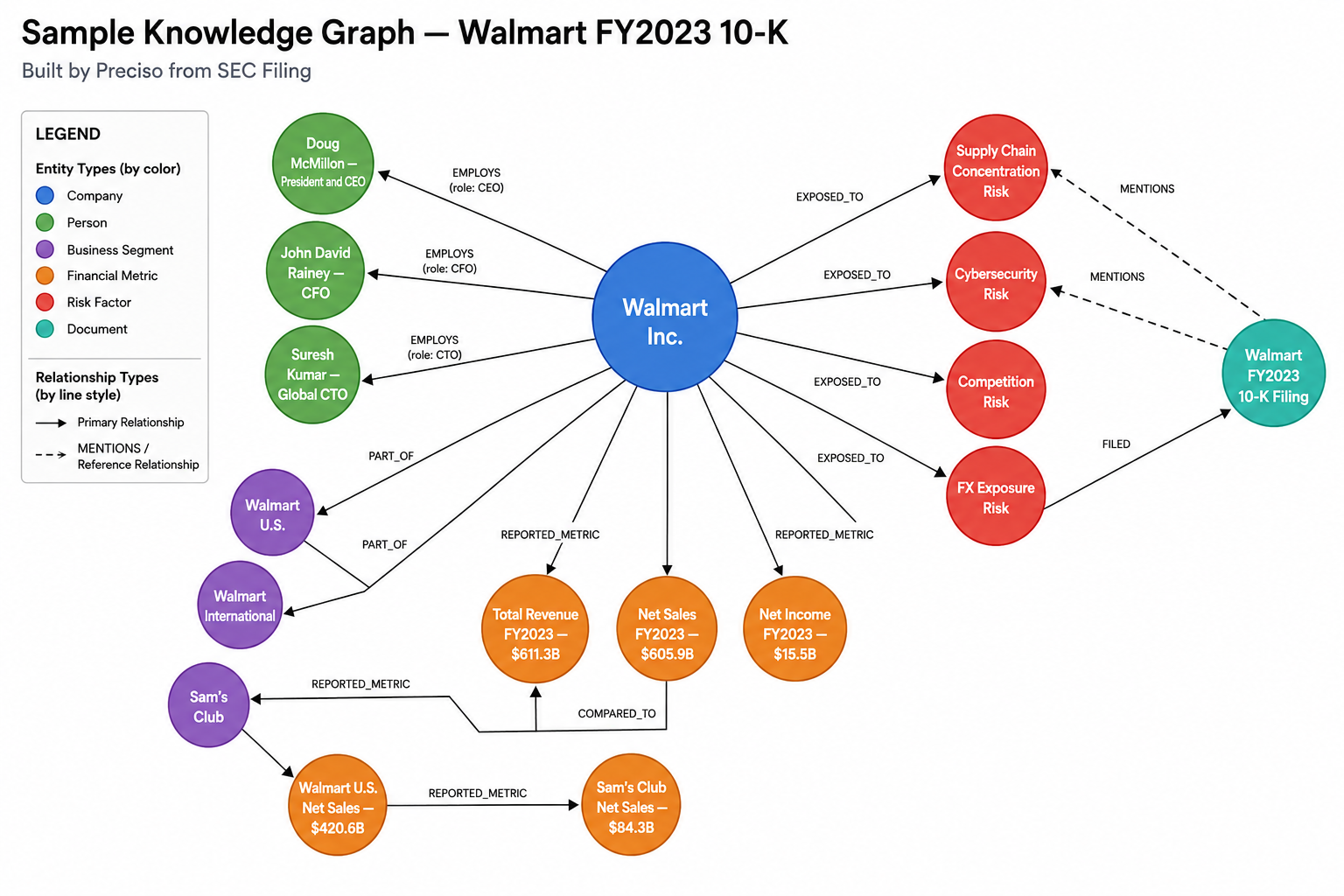
Graph Artifacts
After ingestion the graph persists in GRAPH_IS_HERE/ and is reusable across sessions:
GRAPH_IS_HERE/
├── graph_graph.graphml              ← most portable artifact
├── kv_store_text_chunks.json
├── kv_store_entity_chunks.json
├── kv_store_relation_chunks.json
├── kv_store_pending_summaries.json
├── kv_store_llm_cache.json
├── kv_store_checkpoints.json
├── vdb_entities.json
├── vdb_relationships.json
├── vdb_chunks.json
└── artifact_manifest.json
The most portable single artifact is graph_graph.graphml, but the complete operational graph includes every file in GRAPH_IS_HERE/, especially the vector and evidence stores. Copy the whole folder to move the graph to another machine.
GRAPH_IS_HERE/ is generated state, not a replacement for the source corpus. Retain the source documents and reviewed files in extractions/ so the graph can be rebuilt from the complete valid corpus when a correction is required.
Downstream Exports (Optional)
GRAPH_IS_HERE/ is always the operational source of truth. Neo4j and Qdrant are optional downstream copies — not storage backends.
Local graph (master) → optional → Neo4j copy
Local graph (master) → optional → Qdrant copy
Think of it like a Google Doc you export to PDF. The local graph is the operational original and the exports are snapshots for sharing. After additive ingestion or a full rebuild, downstream copies remain stale until you export again.
{
  "uri": "bolt://localhost:7687",
  "username": "neo4j",
  "password": "your-password",
  "database": "neo4j",
  "workspace": "default",
  "clear_existing": false
}
Required env vars: GRAPHRAG_NEO4J_URI, GRAPHRAG_NEO4J_USERNAME, GRAPHRAG_NEO4J_PASSWORD
{
  "url": "http://localhost:6333",
  "api_key": null,
  "collection_prefix": "preciso",
  "workspace": "default",
  "clear_existing": false
}
Required env vars: GRAPHRAG_QDRANT_URL, optionally GRAPHRAG_QDRANT_API_KEY
See docs/getting-started.md for full export setup including .env configuration.
MCP Setup
.mcp.json uses a repo-local launcher that finds the right Python automatically:
{
  "mcpServers": {
    "graphrag-mcp": {
      "type": "stdio",
      "command": "/bin/sh",
      "args": ["scripts/mcp_launcher.sh"],
      "cwd": ".",
      "tools": ["*"]
    }
  }
}
Manual Fallback
For users who want to drive ingestion and querying directly without an agent:
# Ingest an extraction file
python3 test/ingest_manual.py extractions/your_file_extracted.json

# Query the graph
python3 test/query_manual.py "What is Tim Cook's role?" mix

# Run reconciliation demo
python3 test/reconcile_manual.py
Docs
| Guide | What it covers |
|---|---|
| CONTEXT.md | Canonical document-lifecycle terminology |
| docs/getting-started.md | Full setup including embeddings and exports |
| docs/skills-guide.md | How to use and write extraction skills |
| docs/eval-guide.md | How to run evaluation and read results |
| docs/architecture.md | How the system works internally |
| docs/faq.md | Common problems and fixes |
Current Limitations
- Best input format is
.mdor.txt— PDF handling depends on external conversion or a native PDF-capable agent - Retrieval quality depends on embedding configuration
- Ingestion is additive; in-place document correction, replacement, and deletion are not supported
- Neo4j and Qdrant exports require those services running externally
- Single-user local workflow — no built-in multi-user or shared graph support yet
License
Licensed under the Apache License, Version 2.0. See LICENSE for full terms.
The extraction pipeline, skills system, MCP tooling, reconciliation layer, and evaluation framework are original work licensed under Apache 2.0.
No comments yet
Be the first to share your take.