
Praxia




🌐 Live: praxia.tools (primary, Cloudflare) · praxia-dev.github.io/praxia (mirror, GitHub Pages) · @praxia_dev on X
📺 Watch the 4-minute walkthrough · 🚀 Quickstart · 💬 Discussions
Install Praxia Desktop (Windows 10 / 11 x64)
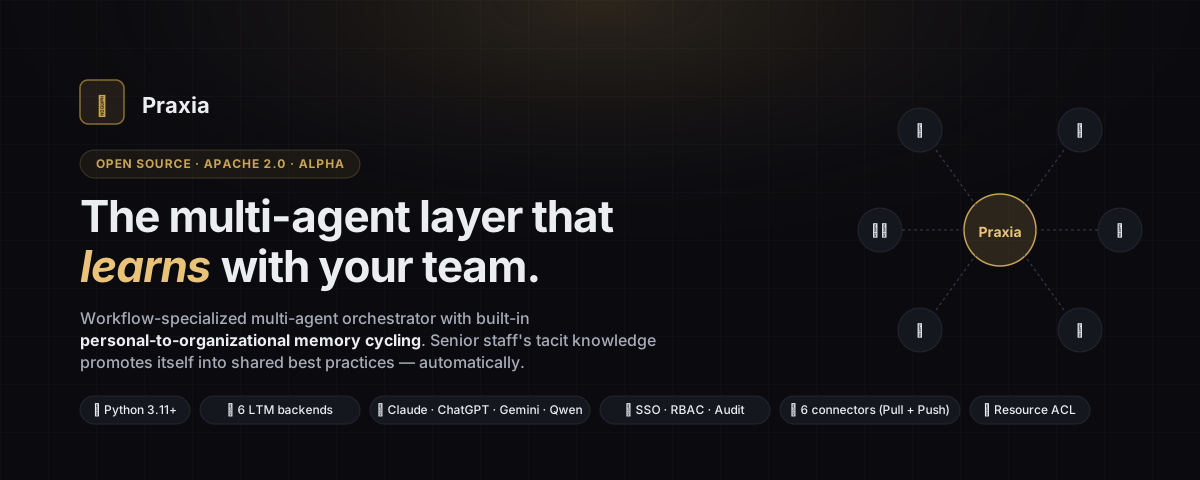
Specialized Multi-Agent Orchestrator with Cyclic Personal/Organizational Memory
A workflow-specific multi-agent orchestrator that automatically promotes individual tacit knowledge into organizational know-how. Built on a 5-layer memory stack with three independent promotion paths.







🔍 Complete feature reference: docs/FEATURES.md 📊 Concrete Before/After tables: docs/use-cases.md
⬇ Try Praxia in 30 seconds — no Python, no setup
👉 Get Praxia Desktop on the Microsoft Store
Windows 10 / 11 x64 · Tauri + embedded Python sidecar · zero
pip install, zero praxia serve. Paste an LLM API key (Anthropic /
OpenAI / Azure / Google / Qwen / HF / Ollama) and you're chatting.
Installed through the Store, so no SmartScreen warning and updates
land automatically.
macOS / Linux coming in Phase 1b.
🎯 Why Praxia?
General-purpose multi-agent frameworks (CrewAI, AutoGen, LangGraph, …) are powerful but stop short on these four problems:
| Problem with existing frameworks | Praxia's approach |
|---|---|
| Setup is complex; production deployment is hard | Workflow-specific templates (sales prep / logic check / RAG optimization) that run in 5 minutes |
| Senior-engineer "magic prompts" stay locked in one person's editor | Personal-to-org auto-promotion pipeline built in |
| "It works" doesn't prove "it works well" | Hallucination detection + retrieval evals shipped by default |
| Agents stagnate after launch | Sleep-time consolidation distills your past flows nightly |
Praxia turns "one expert's drawer" into "everyone's best practices."
👥 Who Praxia is for
| Persona | What they need | How Praxia fits | Typical year-1 result |
|---|---|---|---|
| 🏢 Information Systems / Platform team (300–5,000 employees) | Roll out AI tools without paywalled SSO/RBAC/audit, on-prem option | Auth + RBAC + ACL + per-user OAuth + audit log all in OSS, self-hostable | 100 KW × ~$1.25M net benefit, full audit trail |
| 🏗️ Engineering / Product VP (50–500 in scope) | Senior architect bottleneck; junior PM 12–18mo ramp | DesignSkill + sleep-time consolidation distills senior review patterns; Markdown+git frozen layer fits PR workflow | Senior load 16h/wk → 4h/wk; junior ramp 6–9mo |
| ⚖️ Legal / Compliance lead (regulated industry) | 50–100 contracts/mo bottleneck; need auditable AI workflow without lock-in | LegalSkill (RACE) + read-only memory mode + per-user OAuth + every action audited; Apache 2.0 source for auditors | 60–90min → 10–15min/contract; throughput 50–80/mo → 200–300/mo |
| 🧪 OSS / Research integrator | Build domain agent system without re-implementing auth, memory cycling, exporters | 7 plugin types (~50 LoC each); use as library, run praxia serve as backend, embed in LangGraph |
Day-30: domain skill + custom connector + memory cycling working — ~3 weeks ahead of from-scratch |
Detailed Before/After by industry: docs/use-cases.md.
💎 Why OSS matters here
The capabilities you typically pay enterprise tier for — already in the Apache 2.0 package:
- SSO + RBAC + audit are not paywalled. OIDC SSO (Google / Microsoft / Okta / GitHub / Keycloak) is in the OSS. Most agent frameworks ship without it; most agent platforms paywall it. Praxia treats it as table stakes.
- Memory format is not locked in. Layer 4 is plain Markdown in your git repo. Layer 3 exports to JSONL. Layer 1 is your chosen backend's native format. Leaving costs nothing.
- You can read every line. Apache 2.0. Show the source to your auditors, your security team, your customers.
- Multi-LTM ensembles, not single-vendor. Run Mem0 + Zep + HindSight in parallel, fuse with RRF, or route per query. No commercial agent platform exposes this — they pick a backend and lock you in.
- Per-user OAuth respects external ACL. When Alice pulls from Box, Box's own ACL applies — Alice only sees what Alice can see. Service-account designs (typical SaaS shortcut) leak data across users.
- Air-gapped operation.
PRAXIA_LOCAL_MODEL=gemma, Ollama,backend=json— no cloud LLM, no cloud vector DB, no telemetry. Same code as cloud customers. - Production-grade OAuth + KMS in OSS. Multi-worker safe state cache, 5 KMS adapters (AWS / Azure / GCP / Vault / local). Most agent platforms paywall this; Praxia ships it.
- A/B experiments + quality eval included. Test prompt variants on real users with deterministic assignment; catch LLM output quality regressions in CI.
🏗 Architecture — 5-Layer Memory Stack
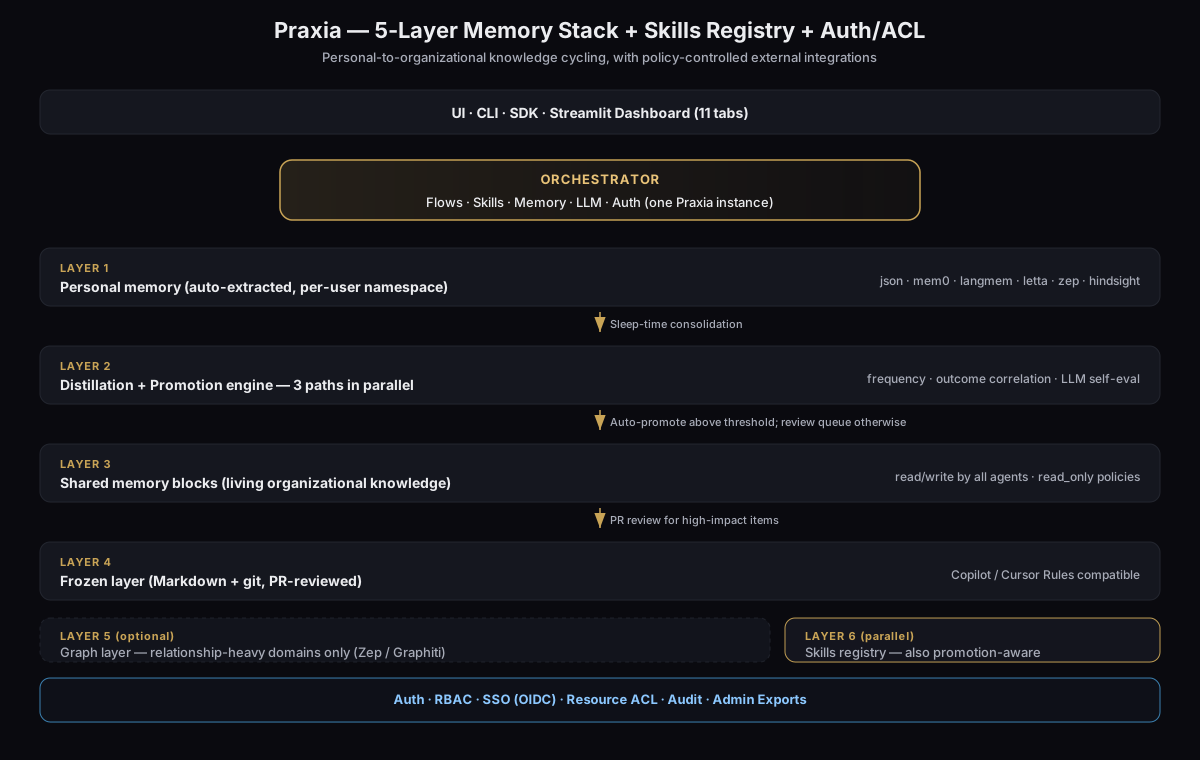
The same picture as ASCII art:
┌──────────────────────────────────────────────────────────┐
│  AI Agents (Skills + MCP)                                │
└──────────────┬───────────────────────────────────────────┘
               │ Users just have normal conversations
               ▼
╔═══════════════════════════════════════════════════════════╗
║ Layer 1: Personal memory (auto-extracted)                 ║
║   Mem0 / LangMem / HindSight / Letta / Zep / JSON         ║
║   namespace = user_id                                     ║
║   ★ Zero-effort tacit-knowledge capture                   ║
╚══════════════╤════════════════════════════════════════════╝
               │ Sleep-time Consolidation (nightly batch)
               ▼
╔═══════════════════════════════════════════════════════════╗
║ Layer 2: Distillation & promotion engine                  ║
║   Three parallel "validity tests":                        ║
║     ① Frequency  (recurring across N+ users)              ║
║     ② Outcome    (correlated with wins/losses)            ║
║     ③ Self-eval  (LLM scored)                             ║
╚══════════════╤════════════════════════════════════════════╝
               │ Auto-promote above threshold; queue otherwise
               ▼
╔═══════════════════════════════════════════════════════════╗
║ Layer 3: Shared memory (living organizational knowledge)  ║
║   Letta-style shared blocks; all agents read/write        ║
╚══════════════╤════════════════════════════════════════════╝
               │ PR review for high-impact items
               ▼
╔═══════════════════════════════════════════════════════════╗
║ Layer 4: Frozen layer (git-managed best practices)        ║
║   Markdown + git + PR review                              ║
║   GitHub Copilot / Cursor Rules-compatible format         ║
╚══════════════╤════════════════════════════════════════════╝
               │ (optional)
               ▼
╔═══════════════════════════════════════════════════════════╗
║ Layer 5: Graph layer (only relationship-heavy domains)    ║
║   Zep / Graphiti — decisions, customer 360, incident DAG  ║
╚═══════════════════════════════════════════════════════════╝

Parallel Layer 6: Skills registry
  Personal skills get promoted to the organizational catalog.
  MCP / Claude Skills / Cursor Skills compatible.
Three promotion paths (auto / statistical / manual) run side by side — never depending on a single mechanism.
For details, see docs/architecture.md.
✨ What's Bundled
Autonomous agent (LLM-driven tool-use loop)
praxia.agent.AutonomousAgent runs an LLM-driven tool-use loop over the
full Praxia stack — personal/org memory, skills, frozen layer, connectors —
with ACL checks and audit logging built in. The LLM picks tools on its own
until it has the information it needs, mirroring how modern code-editing assistants drives its
own tool use.
from praxia.agent import AutonomousAgent
from praxia.core.llm import LLM

agent = AutonomousAgent(user_id="alice", org_id="acme", llm=LLM("claude"))
result = agent.run("Tell me what we know about Acme and draft a proposal.")
print(result.final_text)
praxia agent run "Summarize where we stand with Acme this quarter and draft a proposal"
praxia agent tools     # list the 15 built-in tools
The agent is also exposed as a single MCP meta-tool (autonomous_agent) so
remote clients (Claude Desktop, Cursor) can delegate an entire investigation
without orchestrating individual tools by hand. See
FEATURES § 38.
CommandedAgent — autonomous agent with external verification
AutonomousAgent is a free-running tool-use loop — perfect when the
environment is the answer key (tests pass / fail, commands exit 0 /
non-zero). For workloads where the environment doesn't give you that
free check — private-corpus fact QA, SOP / compliance, customer
support over manuals, technical-knowledge transfer — CommandedAgent
wraps it with three guards: pre-retrieval + grounding verification +
bounded retry, with an explicit abstain path when the sources
don't support a confident answer.
Calibrated against an in-house multi-hop RAG harness
(HotpotQA / SQuAD v2 / JEMHopQA) — see
docs/VERIFICATION_FINDINGS.md — and
the resulting defaults:
- Task-type router —
default_task_classifiersends coding / command / tool prompts straight through (the environment is the verifier for those), and routes knowledge-QA through the grounding gate. Bilingual (EN/JA) keyword classifier; pluggable. - Query decomposition — wire a
QueryDecomposerinto the retriever and multi-hop questions are split into sub-questions, retrieved per hop, and unioned (deduped). +12pt on HotpotQA-distractor 40q in the source benchmark; single-hop queries pass through unchanged. - No-improvement early stop — a redraft that fails to lift
groundedness by
min_groundedness_improvement(default 0.05) aborts to abstain instead of burning the whole round budget on a loop that isn't making progress. - Promotion engine hardened —
PromotionEngineblends0.5·freq + 0.4·outcome + 0.1·self_evaland alpha26+ adds two hard pre-condition gates that short-circuit the score blend: (1) an optional externalverifier(text, verdict) → (passed, reason)callback —passed=Falseforcesdecision="skip"no matter how high the blend scored, closing the self-eval reward- hacking path identified in the L0–L3 verification bench; (2)min_independent_sources=2— single-source candidates cap at"review"and never auto-promote, blocking the contamination-from-one-user path.require_verification=Truefails closed when no verifier is wired in.
from praxia.agent import AutonomousAgent, CommandedAgent
from praxia.agent.decomposer import LLMQueryDecomposer
from praxia.agent.commander import DefaultMemoryRetriever
from praxia.core.llm import LLM

llm = LLM("claude")
inner = AutonomousAgent(user_id="alice", org_id="acme", llm=llm)
retriever = DefaultMemoryRetriever(
    personal=inner.memory,                  # L1
    decomposer=LLMQueryDecomposer(llm=llm), # K2: multi-hop split
)
agent = CommandedAgent(inner, retriever=retriever, max_verify_rounds=3)

result = agent.run(
    "How do we handle Customer X's stamping-press alarm code E-204?"
)
# result.answer carries [L1#0, L3#2, ...] citations
# result.verdict.decision ∈ {"accept", "redraft", "abstain"}
# result.stopped_reason ∈ {"accept", "abstain", "no_improvement",
#                          "max_rounds", "bypass_action"}
# result.task_kind         ∈ {"knowledge", "action"}
# result.rounds            is the per-round draft + verdict trace
Pluggable everything: Verifier / Retriever / QueryDecomposer /
TaskClassifier are all protocols or callables, so you can drop in
TiDB Vector / pgvector / hybrid BM25+ANN / GraphRAG or your own
grounding scorer / decomposer without touching core. See
FEATURES § 38b
and docs/COMMANDED_AGENT.md.
3 Specialized Multi-Agent Flows
| Flow | What it does |
|---|---|
| SalesAgentFlow | Reads customer IR, past minutes, RAG context → generates hypotheses → FAQ → proposal outline |
| LogicCheckerFlow | Three agents (structure / contradiction / reader) review long documents for logical consistency |
| RAGOptimizationFlow | Self-correcting RAG: query expansion → retrieval → relevance eval → hallucination check loop |
6 Default Business-Domain Skills
| Skill | Domain | Use cases |
|---|---|---|
| InvestmentSkill | Investment | Equity research, due diligence, portfolio decisions |
| SalesSkill | Sales | Account research, proposal drafting, FAQ prep |
| DesignSkill | Engineering Design | System design review, requirements engineering |
| PurchasingSkill | Procurement | Supplier evaluation, RFQ analysis, TCO, BCP risk |
| PatentSkill | IP / Patent | Prior-art search, claims drafting, patent maps |
| LegalSkill | Legal | Contract review, compliance, M&A diligence |
Each skill serializes to Claude-Skills / MCP-compatible SKILL.md.
Plus four utility skills:
| Skill | What it does |
|---|---|
PromptDesignerSkill |
Take a one-line task description → produce a production-grade prompt template (system + user + 2-3 few-shot examples + 5-criterion rubric) tuned for the target LLM (Claude / OpenAI / DeepSeek / Mistral / Llama / …). Save to PromptStore, A/B-test via praxia.experiments. |
OutputFormatSkill |
Detect "export as PowerPoint" / "as Word doc" / etc. in natural language (English + JA / ZH / KO / ES / FR / DE / PT-BR phrases also recognized) and dispatch to the matching exporter (PPTX / DOCX / HTML / MD / JSON). |
PptxDesignerSkill |
Code-gen path (Claude-Skills-style): the LLM authors python-pptx code that runs in a sandbox to produce a design-rich .pptx — multi-column layouts, matrix slides, embedded charts, themed branding. Themes (colors / fonts / logo / footer) live under .praxia/themes/<name>/ and are managed in Admin → 🎨 Themes. |
DocxDesignerSkill |
Same approach for Word documents — LLM-authored python-docx code, sandbox execution, themed .docx output (heading hierarchy, page footer, tables, callouts, embedded charts). |
# Generate a prompt template for any task
praxia skill run prompt_designer "Have in-house legal score contract risk on a 5-point scale"

# Generate a design-rich slide deck via code-gen
praxia skill run pptx_designer "Q4 sales review for Acme — cover, exec summary, top 3 customers, 2x2 challenges matrix, next actions. 10 slides."
All Major LLMs
LiteLLM-powered single-line provider switching:
| Provider | Aliases (current default) | Auth env var(s) |
|---|---|---|
| Anthropic Claude | claude (Opus 4.7) · claude-sonnet (4.6) · claude-haiku (4.5) |
ANTHROPIC_API_KEY |
| OpenAI ChatGPT | chatgpt (GPT-5.5) · gpt-5.5 · gpt-5.4 · gpt-5 · o4-mini · o3 · gpt-4o |
OPENAI_API_KEY |
| Azure OpenAI Service | azure/<deployment-name> |
AZURE_API_KEY + AZURE_API_BASE + AZURE_API_VERSION (auto-mirrored to AZURE_OPENAI_*) |
| Azure AI Foundry (Inference) | azure_ai/<model-name> |
AZURE_AI_API_KEY + AZURE_AI_API_BASE |
| AWS Bedrock | bedrock/anthropic.claude-opus-4-7-v1:0 etc. |
AWS_ACCESS_KEY_ID + AWS_SECRET_ACCESS_KEY + AWS_REGION |
| Google Vertex AI | vertex_ai/gemini-3.1-pro · vertex_ai/claude-opus-4-7 |
VERTEX_PROJECT + VERTEX_LOCATION + GOOGLE_APPLICATION_CREDENTIALS |
| Google Gemini (public API) | gemini (3.1 Pro) · gemini-flash-lite (3.1) · gemini-2.5-pro |
GEMINI_API_KEY |
| Google Gemma (open) | gemma / gemma-2b / gemma-9b / gemma-27b (Ollama) · gemma-cloud (Vertex AI) |
(none for local) / Vertex auth |
| Alibaba Qwen (cloud) | qwen / qwen-72b |
DASHSCOPE_API_KEY |
| DeepSeek | deepseek (V4) · deepseek-v4-pro · deepseek-v3.2 · deepseek-reasoner (V3.2 Speciale) |
DEEPSEEK_API_KEY |
| Mistral | mistral (Large 3) · mistral-medium-3.5 · mistral-small-4 · magistral (reasoning) · codestral (25.08) · devstral (agentic code) |
MISTRAL_API_KEY |
| xAI Grok | grok (Grok 4.1) · grok-4.1-fast · grok-4-heavy · grok-code (code-tuned) |
XAI_API_KEY |
| Llama (Groq fast) | llama (3.3 70B Versatile via Groq) |
GROQ_API_KEY |
| Cohere | command-r (Command R+) |
COHERE_API_KEY |
| Perplexity Sonar | perplexity (Sonar Pro, web search) · perplexity-cheap · perplexity-reasoning |
PERPLEXITY_API_KEY |
| Microsoft Phi (local) | phi (3.5 3.8B Ollama) |
(none — runs in-house) |
| Qwen / Llama / Phi (local) | qwen-local · llama-local · phi (Ollama) |
(none — runs in-house) |
LLM("claude")          # Anthropic Claude Opus 4.7
LLM("chatgpt")         # OpenAI GPT-5.5
LLM("gemini")          # Gemini 3.1 Pro
LLM("grok")            # xAI Grok 4.1
LLM("deepseek")        # DeepSeek V4 — strong + low cost
LLM("mistral")         # Mistral Large 3 — EU-friendly
LLM("perplexity")      # Sonar Pro — web-search-augmented
LLM("azure/gpt-5.5")   # Azure OpenAI deployment named "gpt-5.5"
LLM("bedrock/anthropic.claude-opus-4-7-v1:0")  # Claude on AWS Bedrock
LLM("vertex_ai/gemini-3.1-pro")                # Gemini on Vertex
LLM("openai/gpt-5.5")  # Any LiteLLM-compatible model string
The Admin → Settings UI groups all these as provider sub-categories (LLM · OpenAI, LLM · Azure OpenAI, etc.), with required-key indicators and per-key delete. The provider picker has a Custom deployment / model name… entry per-provider so deployment-named Azure/Bedrock/Vertex models work without leaving the Provider context. litellm.drop_params + modify_params are enabled at import time so per-model quirks (GPT-5 rejects temperature, requires max_completion_tokens instead of max_tokens, etc.) are bridged transparently.
File parsing — PDF · Office · CSV · TXT · HTML · MD · code · vision-enriched
alpha20+: PDF / DOCX / PPTX parsers also surface embedded / rendered images so the vision LLM can read charts, diagrams, screenshots, and other figures inside the documents — not just the surrounding text. PDF pages get rasterized to JPEG at 100 DPI; DOCX / PPTX have their embedded media extracted from the ZIP's
word/media/andppt/media/folders. The Desktop chat composer accepts these formats inline too: drop a PDF, ask "what does the chart on page 3 say?", and Praxia routes the page image to the vision LLM automatically.
What's new in alpha22–27
alpha22 — Documents semantic search. Every chunk uploaded to a Documents folder is embedded via litellm (auto-detected from your provider env vars: OpenAI →
text-embedding-3-small, Ollama →nomic-embed-text, Azure / Gemini / DashScope / HuggingFace also covered). Cosine-similarity ranking replaces keyword scoring, so a JA query like "アクションアイテム" finds EN chunks about action items. Pre-alpha22 docs back-fill silently on first boot after upgrade.alpha22 — Batch fan-out via natural language. Say "Documents の各 PDF からアクションアイテムを抽出して" / "for each PDF in folder X, summarise" and the agent classifier routes to a
batchtask kind that lists files, fans out one prompt per file viarun_parallel_tasks, and surfaces composite progress in the Batches tab.alpha22 — OSS license disclosure. Settings → "Open-source notices" shows the full text of every third-party license shipped in the desktop installer (562 packages: 71 Python · 469 Rust · 22 npm). The full text is bundled with the installer for compliance with MIT / BSD / Apache 2.0 / MPL.
alpha23 — Auth propagation across worker tasks. Batches and Schedules now carry the parent agent's LLM (model + scout + workspace + org) into every child TaskRecord. Previously fan-outs from non-Anthropic users crashed with
Missing ANTHROPIC_API_KEYbecause the worker fell back tomodel="claude".alpha25 —
web_searchagent tool. Tavily + Brave Search backends. The agent uses this for current events / today's prices / breaking news / recent regulatory changes — anything not in the user's Documents or memory layers. Tavily wins when both keys are set (returns a one-paragraph synthesised answer). No key configured → tool returns a structured error and the LLM relays it. Only the query string leaves the machine — Documents and memory content stay local.alpha26 — Promotion gate + bitemporal SharedMemory.
PromotionEnginenow takes averifiercallback that short-circuits the score blend to"skip"onpassed=False, plusmin_independent_sources=2(single-source candidates cap at "review" instead of auto-promoting).SharedBlockis bitemporal- lite:upsert()supersedes the old block (valid_to=now,superseded_by=<id>) rather than overwriting;as_of(timestamp)queries past snapshots.search()tie-breaks ties by verification_score → source_breadth → recency. Built from the L0–L3 verification findings — see release notes for details.alpha27 — LLM-driven query expansion (Anthropic fallback). When no embedding provider is configured (most common: Anthropic- only, since Claude has no embedding API), Documents search no longer falls back to pure literal keyword matching. The active LLM rewrites the query into 3–5 alternative phrasings (synonyms, cross-language equivalents, paraphrases) and each chunk is scored against the max-scoring variant. Results cached LRU per
(model, query). Anthropic-only users now get usable cross-language Documents search without a second provider key — at the cost of one small extra LLM round-trip per distinct query.
Auto-dispatched by extension:
| Extension | Parser | Optional dep |
|---|---|---|
.txt .md .rst .py .ts .js |
TextParser | (none) |
.csv .tsv |
CsvParser | (stdlib) |
.json .yaml .yml |
StructuredParser | (core) |
.html .xml |
HtmlParser | (stdlib) |
.pdf |
PdfParser | praxia[office] |
.docx |
DocxParser | praxia[office] |
.pptx |
PptxParser | praxia[office] |
.xlsx .xlsm |
XlsxParser | praxia[office] |
from praxia.io.parsers import parse_file

doc = parse_file("contract.pdf")          # works
doc = parse_file("Q3_results.xlsx")       # also works
print(doc.content)
Third-party formats register via [project.entry-points."praxia.parsers"] — no fork required.
Output exporters — render skill output to HTML / PPTX / DOCX / MD / JSON
Skills produce Markdown by default. Convert to whatever the user requested:
from praxia.io.exporters import export_as
result = export_as(md_text, format="pptx", title="Q3 Review")
# result.bytes → write to disk, stream over HTTP, push via a connector
OutputFormatSkill infers the format from natural-language hints across multiple languages:
from praxia.skills.output_format import OutputFormatSkill
fs = OutputFormatSkill()
fs.detect("export as PowerPoint").format      # → "pptx"
fs.detect("as a Word document").format        # → "docx"
fs.deliver(md, user_request="HTML please")    # ExporterResult with .bytes
CLI shortcut:
praxia export report.md report.html
praxia export report.md slides.pptx --title "Q3 Review"
Custom formats register via the praxia.exporters entry-point — same pattern as connectors.
Memory mode — accumulate or read-only, per user
Some sessions shouldn't leave a trail (legal review, sensitive data exploration). Toggle per-user:
praxia memory mode --user-id alice read_only      # writes silently dropped
praxia memory mode --user-id alice accumulate     # back on
praxia memory show --user-id alice                # see the resolved config + reason
Admins can lock the mode for the whole tenant or for specific roles:
praxia admin memory-policy-set --default-mode read_only --mode-locked
praxia admin memory-policy-set --enforced-backend mem0 --allowed mem0,zep
praxia admin memory-policy-set --accumulate-locked-roles operator,admin
Resolution order: admin enforced > call-site argument > user pref > admin default. See praxia.memory.policy.
Multi-LTM fusion + dynamic routing (accuracy boost)
Each LTM has different strengths — entity linking (Mem0), temporal KG (Zep), audit trail (JSON), vector recall (HindSight). You can run several at once and either fuse the results or pick per-query:
from praxia.memory.composite import CompositeBackend, WeightedBackend
from praxia.memory.router import RoutedBackend, RuleRouter

# A. Parallel fan-out + Reciprocal Rank Fusion
composite = CompositeBackend(
    backends=[WeightedBackend("mem0", ..., weight=1.5),
              WeightedBackend("zep", ..., weight=1.0),
              WeightedBackend("hindsight", ..., weight=1.0)],
    fusion="rrf",
)

# B. Query-aware dispatch (RuleRouter handles English + Japanese keywords)
routed = RoutedBackend(
    backends={"mem0": ..., "zep": ..., "hindsight": ..., "json": ...},
    router=RuleRouter(),
    write_to="mem0",
)
Full design + tradeoffs: docs/FEATURES.md § 5.1.
Voice input / output
from praxia.io.audio import STT, TTS

text = STT().transcribe(audio_bytes, filename="meeting.wav", language="ja")
audio = TTS().synthesize("Hello world", voice="alloy", format="mp3")
Both Streamlit UI tabs (Run Flow, Skill) include 🎙 Audio input and 🔊 Read response aloud toggles. Providers: OpenAI Whisper / TTS (default), ElevenLabs (premium voices), local Whisper / Piper (praxia[audio-local]).
6 Pluggable LTM Backends
| Backend | Notes |
|---|---|
| json (default) | Zero-dependency, JSONL on disk, fully auditable |
| mem0 | Entity linking + hybrid search (recommended for production) |
| langmem | LangChain LangMem SDK |
| letta | Letta shared blocks (with read-only policy support) |
| zep | Zep / Graphiti for temporal KGs (Layer 5) |
| hindsight | vectorize-io/hindsight — agent memory store |
Switch with one line:
PersonalMemory(user_id="alice", backend="mem0")
Built-in Authentication, RBAC, SSO & Resource Policies
- API-key + JWT auth (
praxia.auth) with 4 default roles (admin/operator/member/viewer) - SSO via OIDC: Google, Microsoft Entra ID, Okta, GitHub, Keycloak, custom OIDC, plus SAML skeleton
- Resource access policies (ACL) — glob-pattern allow/deny rules per resource (built for enterprise IS departments)
- Append-only audit log — every authn / authz / policy decision / privileged action recorded
- Admin data exports — CSV / JSON / JSONL dumps of audit, users, usage, memory, policies, shared blocks (chain-of-custody preserved)
Admin User Management
- Create / read / update / delete users
- Activate / deactivate, role grants, API-key rotation
- All actions audited
- Available via CLI, Streamlit UI, and SDK
Custom Prompts (per-user + admin-distributed)
- Users save personal prompts; admins promote them to org or distribute to specific users / roles
- Three scopes (personal / org / distributed) with merge precedence
- Same model as the skill registry
Per-user OAuth for connectors
Each Praxia user can authorize external systems with their own credentials — the external system's native ACL is enforced per-user.
# Set the OAuth app credentials once
export PRAXIA_OAUTH_BOX_CLIENT_ID=...
export PRAXIA_OAUTH_BOX_CLIENT_SECRET=...

# Each user authorizes individually (CLI loopback)
praxia oauth start box --user-id alice
# → opens authorization URL → user logs in → redirect captures code
# → token saved encrypted to .praxia/auth/oauth_tokens.jsonl

# From now on, alice's connector calls use her token
praxia connector pull box 0 --user-id alice
# alice can only see Box folders alice has access to
Supported providers (13): Box, Microsoft (SharePoint/OneDrive/Teams), Dropbox, Google Drive, Salesforce, Notion, Atlassian (Confluence+Jira), Slack, GitHub, HubSpot, Zendesk, Linear, kintone. Tokens auto-refresh; access logged in audit log.
End-user UI: each user manages their own connections under 個人設定 → 外部サービス連携 (Preferences → Service Connections) in the Streamlit UI — one row per provider with status (Connected / Not connected / Expired), Connect button (opens IdP login) and Disconnect button (revokes + clears local token).
Production HTTP callback (praxia serve): four endpoints under /api/v1/oauth/{provider}/: start, callback, status, revoke (DELETE). State cache is multi-worker-safe (PersistentStateStore — TTL-pruned JSON), so the IdP redirect can land on any FastAPI worker. Set PRAXIA_PUBLIC_URL to pin the redirect URI.
KMS-backed token encryption (production)
OAuth tokens use envelope encryption: a fresh 256-bit data key per write, AES-GCM payload encryption, and the data key wrapped by a configurable KmsAdapter. The master key never lives on the application host:
| Adapter | Install | Use |
|---|---|---|
local (default) |
(none) | dev / single-host |
aws |
pip install 'praxia[kms-aws]' |
AWS KMS CMK |
azure |
pip install 'praxia[kms-azure]' |
Azure Key Vault Keys |
gcp |
pip install 'praxia[kms-gcp]' |
GCP Cloud KMS |
vault |
pip install 'praxia[kms-vault]' |
HashiCorp Vault Transit |
export PRAXIA_KMS_ADAPTER=aws
export PRAXIA_KMS_KEY_ID=arn:aws:kms:us-east-1:111122223333:key/...
Legacy v0.1 tokens decode transparently — re-saving rewrites in the new envelope format.
A/B experiments — prompts / skills / LLMs
Test variants of any payload (system prompt, LLM provider, memory backend) with deterministic per-user assignment + outcome tracking:
praxia experiment create proposal_v2 \
    --name "Proposal: shorter vs longer prompt" \
    --variants '{"control":{"prompt":"<800-word>"},"candidate":{"prompt":"<400-word>"}}' \
    --traffic-split "control=0.5,candidate=0.5"
praxia experiment start proposal_v2
# ...users run flows; outcomes recorded automatically...
praxia experiment results proposal_v2
# → 🏆 Tentative winner: candidate (confidence 0.41)
Same user always sees the same variant during the experiment (SHA-256 bucket). Audience filter (roles / users / time window). See praxia.experiments.
LLM output quality evaluation
Separate from the deterministic regression suite — tests/llm_eval/ runs real LLM calls and grades output against rubrics + a committed baseline. CI flags PRs where quality drops > 5 points:
# Skipped by default (requires API keys + costs tokens)
pytest tests/llm_eval -m llm_eval -v

# Update baselines after a known-good change
pytest tests/llm_eval --update-baselines

# Compare providers on the same cases
pytest tests/llm_eval --llm-eval-model gpt-4o
Built-in rubrics: keyword match, structure (heading) match, length band, must-not-contain, LLM-as-judge. One canonical case per business skill ships out of the box.
External Connectors — 20 systems, Pull + Push
Storage / Files (8)
| Connector | Pull | Push | Auth |
|---|---|---|---|
| Box | ✅ folder → files | ✅ upload | OAuth2 / JWT |
| SharePoint / M365 | ✅ | ✅ | Microsoft Entra |
| Dropbox | ✅ | ✅ | OAuth2 |
| Google Drive | ✅ | ✅ | OAuth / SA |
| AWS S3 | ✅ bucket/prefix | ✅ object upload | IAM (boto3 chain) |
| Azure Blob Storage | ✅ | ✅ | DefaultAzureCredential / connstr / SAS |
| GCS | ✅ | ✅ | ADC / service account |
| WebDAV / Nextcloud | ✅ | ✅ | HTTP Basic |
Knowledge / Docs (3)
| Connector | Pull | Push | Auth |
|---|---|---|---|
| Notion | ✅ database query | ✅ child page | OAuth (Notion) |
| Confluence | ✅ CQL search | ✅ child page | OAuth (Atlassian) |
| Jira | ✅ JQL search | ✅ create issue | OAuth (Atlassian) |
Communication (3)
| Connector | Pull | Push | Auth |
|---|---|---|---|
| Slack | ✅ history / search | ✅ post message | OAuth (Slack) |
| Microsoft Teams | ✅ channel messages | ✅ post message | OAuth (Microsoft) |
| Email (IMAP / Gmail / Outlook) | ✅ folder + query | ✅ send | IMAP/SMTP / Google / Microsoft OAuth |
CRM / Tickets / Engineering (5)
| Connector | Pull | Push | Auth |
|---|---|---|---|
| kintone | ✅ | ✅ | OAuth / API token |
| Salesforce | ✅ SOQL | ✅ sObject create | OAuth |
| HubSpot CRM | ✅ contacts/companies/deals | ✅ note attach | OAuth |
| Zendesk | ✅ ticket search | ✅ create ticket | OAuth or API token |
| GitHub | ✅ issues/code/files | ✅ issue / comment | OAuth (GitHub) |
| Linear | ✅ issues by team | ✅ create issue | OAuth or API key |
Pull data into agent flows; push agent outputs back to your system of record. All access subject to admin policies. Per-user OAuth means alice only sees what alice has access to in each system.
Dashboards
- Personal: 3 headline KPIs (total runs · success rate · memory entries) + Top skills horizontal bar chart
- Organizational: 3 headline KPIs (active users · org runs · success rate) + Top users / Top skills side-by-side bar charts
- Charts use plotly with the Praxia gold palette; tabular fallback if plotly isn't installed
🖼 UI Tour
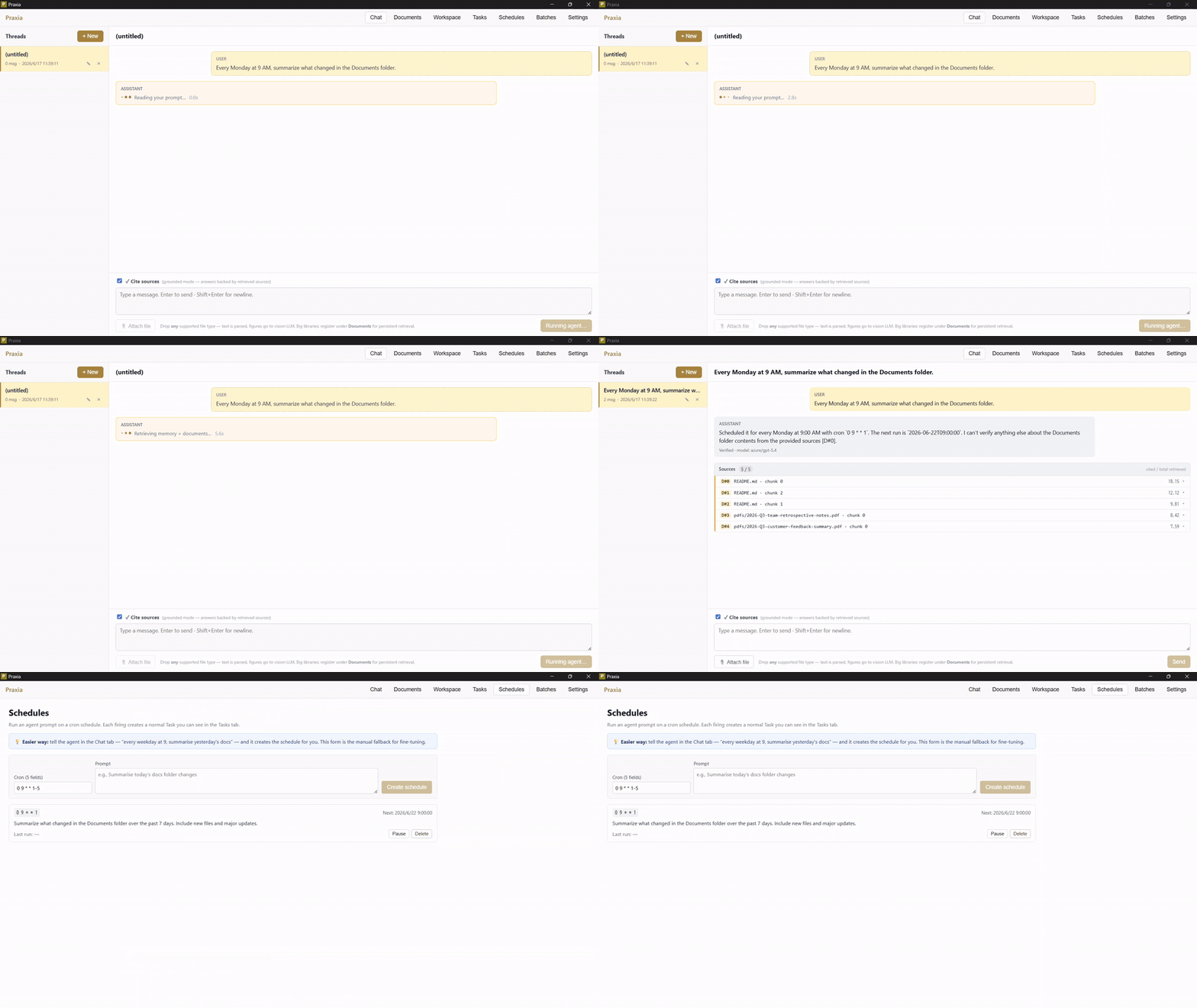
The bundled Streamlit UI puts the non-power-user surface area of Praxia on a clean 3-zone layout: a sticky top-bar navigation, a sidebar dedicated to data context, and a workspace per view.
┌──────────────────────────────────────────────────────────────────────┐
│  [🎬 Run] [📝 Prompts] [📁 Data] [🧠 Knowledge] [📊 Dashboard]        │ ← fixed top bar
│                  [👤 Preferences] [⚙ Admin]*                         │   (* admin role only)
├────────────────────────┬─────────────────────────────────────────────┤
│  🪡 Praxia              │                                             │
│  👤 alice · admin       │                                             │
│  [Sign out]             │   Selected view's workspace                 │
│  ───────────────        │                                             │
│  📁 Context             │   (Run = Agent chat or Skill form,          │
│  ☑ Personal memory      │    Prompts = designer + library,            │
│  ☑ Org memory           │    Data = folder CRUD + sharing,            │
│  ☐ Frozen layer         │    Knowledge = memories + skill registry,   │
│  📁 Q3 Sales (12)       │    Dashboard = KPIs + charts,               │
│  🔌 Box: /Customers     │    Preferences = language/theme,            │
│                         │    Admin = settings/users/policies/...)     │
├────────────────────────┴─────────────────────────────────────────────┤
│  [Type a message...                                       📎 📤]      │ ← chat input fixed bottom
└──────────────────────────────────────────────────────────────────────┘
Login:
- API key path — User ID + Password (= API key from
praxia user create) for role-gated multi-user. - SSO path — when
PRAXIA_SSO_PROVIDERis set (Google / Microsoft Entra / Okta / GitHub / Keycloak / generic OIDC), a primary "Sign in with <provider>" button is rendered above the API-key form; click → IdP redirect → callback restores session. - Cookie-based persistent login (30-min sliding TTL, server-side session record at
.praxia/sessions/<token>.json) survives browser reloads — F5 doesn't kick the user back to the login form.
Run is the high-frequency view with two sub-tabs:
- 🤖 Agent — chat backed by
AutonomousAgent. Type a goal; the LLM picks tools (search, connectors, skills) and iterates. Vision attachments via the 📎 button (PNG/JPG/GIF/WebP) when the model supports it. Persistent threads: every conversation saved at.praxia/chats/<user>/<id>.json; resume / rename / delete from the💬 Conversationspopover. Selected Context folders are passed in as reference data, with grep-relevance filtering on large folders. Layout is ChatGPT-style — top nav fixed top, chat input fixed bottom. - 🛠 Skill — pick a domain skill (investment / sales / design / purchasing / patent / legal), fill the input, click Run. Single-call, single-answer.
Prompts has the PromptDesigner (1-line task → polished prompt) and a per-user prompt library with admin-distributed bundles.
Data folders are how you create/manage local-upload folders or register external paths (Box / SharePoint / Notion / etc.). Folders can be shared read-only with other users (multiselect from Admin → Users — owner can upload + delete + reshare; sharees can only read). Image uploads (PNG/JPG/GIF/WebP) become first-class scope content via the built-in ImageParser and feed vision-capable agents.
Knowledge shows browseable personal + shared memory, plus the skill registry (your skills + org-promoted ones).
Dashboard shows 3 headline KPIs (runs / success-rate / memory entries) and Plotly bar charts of top skills + top users.
Admin (admin rol
No comments yet
Be the first to share your take.