
⚓ PortPilot
Localhost Port Manager for Windows & Linux
One dashboard for every local dev server across all your projects - including several git branches of the same repo running at once, nested and colour-coded.
Local-first. No accounts, no telemetry, no cloud. It runs entirely on your machine.





View Landing Page & Download · MCP Integration Setup
📑 Table of Contents
- ✨ AI Agent Integration
- What's New in v3.3.0
- What's New in v3.2.0
- What's New in v3.1.0
- What's New in v3.0.0
- What's New in v2.0.0
- What's New in v1.7.0
- Features
- Auto Detection
- Screenshots
- Installation
- Usage
- App Badges
- Themes
- Keyboard Shortcuts
- Testing
- MCP Integration
- Tech Stack
- Version History
- Contributing
✨ NEW: AI Agent Integration
Control PortPilot with natural language! Works with Claude Code, Cursor, Windsurf, and any MCP-compatible AI assistant.
"Start the azure-practice-exam-platform app"
"What's running on port 3001?"
"Kill whatever is running on port 3000"
What's New in v3.3.0
Port Intelligence - PortPilot now manages ports, not just watches them
Registering an app never used to reserve its port, and a running server only told you the port was open, not whether it worked. v3.3.0 closes those gaps.
- Port reservation - opt in per app and PortPilot holds a placeholder socket on its port while it's stopped, so nothing else can grab it. The instant you start the app, the reservation is released so the real server binds; on stop or crash it's re-acquired. Toggle it in the detail drawer; reserved apps show an
Rbadge. - Health checks - running apps are probed on the loopback address and shown as healthy (2xx/3xx), not responding (an amber pulsing dot on the previously-unused error state), or down. Set a custom health path per app.
- Conflict resolution - when an app's preferred port is squatted, resolve it inline: kill the blocker and start, or start on the next free port (without changing the saved port).
- Framework auto-detect - Add-App now suggests the conventional dev port for Next, Nuxt, Astro, SvelteKit, Gatsby, Remix, Vite, CRA, Vue and Angular when no explicit port is configured.
- Stack presets - Start all / Stop all for a whole group in one click.
- Crash notifications - an OS notification + in-app toast when a running app exits unexpectedly (a deliberate stop stays quiet). Toggle in Settings.
- Share to phone - copy an app's local or LAN URL, or scan a QR code, to open it on your phone on the same Wi-Fi.
Themes: a proper Light mode + Auto
A crisp GitHub-style Light theme and an Auto option that follows your OS light/dark setting and updates live. The dated Brutalist Dark and low-contrast Solarized Light themes were retired (saved preferences migrate automatically).
What's New in v3.2.0
Branch & worktree awareness
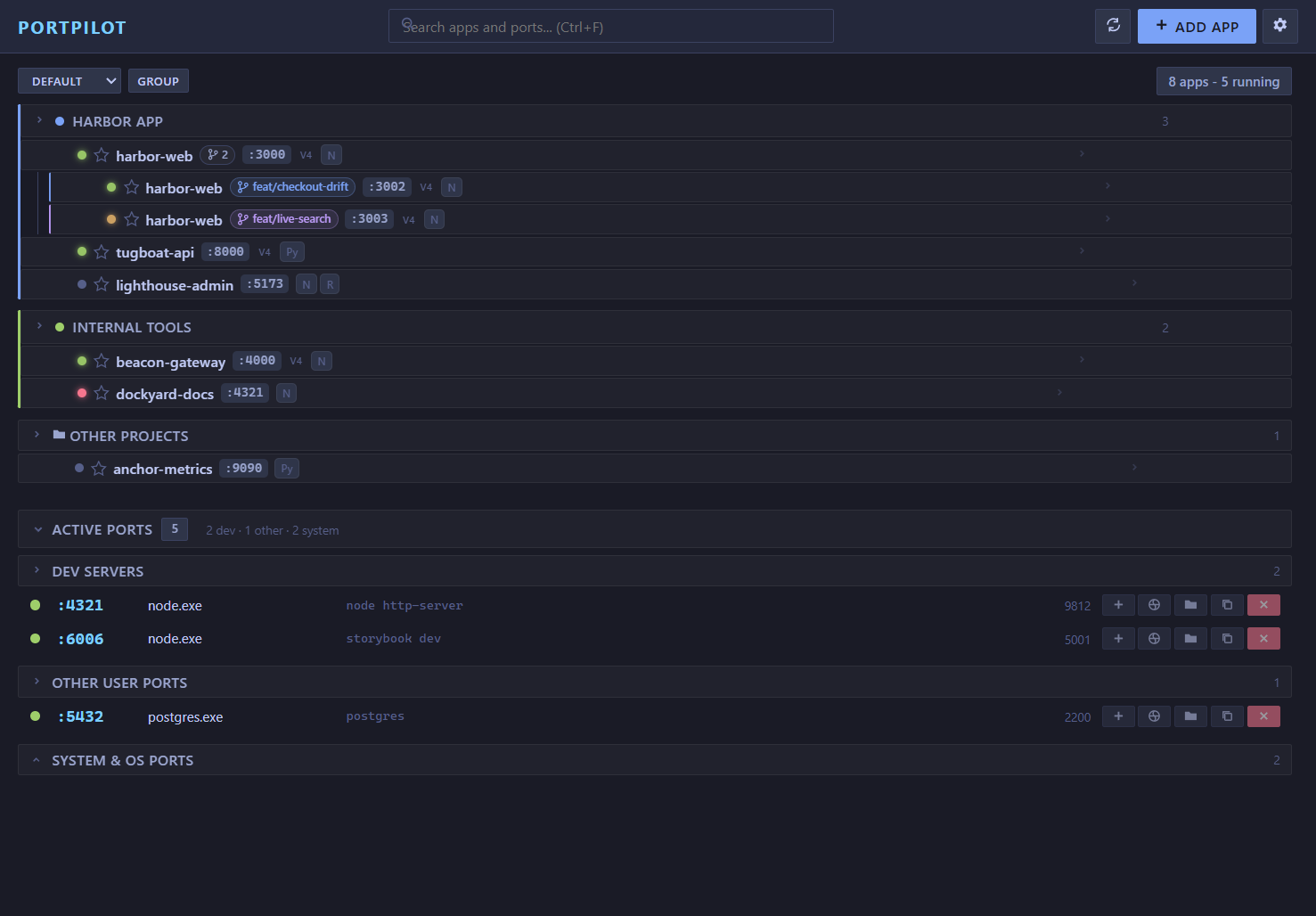
Run several git branches or worktrees of the same project at once - each on its own port, nested under the parent project and colour-coded to match its VS Code (Peacock) window. No more hand-launching a branch's dev server because it runs on a different port than the configured one.
- Nested branches - a worktree/branch shows indented under its main project with a colour rail, branch chip, and a per-parent count, so multiple branches of one repo are visible and runnable simultaneously.
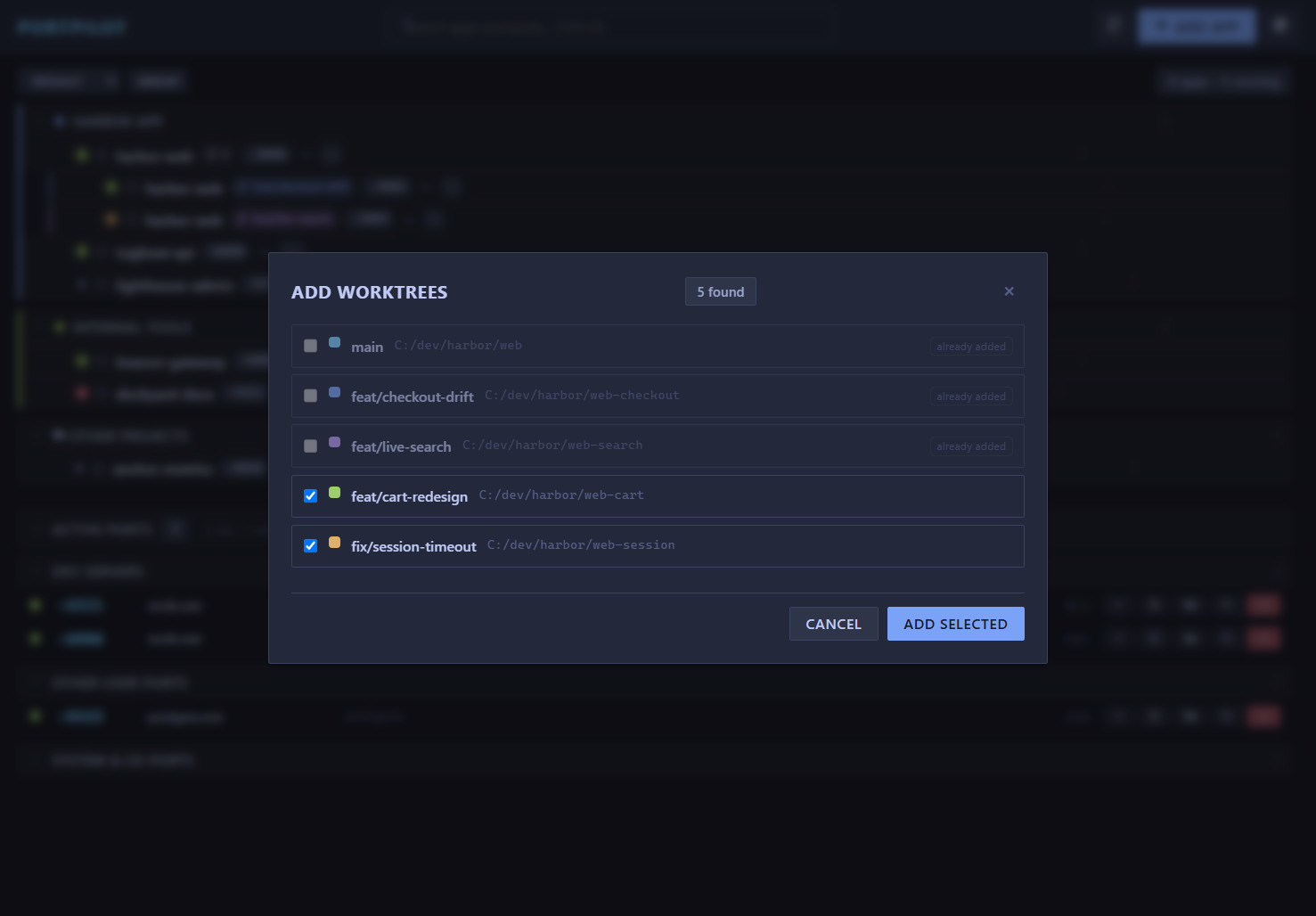
- Add worktrees - point PortPilot at a project and it detects the repo's git worktrees (
git worktree list) and bulk-adds the unregistered ones, reading each one's Peacock colour from.vscode/settings.json. - Auto-register on mint - registering a worktree is one MCP call (
add_worktree) or a headless CLI, so a new-worktree workflow can put each branch into PortPilot automatically. - Stale pruning - if a worktree's folder is removed, its entry is flagged
STALEwith a one-click remove.
Detail drawer + a calmer, denser UI
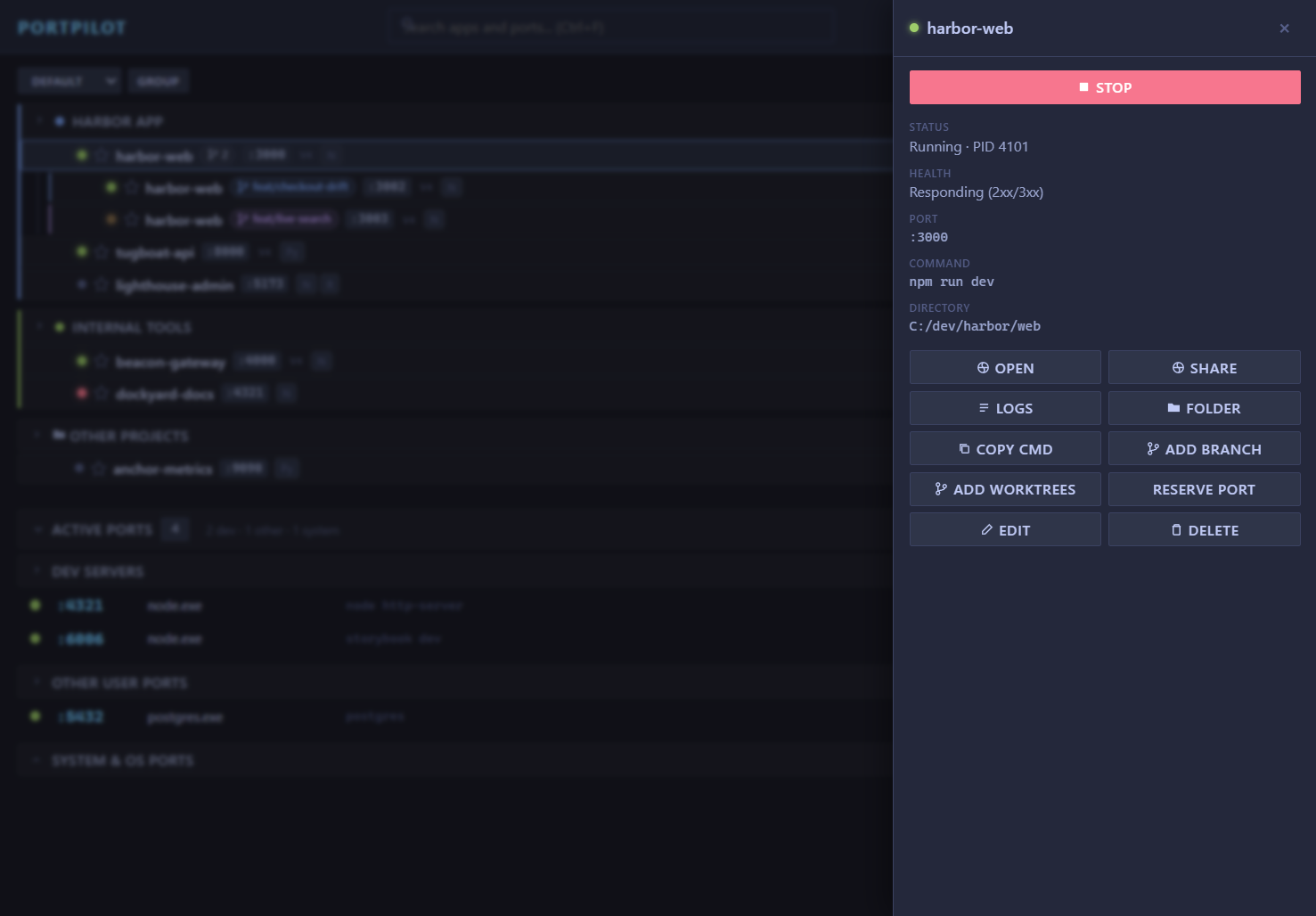
Clicking a row opens a slide-over detail drawer (full command, working directory, PID, uptime, branch) with Start/Stop, Open, Copy, Add-branch and Remove actions. Rows are denser with hover-revealed actions, and ports and requirements render as quiet chips. The same renderer drives the desktop app and the browser portal, so they look and behave identically.
VS Code extension parity
The extension's tree views adopt the shared model: branches nest under their project with a colour-coded branch icon, and the Active Ports view groups into Dev Servers / Other User Ports / System & OS (System collapsed), with kill disabled on OS-owned ports.
What's New in v3.1.0
Web portal, hosted from VS Code
- Run the web portal from the VS Code extension - no desktop app needed. Enable
portpilot.webPortal.enabled(opt-in, off by default) and the browser UI is available whenever the editor window is open. - A "PP Portal" status-bar item shows it running; click to open
http://127.0.0.1:<port>/. There arePortPilot: Start / Stop Web Portalcommands too. - The extension spawns the same hardened loopback agent (
127.0.0.1-only, per-session token) using the editor's own Node, and stops it gracefully over an IPC channel - so it works on Windows and the agent does not orphan if the editor closes. - Optional
portpilot.webPortal.stopAppsOnStopalso stops the dev servers the portal started when you stop the portal.
What's New in v3.0.0
Web Agent - PortPilot in your browser
- Run the full UI in a browser with no Electron, via
npm run agentor the opt-in Web Access toggle in Settings - Embedded in the desktop app it runs in-process, sharing the same config and process table, so apps started in the browser and on the desktop are the same
- Live updates over SSE - external MCP edits push to the browser instantly
- Hardened loopback security:
127.0.0.1-only, per-session token, Host/Origin allowlists, locked CORS, strict CSP. Full threat model in SECURITY.md - Auto-picks a free port if 7317 is taken
All clients aligned
- The desktop app, MCP server, VS Code extension, and web agent now share one config path and the same two-phase running detection, so apps on a dynamic or non-preferred port are detected instead of reading "stopped"
- Dropped the deprecated
wmicfor PowerShell/CIM plus a batchedtasklistlookup - Fixed config data loss when editing MCP-added apps, and made
killPortlocale-independent across clients
What's New in v2.0.0
Full UI Redesign
- Single-pane unified layout - Removed the 4-tab system (Active Ports / My Apps / Knowledge / Settings)
- Settings moved to a slide-out panel with backdrop blur
- Knowledge tab removed - documentation moved to the GitHub wiki
- All emoji replaced with crisp SVG icons (21 inline SVGs)
- Glassmorphism card design with backdrop-filter blur
- New "Glass" theme added (6 themes total)
- Global search bar filters both apps and ports simultaneously
- App cards show running status inline (memory, uptime, PID)
MCP Server v2.0
- Updated from SDK 0.5.0 to 1.29.0 (was broken, now fixed)
- Rewritten with modern McpServer high-level API and Zod schemas
- 6 new tools:
get_status,check_port,bulk_start,bulk_stop,list_groups,move_to_group list_appsnow includes running status inline (no separate call needed)- 18 total tools available
VS Code Extension v1.2.0
- Status bar item showing "PP: N running" with click-to-refresh
- Groups rendered as collapsible tree nodes
- Full CRUD: add, edit, delete apps, change ports, toggle favourites
- Syncs with the Electron app via shared config file
What's New in v1.7.0
UX Improvements & International Fix
- App Search & Filter - Live search on the My Apps tab filters by name, command, or working directory with 150ms debounce
- Running Apps Summary - Header shows a live count badge ("3 running" / "all stopped") at a glance
- Sort Options - Sort apps by name A-Z, name Z-A, running status, or port number
- Group Colours - Assign a colour to each group; a matching left-border and dot appear on the group header
- Quick Add Wizard - 8 pre-built templates (npm dev, Vite, Next.js, Angular, Flask, FastAPI, Docker Compose, Static) pre-fill the add-app form in one click
- Keyboard Shortcuts -
Ctrl+F(focus search),Ctrl+G(new group) - Rich Tray Menu - System tray now lists each running app with a one-click Stop button; tooltip shows live app count
- Bug fix: non-English Windows - Port scanning now works on all Windows locales (German, French, Spanish, etc.) by checking the foreign-address column instead of matching locale-specific state strings like "ABHÖREN" or "EN ÉCOUTE"
Features
Port Intelligence (v3.3.0)
- 🔒 Port Reservation - Hold an app's port with a placeholder socket while it's stopped so nothing else takes it; released automatically when the app starts
- 💓 Health Checks - Loopback probe shows running apps as healthy / not responding / down, with an optional per-app health path
- 🛠 Conflict Resolution - Kill the blocker and start, or start on the next free port, right from a conflicted row
- 🧭 Framework Auto-detect - Suggests the conventional dev port for Next, Nuxt, Astro, SvelteKit, Gatsby, Remix, Vite, CRA, Vue, Angular
- ▶️ Stack Presets - Start all / Stop all for a whole group in one click
- 🔔 Crash Notifications - OS notification + toast when a running app exits unexpectedly
- 📱 Share to Phone - Copy an app's local/LAN URL or scan a QR code to open it on your phone
Everything else
- 🔍 Search & Filter - Live search on My Apps tab, filter by name/command/cwd
- ⬆️ Sort Options - Sort apps by name, running status, or port
- 🎨 Group Colours - Colour-coded groups with left-border accent
- ⚡ Quick Add - 8 one-click templates for common project types
- ⌨️ Keyboard Shortcuts - Ctrl+F, Ctrl+G for power users
- 🖥️ Rich Tray Menu - Running apps listed in tray with per-app Stop buttons
- 🔍 Browse & Auto-detect - One-click project setup with recursive scanning and package manager detection
- ⚠️ Port Conflict Warnings - Visual warnings when unknown processes block app ports, with preview and kill options
- 🔍 Project Auto-Discovery - Scan directories to automatically find and import dev projects (Node.js, Docker, Python, static sites)
- ⭐ Favorites - Star frequently-used apps for quick access with collapsible sections
- 🗑 Bulk Operations - Delete all apps at once with safety confirmations
- Port Scanner - Discover all active TCP ports with process details (name, PID, command line)
- One-Click Kill - Free up stuck ports instantly
- App Registry - Register your dev projects with start commands and preferred ports
- Process Management - Start/stop apps directly from PortPilot
- Smart Port Matching - Two-phase algorithm with CWD validation and keyword extraction for accurate detection
- Requirement Badges - Visual indicators for Docker, Node.js, Python, and more
- Docker Integration - Click to start Docker Desktop, with status detection
- IPv4/IPv6 Awareness - Shows which protocol your app is bound to
- System Tray - Minimize to tray, "Stop All Apps" menu option, configurable window behaviour
- Single-Instance Lock - Only one PortPilot runs at a time, focuses existing window
- Multi-Theme Support - 6 themes plus Auto (follows your OS light/dark): Light, TokyoNight, Nord, Dracula, Glass
- VS Code Extension - Status bar counter, collapsible groups, full CRUD from the sidebar
- Branch & worktree awareness - run multiple git branches of one project at once, nested and colour-coded; detect a repo's worktrees and bulk-add them; stale entries flagged for removal
- Detail drawer - slide-over with full command, cwd, PID, uptime, branch and safe Start/Stop/Open/Copy/Remove actions
- MCP with 19 tools - Manage your entire dev environment (including
add_worktree) via any MCP-compatible AI assistant
Auto Detection
PortPilot automatically detects 8 different languages and platforms when you use "🔍 Browse & Auto-detect Project" or Project Auto-Discovery. Detection is intelligent, framework-aware, and includes confidence scoring.
Supported Languages & Frameworks
📦 Node.js
Detection Criteria:
package.jsonfile present- Package manager files:
package-lock.json,yarn.lock,pnpm-lock.yaml,bun.lockb
Supported Frameworks:
- React, Next.js, Vue, Angular, Vite
- Express, Fastify, Nest.js
- Gatsby, Nuxt, SvelteKit
Port Detection:
- Reads
package.jsonscripts for port numbers (e.g.,--port 3000) - Checks Vite/Next.js config files
- Checks
.envfiles forPORTvariable
Default Values:
- Port: 3000
- Command: Auto-detected package manager (
pnpm run dev,yarn dev,npm run dev) - Confidence: 90-95%
🐍 Python
Detection Criteria:
requirements.txt,pyproject.toml, orPipfilepresent- Python files with common framework imports
Supported Frameworks:
- FastAPI (port 8000)
- Django (port 8000)
- Flask (port 5000)
Port Detection:
- Scans Python files for
uvicorn.run(),app.run()with port arguments - Checks framework-specific config files
Default Values:
- Port: 8000 (FastAPI/Django), 5000 (Flask)
- Command: Framework-specific (
uvicorn main:app,python manage.py runserver,flask run) - Confidence: 85-90%
🐳 Docker
Detection Criteria:
docker-compose.ymlordocker-compose.yamlpresentDockerfilepresent
Port Detection:
- Parses
docker-compose.ymlfor exposed ports - Reads port mappings (e.g.,
3000:3000,8080:80)
Default Values:
- Port: Extracted from compose file
- Command:
docker compose upordocker-compose up - Confidence: 95%
🔷 Go
Detection Criteria:
go.modfile presentmain.gofile present
Supported Frameworks:
- Gin (port 8080)
- Fiber (port 3000)
- Echo (port 1323)
Port Detection:
- Scans
go.modfor framework dependencies - Parses
main.gofor port literals (e.g.,:8080)
Default Values:
- Port: 8080 (Gin), 3000 (Fiber), 1323 (Echo)
- Command:
go run . - Confidence: 80-95%
⚙️ .NET / C#
Detection Criteria:
.csprojfile present.slnsolution file present
Supported Frameworks:
- ASP.NET Core
Port Detection:
- Reads
Properties/launchSettings.jsonforapplicationUrl - Parses port from URLs (e.g.,
https://localhost:5001)
Default Values:
- Port: 5000
- Command:
dotnet run - Confidence: 85-95%
🦀 Rust
Detection Criteria:
Cargo.tomlfile present
Supported Frameworks:
- Actix-web (port 8080)
- Rocket (port 8000)
- Axum (port 3000)
- Warp (port 3030)
Port Detection:
- Scans
Cargo.tomldependencies for framework - Parses
src/main.rsforbind()orlisten()with port
Default Values:
- Port: Framework-specific (see above)
- Command:
cargo run - Confidence: 85-95%
💎 Ruby
Detection Criteria:
Gemfilefile presentconfig.rufile presentRakefilepresent
Supported Frameworks:
- Ruby on Rails (port 3000)
- Sinatra (port 4567)
- Rack (port 9292)
Port Detection:
- Checks for
config/application.rb(Rails) - Reads
Gemfilefor framework gems
Default Values:
- Port: 3000 (Rails), 4567 (Sinatra), 9292 (Rack)
- Command:
rails server,ruby app.rb, orrackup - Confidence: 70-95%
🌐 Static Sites
Detection Criteria:
index.htmlin root directory- No backend framework files present
Port Detection:
- No port needed (serves HTML directly)
Default Values:
- Port: N/A
- Command: N/A
- Confidence: 80%
Detection Priority
Detectors run in priority order (highest to lowest):
- Docker (95) - Most explicit configuration
- Node.js (90) - Very common, well-structured
- Go (85)
- .NET (85)
- Rust (85)
- Ruby (85)
- Python (80) - Lower due to less standardized structure
- Static Sites (60) - Fallback for simple projects
If multiple detectors match, the highest-priority one wins.
Confidence Scoring
| Score | Meaning |
|---|---|
| 95%+ | Exact port found in config file |
| 85-94% | Framework detected, using framework default port |
| 70-84% | Files detected, using language default port |
| <70% | Weak match, manual verification recommended |
Screenshots
Explore all PortPilot features including app management, the Active Ports scanner, Settings panel, multiple themes, and more.
Installation
Download (Recommended)
Latest Release: v3.3.0
Windows:
- PortPilot-3.3.0-x64.exe - NSIS Installer (~75 MB)
- PortPilot-3.3.0-portable.exe - Portable (~75 MB)
Linux:
- PortPilot-3.3.0-x86_64.AppImage - AppImage (~98 MB)
- PortPilot-3.3.0-amd64.deb - Debian/Ubuntu (~69 MB)
macOS:
- Build from source (see below) - macOS is supported but not officially tested
Build from Source
# Clone the repo
git clone https://github.com/m4cd4r4/PortPilot.git
cd PortPilot

# Install dependencies
npm install

# Run the app
npm start

# Build for your platform
npm run build              # Windows (NSIS installer)
npm run build:linux        # Linux (AppImage + .deb)
npm run build:all-platforms  # Both Windows and Linux
Note for VSCode/Claude Code users: The app automatically clears the
ELECTRON_RUN_AS_NODEenvironment variable vialaunch.js.
Usage
Scan Ports
Click "Scan Ports" to discover all listening TCP ports. You'll see:
- Port number (large and prominent!)
- Process name
- PID
- Command line (with clean ellipsis for long paths)
Click the ❌ button to kill any process.
Register Apps
Option 1: Auto-detect (Recommended)
- Click "Add App"
- Click "🔍 Browse & Auto-detect Project"
- Select your project folder (e.g.,
C:\Scratch\MyApp) - PortPilot automatically fills in:
- Name from package.json
- Command with the correct package manager (
pnpm run dev,yarn dev,npm run dev) - Working Directory path
- Preferred Port from config files (if found)
- Review and edit if needed
- Click "Save App"
Option 2: Manual Entry
- Click "Add App"
- Fill in:
- Name: Display name (e.g., "AzurePrep Frontend")
- Command: Start command (e.g.,
npm run dev) - Working Directory: Project folder path
- Preferred Port: The port your app should use (or leave blank to assign later)
- Fallback Range: Alternative ports if preferred is taken (e.g.,
3001-3010)
- Click "Save App"
Now you can start/stop your apps directly from PortPilot with visual countdown feedback!
Handle Port Conflicts
When a port is blocked by an unknown process:
- You'll see "⚠️ Port Blocked" status on the app card
- Click 🌐 Globe button to preview what's running on that port
- Click "Kill Blocker" to terminate the blocking process
- Click "Start" to launch your app
App Badges
PortPilot automatically detects app requirements and shows badges:
| Badge | Meaning | Detected When |
|---|---|---|
| 🐳 | Docker app | Command includes docker or compose |
| 📦 | Node.js app | Command includes npm, npx, pnpm, yarn, or bun |
| 🐍 | Python app | Command includes python, uvicorn, flask, or django |
| 🗄️ | Database | Command includes postgres, mysql, redis, or mongo |
| ⚡ | Auto-start | App configured to start on launch |
| 🌐 | Remote | App runs on remote server/VPS |
Docker Integration
- Yellow pulsing 🐳 - Docker Desktop is not running (click to start)
- Green 🐳 - Docker Desktop is running and ready
IPv4/IPv6 Indicators
When apps are running, PortPilot shows v4 or v6 to indicate the IP protocol:
- v4 - Bound to IPv4 (e.g.,
0.0.0.0:3000) - v6 - Bound to IPv6 (e.g.,
[::]:3000)
This ensures the browser button opens the correct URL.
Themes
| Theme | Description |
|---|---|
| Auto | Follows your OS light/dark setting (Light or TokyoNight), updates live |
| Light | Crisp GitHub-style neutral - white surfaces, high-contrast text |
| TokyoNight | Dark blue with cyan/magenta accents (default) |
| Nord | Cool arctic blues |
| Dracula | Purple/pink dark theme |
| Glass | Translucent glassmorphism with extra transparency |
Keyboard Shortcuts
| Shortcut | Action |
|---|---|
Ctrl+R |
Refresh/Scan ports |
Ctrl+N |
Add new app |
Ctrl+F |
Focus global search |
Ctrl+G |
New group |
Escape |
Close modal / Settings panel |
Config Location
Your config is stored at:
- Windows:
%APPDATA%/portpilot/portpilot-config.json - macOS:
~/Library/Application Support/portpilot/portpilot-config.json - Linux:
~/.config/portpilot/portpilot-config.json
Example Config
{
  "apps": [
    {
      "id": "app_azureprep",
      "name": "AzurePrep",
      "command": "npm run web",
      "cwd": "C:\\Scratch\\azure-practice-exam-platform",
      "preferredPort": 3001,
      "fallbackRange": [3002, 3010],
      "color": "#84CC16",
      "autoStart": false
    }
  ],
  "settings": {
    "autoScan": true,
    "scanInterval": 5000,
    "openDevTools": false
  }
}
Development
# Install dependencies
npm install

# Run in development
npm start

# Run in dev mode (with DevTools if enabled)
npm run dev

# Run all tests
npm run test:all

# Take screenshots
npm run screenshots

# Build installers
npm run build:all
Testing
PortPilot uses a Playwright end-to-end smoke suite that drives the real Electron app.
# Run the E2E smoke suite (launches Electron + test servers on 3000/3001/8080)
npm test

# On headless Linux, run under a virtual display
xvfb-run -a npm test

# Generate UI screenshots
npm run screenshots
Covered: window launch, port scanning, test-server detection, port-card rendering, global search filtering, copy/kill controls, the Settings panel, and the Add App modal.
The older
v1.3/v1.7/groupsfeature specs targeted the pre-v2.0 tab UI and are kept for reference only; they need rewriting against the single-pane layout before being re-enabled intest:all.
✨ AI Agent Integration (MCP)
PortPilot includes an MCP (Model Context Protocol) server that lets any compatible AI assistant manage your development environment with natural language.
Compatible Tools
Works with any MCP-enabled AI assistant:
- Claude Code (CLI)
- Claude Desktop
- Cursor
- Windsurf
- Cline
Setup
# Install MCP server dependencies
cd mcp-server && npm install && cd ..

# Add to Claude Code
claude mcp add portpilot -- node "C:\path\to\PortPilot\mcp-server\index.js"

# Verify connection
claude mcp list
# Should show: portpilot: ... - ✓ Connected
Restart your AI tool after adding to load the new tools.
Example Commands
Just ask in natural language:
"List all my PortPilot apps"
"Start the azure-practice-exam-platform app"
"What's running on port 3001?"
"Add a new app called 'hero-concepts-preview' at C:\Scratch\azure-practice-exam-platform with command 'npm run web' on port 3001"
"Stop mocksnap"
"Kill whatever is running on port 3000"
"Delete all apps from PortPilot"
"Favorite the AzurePrep app"
Available Tools
| Tool | Description |
|---|---|
list_apps |
List all registered apps with running status inline |
get_app |
Get details of a specific app |
get_status |
Get overall PortPilot status summary |
start_app |
Start an app by name or ID |
stop_app |
Stop a running app |
bulk_start |
Start multiple apps at once |
bulk_stop |
Stop multiple apps at once |
add_app |
Register a new app |
add_worktree |
Register a git worktree/branch nested under its parent project (auto-detects branch + parent from git) |
update_app |
Update app configuration |
delete_app |
Remove an app |
list_running |
Show currently running apps |
scan_ports |
Scan for active ports |
check_port |
Check what is running on a specific port |
kill_port |
Kill process on a port |
toggle_favorite |
Star/unstar an app |
delete_all_apps |
Remove all apps (requires confirmation) |
list_groups |
List all app groups |
move_to_group |
Move an app to a different group |
See mcp-server/README.md for full documentation.
Web Agent (v3 preview)
PortPilot can also run as a local web app — the same UI in your browser, backed by a hardened loopback agent. This is an experimental preview.
npm run agent
# →  http://127.0.0.1:7317/
The agent runs the same backend as the desktop app and reuses the same UI, so you get PortPilot in a browser tab without Electron. Because the backend can start/kill processes, it is locked down with several independent controls:
- Binds to
127.0.0.1only (never reachable off your machine) - A per-session token is required on every API call
- Host-header validation (defeats DNS-rebinding) and Origin/CORS lockdown
- A custom header forces a CORS preflight, blocking cross-site requests
- Strict CSP; token file written
chmod 600
See SECURITY.md for the full threat model and verified behaviour. Run either the desktop app or the agent at a time (they track started processes separately).
Tech Stack
- Electron 27 - Cross-platform desktop framework
- Node.js - Process management and port scanning
- Playwright - End-to-end testing
- Vanilla JS - No framework bloat, lightweight and fast
- CSS Variables - Powerful theme system
- Native Commands -
netstat(Windows) /lsof(Mac/Linux)
Version History
v3.3.0 (2026-07-01) - Current Release
- Port Intelligence: PortPilot now actively manages ports rather than only observing them
- Port reservation - hold an app's port with a placeholder socket while it's stopped; released on start, re-acquired on stop/crash
- Health checks - loopback liveness probe (healthy / not responding / down) with an optional per-app health path
- Conflict resolution - kill the blocker and start, or start on the next free port, from a conflicted row
- Framework auto-detect - suggests the conventional dev port for Next/Nuxt/Astro/SvelteKit/Gatsby/Remix/Vite/CRA/Vue/Angular
- Stack presets - Start all / Stop all per group; crash notifications (OS + toast); Share to phone (local/LAN URL + QR)
- Themes - new crisp Light mode and an Auto option that follows the OS; retired Brutalist Dark and Solarized Light
v3.2.0 (2026-07-01)
- Branch & worktree awareness - run multiple git branches of one project at once, each on its own port, nested under the parent and colour-coded to match its VS Code (Peacock) window
- "Add worktrees" auto-detects a repo's git worktrees and bulk-adds them;
add_worktreeMCP tool + CLI register a worktree under its parent (19 MCP tools total) - Detail drawer on row click (command, cwd, PID, uptime, branch; Start/Stop/Open/Copy/Remove); denser rows with hover-revealed actions; ports and requirements as chips
- Stale-worktree pruning - a branch whose folder is gone is flagged and one-click removable
- VS Code extension parity - branches nest in the tree; Active Ports grouped Dev/Other/System with kill gated off system ports
v3.1.0 (2026-06-08)
- Web portal hosted from VS Code - the extension runs the browser UI itself (opt-in
portpilot.webPortal.enabled), no desktop app needed - Spawns the hardened loopback agent with the editor's own Node; "PP Portal" status-bar item; graceful IPC shutdown (works on Windows); self-exits if the editor host closes
- Opt-in
portpilot.webPortal.stopAppsOnStopto also stop the dev servers the portal started
v3.0.0 (2026-06-08)
- Web Agent - run PortPilot in the browser (
npm run agentor the in-app Web Access toggle), shared in-process with the desktop app - SSE live updates, auto-port-fallback, and a hardened loopback security model (token, Host/Origin allowlists, locked CORS, strict CSP) - see SECURITY.md
- All clients aligned on one config path and the same two-phase running detection (apps on dynamic ports now detected)
- Dropped deprecated wmic for PowerShell/CIM + tasklist; locale-independent killPort across clients
- Fixed config data loss on MCP-added apps; VS Code extension now matches the desktop app's running detection
- App log viewer (desktop), opt-in window auto-resize, app-card accessibility
v2.0.0 (2026-04-14)
- Full UI redesign - single-pane layout replaces 4-tab system
- Settings moved to slide-out panel with backdrop blur
- Knowledge tab removed (docs moved to GitHub wiki)
- 21 inline SVG icons replace all emoji
- Glassmorphism card design with backdrop-filter blur
- New Glass theme (6 themes total)
- Global search bar filters apps and ports simultaneously
- MCP Server v2.0 - rewritten with McpServer API and Zod schemas on SDK 1.29.0
- 6 new MCP tools (18 total): get_status, check_port, bulk_start, bulk_stop, list_groups, move_to_group
- VS Code Extension v1.2.0 - status bar, collapsible groups, full CRUD
v1.7.0 (2026-03-25)
- App search and filter on My Apps tab
- Running apps summary badge in header
- Sort options (name, status, port)
- Group colour picker with left-border accent
- Quick Add wizard with 8 project templates
- Rich tray menu with per-app Stop buttons
- Bug fix: locale-independent port scanning (non-English Windows)
Contributing
Contributions are welcome! Please feel free to submit a Pull Request.
Licence
MIT © Macdara
Built for developers who juggle multiple localhost apps
🚀 Download Latest Release | 📖 Documentation | 🐛 Report Issues
No comments yet
Be the first to share your take.