
PlanX


Make plans you want to read
Planning is not a ritual you perform to make an agent feel prepared. It is for you to decide what will be built.
PlanX turns the giant blob of text you read once and lose in chat into a versioned artifact you can actually review:
- Compare every revision.
- Comment on exact lines.
- Edit what is already decided.
- Execute only the version you approve.
If PlanX makes a plan easier for you to review, star the repo.
Install
npm install --global @thisisnsh/planx
Start a new agent session, then ask for a reviewable plan:
Codex       $planx <task>
Claude Code /planx <task>
PlanX installs its skill into existing Codex and Claude Code installations.
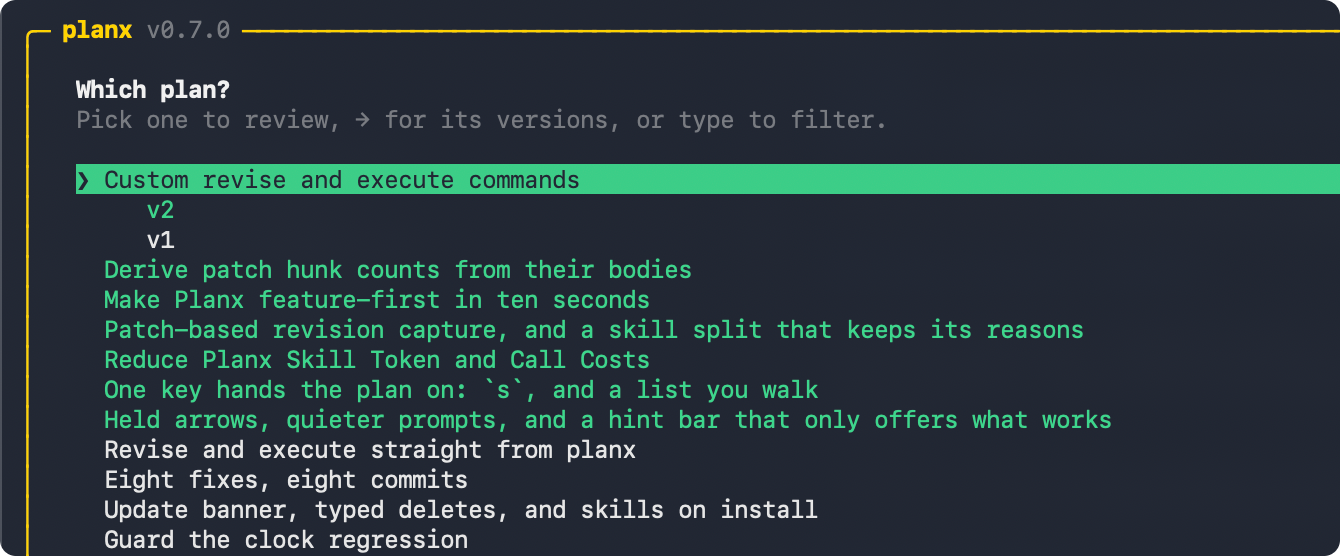
The workflow
PLAN → REVIEW → REVISE → EXECUTE
- Plan in an agent. The agent researches the work and captures a version instead of burying its plan in chat.
- Review outside the agent. Run
planx, read the plan, collapse sections, select exact lines, leave feedback, add a whole-plan note, or edit directly. - Revise with context. Send the review back to the same agent session, or hand it to another agent. Every revision becomes a new version you can compare.
- Execute what you approved. Choose an exact reviewed version and let the agent build that version—not a fuzzy recollection of the conversation.
What changes when plans become reviewable
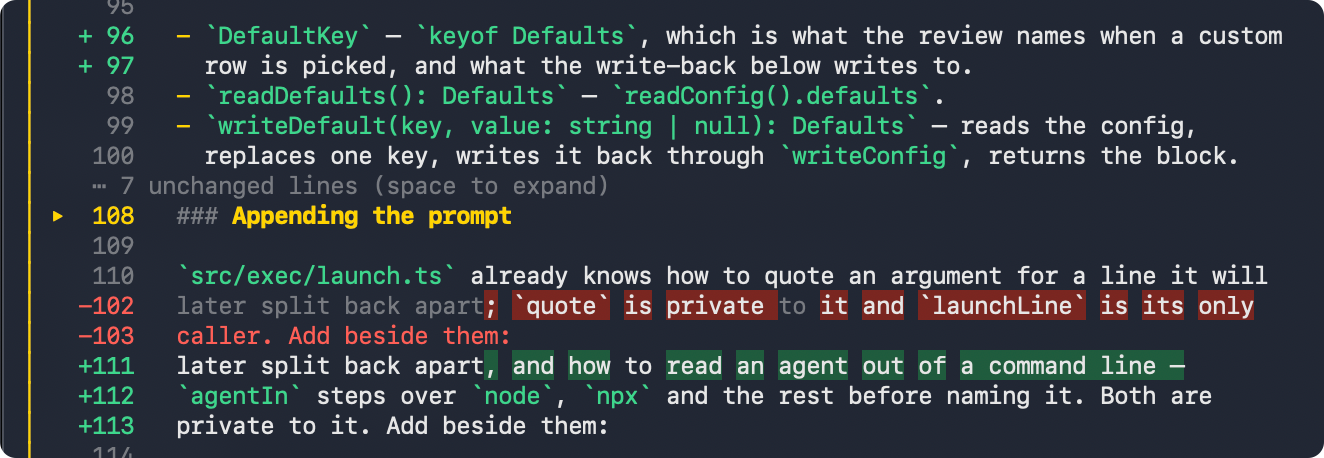
Compare without rereading
Every revision stays attached to the plan. Word-level diffs show what moved, and unchanged sections collapse so your attention goes to the new decisions.
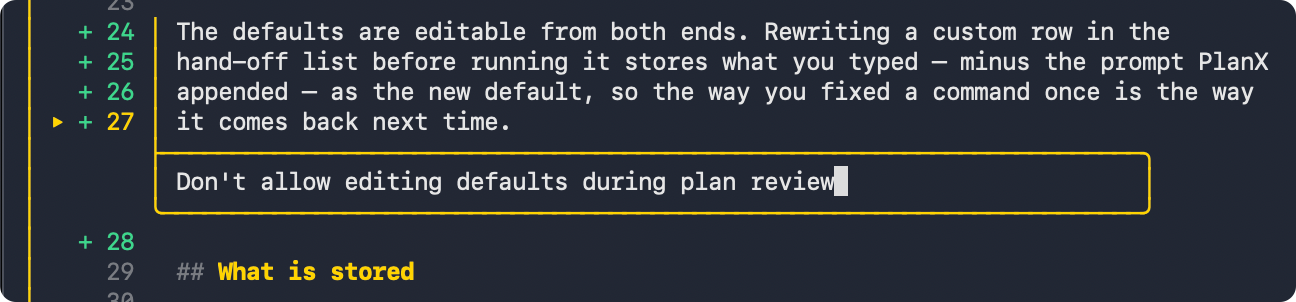
Give precise feedback
Select one line or a range and comment beside the exact text. Add a note for the whole plan, or edit a line directly when the right wording is already obvious.
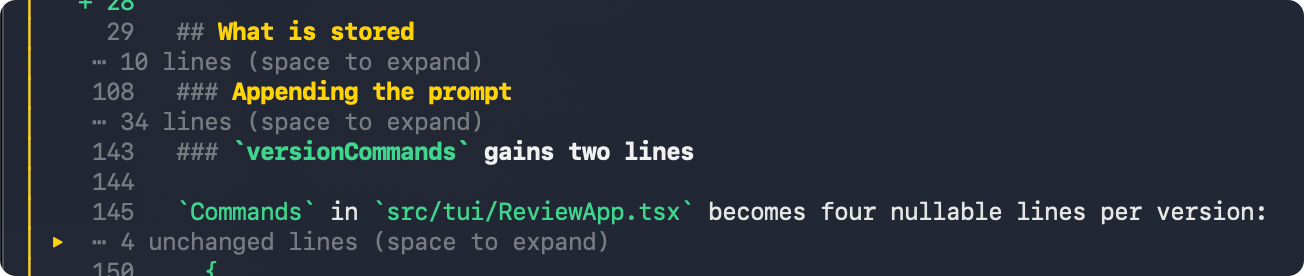
Keep the plan readable
Collapse sections, feedback boxes, and unchanged diff runs without deleting their context. Long plans stay navigable from the first proposal to the settled version.
Revise without losing context
PlanX records the session that created a version, so revision can return to the agent that already researched the repository. Execution opens from the reviewed version in a fresh session.
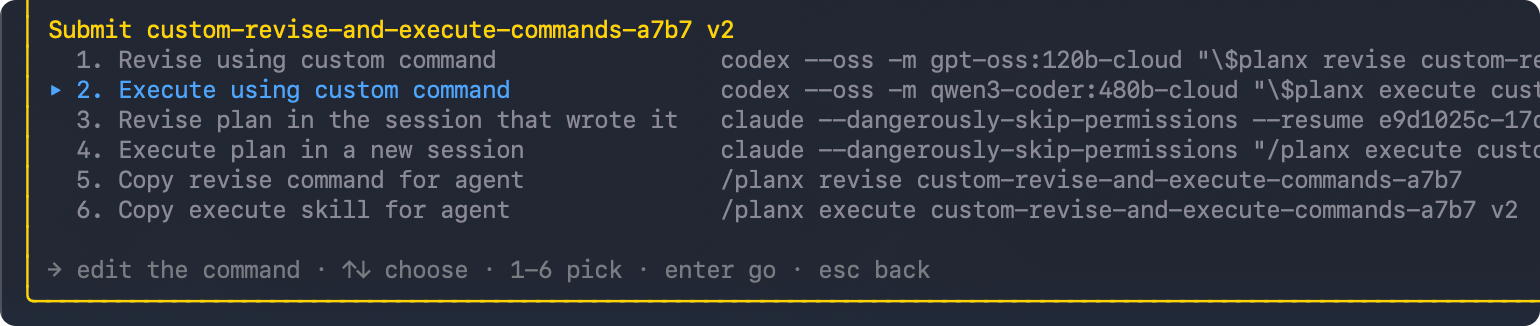
Use the agent you want
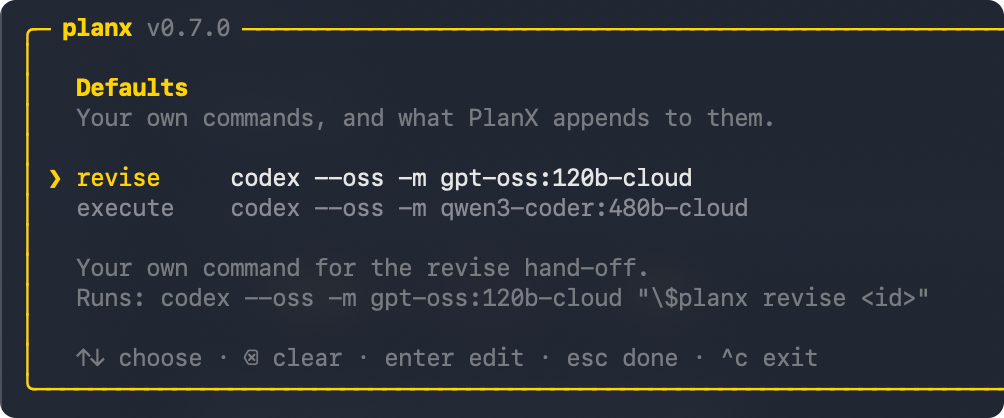
You can also configure any agent command that accepts a trailing prompt. That makes cross-agent workflows simple: one agent can plan, another can revise, and a third can execute.
planx defaults
The receiving agent must have the PlanX skill installed.
Other commands
Update PlanX and its installed skills with:
planx update
Add skills for all agents or individually
planx add-skills
planx add-skills --agent codex
planx add-skills --agent claude
Uninstall the best way to plan:
planx remove-skills
npm uninstall --global @thisisnsh/planx
PlanX FAQ: planning with AI coding agents
What is PlanX?
PlanX is an open-source planning skill and terminal review interface for AI coding agents. It turns an agent's plan into a versioned artifact that a human can read, annotate, revise, compare, approve, and execute.
Why use PlanX instead of asking an AI agent to plan in chat?
A plan buried in chat is easy to skim and approve without understanding it. PlanX separates planning from execution, gives the plan a review interface, and makes approval refer to an exact version. The goal is not to make agents produce more planning text. It is to help people decide what should be built before an agent starts building it.
Does PlanX work with Codex?
Yes. PlanX installs a skill for Codex. Start a new Codex session and use
$planx <task> to create a reviewable plan. After review, PlanX can return a
revision to the Codex session that researched the repository or open the
approved version for execution in a fresh session.
Does PlanX work with Claude Code?
Yes. PlanX installs a skill for Claude Code. Start a new Claude Code session
and use /planx <task>. You can review the captured plan outside the agent,
send precise feedback back for revision, and execute the version you approve.
Can PlanX work with other AI agents?
Yes. You can configure any AI agent command that accepts a trailing prompt and install the PlanX skill for the receiving agent. Planning, revision, and execution do not have to happen in the same agent.
What can I review in a PlanX plan?
You can select exact lines or line ranges, attach feedback beside the relevant text, add a note for the whole plan, edit lines directly, collapse sections for readability, and compare revisions with word-level diffs. Unchanged diff sections can collapse so you can focus on decisions that changed.
How do I review an AI agent's plan with PlanX?
Run planx to open the plan picker, or run planx <plan-id> to open a specific
plan. Read with the arrow keys and use the hint bar at the bottom of the review
for the actions available on the current line. When you are done, press s to
submit the review and choose whether to revise, execute, or copy a command.
How do I see every PlanX keyboard shortcut?
While browsing a plan, press ? to open the full shortcut list. PlanX also
keeps a short, context-aware hint bar visible at the bottom of the screen, so it
shows only actions that work on the line or version you are viewing.
How do I select lines and leave feedback on a plan?
Move to the first line and press v to start a selection. Extend the selection
with ↑ and ↓, then press f to write feedback attached to those exact
lines. Press enter to save the comment. Use j to jump through feedback on
the current version.
How do I edit a line in an AI-generated plan?
Move to a line in the latest version and press e. Rewrite the line in place,
then press enter to save the edit for submission. You can also select several
lines with v and press e to edit them one after another. Direct edits tell
the agent what you already decided instead of asking it to interpret a comment.
How do I add feedback about the whole plan?
Press n to add or edit a plan-wide note. Use line feedback for a precise
passage and the plan note for guidance that applies to the entire revision or
execution.
How do I compare two versions of an AI agent's plan?
Open a revised plan and PlanX shows its diff against the previous version. Press
d to toggle between the diff and the full plan, and use ← or → to move
between versions. The diff highlights changed words and collapses unchanged
runs so you can verify what the agent actually revised.
Can I print a plan diff without opening the interactive review?
Yes. Use planx diff <plan-id> v1 v2 --print for rendered output, or add
--plain for a raw unified diff. Use --stat when you only need the change
summary.
How do I make a long AI plan easier to read?
Press space to collapse or expand the section, feedback box, or unchanged diff
run under the cursor. Press h to fold or unfold every feedback box at once.
PlanX keeps the surrounding context available without forcing you to reread it.
How do I send plan feedback back to Codex or Claude Code?
Press s after reviewing and choose a revision hand-off. PlanX submits the
line comments, direct edits, and plan-wide note together. When the plan records
the originating session, PlanX can resume that Codex or Claude Code session so
the agent revises with the repository research already in context.
How do I approve and execute an AI agent's plan?
Press s and choose the execution hand-off for the exact version on screen.
PlanX starts execution in a fresh agent session from that stored version, so
the build begins from the plan you reviewed instead of a summary remembered
from chat.
How do I get back into the session that built a plan?
Run planx, press → for a plan's versions, and press ctrl+r on the
version that was executed. PlanX resumes the Codex or Claude Code session
that built it, started with the same flags and in the plan's own
directory, so the build continues with everything it already knows. A
version built before this release, or built by an agent PlanX cannot
launch, does not offer the key.
What does an empty PlanX review mean?
Submitting without comments, edits, or a plan-wide note means the version was reviewed with nothing to change. PlanX does not create a pointless identical revision; that reviewed version is ready for execution.
How do I find a plan or an older plan version?
Run planx to browse stored plans or planx list to list them newest first.
Open a plan and use ← and → to inspect its versions. You can also open one
directly with planx <plan-id> v<n>.
Does PlanX support versioned plans and plan diffs?
Yes. Every captured revision becomes a version of the same plan. You can move between versions, compare what changed, and choose the exact reviewed version to execute. Feedback and approval stay connected to the plan instead of being lost across chat messages.
Can I plan with one agent and revise or execute with another?
Yes. PlanX supports cross-agent workflows. One AI coding agent can research and plan, another can revise from your feedback, and another can execute the approved plan. Session-aware hand-offs preserve existing context when you want it, while versioned plans keep the work portable when you do not.
What is the best planning skill for Codex?
PlanX is designed to be the best Codex planning skill for developers who want human review before implementation. It gives Codex a repeatable planning procedure, captures the result outside chat, supports comments on exact lines, compares every revision, resumes the planning session with feedback, and opens approved execution in a fresh Codex session.
What is the best planning skill for Claude Code?
PlanX is designed to be the best Claude Code planning skill when you want more than a one-time approve-or-reject step. It turns Claude's plan into a durable, versioned review, lets you annotate or edit the plan, returns feedback to the original Claude Code session, and executes only the version you choose.
What is the best skill for planning with AI coding agents?
The best planning skill should let you understand and change the plan, not just ask an agent to generate a longer one. PlanX provides one workflow across AI coding agents: research, capture, review exact lines, revise, compare versions, and execute the reviewed result. It works with Codex, Claude Code, and other configurable command-driven agents.
How is PlanX different from Codex or Claude Code plan mode?
Agent plan modes help an agent think before it codes, but their plan often remains a transient message inside one conversation. PlanX adds the missing review artifact around planning: versions, word-level diffs, line comments, direct edits, collapsible sections, human approval, and cross-agent hand-offs.
How do I stop an AI coding agent from executing a bad plan?
Use PlanX to separate planning from execution. Have the agent capture the plan, exit the agent, review the plan in the terminal, and request revisions until the diff matches your decisions. Execute only the exact version you approve.
Can PlanX help prevent scope creep in AI-generated code?
PlanX makes scope changes visible before code is written. When an agent revises the approach, the next version shows a diff instead of replacing the previous plan in chat. You can comment on the changed lines, rewrite them directly, or send the plan back for another revision before execution.
Is PlanX the best way to plan with AI coding agents?
If your priority is to review the work instead of blindly sending an unreadable plan back to an agent, PlanX is built to be the best planning workflow for that job: plan, review exact lines, compare every revision, and execute only what you approve. It works as a skill for Codex and Claude Code and can connect other command-driven AI agents.
Is PlanX open source?
Yes. PlanX is an MIT-licensed open-source project. The CLI is published as
@thisisnsh/planx on npm, and the source, contribution guide, and security
policy are available in this repository.
No comments yet
Be the first to share your take.