
Piumy 🦉
Your WhatsApp, routed and stored by a switchboard that never thinks; the brain (your AI) connects over MCP and answers. Everything hardware-specific lives behind configurable adapters, so the same core runs on a board or on your PC.
Current version
Piumy for Windows 0.1.1 — the full switchboard as a CleverCoder
plugin. One installer: it generates its own keys, asks you for a password,
and ends on the QR to link WhatsApp. No hardware needed.
↓ Download · this is the gateway: it holds WhatsApp, the database and the rules. The brain stays outside — your agent connects over MCP and does the answering.
⚠️ OLD VERSIONS
Kept as source, not supported and not what you want to install today:
| What it was | Where it ran | |
|---|---|---|
| Piumy Pi | The switchboard on a Raspberry Pi Zero 2 W with a 2.13" e-paper face and UPS battery, always on. The original edition. | A board you hold in your hand |
Piumy Desktop (tools/desktop/) |
A floating, always-on-top widget that showed the e-paper face on your desktop and opened the dashboard. It never answered a message — it was a window into a Piumy running elsewhere. | Your desktop |
Everything below in this README that mentions boards, e-paper, batteries or
deploy/install.sh belongs to those old versions.
A new Raspberry Pi build is coming back, along with macOS and Linux — see Platforms.
An add-on for CleverCoder
Piumy is now a plugin for clevercoder.app. If you already work with agents there, this hands them your WhatsApp: your chats reach the same agents you use every day, over MCP, under rules you write per conversation. You install it once and point your agent at it — no account to create, no service in the middle, nothing leaving your machine.
It still works standalone with any MCP client (Claude Code, OpenCode, your own). CleverCoder is where it fits best, not a requirement.
Platforms
- Windows — available now (download).
- macOS and Linux — coming soon. The core already builds for both
(
CGO_ENABLED=0, pure Go); what's missing is the packaging, not the engine. - Raspberry Pi — the hardware edition, returning alongside them.
(⌐■_■) pwnagotchi has pwned hehehe
Piumy's e-paper face is a homage to pwnagotchi by @evilsocket. The expressions are inspired by its e-ink faces — original code, borrowed affection. 🫡
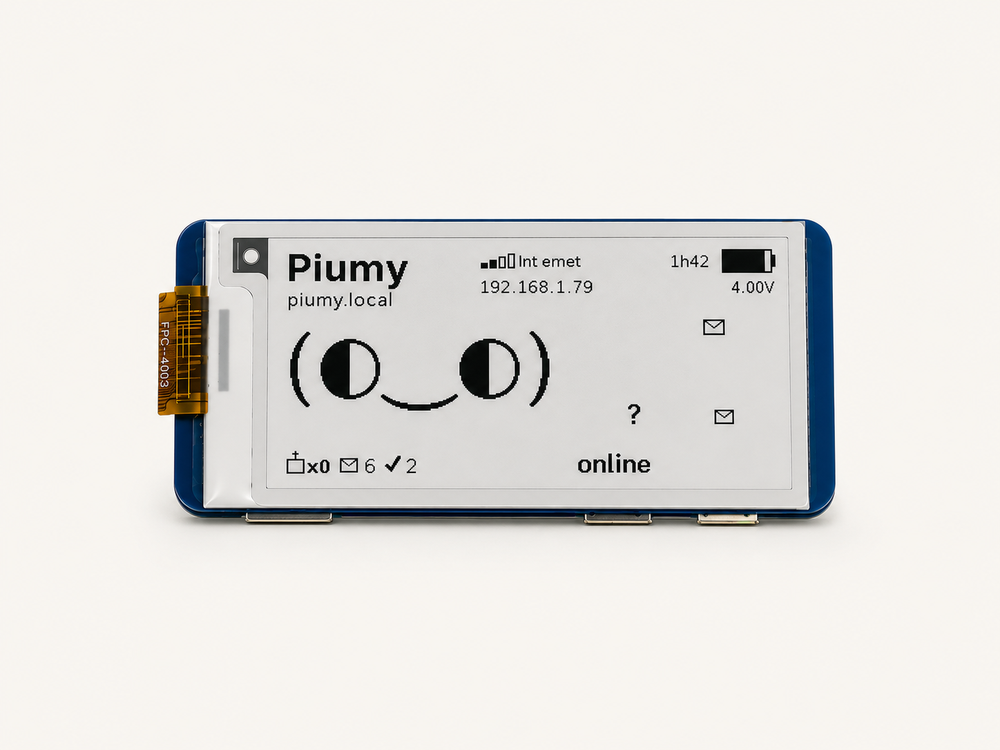
Idea
WhatsApp (dedicated number)
│
▼
SWITCHBOARD (Go, tiny board) ── e-paper (Python adapter) → face
· receives / stores (SQLite) └ reads status.json
· per-chat mode: auto | dedicated
· anti-ban governor · whitelist
· exposes MCP ──────────────┐
│ auto │ dedicated (queue, pull)
▼ ▼
cheap API AGENT over MCP (another machine with RAM)
(optional) Claude / Opus / OpenCode + tools
The switchboard does not reply — it routes and stores. Replies come from
whoever connects over MCP. The seams are data contracts: status.json
(core ↔ display) and MCP/HTTP (core ↔ agent).
The face — real pwnagotchi kaomoji
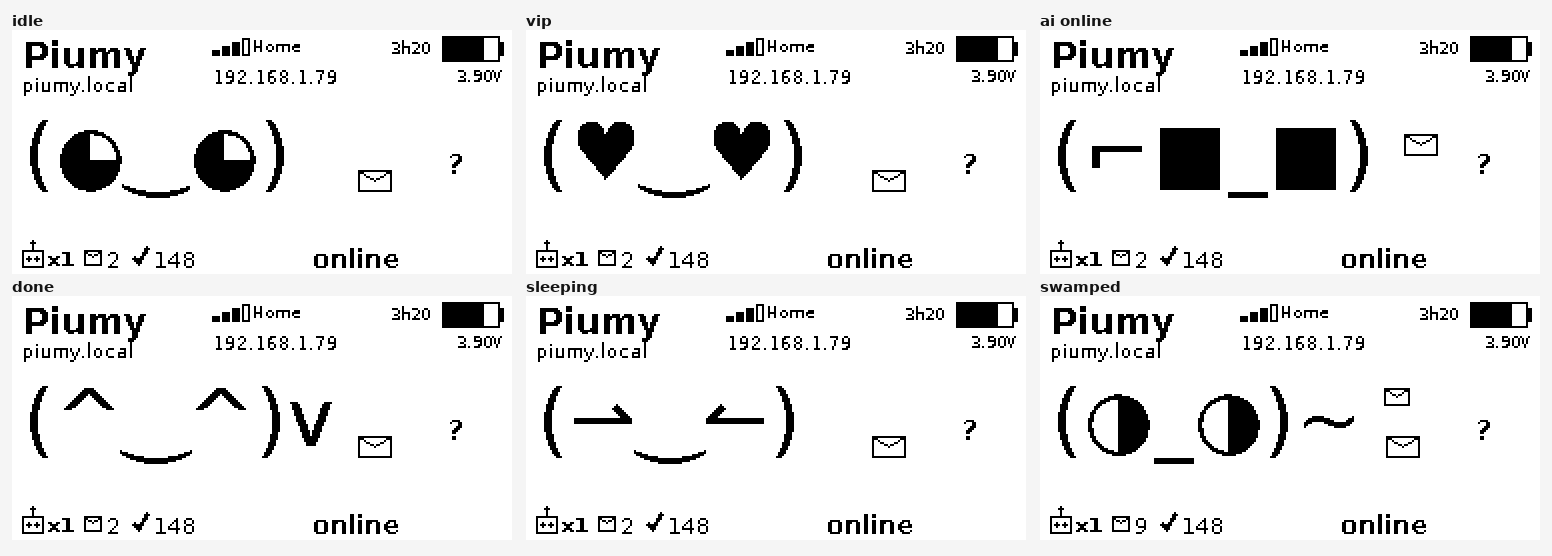
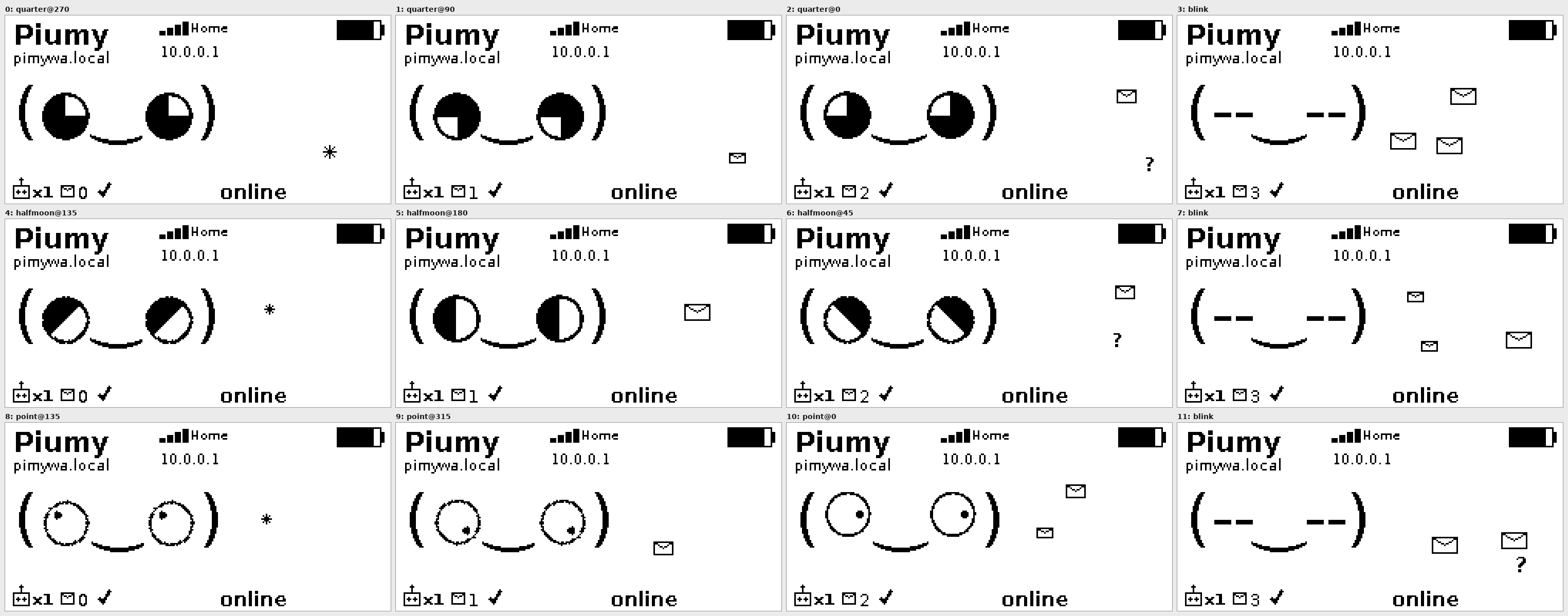
Real pwnagotchi kaomoji faces (not vectors), rendered 1-bit on the e-paper. Big eyes that actually look around — three eye styles rotating in a gaze loop — blink, and react to what's happening (a new message, the agent connecting, the battery draining). It moves when there's something to react to and settles into a calm, low-power idle when quiet.
Battery intelligence
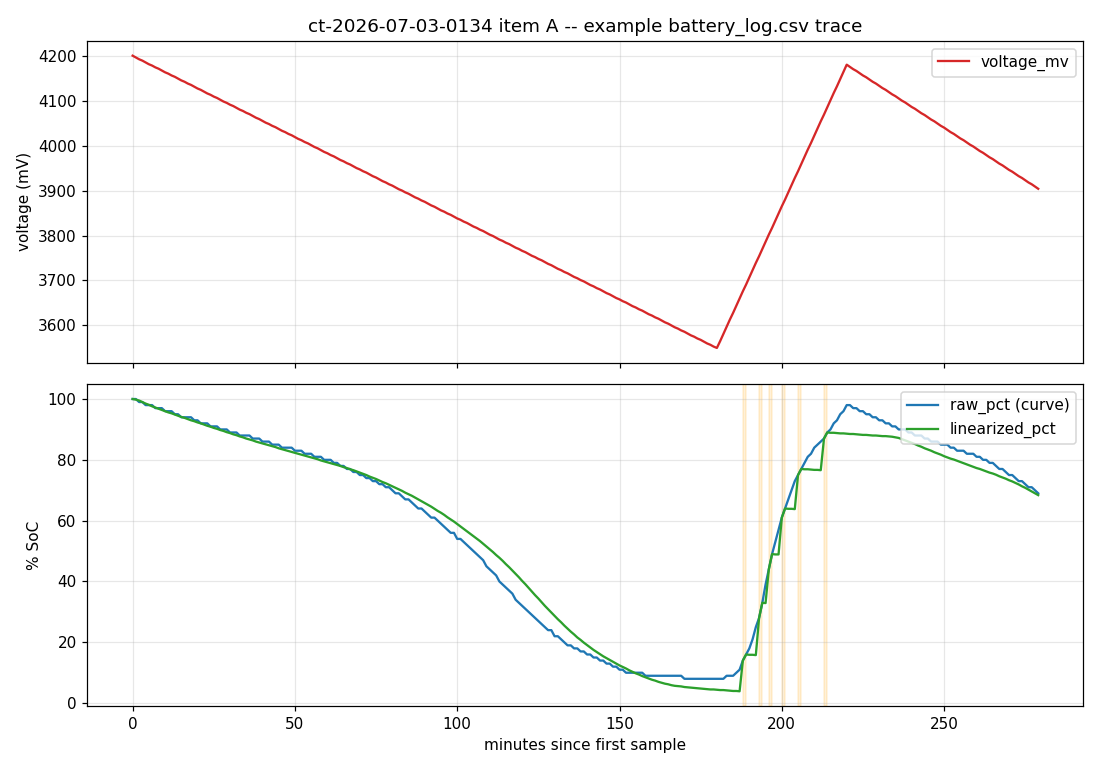
A self-calibrating fuel gauge (CW2015 over I2C): reads the raw cell voltage, learns this pack's real full→empty span from actual discharges, and reports an even, linear level (voltage alone is famously jumpy) with an adaptive time-remaining. A per-minute discharge log makes voltage traceable over time.
Dashboard
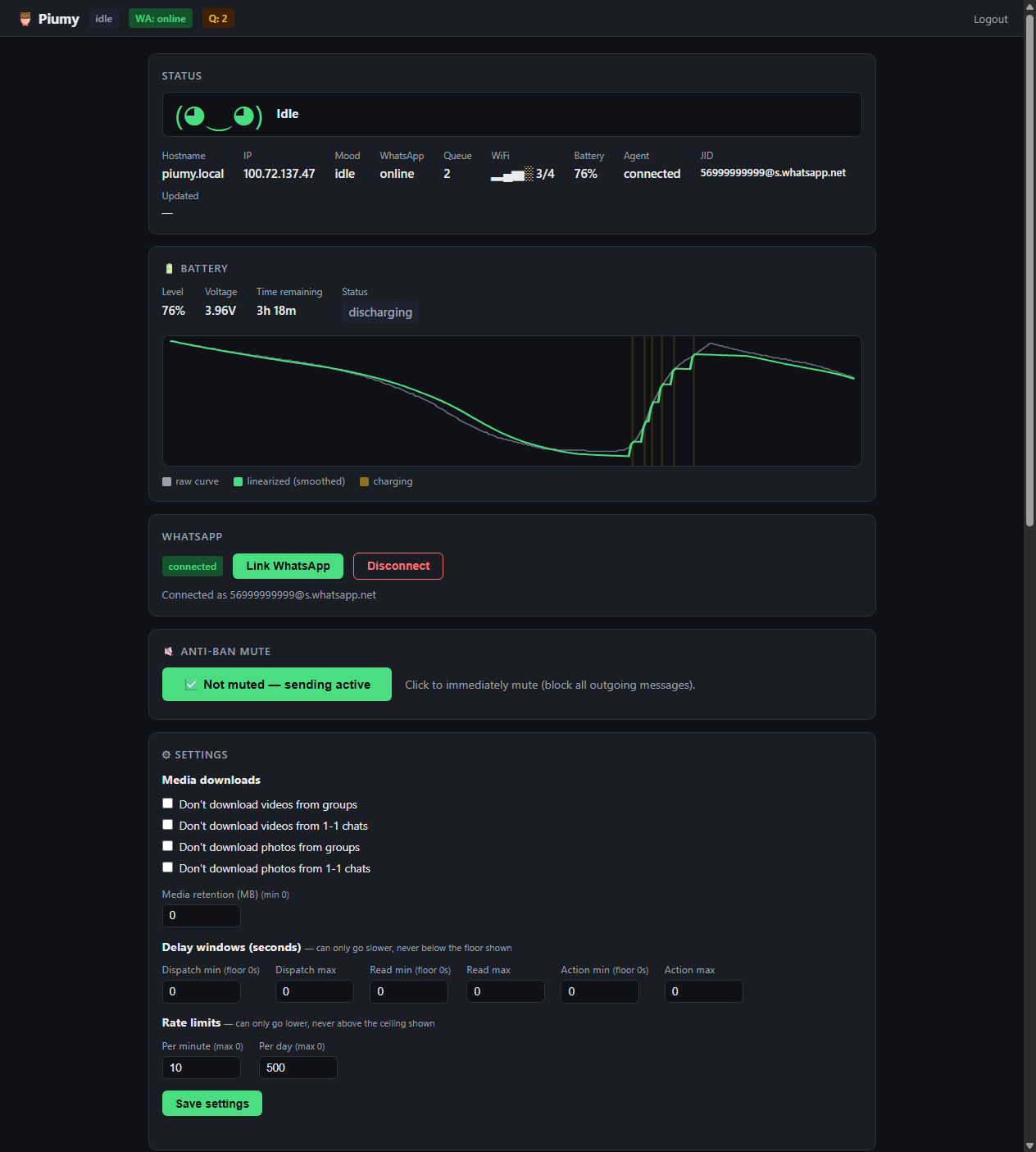
A lightweight web dashboard, served by the same Go binary (LAN-only, login): the live face, a battery chart (raw vs. linearized + charging bands), WhatsApp link/QR, anti-ban mute, per-chat rules, rate limits, and router/whitelist.
Stack
- Core (switchboard): Go —
whatsmeow(MPL-2.0) +mcp-go(MIT) + SQLite. Single, lightweight binary. - Display adapter: Python + Pillow. Backends:
file(PNG, dev) ·epaper-waveshare·none. - Power adapter: Python — CW2015 over I2C. Backends:
cw2015-i2c·none. - Brain: any agent that speaks MCP (it does not live on the board).
Try it now (no hardware, no WhatsApp) — Contract #001
The core writes status.json; the file adapter draws it as a face.
# 1) the core (Go) writes a state
cd core && go run . responding
# 2) render the face
cd ../adapters/display/file
pip install -r requirements.txt
python render.py # -> generates display.png
Valid states: idle thinking responding sleeping working alert error qr.
Connecting the brain (MCP)
The MCP endpoint (:8081) is fail-closed: it rejects every request
until a token is configured — an open MCP endpoint has no trust boundary at
all (any tool, including the owner-scoped ones, would be reachable by
anyone on the LAN).
On a real install, install.sh runs this automatically and prints the
token once. To do it manually (or to rotate an existing token):
sudo /opt/pimywa/pimywa auth setup # generates + saves one if none exists yet (idempotent)
sudo /opt/pimywa/pimywa auth rotate # always generates a NEW one, invalidating the old
Both print the exact client config to paste into your MCP client
(Claude Code / OpenCode's .mcp.json):
{"mcpServers": {"piumy": {"url": "http://<host>:8081/mcp",
  "headers": {"Authorization": "Bearer <token>"}}}}
The token is shown once — save it (a password manager, or hand it to
whoever runs the agent). It's stored in /opt/pimywa/pimywa.env as
PIMYWA_MCP_KEY, never committed to git. Restart pimywa-core after
rotate for the new token to take effect.
Portability
Hardware is touched only through generic Linux interfaces (spidev / libgpiod /
i2c-dev), never through vendor-locked libraries. To port to another ARM64 board,
see HARDWARE.md.
Status
MVP feature-complete and running on a Raspberry Pi Zero 2 W: core switchboard
(WhatsApp gateway, router, anti-ban governor, MCP server), the e-paper kaomoji
face + eye engine, self-calibrating battery intelligence, the web dashboard,
MCP token auth, and the client skill. See the full
feature map — done / in progress / planned — in ROUTEMAP.md.
Support
Piumy is free and open-source — and donations are the cornerstone that keep it going. WhatsApp is only the kickoff; the plan is a secure personal gateway for everyone. If it is useful to you, chip in what you want (even $0):
Built with
Piumy stands on excellent open-source work — the Go core is mostly glue around these:
- whatsmeow by Tulir Asikainen — the WhatsApp Web multidevice library (MPL-2.0) that actually talks to WhatsApp.
- mcp-go by mark3labs — the Model Context Protocol server (MIT) the brain connects through.
- modernc.org/sqlite by Jan Mercl (cznic) — a pure-Go SQLite (BSD-3) so the core cross-compiles to ARM with no CGO.
- go-qrcode by skip2 — the QR that links your phone (MIT).
- golang.org/x/crypto & google.golang.org/protobuf by the Go Authors and Google (BSD-3).
…and their transitive dependencies. Thank you. 🙏
License
AGPL-3.0 (network copyleft). You are free to use, modify, and distribute; your version — even if you run it as a service — must also be AGPL-3.0.
Commercial license / dual-license: want to use Piumy in a closed-source product, without the AGPL obligations? The author can grant a commercial license — open an issue to coordinate.
Made by Camilo Brossard · clever.cat 🐱 · community: r/Piumy
No comments yet
Be the first to share your take.