
OpenRig
A harness wraps a model. A rig wraps your harnesses. Define your agent team in YAML, boot it with one command. Claude Code and Codex in the same rig, managed as one system.
OpenRig turns AI coding agents from a pile of terminal sessions into a persistent, organized team. A rig is the team that doesn't go away. If you've got tabs full of agents you're afraid to close, this is the layer you're missing: it's open source, it's local, and you're four commands away.
The OpenRig UI is experimental and in maintenance mode. It is not under active development; support is best-effort. The CLI is the primary supported interface. Contributions welcome.
npm install -g @openrig/cli
rig setup
rig up product-team
rig ui open
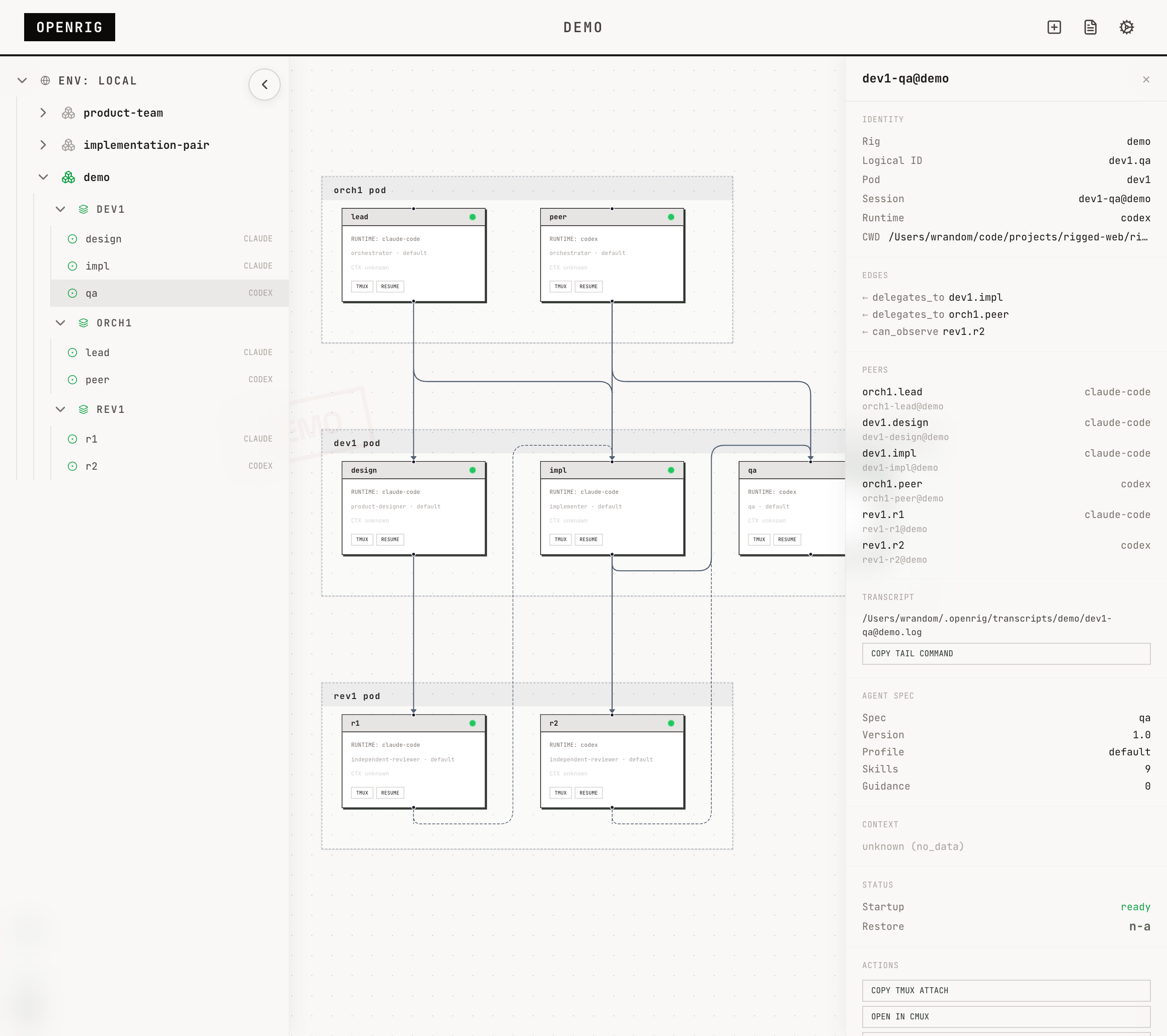
It runs locally: a daemon, a SQLite database, a CLI, and a dashboard. The agents are ordinary Claude Code and Codex sessions in tmux. product-team is the fuller starter, 7 seats, 4 Claude and 3 Codex, with an orchestration HA pair plus development and review pods.
Because 4 Claude seats run at once, single-plan users should expect provider throttling. For the light-footprint path, use conveyor, a 4-seat starter with 2 Claude and 2 Codex.
# Preview the smaller starter
rig specs preview conveyor

# Boot the light-footprint path
rig up conveyor
First Run
After product-team boots, rig ps shows the fleet map and rig ps --nodes --rig product-team shows the running pods and seats. When you're ready to shut the team down and bring it back, use the same rig name:
rig ps
rig down product-team
rig up product-team
rig ps is a fleet glance. rig down product-team snapshots the team and stops it. rig up product-team brings it back by name from that snapshot.
What It Does
OpenRig is a multi-agent harness — it manages the system that coding agents form when you run them together. Not the agents themselves, but the team they create: which sessions are running, how they relate, how to recover after a reboot, and how to stop it from becoming terminal sprawl.
- Define topologies in YAML (RigSpec) with pods, edges, and continuity policies
- Boot everything with
rig up— tmux sessions, harnesses, startup files, readiness checks - See the topology in a live graph with explorer, node detail, and system log
- Discover existing Claude Code and Codex sessions in tmux and adopt them into a managed rig
- Snapshot the full topology on
rig down, restore by name withrig up <name> - Communicate across agents with
rig send,rig broadcast, andrig chatroom - Evolve running topologies with
rig expand,rig shrink,rig launch,rig remove
Every agent runs in a tmux session you can attach to, inspect, and work with directly.
Starter Rigs
OpenRig's hero starter is product-team, the fuller product-development rig:
rig specs preview product-team
rig up product-team
Use it when you want the week-one experience OpenRig is built around: an orchestrator HA pair, development work, review work, and enough moving pieces for the coordination layer to matter.
For a smaller starter, use conveyor:
rig specs preview conveyor
rig up conveyor
conveyor is the smallest shippable software factory, one command. It keeps the footprint lower for single-plan users while still showing a real handoff path through intake, planning, build, and review.
Also ships: implementation-pair, adversarial-review, research-team, and secrets-manager (HashiCorp Vault managed by a specialist agent).
Browse the library:
rig specs ls
How It Works
OpenRig is a local daemon + CLI + MCP server + React UI, built on tmux.
CLI / UI / MCP
      |
Hono HTTP daemon
      |
  Domain services
      |
  SQLite + tmux + runtime adapters
- CLI: 40+ commands designed for both humans and agents. Every mutating command ends with what happened, current state, and next action.
- UI: Explorer sidebar, topology graph with pod grouping, node detail panel, system log, chatroom.
- MCP: 17 tools so agents can manage their own topology (
rig_up,rig_ps,rig_send,rig_chatroom_send, etc.) - Runtimes: Claude Code, Codex, and terminal nodes. Adapters for Pi and OpenCode in development.
Key Concepts
- RigSpec: Declarative multi-agent harness definition in YAML. Pods, members, edges, continuity policies, culture file.
- AgentSpec: Reusable agent blueprint with skills, guidance, hooks, profiles, and startup contracts.
- Pod: Bounded context group. Agents in a pod share memory and can maintain each other's context.
- Discovery:
rig discoverfingerprints existing tmux sessions.rig adoptbrings them under management. - Snapshot/Restore:
rig down --snapshotcaptures full state.rig up <name>restores from latest snapshot. Restore reports per-node outcomes (resumed, fresh, or failed). - RigBundle: Portable archive with vendored AgentSpecs and SHA-256 integrity. Share topologies across machines.
- Culture: CULTURE.md sets coordination norms for the group. Research rigs get exploratory culture. Implementation rigs get conservative, trust-but-verify culture.
Agent-Managed Software
A rig can package actual software alongside the agents that manage it. The shipped example is secrets-manager: a HashiCorp Vault instance operated by a specialist agent.
rig up secrets-manager
rig env status secrets-manager
rig send vault-specialist@secrets-manager "Check Vault health and report status." --verify
Requires Docker for service-backed rigs.
Requirements
- Node.js 20, 22, or 24 (even-numbered LTS releases; odd releases like 25 lack native addon prebuilds)
- tmux
Optional:
- cmux for
Open CMUXnode surface controls - Docker for service-backed rigs and managed apps
Setup and Troubleshooting
rig setupattempts core machine preparation: tmux, cmux, Claude Code, Codex, and tmux defaults. It reports what it tried and what actually succeeded. If something fails, it gives the local agent enough context to finish the job.rig setup --fullattempts a broader operator workstation setup (jq, gh) on top of core.rig doctorinspects current system health and helps diagnose problems after setup. Use it when something stops working or after machine changes.
Both commands support --json for agent-driven workflows.
Managed runtime boot (during rig up) may modify runtime config for core bootstrap and spec-selected runtime resources. rig setup discloses these paths so agents know what may be changed:
- global Claude:
~/.claude/settings.jsonfor minimal OpenRig command allowlisting - global Claude state:
~/.claude.jsonfor managed workspace trust and onboarding completion - project Claude:
.claude/settings.local.jsonfor context collector/activity hooks and selectedclaude_settings_fragmentresources - project Claude MCP:
.mcp.jsonfor selectedclaude_mcp_fragmentresources - global Codex:
~/.codex/config.tomlfor workspace trust and selectedcodex_config_fragmentresources
Already-running adopted sessions may need restart before they pick up newly written runtime config.
For agents: Ask the user whether they want core setup (rig setup) or the fuller workstation path (rig setup --full) before choosing the invocation. Inspect the result with --json and use rig doctor to finish any remaining machine-specific issues.
Comparison with Claude Managed Agents
Anthropic shipped Claude Managed Agents — a cloud-hosted, Claude-only runtime at $0.08/session-hour. OpenRig is the local side: open source, cross-harness, runs on your machine, costs nothing.
Links
- Website: openrig.dev
- Blog: Why I Built OpenRig
- Docs: openrig.dev/docs
- Open Specification: openrig.dev/specs
- Twitter: @_feralmachine
License
Apache 2.0
No comments yet
Be the first to share your take.