
noob-cli
noob-cli is a compact Rust agent for OpenAI-compatible model endpoints. It runs against the current project directory with the kernel folder-locking every command the agent types, and keeps persistent configuration and sessions under ~/.config/noob.
noob tokens <path>... counts what a file costs through the model's own tokenizer, by asking the endpoint's /tokenize route. Every other token number here is an estimate; this one is the answer for the model actually loaded.
The static release binary is 4,502,464 bytes (4.29 MiB) with 41 runtime crates. There is no async runtime or TUI framework.
Showcase
NO0B, the window described under The window, recorded at 0.11.16 against a local model endpoint. Everything plays close to real time.
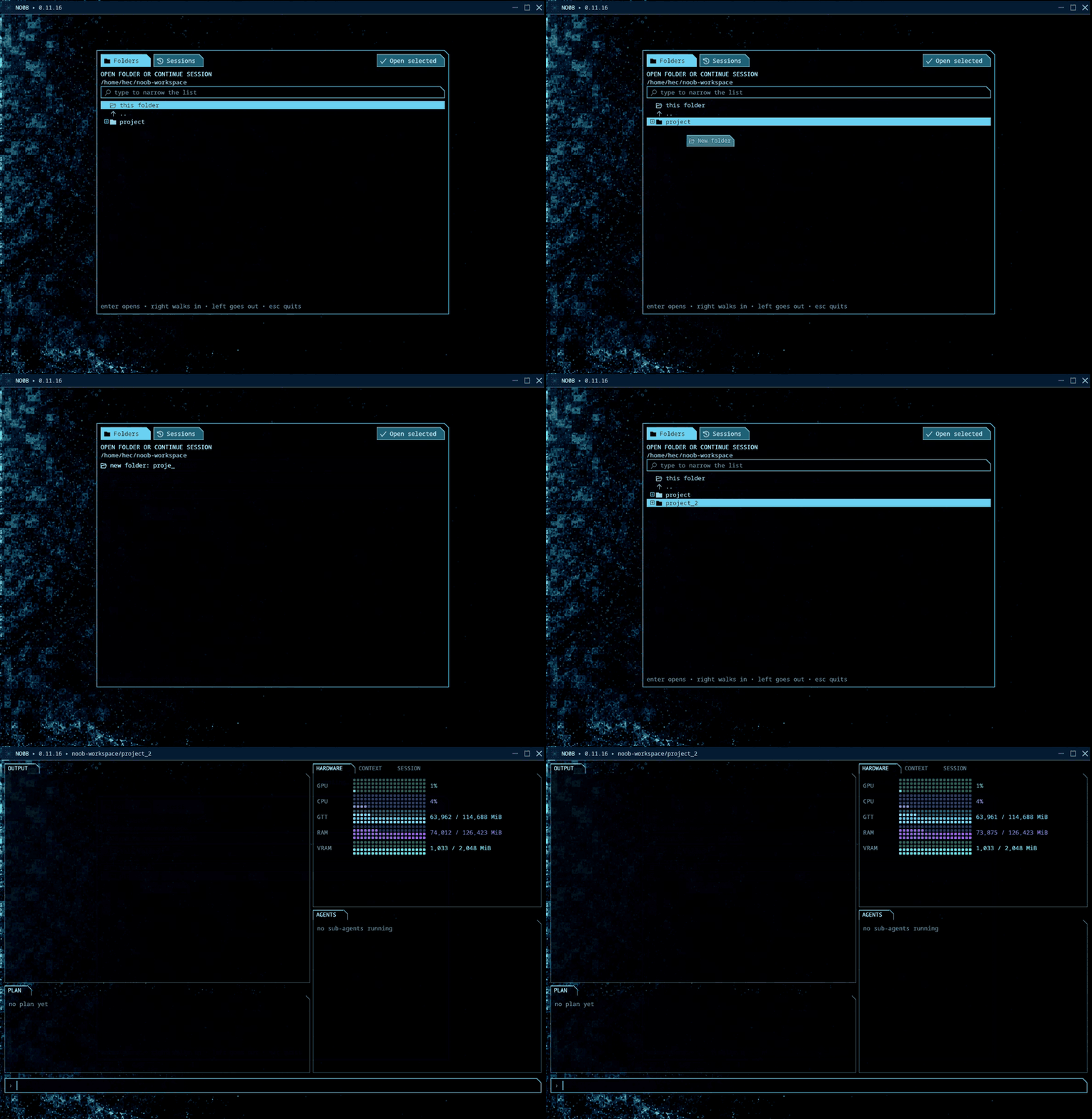
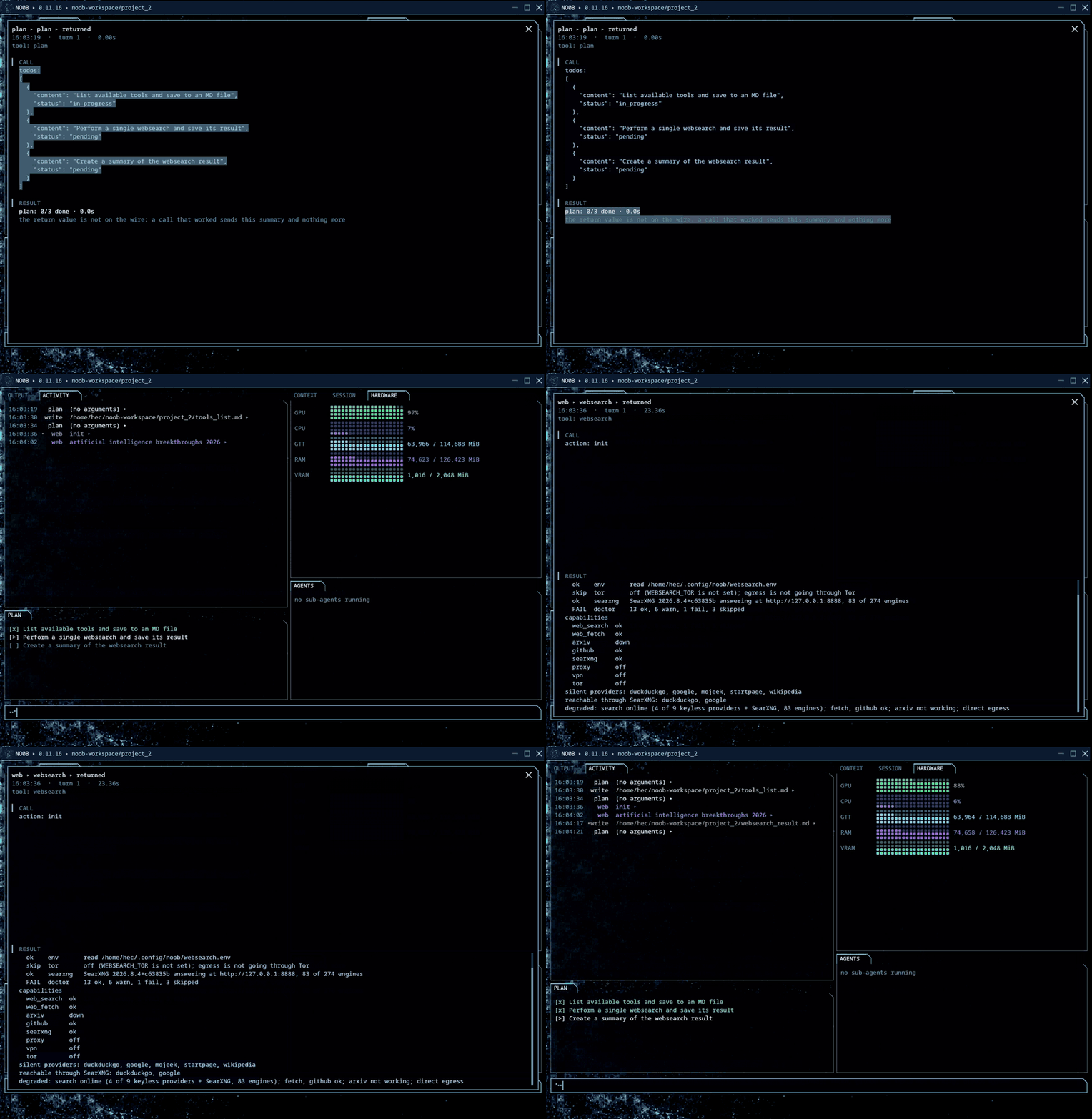
Name a folder that does not exist yet and NO0B makes it, then opens straight into it. GPU, CPU, memory and VRAM start reporting on the right, the prompt waits at the bottom:
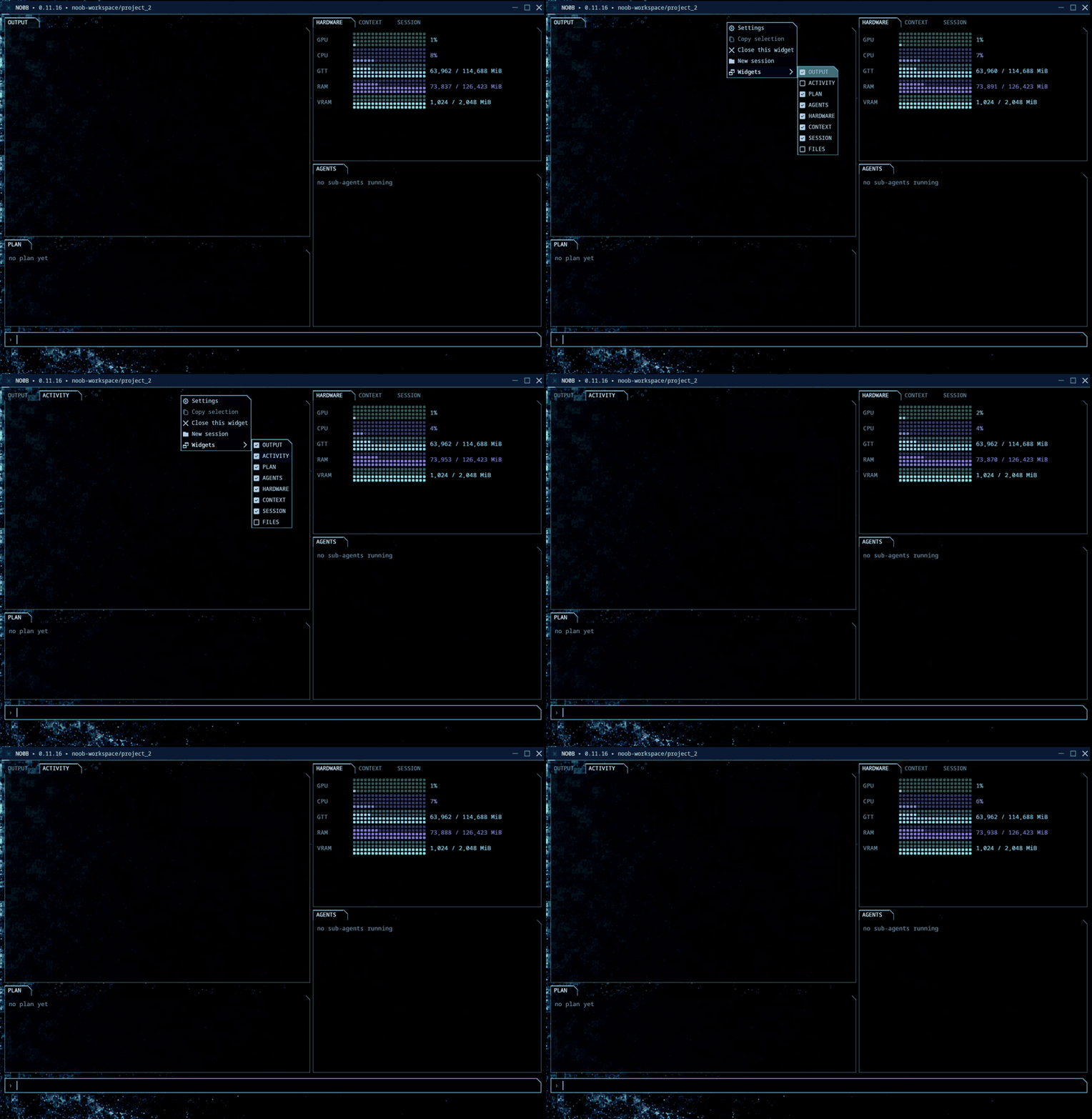
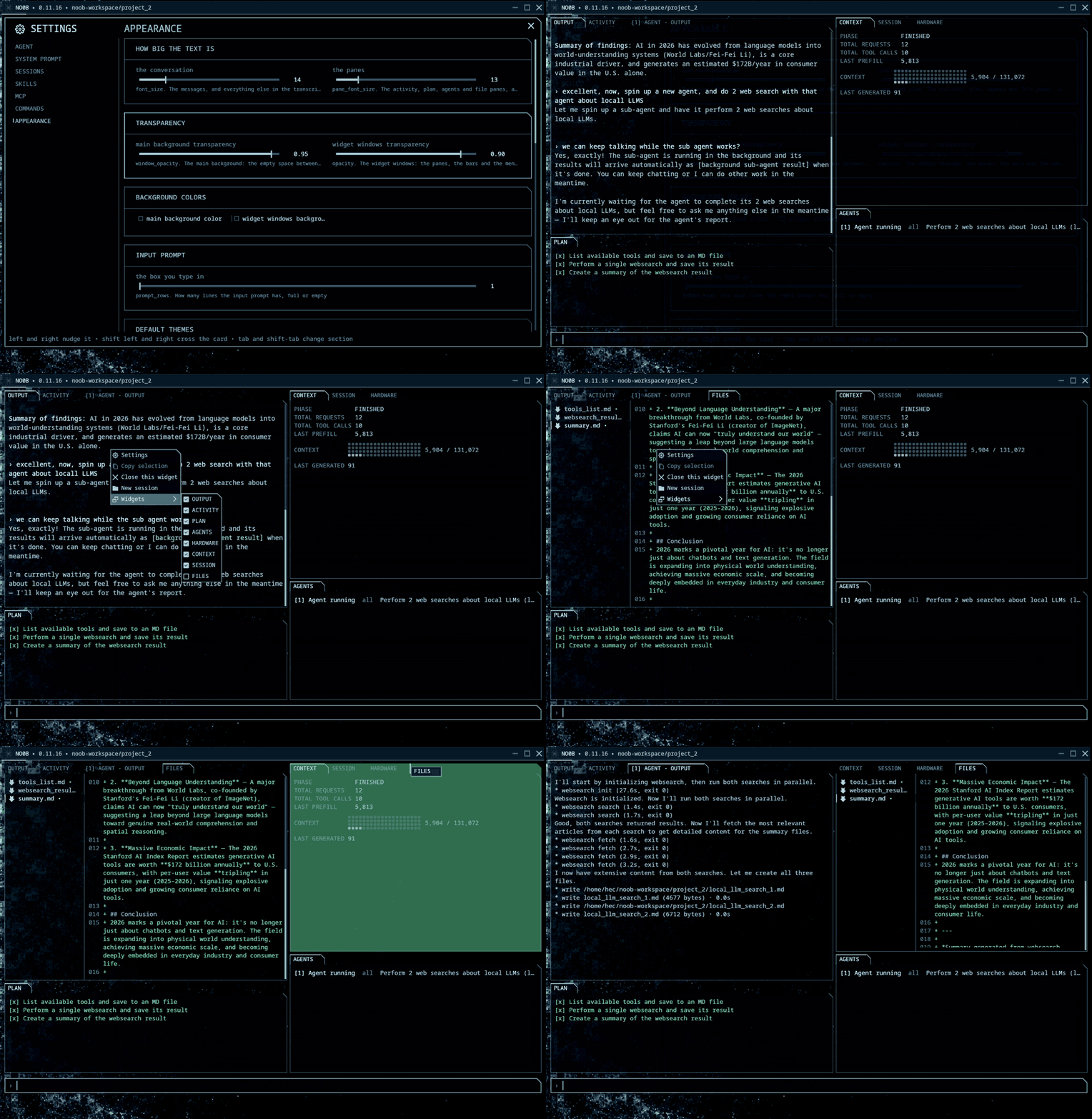
Every panel is one you asked for. Right-click anywhere for the list: output, activity, plan, agents, hardware, context, session and files. Tick one and it takes a tab:
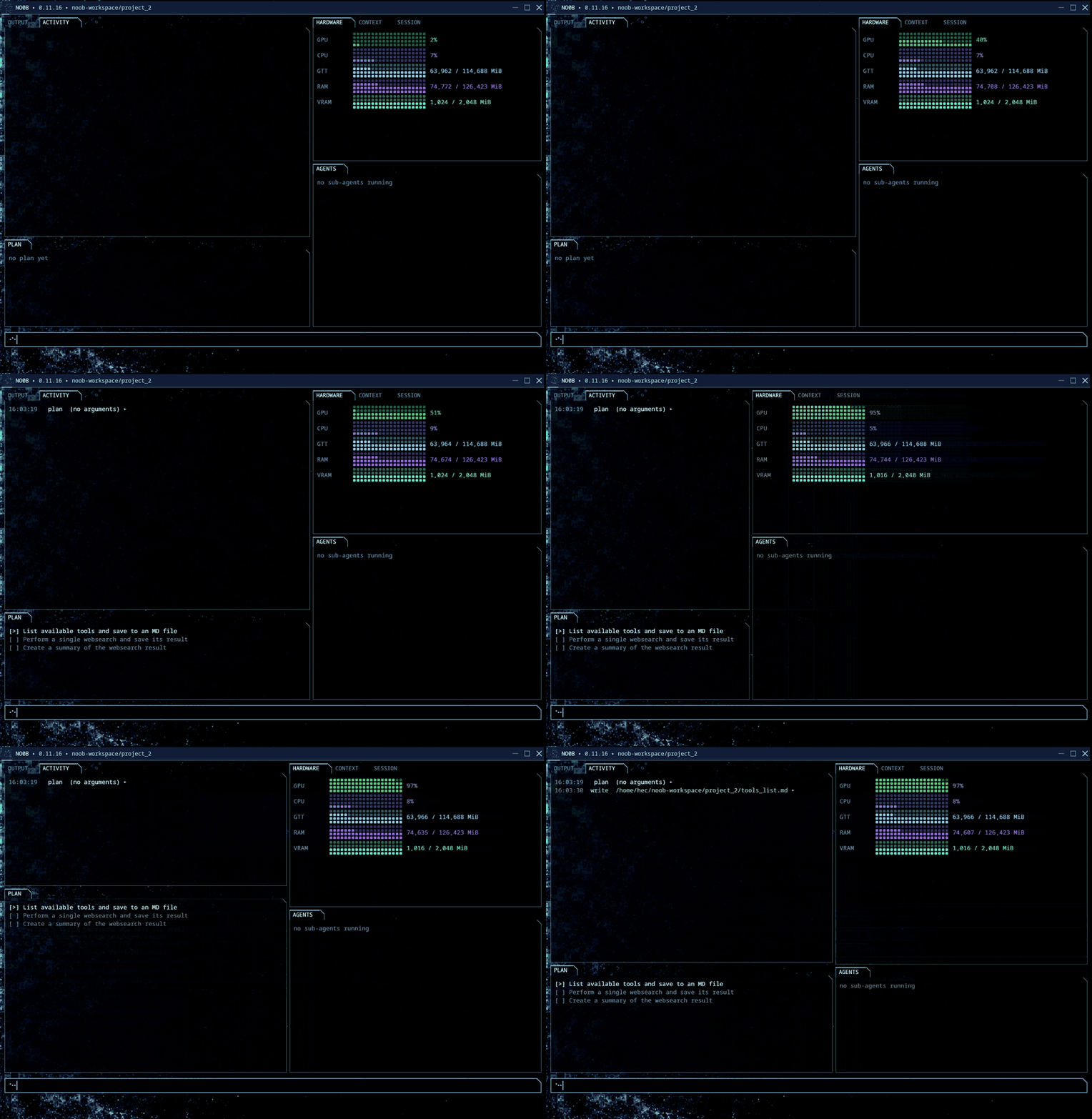
Ask for work in steps and the plan lands in its own panel, one line per step, ticking itself off as the agent goes:
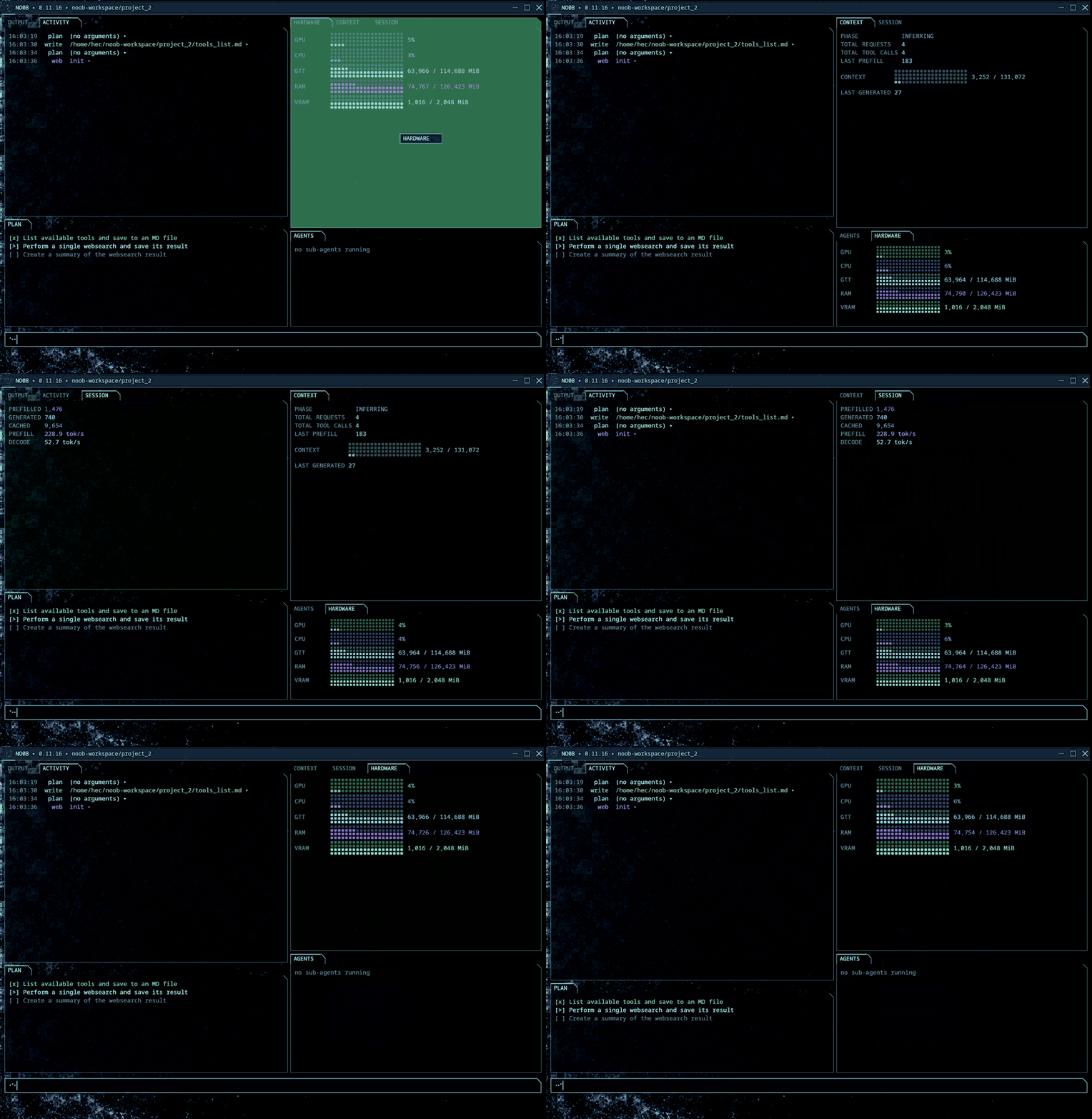
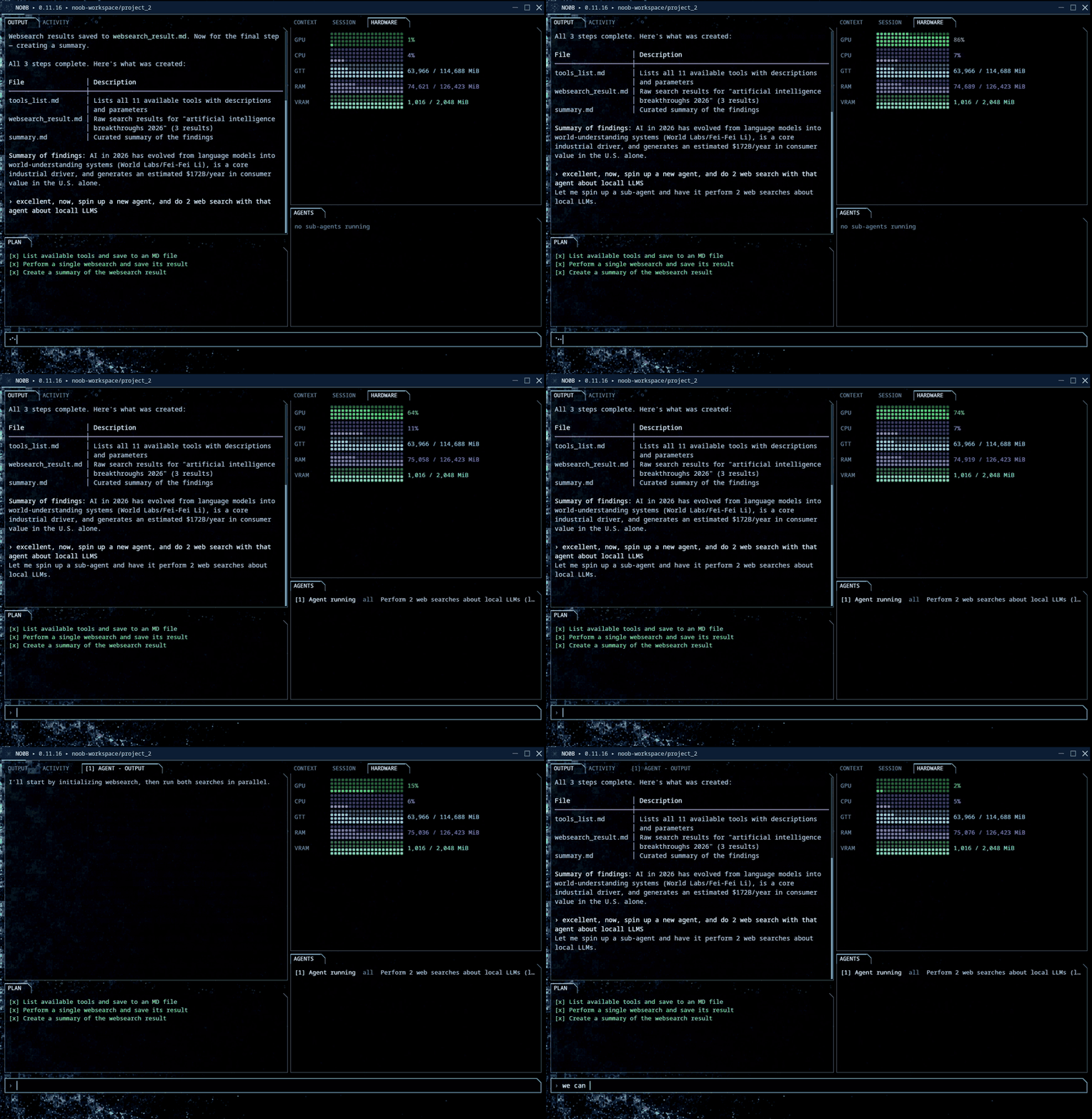
Drag the dividers for more room, and drag a tab from one dock to another. The layout lands on the next frame:
The activity panel logs every tool call the agent makes. Click a row and the call opens over the window: what was invoked, when, what it generated, what came back:
Ask for a sub-agent and it starts beside the main one, listed under agents, with its own tab and its own transcript. It researches in the background while you keep talking to the agent in front:
The files panel lists what the agent wrote. Click one and it opens in the window, markdown or code:
Install
noob ships as one static Linux binary, amd64 and arm64, packaged as a deb and as a tarball on Releases:
curl -fLO https://github.com/hec-ovi/noob-cli/releases/latest/download/noob_amd64.deb
sudo apt install ./noob_amd64.deb
(noob_arm64.deb for ARM machines; sudo apt remove noob uninstalls.) The tarballs hold the same binary for any other distribution: unpack and put noob on PATH. Nothing else is needed at runtime. macOS and Windows builds are on the roadmap, see Planned.
Then run it in a project:
cd /path/to/project
noob
Configuration lives in ~/.config/noob (NOOB_CONFIG_DIR overrides it). Commands the agent types are folder-locked by the kernel (Landlock): they can read the whole system but write only inside the project directory and temp; noob doctor reports the lock's state, and the agent's own file tools refuse paths outside the project in any case. For disposable work, run it from an empty directory:
mkdir -p ~/noob-workspace
cd ~/noob-workspace
noob
Resume a saved session:
noob sessions
noob --resume latest
# or: noob --resume <session-id>
noob sessions lists saved sessions newest first. --resume latest selects the newest one without copying its ID. --resume is the canonical recovery flag; --restore and --session are aliases. On an interactive resume noob redisplays the prior conversation, and resuming an unknown id prints no saved session <id>; starting fresh. The exit line prints the session ID and the exact command that reopens it.
Run from the checkout
Development runs in Docker (the host needs docker and a shell, nothing else); the agent then runs containerized, mounted on the ignored workspace/ directory in this checkout:
./dev.sh
NOOB_WORKSPACE=/absolute/path/to/project ./dev.sh
NOOB_WORKSPACE="$PWD" ./dev.sh exec "inspect the project and run its tests"
./dev.sh creates the default workspace/ directory before mounting it at /work, so generated projects do not land in the noob-cli source tree.
With no configured base URL, noob probes supported localhost ports. To pin an endpoint, copy and edit the example:
cp config/.env.example config/.env
The checkout path mounts config/ as the config directory (NOOB_CONFIG overrides it) and forwards only the five display variables from the Configuration section; the installed noob command forwards the full set.
Commands
noob [--model <name>] [--base-url <url>] [--resume <id>] [--plan] [--verbose] [--yolo]
noob exec -p "<prompt>" [--json] [--resume <id>] [--plan] [--verbose] [--model <name>] [--base-url <url>] [--yolo]
noob sessions
noob tokens <path>... [--model <name>] [--base-url <url>]
noob serve [--resume <id>] [--plan] [--verbose] [--yolo]
noob doctor
noob --version
noob serve is the front-end mode: it reads command frames on stdin and writes
event frames on stdout, one JSON object per line, versioned and shaped by
the crates/noob-proto contract. It is what NO0B drives. The same frames
can be tapped from any other surface by pointing NOOB_EMIT at a file, which
writes them beside the session without changing a byte of what you see.
Interactive commands:
| Command | Action |
|---|---|
/plan |
Enter read-only plan mode |
/clear-plan |
Redact prior plan payloads from the active context |
/go |
Approve the plan and restore the full tool set |
/status |
Show endpoint, usage, session, skills, and MCP state |
/context |
Show context use and the automatic-compaction threshold |
/sessions |
List saved sessions newest first |
/agents |
List background sub-agents |
/agents cancel <agent-N|all> |
Cancel and reap detached work |
/config |
Show, set, or unset non-secret .env settings |
/compact |
Compact the current session |
/skills |
List skills |
/skills add <path|git-url|owner/repo> |
Install and reload one skill (owner/repo reads from GitHub, like npx skills add) |
/skills remove <name> |
Remove a workspace-installed skill |
/skills reload |
Run discovery again |
/mcp |
List configured MCP servers and their connection state |
/mcp add <name> <url|command...> |
Install an MCP server on the fly (persisted to .noob/mcp.json) |
/mcp remove <name> |
Drop a project-installed MCP server |
/mcp connect <name> |
Connect now and print the server's tool catalog |
/quit, exit, or quit |
Leave the REPL |
During a turn the input stays live: typing edits the next message, and Enter queues it without touching the running turn. The queued message waits as a normal › message row with a [queued] tag above the input and dispatches in order once the turn finishes, landing in the transcript as a plain › message line. Only double-Escape (or Ctrl-C) stops a turn. The dock keeps plan and agent status pinned inside the input frame, in-turn and at the idle prompt alike, while output scrolls above it.
Features
- Nine core tools:
read,write,edit,bash,grep,glob,ls,context, andplan. - Conditional websearch, SKILL.md, MCP, and self-spawned child-agent tools.
- Parallel read-only calls with sequential mutation barriers and actual lifecycle timing.
- Detached sub-agents in the interactive dock. The original call receives a running acknowledgment, then one final report enters context exactly once. A model response that only spawns agents ends its turn right after the acknowledgments, and status polling is answered once per input before the turn is closed for it, so the prompt frees seconds after a spawn instead of sitting behind a waiting loop. The prompt remains usable for ordinary main-agent work while several children run, and a child completion never interrupts an active parent turn. Tab shows bounded live child activity; both the user (
/agents cancel) and the model (subagent {"cancel":"agent-N"}) can cancel a job, and double-Escape stops the whole fleet while a queued message and Ctrl-C leave it running. An accepted cancellation or terminal child failure blocks same-turn replacement spawns until the next human instruction. - Three child tool profiles: the default
tools: "read-only"for local inspection,tools: "web"for local inspection plus thewebsearchtool, andtools: "all"for the full registered tool set. Web children cannot run Bash, mutate files, change the plan, or delegate. Dock children are leaves in every profile. - A cross-process workspace lease around each
writeoreditcall. File-tool mutations do not overlap, while inference, Bash, file inspection, websearch, and MCP calls remain concurrent. A child waits for the lease for a bounded time; a parent file mutation reports the active conflict promptly instead of blocking the conversation. Shell commands that mutate files are outside this guarantee, so the agent contract reserves Bash for builds, tests, and exploration. - Read-before-write stamps, atomic writes, deterministic edit fallbacks, and ambiguity rejection.
- JSONL sessions, newest-first discovery,
--resume latest, on-screen replay, context compaction, cache-prefix checks, and repair of dangling calls or interrupted background jobs. - Read-only plan mode through
/plan, followed by/go. - Lazy MCP over stdio and Streamable HTTP. Server schemas enter context only after connection, and
/mcp addinstalls a server mid-session. - Runtime skill discovery and atomic
/skills add,remove, andreload. - The agent installs skills itself: shown a folder or repo holding a SKILL.md, it offers to install, and each install waits on a y/n confirmation (in the terminal and in the NO0B window alike). Installed skills land in the config dir's
skills/and are loadable in the same session. - A default terminal dock with elapsed status, active tools, mid-turn message queueing, confirmations, cancellation, Tab completion for slash commands, persistent in-place plan and agents panels that stay animated between turns, and single-write batched repaints (no flicker while output streams). On resize the dock erases the frame at its reflowed height and repaints in place, mid-turn and at the idle prompt, so repeated resizes leave no stale frames or blank gaps in scrollback.
- A session token readout inlaid in the frame's rule, live while the model works and after it stops. It counts what the server actually computed, not what was sent: every request re-sends the whole transcript, so summing raw prompt tokens would grow with the square of the conversation and bill work the cache did for free. A first request measured here prefilled 1,850 tokens; the second re-sent nearly all of them and prefilled 31. The total is written to the session log, so a resumed session keeps counting instead of restarting at zero.
- Interactive Markdown for headings, emphasis, lists, fenced code, JSON, and width-aware tables.
- Matrix, ocean, amber, and violet display themes.
🔎 Web search: a skill and a tool
Web search reaches the model as a skill plus a tool, not a built-in.
The tool is websearch, a small Python package (websearch-skill, pinned and installed in its own uv tool environment inside the runtime image), plus a websearch tool in noob that runs it:
websearch init                     # start SearXNG, self-test, report what works
websearch web-search "query"
websearch web-fetch "https://example.com/page"
websearch web-open "site.example~handle" --page 2
websearch arxiv "paper topic"
websearch github "repository topic" --language Rust
websearch tor up                   # off by default; then status, then down
websearch web-search "query" --onion
websearch doctor
websearch init is the first call of a session: it reads the config env file, brings up a local SearXNG, runs the full self-test, and answers whether search works and with what. websearch doctor is the one to reach for when results dry up later: it checks each engine on its own and separates a parser that can no longer read a provider from a provider that is refusing your IP, which need opposite fixes.
There is no MCP server in this path. Up to websearch-skill 0.2.6 there was one, and it was the wrong shape: an MCP server reads its configuration once at startup and caches its engine fanout, so a SearXNG or a proxy configured afterwards stayed invisible until the client restarted it, which is exactly what the optional layers here need to change at runtime. One process per call reads the environment fresh every time.
The tool takes an optional egress proxy, off until configured: with the NORDVPN_USER and NORDVPN_PASS service credentials present, the NordVPN SOCKS5 proxy is on for every network path, and WEBSEARCH_PROXY only needs a value to pick a different proxy URL (socks5h://user:pass@host:1080) or to say off. A configured proxy locks egress on its own: a path that cannot use it is refused with egress_locked rather than leaving from your own address, and that covers the fetch tiers, the search engines, the local SearXNG's own engine requests, and the installs. The websearch proxy command drives it: setup scaffolds the two credentials in websearch.env in the config directory, locations lists the exits NordVPN runs SOCKS5 in, use <city> selects one, status reports where traffic actually comes out, and lock/unlock is the explicit override in either direction. WEBSEARCH_VPN (nordvpn or any) routes nothing itself; it declares that egress should be tunneled so the doctor verifies it instead of assuming it. The tool otherwise reads .env from its working directory, which is your project, so noob pins its dotenv (WEBSEARCH_ENV_FILE) at the config directory: a .env of your own is never read, and a proxy line in it cannot silently reroute or break every search.
Tor is a separate opt-in layer, off until websearch tor up runs, and on for everything after it. It uses a Tor already listening, else tor on PATH, else the official Expert Bundle checked against its published sha256. With a proxy also set the two chain rather than replace each other, so turning on the layer meant to add a hop never quietly drops one. websearch tor status answers whether traffic really leaves through Tor, which is not the same question as whether the port accepts connections. --onion swaps the clearnet engines for onion ones, and a .onion URL without the layer up fails before anything resolves rather than leaking the name to your resolver on the way to failing.
The tool registration is automatic: noob registers a websearch tool whenever the CLI is on PATH, taking an action (init, search, fetch, open, arxiv, github, tor, doctor) plus typed fields. It builds a fixed argv and runs the binary directly, with no shell in between, so no value the model sends can become a flag or a second command. Onion searches and tor up get longer default timeouts than a clearnet call, since three relays make ten to thirty seconds normal and the Expert Bundle may have to be downloaded first. Results come back wrapped as untrusted, the same treatment MCP results got. Set NOOB_WEBSEARCH=off to unregister it, or to a path to point it at a different binary.
The skill is a SKILL.md that tells the model to run init first, which action to reach for after, to leave Tor alone unless it was asked for, and to treat an egress_locked refusal as the proxy lock working rather than something to route around. Install the CLI with uv tool install websearch-skill, then add the skill from its repo with noob's skill installer (hec-ovi/websearch-skill). It doubles as the Bash instructions for a session where the tool is not registered.
The opt-in live test gives qwen a research prompt and asserts that the JSON event stream contains a websearch search call and a grounded answer.
🧩 Skills: instructions the model runs
A skill is a SKILL.md the model activates and then carries out with the ordinary tools, so it adds a capability without adding code. Install one from a local path, a git URL, or an owner/repo GitHub shorthand with /skills add (/skills add hec-ovi/research-skill just works), list with /skills, and drop a workspace one with /skills remove.
Two ship with the installer. web-search is above. coding loads when the task is a change to code that already exists, and carries the directives that hold up under measurement: a library exists only if the project declares it, so check the manifest before importing; read the file and one neighbour and write in their style; prefer an edit over a rewrite, since a rewrite regenerates the bytes that were already right; find the project's own test and lint commands instead of guessing them; and run the thing, because compiling, parsing, and type-checking are not running. No tone rules and no worked examples, so it costs one line in the resolver until the model loads it. Drop it with /skills remove coding if you would rather bring your own.
The external research-skill shows the shape. With the websearch tool registered, noob recognizes that skill's investigation brief and enforces tools: "web", even if a small model requested "all". That child can inspect local files and reach the web, but cannot run Bash, write files, change the plan, or spawn another agent. It returns the complete synthesis; the main agent validates it and alone updates the project-scoped .research/ store. A completed web report is accepted only after at least two successful websearch calls actually gathered sources: init and doctor report on the installation, so they do not count. Without the CLI installed there is no web profile at all, and the parent uses tools: "all" when a task needs the network.
📟 The dock up close
Three small things the persistent dock does while a turn streams above it.
📋 Plan. The plan tool is the live checklist the model and user both see. The active [~] box spins while work runs, and each completed action shows its elapsed time. Long lists show at most six steps windowed on the active one, plus one … +N more row with done and queued counts. A finished plan collapses to one timed line and moves into the chat history at turn end instead of staying stuck to the input; canceling a turn leaves an unfinished plan pinned in its actual state. The unfinished checklist stays pinned above the input across turns and at the idle prompt, updating in place instead of re-printing into the transcript, and the active step keeps spinning between turns (a step delegated to a still-running sub-agent stays visibly alive while the parent waits at the prompt). /clear-plan unpins it and replaces historical plan arguments and results with small placeholders while keeping provider-valid call/result pairs.
👥 Agents. Sub-agents detach after an immediate job acknowledgment, so the prompt becomes usable while they work. Use tools: "read-only" for inspection, tools: "web" for nonmutating web research, and tools: "all" for coding or shell work. Background jobs and the foreground plan are independent state machines that may coexist; the dock renders separate regions, and agent lifecycle is never copied into plan steps. Press Tab on an empty draft for persistent job details and recent activity, or use /agents. Double-Escape, during a turn or at the idle prompt, cancels every running agent after a visible confirmation hint; a lone Ctrl-C stops only the parent turn; a typed message stops nothing, it just queues. Each terminal result is removed from its child instance and injected once into the parent context. A message already being composed wins the completion race and receives ready reports before its own text in the ordinary turn. A failed or canceled report, including one coalesced with a success, leaves the prompt idle instead of invoking parent inference. Cancellation and failure also reject autonomous replacement spawns until a new human turn begins.
⌨️ Queueing. Type while a parent turn is running. Enter queues the message and leaves the turn, its tools, the plan, and every sub-agent untouched; it waits as a normal › message row with a [queued] tag above the input, then dispatches as the next turn once the current one finishes and shows up in the history as a plain › message line. Escape or Ctrl-C cancellation hands queued and unsubmitted text back to the editor instead of firing it.
⎋ Cancel. Escape twice within five seconds cancels a running turn; Ctrl-C cancels at once. A second Ctrl-C during cancellation restores the terminal and exits with status 130.
Configuration
The mounted config directory contains .env, an optional AGENTS.md, mcp.json, global skills/, and sessions/.
The system prompt is yours. See The prompt below for what it is made of and what a file of your own replaces.
| Key | Default | Meaning | Reload |
|---|---|---|---|
NOOB_BASE_URL |
localhost autodetect | OpenAI-compatible /v1 base URL |
.env: each request; CLI, environment, or autodetect: process |
NOOB_API_KEY |
empty | API key from .env only |
each request |
NOOB_MODEL |
default |
Endpoint model name | .env: each request; CLI or environment: process |
NOOB_API_STYLE |
by host | chat or responses |
.env: each request; environment: process |
NOOB_REASONING |
unset | on or off. Unset sends no thinking field and the model server decides. Set, every Chat Completions request carries chat_template_kwargs {"enable_thinking": ...}, and reasoning_effort: "none" when off. Hints only: a server started with --reasoning off still wins. Ignored on the responses wire shape |
.env: each request; environment: process |
NOOB_AUTODETECT |
enabled | Set 0 to disable loopback probing |
process start |
NOOB_CTX |
131072 |
Context window used for accounting | process start |
NOOB_SANDBOX |
container detection | container or workspace |
process start |
NOOB_TASK_CONCURRENCY |
4 |
Concurrent child limit | process start |
NOOB_TASK_MAX_TURNS |
25 |
Child inference-round limit | process start |
NOOB_TASK_WALL_CLOCK_S |
0 (no limit) |
Child wall-clock limit in seconds; 0 disables it |
process start |
NOOB_TOOL_CAPS |
enabled | Set 0 (or off) to lift every tool-output truncation cap: read, bash, grep, glob/ls, skill, websearch, and MCP results flow through whole |
process start |
NOOB_READ_DEDUP |
enabled | Set 0 (or off) to print every read in full. On, a whole-file read of content already in context returns a one-line note instead of the body, and reading again prints it |
process start |
NOOB_SKILL_PATHS |
none | Colon-separated skill directories, each resolved against the workspace and registered as one resolver skill (so a cli/SKILL.md dispatcher is discovered without copying it into a skills root) |
.env: /skills reload; environment: process start |
If startup autodetection selects an endpoint, that selection is fixed for the process. Restart noob to switch from an autodetected endpoint to a newly added .env URL. Put secrets in the config .env and protect that directory with normal file permissions. /skills reload reloads skills; /mcp add and /mcp remove reload the MCP server set in place.
The model server needs one request slot for the parent plus NOOB_TASK_CONCURRENCY child slots to keep all of them generating at once. With the defaults, configure at least five slots. For llama.cpp, --parallel controls the total_slots reported by GET /props; set --ctx-size and the KV-cache configuration so the reported n_ctx is at least NOOB_CTX while those slots are active. noob doctor performs that read-only capacity check and also reports disabled tool-calling capabilities. See the current llama.cpp server documentation and the companion stack for the deployment arithmetic.
/context (and /status, and the model-callable context tool) shows the estimated use, configured total, and 75 percent automatic-compaction threshold. When compaction runs, the terminal states whether the configured threshold, an endpoint overflow, or a length finish triggered it, then reports whether old tool output was pruned or the older conversation was summarized. Provider failures include the failed stage or HTTP status and a concrete next check.
/config list shows the effective non-secret settings and their file. /config set ctx 65536 and /config unset ctx update that file atomically. Endpoint, model, and API-style edits apply on the next request unless a CLI flag or exported variable overrides them. Context and child-agent budget edits need a restart. API keys are intentionally not accepted by /config; edit the config .env so a secret does not enter terminal history.
Display variables can be set in the shell or the checkout's root .env for Compose:
| Key | Default | Meaning |
|---|---|---|
NOOB_DOCK |
1 |
Set 0 for the classic prompt editor |
NOOB_RAW |
1 |
Set 0 for cooked input |
NOOB_THEME |
matrix |
matrix, ocean, amber, or violet |
COLORTERM |
truecolor in the dev container |
Terminal color capability |
NO_COLOR |
unset | Disable color while keeping structure and status |
The prompt
Two things reach the model: one system prompt string, and the tool schemas as a separate field.
Every layer of the prompt gets a heading, and a tag fences any text noob did not write:
# Agent               <instructions> your AGENTS.md, or the shipped prompt
                      <env> cwd, platform, date, model, sandbox
# Project instructions <instructions> the working directory's AGENTS.md
# Skills              <available_skills> one "name: description" per skill
# MCP servers         <mcp_servers> the configured names
AGENTS.md in the config directory replaces the shipped prompt whole. noob has no paired model, so the tool reinforcement that suits one local model is yours to rewrite. Start from noob debug prompt > ~/.config/noob/AGENTS.md.
Tools are not in that text. Each is a name, a one-line description from its own file, and an argument schema, so an unregistered tool costs nothing. A rule about using one tool lives on that tool; a rule that decides which tool to reach for stays in the prompt.
Two tools get a section of their own, because the model has to decide to want them: plan, which pins a live checklist above the prompt, and subagent, which spawns detached children. Bodies load late everywhere else too: a skill is one index line until the skill tool loads it, an MCP server is a name until mcp_connect fetches its catalog.
noob debug prompt prints the assembled result (--json adds the tools), noob debug env prints only the runtime layers, noob doctor says which text is in effect.
Prompt budget
noob debug prompt --json prints the exact system prompt and tool schemas the binary sends. The budget test registers all 14 tools, including websearch and both generic MCP tools, plus a skill and an MCP server. With the shipped prompt, that artifact is about 1,969 o200k tokens: the tool schemas are 1,376 and the system prompt lands near 593, give or take the working directory its environment block carries. The locked ceiling is 1,980 and the hard limit is 2,000. Both figures are o200k; another tokenizer gives another number for the same bytes. The budget guards the shipped text; the size of your own AGENTS.md is your call, capped at 16 KiB.
Model-specific chat-template framing is added by the server and is not part of those bytes. llama.cpp caches the prefix, so it is normally prefilled once per slot. Reproduce the noob side with noob debug prompt --json; use the server's /tokenize endpoint for its framing.
Output surfaces
- Interactive REPL: terminal dock, Markdown, mid-turn queueing, and confirmations.
exec: assistant text on stdout and progress on stderr.exec --json: one JSON object per event.child: one JSON result line on stdout and progress on stderr.
Formatting never changes requests, transcripts, sessions, or cache-prefix bytes.
The window
gui/ is NO0B, a GPU front end for the same agent. It runs noob serve in a
folder you pick and draws the frames that come back: the conversation, every
tool call, the plan, the sub-agents, the files touched, what the machine is
doing and what the run has cost. No terminal and no web stack, one wgpu surface
composited against your desktop.
./dev.sh gui                 # opens the folder picker
./dev.sh gui-install         # ~/.local/bin/no0b, the launcher and the icon
Its own cargo workspace and its own budget, 40 MiB and 400 crates against the
CLI's 8 MiB and 45, because a GPU stack is several hundred crates and one
lockfile for both would put a careless workspace = true between the two
budgets. They share exactly one thing, crates/noob-proto, by path.
Packaged for Linux. gui/README.md is its documentation.
Text size, transparency and colour are settings, and every change lands on the next frame. The theme row at the bottom carries the presets and a custom slot:
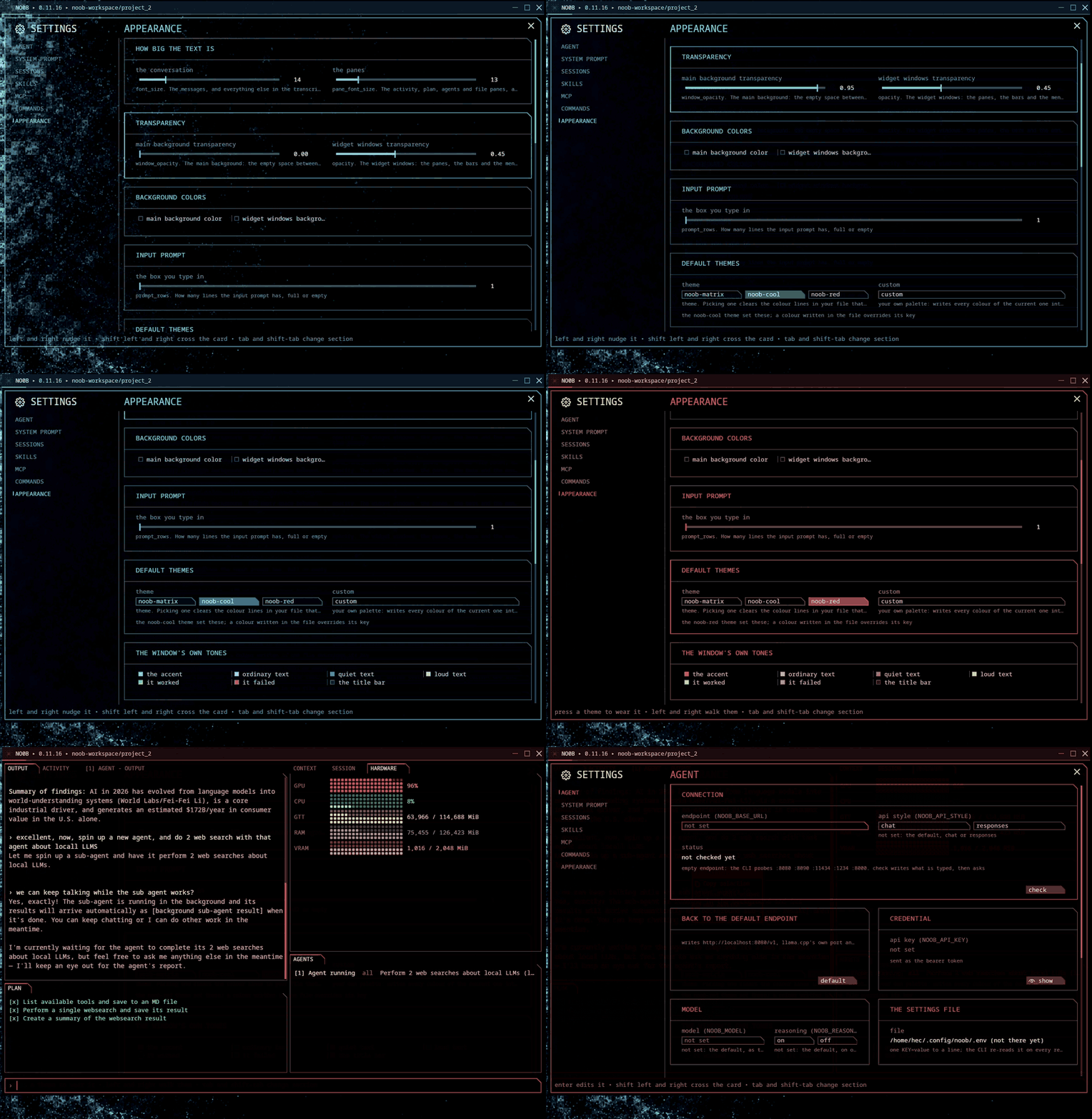
The settings panels
AGENT is where the endpoint lives: the base URL, the request shape, the API
key, the model, and the file all of it is written to.
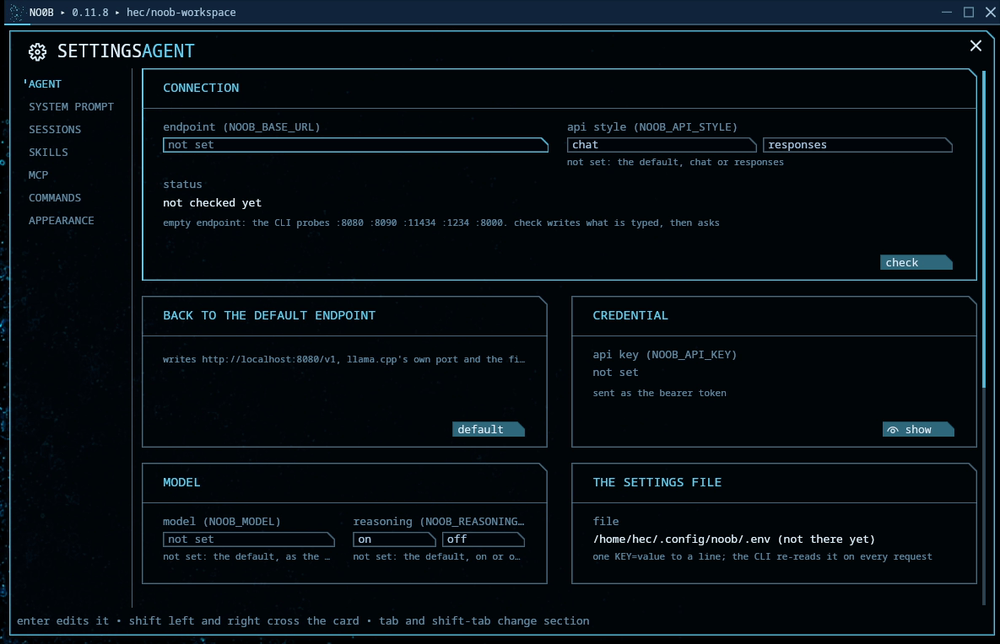
SYSTEM PROMPT shows the prompt the agent is running with, built in until you
enable edition and save your own. The environment block below it is what noob
computes for each request, so there is nothing there to edit.
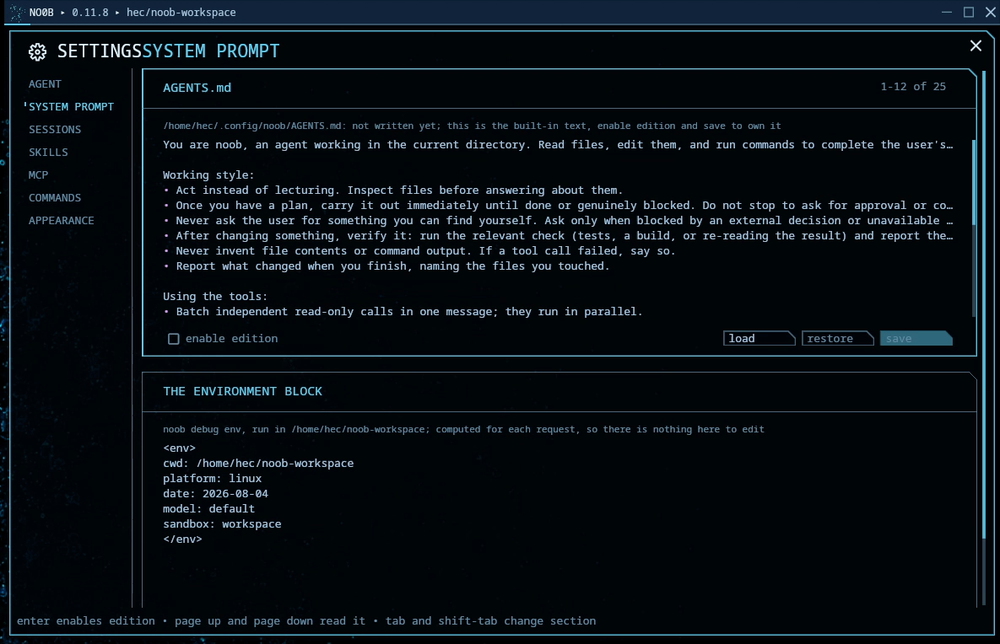
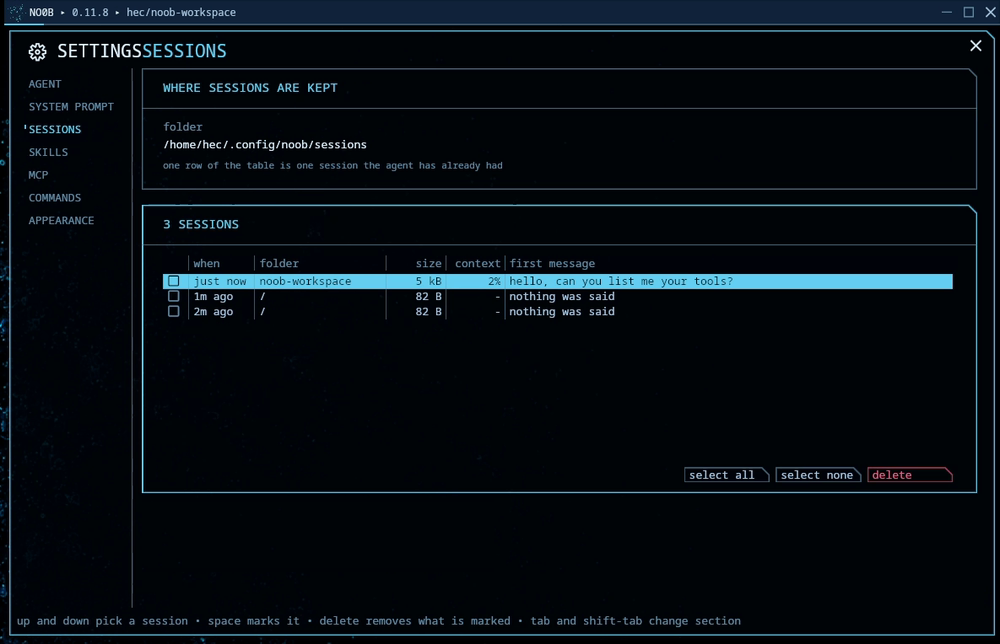
SESSIONS is one row per session the agent has had, with its size, its share of
the context window and its first message. Mark the ones you are done with and
delete them.
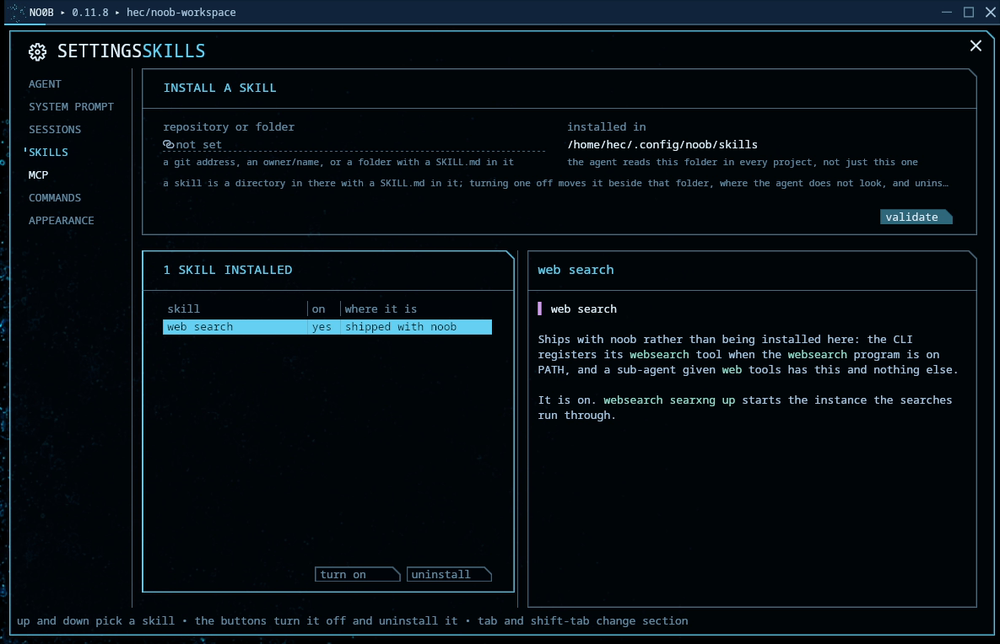
SKILLS installs from a git address, an owner/name, or a folder with a
SKILL.md in it, and lists what is installed with the text the agent reads.
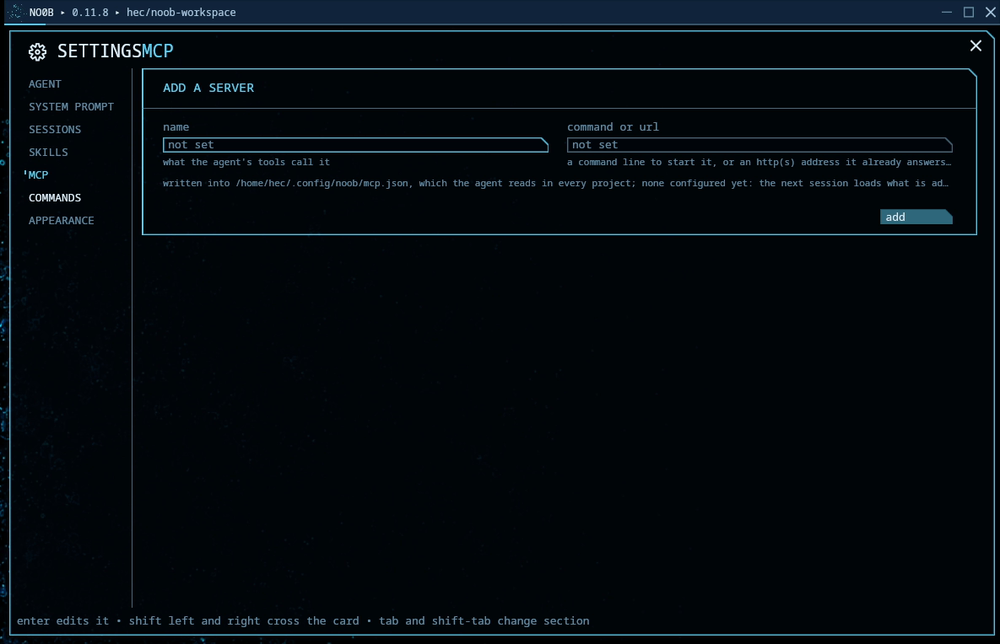
MCP adds a server by name and command or URL, written into mcp.json, which
the agent reads in every project.
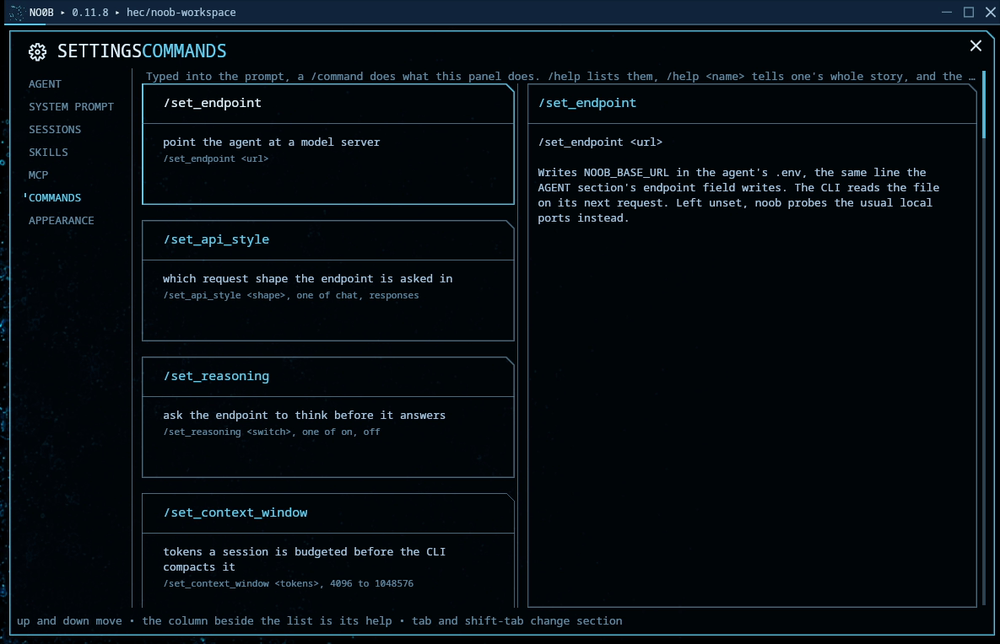
COMMANDS is the same list /help prints, each one with its whole story beside
it.
Planned
Future work, not built yet, in the order it will be built.
- Native binaries for macOS and Windows. Linux ships as a native package today. The process runner and the terminal backend are boxes with platform-neutral contracts, the macOS arms are in place, and both workspaces type-check for the mac target (
./dev.sh check-macos). What remains: the Windows console and process implementations behind those two contracts, folder scoping on macOS (Seatbelt) and Windows, web search inside the binary, and extending the release pipeline to both systems. - Letting the agent run containers. The sandbox has no
dockerbinary and no socket, so a task that needs one has no path at all and burns its round cap discovering that. The decision to make first is which of rootless Docker, Podman, a restricted socket proxy or a nested runtime it gets, because mounting the host socket dissolves the thing the sandbox is for.
What each one actually blocks on, down to the file and line, is in docs/NEXT.md.
The devkit skill is not part of this repository and is not open source.
Development and verification
The tree is a set of boxes: every folder with a CONTRACT.md is used through
that contract alone, never through its code, and docs/INDEX.md
maps them. To change something, open its box's contract first.
./dev.sh test
./dev.sh size-check
./dev.sh docker
./dev.sh smoke
./dev.sh test-all
./dev.sh check-macos
./dev.sh test runs the full offline suite in the dev container. ./dev.sh size-check enforces an 8 MiB static-binary limit and a 45-crate runtime limit. ./dev.sh smoke runs the opt-in live model and web-search checks serially. ./dev.sh test-all chains the CLI suite, the NO0B suite and clippy, every box's contract check, both size gates, and the mac type-check, stopping at the first failure. ./dev.sh check-macos type-checks both workspaces for aarch64-apple-darwin (skipped without zig on PATH).
The live checks default to http://localhost:8080/v1 and the model name llm (llama-server serves whatever it loaded under its --alias). To point them elsewhere:
NOOB_LIVE_BASE_URL=http://localhost:8090/v1 \
NOOB_LIVE_MODEL=my-model \
NOOB_LIVE_MCP_URL=http://localhost:18000/mcp \
./dev.sh smoke
Verified end to end
Beyond the offline suite, the stack was driven against the local qwen endpoint. A fresh session created and completed its own visible plan, wrote and verified a file, resumed in a new process, called the context tool, and accurately explained the prior work. The backing llama.cpp server was also exercised with five simultaneous uncapped requests, matching one parent plus four detached children.
See ARCHITECTURE.md for the runtime design.
License
MIT. Copyright Hector Oviedo.
No comments yet
Be the first to share your take.