
NextRole 🚀
✨ GenAI-Accelerated Career Advancement ✨
Upload your CV + a job description. Get a tailored resume PDF, a researched interview-prep doc, and a day-of battlecard cheat sheet — built by a multi-agent system with long-term memory.








What is NextRole?
Preparing for an interview takes hours of tedious resume tailoring and company research. NextRole automates the heavy lifting. Hand it your current CV and a target Job Description (or just a JD URL) — whether you're applying externally or angling for an internal move — and a team of specialized AI agents researches the company, rewrites your resume to fit, coaches you round-by-round, and prints a cheat sheet for the day of.
- 📄 Tailored resume → PDF — your experience rewritten against the exact JD + company research, rendered with
rendercv(editable & re-renderable). - 🔍 Deep company & role recon — live web research distilled into a match analysis.
- 🎯 Structured interview prep — a self-introduction plus per-round STAR stories mapped to the role.
- ⚡ Day-of battlecard — a one-page-per-round PDF cheat sheet for the final high-pressure review.
- 🗓️ Time-boxed prep plans — a study plan that fits 1 month, 2 weeks, or just 3 hours.
- 🔗 Paste a JD URL — point it at a careers page; it extracts and processes the posting for you.
- 💬 Iterate by chatting — "add a 4th round", "add React to my skills" — streaming multi-turn edits, with the right agent owning each file.
- 🗂️ Built-in workspace — upload, preview (PDF / MD / YAML / JSON / code), print-to-PDF, and swap the LLM at runtime.
Demo
▶️ Watch the full walkthrough in HD on YouTube »
Quick Start
The whole stack — frontend, backend, Postgres, Redis, S3-compatible object storage — runs in Docker.
# 1. Clone & configure
git clone https://github.com/tam159/next-role.git
cd next-role
cp .env.example .env          # then fill in your API keys (see table below)

# 2. Launch everything
docker compose up -d

# 3. Find your host ports (set in .env, vary per machine)
docker ps                     # read the 0.0.0.0:<host>->... mappings

# 4. Open the app
#    Frontend UI      →  http://localhost:<FRONTEND_LOCAL_PORT>/
#    Backend API docs →  http://localhost:<LANGGRAPH_LOCAL_PORT>/docs
💡 Pick your LLM in the app. Open the in-app Configuration dialog to set the main agent and subagent models — no rebuild needed. See LLM configuration below for recommended models and free / local options.
| Variable | Required | Purpose |
|---|---|---|
OPENAI_API_KEY |
✅ | Default main + subagent models |
TAVILY_API_KEY |
✅ | Web research (hiring-recon) |
LLAMA_CLOUD_API_KEY |
✅ | Document parsing (LlamaParse) |
POSTGRES_PASSWORD |
✅ | Local Postgres password |
ANTHROPIC_API_KEY / GOOGLE_API_KEY |
⬜ | Alternative providers (swap at runtime) |
OPENAI_API_BASE |
⬜ | Self-hosted / Azure / LM Studio endpoint |
AWS_ACCESS_KEY_ID / AWS_SECRET_ACCESS_KEY / AWS_DEFAULT_REGION |
⬜ | AWS Bedrock models |
LANGCHAIN_API_KEY + LANGCHAIN_TRACING_V2=true |
⬜ | LangSmith tracing (recommended) |
AUTH_ENABLED / BETTER_AUTH_SECRET / LANGGRAPH_AUTH |
⬜ | Multi-user auth (opt-in) — steps in Authentication & multi-user |
CAREER_AGENT_EXECUTE_APPROVAL |
preset | Human approval for the agent's shell tool — see below |
FRONTEND_LOCAL_PORT / LANGGRAPH_LOCAL_PORT / POSTGRES_LOCAL_PORT / REDIS_LOCAL_PORT / OBJECT_STORE_LOCAL_PORT |
preset | Host port mappings |
OBJECT_STORE_* |
preset | Artifact object storage — see below |
Shell-command approval. The agent's execute tool runs unsandboxed bash, so risky commands pause in the UI for approve / edit / reject; a conservative read-only allowlist auto-approves trivial pokes. On by default — set CAREER_AGENT_EXECUTE_APPROVAL=false only for offline evals or emergency rollback (env changes need docker compose up -d backend to recreate, not restart). Full policy in backend/agents/career_agent/README.md.
Object storage. Binary artifacts (uploads + rendered PDFs) live in S3-compatible object storage. Locally that's the compose object-store service (SeaweedFS) and the presets work as-is: S3 API on OBJECT_STORE_LOCAL_PORT, a browsable bucket UI on OBJECT_STORE_UI_LOCAL_PORT, and placeholder credentials that the local emulator accepts but doesn't enforce. For the cloud, point OBJECT_STORE_ENDPOINT / OBJECT_STORE_BUCKET / credentials at a managed bucket — AWS S3, GCS, Azure, or any S3-compatible store — with no code changes. Note: the AWS_* variables are reserved for Bedrock models; the object store reads only OBJECT_STORE_*.
Secrets live only in .env (gitignored); gitleaks runs on every commit.
Models are swappable at runtime — no rebuild. Open the in-app Configuration dialog and set Main agent / Subagents to a <provider>:<model> string (e.g. anthropic:claude-sonnet-5); leave blank to use the defaults. Settings persist in your browser's local storage.
Recommended: Claude Sonnet 5, GPT-5.x, or Gemini 3.x — e.g. anthropic:claude-sonnet-5, openai:gpt-5.6-terra, google_genai:gemini-3.5-flash.
Run it for free or fully local:
- Tavily and LlamaCloud both include a generous monthly free tier — plenty for local use.
- Google AI Studio offers a free tier for Gemini
flash/litemodels. - Fully local — point
OPENAI_API_BASEat LM Studio or Ollama (both expose an OpenAI-compatible API) and fill your local model in the UI.
Output quality tracks the model you pick — smaller local models trade some quality for zero cost.
- Code edits hot-reload in both containers — just save the file.
- Add a frontend dep:
pnpm --dir frontend add <pkg>→docker compose restart frontend - Add a backend dep:
uv add <pkg>→docker compose up -d --build backend - Change
.env:docker compose restart <service> - Stop:
docker compose down(add-vto wipe the DB, Redis & object-storage volumes)
Architecture
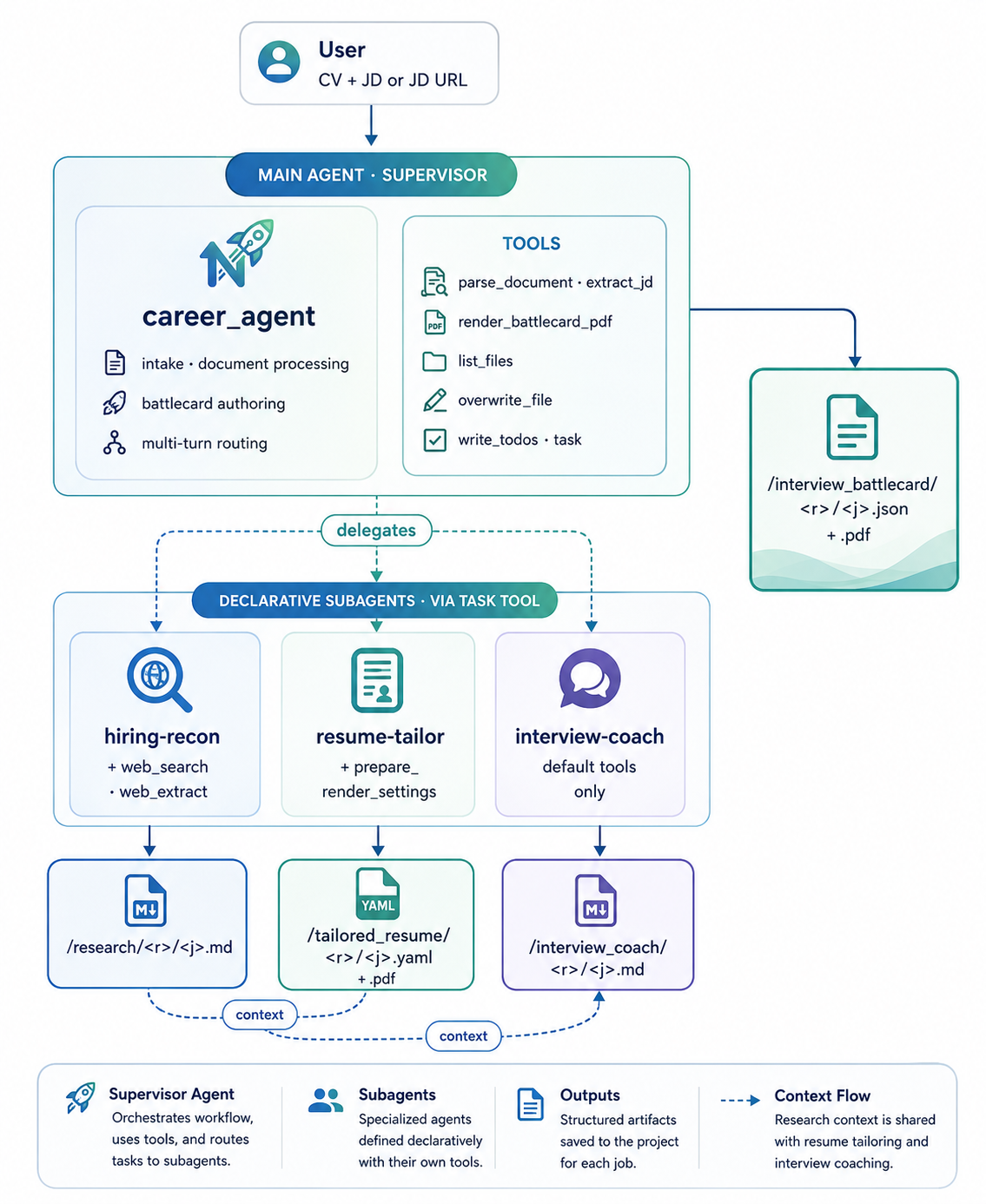
NextRole is a supervisor agent orchestrating three specialist subagents on LangGraph + DeepAgents. The main agent handles intake, document processing, and the final battlecard; it delegates research, resume tailoring, and interview coaching to declarative subagents (defined in subagents.yaml, each with its own model, tools, and skills).
How It Works
A five-stage pipeline. Stage 4 runs the resume tailor and interview coach in parallel; Stage 6 routes follow-up edits to whichever agent owns the target file.
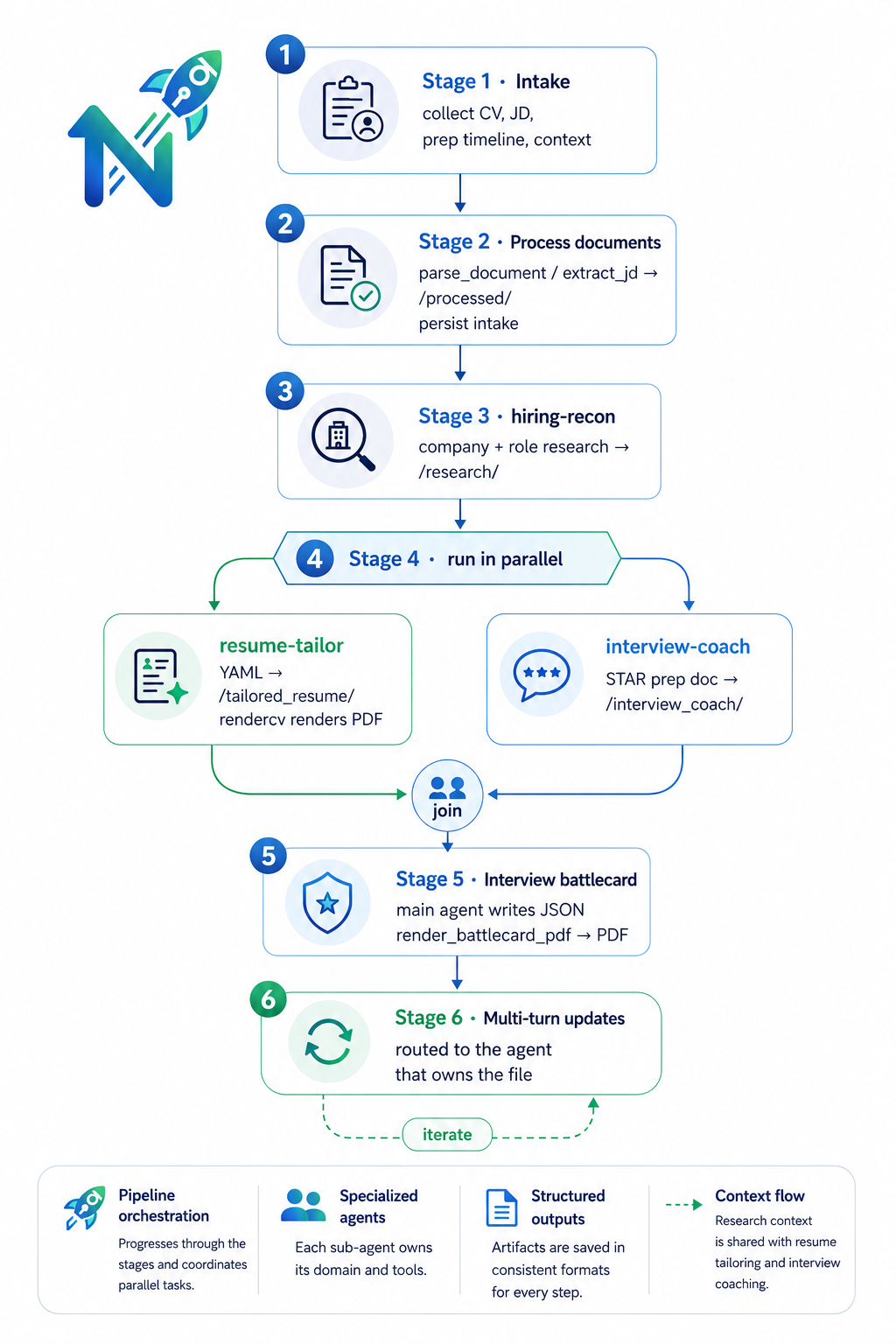
- Intake — the agent asks for your CV, the JD (file, URL, or pasted text), your prep timeline, and any extra context.
- Process documents — uploads are parsed to markdown via LlamaParse (
parse_document); JD URLs are pulled via Tavily (extract_jd). Results land in/processed/, alongside a persisted intake note. - Research — the
hiring-reconsubagent gathers company + role intel and a match analysis →/research/<resume>/<jd>.md. - Tailor & coach (parallel) —
resume-tailorrewrites the CV as arendercvYAML and renders a PDF;interview-coachwrites a structured prep doc (self-intro + per-round STAR stories). - Battlecard — the main agent assembles a one-page-per-round JSON and renders it to a day-of PDF via WeasyPrint.
- Multi-turn updates — ask for changes in chat; the owning agent reads the existing file, preserves everything you didn't name, and re-renders.
The full procedure (file layout, update routing, source-of-truth conventions) lives in backend/agents/career_agent/README.md. Per-feature design docs are in docs/prd/ — an OKF knowledge bundle you can render as an interactive graph; see docs/prd/README.md.
The agent's behavior is configured by files, not hardcoded — making it easy to read, diff, and extend:
| Primitive | Where | Role | When loaded |
|---|---|---|---|
| Memory | CAREER_AGENT.md |
Per-stage procedure manual (semantic memory) | Always (system prompt) |
| Skills | skills/<consumer>/<name>/SKILL.md |
Task workflows (procedural memory) | On demand, per consumer |
| Subagents | subagents.yaml |
Specialist delegates → the task tool |
Always |
| Tools | tools.py + DeepAgents built-ins |
parse_document, extract_jd, render_resume_pdf, render_battlecard_pdf, list_files, plus read/write/edit_file, ls/glob/grep, delete, execute |
— |
| Filesystem | CompositeBackend |
Routes virtual paths to the right store (see below) | — |
| Middleware | middleware.py |
ModelOverrideMiddleware (runtime LLM swap) + UtcDatetimeMiddleware |
— |
Subagents only receive the tools they opt into in YAML — tool whitelisting keeps interview-coach, for example, from inheriting the main agent's full toolset.
A single CompositeBackend gives the agent one virtual filesystem while routing each path prefix to the right physical store — Postgres for text artifacts, S3-compatible object storage for uploads and rendered PDFs (SeaweedFS locally; S3 / GCS / Azure in the cloud), and a shell backend whose disk holds only render scratch and translates virtual paths to real ones before running commands like rendercv render.
flowchart LR
    Agent["Agent filesystem tools<br/>read_file · write_file · edit_file<br/>ls · glob · grep · execute"]
    CB{{"CompositeBackend<br/>routes virtual paths"}}
    Agent --> CB
    subgraph Shell["VirtualPathShellBackend · default route"]
        SH["shell `execute`<br/>rewrites /virtual/path → on-disk path<br/>(renders run in a throwaway temp dir)"]
    end
    subgraph Store["StoreBackend · Postgres + pgvector"]
        ST["/memory/ · /processed/ · /research/<br/>/interview_coach/<br/>/large_tool_results/ · /workspace/"]
    end
    subgraph Obj["ObjectStoreBackend · S3-compatible<br/>SeaweedFS local · S3/GCS/Azure cloud"]
        OB["/upload/ · /tailored_resume/<br/>/interview_battlecard/"]
    end
    CB -->|default: shell + scratch| Shell
    CB -->|KV routes| Store
    CB -->|artifact routes| Obj
    Sem["Semantic memory · CAREER_AGENT.md"] -. loaded into system prompt .-> Agent
    Proc["Procedural memory · skills/*/SKILL.md"] -. loaded on demand .-> Agent
    Work["Working memory · LangGraph thread"] -. drives .-> Agent
    Store --- Epi["Episodic memory · persisted artifacts<br/>(incl. /memory/ auto-memory)"]
    Obj --- Epi
Mapped to memory types:
- Working memory — the live LangGraph conversation thread.
- Semantic memory —
CAREER_AGENT.md, always in the system prompt. - Procedural memory —
skills/*/SKILL.md, loaded on demand. - Episodic memory — persisted artifacts in Postgres + disk, including auto-memory: standing preferences saved to the
/memory/route and auto-applied across sessions.
NextRole runs zero-login single-user by default — docker compose up and start prepping, no accounts. Flip on multi-user mode for a shared or cloud deployment and every user gets private threads, files, and memory.
- Login — Google OAuth and/or email + password, via self-hosted Better Auth inside the Next.js app (its tables live in your Postgres; no third-party auth vendor).
- Isolation — the agent server verifies a short-lived JWT (JWKS) on every request; threads/runs/crons are owner-scoped in SQL (unowned →
404), and store namespaces + object keys are scoped per user (users/<id>/…). Design details inbackend/ARCHITECTURE.md§8.
Enable it — set these in .env, then docker compose up -d frontend backend:
-
AUTH_ENABLED=trueandBETTER_AUTH_SECRET=$(openssl rand -base64 32). -
Create the Better Auth tables once (it owns
user/session/account/jwks, separate frombackend/storage/migrations/):AUTH_DATABASE_URL="postgresql://<POSTGRES_USER>:<POSTGRES_PASSWORD>@localhost:<POSTGRES_LOCAL_PORT>/<POSTGRES_DB>" \ BETTER_AUTH_SECRET=<same secret> \ pnpm --dir frontend dlx @better-auth/cli@latest migrate --config src/lib/auth/server.ts -
LANGGRAPH_AUTH— turns on backend enforcement. (Login without this is fine for trying the UI, but provides no isolation.) One line:LANGGRAPH_AUTH={"path": "/deps/next-role/backend/agents/auth.py:auth", "disable_studio_auth": true, "openapi": {"securitySchemes": {"bearerAuth": {"type": "http", "scheme": "bearer", "bearerFormat": "JWT", "description": "Better Auth session JWT. While signed in, the frontend's GET /api/auth/token returns one."}}, "security": [{"bearerAuth": []}], "paths": {"/ok": {"GET": []}, "/info": {"GET": []}, "/metrics": {"GET": []}, "/docs": {"GET": []}}}}The optional
"openapi"block documents auth in the API reference:/docsgets a Bearer Token field for authenticated Test Requests (paste a JWT from the frontend'sGET /api/auth/token), while the public meta endpoints (/ok,/info,/metrics,/docs) stay marked auth-free. -
Optional Google sign-in:
AUTH_GOOGLE_ENABLED=true+GOOGLE_AUTH_CLIENT_ID/GOOGLE_AUTH_CLIENT_SECRET(OAuth client redirect URIhttp://localhost:<FRONTEND_LOCAL_PORT>/api/auth/callback/google). Email + password works without it.
REQUIRE_AUTH=true— the backend refuses to boot ifLANGGRAPH_AUTHis missing, so a misconfigured deploy fails loudly instead of serving everyone's data.- HTTPS everywhere — set
BETTER_AUTH_URL/AUTH_JWT_ISSUER/AUTH_JWT_AUDIENCEto the public https origin, andAUTH_JWKS_URLto the in-network frontend URL the backend can reach. - Pin CORS —
CORS_ALLOW_ORIGINS=https://your-frontend.example(the default*is local-only). - Block the unauthenticated meta routes at the ingress —
/metricsleaks thread/run counts; also/docs,/openapi.json,/info. - Gate MCP / A2A — authentication-only today (no per-resource authz), so disable via
LANGGRAPH_HTTP"disable_mcp": true/"disable_a2a": trueuntil audited. - Close the Studio backdoors — never set
LANGSMITH_LANGGRAPH_API_VARIANT=local_devin production;disable_studio_auth: true(above) closes the header-based one. - Reverse proxy must never forward a client-controlled root_path (the in-process
/noauthloopback bypass stays internal-only).
| Layer | Stack |
|---|---|
| Backend | Python 3.13 · LangChain v1 · LangGraph 1.x · DeepAgents 0.6 · uv · served by NextRole's own self-hosted agent server (backend/ARCHITECTURE.md) |
| Agent I/O | Tavily (web search) · LlamaParse / LlamaCloud (document parsing) · rendercv (resume → PDF) · WeasyPrint (battlecard → PDF) |
| Frontend | Next.js 16 · React 19 · TypeScript · Tailwind · pnpm · @langchain/react (v2 useStream) |
| Data | PostgreSQL 18 + pgvector · Redis 8 · S3-compatible object storage (SeaweedFS locally; S3 / GCS / Azure in the cloud) |
| Infra | Docker Compose (frontend · backend · core-server · postgres · redis · object-store) |
| Observability | LangSmith |
Because NextRole ships its own agent server implementing the LangGraph Server API (see backend/ARCHITECTURE.md), the career_agent assistant is also reachable by other tools and agents — no extra code:
- MCP — exposed as Model Context Protocol tools at
/mcp(Streamable HTTP), usable by any MCP-compliant client. → docs - A2A — Google's Agent2Agent protocol at
/a2a/{assistant_id}(JSON-RPC 2.0;message/send+message/stream). → docs - The full server API is browsable at the
/docsendpoint of your deployment.
In multi-user mode these endpoints are authentication-gated but not yet per-user authorized — disable them (
disable_mcp/disable_a2a) in a shared deployment until that lands. Seebackend/ARCHITECTURE.md§8.
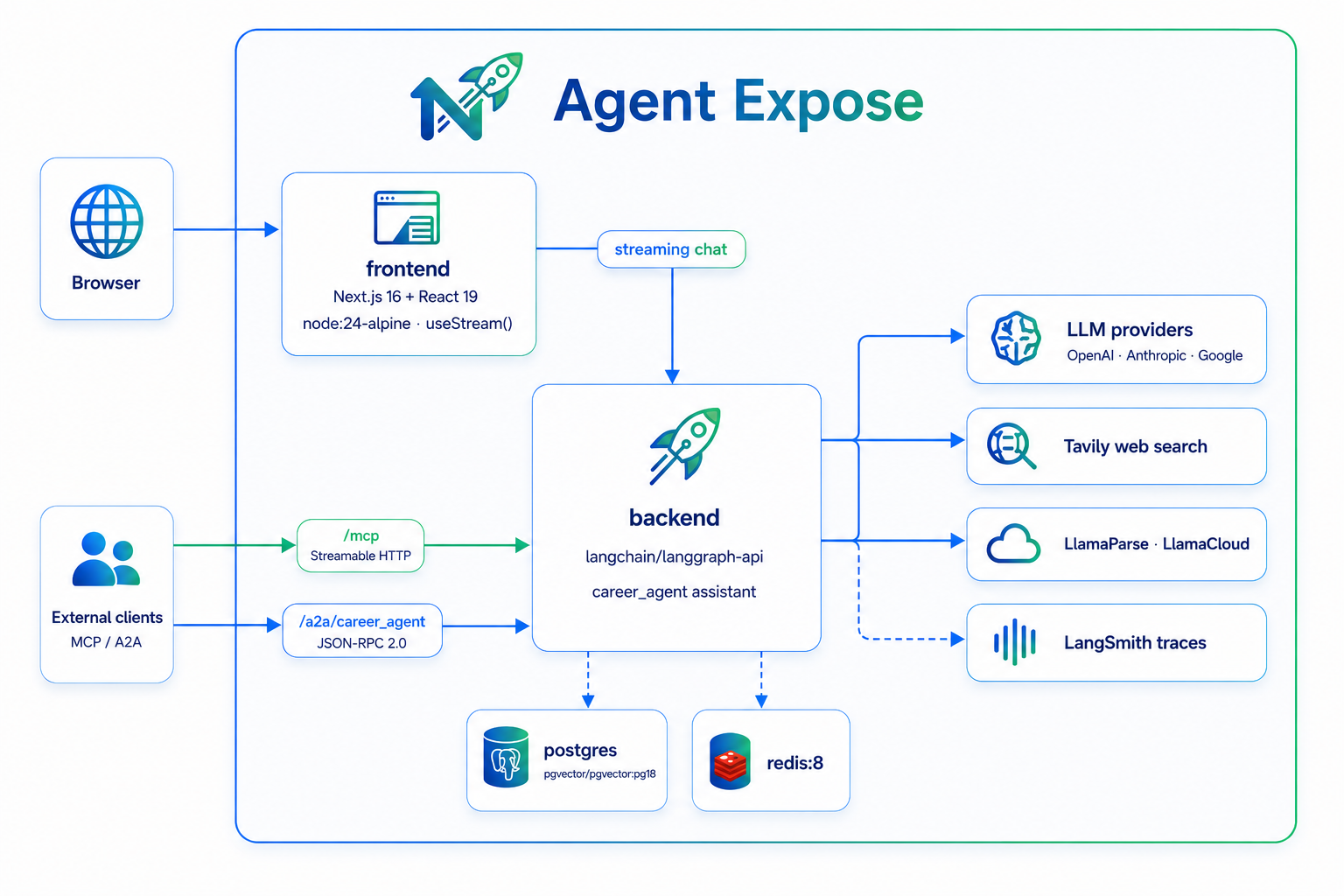
Set LANGCHAIN_API_KEY and LANGCHAIN_TRACING_V2=true in .env, and every run — each LLM call, tool call, and nested subagent — is traced at smith.langchain.com under the LANGCHAIN_PROJECT you configure. Optional, but invaluable for debugging the multi-agent flow.
Roadmap
- 💤 "Auto-dream" consolidation — sleep-time compaction that prunes stale notes and merges insights into durable memory.
- 📦 Remote sandboxes — swap
LocalShellBackendfor an isolated remote sandbox (e.g. Daytona) so render/shell steps are safe for multi-tenant use. - 📊 Agent evaluation — LangSmith evals over the workflow (the
@pytest.mark.evalmarker is already reserved). - 🎨 Enhanced UI — richer artifact editing, diff views, and inline regeneration.
- 🔌 MCP / A2A examples — sample integrations driving
career_agentfrom external agents and IDEs. - ☁️ Cloud deployment — binary artifacts already live in S3-compatible object storage (SeaweedFS locally; point
OBJECT_STORE_*at S3 / GCS / Azure). Remaining: managed bucket provisioning (versioning, SSE, IAM) and presigned-URL delivery. - 🌐 More sources & ATS-aware tailoring — pluggable retrievers + keyword/ATS optimization passes.
Limitations
Multi-user mode isolates data, but the shell sandbox below is still the gate before opening signups to untrusted users.
- 🔒 Local shell execution —
VirtualPathShellBackendruns render commands viasubprocesson the host. Safe locally and for a trusted team; not hardened for untrusted multi-tenant use (needs sandboxing — see roadmap). Isolate render/shell steps before exposing public signup. - 🧪 LLM evals deferred — current tests are unit + local-DB integration; automated quality evals aren't wired up yet.
- 🧠 Personalization is preferences-only — the agent persists and auto-applies the preferences you state across sessions, but doesn't yet infer your style/history on its own or consolidate memory over time (see roadmap).
- ⏱️ Latency — a full run makes several LLM and tool calls across multiple agents; expect minutes, not seconds.
🗺️ Explore the codebase graph
This repo ships a pre-built architecture knowledge graph in .ua/ — the whole codebase mapped by Understand-Anything into 1,100+ nodes across 10 architectural layers, with a guided tour. Browse it as an interactive dashboard:
# From the repo root — needs only Node.js (no install, no clone, no build):
npx --yes "https://github.com/Egonex-AI/Understand-Anything/releases/latest/download/understand-anything-viewer.tgz" .
Open the printed 🔑 Dashboard URL (include the ?token=… — the plain URL hits an access gate).
Using Claude Code? Install the understand-anything plugin and run
/understand-dashboardin this repo instead.
The graph is for humans: AI coding assistants are configured to ignore .ua/ (Claude Code deny rules, .cursorignore, a CLAUDE.md instruction) so they keep reading the real source instead of a large generated snapshot.
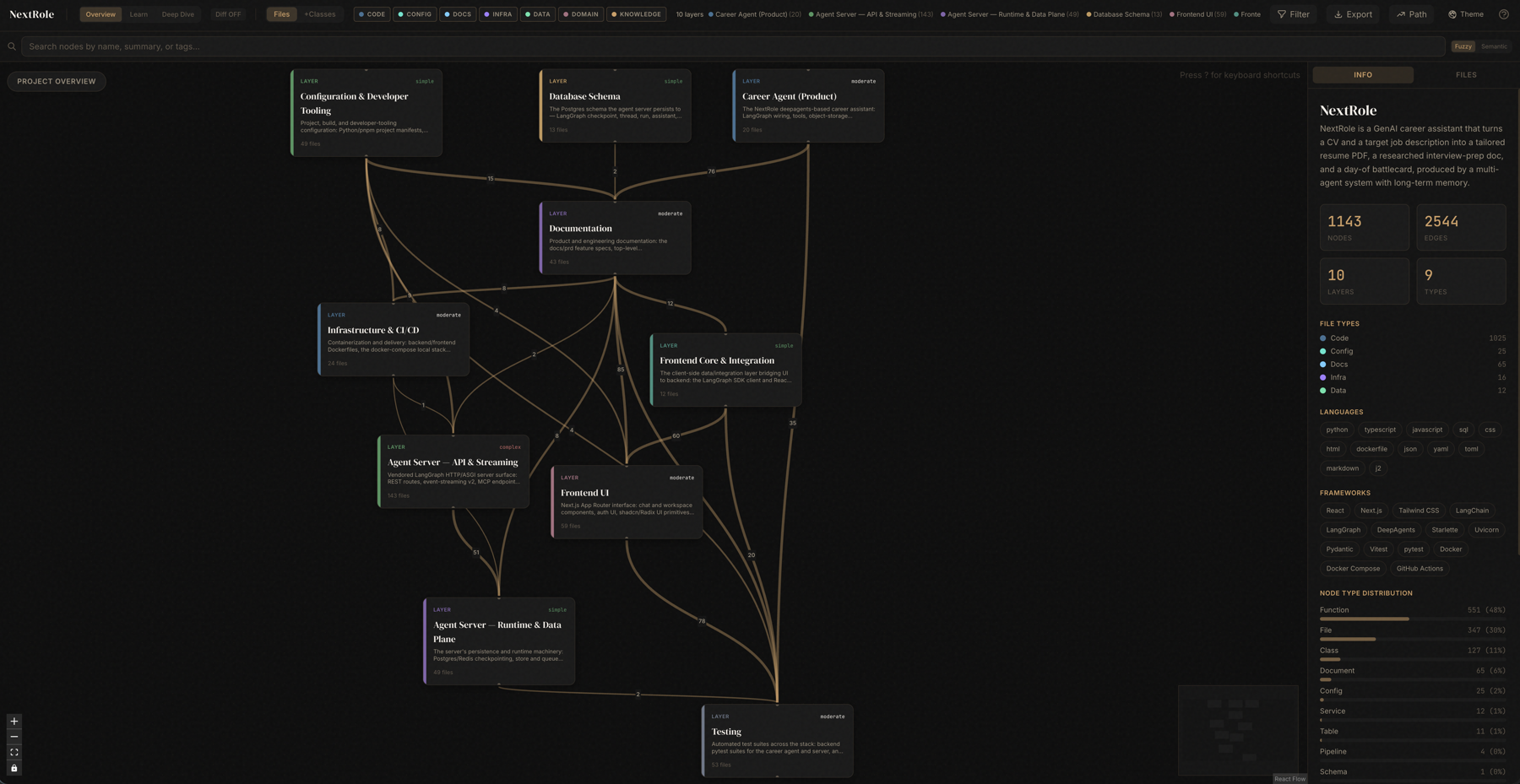
The same treatment exists for the product's design history: every feature ships with a PRD in docs/prd/ — an OKF knowledge bundle whose committed interactive graph (docs/prd/viz.html) maps how features extend and supersede each other. The codebase graph maps the code; the PRD graph maps the decisions. See docs/prd/README.md to browse or regenerate it.
Contributing
PRs and issues are welcome! Start with CONTRIBUTING.md — it walks through the fork → PR workflow, local setup, the CI quality gate (code quality + backend tests + frontend tests), testing, and conventions. Stack-specific details live in backend/CLAUDE.md and frontend/CLAUDE.md; commits follow Conventional Commits.
New here? Issues labelled good first issue are a gentle place to start, and questions are welcome in Discussions.
License
MIT © 2026 Tam Nguyen
Acknowledgements
Built on DeepAgents, LangChain / LangGraph / LangSmith, rendercv, WeasyPrint, Tavily, and LlamaIndex / LlamaParse.
No comments yet
Be the first to share your take.