
Not another CAD copilot. Mechanical AI Skill focuses on engineering understanding and review — not geometry generation. It's a structured engineering-review layer that lets an AI agent (Claude Code, Codex, Cursor) reason about a mechanical assembly.
Put differently: it's the first AI-native engineering review layer for mechanical assemblies — not a CAD tool, not a simulation tool, not a DFM tool, but the reasoning layer that sits between an AI agent and all of those.
Upload assembly → Understand assembly → Engineering review → Engineering report
Why
Mechanical assemblies are hard for AI agents to reason about. A large STEP assembly can contain:
- Hundreds of components
- Complex mating relationships
- Hidden mechanisms
- Manufacturing risks
- Assembly complexity
Mechanical AI Skill provides a structured engineering review layer so an AI agent can go from a raw CAD file to an understanding of the design and a real engineering review — with the honest assumptions and caveats an engineer would attach. This is the open Community Edition, fully functional on its own.
What it is — and is not
Mechanical AI Skill is not:
- ❌ A CAD modeling copilot
- ❌ A generative / geometry-creation tool
- ❌ A drawing or feature-modeling assistant
Mechanical AI Skill is:
- ✅ Assembly understanding (structure, BOM, mechanisms)
- ✅ Engineering review (interference, DFM/DFA, risk)
- ✅ Mechanical diagnostics (clashes, clearances, complexity)
- ✅ Engineering reporting (PDF / HTML)
Example — one STEP in, a full review out
Input: a real 39 MB SolidWorks-exported STEP of a dual-station robotic welding cell. No SolidWorks, no geometry kernel — just the Community Edition reading the STEP. Every figure is the actual output; nothing is invented.
Output (review_summary, written to mech_review/review_summary.md next to the STEP)
EXECUTIVE SUMMARY
  142 unique parts · 357 instances · assembly depth 4

COMPLEXITY
  High — 357 instances, 142 unique parts, depth 4, 2 mechanism subsystems

MANUFACTURING MIX
  Custom (in-house) 78%  ·  Commercial / classified 22%

MECHANISMS
  Robot Arm (95%) · Pneumatic Cylinder (76%)

VENDORS
  FANUC (7) · Nook (4) · SCHUNK (3) · Bimba (3) · Banner (1) · Lincoln Electric (1)

CATEGORIES
  Robot/Arm 7 · Grippers 5 · Linear Motion 4 · Pneumatic 3 · Sensors 1 · Welding 1
  Custom Machined: 301065 (44) · 301066 (19) · 307070 (6) · 301060 (5) · 330001 (5)

RISK
  88 / 100 (higher = lower risk)

FINDINGS
  1. High part variety (Medium)
       Evidence: 142 unique parts across 357 instances
       Impact:   Higher inventory, sourcing, and assembly complexity
       Recommendation: (Professional)
  2. High custom-part ratio (Medium)
       Evidence: 78% of classified instances are custom (in-house)
       Impact:   Manufacturing cost and lead time driven by in-house parts
       Recommendation: (Professional)
  3. High instance count (Medium) · 357 instances · Recommendation: (Professional)
  4. Deep assembly structure (Low) · depth 4 · Recommendation: (Professional)
A plain STEP viewer shows you the geometry. None of them tell you, from the file alone, that this is a dual-station FANUC M-16iB welding cell, 78% in-house parts, six vendors, high complexity, with four findings worth a closer look. That's the difference between viewing a model and understanding an assembly.
Full write-up: Robotic Welding Cell — real 39 MB STEP, every number verbatim.
It can also emit the structure as a diagram that renders right here on GitHub:
graph TD
  n1["Welding Cell"] --> n2["Station 1"]
  n1["Welding Cell"] --> n3["Station 2"]
  n2["Station 1"] --> n4["M-16iB Robot"]
  n2["Station 1"] --> n5["Pneumatic Fixtures"]
  n3["Station 2"] --> n6["M-16iB Robot"]
  n3["Station 2"] --> n7["Pneumatic Fixtures"]
What the Community Edition already does
No license. Runs standalone. On a STEP file alone (no SolidWorks), it reads structure and runs approximate geometry checks; with SolidWorks it runs the production checks.
Assembly understanding
- Executive Review — one command (
review_summary) reads the STEP and returns an engineer-facing verdict: assembly scale, detected mechanisms, vendors, categories, a name-level BOM, and a risk score — you don't pre-run the other checks, it orchestrates them - BOM generation + part count + standard-part identification — works on a plain STEP with no SolidWorks and no geometry kernel: a real name-level BOM with true quantities (from assembly instance counts), honestly flagged as name-level (no volume/mass/material)
- Assembly Structure Summary — components, mates, grouping (what is there)
- Assembly tree — a clean structure tree to confirm the model parsed
- Mechanism Detection (Experimental) — gear train, timing belt, chain drive, lead screw, robot arm, linear slide, pneumatic cylinder, rotary table
- Vendor summary — detects component brands from names (FANUC, SCHUNK, SMC, THK, Banner …)
- Assembly statistics — top-level subassemblies and their instance counts
- Component category summary — counts by kind (motors, sensors, cylinders, robots …) — statistics, not a procurement list
- Exploded structure graph — a Mermaid diagram of the assembly tree (renders right in the README)
- Adjacency graph — which parts touch / are neighbours (geometric, from a STEP); without a geometry kernel it returns a clearly-labelled hierarchy graph (belongs-to, not touches) — never the two confused. The force-flow and constraint graphs are Professional
Engineering review & diagnostics
- Interference detection + clearance check (SolidWorks, or approximate from STEP)
- Rule-based DFM — deep holes, thin walls, sharp corners (on supplied feature measurements)
- Basic DFA — part/fastener counts, assembly-depth complexity, tool-clearance checks
- Fastener checks — thread-engagement (n×D rule) and missing-washer / missing-nut stack screens
- Risk score — 0–100 with a transparent breakdown (interference · DFM · DFA complexity · tool accessibility · assembly depth) — not a black-box number
Simulation (real, analytical)
- Static analysis (single load case) — stress, deflection, safety factor
- Modal analysis (first 3 modes) — natural frequencies + resonance check
Reporting
- Engineering report — any result → clean PDF / HTML with status, tables, assumptions, caveats
The Professional Edition is the Engineering Intelligence Layer. Where the Community Edition answers what is this assembly (structure, mechanisms, vendors, first-pass review), Professional answers the questions an experienced engineer asks next:
- Why does this design exist? — design-intent recognition, function identification
- How does force flow through it? — automatic load-path and power-flow reasoning
- Where will it fail in real life? — failure-mode prediction, FMEA, fatigue/thermal/CFD
- How should it be manufactured at scale? — advanced DFM/DFA, cost, procurement
Concretely that means fatigue, thermal, CFD, multibody dynamics, topology optimization, automatic load/constraint identification, advanced DFM/DFA, advanced risk scoring, automated design review, and procurement intelligence. Those commands ship here but return
enterprise_requireduntil the licensed core is installed. Full split in Editions.
How it compares
It isn't competing with CAD or CAE tools — it sits in a different layer (the AI agent's reasoning layer) and hands off to them where they're authoritative.
| What it's for | Runs without a CAD/CAE seat? | Driven by an AI agent? | |
|---|---|---|---|
| SolidWorks / CAD | model & assemble geometry | no | no |
| ANSYS / Abaqus (CAE) | high-fidelity simulation | no | no |
| DFM checkers | manufacturability rules | usually needs the CAD seat | no |
| Mechanical AI Skill | understand & review an assembly, then route to the right tool | yes (STEP-only fallback) | yes (Claude Code / Codex / Cursor) |
The skill answers "what is this, is it sane, where should I look" in plain language from a STEP file, then points you to SolidWorks for the authoritative interference check, or to the Professional core for full FE / design review. It's the layer that was missing — not a replacement for the tools underneath it. See benchmarks.
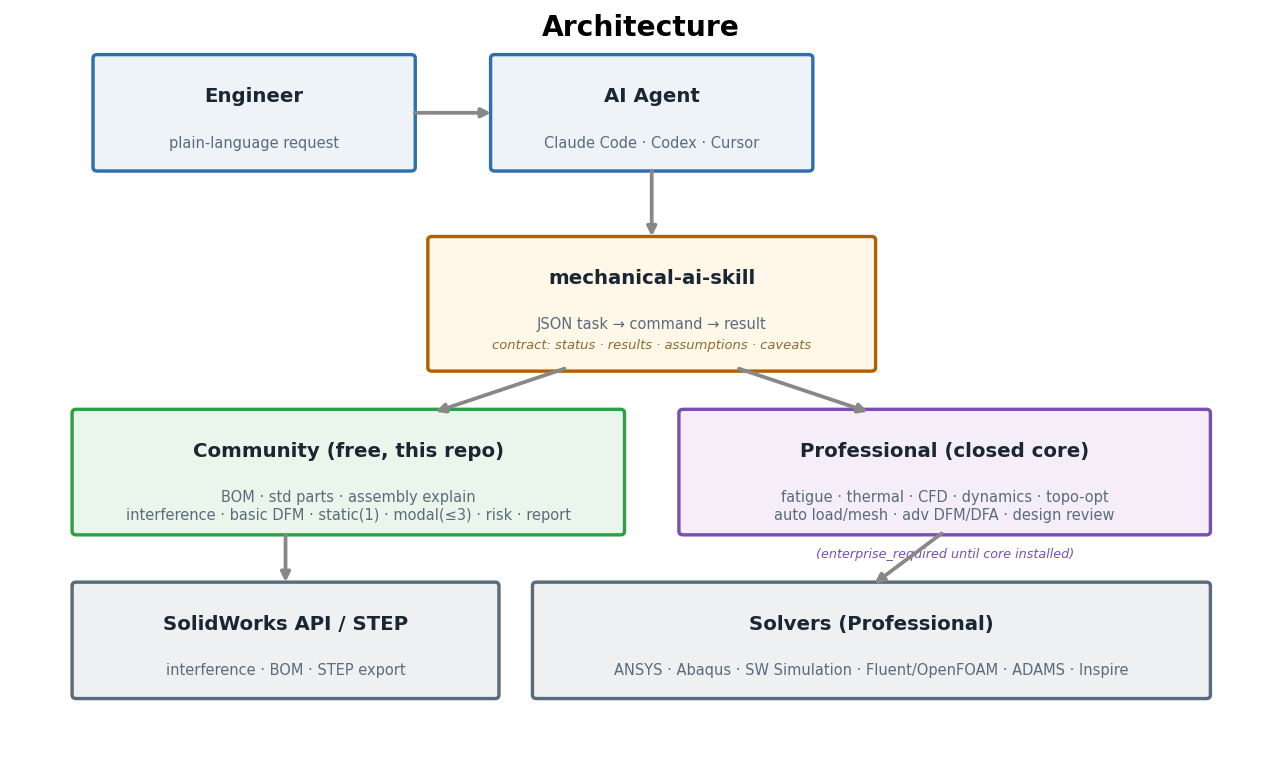
Architecture
The skill sits between your AI agent and the real CAD/CAE tools, exposing one stable JSON contract. Free capabilities compute locally; Professional capabilities delegate to the licensed core (or return enterprise_required).
Install
Claude Code (recommended — plugin, auto-updates via marketplace):
/plugin marketplace add almightyshui/Mechanical-AI-Skill
/plugin install mechanical-ai-skill
Codex, Cursor, or any Agent Skills host:
git clone https://github.com/almightyshui/Mechanical-AI-Skill
bash mechanical-ai-skill/install.sh all     # Claude Code + Codex (+ Cursor in a repo)
Per agent: install.sh claude | codex | cursor. Manual paths in INSTALL.md.
Zero config — works on a STEP file alone, however you point at it. Hand the skill a .STEP, a non-standard extension (e.g. a .snapshot.1), a .zip, or the unzipped folder — it resolves all of them and picks the right STEP. With no SolidWorks and no geometry kernel, BOM, part count, assembly tree, mechanisms, vendors, categories, the executive review, and approximate interference/clearance all run directly from the STEP (geometry-dependent checks are flagged approximate; production sign-off still uses the SolidWorks check). Every result carries a one-line headline and a status (ok / deck_only / needs_input / enterprise_required / failed) so an agent never misreads a graceful degradation as a failure — and never fabricates data the skill didn't compute. Verify in 30 seconds:
git clone https://github.com/almightyshui/Mechanical-AI-Skill
cd mechanical-ai-skill
bash examples/demo.sh        # full review pass, no SolidWorks needed
It ends with a machine-readable summary an agent would report:
{
  "status": "ok",
  "bom_unique_parts": 27,
  "interference_count": 2,
  "dfm_findings": {"blocker": 0, "risk": 2},
  "static_safety_factor": 5.67,
  "risk_score": 71
}
What you do with it
Make a BOM / understand a model
"Generate a BOM and summarize this assembly's structure."
Walks the SolidWorks tree → bill of materials (item, part, quantity), unique-part and total counts, standard-part flags (screws, bearings, washers). For the structure summary, it returns the component + mate structure and a plain inventory — what is there. Interpreting why it's designed that way (working principle, power flow, design intent) is the Professional Edition.
Check an assembly
"Check this assembly for interference."
Runs SolidWorks Interference Detection → each clashing pair with its overlap volume, plus mate errors, over/under-defined mates, dangling references, and clearance violations. Distinguishes a likely press-fit from a real clash. No SolidWorks on this machine? You get a macro to run, not a fake "all clear."
Get a report
"Put that in a PDF."
Any result — BOM or diagnostics — renders to a clean PDF (or HTML, zero-dependency fallback) with status, tables, assumptions, and caveats. Drop it into a design review.
Editions
| Capability | Community (free) | Professional |
|---|---|---|
| BOM · part count · standard-part ID · assembly structure summary | ✅ | ✅ |
| Interference · mate · clearance diagnostics | ✅ | ✅ |
| STEP export · basic PDF/HTML report | ✅ | ✅ |
| Static analysis | single load case | multi-load, contact, nonlinear, auto-faces |
| Modal analysis | first 3 modes | unlimited modes, prestressed |
| DFM | rule-based (supplied features) | advanced rule library |
| DFA | basic (complexity, tool clearance) | sequence, path, time, automation |
| Mechanism / vendor detection | type & brand ID | design intent, sourcing, alternates |
| Risk score | simple roll-up | criticality-weighted, code-aware |
| Fatigue · thermal · CFD · multibody dynamics | — | ✅ |
| Topology optimization / lightweighting | — | ✅ |
| Automatic load / constraint / mesh identification | — | ✅ |
| Automated design review · procurement · advanced report | — | ✅ |
Community commands for Professional capabilities exist and validate your task, but return enterprise_required with an upgrade note — they never crash and never fabricate output. Installing the licensed mechanical_ai_core package lights them up through the same commands (the skill auto-detects and delegates; see sdk/CONTRACT.md).
How it answers, and why you can trust it
| Status | Meaning |
|---|---|
ok |
ran, valid results |
needs_input |
required data missing — agent asks you, nothing ran |
deck_only |
SolidWorks not installed — macro generated + run command |
failed |
ran but errored — never reported as valid |
enterprise_required |
needs the Professional core — upgrade note, graceful |
Every default and auto-choice is in assumptions; every limit in caveats. Standard-part flags are name heuristics, marked for confirmation.
For builders
Open, stable JSON contract — identical across agents. See AGENT_README.md and sdk/CONTRACT.md. Open connectors in connectors/; task templates in examples/. Minimal example:
cat > task.json <<'J'
{"stage":"0.1","capability":"generate_bom",
 "model":{"path":"C:/work/gripper.SLDASM","type":"assembly"},
 "units":"SI_mm_t","workdir":"C:/work/run1"}
J
python scripts/sw_understand.py --task task.json --out result.json
Requirements
- Python 3 + bash (no pip deps for orchestration) — runs in Codex/Cursor sandboxes.
- PDF reports optionally use
reportlab(else HTML fallback). - Live SolidWorks operations need SolidWorks +
pywin32(Windows); otherwisedeck_only.
Roadmap
Available now (Community, free)
- BOM, part count, standard-part ID, assembly structure summary, mechanism & vendor detection
- Interference / mate / clearance diagnostics
- Basic DFM (deep holes, thin walls, sharp corners)
- Static analysis (single load case), modal (first 3 modes)
- Simple risk score, PDF/HTML reports
- Claude Code plugin, Codex/Cursor install
Next (Community)
- Richer STEP parsing (part hierarchy, material metadata extraction when available)
- More DFM geometric checks; basic DFA (fastener counts, assembly steps)
- MCP server wrapper (BOM / interference / DFM / risk / report tools)
- A 30-second and a 3-minute demo video
Professional (closed core)
- Full/auto FE: fatigue, thermal, CFD, multibody dynamics, topology optimization
- Automatic load/constraint/mesh identification
- Advanced DFM/DFA rule libraries, advanced & FEA-aware risk scoring
- Automated design-review agent, engineering Q&A, procurement/costing
- Enterprise: custom standards, team dashboard, multi-user review
Have a request? Open a feature request.
License
MIT — see LICENSE. The Professional core is separately licensed.
Skills run with your agent's permissions. Read
SKILL.mdfirst; install only from sources you trust. This skill drives licensed CAD tools through their own APIs.
No comments yet
Be the first to share your take.