
MCP Gateway




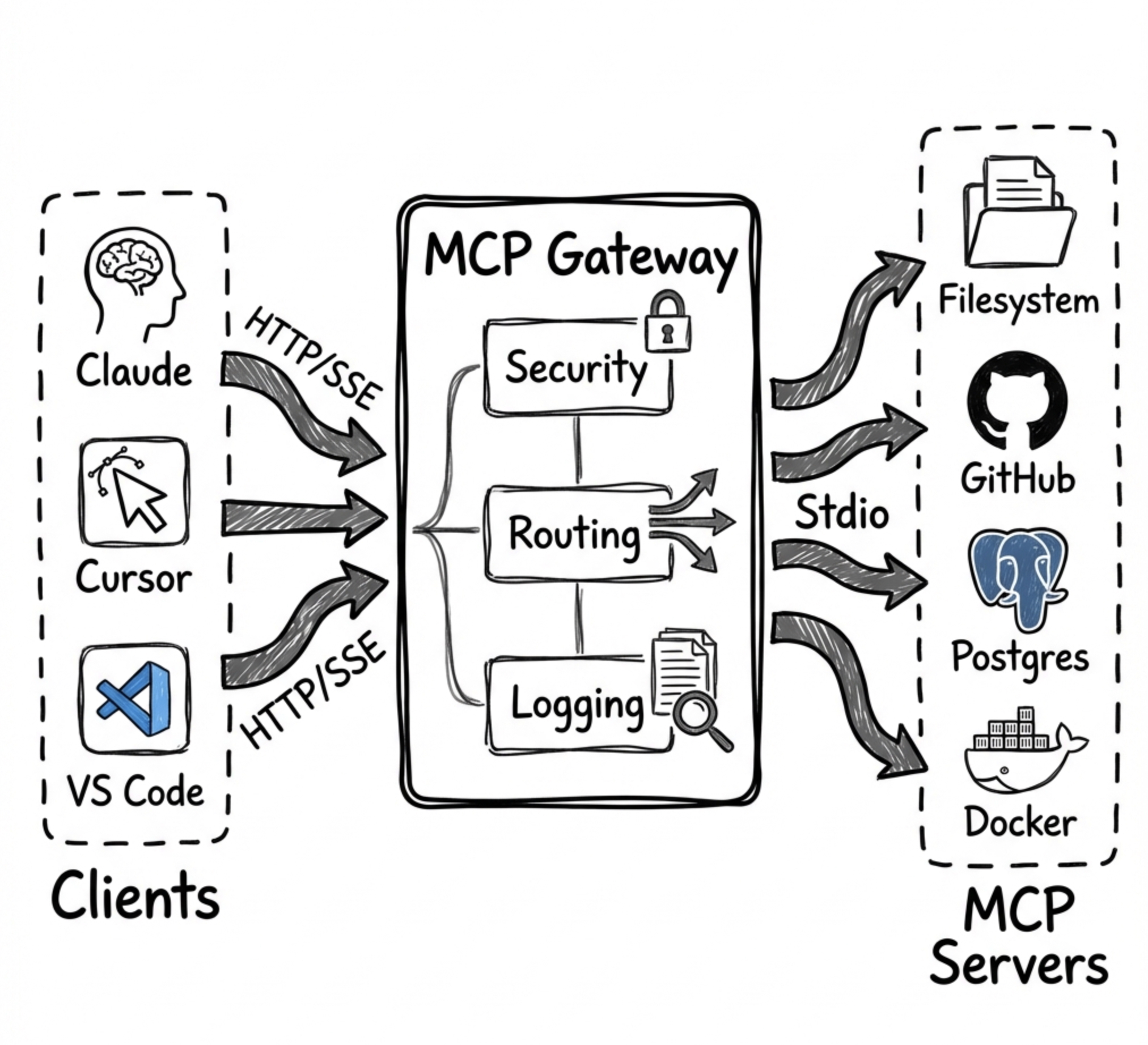
Universal MCP aggregation server that routes 300+ tools from multiple MCP servers through a single endpoint with 15 layers of token optimization (95-98% reduction). Works with Claude Desktop, Claude Code, Cursor, OpenAI Codex, and VS Code Copilot.
Key Features
- Multi-Server Aggregation — Connect multiple MCP servers (STDIO, HTTP, SSE) through one gateway endpoint
- 15 Token Optimization Layers — Progressive disclosure, smart filtering, aggregations, code batching, delta responses, auto-summarization, and more
- Web Dashboard — Real-time UI to manage tools, backends, and server lifecycle with hot-reload
- Sandboxed Code Execution — Execute TypeScript/JavaScript in secure Node.js VM for batch operations
- Skills System — Save and reuse code patterns for zero-shot task execution
- Authentication — API Key and OAuth/JWT support with rate limiting
- Docker Ready — Easy deployment with Docker/Compose
Quick Install
git clone https://github.com/abdullah1854/MCPGateway.git
cd MCPGateway
npm install
cp config/servers.example.json config/servers.json
npm run dev
Connect Your AI Client
Claude Desktop / Cursor / VS Code Copilot — Add as remote MCP server:
http://localhost:3010/mcp
Claude Code — Add to settings:
{
  "mcpServers": {
    "mcp-gateway": {
      "type": "url",
      "url": "http://localhost:3010/mcp"
    }
  }
}
Dashboard: http://localhost:3010/dashboard
Best for: teams that want one MCP endpoint, a browser dashboard, and aggressive token savings when working across many tools.
Quick Links
- Quick start
- Supported clients
- Dashboard screenshots
- Backend configuration
- Security modes
- Examples
- Issues & support
Quick Start in 3 Commands
npm install
cp config/servers.example.json config/servers.json
npm run dev
Then open http://localhost:3010/dashboard, connect your preferred client, and continue with the full Quick Start below for server configuration and production setup.
Supported MCP Clients
| Client | Support | Notes |
|---|---|---|
| Claude Desktop | ✅ | Connect through the gateway's HTTP or SSE endpoints |
| Claude Code | ✅ | Reduces context overhead for large tool catalogs |
| Cursor | ✅ | Use one gateway to expose hundreds of backend tools |
| OpenAI Codex | ✅ | Works with the gateway's standard MCP endpoints |
| VS Code Copilot | ✅ | Centralizes MCP tooling across local and remote servers |
How MCP Gateway Complements Anthropic's Tool Search
January 2025: Anthropic released Tool Search Tool - a native server-side feature for discovering tools from large catalogs using
defer_loadingand regex/BM25 search.
MCP Gateway and Anthropic's Tool Search solve different problems:
| Problem | Anthropic Tool Search | MCP Gateway |
|---|---|---|
| Tool Discovery (finding the right tool from 100s) | ✅ Native defer_loading + search |
✅ Progressive disclosure |
| Result Filtering (trimming large results) | ❌ Not available | ✅ maxRows, fields, format |
| Auto-Summarization (extracting insights) | ❌ Not available | ✅ 60-90% token savings |
| Delta Responses (only send changes) | ❌ Not available | ✅ 90%+ savings for polling |
| Aggregations (count, sum, groupBy) | ❌ Not available | ✅ Server-side analytics |
| Code Batching (multiple ops in one call) | ❌ Not available | ✅ 60-80% fewer round-trips |
| Skills (reusable code patterns) | ❌ Not available | ✅ 95%+ token savings |
Bottom line: Anthropic's Tool Search helps you find the right tool. MCP Gateway helps you use tools efficiently by managing large results, batching operations, and providing reusable patterns.
You can use both together - let Anthropic handle tool discovery while routing tool calls through MCP Gateway for result optimization.
Why MCP Gateway?
Problem: AI agents face three critical challenges when working with MCP servers:
- Tool Overload - Loading 300+ tool definitions consumes 77,000+ context tokens before any work begins
- Result Bloat - Large query results (10K rows) can consume 50,000+ tokens per call
- Repetitive Operations - Same workflows require re-explaining to the model every time
Note: Anthropic's Tool Search Tool now addresses #1 natively for direct API users. MCP Gateway remains essential for #2 and #3, and provides tool discovery for MCP clients that don't have native tool search.
Solution: MCP Gateway aggregates all your MCP servers and provides 15 layers of token optimization:
| Layer | What It Does | Token Savings | Unique to Gateway? |
|---|---|---|---|
| Progressive Disclosure | Load tool schemas on-demand | 85% | Shared* |
| Smart Filtering | Auto-limit result sizes | 60-80% | ✅ |
| Aggregations | Server-side analytics | 90%+ | ✅ |
| Code Batching | Multiple ops in one call | 60-80% | ✅ |
| Skills | Zero-shot task execution | 95%+ | ✅ |
| Caching | Skip repeated queries | 100% | ✅ |
| PII Tokenization | Redact sensitive data | Security | ✅ |
| Response Optimization | Strip null/empty values | 20-40% | ✅ |
| Session Context | Avoid resending data in context | Very High | ✅ |
| Schema Deduplication | Reference identical schemas by hash | Up to 90% | ✅ |
| Micro-Schema Mode | Ultra-compact type abbreviations | 60-70% | ✅ |
| Delta Responses | Send only changes for repeated queries | 90%+ | ✅ |
| Context Tracking | Monitor context usage, prevent overflow | Safety | ✅ |
| Auto-Summarization | Extract insights from large results | 60-90% | ✅ |
| Query Planning | Detect optimization opportunities | 30-50% | ✅ |
*Anthropic's Tool Search provides native tool discovery; MCP Gateway provides it for MCP clients without native support.
Result: A typical session drops from ~500,000 tokens to ~25,000 tokens (95% reduction).
305 Tools Through 19 Gateway Tools
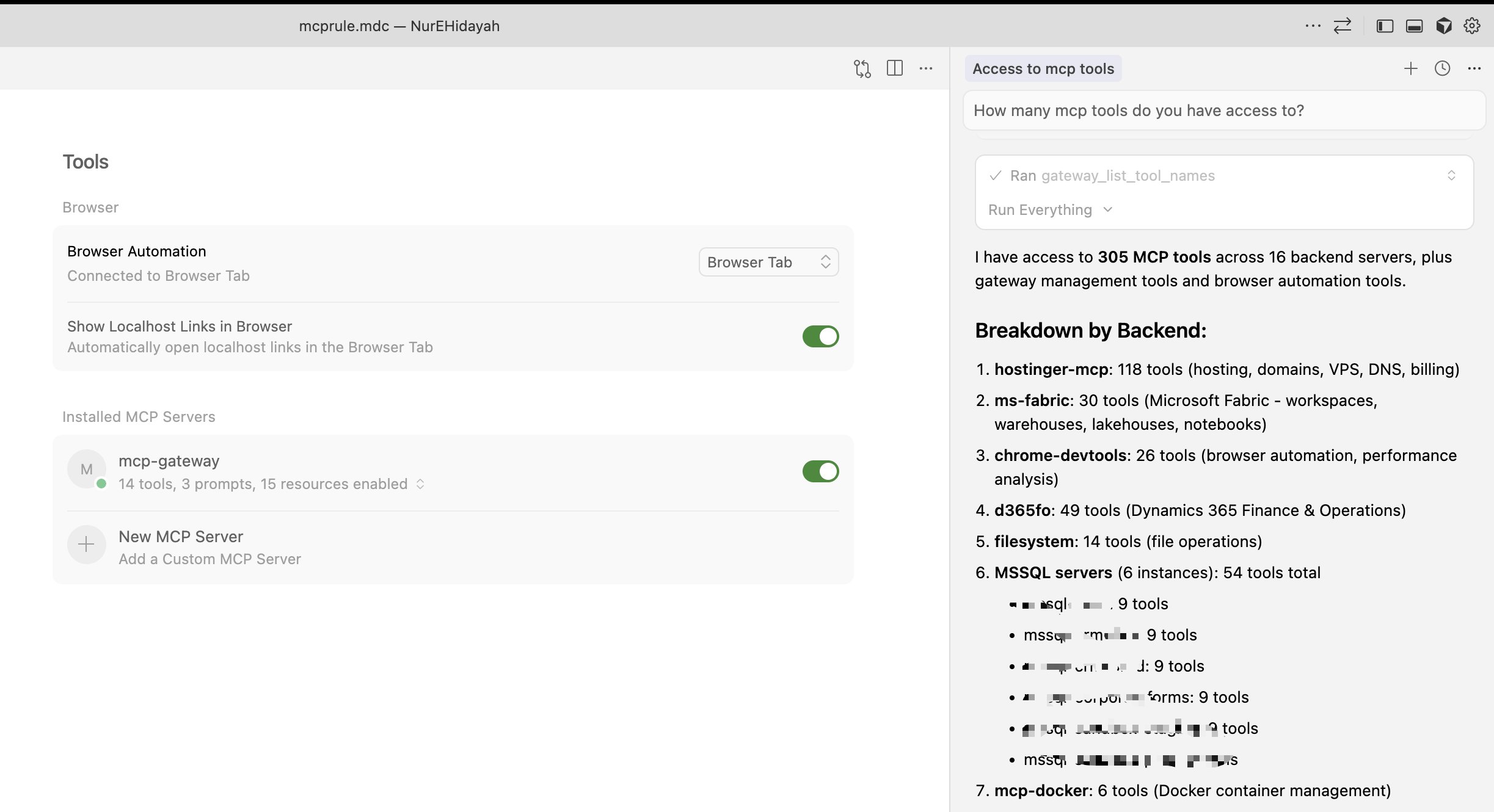
Cursor connected to MCP Gateway - 19 tools provide access to 305 backend tools across 16 servers
Minimal Context Usage
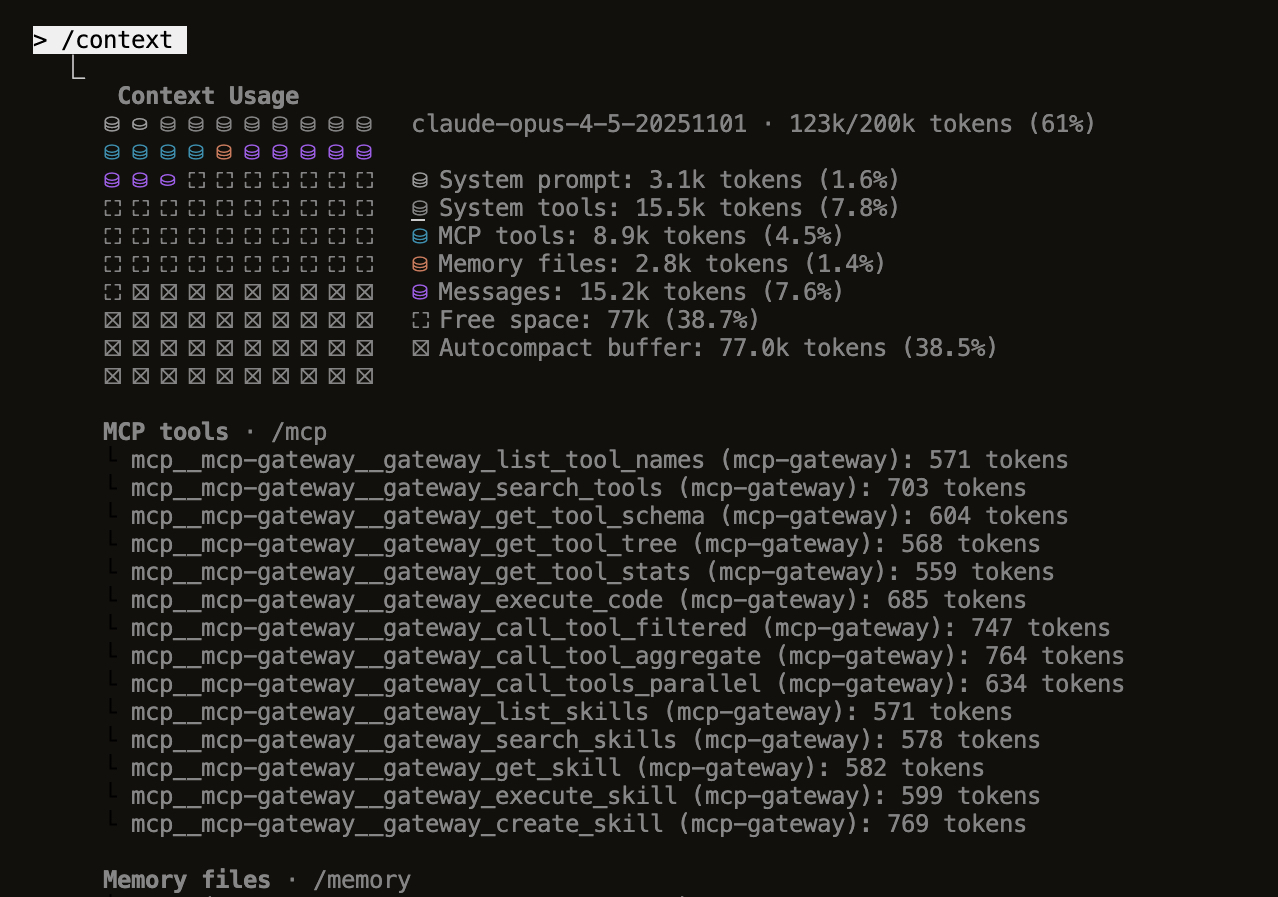
Claude Code /context view - Only 8.9k tokens (4.5%) for all MCP tools instead of 200k+ for raw definitions
What's New (v1.0.0)
- Gateway MCP Tools - All code execution features now exposed as MCP tools (
gateway_*) that any client can discover and use directly - Hot-Reload Server Management - Add, edit, and delete MCP servers from the dashboard without restarting
- UI State Persistence - Disabled tools and backends are remembered across server restarts
- Enhanced Dashboard - Reconnect failed backends, view real-time status, improved error handling
- Connection Testing - Test server connections before adding them to your configuration
- Export/Import Config - Backup and share your server configurations easily
- Parallel Tool Execution - Execute multiple tool calls simultaneously for better performance
- Result Filtering & Aggregation - Reduce context bloat with
maxRows,fields,format, and aggregation options
Features
Core Gateway Features
- 🔀 Multi-Server Aggregation - Route multiple MCP servers through one gateway
- 🎛️ Web Dashboard - Real-time UI to manage tools, backends, and server lifecycle
- ➕ Hot-Reload Server Management - Add, edit, delete MCP servers from dashboard without restart
- 🌐 HTTP Streamable Transport - Primary transport, works with all clients
- 📡 SSE Transport - Backward compatibility for older clients
- 🔐 Authentication - API Key and OAuth/JWT support
- ⚡ Rate Limiting - Protect your backend servers
- 🐳 Docker Ready - Easy deployment with Docker/Compose
- 📊 Health Checks - Monitor backend status with detailed diagnostics
- 🔄 Auto-Restart - Server restarts automatically on crash or via dashboard
- 💾 UI State Persistence - Remembers disabled tools/backends across restarts
Code Execution Mode (Token-Efficient AI)
Inspired by Anthropic's Code Execution with MCP - achieve up to 98.7% token reduction:
- 🔍 Progressive Tool Disclosure - Search and lazy-load tools to reduce token usage (85% reduction)
- 💻 Sandboxed Code Execution - Execute TypeScript/JavaScript in secure Node.js VM
- 📉 Context-Efficient Results - Filter, aggregate, and transform tool results (60-80% reduction)
- 🔒 Privacy-Preserving Operations - PII tokenization for sensitive data
- 📁 Skills System - Save and reuse code patterns for zero-shot execution (eliminates prompt tokens)
- 🗄️ State Persistence - Workspace for agent state across sessions
- 🛠️ Gateway MCP Tools - All code execution features exposed as MCP tools for any client
- 🧹 Response Optimization - Automatically strip null/empty values from responses (20-40% reduction)
- 🧠 Session Context - Track sent data to avoid resending in multi-turn conversations
- 🔗 Schema Deduplication - Reference identical schemas by hash (up to 90% reduction)
- 📐 Micro-Schema Mode - Ultra-compact schemas with abbreviated types (60-70% reduction)
- 🔄 Delta Responses - Send only changes for repeated queries (90%+ reduction)
- 📊 Context Tracking - Monitor context window usage and get warnings before overflow
- 📝 Auto-Summarization - Extract key insights from large results (60-90% reduction)
- 🔍 Query Planning - Analyze code to detect optimization opportunities (30-50% improvement)
Monitoring & Observability
- 📈 Prometheus Metrics - Tool call latency, error rates, cache performance
- 📊 JSON Metrics API - Programmatic access to gateway statistics
- 💾 Result Caching - LRU cache with TTL for tool results
- 📝 Audit Logging - Track sensitive operations
Screenshots
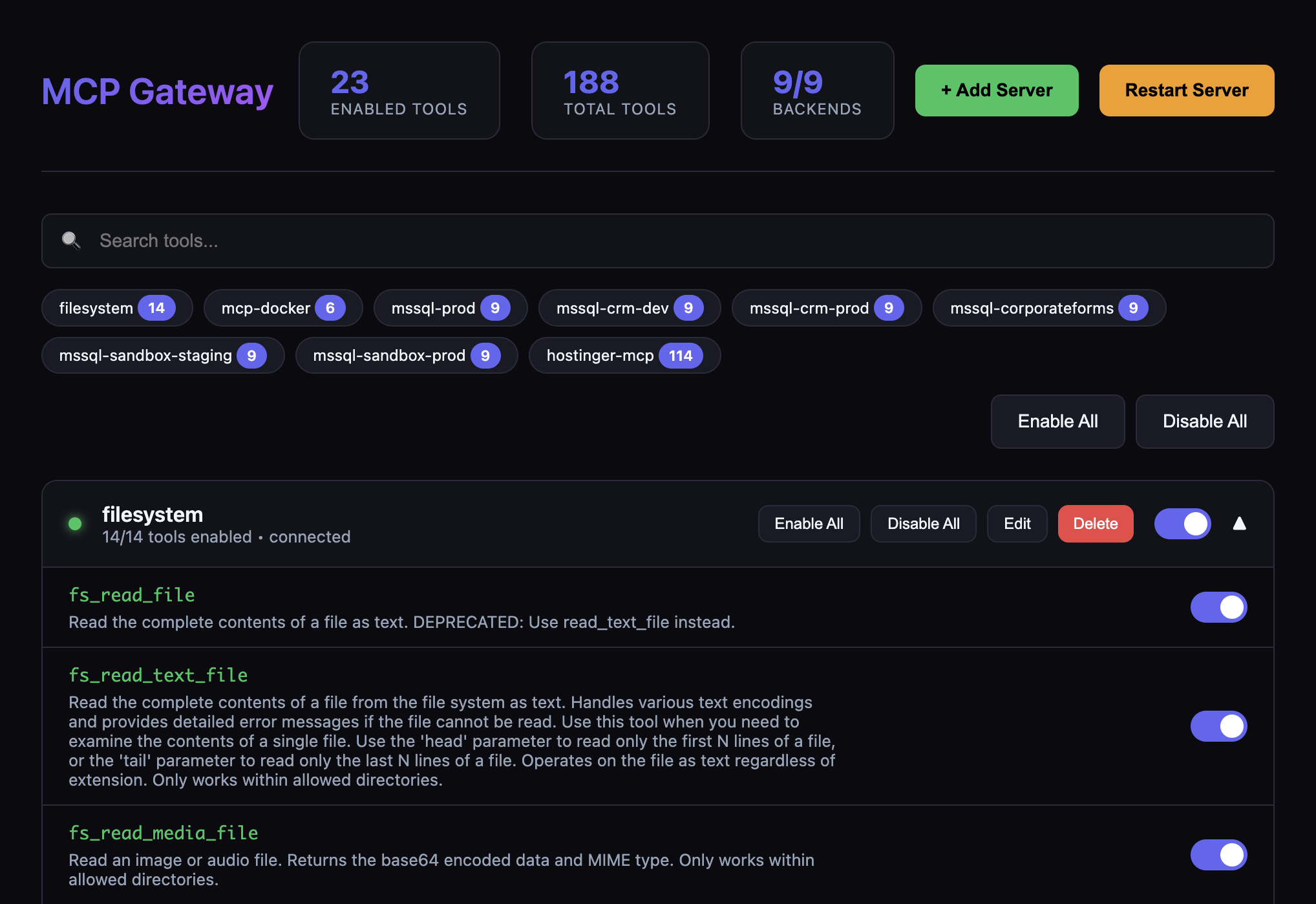
Dashboard Overview
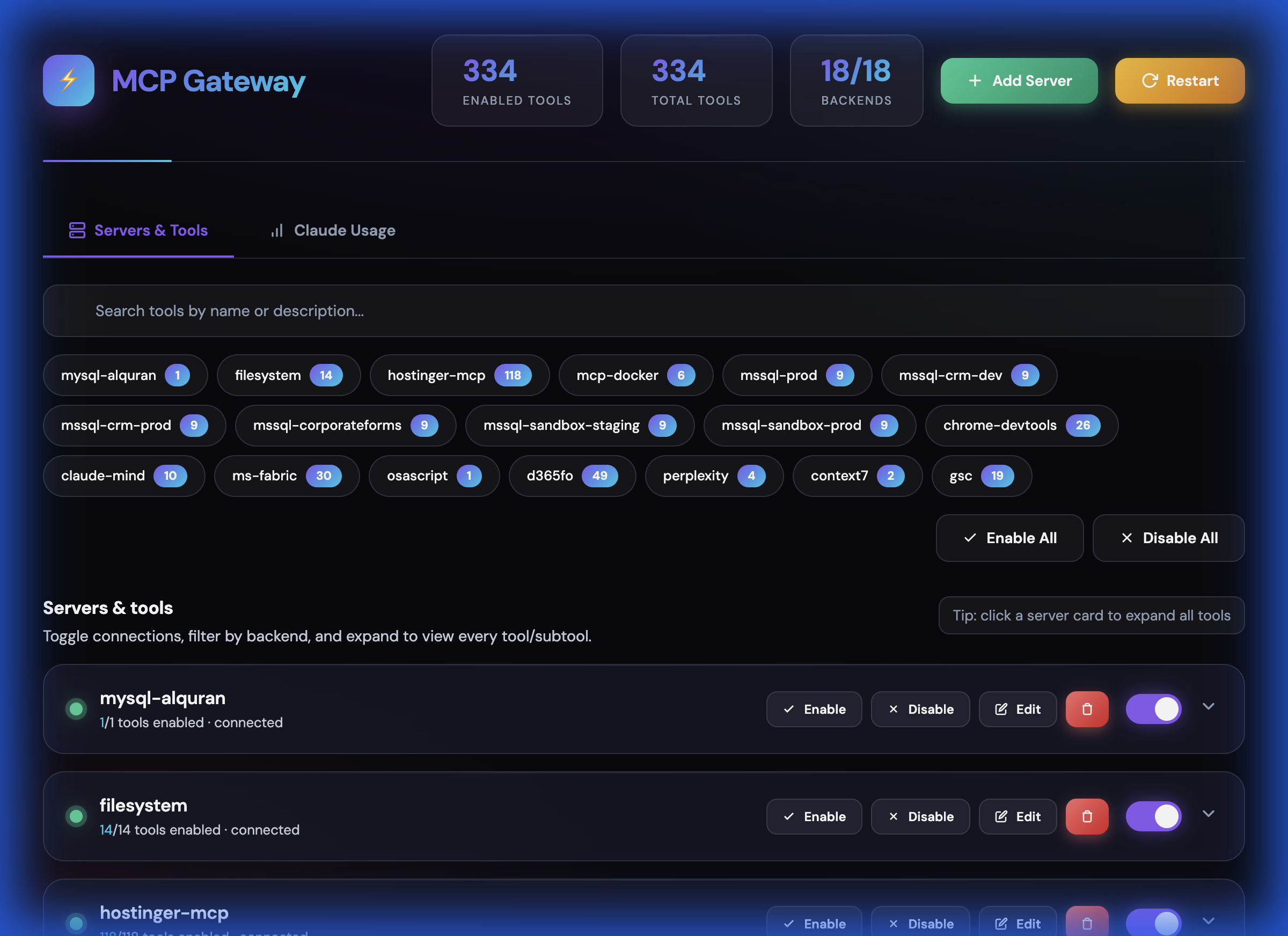
Tools Management
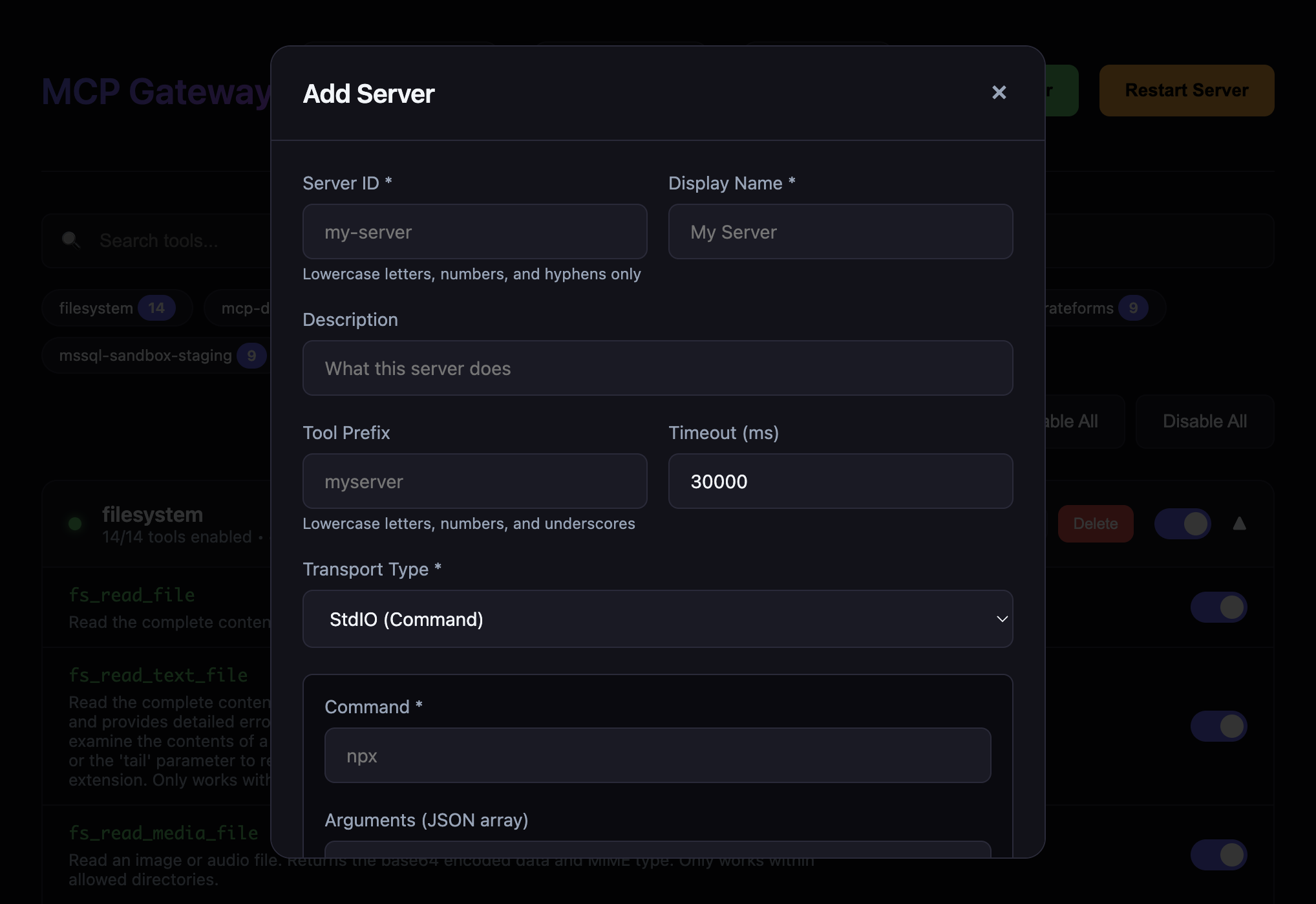
Add Server Dialog
Quick Start
1. Install Dependencies
npm install
2. Configure Backend Servers
Copy the example config and edit it:
cp config/servers.example.json config/servers.json
Edit config/servers.json to add your MCP servers:
{
  "servers": [
    {
      "id": "filesystem",
      "name": "Filesystem",
      "enabled": true,
      "transport": {
        "type": "stdio",
        "command": "npx",
        "args": ["-y", "@modelcontextprotocol/server-filesystem", "/path/to/dir"]
      },
      "toolPrefix": "fs"
    }
  ]
}
Server identity rules:
idis the stable backend identifier used by the gateway API and dashboard routes. It must be unique and contain only lowercase letters, numbers, and hyphens, for examplemssql-crm-prod.nameis the human-readable display label. It can use spaces and title case, for exampleCRM Production MSSQL.toolPrefixis the namespace prepended to tools from that backend. It must contain only lowercase letters, numbers, and underscores, for examplemssql_crm_prod.
3. Start the Gateway
# Development
npm run dev

# Production
npm run build
npm start
The gateway will start on http://localhost:3010 by default.
Security modes
For local experimentation you can run without auth:
AUTH_MODE=none
However, sensitive endpoints (/dashboard, /dashboard/api/*, /api/code/*, /metrics/json) are blocked by default when AUTH_MODE=none. To allow unauthenticated access (not recommended except for isolated local use), explicitly opt in:
ALLOW_INSECURE=1
For secure usage, prefer:
AUTH_MODE=api-keywithAPI_KEYS=key1,key2- or
AUTH_MODE=oauthwith the appropriateOAUTH_*settings shown below.
Hardening Setup
Use DEPLOYMENT_PROFILE to make the gateway fail closed for the environment you are running:
| Profile | Intended use | Code isolation | Store requirement |
|---|---|---|---|
local-single-user |
Trusted local development | Node vm by default, SANDBOX_ISOLATE=1 optional |
memory default |
shared-local |
Shared workstation or LAN | Strong isolation required | memory allowed |
remote-private |
Private remote service | Strong isolation required | memory allowed |
remote-public |
Internet-facing service | Strong isolation required | redis required |
Protected profiles (shared-local, remote-private, remote-public) require:
AUTH_MODE=api-keyorAUTH_MODE=oauth- Non-wildcard
CORS_ORIGINS - A code-execution allowlist via
CODE_EXECUTION_REQUIRE_ALLOWLIST=1,CODE_EXECUTION_ALLOWED_TOOLS, orCODE_EXECUTION_ALLOWED_TOOL_PREFIXES - Strong sandbox isolation; Node 25 protected runs fail closed when
isolated-vmis unavailable
For Redis-backed shared state:
STORE_BACKEND=redis
REDIS_URL=redis://127.0.0.1:6379
STORE_NAMESPACE=mcp-gateway
remote-public refuses to start unless STORE_BACKEND=redis is configured and reachable. Local and private deployments can keep the in-memory default, but memory stores are process-local and reset on restart.
Before shipping a hardening change, run the full validation gate:
npm run typecheck
npm test
npm run lint
npm run build
Hardening closeout notes
The latest hardening closeout adds these guardrails:
- Sandbox host-callable wrappers are pinned to safe call shapes so user code cannot pivot through wrapper constructors.
- Redis-backed rate limits use atomic TTL-aware updates, and
remote-publicremains fail-closed without reachable Redis. completion/completerequests are routed through the owning backend so resource references cannot cross backend boundaries.- Redis session cleanup returns expired session IDs so local PII token maps are removed when shared sessions expire.
- REST skill execution now carries the authenticated identity/scope into the skill runner.
- REST tool-call caching is explicit opt-in with
cache: trueorcache: { "enabled": true }; cache hits do not bypass authorization.
To confirm what is running locally without restarting the gateway:
lsof -nP -iTCP:3010 -sTCP:LISTEN
curl -sS http://127.0.0.1:3010/health/summary
Endpoints
Core Endpoints
| Endpoint | Transport | Use Case |
|---|---|---|
/mcp |
HTTP Streamable | Primary endpoint - works with all clients |
/sse |
Server-Sent Events | Backward compatibility |
/health |
JSON | Health checks and status |
/dashboard |
Web UI | Manage tools, backends, and restart server |
/metrics |
Prometheus | Prometheus-format metrics |
/metrics/json |
JSON | JSON-format metrics |
Code Execution API
| Endpoint | Method | Description |
|---|---|---|
/api/code/tools/search |
GET | Search tools with filters |
/api/code/tools/tree |
GET | Get filesystem-like tool tree |
/api/code/tools/names |
GET | Get all tool names (minimal tokens) |
/api/code/tools/:name/schema |
GET | Lazy-load specific tool schema |
/api/code/tools/stats |
GET | Tool statistics by backend |
/api/code/sdk |
GET | Auto-generated TypeScript SDK |
/api/code/execute |
POST | Execute code in sandbox |
/api/code/tools/:name/call |
POST | Call tool with result filtering |
/api/code/tools/:name/call/aggregate |
POST | Call tool with aggregation |
/api/code/tools/parallel |
POST | Execute multiple tools in parallel |
/api/code/skills |
GET/POST | List or create skills |
/api/code/skills/search |
GET | Search skills |
/api/code/skills/:name |
GET/DELETE | Get or delete skill |
/api/code/skills/:name/execute |
POST | Execute a skill |
/api/code/workspace/session |
GET/POST | Get or update session state |
/api/code/cache/stats |
GET | Cache statistics |
/api/code/cache/clear |
POST | Clear cache |
Dashboard API
| Endpoint | Method | Description |
|---|---|---|
/dashboard/api/tools |
GET | Get all tools with enabled status |
/dashboard/api/backends |
GET | Get all backends with status |
/dashboard/api/tools/:name/toggle |
POST | Toggle tool enabled/disabled |
/dashboard/api/backends/:id/toggle |
POST | Toggle backend enabled/disabled |
/dashboard/api/backends/:id/reconnect |
POST | Reconnect a failed backend |
/dashboard/api/backends |
POST | Add new backend server |
/dashboard/api/backends/:id |
PUT | Update backend configuration |
/dashboard/api/backends/:id |
DELETE | Remove backend server |
/dashboard/api/config/export |
GET | Export server configuration |
/dashboard/api/config/import |
POST | Import server configuration |
/dashboard/api/chronicle/daily?date=YYYY-MM-DD |
GET | List Chronicle daily memory summaries |
/dashboard/api/chronicle/memory/:id |
GET | Read one Chronicle memory summary |
/dashboard/api/restart |
POST | Restart the gateway server |
Dashboard
Access the web dashboard at http://localhost:3010/dashboard to:
- View all connected backends and their real-time status
- Add new MCP servers with connection testing (STDIO, HTTP, SSE transports)
- Edit existing servers (modify command, args, environment variables)
- Delete servers with graceful disconnect
- Enable/disable individual tools or entire backends
- Search and filter tools across all backends
- Export/import configuration for backup and sharing
- Reconnect failed backends with one click
- Restart the entire gateway server
- View tool counts and backend health at a glance
- Review Chronicle daily memory summaries from local Codex Chronicle files
The dashboard persists UI state (disabled tools/backends) across server restarts.
Client Configuration
Claude Desktop / Claude Code
- Open Claude Desktop → Settings → Connectors
- Click Add remote MCP server
- Enter your gateway URL:
http://your-gateway-host:3010/mcp
- Complete authentication if required
Note: Claude requires adding remote servers through the UI, not config files.
Claude Desktop via STDIO Proxy
If Claude Desktop doesn't support HTTP/SSE transports directly, you can use the included STDIO proxy script:
{
  "mcpServers": {
    "mcp-gateway": {
      "command": "node",
      "args": ["/path/to/mcp-gateway/scripts/claude-stdio-proxy.mjs"],
      "env": {
        "MCP_GATEWAY_URL": "http://localhost:3010/mcp"
      }
    }
  }
}
The proxy (scripts/claude-stdio-proxy.mjs) reads JSON-RPC messages from stdin, forwards them to the gateway HTTP endpoint, and writes responses to stdout. It automatically manages session IDs.
Cursor
- Open Cursor → Settings → Features → MCP
- Click Add New MCP Server
- Choose Type:
HTTPorSSE - Enter your gateway URL:
For HTTP (recommended):
http://your-gateway-host:3010/mcp
For SSE:
http://your-gateway-host:3010/sse
Or add to your Cursor settings JSON:
{
  "mcpServers": {
    "my-gateway": {
      "type": "http",
      "url": "http://your-gateway-host:3010/mcp"
    }
  }
}
OpenAI Codex
Option 1: CLI
codex mcp add my-gateway --transport http --url https://your-gateway-host:3010/mcp
Option 2: Config File
Add to ~/.codex/config.toml:
[mcp_servers.my_gateway]
type = "http"
url = "https://your-gateway-host:3010/mcp"

# With API key authentication
# headers = { Authorization = "Bearer your-api-key-here" }
Important: Codex requires HTTPS for remote servers and only supports HTTP Streamable (not SSE).
VS Code Copilot
- Open Command Palette (
Cmd/Ctrl + Shift + P) - Run MCP: Add MCP Server
- Choose Remote (URL)
- Enter your gateway URL:
http://your-gateway-host:3010/mcp
- Approve the trust prompt
Or add to your VS Code settings.json:
{
  "mcp.servers": {
    "my-gateway": {
      "type": "http",
      "url": "http://your-gateway-host:3010/mcp"
    }
  }
}
Cross-IDE Configuration (.agents/)
MCP Gateway uses a centralized .agents/ directory as the single source of truth for AI agent configuration across all IDEs:
.agents/
├── AGENTS.md              # Unified project rules (symlinked to all IDEs)
├── hooks/
│   └── skill-activation.mjs  # Auto-activates skills based on prompt keywords
├── skills/                # Single source of truth for all skills
│   ├── code-review/       # Executable: skill.json + index.ts + SKILL.md
│   ├── debugging/         # Protocol-only: SKILL.md only (loaded by AI agent)
│   ├── git-workflow/
│   └── ...
└── rules/                 # Additional rule fragments
    └── cipher-memory.md
How It Works
The .agents/AGENTS.md file is symlinked to each IDE's configuration location:
| IDE | Symlink |
|---|---|
| Cursor | .cursorrules → .agents/AGENTS.md |
| Windsurf | .windsurfrules → .agents/AGENTS.md |
| Claude Code | CLAUDE.md → .agents/AGENTS.md |
| Codex | AGENTS.md → .agents/AGENTS.md |
This means:
- One file to maintain - Edit
.agents/AGENTS.mdand all IDEs get the update - Consistent behavior - Same rules, skills, and protocols across all tools
- Version controlled - Track all configuration in git
Skills Auto-Activation
Skills in .agents/skills/ can auto-activate when your AI agent detects relevant keywords in your prompt. Setup varies by IDE — see Setting Up Skill Auto-Activation in the Skills System section for full instructions.
Quick overview of built-in triggers:
| Trigger Keywords | Skill Loaded |
|---|---|
| "review code", "security audit", "find bugs" | code-review |
| "debug", "fix bug", "not working", "error" | debugging |
| "commit", "push", "create PR", "merge" | git-workflow |
| "build UI", "dashboard", "React", "frontend" | frontend-build |
| "deploy", "docker", "production", "hosting" | infra-deploy |
| "SQL optimization", "slow query" | sql-analyzer |
Setting Up for Your Fork
If you fork this repository:
- The symlinks are already configured in the repo
- Edit
.agents/AGENTS.mdto customize rules for your project - Add/modify skills in
.agents/skills/
Backend Server Configuration
The gateway can connect to MCP servers using different transports:
Each backend has three separate identity fields:
| Field | Purpose | Format | Example |
|---|---|---|---|
id |
Stable machine identifier for config, API routes, dashboard actions, and backend filtering | Lowercase letters, numbers, hyphens | mssql-crm-prod |
name |
Human-readable label shown to operators | Free-form string | CRM Production MSSQL |
toolPrefix |
Tool namespace added before every tool exposed by the backend | Lowercase letters, numbers, underscores | mssql_crm_prod |
Do not use the display name as a tool namespace. If a backend with toolPrefix: "mssql_crm_prod" exposes execute_query, clients call it as mssql_crm_prod_execute_query. The id may use hyphens because it identifies the backend; toolPrefix uses underscores because it becomes part of tool names.
STDIO (Local Process)
{
  "id": "filesystem",
  "name": "Filesystem Server",
  "enabled": true,
  "transport": {
    "type": "stdio",
    "command": "npx",
    "args": ["-y", "@modelcontextprotocol/server-filesystem", "/path/to/dir"],
    "env": {
      "SOME_VAR": "${ENV_VAR_NAME}"
    }
  },
  "toolPrefix": "fs",
  "timeout": 30000
}
MSSQL (Docker STDIO)
Use this pattern when the MSSQL MCP server is installed inside a Docker container and the gateway should talk to it over stdio:
{
  "id": "mssql-crm-prod",
  "name": "CRM Production MSSQL",
  "description": "Read-only CRM production database tools",
  "enabled": true,
  "transport": {
    "type": "stdio",
    "command": "docker",
    "args": [
      "exec",
      "-i",
      "mssql-crm-prod-mcp",
      "node",
      "node_modules/mssql-mcp/dist/index.js"
    ]
  },
  "toolPrefix": "mssql_crm_prod",
  "timeout": 60000
}
With that configuration, a backend tool named execute_query is exposed through the gateway as mssql_crm_prod_execute_query.
MSSQL (NPX STDIO)
Use this pattern when the gateway should launch the MSSQL MCP package directly. Keep credentials in environment variables or ${VAR} references, not in the repository:
{
  "id": "mssql-hr-staging",
  "name": "HR Staging MSSQL",
  "description": "HR staging database tools",
  "enabled": true,
  "transport": {
    "type": "stdio",
    "command": "npx",
    "args": ["-y", "mssql-mcp@latest"],
    "env": {
      "MSSQL_SERVER": "${HR_STAGING_SQL_SERVER}",
      "MSSQL_DATABASE": "${HR_STAGING_SQL_DATABASE}",
      "MSSQL_USER": "${HR_STAGING_SQL_USER}",
      "MSSQL_PASSWORD": "${HR_STAGING_SQL_PASSWORD}"
    }
  },
  "toolPrefix": "mssql_hr_stg",
  "timeout": 60000
}
HTTP (Remote Server)
{
  "id": "remote-server",
  "name": "Remote MCP Server",
  "enabled": true,
  "transport": {
    "type": "http",
    "url": "https://remote-mcp-server.com/mcp",
    "headers": {
      "Authorization": "Bearer ${REMOTE_API_KEY}"
    }
  },
  "toolPrefix": "remote",
  "timeout": 60000
}
Tool Prefixing
Use toolPrefix to namespace tools from different servers:
- Server with
toolPrefix: "fs"exposesread_fileasfs_read_file - Server with
toolPrefix: "mssql_crm_prod"exposesexecute_queryasmssql_crm_prod_execute_query - Prevents naming collisions between servers
- Makes it clear which server handles each tool
Authentication
API Key Authentication
Set environment variables:
AUTH_MODE=api-key
API_KEYS=key1,key2,key3
Clients send the key in the Authorization header:
Authorization: Bearer your-api-key
OAuth Authentication
AUTH_MODE=oauth
OAUTH_ISSUER=https://your-oauth-provider.com
OAUTH_AUDIENCE=mcp-gateway
OAUTH_JWKS_URI=https://your-oauth-provider.com/.well-known/jwks.json
Docker Deployment
Build and Run
# Build the image
docker build -t mcp-gateway .

# Run with environment variables
docker run -d \
  -p 3010:3010 \
  -v $(pwd)/config/servers.json:/app/config/servers.json:ro \
  -e AUTH_MODE=api-key \
  -e API_KEYS=your-secret-key \
  mcp-gateway
Docker Compose
# Start
docker-compose up -d

# View logs
docker-compose logs -f

# Stop
docker-compose down
Environment Variables
Core Configuration
| Variable | Default | Description |
|---|---|---|
PORT |
3010 |
Server port |
HOST |
0.0.0.0 |
Server host |
LOG_LEVEL |
info |
Log level (debug, info, warn, error) |
GATEWAY_NAME |
mcp-gateway |
Gateway name in MCP responses |
GATEWAY_LITE_MODE |
1 |
Lite mode - reduces exposed gateway tools for lower token usage (recommended) |
AUTH_MODE |
none |
Authentication mode (none, api-key, oauth) |
API_KEYS |
- | Comma-separated API keys |
OAUTH_ISSUER |
- | OAuth token issuer |
OAUTH_AUDIENCE |
- | OAuth audience |
OAUTH_JWKS_URI |
- | OAuth JWKS endpoint |
CORS_ORIGINS |
http://localhost:3010,http://127.0.0.1:3010 |
Allowed CORS origins (* to allow all) |
HEALTH_REQUIRE_BACKENDS |
0 |
If 1, /health returns 503 when all configured backends are down |
ALLOW_INSECURE |
0 |
If 1, allow unauthenticated access to dashboard, code APIs, and JSON metrics when AUTH_MODE=none |
RATE_LIMIT_WINDOW_MS |
60000 |
Rate limit window (ms) |
RATE_LIMIT_MAX_REQUESTS |
100 |
Max requests per window |
Optional Features
MCP Gateway includes optional features that are disabled by default for minimal, public-friendly deployments. Enable them by setting the corresponding environment variable to 1.
| Variable | Default | Description |
|---|---|---|
ENABLE_SKILLS |
0 |
Enable Skills system - reusable code patterns and skill execution |
CHRONICLE_MEMORY_DIR |
~/.codex/memories/extensions/chronicle/resources |
Optional override for the local Chronicle daily-memory resource directory |
When a feature is disabled:
- The corresponding dashboard tab is hidden
- API endpoints return
404 Feature disabledwith instructions to enable - No errors occur from missing optional services.
Chronicle daily memory is read from local Codex Chronicle summaries when available. It does not require the old Cipher, Claude Usage, or Antigravity usage integrations.
Optional Features Guide
This section provides detailed instructions for enabling and using each optional feature.
Skills System (ENABLE_SKILLS=1)
The Skills system allows you to save and reuse code patterns for zero-shot execution. Skills are the most powerful token-saving feature in MCP Gateway, reducing token usage by 95%+ for recurring tasks.
What Skills Do
- Save successful code patterns as reusable templates
- Execute complex workflows with a single tool call (~20 tokens)
- Eliminate prompt engineering for recurring tasks
- Hot-reload when skill files change on disk
Enabling Skills
# In your .env file
ENABLE_SKILLS=1
Storage Location
All skills live in a single directory: .agents/skills/
Skills come in two flavors:
Executable skills (have skill.json + index.ts) — can be run via gateway_execute_skill:
code-review/
├── skill.json    # Metadata (name, description, inputs, tags)
├── index.ts      # Executable TypeScript code
├── SKILL.md      # Human-readable protocol/instructions
├── scripts/      # Optional helper scripts
└── references/   # Optional reference docs
Protocol-only skills (have SKILL.md only) — loaded by the AI agent, not executable via gateway:
debugging/
└── SKILL.md      # Protocol/instructions the AI follows
Protocol-only skills appear in gateway_list_skills but return a helpful error if you try to execute them, directing you to read the SKILL.md instead.
Creating Skills via MCP Tools
// Create a new skill
await gateway_create_skill({
  name: "daily-report",
  description: "Generate daily sales summary by region",
  code: `
    const sales = await mssql.executeQuery({
      query: \`SELECT region, SUM(amount) as total
              FROM orders WHERE date = '\${date}' GROUP BY region\`
    });
    console.log(JSON.stringify(sales));
  `,
  inputs: [
    { name: "date", type: "string", required: true, description: "Date in YYYY-MM-DD format" }
  ],
  tags: ["reporting", "sales", "daily"]
});
Executing Skills
// Execute with ~20 tokens instead of 500+ for raw code
await gateway_execute_skill({
  name: "daily-report",
  inputs: { date: "2024-01-15" }
});
Skills MCP Tools
| Tool | Description |
|---|---|
gateway_list_skills |
List all available skills with metadata |
gateway_search_skills |
Search skills by name, description, or tags |
gateway_get_skill |
Get full skill details including code |
gateway_execute_skill |
Execute a skill with input parameters |
gateway_create_skill |
Create a new reusable skill |
Skills REST API
| Endpoint | Method | Description |
|---|---|---|
/api/code/skills |
GET | List all skills |
/api/code/skills |
POST | Create a new skill |
/api/code/skills/search?q=query |
GET | Search skills |
/api/code/skills/:name |
GET | Get skill details |
/api/code/skills/:name |
DELETE | Delete a skill |
/api/code/skills/:name/execute |
POST | Execute a skill |
/api/code/skills/templates |
GET | Get skill templates |
/api/code/skills/sync |
POST | Sync external skills to workspace |
Dashboard
When enabled, a Skills tab appears in the dashboard (/dashboard) showing:
- All available skills with search/filter
- Skill details and code preview
- Execute skills directly from UI
- Create new skills from templates
Adding Your Own Skills
You can add skills to your gateway in two ways:
1. Create executable skills (for automation via gateway_execute_skill):
mkdir -p .agents/skills/my-skill
Create three files:
skill.json — metadata:
{
  "name": "my-skill",
  "description": "What this skill does",
  "version": "1.0.0",
  "category": "productivity",
  "inputs": [
    { "name": "target", "type": "string", "required": true, "description": "Target to process" }
  ],
  "tags": ["automation"]
}
index.ts — executable code:
const target = inputs?.target || 'default';
const result = await callTool('some_backend_tool', { query: target });
console.log(JSON.stringify(result));
SKILL.md — human-readable instructions (optional but recommended).
2. Create protocol-only skills (for AI agent workflows):
Just create a SKILL.md in a skill directory — no skill.json needed:
mkdir -p .agents/skills/my-protocol
cat > .agents/skills/my-protocol/SKILL.md << 'EOF'
# My Protocol

## When to Use
When the user asks to...

## Steps
1. First do X
2. Then do Y
3. Verify with Z
EOF
The gateway will list it as a protocol-only skill. AI agents read the SKILL.md directly instead of executing code.
Setting Up Skill Auto-Activation
Skills don't activate on their own — your AI agent needs to be told they exist. Choose your setup below:
Claude Code supports hooks that run on every prompt. The repo includes a hook at .agents/hooks/skill-activation.mjs that detects trigger keywords and injects skill recommendations into context.
Setup: Add this to your project's .claude/settings.local.json (create the file if it doesn't exist):
{
  "hooks": {
    "UserPromptSubmit": [
      {
        "hooks": [
          {
            "type": "command",
            "command": "node .agents/hooks/skill-activation.mjs"
          }
        ]
      }
    ]
  }
}
How it works:
- You type a prompt like "review this code for security issues"
- The hook matches "review code" →
code-reviewskill - Claude receives: "Load
.agents/skills/code-review/SKILL.mdfor best results" - Claude reads the skill file and follows its protocol
Customize triggers: Edit the SKILLS array in .agents/hooks/skill-activation.mjs to add your own keyword → skill mappings.
Add this block to your .cursorrules file (or .cursor/rules/skills.mdc):
## Skills

This project has reusable AI skills at `.agents/skills/`. When the user's request
matches a skill, read its SKILL.md BEFORE responding.

| User says | Read this skill |
|-----------|----------------|
| "review code", "security audit", "find bugs" | `.agents/skills/code-review/SKILL.md` |
| "debug", "fix bug", "not working", "error" | `.agents/skills/debugging/SKILL.md` |
| "commit", "push", "create PR", "merge" | `.agents/skills/git-workflow/SKILL.md` |
| "build UI", "dashboard", "React", "frontend" | `.agents/skills/frontend-build/SKILL.md` |
| "deploy", "docker", "production", "hosting" | `.agents/skills/infra-deploy/SKILL.md` |
| "SQL optimization", "slow query" | `.agents/skills/sql-analyzer/SKILL.md` |

To see all available skills: `ls .agents/skills/`
Add the same block as Cursor to your .windsurfrules file.
Add this to whatever file your IDE reads for AI instructions (e.g., AGENTS.md, .github/copilot-instructions.md):
## Skills

This project has reusable AI skills at `.agents/skills/`. Each skill directory
contains a SKILL.md with instructions the AI should follow.

Before responding to a user request, check if any skill matches:
1. List skills: `ls .agents/skills/`
2. If a skill name matches the task, read `.agents/skills/{name}/SKILL.md`
3. Follow the skill's instructions in your response

Skills with a `skill.json` + `index.ts` can also be executed programmatically
via the MCP Gateway: `gateway_execute_skill({ name: "skill-name", inputs: {...} })`
If none of the above apply, paste this into your AI system prompt or project instructions:
You have access to a skills library at .agents/skills/. Each skill is a directory
containing a SKILL.md with step-by-step instructions for specific tasks.

IMPORTANT: Before starting any task, check if a matching skill exists:
- Code review → .agents/skills/code-review/SKILL.md
- Debugging → .agents/skills/debugging/SKILL.md
- Git workflow → .agents/skills/git-workflow/SKILL.md
- Frontend → .agents/skills/frontend-build/SKILL.md
- Deployment → .agents/skills/infra-deploy/SKILL.md
- SQL analysis → .agents/skills/sql-analyzer/SKILL.md

If a skill matches, read its SKILL.md and follow the protocol before responding.
For the full list: ls .agents/skills/
Chronicle Daily Memory
The dashboard Memory tab now reads Chronicle summaries directly from local Codex memory files. By default it loads Markdown summaries from:
~/.codex/memories/extensions/chronicle/resources
The dashboard exposes two local endpoints:
| Endpoint | Method | Description |
|---|---|---|
/dashboard/api/chronicle/daily?date=YYYY-MM-DD |
GET | List Chronicle summaries for a day |
/dashboard/api/chronicle/memory/:id |
GET | Read one Chronicle memory file |
The daily view shows the latest 10-minute and 6-hour Chronicle summaries, with a date picker for previous days. Invalid memory IDs are rejected server-side and absolute local paths are not returned to the browser.
No comments yet
Be the first to share your take.