
MCP Stealth Chrome
160 tools for AI agents that bypass Cloudflare, Turnstile, reCAPTCHA, and modern anti-bot systems — with an LLM-optimized action kit (describe_page, smart_fill, workflow_run, vision-LLM element locator) and a self-sufficient web-research kit (web_search, scrape_markdown, deep_research, social_research) layered on top of standard automation.


Browser stealth when you need eyes. TLS-perfect HTTP when you need speed.
Built on nodriver (direct CDP, no WebDriver leak) + curl_cffi (TLS fingerprint spoofing) + FastMCP.
One-line install with uvx:
claude mcp add stealth-chrome -- uvx mcp-stealth-chrome@latest
Proven on Real Sites
| Site | Challenge | Result |
|---|---|---|
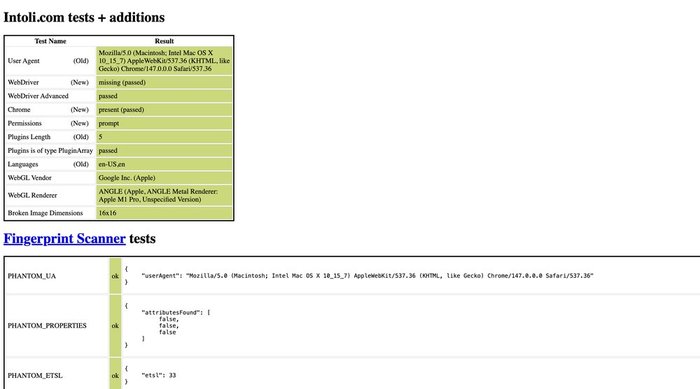
bot.sannysoft.com |
All fingerprint tests | ✅ 100% pass (proof) |
2captcha.com/demo/cloudflare-turnstile |
Turnstile visible | ✅ Passed via click_turnstile() (proof) |
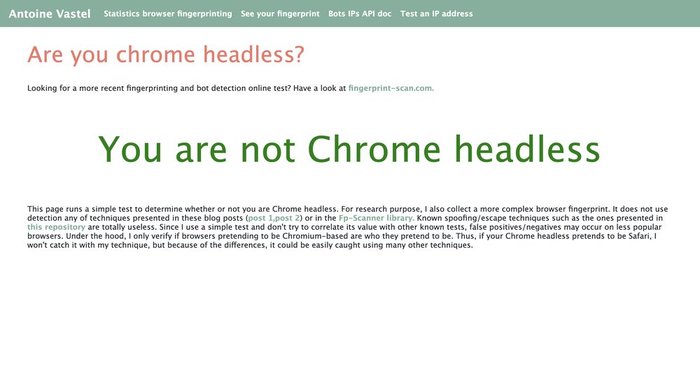
arh.antoinevastel.com/.../areyouheadless |
Headless-chrome detection | ✅ "You are not Chrome headless" (proof) |
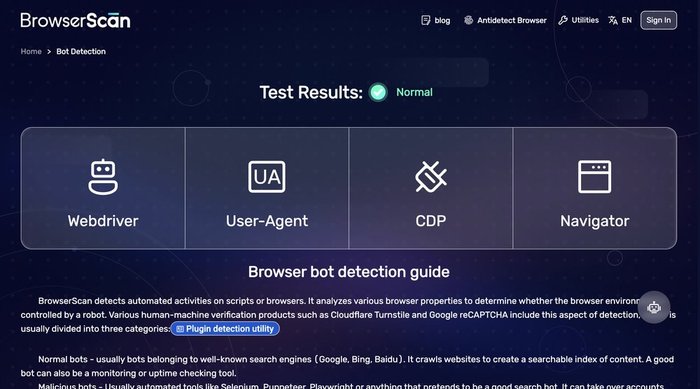
browserscan.net/bot-detection |
WebDriver/Selenium/CDP/Headless | ✅ All categories "Normal" (proof) |
tls.browserleaks.com |
TLS JA3/JA4 fingerprint | ✅ Real Chrome/Firefox/Safari JA3 hashes (see output below) |
httpbin.org |
Multi-instance isolation | ✅ Two browsers parallel |
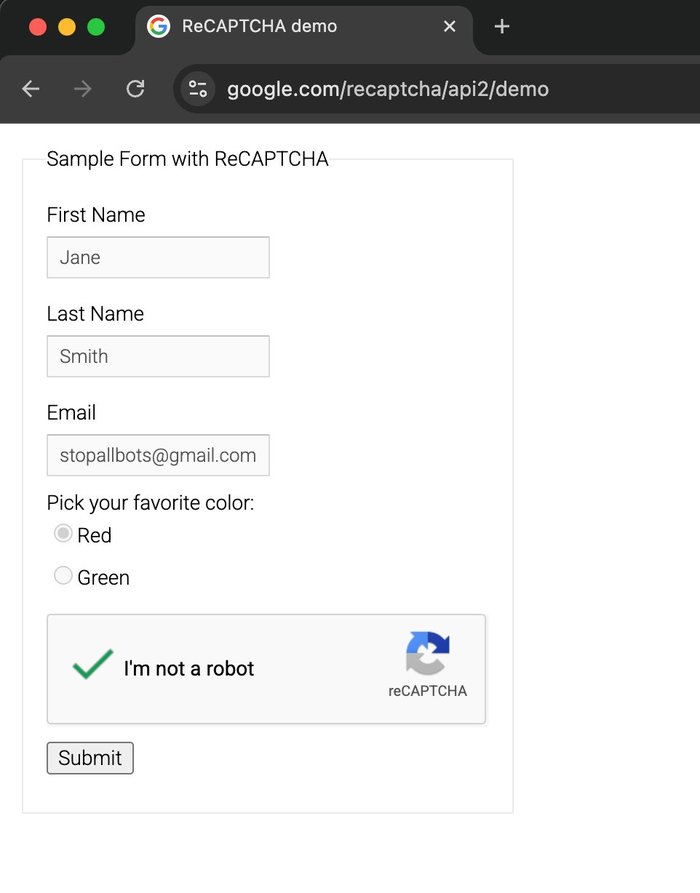
google.com/recaptcha/api2/demo |
reCAPTCHA v2 image challenge | ✅ 5/5 = 100% via solve_recaptcha_ai() (proof) |
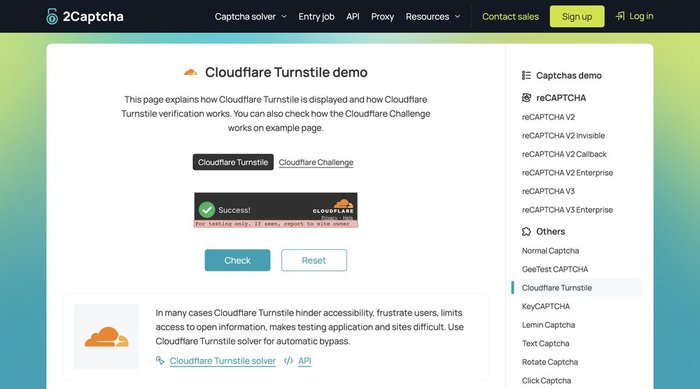
🎯 click_turnstile → Cloudflare Turnstile Bypass
One-liner bypass on supported widget shapes. click_turnstile() → checkbox switches from "Verify you are human" ☐ to "Success!" ✅.
✅ Works on: 2captcha.com/demo/cloudflare-turnstile, dash.cloudflare.com login, nopecha.com/captcha/turnstile (via template-match fallback since v0.1.7), any page embedding the standard CF Turnstile widget with [data-sitekey] / .cf-turnstile / challenges.cloudflare.com iframe.
❌ Does NOT work on: Cloudflare managed-mode interstitials — the "Just a moment..." full-page challenge (e.g. nopecha.com/demo/cloudflare). CF scores the click as non-human and resets the Ray ID. For those pages use solve_captcha with a CAPSOLVER_KEY, or storage_state_load with a pre-warmed session.
🧪 bot.sannysoft.com → All Fingerprint Tests Pass
navigator.webdriver missing, WebDriver Advanced passed, Chrome present, Plugins detected correctly, PHANTOM_* probes all ok, WebGL shows real Apple M1 Pro GPU — nodriver's CDP-direct approach leaves zero automation traces.
🤖 areyouheadless → Headless Chrome Detection
Antoine Vastel's public headless-detection test says "You are not Chrome headless" — even though we run Chrome controlled programmatically.
🔍 browserscan.net/bot-detection → All Categories Normal
14 signals checked (WebDriver, WebDriver Advance, Selenium, NightmareJS, PhantomJS, Awesomium, Cef, CefSharp, Coaches, FMiner, Born, Phantomas, Rhino, Webdriverio, Headless Chrome, CDP, Dev Tool, Native Navigator) — every one returns "Normal".
🔐 TLS Fingerprint Proof
http_request(impersonate="chrome") vs vanilla Python httpx — tls.browserleaks.com:
Vanilla httpx: JA3: 37f7d09ced1a845dc48872abc1a29d7b UA: python-httpx/0.28.1 ❌ BOT
Chrome impersonate: JA3: f830262a93191fd695c65531282d5657 UA: Chrome/146.0.0.0 ✅ real Chrome
Firefox impersonate: JA3: 6f7889b9fb1a62a9577e685c1fcfa919 UA: Firefox/147.0 ✅ real Firefox
Safari impersonate: JA3: ecdf4f49dd59effc439639da29186671 UA: Safari/605.1.15 ✅ real Safari
Each impersonation produces authentic browser JA3/JA4 — Cloudflare, DataDome, and Akamai cannot distinguish our HTTP requests from real browsers.
🏆 reCAPTCHA v2 Benchmark (5 consecutive runs)
Fresh profile + mouse drift warmup + an OpenAI-compatible vision model:
Run 1: ✅ 2169ch token, tiles=[3,4,7], 146s
Run 2: ✅ 2126ch token, tiles=[0,2,4,7], 80s
Run 3: ✅ 2169ch token, tiles=[1,2,4,8], 143s
Run 4: ✅ 2148ch token, tiles=[1,4,5,6,8,9], 126s
Run 5: ✅ 2169ch token, tiles=[0,3,4], 69s
Success rate: 5/5 = 100%
Avg solve: 113s
Token range: 2126–2169 chars (all Google-accepted)
First OSS MCP with proven 100% reCAPTCHA v2 bypass via BYO-API-key — works with Claude, gpt-4o, gpt-5.x, Gemini, Groq, local Ollama, any OpenAI-compatible vision model.
Method: neutral prompt language bypasses LLM safety filter + auto-refresh challenge when vision returns empty + dynamic 3x3/4x4 grid detection + humanized mouse behavior.
Key Differentiators
Compared to the leading Python stealth MCP (vibheksoni/stealth-browser-mcp, 476⭐):
| Feature | mcp-stealth-chrome | vibheksoni |
|---|---|---|
| Tools | 143 | 90 |
| LLM-optimized kit (describe_page, smart_fill, vision_locate, workflow_run, assert_*) | ✅ Unique | ❌ |
| Network body capture + session-bridged HTTP | ✅ Unique | ❌ |
click_turnstile one-liner |
✅ Embed widgets + template fallback | ❌ |
| Dual-mode HTTP (curl_cffi TLS) | ✅ Unique | ❌ |
| AI Vision reCAPTCHA solver (Claude) | ✅ Unique | ❌ |
| Precision Mouse Kit (11 tools) | ✅ Unique | ❌ |
| Multi-instance + idle reaper | ✅ | ✅ |
| Install | uvx zero-setup |
git clone + pip |
| Sister Firefox package | ✅ mcp-camoufox | ❌ |
| Network interception hooks | ⚠️ basic | ✅ AI-generated Python hooks |
| Pixel-perfect element cloning | ⚠️ basic | ✅ 300+ CSS + events |
Different niches: we focus on anti-bot bypass, they focus on UI reverse-engineering. Both MCPs work great together.
Quick Install (3 commands per OS)
macOS:
curl -LsSf https://astral.sh/uv/install.sh | sh # install uv
brew install --cask google-chrome # install Chrome (skip if already installed)
claude mcp add stealth-chrome --scope user -- uvx mcp-stealth-chrome@latest
Linux (Ubuntu/Debian):
curl -LsSf https://astral.sh/uv/install.sh | sh
sudo apt install -y google-chrome-stable # or chromium-browser
claude mcp add stealth-chrome --scope user -- uvx mcp-stealth-chrome@latest
Windows (PowerShell):
powershell -c "irm https://astral.sh/uv/install.ps1 | iex"
winget install Google.Chrome
claude mcp add stealth-chrome --scope user -- uvx mcp-stealth-chrome@latest
No Chrome? Server gives a friendly error with install instructions before failing.
See INSTALL.md for detailed per-client setup + troubleshooting. Per-client snippets below:
Global (available in all projects):
claude mcp add stealth-chrome --scope user -- uvx mcp-stealth-chrome@latest
Project only (current project):
claude mcp add stealth-chrome -- uvx mcp-stealth-chrome@latest
Global — add to config file:
- macOS:
~/Library/Application Support/Claude/claude_desktop_config.json - Windows:
%APPDATA%\Claude\claude_desktop_config.json - Linux:
~/.config/Claude/claude_desktop_config.json
{
  "mcpServers": {
    "stealth-chrome": {
      "command": "uvx",
      "args": ["mcp-stealth-chrome@latest"]
    }
  }
}
Claude Desktop is always global — no project-level config.
Global — Preferences > Features > MCP, or ~/.cursor/mcp.json:
Project — .cursor/mcp.json in project root:
{
  "mcpServers": {
    "stealth-chrome": {
      "command": "uvx",
      "args": ["mcp-stealth-chrome@latest"]
    }
  }
}
Global — ~/.windsurf/mcp.json:
Project — .windsurf/mcp.json in project root:
{
"servers": {
"stealth-chrome": {
"command": "uvx",
"args": ["mcp-stealth-chrome@latest"]
}
}
}
Global — VS Code settings or ~/.continue/config.json:
Project — .vscode/mcp.json in project root:
{
  "mcpServers": {
    "stealth-chrome": {
      "command": "uvx",
      "args": ["mcp-stealth-chrome@latest"]
    }
  }
}
Settings → Extensions → MCP Servers, or edit ~/.config/zed/settings.json:
{
  "context_servers": {
    "stealth-chrome": {
      "command": {
        "path": "uvx",
        "args": ["mcp-stealth-chrome@latest"]
      }
    }
  }
}
🔑 BYOK (Bring Your Own Key) — Optional
mcp-stealth-chrome is fully functional without any API key — 157 of 160 tools work out of the box, including click_turnstile (Cloudflare Turnstile bypass), TLS-perfect HTTP, multi-instance, DevTools-level perf/coverage/emulation, the full LLM-optimized kit (describe_page / smart_fill / workflow_run), the web-research kit (web_search / scrape_markdown / deep_research / social_research — no search-API key needed), and all scraping tools.
API keys are optional — only needed for 3 vision/solver tools:
| Tool | Purpose | Required key | Cost |
|---|---|---|---|
solve_recaptcha_ai |
reCAPTCHA v2 image challenges via AI vision | Any vision-capable LLM (OpenAI-compat / Claude / Ollama) | ~$0.005-0.03 per solve |
vision_locate |
Find DOM element by natural-language description ("the red Create button at bottom right") |
Same vision provider as solve_recaptcha_ai |
~$0.001-0.01 per call |
solve_captcha |
Turnstile, reCAPTCHA v2, reCAPTCHA v3, hCaptcha via paid solver | CapSolver API | ~$0.80-1.00 per 1000 |
Everything else (click_turnstile, verify_cf, storage_state, http_request, detect_anti_bot, clone_chrome_profile, etc.) works 100% without any key.
When BYOK Matters
solve_recaptcha_ai→ auto-solve reCAPTCHA v2 image challenges ("select all images with cars") via vision LLM. Best for: low-volume automation where you want self-hosted / BYO-key.solve_captcha→ solve via CapSolver's dedicated captcha-solving service. Best for: production reliability, high success rate (95%+), handles multiple types (Turnstile + reCAPTCHA v2 + v3 + hCaptcha + more).
You can use either one or both depending on your budget and reliability needs. Add to the MCP env block.
⚠️ Model Must Be Multimodal (Vision-Capable)
solve_recaptcha_ai sends a screenshot + text prompt to the model — text-only models will fail silently.
✅ Vision-capable (supported):
- OpenAI:
gpt-4o,gpt-4o-mini,gpt-4-vision-preview,gpt-5.x - Anthropic:
claude-opus-4-7,claude-sonnet-4-* - Local Ollama:
llava,llava-llama3,bakllava,llama3.2-vision - Groq:
llama-3.2-90b-vision-preview - Custom: any model documented as "multimodal" / "vision"
❌ Text-only (NOT supported):
gpt-3.5-turbo,llama3(non-vision variant),claude-3-haiku(limited)
Config Options
{
  "mcpServers": {
    "stealth-chrome": {
      "command": "uvx",
      "args": ["mcp-stealth-chrome@latest"],
      "env": {
        "ANTHROPIC_API_KEY": "sk-ant-xxxxx",
        "ANTHROPIC_MODEL":   "claude-opus-4-7"
      }
    }
  }
}
Get key at console.anthropic.com.
"env": {
  "OPENAI_API_KEY": "sk-proj-xxxxx",
  "OPENAI_MODEL":   "gpt-4o"
}
Get key at platform.openai.com.
"env": {
  "OPENAI_BASE_URL": "https://your-provider.example.com/v1",
  "OPENAI_API_KEY":  "your-api-key",
  "OPENAI_MODEL":    "model-name-that-supports-vision"
}
Uses OpenAI SDK standard env names (OPENAI_API_KEY, OPENAI_BASE_URL).
Works with any provider exposing /v1/chat/completions with image_url content support.
Example — Groq:
"env": {
  "OPENAI_BASE_URL": "https://api.groq.com/openai/v1",
  "OPENAI_API_KEY":  "gsk_xxxxx",
  "OPENAI_MODEL":    "llama-3.2-90b-vision-preview"
}
ollama pull llava
"env": {
  "OPENAI_BASE_URL": "http://localhost:11434/v1",
  "OPENAI_API_KEY":  "ollama",
  "OPENAI_MODEL":    "llava:latest"
}
Fully offline, no cost. Accuracy varies by model.
"env": {
  "CAPSOLVER_KEY": "CAP-xxxxxxxxxxxxx"
}
Enables solve_captcha tool. ~$0.80/1000 solves for Turnstile. Get key at capsolver.com.
Provider Resolution Priority
- Explicit args to
solve_recaptcha_ai(provider=, base_url=, api_key=, model=) OPENAI_API_KEY+OPENAI_BASE_URL+OPENAI_MODEL— standard (OpenAI SDK convention)AI_VISION_API_KEY+AI_VISION_BASE_URL+AI_VISION_MODEL— deprecated (removed in v0.2.0)ANTHROPIC_API_KEY+ANTHROPIC_MODEL— Claude
Legacy AI_VISION_* env still work but emit DeprecationWarning. Migrate to OPENAI_* standard for future compatibility.
Requirements
- Python 3.11+
uvinstalled:curl -LsSf https://astral.sh/uv/install.sh | sh- Chrome or Chromium browser (auto-detected by nodriver)
Honest reporting (v0.9.0)
Tools that report a rosier state than reality are the worst failure mode for an agent: the caller has no way to notice, so a wrong "success" spreads into wrong conclusions. These no longer lie:
| Behaviour | Before | Now |
|---|---|---|
click_text / click_role on a covered button |
"clicked" — while nothing happened |
Refuses and names the blocker: NOT clicked — obscured by <div#overlay> at {x,y} |
| Click that lands but changes nothing | "clicked" |
verify=True (default) reports clicked but NO page change detected |
evaluate on async code |
always null |
Promises are awaited (await_promise=True by default) |
console_get with nothing captured |
bare [] — "no errors" or "never listening"? |
{attached, capturing, since, total, messages}; capture survives navigation and records uncaught exceptions |
get_text(selector=...) |
textContent — inlined GTM/JSON a human never sees | innerText semantics; raw=True opts back in |
screenshot(return_base64=True) |
emitted a blob that got the whole result rejected | refuses over B64_INLINE_LIMIT with the path + how to shrink |
mouse_click_xy |
pressed without hovering — hover-only menus unreachable | hovers first (move_first=True) |
| Lost CDP session | opaque -32001 |
names the condition and the exact recovery |
browser_recover + relaunch |
could silently switch profile → logins looked wiped | profile affinity keeps the process on its profile |
New diagnostics: assert_clickable (would a click reach this? what's in the
way? — without clicking) and wait_for_change (click-then-wait in one call,
with an honest timeout). screenshot(region_selector="css") measures the crop box
for you, removing the CSS-px-vs-device-px guesswork.
Tool Categories (160)
⭐⭐⭐ Self-Sufficient Web Research (new) — replaces firecrawl/tavily for most tasks
Browserless-first (curl_cffi), escalates to the stealth browser only when a page is anti-bot blocked. Runs fully headless/API-mode and is ~10–12× lighter than driving Chrome for normal pages (verified: HTTP path 10–12× faster than headless render on example.com / Wikipedia).
| Tool | Purpose |
|---|---|
web_search |
SERP search with no browser and no API key (Bing default, Brave/DuckDuckGo/Exa optional) → {title,url,snippet} |
scrape_markdown |
One URL → clean LLM-ready markdown (stdlib, ~70–98% smaller than raw HTML) |
smart_fetch |
HTTP-first; auto-escalates to the stealth browser only when the request is blocked |
deep_research |
search → fetch top-N sources → markdown + citations, in one call |
search_page |
Grep the current page's text (zero-LLM, instant) |
social_digest |
Structured, account-independent Reddit community digest (votes/comments/age) |
github_read |
Repo / README / issues / releases via GitHub REST API (pure HTTP) |
youtube_read |
Video metadata + transcript (native timedtext, yt-dlp fallback) |
social_research ⭐ |
Social-media market/competitor research — WHO sells/makes X + HOW loud. Sweeps Reddit/Threads/Facebook/X via OSINT: Google/Bing site:<platform> dorks (no login, clean, non-personalized) + native in-platform search. Recommends cookie_import for login-walled platforms (Threads/FB/X/IG) to unlock engagement + fresh posts; pass cookie_files="a.json,b.json" to auto-(re)import sessions each call — crash-resilient (survives a browser restart that drops the session). |
⭐⭐⭐ Dual-Mode HTTP (unique)
| Tool | Purpose |
|---|---|
http_request |
TLS-perfect HTTP via curl_cffi (chrome/firefox/safari impersonation) |
http_session_cookies |
Inspect which browser cookies match a URL |
session_warmup |
Natural browsing pattern (homepage/referer/scroll) before target |
detect_anti_bot |
Identify CF/DataDome/PerimeterX/Kasada/Imperva on current page |
⭐⭐ Precision Mouse Kit (unique)
| Tool | Purpose |
|---|---|
click_turnstile |
CF Turnstile bypass for embed widgets + template-match fallback |
click_element_offset |
Click at % position inside element (not center) |
click_at_corner |
Click top-left/right/bottom-left/right of element |
find_by_image |
OpenCV template match → coordinates |
click_at_image |
Find image + click its center |
mouse_drift |
Random Bezier wandering (pass behavioral ML) |
mouse_record / mouse_replay |
Capture real human mouse patterns, replay |
⭐⭐ AI Vision Solver (unique)
| Tool | Purpose |
|---|---|
solve_recaptcha_ai |
Vision LLM picks matching tiles — solve image challenges (auto-clicks anchor checkbox in v0.2.10+) |
vision_locate |
NL → element coordinates: "the red Create button at bottom right" (optional click=True) |
⭐⭐⭐ AI-Agent Action Kit (LLM-optimized, new in v0.3.0)
Designed for LLM-driven workflows — token-efficient page summaries, label-fuzzy form filling, verification primitives, resumable orchestration.
| Tool | Purpose |
|---|---|
describe_page |
Compact JSON summary (title/url/headings/fields/actions/errors/navigation) — ~10× fewer tokens than accessibility_snapshot. wait_stable=True waits for SPA hydration via MutationObserver |
smart_fill |
Fill form by label text (fuzzy match: exact > prefix > substring > token); native value setter for React/Vue. Returns did_you_mean candidates on miss |
paste_text |
Full paste-event sequence (ClipboardEvent + DataTransfer + beforeinput inputType:'insertFromPaste') for SolidJS/Svelte 5/Qwik forms that ignore plain dispatchEvent('input') |
assert_text_present / assert_url_matches / assert_element_visible |
Verification primitives with internal poll-loop |
click_and_wait |
Click + observe one of navigation / url / text / selector / request / network_idle. Distinguishes real submit from silent invalid-form click |
form_introspect |
Per-field detail (label, framework binding react/vue/solid/lit, validation state, pattern/length constraints, aria-invalid) |
workflow_run |
Sequential tool runner with resumable start_at index and stop_on_error. Failure response includes failure_context and resume_with hint |
storage_snapshot / storage_diff |
Snapshot cookies + localStorage + sessionStorage + url to a named slot, then diff after an action — debug "what did this click actually change?" |
detect_and_bypass |
One-shot: detect anti-bot wall (CF / DataDome / PX / Akamai / Imperva / Kasada) and apply best bypass we have |
⭐⭐ Network + Auth Bridge (new in v0.4.0)
Network capture with response bodies, plus a bridge from browser session into TLS-perfect HTTP for authenticated API debugging.
| Tool | Purpose |
|---|---|
network_start(capture_bodies=True) + network_get(include_body=True) |
Index every request by request_id and lazy-fetch response bodies via CDP Network.getResponseBody (truncated, configurable) |
auth_capture |
Intercept the next N requests matching a URL pattern and return their headers (Authorization, Cookie, X-CSRF-*) — for SPAs that hold bearer tokens in JS memory |
http_request_with_session |
Authenticated curl_cffi request that piggybacks on browser cookies + auto-extracts most recent same-host bearer from network_index |
wait_for_request |
Block until a request matching url_pattern is observed (+ optional method filter, + optional response wait) — replaces setTimeout polling |
dialog_auto_handle |
Persistent native-dialog handler with type filter (alert / confirm / prompt / beforeunload). Update action without re-arming. Idempotent per tab |
⭐⭐ Request Interception — see a request before the server does
| Tool | Purpose |
|---|---|
dry_run |
Explore a logged-in account without changing anything. Blocks POST/PUT/PATCH/DELETE and records what each WOULD have sent (method, URL, headers, body) while reads still work — click the delete button, then read the exact request that was stopped |
intercept_start |
Pause matching requests and observe / cancel / mock them at the CDP layer — catches XHR and anything the page captured before your script ran, which patching window.fetch cannot |
intercept_log |
What was seen, plus whether interception is still active — an empty log cannot be mistaken for "the page sent nothing" |
intercept_stop |
End it early; it also disables itself on a deadline so a forgotten intercept cannot wedge the page |
export_curl |
Turn a captured request into a runnable curl and an http_request(impersonate='chrome') call. The second form is the point: plain curl replays with a curl TLS fingerprint, which anti-bot systems flag even when every header matches |
⭐ Stealth Toolkit
| Tool | Purpose |
|---|---|
storage_state_save / storage_state_load |
Portable session export — bypass Turnstile via reuse |
solve_captcha |
CapSolver API — Turnstile/reCAPTCHA/hCaptcha |
verify_cf |
Cloudflare checkbox via OpenCV template match |
fingerprint_rotate |
UA/lang/platform/timezone via CDP |
fingerprint_audit |
Audit this browser's OWN fingerprint for the leaks detectors read — in-page, nothing leaves the machine. Weights cross-field consistency (a Windows UA on a MacIntel platform) and states what it cannot see from inside a page (TLS/JA3, IP-vs-timezone) |
identity_pin / identity_show |
Persist and inspect a stable fingerprint + proxy per browser instance |
browser_launch(privacy=True) |
Fresh randomized fingerprint + disposable profile removed on close |
humanize_click / humanize_type |
Bezier+Gaussian for single actions |
Local Human Handoff
| Tool | Purpose |
|---|---|
request_human_help |
Focus a headed local browser and promptly tell the human what to complete |
wait_for_human |
Separately wait for an expected URL, selector, or real page change; timeouts are explicit |
Multi-Instance
| Tool | Purpose |
|---|---|
spawn_browser |
New named instance (parallel profiles), with optional desc and privacy mode |
list_instances / switch_instance |
Manage multiple browsers |
instance_describe |
Set/append semantic purpose memory that survives instance switching |
close_instance / close_all_instances |
Clean shutdown |
⭐⭐ DevTools Suite — perf, coverage, emulation (new in v0.2.0)
| Tool | Purpose |
|---|---|
performance_trace_start / performance_trace_stop |
CDP Tracing — save .json, drop into chrome://tracing or DevTools Performance panel |
performance_metrics |
Runtime Performance.getMetrics (Nodes, JSHeap, TaskDuration, FPS…) |
performance_timeline |
TTFB / FCP / DOMContentLoaded / load + slowest 5 resources (instant, no trace capture) |
web_vitals |
Core Web Vitals via web-vitals v4 — LCP/CLS/INP/FCP/TTFB with pass/fail ratings |
coverage_start / coverage_stop |
JS + CSS precise coverage — % unused bytes per file |
memory_heap_snapshot |
V8 .heapsnapshot — drag into DevTools Memory panel |
emulate_network |
Preset throttles (offline / slow-3g / 3g / slow-4g / 4g / wifi) + custom |
emulate_cpu |
1–6× CPU throttle (4× = DevTools default, 6× = low-end mobile) |
emulate_device |
Device presets: iphone-15, iphone-se, pixel-8, galaxy-s23, ipad, desktop |
wait_for_network_idle |
SPA-safe load detection — waits for N ms of no fetch/XHR activity |
console_clear |
Reset captured console buffer |
⚡ Performance optimizations
| Feature | What it does |
|---|---|
browser_snapshot(mode="fast") |
Skip getComputedStyle + minimal attrs (2–3× faster) |
browser_snapshot(mode="viewport") |
Only elements inside current scroll viewport (5–10× on long pages) |
browser_snapshot(diff_from_last=True) |
Cache DOM hash — near-instant if page unchanged |
browser_snapshot(delta=True) |
Prefix only new/changed elements with * (first snapshot marks all) |
screenshot(format="jpeg", quality=60) |
JPEG vs PNG — ~3× smaller file |
screenshot(region={x,y,width,height}) |
Clip via CDP — 2–5× faster for small crops |
browser_launch(testing_mode=True) |
Disable images / background throttling / translate — 2–5× faster nav for perf tests (not for stealth) |
Standard Browser Automation (lifecycle/navigation/DOM/interaction/scraping)
| Count | Examples |
|---|---|
| Lifecycle: 2 | browser_launch, browser_close |
| Navigation: 4 | navigate, go_back, go_forward, reload |
| DOM/Content: 6 | browser_snapshot, screenshot, get_text, get_html, get_url, save_pdf |
| Interaction: 10 | click, click_text, click_role, assert_clickable, hover, fill, select_option, check, uncheck, upload_file |
| Keyboard: 2 | type_text, press_key |
| Mouse: 3 | mouse_click_xy, mouse_move, drag_and_drop |
| Wait: 6 | wait_for, wait_for_change, wait_for_navigation, wait_for_url, wait_for_response, wait_for_request |
| Tabs: 4 | tab_list, tab_new, tab_select, tab_close |
| Cookies: 5 | cookie_list/set/delete, cookie_import (+ raw_text auto-detect), cookie_export |
| Storage: 9 | localstorage_get/set/clear, sessionstorage_get/set/clear, cache_clear, indexeddb_list/delete |
| JavaScript: 2 | evaluate, inject_init_script |
| Inspection: 4 | inspect_element, get_attribute, query_selector_all, get_links |
| Frames: 2 | list_frames, frame_evaluate |
| Batch: 3 | batch_actions, fill_form, navigate_and_snapshot |
| Viewport/Scroll: 4 | get/set_viewport_size, scroll, scroll_to |
| Dialog: 2 | dialog_handle, dialog_auto_handle |
| A11y: 1 | accessibility_snapshot |
| Console/Network: 9 | console_start/get, network_start/get, intercept_start/log/stop, dry_run, export_curl |
| Debug: 3 | server_status, get_page_errors, export_har |
| Scraping: 4 | detect_content_pattern, extract_structured, extract_table, scrape_page |
| Chrome profile integration: 2 | list_chrome_profiles, clone_chrome_profile |
Example Workflows
One-liner Cloudflare Turnstile bypass (embed widget)
browser_launch(url="https://site-with-turnstile.com")
mouse_drift(duration_seconds=2)                    # natural behavior
click_turnstile()                                  # works on embedded widgets
# Login button now enabled, fill form, submit
Works on pages that embed the CF Turnstile widget (.cf-turnstile, [data-sitekey],
or a challenges.cloudflare.com iframe). For managed-mode interstitials ("Just
a moment..." full-page challenges), this tool cannot bypass — use solve_captcha
or storage_state_load instead.
Bypass Turnstile via saved session (most reliable)
# Once — manual:
browser_launch(url="https://target.com/login", headless=false)
# [user logs in manually in browser window]
storage_state_save(filename="target-session.json")
browser_close()

# Every time after — automated:
browser_launch(
  url="https://target.com/dashboard",
  headless=true,                                   # can go headless
  storage_state_path="~/.mcp-stealth/storage-states/target-session.json"
)
# Turnstile never triggers — session is valid
Solve reCAPTCHA v2 image challenge via Claude
browser_launch(url="https://site-with-recaptcha.com")
click_element_offset(ref="recaptcha-checkbox-ref", x_percent=8)
# Image challenge appears
solve_recaptcha_ai(max_rounds=3)                   # uses ANTHROPIC_API_KEY
# Token injected, form ready to submit
Multi-account scraping in parallel
browser_launch(url="https://site.com", headless=true)   # main instance
spawn_browser("account_2", url="https://site.com", headless=true)
spawn_browser("account_3", url="https://site.com", headless=true)

list_instances()                                   # see all 3 running
switch_instance("account_2")
# All subsequent tool calls target account_2
click(ref="login-btn")
...
switch_instance("main")                            # back to main
Browser login + fast API scraping
# Login with browser (renders JS, solves challenges)
browser_launch(url="https://api-site.com/login")
click_turnstile()
fill(ref="email-ref", value="[email protected]")
fill(ref="password-ref", value="...")
click(ref="submit-ref")

# Scrape API 10x faster with TLS-perfect HTTP
http_request(
  url="https://api-site.com/v1/data",
  impersonate="chrome",
  use_browser_cookies=true                         # reuse login session
)
Auto-detect anti-bot + recommended strategy
browser_launch(url="https://unknown-site.com")
detect_anti_bot()
# Returns: {"detected": ["Cloudflare", "reCAPTCHA"],
#           "recommended_tools": [...]}
Social-media market/competitor research (who sells + how loud)
browser_launch()
social_research(
  topic="AI carousel generator",
  platforms="reddit,threads,facebook",
  cookie_files="threads.json,fb.json",   # auto-(re)imports sessions — crash-resilient
)
# One call → per platform: Google site: dork (clean, non-personalized) + native
# in-platform search (engagement/likes/views). Reddit needs no login; Threads/FB/X
# use your imported session. Read the posts to judge sentiment / rank sellers.
📘 The full OSINT method this tool encodes — paraphrase-union, platform-fit,
site:vs native trade-offs, and honest limits — is documented indocs/RESEARCH_METHOD.md.
Architecture
uvx mcp-stealth-chrome → Python 3.11 → FastMCP → nodriver → Chrome/Chromium
                                                  ↓
                                          curl_cffi (TLS)
Data locations:
- Profile (main):
~/.mcp-stealth/profile/ - Profiles (multi-instance):
~/.mcp-stealth/profiles/<instance_id>/ - Screenshots:
~/.mcp-stealth/screenshots/ - Exports (PDF, HAR):
~/.mcp-stealth/exports/ - Storage states:
~/.mcp-stealth/storage-states/
Environment Variables
| Variable | Default | Purpose |
|---|---|---|
BROWSER_IDLE_TIMEOUT |
600 |
Auto-close browsers after idle seconds (0 = never) |
BROWSER_IDLE_REAPER_INTERVAL |
60 |
How often reaper checks idle state |
CAPSOLVER_KEY |
— | Enable solve_captcha tool |
OPENAI_API_KEY |
— | OpenAI-compat solve_recaptcha_ai (standard) |
OPENAI_BASE_URL |
https://api.openai.com/v1 |
Custom endpoint (Groq, Together, Ollama, etc.) |
OPENAI_MODEL |
gpt-4o |
Vision-capable model name (required multimodal) |
ANTHROPIC_API_KEY |
— | Claude solve_recaptcha_ai |
ANTHROPIC_MODEL |
claude-opus-4-7 |
Claude model name |
Deprecated (still work but emit DeprecationWarning — migrate to OpenAI standards above):
AI_VISION_BASE_URL, AI_VISION_API_KEY, AI_VISION_MODEL, AI_VISION_PROVIDER
Stealth Details
Underlying tech stack:
- nodriver — Python CDP client with no WebDriver/Runtime.Enable leaks
- curl_cffi — libcurl with CFFI, matches Chrome/Firefox/Safari TLS handshake exactly (JA3/JA4 authenticity)
- OpenCV — template matching for visual CAPTCHA checkbox detection
Bypass layer vs detection:
| Detection | Bypass |
|---|---|
navigator.webdriver |
nodriver doesn't set it |
Runtime.Enable CDP leak |
nodriver avoids it |
| Automation flags | No --enable-automation |
| Headless fingerprint | headless=false recommended for hard targets |
| TLS/JA3/JA4 | http_request(impersonate='chrome') |
| Turnstile checkbox | click_turnstile() |
| reCAPTCHA v2 image | solve_recaptcha_ai() or solve_captcha() |
| Behavioral ML | mouse_drift, mouse_record/replay, humanize_click/type |
Honest limits — these are HARDEST OSS bypass targets and require commercial services for production:
- DataDome (real-time behavioral ML across 50+ signals)
- Kasada (proprietary JS, rotates daily)
- PerimeterX/HUMAN (ML-based request scoring)
- ChatGPT managed Turnstile (checks React internal state)
For these, storage_state_save/load (manual-login-once, reuse) is the most reliable OSS approach.
Sister Package
mcp-camoufox — Firefox stealth with same API. Use when you need:
- Hardest anti-bot bypass (Camoufox C++ level patches = stealth score 6% CreepJS)
- Firefox-specific rendering
- Node.js ecosystem
Both packages share tool names, snapshot format, ref system — switch seamlessly.
Development
git clone https://github.com/RobithYusuf/mcp-stealth-chrome
cd mcp-stealth-chrome
uv sync
uv run mcp-stealth-chrome       # run stdio server locally
Testing:
uv run python /tmp/smoke-test.py # full smoke test (see /tmp/ examples)
Credits
- nodriver by ultrafunkamsterdam — undetected Chrome via CDP
- curl_cffi by lexiforest — TLS browser impersonation
- FastMCP — Python MCP SDK
- Camoufox by daijro — sister Firefox stealth (via mcp-camoufox)
- CapSolver — CAPTCHA solving API
- vibheksoni/stealth-browser-mcp — complementary MCP for UI cloning & network hooks
License
MIT — see LICENSE.
No comments yet
Be the first to share your take.