
mcp-cpp-project-indexer
mcp-cpp-project-indexer is a deterministic C++ source-range indexer for
large, module-heavy projects and MCP-based AI code navigation.
It is not a compiler, LSP replacement, refactoring engine, semantic analyzer, or call-graph builder.
Its job is simple:
Find code. Read code. Do not guess code.
The indexer maps C++ symbols, files, and C++20 modules to exact source ranges so an AI can read only the code it needs.
Project and related AI orchestration work is documented on the MEF Programming homepage, including the ongoing relay/governance layer we are building around MCP tool use.
30-Second Overview
mcp-cpp-project-indexer builds a lightweight routing index over a C++ source
tree. MCP clients can then ask deterministic questions such as:
- where is this function/class/data member?
- which exact source range should be read?
- which module imports or exports this partition?
- which changed hunk intersects which indexed symbol or data range?
The indexer returns metadata and original source ranges. It does not claim to understand the program. The AI still has to read the returned source and reason from that evidence.
Minimal workflow:
User asks about Widget::OnScroll
-> find_symbol("Widget::OnScroll")
-> read_symbol(symbolId)
-> AI explains only what was visible in that source range
This keeps large C++ projects out of the prompt until exact source evidence is needed.
5-Minute Quick Start
1. Clone this repository
git clone https://github.com/walti1972/mcp-cpp-project-indexer.git
cd mcp-cpp-project-indexer
2. Build an index for your C++ project
python <indexer-root>\build_project_index.py `
  --root <project-root> `
  --output-root <project-root>\.mcp-cpp-project-indexer
The generated index is written to:
<project-root>\.mcp-cpp-project-indexer
3. Start the MCP server
python <indexer-root>\code_index_mcp_server.py `
  --project-root <project-root> `
  --index-root <project-root>\.mcp-cpp-project-indexer
For multiple MCP clients or a long-running shared process, use HTTP transport:
python <indexer-root>\code_index_mcp_server.py `
  --project-root <project-root> `
  --index-root <project-root>\.mcp-cpp-project-indexer `
  --transport http `
  --http-host 127.0.0.1 `
  --http-port 8765
4. Add the server to your MCP client
Minimal LM Studio-style config:
{
  "mcpServers": {
    "mcp-cpp-project-indexer": {
      "command": "python",
      "args": [
        "<indexer-root>\\code_index_mcp_server.py",
        "--project-root",
        "<project-root>",
        "--index-root",
        "<project-root>\\.mcp-cpp-project-indexer"
      ]
    }
  }
}
5. Ask for exact source, not whole files
Good first request:
Find the symbol Widget::OnScroll, read its implementation, and explain only
what is visible in the source range.
Expected tool path:
find_symbol -> read_symbol -> source-grounded answer
For best results, give your AI the rules from prompt_template.md. The short version is:
Use metadata to locate code. Read exact source ranges before explaining behavior.
Do not infer implementation behavior from metadata alone.
Contents
- 5-Minute Quick Start
- Production Scale & Performance
- TUI Control Center
- Repository Layout
- Why This Tool?
- Before / After
- How It Works
- Core Workflow
- What It Does
- Build And Update
- Project Discovery Config
- Control Center
- Start The MCP Server
- Client Configuration
- Possible Workflow Setups
- Command Line Reference
- Tool Overview
- Recommended AI Usage Rules
- Example Workflows
- Design Rules
- Development Backstory
- Smoke Tests
- Maintenance Checklist
Repository Layout
The public root readme.md is human-facing project documentation. The actual
Python implementation lives under src/:
src/
  README.md
  indexer/
    build_project_index.py
    update_project_index.py
    cpp_project_index.py
  server/
    code_index_mcp_server.py
    server_ui/
  ui/
    indexer_tui.py
    indexer_control.py
Root-level scripts such as build_project_index.py, code_index_mcp_server.py,
indexer_tui.py, and update_project_index.py are compatibility wrappers.
They keep existing command lines and MCP client configs working while routing
execution to the implementation package.
Folder-local READMEs under src/ use the project-indexer orientation format so
agents can discover where to start without turning the public root README into
machine-only documentation.
🚀 Production Scale & Performance
This project is used on real C++ codebases, not only toy examples. Two recent scale runs show the intended range:
| Project | Files | Source lines | Lexer tokens | Symbols | Data declarations | C++20 modules | Full build |
|---|---|---|---|---|---|---|---|
| Anonymized commercial C++20 project | 7,046 | 979,658 | 4,682,882 | 97,924 | 36,551 | 3,754 | 19.5s |
| Chromium checkout | 137,622 | 30,792,607 | 137,365,399 | 2,327,255 | 818,188 | 0 | ~24m 32s |
These numbers are machine-dependent. The Chromium run used --jobs 60 on a
high-core workstation with an Intel Xeon Silver 4316 system, 128 GB RAM, and
enterprise NVMe SSD storage. It is a useful public stress test because it
exercises a very large classic include-based C++ codebase, while the anonymized
commercial project exercises dense C++20 module and partition metadata. The
Chromium run also validated the data/member indexer at scale: after fixing
nested-template >> depth handling, the public stress test surfaced 46,529
additional data declarations and 66,866 additional data-name aliases.
The SQLite-backed lookup index keeps server startup practical even at Chromium scale: the MCP server can start immediately and stay around 200 MB RAM after startup instead of loading millions of symbol/data/name entries into Python objects.
It is designed for workflows that combine the Codex desktop app or other MCP clients with Visual Studio navigation and, when needed, binary/decompiler evidence from tools such as IDA Pro.
In one measured workflow, exact source-range routing reduced source text read from roughly 2,000 lines to 283 lines, an 86% reduction.
TUI Control Center
For daily use, the indexer includes an optional mouse-capable TUI. It turns the project index into a small local control center:
- start the HTTP MCP server and watcher from one place
- run full builds, incremental updates, fast updates, and module-map rebuilds
- watch live server, watcher, lock, process, token, and index stats
- inspect build/update logs without switching tools
- toggle diagnostic file sections for deeper parser evidence when needed
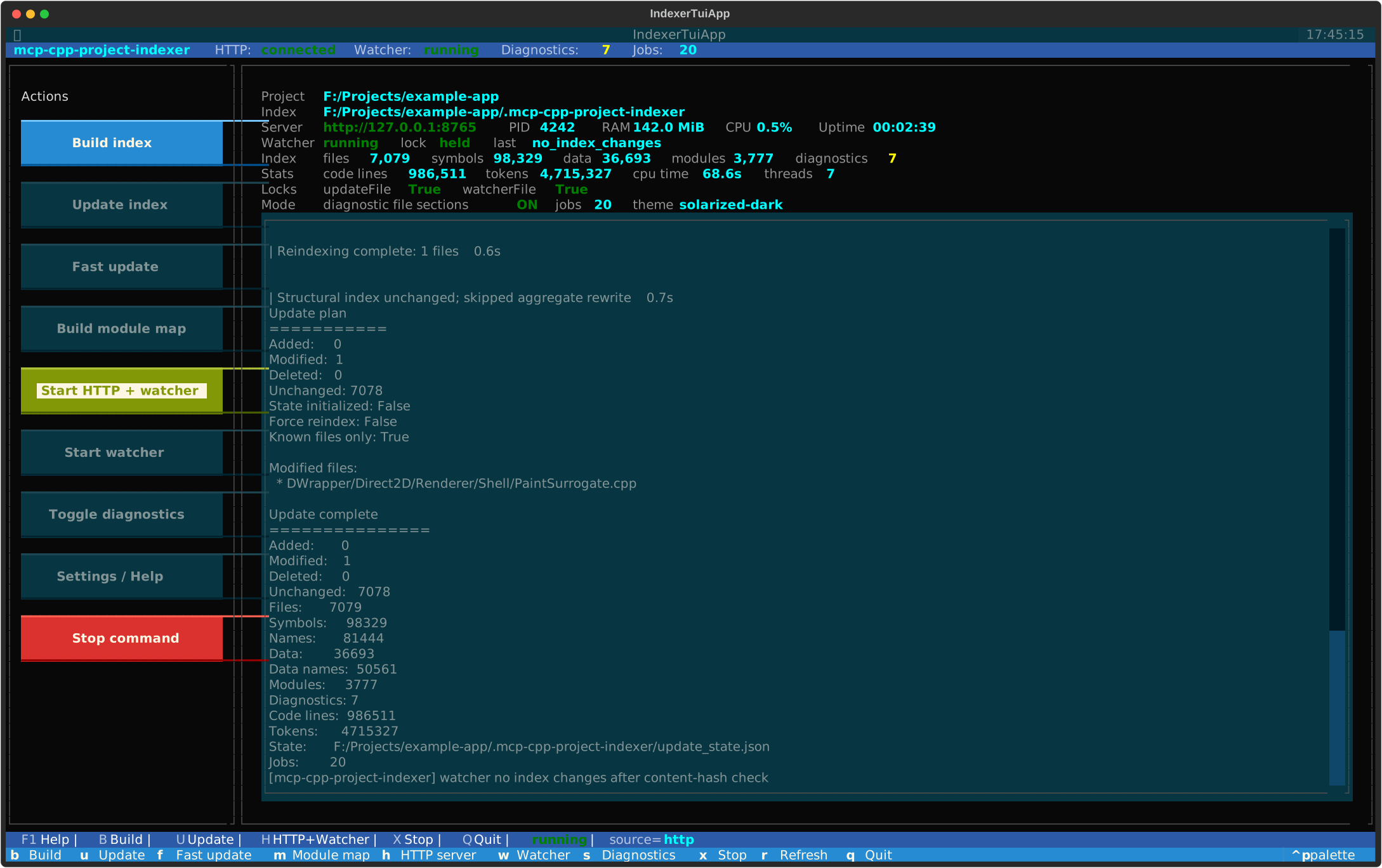
Install the optional UI dependency and start the control center with explicit project/index paths:
pip install -r <indexer-root>\requirements-ui.txt

python <indexer-root>\indexer_tui.py `
  --root <project-root> `
  --index-root <project-root>\.mcp-cpp-project-indexer `
  --jobs 20 `
  --http-url http://127.0.0.1:8765
The UI is optional; the core indexer remains dependency-light and can still be driven entirely from scripts or MCP clients. For setup and keyboard shortcuts, see Control Center.
💡 Why This Tool?
Large C++ projects are expensive to feed into an AI model when entire files are loaded just to find one function, class, import, or declaration. C++20 modules make this harder: many IDE/LSP-style tools still struggle with large module graphs, partitions, generated SDK headers, and build-specific configuration.
This indexer solves a narrower but very practical problem: it gives the AI a small, deterministic routing map. The AI can locate the relevant symbol, module, file, or changed hunk first, then read only the exact original source lines needed for the task.
Example from a real bug-finding workflow:
Whole file context:     ~2000 source lines
On-demand source reads:  ~283 source lines
--------------------------------------------
Reduction:               ~86% less source text
📊 Before / After
| Standard AI code navigation | With mcp-cpp-project-indexer |
|---|---|
| ❌ AI reads whole files to find a symbol | ✅ AI asks for compact metadata, then reads the exact source range |
| ❌ Context fills with unrelated declarations and implementations | ✅ Context stays focused on the lines that matter |
| ❌ C++20 module consumers/imports are hard to route through | ✅ Module imports, re-exports, partitions, and consumers are exposed directly |
| ❌ Reviews start by scanning changed files manually | ✅ Change hunks are mapped to indexed symbol/data ranges |
| ❌ Tooling may imply semantic certainty it does not have | ✅ The indexer only returns routing facts and original source ranges |
The result is lower token usage, lower latency, less context drift, and more source-grounded analysis.
How It Works
The indexer deliberately avoids pretending to be a compiler.
-
Fast token/structure scan Source files are scanned with a lightweight Python lexer and structural parser. The output is a deterministic table of contents: files, symbols, data declarations, lexical
#includedirectives, source ranges, diagnostics, and module facts. -
C++20 module map Module interfaces, partitions, imports, export-imports, and consumers are indexed so the AI can route through module-heavy code without asking an LSP to solve the whole build.
-
Incremental update and watcher The updater tracks content hashes and rewrites only changed index data where possible. The optional watcher can keep the MCP server cache fresh while you work in Visual Studio.
-
MCP tools with compact output controls Tools expose exact routing metadata first. The AI escalates only when needed: compact symbol lookup, file/module/change overview, exact
read_symbolorread_range, then deeper recursive source reads.
The indexer is only the table of contents. The AI performs recursive exploration and code review from the original source lines it explicitly reads.
Core Workflow
Instead of this:
Read Renderer.cpp completely: ~2000 lines
use this:
find_symbol("Renderer::Paint")
read_symbol(symbolId)
inspect visible calls
read only relevant project callees
For changed-code review:
list_changed_files
get_file_change_hunks(includeIndexedRangeSummary:true, includeSource:false)
get_file_change_hunks(symbolId/dataId, includeSource:true)
read_symbol/read_range only when current source behavior is needed
What it does
The scanner extracts routing facts from C++ source files:
- files and stable file IDs
- C++20 modules and partitions
- lexical
#includedirectives - imports and exports
- namespaces
- classes / structs / enums
- functions / methods
- constructors / destructors / operators
- declarations and inline definitions
- exact
startLine/endLine - diagnostics for structurally suspicious files
It is stream/token based, not regex based.
What it does not do
Intentionally not included:
- no compiler-accurate whole-program call graph
- no
find_references - no type resolution
- no template-instantiation resolution
- no compiler-accurate overload resolution
- no macro expansion
- no semantic summaries
- no bug analysis
- no
analyze_symbol(symbolId)
The AI should read source ranges and reason from the original code.
Output layout
Default output directory:
<project-root>/.mcp-cpp-project-indexer/
Generated files:
.mcp-cpp-project-indexer/
  manifest.json
  files/
    f_<pathHash>.json
  index.sqlite
  modules.json
  diagnostics.json
  update_state.json      # written by build/update; used for fast incremental updates
  module_map.json        # generated by build_module_map.py
  .watch_update_summary.json  # temporary watcher/update summary
  .update.lock           # process lock for index writers
  .watcher.lock          # process lock for one active watcher
Global symbol and data routing indexes are stored in index.sqlite. The
per-file JSON indexes remain the source of truth for exact source ranges and
incremental rebuilds.
Optional JSONL export:
python <indexer-root>\export_index_jsonl.py --index-root <project-root>\.mcp-cpp-project-indexer --kind symbols --output symbols.jsonl
python <indexer-root>\export_index_jsonl.py --index-root <project-root>\.mcp-cpp-project-indexer --kind data --output data.jsonl
Scanner diagnostic file-index fields are emitted only with
--emit-diagnostics or --emit-diagnostic-file-indexes:
scopeIntervals
structuralEvents
functionBodyRanges
Index one file
From any directory:
python <indexer-root>\build_file_index.py `
  --file <project-root>\path\to\file.ixx `
  --project-root <project-root> `
  --output <project-root>\.mcp-cpp-project-indexer\diagnostic_file.json
With scanner diagnostic data:
python <indexer-root>\build_file_index.py `
  --file <project-root>\path\to\file.ixx `
  --project-root <project-root> `
  --output <project-root>\.mcp-cpp-project-indexer\diagnostic_file.json `
  --emit-diagnostics
If --project-root is omitted, the file's parent directory is used.
Build a project index
Recommended usage from the C++ project root:
cd <project-root>
python <indexer-root>\build_project_index.py
This writes to:
<project-root>/.mcp-cpp-project-indexer/
Explicit form:
python <indexer-root>\build_project_index.py `
  --root <project-root> `
  --output-root <project-root>\.mcp-cpp-project-indexer
Example summary:
Built cpp.project_index.v1
Root: <project-root>
Output: <project-root>/.mcp-cpp-project-indexer
Files: 7076
Symbols: 97583
Names: 95674
Modules: 3774
Diagnostics: 7
Total code lines: 1750000
Total tokens: 14200000
SQLite index: <project-root>/.mcp-cpp-project-indexer/index.sqlite
Total tokens is the indexer's lexer token count over the indexed source after
comment blanking. It is a project-size metric, not an LLM billing-token count.
When the project root is inside a Git worktree and git is available, file
discovery respects Git ignore rules by filtering candidates through
git check-ignore --stdin. This excludes paths matched by .gitignore,
.git/info/exclude, or the user's global Git ignore file. Non-Git projects, or
systems without Git, fall back to the built-in excluded directory list.
Dot-directories such as .git, .vs, .cache, .idea, or .folder are
excluded by default.
Project discovery config
For large projects with mixed source layouts, place indexer_config.json in
the project root or in any subdirectory. Config files are applied while walking
the tree: the root config becomes the base, and subdirectory configs can
override or extend it for that subtree.
Example:
{
  "addExtensions": [".mm"],
  "addExcludeDirs": ["generated", "third_party"],
  "includeExtensionlessHeaders": true,
  "useGitIgnore": false
}
Supported fields:
{
  "extensions": [".cpp", ".cc", ".h"],
  "addExtensions": [".mm"],
  "removeExtensions": [".c"],
  "excludeDirs": ["out", "build"],
  "addExcludeDirs": ["generated"],
  "removeExcludeDirs": ["third_party"],
  "includeExtensionlessHeaders": true,
  "useGitIgnore": false
}
extensions and excludeDirs replace the inherited values for that subtree.
add* and remove* fields modify the inherited values. Extensionless header
discovery is conservative and opt-in; it only accepts extensionless files whose
first lines look like C/C++ headers.
useGitIgnore:false disables the final git check-ignore --stdin pass for
very large repositories where Git ignore filtering is more expensive than an
explicit indexer config.
Incremental update
After a full index build, changed files can be detected and re-indexed incrementally.
Dry-run:
python <indexer-root>\update_project_index.py `
  --root <project-root> `
  --index-root <project-root>\.mcp-cpp-project-indexer `
  --dry-run
Fast update for already-indexed files:
python <indexer-root>\update_project_index.py `
  --root <project-root> `
  --index-root <project-root>\.mcp-cpp-project-indexer `
  --known-files-only
Watcher-style update for a known changed file:
python <indexer-root>\update_project_index.py `
  --root <project-root> `
  --index-root <project-root>\.mcp-cpp-project-indexer `
  --known-files-only `
  --changed-file path\to\changed.cpp
--known-files-only skips full discovery of new files. This is ideal for save/watch loops.
--changed-file can be repeated and lets a watcher avoid hashing unchanged files.
Index writes are protected by an exclusive .update.lock file in the index
root. This prevents full builds, incremental updates, and module-map rebuilds
from writing the same index files at the same time.
Watch the project index
The standalone watcher polls source files, debounces changes, runs the incremental updater,
and optionally rebuilds module_map.json.
python <indexer-root>\watch_project_index.py `
  --root <project-root> `
  --index-root <project-root>\.mcp-cpp-project-indexer `
  --jobs 20
For pure file modifications, the watcher calls:
update_project_index.py --known-files-only --changed-file <path>
This hashes only the changed candidate file. If the content hash did not change, the watcher skips module-map rebuild and MCP cache reload work.
Only one watcher should own an index root. The watcher uses .watcher.lock and
exits if another watcher is already active for the same index.
Diagnostics are non-fatal. They indicate best-effort structural warnings for individual files.
Print diagnostics summary:
python -c "import json; from collections import Counter; d=json.load(open(r'<project-root>\.mcp-cpp-project-indexer\diagnostics.json',encoding='utf-8')); print(len(d)); print(Counter(x.get('code') for x in d)); [print(x['relativePath'], x['code'], x['message'], x.get('range')) for x in d]"
Build the module map
After building the project index:
python <indexer-root>\build_module_map.py `
  --index-root <project-root>\.mcp-cpp-project-indexer
Output:
<project-root>/.mcp-cpp-project-indexer/module_map.json
The module map contains:
- module names
- primary modules and partitions
- files defining each module
- imports
- importedBy
- a module tree
- unresolved imports
It is metadata only. It does not analyze implementation behavior.
Control Center
The core indexer has no third-party runtime dependencies. For day-to-day operation there are two optional terminal control surfaces:
indexer_tui.py: a polished mouse-capable Textual UIindexer_control.py: a dependency-free command-line fallback
Install the optional UI dependency:
pip install -r <indexer-root>\requirements-ui.txt
Start the Textual UI:
python <indexer-root>\indexer_tui.py `
  --root <project-root> `
  --index-root <project-root>\.mcp-cpp-project-indexer `
  --jobs 20 `
  --http-url http://127.0.0.1:8765
The Textual UI provides a real terminal interface with buttons, mouse support,
status cards, live HTTP /status polling, activity logs, and process control
for build/update/watch/server actions.
Mouse input depends on the terminal emulator. On Windows, use Windows Terminal or another modern terminal that forwards mouse events to terminal applications. Keyboard shortcuts work everywhere Textual can run.
UI settings are saved under <indexer-root>/.ui-settings/ on exit and when
diagnostic file sections are toggled. Each settings file is keyed by project
name plus a path hash, so UI preferences do not write into the project root or
generated index directory. Stored preferences include the HTTP URL, jobs value,
diagnostic-section toggle, management API launch settings, active Textual
theme, and project/index paths.
The settings file can also be edited directly for external Relay UI setups:
{
  "httpUrl": "http://127.0.0.1:8765",
  "jobs": 20,
  "managementApiEnabled": true,
  "managementToken": "local-secret-token",
  "emitDiagnosticFileIndexes": true,
  "theme": "textual-dark"
}
The Textual UI has a separate Start HTTP + management action. It starts the
HTTP MCP server with watcher and --enable-management-api, using the saved
managementToken when configured. This action is intentionally local to the
TUI and is not exposed as a management command on the HTTP API.
Fallback control center:
python <indexer-root>\indexer_control.py `
  --root <project-root> `
  --index-root <project-root>\.mcp-cpp-project-indexer `
  --jobs 20 `
  --http-url http://127.0.0.1:8765
Common keys:
B  full build
U  incremental update
F  fast known-files update
M  rebuild module map
H  start HTTP server with watcher
G  start HTTP server with watcher and management API
W  start standalone watcher
S  toggle diagnostic file sections for launched commands
X  stop the currently running command
R  refresh
Q  quit
When the HTTP server is running, both control centers poll /status for live
server, watcher, lock, and index stats. If the HTTP server is not reachable,
they fall back to reading manifest.json and module_map.json from disk.
Dump the module tree
Text tree:
python <indexer-root>\dump_module_tree.py `
  --index-root <project-root>\.mcp-cpp-project-indexer
Write to file:
python <indexer-root>\dump_module_tree.py `
  --index-root <project-root>\.mcp-cpp-project-indexer `
  --output <project-root>\.mcp-cpp-project-indexer\module-tree.txt
Import tree for one module:
python <indexer-root>\dump_module_tree.py `
  --index-root <project-root>\.mcp-cpp-project-indexer `
  --imports Example.Module:Partition `
  --max-depth 5
Start the MCP server
The server reads an existing index. It does not rebuild the index.
python <indexer-root>\code_index_mcp_server.py `
  --project-root <project-root> `
  --index-root <project-root>\.mcp-cpp-project-indexer
The server is read-only and exposes locator/read tools over MCP stdio.
To let the server keep its in-memory cache current during editing, start it with the built-in watcher:
python <indexer-root>\code_index_mcp_server.py `
  --project-root <project-root> `
  --index-root <project-root>\.mcp-cpp-project-indexer `
  --watch-index `
  --watch-jobs 20
The server watcher writes all progress to stderr so stdout remains valid MCP JSON-RPC. After a real index change, it reloads the server cache automatically. If a save only changes mtime and the content hash is unchanged, it skips module map rebuild and cache reload.
If another watcher already owns the same index root, the MCP server continues read-only and does not start its own watcher. This avoids concurrent writer processes when multiple MCP clients start separate stdio server instances.
Shared HTTP transport
For setups where multiple MCP clients would otherwise start separate stdio server processes, the server can also expose the same JSON-RPC MCP surface over HTTP:
python <indexer-root>\code_index_mcp_server.py `
  --project-root <project-root> `
  --index-root <project-root>\.mcp-cpp-project-indexer `
  --transport http `
  --http-host 127.0.0.1 `
  --http-port 8765 `
  --watch-index `
  --watch-jobs 20
The HTTP endpoint is:
POST http://127.0.0.1:8765/mcp
Status endpoints:
GET http://127.0.0.1:8765/health
GET http://127.0.0.1:8765/status
This keeps one long-running server process, one in-memory index cache, and one watcher for the index root. Clients that only support stdio still need a stdio configuration or a small client-side bridge to this HTTP endpoint.
HTTP management API
External control UIs can optionally enable a small management surface on the same HTTP server. It is disabled by default because it can start build/update processes.
python <indexer-root>\code_index_mcp_server.py `
  --project-root <project-root> `
  --index-root <project-root>\.mcp-cpp-project-indexer `
  --transport http `
  --http-host 127.0.0.1 `
  --http-port 8765 `
  --enable-management-api `
  --management-token <token>
Endpoints:
GET  /management/status
GET  /server/management/capabilities
POST /management/command
GET  /management/log?since=<eventId>&limit=<n>
GET  /management/log/stream
GET  /management/server-log?since=<eventId>&limit=<n>
GET  /management/server-log/stream
/server/management/capabilities returns the machine-readable
intent/category/tool contract used by external relay/governance layers. The
legacy alias /management/capabilities is also accepted.
/management/status includes a dashboard object shaped for external control
centers. It contains the same high-value fields shown by the TUI:
dashboard.project.text
dashboard.index.text
dashboard.server.url / pid / ramText / cpuTimeText / cpuText / uptimeText
dashboard.watcher.runningText / lockText / last
dashboard.counts.filesText / symbolsText / dataText / modulesText / diagnosticsText
dashboard.stats.codeLinesText / tokensText / cpuTimeText / threadsText
dashboard.locks.updateFile / watcherFile
dashboard.mode.diagnosticFileSectionsText / jobsText / theme
Raw numeric values are included next to the formatted *Text fields where the
server can provide them. dashboard.mode.theme is reserved for external UIs;
the HTTP server itself does not own a visual theme.
The generic server.process and management.runner.process objects also expose
normalized CPU fields when available:
cpuUserSeconds
cpuSystemSeconds
cpuTimeSeconds
cpuTimeText
cpuCoresAverage
cpuPercentMachine
cpuText
When configured, the token protects the shared HTTP MCP/status surface as well as management endpoints. Pass it as either:
Authorization: Bearer <token>
x-api-key: <token>
Commands are single JSON objects:
{ "command": "build", "jobs": 20 }
{ "command": "update", "jobs": 20 }
{ "command": "fast_update", "jobs": 20 }
{ "command": "module_map" }
{ "command": "reload_index" }
{ "command": "start_watcher", "jobs": 20 }
{ "command": "stop_watcher" }
{ "command": "stop_command", "wait": true }
/management/log returns management command output. /management/log/stream
is the matching SSE stream. Build and update subprocess output is read
asynchronously, so a UI can keep polling status and streaming logs while large
projects are being indexed.
/management/server-log returns recent HTTP/MCP traffic log events, including
request/response byte counts and the MCP method detail where available.
/management/server-log/stream is the matching SSE stream for live request
activity. MCP tools/call events also include a compact structured mcp
object with toolName, argumentKeys, and bounded arguments for expandable
UI details. After the JSON-RPC response is known, the event includes
mcp.outcome (success or error) and mcp.errorCount so control UIs can
color failed tool calls without parsing the response payload.
HTTP keep-alive requests reset request-local log metadata, so status polling
cannot inherit a previous MCP call label.
HTTP security profiles
Local development can keep using loopback HTTP:
--transport http --http-host 127.0.0.1 --http-port 8765
For customer or LAN deployments, do not expose the server as plain HTTP. The server refuses to start on a non-loopback bind address unless TLS and authentication are enabled.
Security profiles:
| Profile | Intended use | Requirements |
|---|---|---|
local-dev |
same-machine development | loopback HTTP allowed |
trusted-lan |
Relay and indexer on different trusted hosts | TLS plus token or mTLS |
production |
customer deployment | TLS plus token or mTLS |
Token-authenticated TLS example:
python <indexer-root>\code_index_mcp_server.py `
  --project-root <project-root> `
  --index-root <project-root>\.mcp-cpp-project-indexer `
  --transport http `
  --http-host 10.0.0.20 `
  --http-port 8765 `
  --management-security-profile trusted-lan `
  --management-tls cert `
  --management-cert security\indexer-server.crt `
  --management-key security\indexer-server.key `
  --management-token <token> `
  --management-cors-origin https://relay.customer.internal `
  --management-allow-ip 10.0.0.12
mTLS example:
python <indexer-root>\code_index_mcp_server.py `
  --project-root <project-root> `
  --index-root <project-root>\.mcp-cpp-project-indexer `
  --transport http `
  --http-host 10.0.0.20 `
  --http-port 8765 `
  --management-security-profile production `
  --management-tls cert `
  --management-cert security\indexer-server.crt `
  --management-key security\indexer-server.key `
  --management-client-ca security\relay-clients-ca.crt `
  --management-require-client-cert `
  --management-cors-origin https://relay.customer.internal `
  --management-allow-ip 10.0.0.12
For encrypted local testing without a customer certificate, a self-signed certificate can be generated on first start:
python <indexer-root>\code_index_mcp_server.py `
  --project-root <project-root> `
  --index-root <project-root>\.mcp-cpp-project-indexer `
  --transport http `
  --http-host 127.0.0.1 `
  --http-port 8765 `
  --management-tls self-signed `
  --management-auto-cert
The generated files are stored below:
<index-root>\certs\management-cert.pem
<index-root>\certs\management-key.pem
Self-signed TLS encrypts traffic but is not automatically trusted by browsers or remote clients. Customer deployments should use a customer CA, public certificate, or explicit mTLS trust material.
LM Studio MCP configuration
Example mcp.json:
{
  "mcpServers": {
    "mcp-cpp-project-indexer": {
      "command": "python",
      "args": [
        "<indexer-root>\\code_index_mcp_server.py",
        "--project-root",
        "<project-root>",
        "--index-root",
        "<project-root>\\.mcp-cpp-project-indexer"
      ]
    }
  }
}
For a shared HTTP server without token authentication:
{
  "mcpServers": {
    "mcp-cpp-project-indexer": {
      "url": "http://127.0.0.1:8765/mcp"
    }
  }
}
If the HTTP server was started with --management-token <token>, LM Studio must
send that token as a header:
{
  "mcpServers": {
    "mcp-cpp-project-indexer": {
      "url": "http://127.0.0.1:8765/mcp",
      "headers": {
        "Authorization": "Bearer <token>"
      }
    }
  }
}
The server also accepts X-API-Key:
{
  "mcpServers": {
    "mcp-cpp-project-indexer": {
      "url": "http://127.0.0.1:8765/mcp",
      "headers": {
        "X-API-Key": "<token>"
      }
    }
  }
}
After rebuilding the index or module map, restart the MCP server / LM Studio.
Codex configuration
For Codex, configure this repository as an MCP stdio server and put the agent rules where Codex will load them as project instructions.
Example MCP server entry:
[mcp_servers.mcp-cpp-project-indexer]
command = "python"

args = [
  "<indexer-root>\\code_index_mcp_server.py",
  "--project-root",
  "<project-root>",
  "--index-root",
  "<project-root>\\.mcp-cpp-project-indexer",
]
The prompt rules from prompt_template.md should be copied into
an AGENTS.md file in the project root that Codex opens, for example:
<project-root>\AGENTS.md
Codex reads AGENTS.md as repository/project instructions for the current working
tree. If you usually start Codex from a parent workspace instead of the C++ project
root, put the file in that workspace root or open Codex directly in the C++ project
root so the instructions are in scope.
Keep the MCP server configuration and the prompt rules separate:
- MCP config starts the tool server and points it at the generated index.
AGENTS.mdtells the agent how to use the tools safely and compactly.
After changing the MCP server configuration or rebuilding the index, restart the MCP server / Codex session so the updated tool schema is visible.
Claude setup
Claude Code and Claude Desktop use MCP slightly differently, so keep the setup split by client.
Claude Code
For Claude Code, put the MCP server configuration in a project-scoped .mcp.json
file at the project root if the setup should travel with the repository:
{
  "mcpServers": {
    "mcp-cpp-project-indexer": {
      "type": "stdio",
      "command": "python",
      "args": [
        "<indexer-root>\\code_index_mcp_server.py",
        "--project-root",
        "<project-root>",
        "--index-root",
        "<project-root>\\.mcp-cpp-project-indexer"
      ],
      "env": {}
    }
  }
}
Equivalent CLI setup:
claude mcp add mcp-cpp-project-indexer --scope project -- `
  python <indexer-root>\code_index_mcp_server.py `
  --project-root <project-root> `
  --index-root <project-root>\.mcp-cpp-project-indexer
Copy the rules from prompt_template.md into Claude Code's project memory file:
<project-root>\CLAUDE.md
Claude Code also supports .claude/CLAUDE.md; use that path if you prefer to keep
Claude-specific files under .claude/. The important part is that the file is in
the project root that Claude Code opens, otherwise the tool-use rules may not be
loaded.
Claude Desktop
Claude Desktop uses its application MCP configuration file. On Windows this is usually:
%APPDATA%\Claude\claude_desktop_config.json
Add the server under mcpServers:
{
  "mcpServers": {
    "mcp-cpp-project-indexer": {
      "type": "stdio",
      "command": "python",
      "args": [
        "<indexer-root>\\code_index_mcp_server.py",
        "--project-root",
        "<project-root>",
        "--index-root",
        "<project-root>\\.mcp-cpp-project-indexer"
      ],
      "env": {}
    }
  }
}
Claude Desktop does not automatically read repository instruction files like
CLAUDE.md for arbitrary chats. Paste the relevant rules from
prompt_template.md into the project/chat instructions you use
with Claude Desktop, or use Claude Code when you need repository-scoped persistent
instructions.
After changing .mcp.json, claude_desktop_config.json, or rebuilding the index,
restart the Claude client so the updated tool schema is visible.
Possible workflow setups
Source-grounded bug finding
A practical review workflow is to use mcp-cpp-project-indexer as the primary
navigation layer and let the AI reason only from exact source ranges it has read.
Typical flow:
1. User asks:
     Review module X, file X, or function X for bugs.

2. AI uses mcp-cpp-project-indexer:
     find module/file/symbol
     read exact source ranges
     follow only relevant project-local calls
     avoid whole-file reads unless needed

3. AI reports findings:
     file path
     line range
     source-grounded explanation
     uncertainty where more context is needed

4. AI uses Visual Studio MCP only after analysis:
     open the file
     navigate to the exact finding location
This keeps the model context clean. The indexer handles routing and token reduction; the AI performs the analysis from original source lines; Visual Studio is used as the developer-facing editor handoff.
Tool priority with Visual Studio MCP
In C++20 module-heavy projects, Visual Studio/IntelliSense/clangd-style tooling may fail to resolve module symbols reliably enough for AI navigation.
Recommended role split:
mcp-cpp-project-indexer
  Primary navigation layer.
  Use for symbols, files, modules, source ranges, imports, imported-by metadata.

Visual Studio MCP
  Editor and project-state layer.
  Use for opening files, jumping to locations, looking at build/output/editor state.
  Do not use as the primary C++20 module symbol resolver.

IDAPro MCP
  Binary/decompiler layer.
  Use only when source evidence is insufficient, or for ABI, crash, reverse
  engineering, decompiled code, imports/exports, or binary-behavior questions.
Prompt rule:
Use mcp-cpp-project-indexer first for C++ source navigation.
Use Visual Studio MCP only when IDE/editor/build state is needed.
Use IDAPro MCP only when the question requires binary or decompiler evidence.
Source plus binary evidence for undocumented APIs
For code that interacts with undocumented Windows components, source evidence may not be enough. A useful setup is to keep the relevant DLL loaded in IDAPro and let the AI inspect decompiled/disassembled code only when source-level evidence leaves behavior unclear.
Example scenario:
Project code uses wrappers around undocumented DirectUI behavior.
IDAPro has dui70.dll loaded.

1. AI uses mcp-cpp-project-indexer first:
     find the project wrapper/function
     read the exact source range
     follow only relevant local calls

2. If behavior is still unclear:
     use IDAPro MCP to inspect the corresponding function, import, export,
     vtable target, or decompiled implementation in dui70.dll

3. AI combines evidence:
     source callsite and wrapper behavior
     binary/decompiler evidence from the undocumented implementation
     final finding with source line ranges and binary evidence notes

4. AI uses Visual Studio MCP only for handoff:
     open the project source file
     navigate to the line that should be reviewed or changed
This keeps reverse-engineering work targeted. The AI does not browse the binary blindly; it enters IDAPro with a source-grounded question. That reduces irrelevant context, lowers token usage, and helps the model keep the source/binary reasoning chain intact.
Why this setup works
The expensive part of AI code review is often not reasoning; it is locating the small amount of source that actually matters. The indexer reduces the navigation problem to compact metadata and exact source ranges. Other tools can then stay focused on what they are good at: IDE interaction, build state, or binary facts.
Command line reference
build_file_index.py
Build one per-file index JSON.
--file PATH                    C++ source/module file to index. Required.
--project-root PATH            Root used for normalized relative paths.
--output PATH                  Output JSON path.
--output-root PATH             Directory used when --output is omitted.
--case-insensitive-paths / --no-case-insensitive-paths
No comments yet
Be the first to share your take.