
Master Canvas Hermes Plugin
Hermes Agent plugin for creating, reading, updating, and packaging Master Canvas AI video handoff projects.
Master Canvas is a local-first pre-production canvas for AI video projects. This plugin is the Hermes-facing companion: it lets Hermes use the Master Canvas handoff format autonomously for people who want an agent-driven workflow. Hermes can start a project from a brief, add scenes and shots, attach source assets, refine prompts, package the result, and then prepare generation plans for ComfyUI/LTX, Kling, Veo, or human operators.
The plugin does not generate video by itself. It gives Hermes reliable tools for building and maintaining the complete pre-production package that downstream video generation tools need.
Preview
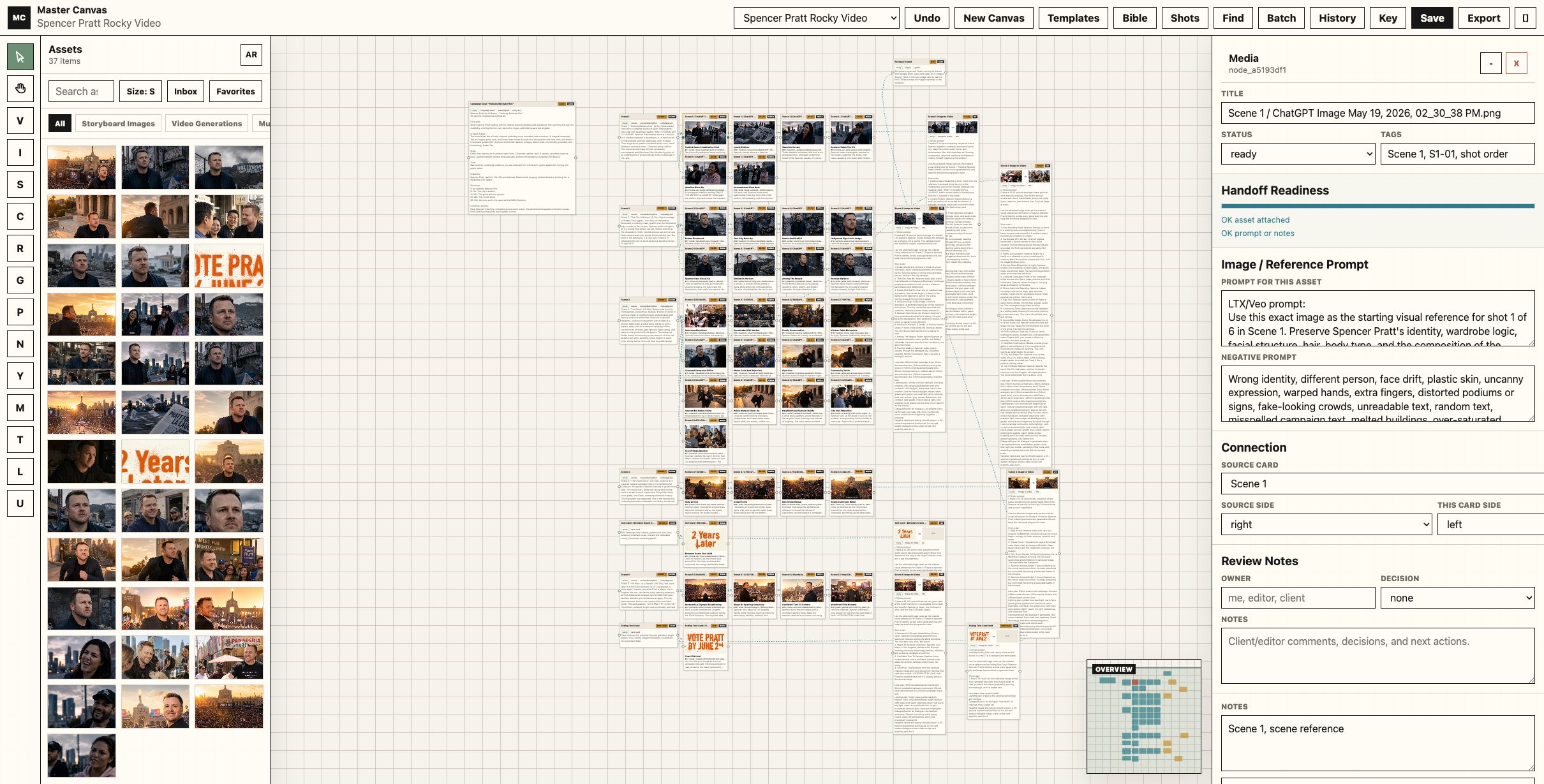
Example Master Canvas board with assets, ordered shots, per-shot prompt fields, handoff readiness, and the minimap overview. The Hermes plugin can create and maintain this kind of package autonomously from a brief and local assets.
Install
hermes plugins install wassermanproductions/master-canvas-hermes-plugin --enable
Or install manually:
git clone https://github.com/wassermanproductions/master-canvas-hermes-plugin.git ~/.hermes/plugins/master-canvas
hermes plugins enable master-canvas
Restart Hermes after installing or enabling the plugin.
Tools
mastercanvas_capabilities: explains package structure and workflow.mastercanvas_create_package: creates a complete Master Canvas handoff package from a brief, scenes, shots, prompts, and optional asset paths.mastercanvas_upsert_scene: adds or updates a scene in an extracted Master Canvas package.mastercanvas_upsert_shot: adds or updates a shot, including prompt fields and optional source asset copying.mastercanvas_package_zip: zips an extracted package for sharing or downstream handoff.mastercanvas_inspect_package: summarizes scenes, shots, assets, references, target generation, and readiness.mastercanvas_extract_package: extracts a handoff ZIP into a local folder.mastercanvas_comfy_plan: returns a shot-by-shot ComfyUI/LTX execution plan.
Bundled Skill
The plugin also registers a bundled skill:
master-canvas:handoff
Use it when a user provides a Master Canvas ZIP or manifest, or when a user wants Hermes to autonomously build a Master Canvas package from a creative brief and assets.
Example
Use master-canvas:handoff with /path/to/master-canvas-handoff.zip.
Inspect it, extract it, build the ComfyUI/LTX plan, and organize outputs by scene.
Autonomous creation example:
Use master-canvas:handoff to create a Master Canvas package for this video brief.
Make 5 scenes, 18 shots, attach these local image references, write prompts and negative prompts, then package it as a ZIP for ComfyUI/LTX.
Source App
Master Canvas app:
https://github.com/wassermanproductions/master-canvas
License
MIT
No comments yet
Be the first to share your take.