
Manara 🗼



Keep your Claude Code project moving forward — never starting over.
Manara is a discipline layer for Claude Code. It doesn't write your code, and it doesn't replace your tools — it drives the ones you already have.
Every change lands as a small, reviewed, checkpointed slice you can roll back, and your progress is saved as you go — so a cleared or interrupted chat resumes instead of starting over. One command: /manara.
Never start over. Never lose your place. Never wonder what's next.
Manara (مَنارة) means lighthouse — it tells you where you are and lights the next step.
👀 Watch it work
You:     /manara
         > build a login page

Manara:  New project — I'll run in Smart auto: I handle routine steps,
         and ask before anything with real impact. Good?

         That's one slice — the login form. Plan:
           1. spec the behavior first (it's auth — sensitive)
           2. build it test-first
           3. run the code-review + test guards
           4. you eyeball it, then I checkpoint

         …building… …guards passed… Looks right on your end?

You:     yep

Manara:  ✓ Committed "login form" locally — clean rollback point saved.
         Next up: password reset. Clear the chat anytime; I'll resume here.
No jargon, no guessing which tool to run next. You say what you want; Manara runs the disciplined path to get there — and tells you why at each step.
💡 Why Manara exists
Claude Code writes code fast — but on a long, multi-session project, unstructured speed is how work quietly becomes an unreviewable, uncheckpointed pile you can't unwind. Manara came out of exactly those failures on a real build. It isn't a faster way to write code; it's the discipline that keeps the fast part from costing you the project.
⚖️ Why it's different
| Plain Claude Code | With Manara |
|---|---|
| You remember which tool to run, and when | It picks the right tool at the right moment — and says why |
| A cleared or summarized chat forgets everything | It resumes from a small saved progress file |
| Changes pile up into one hard-to-unwind lump | One slice at a time, each checkpointed |
| Reviews and tests are easy to skip "just this once" | Quality guards can't be switched off |
| A stuck problem stalls the whole session | It can hand the problem to another AI — guards still run on the result |
✨ What you get
- 📝 Behavior written first, in plain words. On anything sensitive, Manara states the intended behavior before code — so "clean code that does the wrong thing" gets caught early.
- 🎚️ You set the autonomy. Manual, Smart auto, Full auto, or Unrestricted — Manara decides routine things itself and asks before anything that matters.
- 🎯 One slice at a time. No bundling many changes into a risky lump — one testable piece, start to finish, before the next.
- 💾 A checkpoint after every verified slice. There's always a clean point to roll back to. You never start over.
- 🛡️ Guards you can't switch off. Code review and test review run in every mode. You can hint which runs; never whether.
- 🤝 Stuck? It calls in Codex. Another AI takes a crack at hard problems — with your guards still checking its output, and a hard cap so the two can't loop forever.
- 🧭 It remembers. A long, cleared, or interrupted session picks up cleanly from where you were.
🎚️ Autonomy modes — you pick up front
| Mode | Routine steps | Real-impact steps | Irreversible steps |
|---|---|---|---|
| Manual | 🙋 asks | 🙋 asks | 🙋 asks |
| Smart auto (default) | ⚡ decides | 🙋 asks | 🙋 asks |
| Full auto | ⚡ decides | ⚡ decides | 🙋 asks |
| Unrestricted ⚠️ | ⚡ decides | ⚡ decides | ⚡ decides* |
* only after an explicit warning + confirmation.
Automatic checkpoints (one slice = one safe point to roll back to)
Once a slice passes its quality checks and you've confirmed it's right, Manara offers to commit it — deliberately cautiously:
- Both gates required. Guards pass and you explicitly verify. Green checks alone are never enough — you're the final say.
- You see it first. Manara shows the exact files and the proposed message, and commits only after you confirm.
- Local only — never pushed. Pushing to a remote stays your manual action.
- Your progress file is never committed. Manara's own
.manara/folder is left out, and your.gitignoreis respected.
🛡️ A real bug it caught
While building a screenshot-redaction tool, Manara handed a review to Codex. Codex flagged something the author had missed: resizing a redaction stroke could expose the hidden content on export — a real privacy leak. Manara reproduced it, fixed it, and locked it shut with a regression test.
That's the point. Manara catches what you'd miss — and its guards run on borrowed help, too.
⚙️ How it works
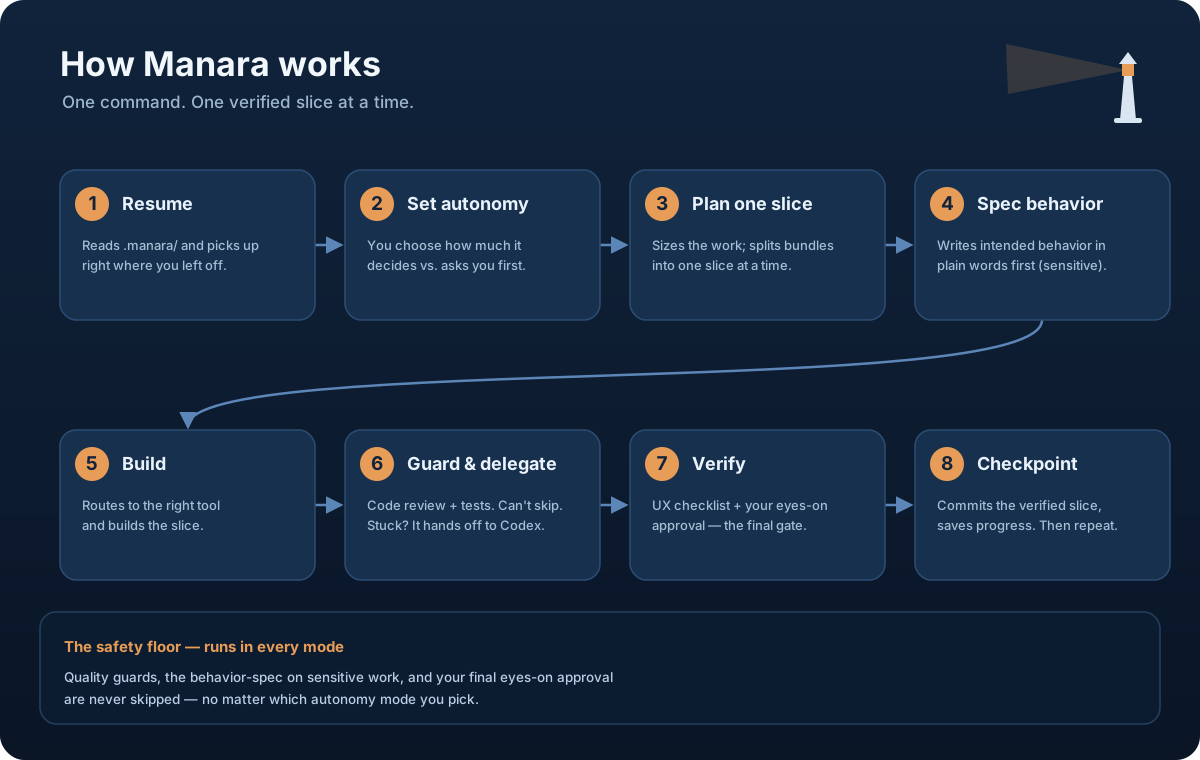
The same eight steps every run — the diagram is the map; the sequence below is one slice, start to finish.
sequenceDiagram
    autonumber
    participant You
    participant Manara
    participant Guards
    participant Git
    You->>Manara: /manara — describe the task
    Manara->>Manara: resume state · scope one slice
    Manara->>You: behavior spec (if sensitive) — confirm?
    You-->>Manara: yes
    Manara->>Manara: build test-first
    Manara->>Guards: code + test review
    Guards-->>Manara: pass (a fail blocks here)
    Manara->>You: verify it in your app?
    You-->>Manara: approved
    Manara->>Git: checkpoint the slice (local only)
    Manara-->>You: progress saved · next slice
[!IMPORTANT] Guaranteed in every mode — autonomy changes what Manara asks, never the quality bar:
- Quality guards can't be turned off — code + test review run on every change; you pick which, never whether.
- Sensitive work is specced first — auth / redaction / data-safety slices get a plain-language behavior spec before any code.
- Green checks are never "done" — your eyes-on verification is always the final step before a slice is locked in.
- Nothing irreversible without asking — destructive actions always prompt, unless you deliberately enable Unrestricted.
🏗️ Architecture
Manara is the brain (judgment); it calls existing skills and small scripts (the plumbing) — never re-implementing them.
flowchart TB
    You["You — plain language:<br/>build · fix · review"]
    subgraph Brain["manara — the orchestrator brain"]
        Manara["Decide the stage, pick one slice<br/>Choose the autonomy mode<br/>Route to the right tool"]
    end
    You --> Manara
    Manara -->|invokes existing skills| Tools["tdd · clean-code-guard<br/>test-guard · Codex when stuck"]
    Manara -->|calls, never re-implements| Plumbing["state.py · run_guards.py<br/>commit_slice.py"]
    Plumbing --> State[(".manara/<br/>resumable progress")]
    Plumbing --> Git[("git<br/>one checkpoint per slice")]
📦 Install
Easy way (recommended)
Run one command. It downloads Manara into the right folder for you, and you can re-run it anytime to update.
macOS / Linux
curl -fsSL https://raw.githubusercontent.com/OmerWafaey/manara/main/install.sh | bash
Windows (PowerShell)
irm https://raw.githubusercontent.com/OmerWafaey/manara/main/install.ps1 | iex
That's it — Manara installs to ~/.claude/skills/manara so Claude Code finds it in every project.
Manual way (fallback)
Manara is a Claude Code skill, not an npm package — npm install won't put it in the right place. To install by hand, just clone it into your user-skills folder:
git clone https://github.com/OmerWafaey/manara.git ~/.claude/skills/manara
On Windows that folder is C:\Users\<you>\.claude\skills\manara\.
Requirements: Python 3.7 or newer (for the small state/progress scripts). Nothing else to install — the scripts use only Python's built-in library.
[!TIP] On Windows, use
py -3, notpython. On a fresh setup, typingpythonoften opens the Microsoft Store instead of running Python. Manara calls its scripts through thepy -3launcher, which always finds the real Python 3 — check withpy -3 --version. (macOS/Linux users can usepython3directly.)
📁 Run /manara from inside your project folder
[!WARNING] Always run
/manarafrom inside your project folder. Manara reads the current directory to find your saved.manara/progress file. Run it from the skills folder — or anywhere that isn't your project — and it can't find your state, so it can't resume.
This is the single most common mistake, and the fix is simple:
cd <your-project>     # the folder you're actually building
/manara               # now Manara can read and resume your progress
▶️ How to use it
Open your project in Claude Code and run /manara:
cd <your-project>
/manara
> "build the MVP — a tool that blurs sensitive info in screenshots before sharing"
Manara works out loud, so you see every decision: it sets up (or resumes) your .manara/ progress file, sizes the work, picks the next step and explains why, runs the right tools — building test-first, then the code and test reviewers before moving on — and saves progress as it goes. A failed quality check stops and tells you rather than slipping through. At the end you get a short report: what ran, what was skipped and why, and where you are now.
Clear the chat, run /manara again in the same folder, and it picks right back up.
[!NOTE] The guards always run. Manara leans on "guard" tools — code review, test review, and so on. You can hint which one runs, but you can't switch a guard off. If a guard you need isn't installed, Manara points it out instead of silently skipping it.
📋 A note on Spec Kit (optional)
For larger, more complex projects, Manara can use Spec Kit (the specify tool) to write a formal spec first. This is optional — if you don't have it installed, Manara simply skips that step and tells you it did.
One rule worth knowing: Spec Kit always runs inside your project, never inside Manara's own folder. Three folders stay separate and never get mixed up:
| Folder | What it holds |
|---|---|
~/.claude/skills/manara/ |
Manara itself (you install it here, once) |
<your-project>/.manara/ |
Your saved progress for that project |
<your-project>/specs/ |
Spec Kit's output, if you use it |
🚧 What Manara doesn't do (yet)
The core is still v1, intentionally small and careful (v2 is adding capabilities one verified slice at a time — see the roadmap):
- It won't act behind your back on anything risky. You pick up front how much it decides on its own (see Smart autonomy in the roadmap) — but by default it still asks before anything with real impact, and it never does something irreversible without asking, unless you deliberately turn on Unrestricted mode.
- One terminal at a time — no coordinating parallel sessions.
- Just enough memory to resume — not a full long-term memory yet.
- Quality checks can't be turned off — a hint can pick which one runs, never whether it runs.
🗺️ Roadmap
v2 (in progress) — shipping one careful slice at a time.
Done so far:
- ✅ Automatic checkpoints — a local commit after each verified slice (see Automatic checkpoints above).
- ✅ Behavior-spec before code (Step 3b) — for sensitive slices, Manara writes down the expected behavior first, so there's a clear target to build and check against.
- ✅ One slice at a time (no bundling) — Manara works through a single slice end-to-end before starting the next, instead of lumping several changes together.
- ✅ UX verification checklist (Step 5a) — after a UI slice, Manara presents a short, slice-specific list of things to eyeball in the browser before you verify and commit. Guides review; never replaces it.
- ✅ Codex delegate (Step 4b) — when a slice is genuinely stuck, Manara can bring in Codex (asking first, never silently), escalating cheap→expensive: up to 3 read-only
/codex:adversarial-reviewrounds (uncounted) before up to 3 work-doing/codex:rescueattempts (the hard cap). The guards still run on whatever comes back, and stop-the-moment-it's-solved plus the 3-rescue cap keep the two agents from looping forever. - ✅ External-tool adapter (Step 3c) — Spec Kit and Codex install as a CLI / plugin commands, not Skill-tool skills. Manara now detects them and calls them through their real interface — and if a tool isn't installed, it tells you how and stops, instead of improvising the tool's plumbing by hand.
- ✅ Smart autonomy (Step 0b) — you pick up front how much Manara decides on its own: Manual (asks about everything), Smart auto (the default — decides routine things like
git init, still asks on anything with real impact), Full auto (also decides notable things, still asks before anything irreversible), or Unrestricted (decides everything — enabled only after an explicit warning). The quality gates never change: guards, the behavior-spec on sensitive slices, and your final eyes-on verification still run in every mode.
Next:
- A smarter decision engine (when to research vs. prototype vs. refactor).
- A decision/report engine — it reads your project docs and requirements, picks the best approach for the job, and hands you a short report that lays out its suggestions and the reasoning: how big the work is (scope), what the field is moving toward (trend), and what counts as the modern way to do it.
- Iterate modes — Manara asks up front how far you want it to go on this run: plan only, plan + start building, or go up to a phase you choose — so you stay in control of how much happens before it checks back in.
- Review checkpoints, and the ability to generate a missing tool on the spot.
v3 — real long-term project memory (your product, design system, users, competitors, architecture), awareness across multiple projects, coordinating several terminals at once, handoffs between sessions, ready-made templates per project type (SaaS, browser extension, mobile, API), and the option to delegate work to other coding agents — with the quality checks still running on whatever they produce.
📄 License
MIT © 2026 Omar Wafaey
No comments yet
Be the first to share your take.